How do I fix DKIM failing body hash verification?

Published 14 Jun 2025
Updated 27 Jul 2026
12 min read
Summarize with

Updated on 27 Jul 2026: We clarified how to reproduce a DKIM body hash and trace the exact post-signing change.
Fix DKIM failing body hash verification by proving where the message body changes, then correcting the sender, outbound MTA encoding, or any system that rewrites the message after DKIM signing. If the same message fails at Gmail and Outlook, inspect the signer and shared mail flow. If it fails only at Outlook, test MIME and text encoding before changing keys.
Confirm the selector and public key in the DKIM checker to rule out a separate DNS or key failure. A matching public key cannot repair a body hash mismatch, but this check prevents two different DKIM errors from being confused.
- Scope: Send the same message to Gmail, Outlook, and one internal mailbox.
- Headers: Compare Authentication-Results, DKIM-Signature, selector, domain, and body hash.
- Flow: Move DKIM signing after disclaimers, tracking, antivirus banners, and encoding changes.
- Keys: Rotate the selector only when a separate signature check confirms stale or mismatched key material.
What body hash verification means
DKIM signs selected headers and the message body. The signer canonicalizes the body, hashes it, and places that value in the bh= tag. The receiver canonicalizes the body the same way and calculates the hash again. If the new value differs from bh=, it reports a body hash failure.
A DKIM body hash error is not a DNS-only problem. It means the canonicalized body checked by the receiver did not match the body hash stored by the signer. The usual causes are a message modification after signing or a signer that hashed different bytes from those it transmitted.
Read the second value in the c= tag to identify the body canonicalization mode. With relaxed/relaxed, the second value means relaxed body canonicalization. If c= is absent, DKIM defaults to simple header and simple body canonicalization. Base64 and quoted-printable bodies are hashed after content-transfer encoding and before decoding.
DKIM signature fields to inspecttext
DKIM-Signature: v=1; a=rsa-sha256; c=relaxed/relaxed;
 d=example.com; s=selector1;
 h=from:to:subject:date:mime-version:content-type;
 bh=2jmj7l5rSw0yVb/vlWAYkK/YBwk=;
 b=base64signature...
Do not rotate keys first by habit
Key rotation is valid when the selector points to the wrong public key or the signer uses a stale private key, but those conditions normally produce a signature verification error. Rotation will not fix a footer, link wrapper, or transfer encoding change added after signing.
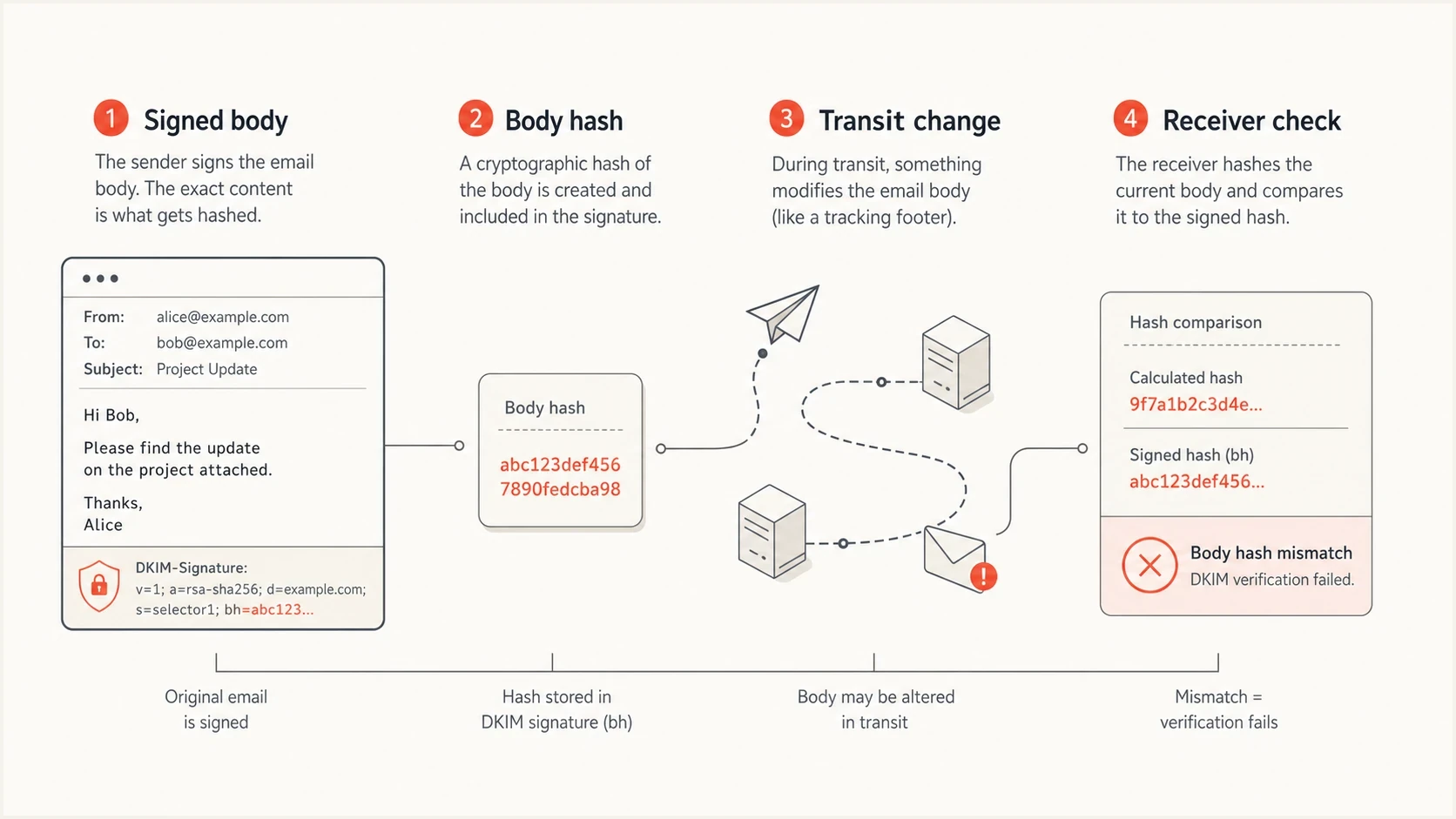
Infographic showing DKIM body hash verification through signing, transit, and receiver checks.
First isolate the scope
Separate receiver-specific failures from failures across the sending path. Send the exact same message, with the same content and route, to Gmail, Outlook, and a mailbox inside your own system. Do not compare a test message that uses different content, links, or routing.
Fails at one receiver
- Likely cause: A receiver-specific processing path or a MIME and canonicalization edge case.
- Test: Compare raw source at the failing receiver and a passing receiver.
- Fix: Normalize transfer encoding, use relaxed body canonicalization, and avoid unusual body formatting.
Fails at multiple receivers
- Likely cause: The signer hashed the wrong bytes or a shared system rewrote the body after signing.
- Test: Send a minimal plain text message through the same route and compare results.
- Fix: Repair the signer or place signing after the last content-changing step.
Gmail is useful for this comparison because it exposes Authentication-Results in message source. Google documents sender-side checks in its DKIM guidance. If Gmail passes and Outlook fails for the same message, inspect encoding and the route into Microsoft before changing the shared signer. Cases in Microsoft Answers also identify mail flow rules, disclaimers, gateways, and forwarders as causes.
|
|
|
|---|---|---|
Gmail and Outlook fail | Signer or body rewrite | Sign last |
Outlook only fails | Encoding or route edge case | Compare raw MIME |
Forwarded mail fails | Footer or gateway edit | Move signer |
One template fails | Template-specific rewrite | Compare raw body |
Use the failure pattern to choose the first fix.
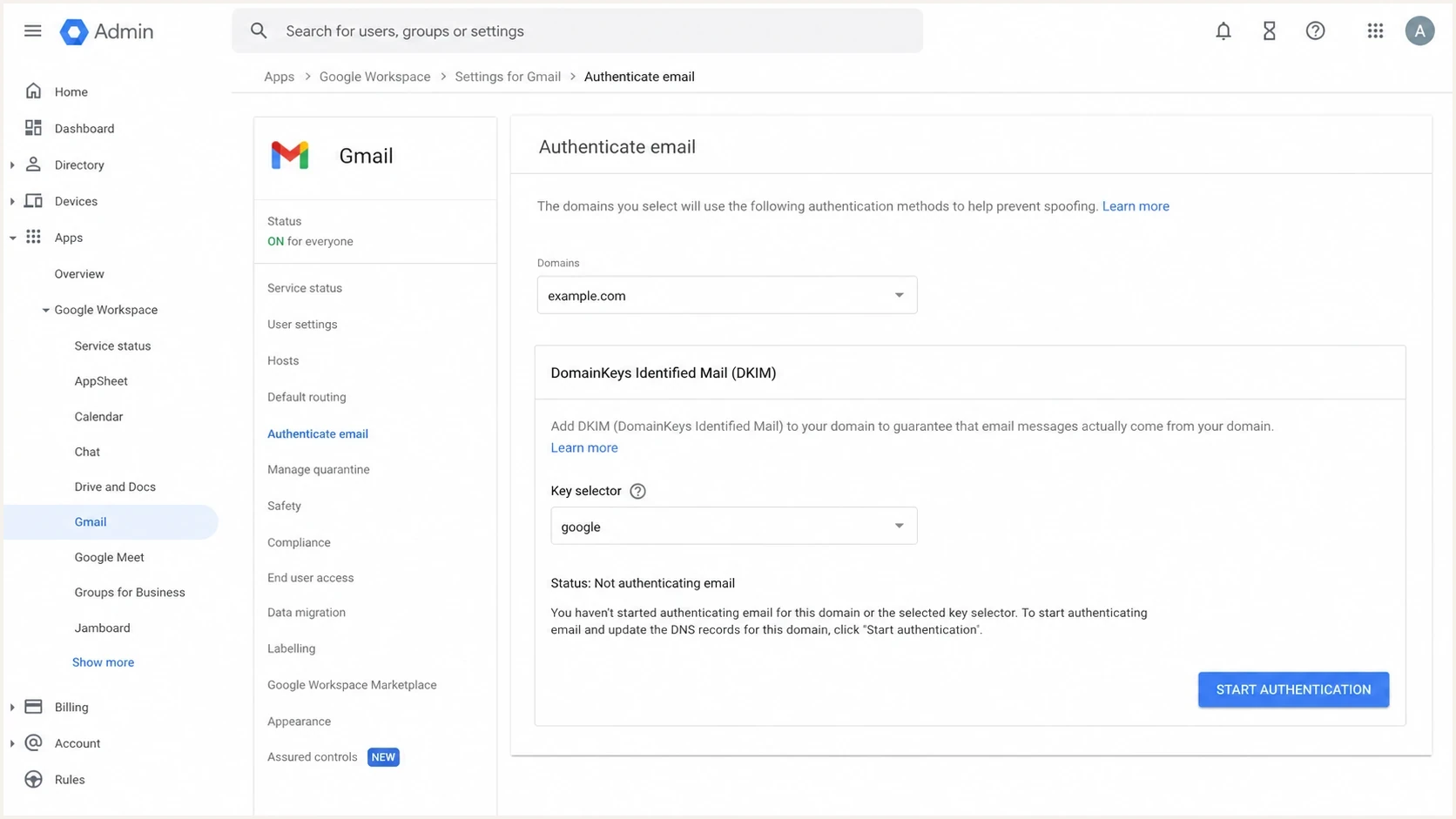
Google Admin console DKIM authentication screen used to check sender setup.
Rule out a separate signature or DNS failure
After the scope is clear, check whether the receiver can retrieve the expected public key. This is a secondary check because an absent or mismatched key normally produces a signature verification error, not a body hash mismatch. Pull the d= domain and s= selector from the DKIM-Signature header, then query the matching TXT record outside your network so cached internal DNS does not hide a stale or split-horizon record.
DKIM checker
Check selector records and public key configuration.
?/7tests passed
A valid DNS record must match the selector in the header and contain the public key paired with the active private key. If a provider rotated keys without updating DNS, the receiver can fetch a DKIM record and still report that the signature did not verify. Use a domain health check when you also need to review SPF, DKIM, and DMARC together.
DKIM DNS record formattext
selector1._domainkey.example.com  TXT
"v=DKIM1; k=rsa; p=MIIBIjANBgkqh..."
- Selector: The selector in the header must resolve under the signing domain.
- Key pair: The signer must use the private key that matches the public key in DNS.
- Record shape: Resolver output must reassemble to one valid DKIM key. Multiple quoted strings are valid when their contents join without added spaces.
- Header domain: The signing domain should be the domain you expect for the sending service.
Fix the cause at the sender
The most reliable fix is to make DKIM signing the last content-changing step before the message leaves your control. If a system adds a disclaimer, tracking pixel, link wrapper, unsubscribe block, marketing footer, antivirus banner, or legal footer after signing, the body hash changes and DKIM breaks.
Sender-side repair order
- Simplify: Send a plain text test with no tracking, footer, or attachment.
- Compare: Check whether the plain message passes where the normal message fails.
- Move: Place DKIM signing after all systems that alter body content.
- Normalize: Use stable MIME boundaries, CRLF line endings, character sets, and content-transfer encoding.
- Retest: Send the unchanged test to each receiver and retain the raw source.
For MTAs, run the DKIM signer after content filters, stop converting 8-bit bodies after signing, avoid post-signing quoted-printable rewrites, and keep CRLF line endings stable. For marketing or CRM mail, confirm that template expansion, link rewriting, and tracking insertion all happen before signing.
DKIM and DMARC standards do not define a universal acceptable failure percentage. Segment aggregate results by source and template instead. Investigate any repeatable failure on an authorized sending path, even when the domain-wide percentage looks small.
Do not use the DKIM l= body length tag as the default answer. It can let later content be appended without invalidating the signed portion, but it leaves content after the stated length outside DKIM protection. Use it only for a controlled requirement, not as a general deliverability repair.
Stop downstream systems from rewriting mail
A body hash failure can happen after your sender hands off the message. Forwarders, secure email gateways, archiving systems, and routing appliances can append notices, rewrite URLs, modify HTML, or convert encoding. When that happens, the original DKIM signature no longer covers the body the receiver sees.
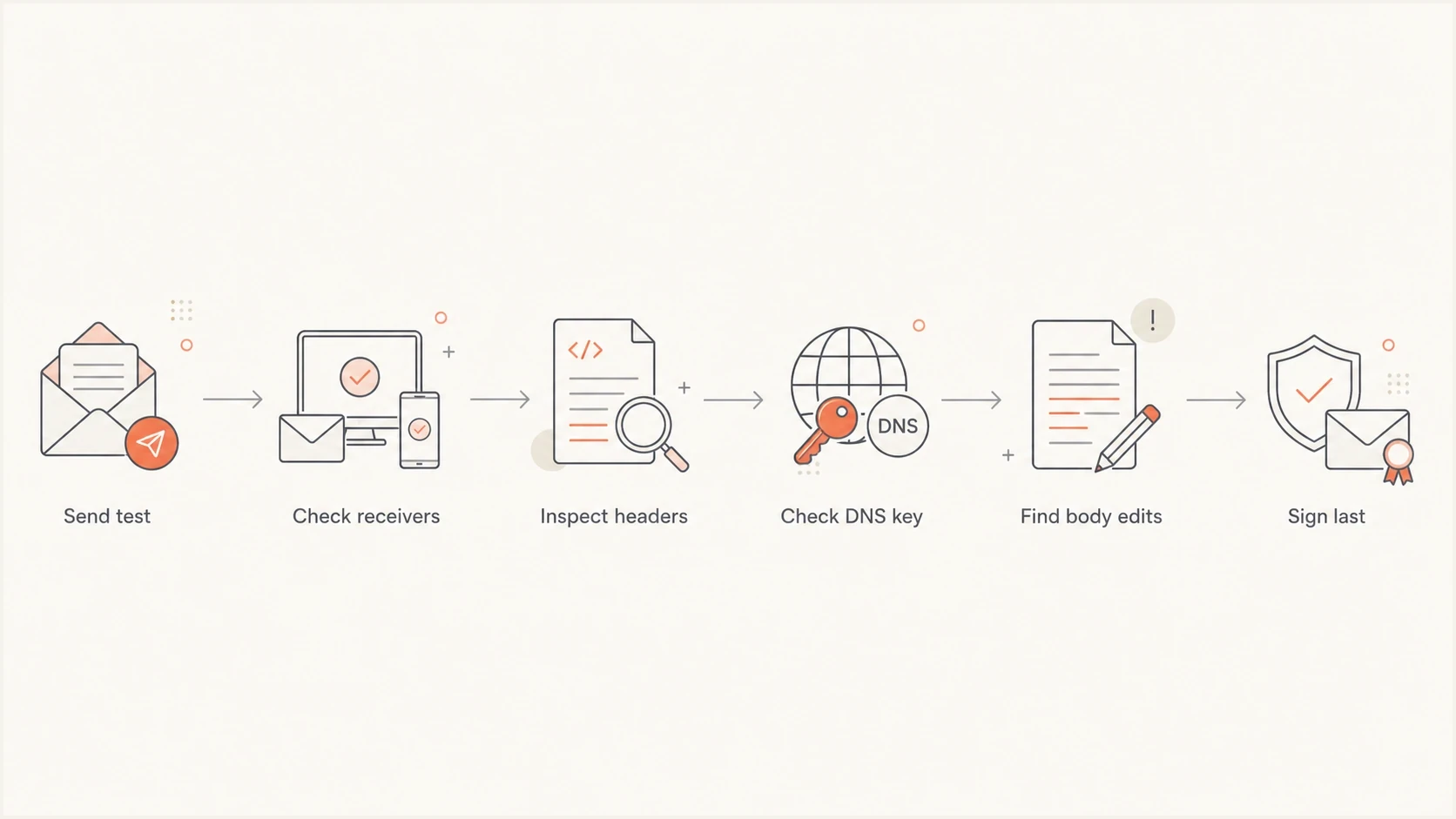
Flowchart for troubleshooting DKIM body hash failures.
To isolate the modifier, capture the message at each controlled hop and compare the raw body before and after each gateway. A one-byte difference can be enough when the selected canonicalization does not normalize it. Added content, a changed MIME boundary, or a rewrapped quoted-printable line can change the hash. Extra empty lines at the end are ignored by both DKIM body canonicalization modes.
- Forwarders: Check for footer insertion, list content, and HTML cleanup.
- Gateways: Disable body rewrite actions for a controlled test.
- Marketing paths: Confirm that link wrapping and open tracking happen before signing.
- MIME changes: Keep charset, content-transfer-encoding, and boundaries consistent after signing.
When a forwarding service must modify the body, ARC can preserve the authentication results observed before that change, but it does not make the original DKIM signature pass. A responsible intermediary verifies the incoming message before modification, applies the required change, adds its own DKIM signature, and seals the authentication chain. The receiver still decides whether to trust that chain.
If this sits inside a broader authentication issue, use DKIM troubleshooting to separate body hash errors from missing signatures, wrong selectors, and invalid public keys.
Recompute the body hash byte for byte
When headers do not reveal the modifier, reproduce the receiver's body hash. Work with the raw .eml source, not copied text or the rendered message, because DKIM hashes bytes that include MIME boundaries and content-transfer encoding.
- Extract: Save the original raw message and separate the body after the blank line that ends the header block.
- Canonicalize: Apply the body mode from the second value of c= while preserving CRLF line endings.
- Limit: If l= is present, hash only that many octets of the canonicalized body. Otherwise, hash the complete canonicalized body.
- Compare: Use the hash named by a=, base64-encode the result, and compare it exactly with bh=.
Body hash verification sequencetext
raw .eml body
  -> body canonicalization from c=
  -> optional octet limit from l=
  -> hash algorithm from a=
  -> base64 encoding
  -> exact comparison with bh=
With relaxed body canonicalization, remove whitespace at line ends, reduce each run of spaces and tabs within a line to one space, and remove empty trailing lines. Simple body canonicalization only removes empty trailing lines and normalizes the final CRLF. Do not decode quoted-printable or base64 content before hashing.
Use two captures to locate the change
Recompute the hash for a capture taken immediately after signing and another taken after the next gateway. The first hop where the calculated value stops matching bh= identifies the system that changed the signed body.
Monitor the repair with DMARC data
A single header sample tells you what happened to one message. DMARC aggregate data shows whether the repair worked across real traffic. After changing signing order, encoding, or keys, monitor the failing source by IP, sending service, reporting receiver, DKIM domain, and policy result.

Issue steps to fix dialog showing the issue overview, tailored fix steps, and verification action
Suped is our DMARC reporting and email authentication product. For this workflow, use it to group authentication failures by source, alert on recurrence, assign the issue with repair steps, and verify that the affected source returns to DKIM pass after the mail flow change.
Use Suped's DMARC monitoring to confirm that the failing source moves back to DKIM pass, then keep watching its results for at least one full sending cycle. If you send newsletters weekly, one day of clean data is not enough.
What a successful fix looks like
- Headers: New test messages show DKIM pass at Gmail and Outlook.
- Reports: DMARC aggregate data shows the repaired source returning to DKIM pass.
- Routing: No gateway or footer system changes the body after signing.
- Keys: The active selector has the matching public key in DNS.
Views from the trenches
Best practices
Test the exact same message at Gmail and Outlook before changing sender configuration.
Place DKIM signing after every footer, tracking, filter, and encoding step in the path.
Use DMARC source data to confirm whether one sample or a whole sender has failed.
Common pitfalls
Rotating DKIM keys first wastes time when a gateway edits the body after signing.
Comparing different test messages hides template, footer, and MIME encoding changes.
Treating an Outlook-only failure as universal can send teams down the wrong path.
Expert tips
Use Gmail header results as a benchmark, then inspect Microsoft-only failures for encoding.
If Gmail and Outlook fail together, inspect the signer and every later body rewrite step.
Keep a raw source sample from each receiver so byte-level body differences are visible.
Expert from Email Geeks says Gmail is a useful benchmark because its authentication results are clear, so compare it with Outlook before blaming one receiver.
2022-11-18 - Email Geeks
Expert from Email Geeks says an Outlook-only body hash failure often points to MIME or text encoding differences in the outbound path.
2022-11-18 - Email Geeks
Keep the signed body unchanged
The direct fix is to make sure the body that gets signed is the same body receivers evaluate. Start with receiver scope, prove whether the issue affects one route or every route, then repair the signing order, encoding, signer output, or downstream rewrite.
If the failure is limited to one message, raw headers and message source are enough. If it affects real traffic, use Suped to track the failing source, alert on recurrence, and verify the DMARC outcome after the fix. The workflow depends on disciplined isolation: same message, multiple receivers, raw source comparison, then the smallest change that keeps the signed body stable.




