How to troubleshoot DKIM failures and which tools to use?

Published 27 May 2025
Updated 11 Aug 2026
12 min read
Summarize with

Updated on 11 Aug 2026: We added a DKIM reason-code lookup and refreshed the DNS, signature, and alignment checks.
The fastest way to troubleshoot DKIM failures is to prove four things in order: the message was signed, the selector resolves to the right public key, the receiver validates the signature, and the authenticated domain matches the domain path DMARC expects. Use a layered set of tools for that: a DKIM record checker, Gmail Show original, Outlook.com or Microsoft message headers, authoritative DNS lookups with dig, and a controlled local validation inbox when the failure is stubborn.
DKIM troubleshooting is not one test. A public checker tells you whether the DNS record and key syntax are sane. A mailbox provider tells you how a real receiver judged the signed message. A local validator helps prove whether your own code is wrong or the sender really broke the signature.
DKIM failure checklist
When the error says DKIM failed, avoid changing DNS first. Separate the failure into signing, DNS, validation, message mutation, and DMARC domain alignment. That keeps the investigation short and stops teams from rotating keys when the body hash was changed after signing.
- Signed: Confirm the delivered message has a DKIM-Signature header. If there is no signature, the sending system never signed that message.
- Selector: Read the s= and d= values, then query the selector record at the exact domain shown by the signature.
- Receiver: Send the same message stream to Gmail and Outlook.com, then inspect Authentication-Results instead of trusting only one validator.
- Mutation: Check for body hash failure, MIME rewriting, footer injection, link rewriting, line-ending changes, or gateway changes after signing.
- Decision: If several independent receivers fail, fix the sender. If only your validator fails, debug your parser or crypto library.
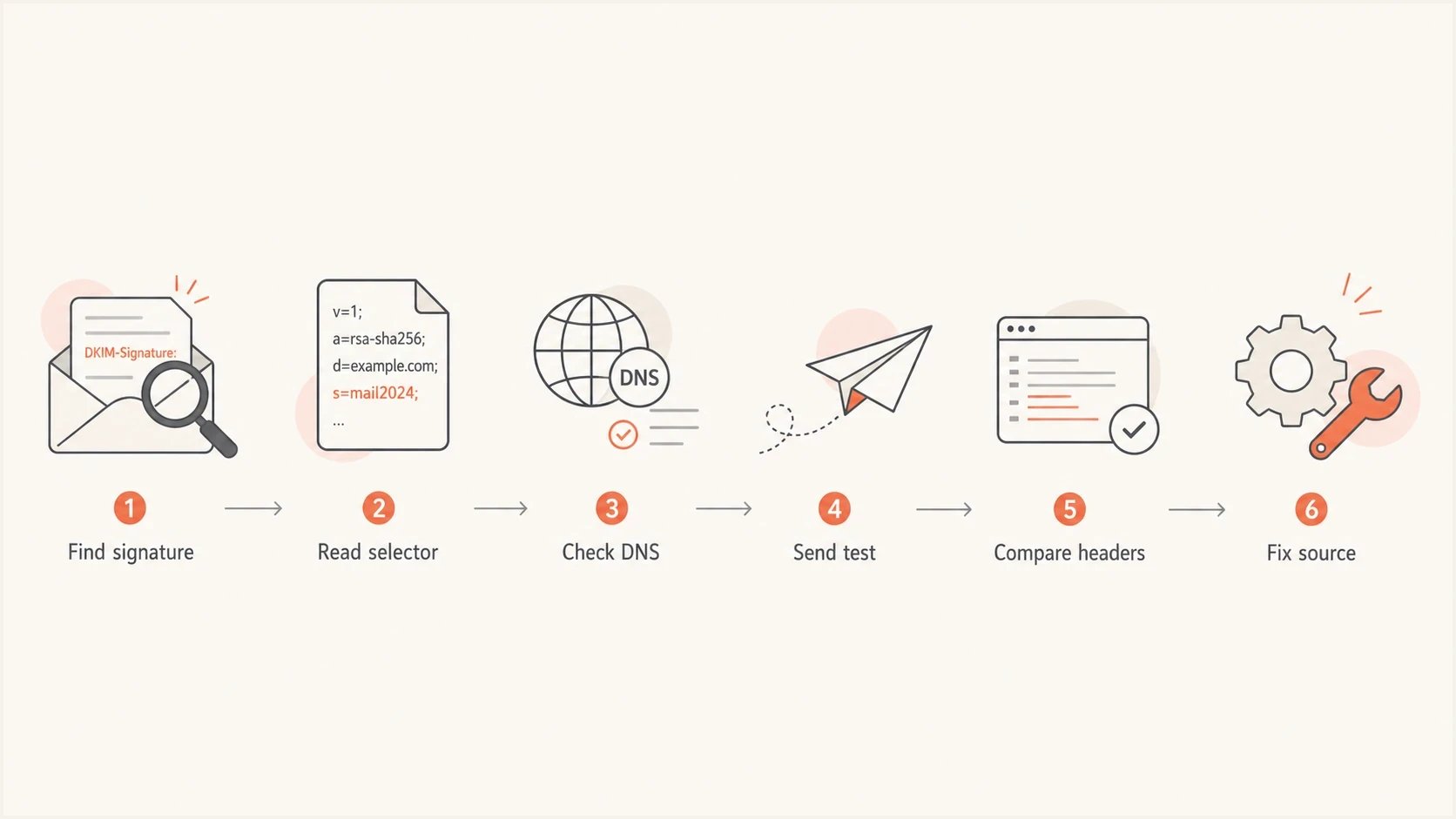
A DKIM troubleshooting flow from signature capture to fixing the source.
Compare receiver results
No single mailbox provider is a reference implementation. Gmail is useful because it is widely used and practical. Microsoft receivers can expose DNS and encoding issues that another receiver accepts. Compare more than one result before deciding where the fault sits.
First decide what failed
People often say DKIM failed when they mean different things. DKIM itself can fail because the cryptographic signature does not validate. DMARC can also fail its DKIM path even when DKIM passes, because the signing domain does not align with the visible From domain.
DKIM validation failed
This is a signature problem. The receiver found a DKIM-Signature header, fetched the public key, and still rejected the cryptographic check.
- Key: The public key does not match the private key used to sign.
- Body: The message body changed after signing.
- Header: A signed header was added, removed, folded, or rewritten.
- DNS: The selector record is missing, stale, malformed, or intermittently unavailable.
DMARC DKIM path failed
This is a domain alignment problem. DKIM can pass, but its DMARC path still fails when the d= domain does not share the visible From domain's organizational domain under relaxed alignment, or does not match it exactly under strict alignment.
- From: The visible From domain is the domain DMARC evaluates.
- Signer: The d= domain in the DKIM signature belongs to the signer.
- Alignment: Relaxed alignment accepts the same organizational domain; strict alignment requires an exact domain match.
- Fallback: SPF can still pass DMARC if its authenticated domain aligns.
This distinction matters because the fix lives in a different place. A validation failure belongs with the sender, DNS host, or post-processing gateway. A DMARC alignment failure belongs in the sending domain setup, vendor configuration, or From domain strategy.
Which tools to use
For a quick public selector check, use Suped's DKIM checker. It validates the DKIM DNS record, parses the public key, and shows whether the selector is ready for signing. For a broader check across authentication records, use the domain health check to view DKIM, SPF, and DMARC together.
After that, the best tool depends on what you need to prove. Use DNS queries for selector existence, mailbox headers for receiver behavior, and a controlled local validator to isolate a validator bug from a broken sender.
|
|
|
|---|---|---|
Suped DKIM checker | Selector DNS | No body mutation test |
Suped health check | SPF, DKIM, DMARC | Broader than one selector |
Gmail Show original | Live receiver result | One receiver's view |
Outlook.com headers | Live receiver result | Forwarding can add noise |
dig or nslookup | DNS proof | Manual interpretation |
Local DKIM validator | Controlled validation | Takes setup |
Practical DKIM troubleshooting tools and when to use them.
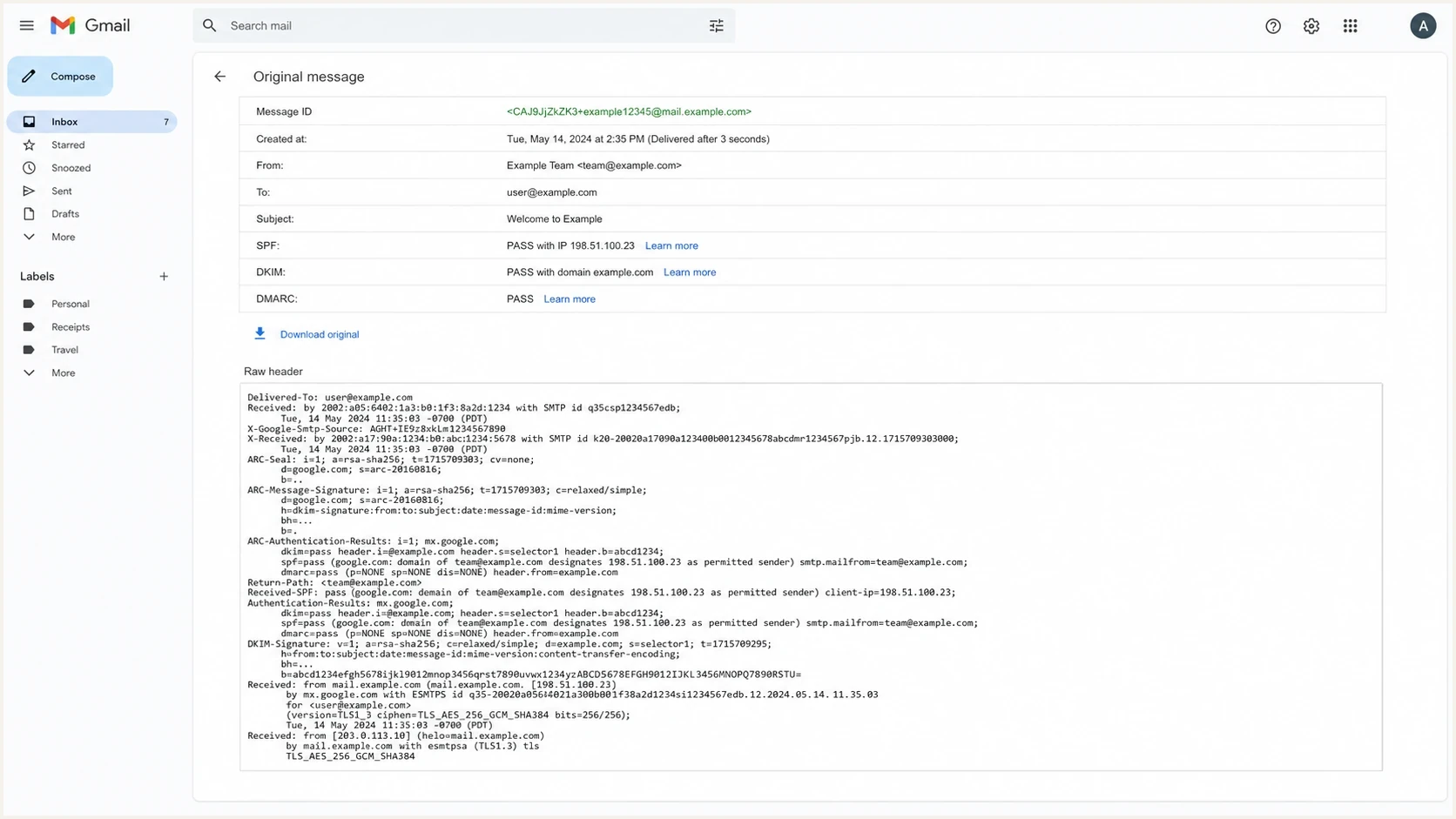
Gmail Show original displaying SPF, DKIM, DMARC, and Authentication-Results.
A practical troubleshooting sequence
Start with the exact delivered message, not a screenshot of a failure badge. DKIM verification depends on the final headers and final body as received. If a forwarding service, mailing list, security gateway, CRM, or footer tool changed the message after signing, the sending platform can look correct and the receiver can still be right to reject the signature.
- Capture: Save the full original source from the receiver that reports the failure.
- Parse: Read d=, s=, a=, c=, h=, bh=, and b= from every DKIM-Signature header.
- Resolve: Query selector._domainkey.domain from authoritative DNS and a public resolver.
- Compare: Confirm the public key is the active key for the sending service.
- Send: Send a fresh test to Gmail and Outlook.com, then compare Authentication-Results.
- Repeat: If the result is split, send to a controlled local DKIM validator.
- Fix: Change one variable at a time, then send a new message through the same route.
Header fields to capturetext
Authentication-Results: mx.example;
  dkim=fail reason=signature did not verify header.d=example.com

DKIM-Signature: v=1; a=rsa-sha256; c=relaxed/relaxed;
  d=example.com; s=selector1; h=from:subject:date;
  bh=base64-body-hash; b=base64-signature
The selector record check belongs early in the sequence because it is cheap and removes a large class of false leads. If the selector does not resolve, has a malformed key, or returns different answers across resolvers, signature validation cannot be trusted.
DKIM checker
Check selector records and public key configuration.
?/7tests passed
After the selector is clean, the live message matters more than the DNS record alone. A correct public key does not save a message whose body changed after the signature was created.
Match DKIM results to fixes
Read the DKIM result and its reason in the receiver's Authentication-Results header. Exact wording varies, but the result usually points to signing, DNS retrieval, message mutation, or DMARC alignment.
|
|
|
|---|---|---|
dkim=none | No usable DKIM signature was found | Enable signing and confirm the message took the expected outbound route |
no key for signature | The selector key could not be retrieved | Check d=, s=, the TXT or CNAME record, delegation, and DNS propagation |
dkim=temperror | A temporary lookup or processing error occurred | Compare authoritative answers, resolver timeouts, DNSSEC status, and later retries |
dkim=permerror | The signature or key has a permanent syntax or policy problem | Validate tags, key syntax, supported algorithms, and key size |
body hash did not verify | The signed body changed | Trace footer, MIME, link, attachment, and line-ending changes after signing |
signature did not verify | The cryptographic signature does not match | Compare the active key and inspect changes to headers listed in h= |
dkim=pass, dmarc=fail | The signature validates but its domain does not align | Configure aligned d= signing for the visible From domain |
Common DKIM results and the next troubleshooting action.
Multiple signatures need separate checks
A message can carry several DKIM signatures, and one valid aligned signature is enough for the DKIM path through DMARC. Match each result to its own d= and s= values. Gmail evaluates the first five signatures in header order, so an authenticating signature placed later can be missed.
DNS and selector checks
Most DKIM DNS problems are selector mistakes, stale keys, split DNS, missing CNAME targets, or TXT records that were pasted with broken quotes. Check both the exact selector from the message and the selector that the sending platform says it uses. Those are not always the same after a key rotation.
Example DKIM public keydns
selector1._domainkey.example.com TXT
v=DKIM1; k=rsa;
p=MIIBIjANBgkqhkiG9w0BAQEFAAOCAQ8A...
DNS checksbash
dig +short TXT selector1._domainkey.example.com

dig +short CNAME selector1._domainkey.example.com

dig @8.8.8.8 +short TXT selector1._domainkey.example.com

dig @1.1.1.1 +short TXT selector1._domainkey.example.com

dig +trace TXT selector1._domainkey.example.com
A DNS TXT character limit can truncate a long RSA public key. Each TXT character-string can hold up to 255 octets, so publish a long key as adjacent quoted strings when the DNS interface requires it. Resolvers concatenate those strings into one value. Confirm the complete p= value and its character order in the live DNS answer.
Intermittent DNS matters
Intermittent DKIM failures often come from DNS inconsistency. One resolver has the new key, another resolver has the old key, and a receiver lands on the wrong answer. That creates failures that look random until you check authoritative DNS and public resolvers side by side.
- Authoritative: Check the domain's real name servers, not only the cached answer from one resolver.
- Public: Compare public resolvers so propagation and cache behavior are visible.
- Rotation: Keep the old key published long enough for delayed and in-flight mail to finish delivery.
- CNAME: Follow delegated selector records to the final TXT answer and validate that target too.
When the signature itself breaks
A valid selector record does not guarantee a valid DKIM result. The signature can fail after DNS is perfect because the message was changed after signing. If the receiver reports a body hash mismatch, work through body hash failures before rotating keys.
Hosted mail systems add another trap. A tenant can have DKIM enabled in the admin portal, but a custom domain, selector, or CNAME target is still wrong. For Microsoft tenants, separate DNS setup issues from receiver behavior and use the focused path for Microsoft DKIM failures.
Broken before signing
- Wrong key: The platform signs with a private key that does not match DNS.
- Bad selector: The message points at a selector that is not published.
- Weak method: The signer uses rsa-sha1 or an RSA key shorter than 1024 bits. Use rsa-sha256 and prefer a 2048-bit RSA key.
- Bad header: The signer includes the wrong header set in h=.
Broken after signing
- Footer: A compliance or marketing footer changes the signed body.
- Gateway: A security appliance rewrites links or attachments.
- MIME: A relay changes transfer encoding or line endings.
- Forwarding: A forwarder changes content before the final receiver checks DKIM.
Body hash cluetext
Authentication-Results: mx.example;
  dkim=fail reason=body hash did not verify header.d=example.com
Avoid the DKIM l= body-length tag. It signs only the stated body length and leaves appended content outside the protected portion, which creates an abuse risk. Sign the complete final message after all outbound modifications instead.
Decision confidence
Use the number of independent signals to decide whether to fix the sender, DNS, or your validator.
Low confidence
1 signal
One private validator fails and receiver headers pass.
Medium confidence
2 signals
One live receiver fails and DNS has a clear mismatch.
High confidence
3+ signals
Several receivers and a local validator fail the same message.
Ready to close
pass
New test mail passes at live receivers and DNS is stable.
Where Suped fits
Suped's product connects one-off DKIM checks to ongoing authentication monitoring. Use the selector check to confirm DNS, then use DMARC monitoring to group authentication results by sending source, detect alignment changes, and track whether a fix holds across later mail.
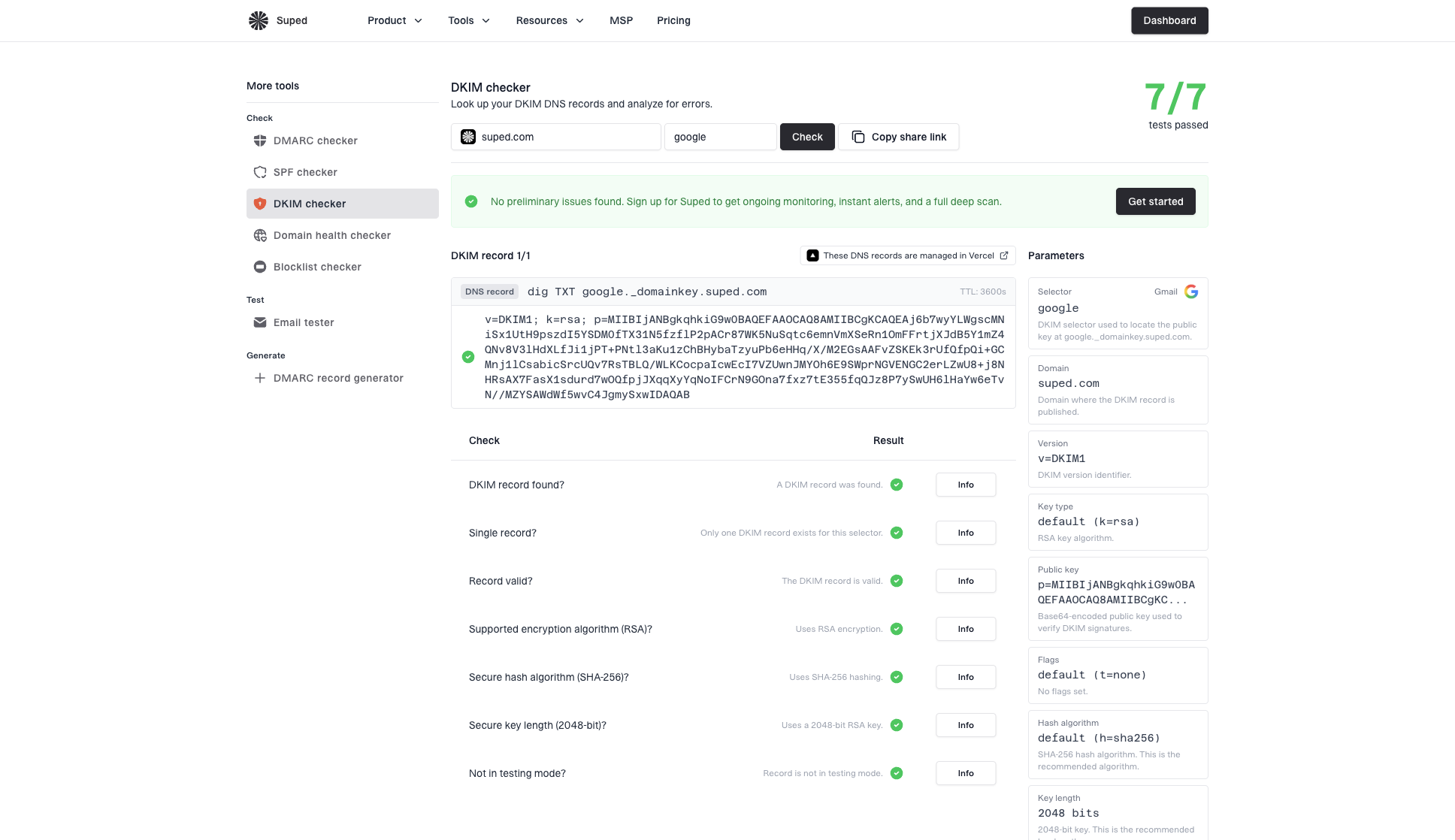
DKIM checker sample results showing selector, DKIM DNS record, validation checks, parameters, and share link
A practical Suped workflow is to validate the selector, identify the affected source in DMARC reports, review issue history, and verify recovery after the DNS or sender change. Alerts help catch a broken selector or a new unaligned sender without repeating manual header checks for every incident.
- Detect: Suped groups authentication issues by domain, source, and failure type.
- Alert: Alerts surface selector or sender changes that need investigation.
- Fix: Issue pages connect a failure to the relevant DNS or sending-platform action.
- Verify: Later reports show whether the source is passing DKIM and aligning with DMARC.
Views from the trenches
Best practices
Check selector DNS before debugging code, then compare authoritative and cached answers.
Send fresh tests to at least two major mailbox providers before blaming one validator.
Keep old DKIM keys published during rotation so delayed messages still validate.
Common pitfalls
Treating a DNS lookup pass as proof that a delivered message still validates at the inbox.
Ignoring body changes from footers, link rewriting, relays, and MIME normalization.
Assuming Gmail pass means every receiver will pass the same DKIM signature without testing.
Expert tips
Use a controlled validation inbox when you need to separate sender bugs from parser bugs.
Compare Gmail and Microsoft headers because they expose different failure patterns.
Look at the exact d= and s= values in the failed message, not the expected setup.
Marketer from Email Geeks says a second validator helps separate a local parser bug from a sender signature that is broken everywhere.
2022-07-12 - Email Geeks
Marketer from Email Geeks says a local DKIM test inbox in debug mode can expose unusual algorithm behavior.
2022-07-12 - Email Geeks
What to fix
Start with the failed message source, read every DKIM-Signature, verify each selector in DNS, compare live receiver headers, and use a controlled validator if the answer is still unclear. Fix the sender, key, selector, or post-signing modification when the signature fails everywhere. Debug the validator when only that tool fails. When DKIM passes but DMARC fails, align the signing domain with the visible From domain. Suped connects that investigation to ongoing source-level reporting, alerts, and verification across domains.




