What causes invalid RSA public key errors in DKIM records and how can I fix it?

Updated on 30 Jul 2026: We updated this guide to explain RSA key encoding and make the DNS repair steps more precise.
An invalid RSA public key error in a DKIM record means the value inside the p= tag cannot be decoded and parsed as the required RSA public key. The common cause is not a mysterious DKIM failure. It is usually a damaged DNS value: one missing character, one extra quote, literal zone-file syntax, a truncated paste, or a DNS migration that changed the long TXT value.
The fix is direct. Get the original DKIM public key from the system that signs mail for the domain, republish that exact value at the selector hostname, wait for DNS to update, then test a real message. Do not rotate every key immediately when this error appears. First compare the published p= value against the expected key, because a one-character paste error is enough to break validation.
What the error means
DKIM works by placing a signature in the message header and publishing the matching public key in DNS. The receiver reads the selector from the DKIM-Signature header, looks up the TXT record at a name like selector._domainkey, then decodes the public key in the p= tag. If the receiver cannot decode and parse that public key, it cannot verify the signature.
A message such as bad base64 decode tells me the problem appears before signature verification. The validator has not reached the point of deciding whether the message body changed. It failed while trying to convert the DNS text into a usable RSA key.
Fast diagnosis
Remove permitted whitespace before checking the p= value. A non-Base64 character or a character count with remainder 1 when divided by 4 proves the text cannot decode as Base64. Other lengths can be valid when padding is omitted, so always decode and parse the result instead of judging by length alone.
This is different from a DKIM signature mismatch. With a mismatch, the DNS public key is readable, but the signature does not match the signed headers or body. With an invalid RSA public key, the public key itself is unreadable or not an RSA key.
An empty p= value has a separate meaning: it revokes that selector. A receiver should treat signatures that reference the revoked key as an error, but the record is not a malformed Base64 key.
Invalid public key
- Failure point: The DNS value cannot be decoded into a usable RSA public key.
- Usual cause: The long TXT value was truncated, altered, wrapped incorrectly, or encoded in the wrong key format.
- Best fix: Replace the entire public key with the original value from the signing system.
Signature mismatch
- Failure point: The key loads, but the message signature does not validate.
- Usual cause: A mail gateway, footer, relay, or signer change altered signed content.
- Best fix: Inspect the signed message path and verify the final message after all modifications.
The common causes
Start with the assumption that the DNS record changed. DKIM public keys are long, and DNS control panels display long TXT records in different ways. A record that was valid in the old DNS interface can be broken when someone copies the displayed value into a new provider.
- Missing character: A single lost character in the middle of p= makes the Base64 string invalid or changes the decoded bytes.
- Truncated paste: The DNS form accepts only part of the value, or the operator copies only one visible segment.
- Literal zone syntax: A web DNS form stores parentheses, backslashes, or quote marks that belonged to a zone-file presentation.
- Copied quotes: The record is copied from a quoted display format, and the quotes become part of the returned DNS value.
- Wrong selector: The sender signs with one selector, but DNS has an old or unrelated public key at that hostname.
- Wrong key encoding: The p= value is valid Base64 but contains an OpenSSH key, a certificate, or another structure instead of the required RSA public key.
The length clue needs care. After removing permitted whitespace, a Base64 value whose length leaves remainder 1 when divided by 4 cannot be valid. Remainders 2 or 3 can simply mean optional padding was omitted, so an odd length alone does not prove damage. Decode the value and confirm that the resulting bytes parse as the expected RSA public key.
DKIM public key sanity checks
Quick signals that help separate a damaged key from a normal DKIM TXT record.
Length mod 4 = 1
Bad
Invalid after permitted whitespace is removed.
Quoted chunks
Check
Normal in zone-file format if DNS joins them correctly.
1024-bit RSA key
Minimum
RFC 8301 minimum for signing, but 2048 bits is recommended.
2048-bit RSA key
Preferred
Recommended RSA choice when DNS publishes every character correctly.
DNS provider limits are another common source of confusion. One DNS TXT character-string can contain up to 255 octets, but a TXT record can contain multiple strings. DKIM requires those strings to be joined with no added whitespace before the record is used. If a provider stores the chunks incorrectly, or if someone copies the visible chunks into another provider with quote marks and separators included, DKIM breaks. This related guide on DNS TXT limits goes deeper into that specific failure mode.
Check the RSA key encoding
Base64 validity is only the first layer. A p= value can decode successfully and still trigger an invalid RSA public key error because the decoded bytes use the wrong structure. For k=rsa, RFC 6376 specifies an ASN.1 DER-encoded PKCS#1 RSAPublicKey, with those DER bytes encoded again as Base64 for the DNS tag.
- Signer-generated DKIM value: Use this complete record whenever it is available because it already has the expected key structure.
- OpenSSH or SSH2 key: A value beginning with ssh-rsa AAAAB3 uses an SSH-specific structure and does not belong in a DKIM p= tag.
- PEM public key: Do not paste the BEGIN and END lines. A BEGIN PUBLIC KEY file usually wraps SubjectPublicKeyInfo, which is not the PKCS#1 structure specified for RSA DKIM.
- Certificate or private key: Neither belongs in DNS. If private key material was published, replace the key pair and move to a new selector.
Key forms that should not be pasted into p=text
ssh-rsa AAAAB3NzaC1yc2EAAAADAQABAAABAQ...

-----BEGIN PUBLIC KEY-----
MIIBIjANBgkqhkiG9w0BAQEFAAOCAQ8A...
-----END PUBLIC KEY-----
Removing PEM headers does not convert the bytes inside to a different ASN.1 structure. If the signing system cannot export a DKIM-ready TXT value, convert or regenerate the public key in the format that the signer documents, then confirm that its modulus matches the private key used for signing.
Use the signing system as the source
Do not choose a key format by how the Base64 prefix looks. Retrieve the DKIM DNS value generated for the active selector, or create a new selector and key pair when that source value is unavailable.
How to fix it
Fix the record by replacing the whole public key. Do not try to guess the missing character. Do not paste around the broken part. A DKIM public key is generated by the signing system, and the public DNS record must match that generated value exactly.
- Find selector: Open a failing message and read the s= and d= values in the DKIM signature.
- Get source key: Copy the public key from the mail platform, MTA, or signing service that owns that selector.
- Replace record: Update the TXT record at the exact selector hostname and paste the complete value.
- Preserve value: Use the provider's TXT field format, but keep the actual key characters unchanged.
- Retest mail: Send a new message after DNS propagation and inspect the authentication result.
Valid split DKIM TXT record exampledns
selector1._domainkey.example.com. 300 IN TXT (
  "v=DKIM1; k=rsa; "
  "p=MIIBIjANBgkqhkiG9w0BAQEFAAOCAQ8AMIIBCgKCAQEAwY5m8z"
  "mM6B6mQ2soC2CxL6nq2r31K09vJxJ9ZtqP0eF4xXq"
  "nZ9u8b9Dg4k8nQIDAQAB"
)
The quoted split above is normal zone-file presentation. DNS does not return the quote marks as part of the key, and DKIM joins the strings without spaces. In many web DNS panels, though, the right input is a single TXT value, not a zone-file style block. That mismatch is where many DKIM records get damaged.
Do not drop to a 1024-bit key solely because a DNS form rejects a 2048-bit value. RFC 8301 permits 1024 bits as the minimum but recommends at least 2048 bits. First confirm the panel's split-string syntax or move authoritative DNS to a provider that can publish the full TXT record correctly.
Do not patch the key manually
If one character is missing, adding a random Base64 character only creates a different invalid or wrong key. The correct repair is to retrieve the original public key or generate a new key pair and publish the new public key.
If the signing system no longer shows the old key, generate a new DKIM key pair, publish the new public key, and switch the sender to sign with the new selector. Keep the old selector in DNS during a short overlap if old mail still needs to validate.
Validate the key before changing more DNS
After republishing the record, validate the selector itself before touching DMARC policy or sender configuration. A clean key lookup tells you that the DNS value can be decoded and parsed. It does not prove every outbound message is signed correctly, but it removes the public key as the failure point.
A focused DKIM checker is useful here because you can test the selector and domain without waiting for a new campaign or automated send. If the selector passes but messages still fail, move to message-level troubleshooting.
DKIM checker
Check selector records and public key configuration.
?/7tests passed
If the checker says the selector has no record, verify the hostname. A DKIM TXT record lives under _domainkey, and a single missing label changes the lookup entirely. The troubleshooting path for a no DKIM record error is related, but the fix is different because DNS lookup fails before key parsing starts.
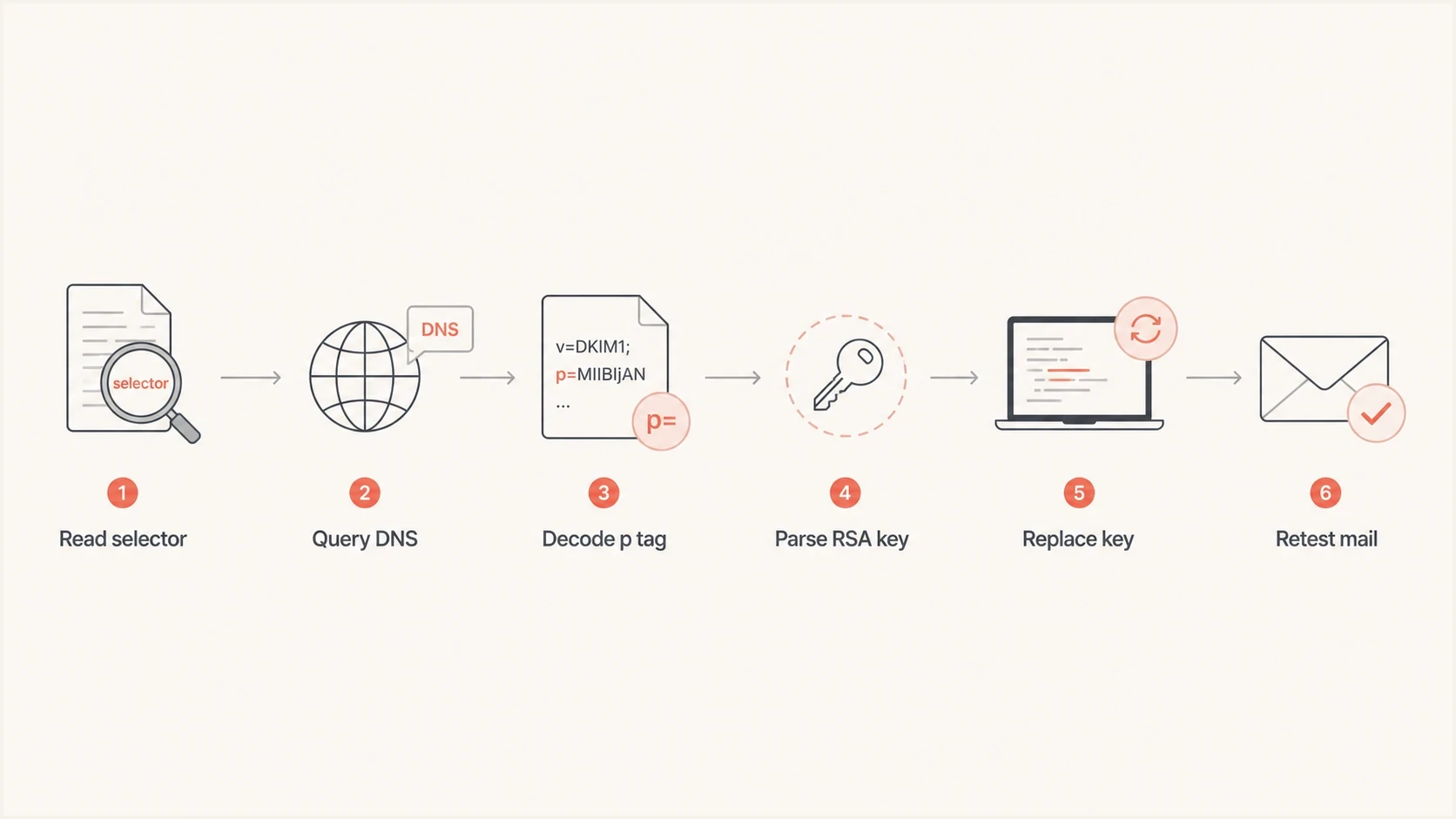
DKIM troubleshooting flowchart for selector lookup, RSA public key decoding, DNS replacement, and email retesting.
Once the selector validates, send a fresh test message. Check whether DKIM passes, whether the signing domain matches the domain you expected, and whether DMARC gets either SPF or DKIM domain match. A valid key fixes only the DNS key parsing problem. It does not fix unsigned mail, wrong signing domains, body hash failures, or forwarding changes.
What to check in the DNS record
The DKIM TXT record is a tag-value list. The public key sits in p=, and the rest of the record gives receivers context. Most broken RSA public key errors come down to the p= tag, but check the whole TXT value because surrounding syntax can hide the real mistake.
|
|
|
|---|---|---|
Version | v=DKIM1 or omitted | Conflicting value |
Type | k=rsa | Type and key disagree |
Key | p=... | Damaged or empty |
Host | selector._domainkey | Wrong selector name |
Compact DKIM TXT record checks.
If the record has multiple TXT values at the same selector, clean that up as well. DKIM selectors should not publish competing keys for the same hostname. Receivers can treat multiple records as invalid, and the failure will look inconsistent across mailbox providers.
Broken DKIM TXT record patternstext
v=DKIM1; k=rsa; p=MIIBIjANBgkq...IDAQAB"

v=DKIM1; k=rsa; p=MIIBIjAN*BgkqhkiG9...IDAQAB

v=DKIM1; k=rsa; p=MIIBIjANBgkqhkiG9...IDAQA
Those examples show an extra quote, an illegal Base64 character, and a truncated ending. The exact visible error varies by validator, but the repair remains the same: replace the key with the clean source value.
Prevent the same failure
The best prevention is to stop treating DKIM TXT records as casual copy-paste text. Long keys need a repeatable change process, especially when moving DNS providers or rotating keys across many domains.
- Store source: Keep the generated DKIM record from the signing platform in a controlled ticket or change log.
- Copy raw: Copy from the provider's raw record value, not a wrapped display view.
- Avoid editors: Do not use word processors or editors that auto-wrap, quote, or reformat text.
- Test selector: Validate the selector immediately after DNS changes and again after propagation.
- Monitor mail: Watch real authentication results after the DNS record looks valid.
Suped is our DMARC and email authentication platform. Teams can use it to identify sending sources in aggregate DMARC data, track DKIM and SPF failure rates, check authentication records, and receive alerts when results change. That workflow connects a repaired selector to the real mail that uses it instead of stopping at a one-off DNS lookup.
DMARC record detail view showing SPF, DKIM, DMARC, rDNS diagnostics, and DNS records
Suped also supports the ongoing work around DMARC policy staging, SPF lookup limits, Hosted SPF, Hosted DMARC, Hosted MTA-STS, blocklist (blacklist) monitoring, and authentication alerts. For this specific error, use the record diagnostics to confirm the selector, then use message data to verify that the active source has returned to DKIM pass.
If you need a broader DNS and authentication snapshot, run a domain health checker after the DKIM record passes. If the domain sends meaningful business email, ongoing DMARC monitoring is the better long-term control because it shows which sources are passing, failing, or sending without authorization.
Views from the trenches
Best practices
Compare the DNS key against the source key before rotating selectors or changing mail flow.
Validate the selector after every DNS migration, especially when records were copied manually.
Keep DKIM record copies in change tickets so later DNS edits can be checked byte for byte.
Send a fresh test message after DNS passes because message signing can still fail later.
Common pitfalls
Copying wrapped TXT records from one DNS panel can insert quotes, spaces, or newlines.
Fixing only the visible error often misses a wrong selector or stale key at the same host.
Assuming a valid DNS lookup proves DKIM passes skips the need to test a real message.
Letting old selectors linger without notes makes future key comparisons slower and risky.
Expert tips
Treat a modulo-four remainder of one as paste damage and fetch the source value again.
Use a new selector when the original key source is gone, then monitor both during overlap.
Check for multiple TXT records at the selector before chasing message-level DKIM failures.
During DNS moves, export raw zone data and avoid copying from formatted browser displays.
Marketer from Email Geeks says bad base64 decode usually means the DKIM public key was malformed before any message signature check happened.
2024-01-26 - Email Geeks
Marketer from Email Geeks says a Base64 length that leaves remainder one is a strong clue that a character was lost during copying.
2024-01-26 - Email Geeks
The practical takeaway
Invalid RSA public key errors in DKIM records come from the DNS key value, not from DMARC policy and usually not from the message content. The receiver cannot decode and parse the public key in p=, so it cannot use that key to verify any signature.
The clean repair is to republish the complete original public key or rotate to a new selector if the original key is unavailable. After that, validate the selector, send a new message, and monitor authentication results. That sequence keeps the fix narrow and prevents unnecessary changes to SPF, DMARC, or mail routing.




