What causes DKIM key issues when DNS provider limits TXT record length?

Updated on 23 Sep 2026: We clarified the 255-octet TXT string limit and added current checks for DNS response size and DKIM key choice.
DKIM key issues happen when a DNS provider's control panel cannot accept or correctly serialize the full TXT value that contains the DKIM public key. The common failure is not the public DNS standard itself. It is the provider's web UI, validation logic, API, or zone editor truncating the value, rejecting it, or telling the user to publish the key as several separate TXT records.
The direct answer is this: a DKIM TXT record can contain multiple character-strings, and verifiers concatenate those strings without adding whitespace. The 255-octet limit applies to each string, not the complete TXT record or selector name. A DKIM key should not be split into duplicate TXT records at the same selector name. If the DNS portal cuts the key short, or support tells you to add each part as a duplicate record, the published key is incomplete or ambiguous and DKIM validation fails.
Treat this as a DNS publishing problem first and a DKIM problem second. DKIM cannot work until the selector lookup returns one coherent TXT record containing the complete public key.
Why the key breaks
DKIM signing depends on a sender adding a DKIM-Signature header to the message. The receiver looks up a DNS TXT record using the domain in the d= tag and selector in the s= tag, reads the public key in the p= tag, and uses it to verify the signature. If that p= value is missing, shortened, split incorrectly, or returned with another key record, verification becomes impossible or verifier-dependent.
- Truncated value: The DNS portal saves only part of the TXT value, so the public key no longer matches the private key used by the sender.
- Duplicate records: The key is split across two TXT records at the same selector, so validators receive separate key records instead of one concatenated value.
- Literal quotes or whitespace: The editor stores quote characters, spaces, or line breaks inside the Base64 p= value instead of treating quotes as input syntax.
- Incorrect 255 limit: The interface treats the per-string limit as a limit on the whole TXT record.
- Old DNS tooling: Legacy registrar or hosting panels handle short records but fail with current DKIM key sizes.
The key rule
A long DKIM key belongs in one TXT resource record. That record can contain several character-strings. It should not be published as several TXT records with the same selector name.
A lookup can look confusing because command-line output often prints one TXT record as multiple quoted chunks. That is normal when the chunks belong to the same record. It is wrong when the authoritative zone contains separate TXT records for each chunk.
The DNS TXT record limit that matters
The number people usually quote is 255 octets. That limit applies to each TXT character-string, not to the whole TXT resource record. A single TXT record can have multiple character-strings, and DKIM joins them in order without inserting spaces. The p= value uses Base64 ASCII, so each visible key character occupies one octet. This is why a 2048-bit RSA DKIM key works even when the full TXT value is longer than 255 characters.
DKIM selector length is a separate DNS naming limit. The selector is part of the record's owner name, not part of the TXT value. Its DNS label can be up to 63 octets, and the complete domain name can be up to 255 octets in DNS wire format. A shorter selector does not create more room for the p= value, although an overlong selector label makes the owner name invalid.
|
|
|
|---|---|---|
Portal cap | UI rejects or cuts value | Use support or move DNS |
255 octets | Per character-string | Split inside one record |
63 octets | Per selector label | Shorten an invalid selector |
Duplicate TXT | Multiple key records | Delete partial duplicates |
Long RSA key | Longer p= value | Publish correct chunks |
Common DKIM TXT length failure modes
The practical problem is that provider input formats differ. Some portals accept one long unquoted value and split it automatically. Others require quoted chunks of no more than 255 octets. Some treat quotation marks as literal data. Quotes in zone-file examples are presentation syntax and are not part of the DKIM value. Follow the provider's current input format, then verify the public result instead of assuming the saved form matches the DNS answer.
TXT value risk by provider behavior
The same DKIM key length can be safe or broken depending on how the DNS provider stores the value.
Normal portal
Safe
Accepts one TXT record with quoted chunks.
Short UI limit
Broken
Cuts the value before the full key is saved.
Duplicate split
Invalid
Creates multiple TXT records at one selector.
Zone-file support
Works
Support adds one record outside the portal.
If you are also dealing with key-size errors, the related issue is usually the shape of the RSA public key rather than the TXT storage limit. The notes on invalid RSA public key errors are useful when the value is complete but still fails parsing.
Correct split versus broken split
The safest way to explain this to a DNS host is to use the word record carefully. Splitting a long DKIM TXT value into character-strings inside one record is valid. Splitting it into duplicate TXT records is not a valid way to publish one DKIM key.
Broken split
- Shape: Two TXT records use the same selector name.
- Lookup: The resolver returns multiple TXT answers.
- DKIM result: The result is undefined, and verifier behavior can vary.
Correct split
- Shape: One TXT record holds several character-strings.
- Lookup: The strings are joined into one DKIM value.
- DKIM result: Receivers can parse the complete public key.
Correct shape: one TXT record with quoted stringsDNS
selector1._domainkey.example.com. TXT (
  "v=DKIM1; k=rsa; "
  "p=MIIBIjANBgkqhkiG9w0BAQEFAAOCAQ8A..."
)
Broken shape: duplicate TXT recordsDNS
selector1._domainkey.example.com. TXT "v=DKIM1; k=rsa;"
selector1._domainkey.example.com. TXT "p=MIIBIjANBg..."
The second example looks tempting when a portal refuses the full value, but multiple key records at one selector produce undefined DKIM results. If the provider says to add duplicate records containing each part, ask for escalation or move authoritative DNS management.
TXT string limits versus DNS response size
The 255-octet character-string limit is not the maximum size of the complete DNS response. A response also carries the owner name, record metadata, and sometimes DNSSEC data. Modern resolvers advertise larger UDP response sizes with EDNS, and DNS uses TCP when a complete answer does not fit in the available UDP response.
- UDP truncation: A truncated response should trigger a retry over TCP; it does not mean the TXT strings were assembled incorrectly.
- Blocked TCP: A firewall or resolver that blocks DNS over TCP can turn a valid long record into a lookup timeout.
- DNSSEC overhead: Signed zones return extra data, so response-path problems can appear even when the DKIM TXT value has not changed.
- Authoritative comparison: Compare UDP and TCP answers from an authoritative nameserver before changing the key.
Compare normal and TCP DNS answersBASH
dig @ns1.example.net TXT selector1._domainkey.example.com +dnssec
dig @ns1.example.net TXT selector1._domainkey.example.com +dnssec +tcp
Read the failure correctly
If the TXT value is complete over TCP but the normal lookup times out or returns a truncated answer, fix the DNS response path. Rechunking the same key will not repair blocked TCP, broken EDNS handling, or an unreliable authoritative server.
How to fix the record
Verify the public DNS answer first, remove invalid records, then republish the DKIM key in a format the authoritative DNS can serve correctly. Do not debug signing software until the selector lookup returns the exact expected key.
- Copy the expected value: Keep the exact selector name and complete TXT value supplied by the sending platform.
- Query authoritative DNS: Ask an authoritative nameserver directly so recursive cache data does not hide the current zone.
- Remove duplicates: Delete partial TXT records that share the selector and were created to hold separate key fragments.
- Publish one record: Add one TXT record using the long-value format required by the DNS provider.
- Escalate support: Ask the provider to add the record directly to the zone if the portal cannot save it.
- Check caches: If the authoritative answer is correct but a recursive lookup is stale, allow the previous TTL to expire.
- Retest signing: Send a real message through the affected system and confirm DKIM passes in the received headers.
Recursive and authoritative lookup commandsBASH
dig TXT selector1._domainkey.example.com +short
dig NS example.com +short
dig @ns1.example.net TXT selector1._domainkey.example.com +short
Suped's DKIM checker can confirm the selector, p= value, syntax, and key parameters. That helps separate a DNS storage issue from a malformed key.
DKIM checker
Check selector records and public key configuration.
?/7tests passed
A passing lookup does not mean every outbound message is signed. After the record is valid, send mail through the affected system and inspect the Authentication-Results and DKIM-Signature headers. If DNS is correct but no DKIM-Signature header appears, the sender has a signing configuration problem.
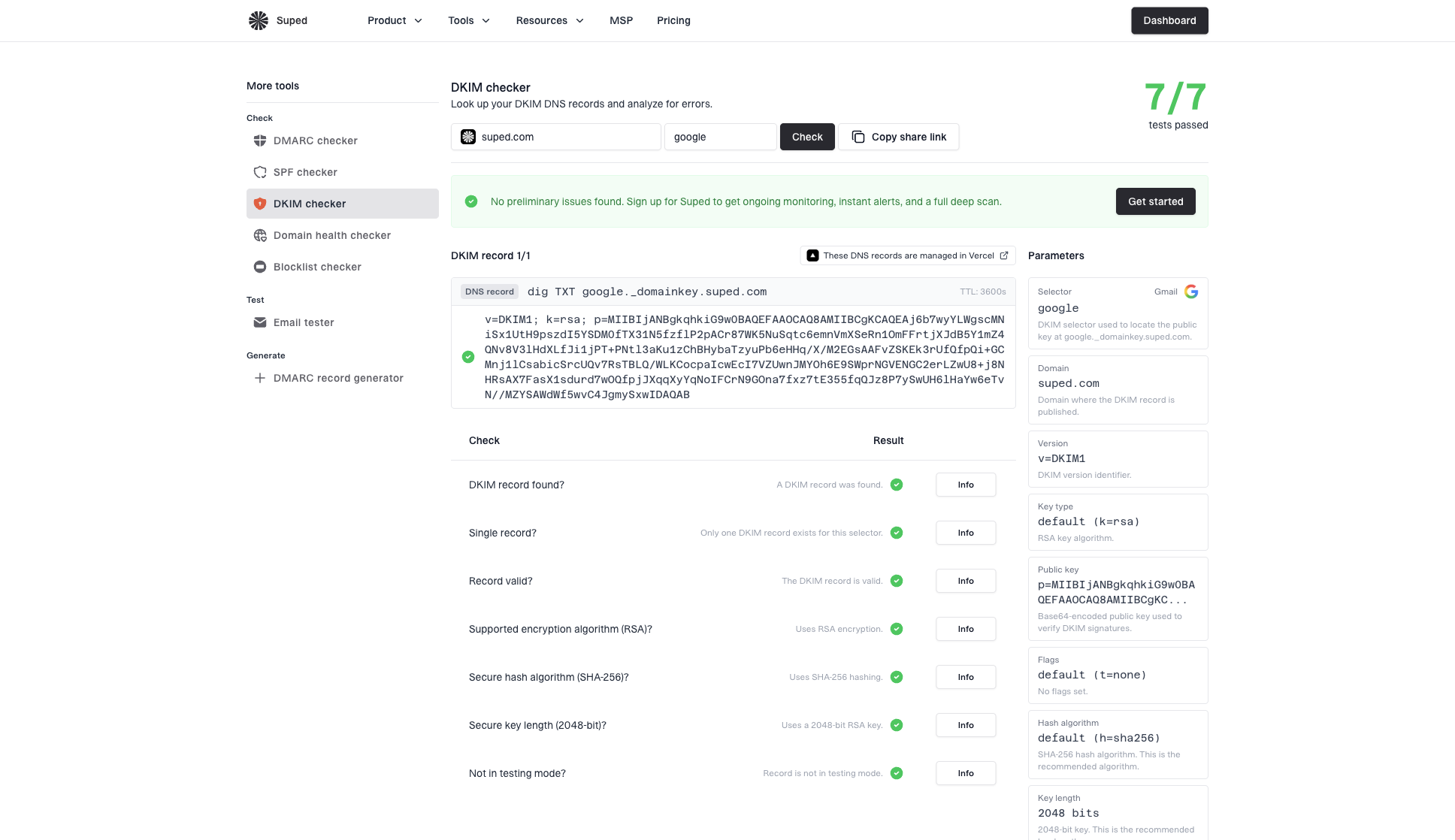
DKIM checker sample results showing selector, DKIM DNS record, validation checks, parameters, and share link
When long keys make the issue worse
A 2048-bit RSA DKIM key has a longer p= value than a 1024-bit key, so it exposes weak DNS portals faster. RFC 8301 requires RSA signing keys of at least 1024 bits and recommends at least 2048 bits. Prefer 2048-bit RSA when the sending platform and DNS provider support it. If the portal cannot publish the key, use the provider's supported multi-string format, ask support to publish it, use a sender-supplied CNAME, or move authoritative DNS.
Key-size judgement
A documented 1024-bit RSA option is the minimum allowed signing size and a weaker temporary fallback for a constrained DNS host. Do not use an RSA key below 1024 bits, and plan to restore 2048-bit support instead of keeping the fallback.
RFC 8463 defines Ed25519 DKIM with a 44-octet Base64 public key, so its DNS record usually fits in one TXT character-string. Publish it only through a sending platform that supports Ed25519, and keep an RSA signature for receiver compatibility. Ed25519 is an algorithm choice, not a repair for a portal that corrupts valid TXT data.
Some older mail systems also struggle with very long keys or unsupported formats. If you need a key-size decision for a constrained environment, the notes on recommended key length give more context. For current sending platforms, correct DNS publication remains the main requirement.
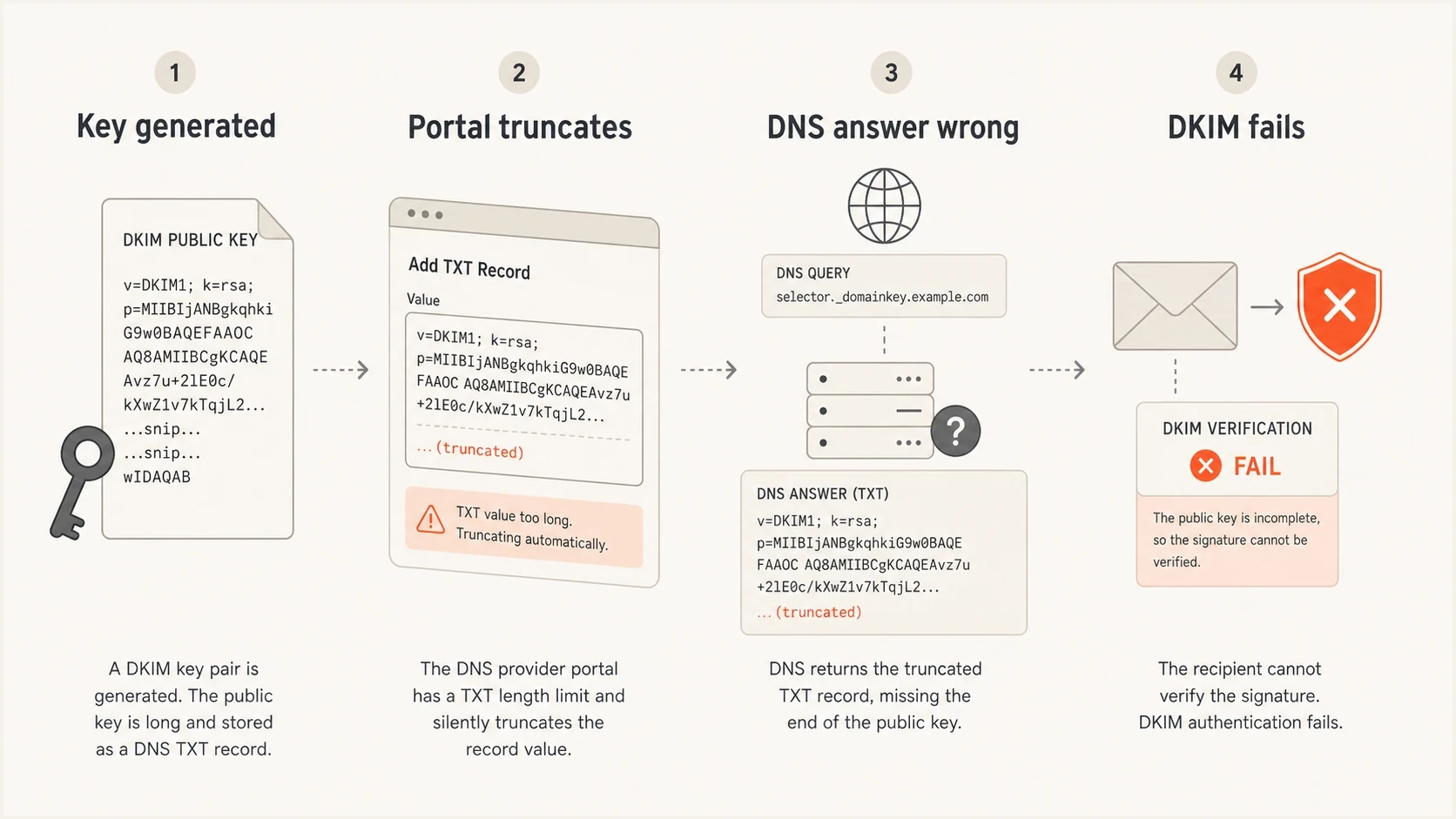
A four-part infographic showing a DKIM key being generated, truncated, served incorrectly, and failing validation.
When a CNAME avoids the TXT limit
Some managed sending platforms provide a CNAME record for each DKIM selector instead of asking you to publish the public key in your own zone. The short CNAME points the selector lookup to a hostname where the sending platform publishes and rotates the TXT key. This avoids entering the long p= value in your DNS portal.
- Use supplied values: Create a CNAME only when the sending platform gives you the exact selector name and target.
- Remove conflicts: A CNAME cannot coexist with a TXT record or other ordinary data at the same selector name.
- Check the full chain: Query the selector and confirm that the CNAME target resolves to one complete DKIM key record.
- Keep rotation records: Publish every selector the platform requires so future key rotation does not fail.
Sender-supplied CNAME shapeDNS
selector1._domainkey.example.com. CNAME selector1.provider.example.
Do not invent a CNAME target
A CNAME works only when the sending platform manages a valid DKIM key at the target. Changing a TXT selector to an arbitrary alias does not shorten or repair the key.
Use Suped after the DNS fix
Suped is our DMARC and email authentication platform. For this workflow, use it to check the repaired selector, confirm the public key, and watch for DKIM failures after DNS changes or key rotation.
For a single domain, the domain health checker confirms whether DKIM, SPF, and DMARC are publicly visible and syntactically valid. For production mail, DMARC monitoring shows which sending sources pass or fail and whether a valid DKIM signature with the required domain match survives selector changes.
Manual troubleshooting
- Scope: Useful for one selector or one urgent DNS change.
- Risk: The same fault can return when a new sender or key is added.
- Visibility: Headers show one message rather than domain-wide behavior.
Suped workflow
- Scope: Tracks authentication across monitored domains.
- Alerts: Flags DKIM and DMARC failures after DNS or sender changes.
- Fixes: Gives specific steps instead of leaving teams with raw XML reports.
Save the expected selector and p= value before the DNS change, validate a live message after publication, then monitor DMARC reports for authentication failures. That sequence makes truncation and rotation regressions easier to identify without confusing a DNS record check with proof that every message is signed.
DMARC record detail view showing SPF, DKIM, DMARC, rDNS diagnostics, and DNS records
Views from the trenches
Best practices
Confirm the public TXT answer before changing DKIM signing or DMARC policy settings.
Ask support to add one TXT record in the zone file when the portal blocks long values.
Move authoritative DNS when a provider cannot support modern email authentication records.
Common pitfalls
Do not create duplicate TXT records for one DKIM key just to bypass a portal limit.
Do not confuse several quoted strings in one record with several records at one name.
Do not downgrade RSA key size until DNS publishing and resolver behavior are verified.
Expert tips
Check DNS response-size failures separately from the 255-octet per-string limit.
Keep a copy of the expected p= value so truncation is easy to prove after lookup.
Use monitoring after the fix so the next selector or sender change does not regress.
Expert from Email Geeks says duplicate TXT entries for DKIM create an invalid key and receivers treat the signature as not verifiable.
2021-05-25 - Email Geeks
Expert from Email Geeks says one TXT record can contain multiple quoted strings, and those strings are concatenated by DNS clients.
2021-05-25 - Email Geeks
The practical answer
DKIM key issues blamed on a DNS TXT length limit usually come down to one failure: the selector lookup does not return the complete public key as one valid TXT resource record. The provider's UI truncates it, rejects it, stores formatting as data, or gives bad duplicate-record advice. A separate DNS response-size problem can also make a valid record time out or arrive truncated.
Publish one TXT record with the full DKIM value, using character-string chunks inside that record when the provider requires them. If the sender supplies a CNAME, publish that exact alias without conflicting TXT data. Then validate authoritative UDP and TCP answers, check the recursive result, send a real message, and confirm DKIM passes.
Once the record is fixed, keep monitoring the domain. DKIM DNS failures are easy to reintroduce when selectors rotate, new senders are added, or DNS ownership changes.




