How to fix “DKIM record published no DKIM record found” errors

Published 12 Jul 2025
Updated 22 Sep 2026
12 min read
Summarize with

Updated on 22 Sep 2026: We refreshed this guide with DNS response diagnostics and current Microsoft 365 selector guidance.
The fix is to make the selector, DNS hostname, and public key match the DKIM signature your mail system uses. The error means a checker queried the expected DKIM location, usually selector._domainkey.yourdomain.com, and did not get a usable DKIM TXT record directly or through a CNAME. Start by confirming the selector in the message header, then publish the record at the exact DNS name, check the public DNS response, and send a new signed test email.
Most cases are publishing problems rather than cryptographic problems. The record is under the wrong host, the DNS provider added the domain twice, the selector is not the one the sender uses, a CNAME points to the wrong target, or the email was never DKIM signed.
The same troubleshooting process applies whether the wording appears in a mailbox provider admin screen or a DNS checker. A related failure can also appear in DMARC reporting as DKIM failure for a sending source. DKIM validation starts with a DNS lookup. If that lookup does not return the key for the selector in the email header, the validator has nothing to verify.
What the error means
DKIM has two pieces that must line up. The sending system adds a DKIM-Signature header to the email. That header includes a selector, shown as s=, and a signing domain, shown as d=. The receiving server combines those values to find the public key in DNS.
How the DKIM DNS lookup is builttext
selector + ._domainkey. + signing-domain

s=selector1

d=example.com

Lookup:
selector1._domainkey.example.com
If the lookup returns no answer, or a CNAME chain ends without a usable key, the checker reports that a DKIM record was expected but no DKIM record was found. If DNS returns a malformed key, the error usually refers to an invalid public key, bad tag, unsupported key type, or permerror.
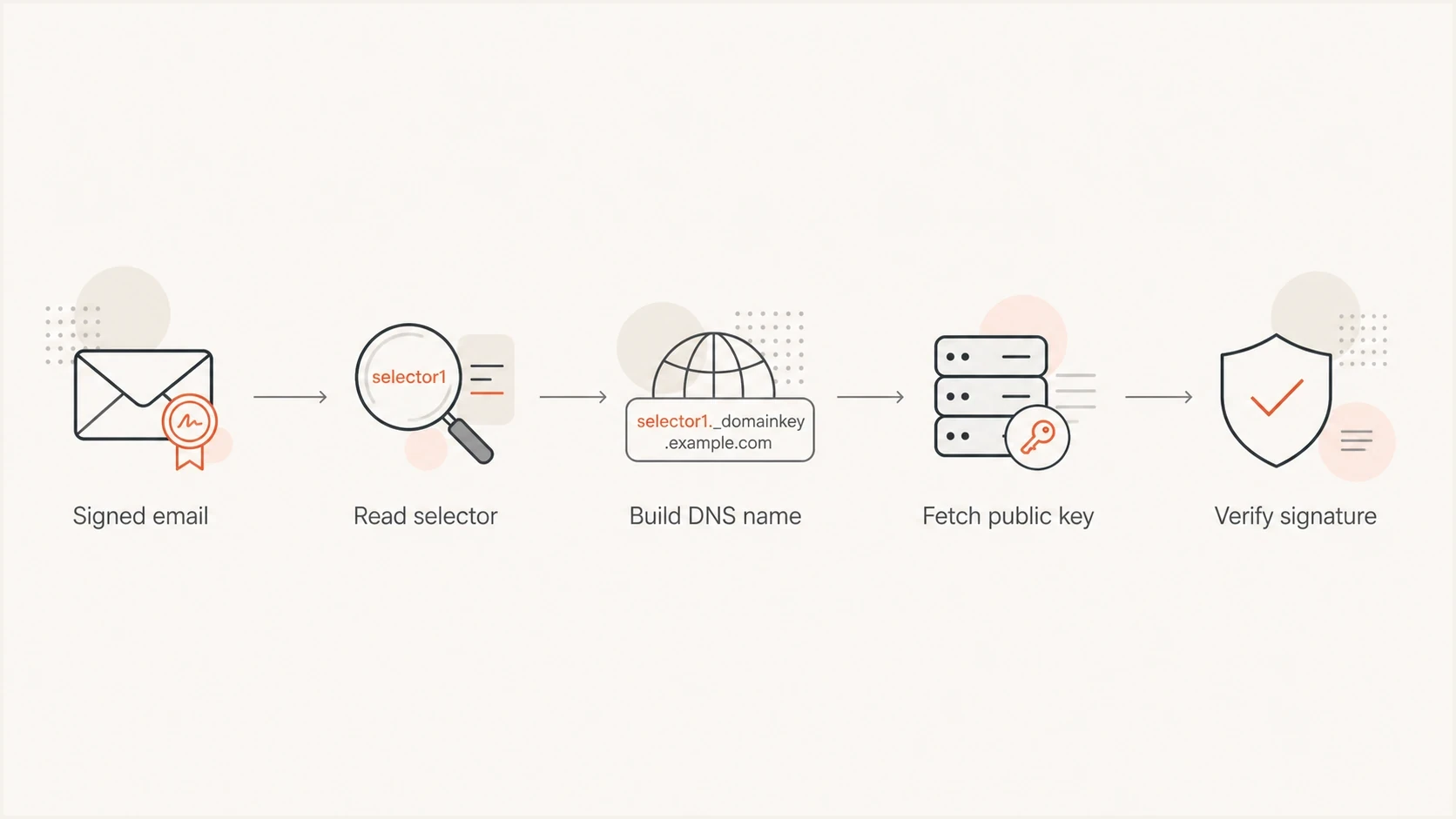
Flowchart showing how a receiver uses the DKIM selector and domain to find the public key.
Fix it in this order
Use this order because it separates DNS publication errors from signing errors. Do not change the key first. First prove that you are checking the same selector and domain that the sender used in the message.
- Selector: Open the original message headers and read the selector value after s=. Do not assume the selector from memory.
- Domain: Read the signing domain after d=. DKIM can sign with a subdomain, a vendor domain, or your organizational domain.
- Hostname: Publish the record at selector._domainkey.domain, not at the root domain and not at _domainkey alone.
- Record type: Use the exact type your sender requires. Some systems provide a TXT public key, while others provide a CNAME that delegates key hosting.
- Value: Copy the full public key or CNAME target without extra spaces, quotes copied as text, or missing characters.
- Test: After DNS resolves, send a new email. Old messages do not prove that the current signer and DNS are correct.
Do not troubleshoot DKIM only by looking at the DNS dashboard. The DNS dashboard shows what you intended to publish. The receiver only sees the public DNS answer for the exact selector and domain in the message header.
Example TXT DKIM recorddns
Host:
selector1._domainkey.example.com

Type:
TXT

Value:
v=DKIM1; k=rsa; p=MIIBIjANBgkqhkiG9w0BAQEFAAOCAQ8A...
Example CNAME DKIM recorddns
Host:
selector1._domainkey.example.com

Type:
CNAME

Value:
selector1-example-com._domainkey.sender.example.net
Where the lookup usually breaks
The fastest way to fix this error is to map the visible symptom to the likely cause. These are the common cases when a team says the DKIM record is published but a checker still says no DKIM record was found.
|
|
|
|---|---|---|
No DNS answer | Wrong hostname or selector | Rebuild the exact name |
Old key appears | Recursive DNS cache | Wait for the cached TTL |
CNAME but no key | Wrong or inactive target | Copy the target or check sender state |
Unsigned mail | DKIM signing disabled | Enable signing |
Invalid key | Truncated or duplicate TXT | Publish one complete key |
Common DKIM no-record symptoms and fixes
The host value is the easiest place to make a mistake because DNS dashboards handle zone names differently. Some dashboards ask for only selector._domainkey. Others accept the full selector._domainkey.example.com name. If you enter the full name where the dashboard expects a relative name, it can publish selector._domainkey.example.com.example.com.
Broken publication
- Selector: The checker tests selector1, but the DNS record was created under default.
- Zone name: The DNS host appended the domain again after a full host value was pasted.
- Record type: The sender expects a CNAME, but a TXT record was created instead.
- Mail state: The message has no DKIM-Signature header, so there is no selector to validate.
Correct publication
- Selector: The selector in the email header is the same selector checked in DNS.
- Zone name: The published hostname resolves exactly once under the intended domain.
- Record type: The type matches the sender instructions, either TXT or CNAME.
- Mail state: A fresh test message has a DKIM-Signature header and passes verification.
Check the selector and DNS answer
The most reliable selector is the one in a real email header. Open the message source, search for DKIM-Signature, and read the s= and d= values. If there are multiple DKIM signatures, check each one separately. A message can pass with one signature and fail with another.
If you do not have an email header yet, use the sender's DKIM setup page to find the expected selector, then verify the DNS answer with the DKIM checker. Enter the selector and domain separately so you can catch selector mistakes instead of testing a guessed hostname.
DKIM checker
Check selector records and public key configuration.
?/7tests passed
A clean DKIM lookup should end at one usable TXT key record, either directly or through a sender-provided CNAME. The record needs a non-empty p= public key. The v=DKIM1 version tag is recommended, but a key can validly omit it. If the checker returns no record, test the exact DNS name and confirm that the record is in public authoritative DNS rather than only a private zone.
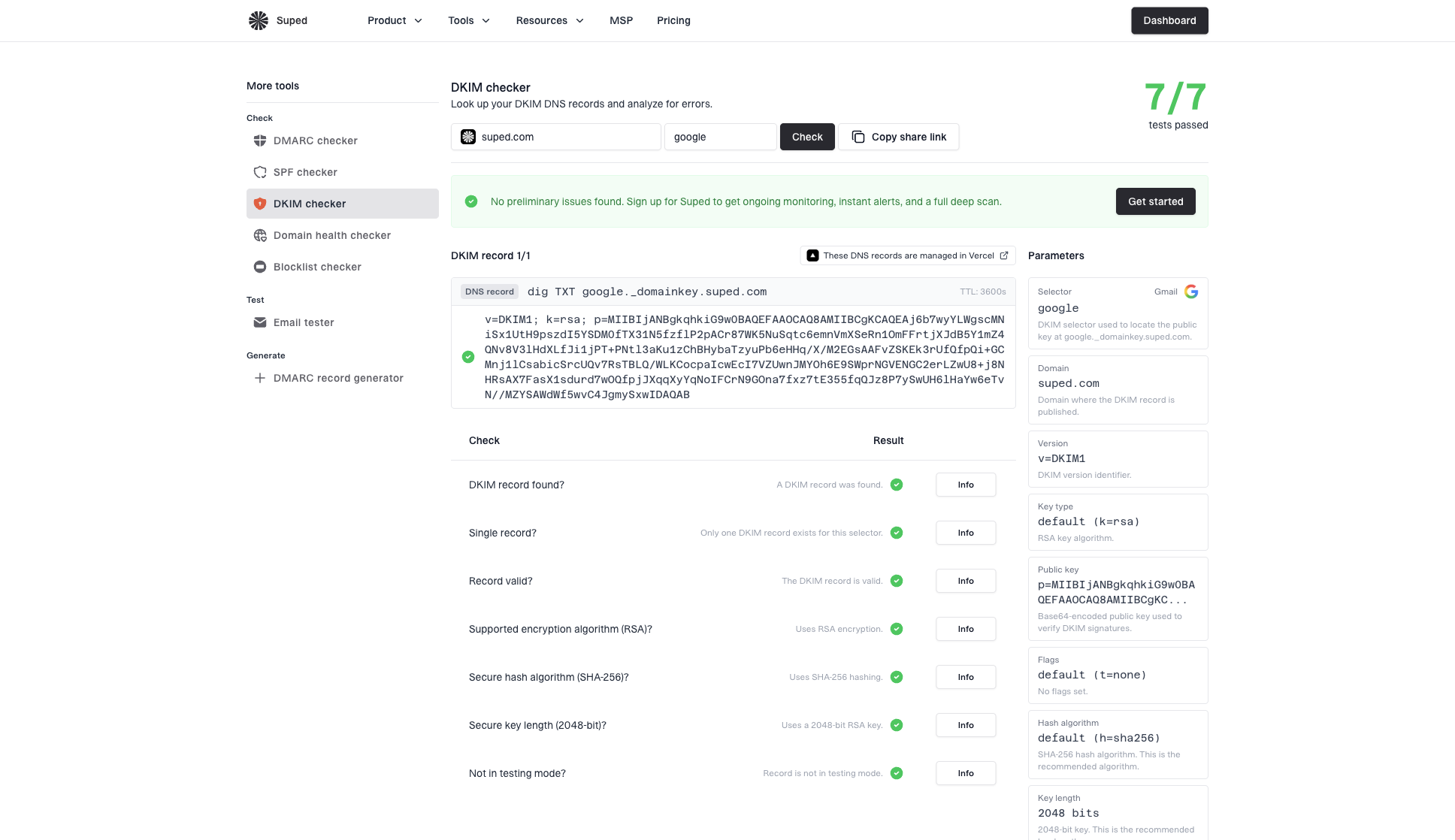
DKIM checker sample results showing selector, DKIM DNS record, validation checks, parameters, and share link
When the selector looks correct but validation still fails, treat it as a different DKIM issue. DNS is answering, but the returned key or signing details do not match the message.
Read the DNS response before editing the key
A blank result does not identify one cause. Query the exact selector hostname and read the DNS status, answer section, and CNAME target. The response tells you which layer to fix.
- NOERROR with TXT: DNS found the key. If DKIM still fails, inspect key syntax, revocation, or signature verification instead of republishing the hostname.
- NOERROR without TXT: The name exists but has no TXT answer, often called NODATA. Check for the wrong record type or a CNAME target that does not return a key.
- NXDOMAIN: The queried name does not exist. Recheck the selector, signing domain, zone, and whether the DNS dashboard appended the domain.
- SERVFAIL or timeout: DNS could not complete the lookup. Check authoritative nameserver availability, delegation, and DNSSEC validation before changing the DKIM key.
Query the DKIM name and CNAME chainbash
dig TXT selector1._domainkey.example.com
dig CNAME selector1._domainkey.example.com
dig +trace TXT selector1._domainkey.example.com
If the record was missing before you published it, recursive resolvers can retain the old NXDOMAIN or NODATA response. That negative-cache period comes from the zone's SOA data, not from the TTL on the new DKIM record. Confirm the record on every authoritative nameserver first, then wait for the negative-cache TTL before judging a recursive lookup.
Compare authoritative nameserversbash
dig NS example.com
dig @ns1.example.net TXT selector1._domainkey.example.com
dig @ns2.example.net TXT selector1._domainkey.example.com
If authoritative nameservers disagree, recipients can alternate between finding the key and reporting no key. Fix zone synchronization or delegation before rotating the DKIM key.
Fix DNS publication problems
Once you know the exact selector and domain, focus on the DNS record itself. A DKIM TXT record must contain one complete public key. A DKIM CNAME record must point to the exact target the sender gave you. Do not mix the two patterns.
Relative versus full DNS host valuesdns
If your DNS zone is example.com, enter one of these:

Relative host:
selector1._domainkey

Full host:
selector1._domainkey.example.com

Do not publish:
selector1._domainkey.example.com.example.com
TXT formatting also matters. Many DNS providers split long TXT values into quoted chunks behind the scenes, which is normal. The problem happens when copied quote marks, line breaks, or missing characters become part of the key. If the sender provides a copy button, use it. If not, copy into a plain text editor first and remove extra whitespace around the value.
Publish only one DKIM key record at a selector. Receivers can handle multiple key records differently, so duplicate records can cause inconsistent verification.
- Duplicate TXT: Remove the old value before adding a replacement key for the same selector.
- TXT plus CNAME: Use one record type at the DKIM hostname, not both.
- Private DNS: Publish the key in public authoritative DNS for the signing domain.
- Short TTL: Use a short TTL during setup, then raise it after validation passes.
If DNS returns a key but the checker complains about the public key itself, treat that as a different problem. The fix is usually to republish the key, remove stray characters, or generate a new key pair. The related guide on invalid RSA keys covers that specific failure.
Confirm the message is signed
A published DKIM record does not sign mail by itself. Your sending platform must apply the DKIM-Signature header when it sends the message. If the message has no DKIM-Signature header, a checker can only validate DNS, not the actual email.
Header fields to inspecttext
DKIM-Signature: v=1; a=rsa-sha256; d=example.com; s=selector1;
Authentication-Results: mx.example.net; dkim=pass header.d=example.com
If there is no DKIM-Signature header, enable DKIM signing in the sender, choose the verified domain, and send a fresh message. If the sender signs with a different domain than expected, the DNS lookup must be performed under that signing domain, not the visible From domain.
This is also where DMARC domain matching matters. DKIM can pass while DMARC fails if the d= signing domain does not match the visible From domain under DMARC rules. Relaxed mode, the default, allows both domains to share the same organizational domain. Strict adkim=s requires an exact domain match.
When the DNS record is correct but the email is not signed, the right fix is in the sending platform, not DNS. The related walkthrough on mail that is not DKIM signed is the better next step.
How Suped fits into the workflow
Manual DKIM checks are useful when fixing one selector. When a team needs to identify the sending source behind a failure, measure the affected traffic, or check whether the DKIM domain matches for DMARC, Suped's product adds that context to the workflow.
Suped connects DKIM, SPF, and DMARC results with source identification, alerts, blocklist (blacklist) monitoring, and deliverability signals. The source-level view shows which source sent the mail, which authentication result failed, and the record or sending configuration to inspect.

Issue steps to fix dialog showing the issue overview, tailored fix steps, and verification action
For a broader check of the domain, the domain health check helps confirm DKIM, SPF, and DMARC records together. For ongoing enforcement and reporting, DMARC monitoring turns one-off authentication checks into source-level reporting and alerts.
?
What's your domain score?
Deep-scan SPF, DKIM & DMARC records for email deliverability and security issues.
The DNS repair sequence stays the same: confirm the selector, hostname, record type, value, public answer, and fresh test mail. Suped keeps those checks organized by sending source and alerts teams when authentication regresses across several domains or senders.
When the error persists
If the selector and DNS record are correct but the error still appears, prove each layer before editing the key again. A checker can cache old DNS. A mailbox provider can show setup status before all authoritative nameservers answer. A message can carry an old selector after a key rotation. These are timing and routing issues.
- Authoritative DNS: Query every authoritative nameserver and confirm they return the same answer.
- Fresh mail: Send a new message after signing is enabled and DNS is visible.
- Key rotation: Keep the old selector published until all mail signed with it has aged out.
- Provider status: Wait for the sender's admin status to recheck after public DNS starts answering.
If a receiving server reports no key for signature, treat that as the runtime version of the same problem. The email points receivers to a selector, but DNS does not provide the public key they need.
Check Microsoft 365 selector state
The exact wording is common when Microsoft 365 selector1 and selector2 produce different results. Microsoft 365 requires both CNAME records for a custom domain, but only one selector signs mail at a time. The other selector is reserved for a later key rotation. A no-record result for the inactive selector does not prove that current outbound mail is failing DKIM, but both customer-hosted CNAMEs still need to match the tenant values.
Do not build Microsoft 365 CNAME targets from an example. Custom domains added since May 2025 can use targets with a tenant-specific dynamic partition character and the dkim.mail.microsoft parent domain. Older custom domains can retain the earlier onmicrosoft.com target format. The old and new target formats cannot be combined for one selector, so copy Selector1CNAME and Selector2CNAME from the tenant's current DKIM configuration.
- Identify the active selector: Send a fresh message and read its s= value instead of assuming selector1 or selector2 is active.
- Verify both CNAMEs: Copy the exact selector1 and selector2 targets shown for the domain in the tenant. Do not construct the targets from a remembered naming pattern.
- Separate current signing from rotation: If the active selector returns a key and fresh mail shows dkim=pass, an inactive-selector warning is a rotation-readiness issue rather than a current signing failure.
- Retest after rotation: Keep both CNAMEs published, allow the platform rotation to complete, then confirm that a new message uses the alternate selector.
Do not delete the inactive selector or rotate keys solely to satisfy a generic lookup result. The Microsoft thread describes the same selector2 symptom. Check the selector used in a fresh signature and the tenant's DKIM status before changing DNS.
The practical fix
To fix "DKIM record published no DKIM record found", do not keep republishing random DKIM records. Read the selector and signing domain, build the exact DNS hostname, publish the correct TXT or CNAME record there, confirm public DNS returns the key, then send a new signed email and check the result.
If the record is visible and mail is signed, DKIM should move from no record to either pass or a more specific validation error. That more specific error confirms the DNS lookup is working and narrows the remaining issue to key format, a revoked key, body hash verification, or signing configuration.
The clean end state is simple: the DKIM selector in the message header resolves in public DNS, the returned key matches the private key used by the sender, and the visible From domain has DMARC coverage for the authenticated traffic.




