How to understand and resolve a DKIM permerror (no key for signature) in email headers?

Published 11 Aug 2025
Updated 5 Aug 2026
10 min read
Summarize with
Updated on 5 Aug 2026: We added authoritative DNS and cache checks for resolving missing DKIM keys, and clarified DMARC alignment.
A dkim=permerror result with no key for signature is a real DKIM authentication error. It means the receiving server found a DKIM signature, read the signing domain and selector, then could not retrieve a public key record from DNS. It is a configuration issue to fix unless authoritative DNS and the timing of the failure show that the receiver had a temporary lookup problem or a cached negative answer.
The practical fix is usually straightforward: find the d= domain and s= selector in the DKIM-Signature header, look up the matching DNS hostname, then publish the missing DKIM public key as a TXT record. If an ESP signs with your domain, the ESP supplies the public key or CNAME target, but the domain owner usually publishes it in DNS.
- Actual error: The receiver could not verify DKIM because the public key record was not available.
- Most common cause: The selector TXT record is missing, published at the wrong hostname, or delegated to a CNAME target that does not return the key.
- Deliverability impact: DKIM will not pass for that signature, and DMARC depends on SPF or another aligned DKIM signature.
- Fastest proof: Query the exact selector hostname in public and authoritative DNS, then inspect the response type.
What the header means
DKIM uses a private key at the sending system and a public key in DNS. The sender signs selected parts of the message. The receiver finds the matching public key through DNS, verifies the cryptographic signature, then writes the result into Authentication-Results.
When the result says no key for signature, the receiver is not saying the content changed. It is saying it could not get the public key record needed to check the signature at all. That is different from body hash failure, header canonicalization trouble, a revoked key, invalid key syntax, or an expired signature.
Header exampletext
DKIM-Signature: v=1; a=rsa-sha256; d=example.com; s=selector1;
 h=from:to:subject:date; bh=abc123; b=def456
Authentication-Results: mx.google.com;
 dkim=permerror (no key for signature) header.d=example.com
The important values are d= and s=. The receiver builds the DNS hostname as s._domainkey.d. If s=selector1 and d=example.com, the public key must be at selector1._domainkey.example.com.
Fast definition
A DKIM permerror is a permanent verification error. In this specific case, the corresponding public key record did not exist for the selector and signing domain in the message header.
How to read the DKIM signature
Start with the raw message headers, not the simplified delivery status shown in an inbox. In Gmail, use Show original. In Outlook, use message options or view message source. Search for the first DKIM-Signature header that matches the failing result.
A message can have more than one DKIM signature. One can pass while another returns permerror. That matters because DMARC only needs one aligned DKIM signature to pass, or an aligned SPF result to pass. Still, an unused or broken signature should be removed or fixed because it creates noise and can hide real sending-source problems.
- Find the signature: Search for DKIM-Signature and identify the one tied to the failing Authentication-Results line.
- Copy the domain: Use the value after d= as the signing domain.
- Copy the selector: Use the value after s= as the DNS selector.
- Build the lookup: Check the TXT record at selector dot _domainkey dot signing domain.
For a quick public lookup, Suped's DKIM checker can validate the selector and show whether the TXT record has a DKIM key. It is useful when you need proof that the issue is DNS, not inbox rendering or campaign reporting.
DKIM checker
Check selector records and public key configuration.
?/7tests passed
If the lookup returns no TXT record, the receiver's error is expected. If a record exists but has an empty p= value, the key has been revoked. Invalid key syntax produces a different permanent key error, so preserve the exact Authentication-Results wording when diagnosing it.
How to interpret the DNS lookup
Query the TXT record type explicitly. A command that defaults to an A-record lookup only checks for an IP address, so an empty A answer does not show whether a DKIM key exists. Check for a CNAME too because some senders delegate the selector hostname to a key they host.
DKIM DNS diagnostic commandsbash
dig TXT selector1._domainkey.example.com
dig CNAME selector1._domainkey.example.com
dig NS example.com
dig @<authoritative-nameserver> TXT selector1._domainkey.example.com
- TXT answer: A valid key record normally contains v=DKIM1 and a non-empty p= value. DNS can display one TXT record as several quoted strings; DKIM joins those strings without adding spaces.
- CNAME answer: Follow the target and confirm that it returns the DKIM TXT record. If the DNS host offers HTTP proxying, keep a DKIM CNAME set to DNS-only so the query reaches the target.
- NXDOMAIN or no TXT data: No public key record exists at the exact name queried. Check the selector, signing domain, DNS zone, and any CNAME target.
- SERVFAIL or timeout: The resolver could not complete the query. Check authoritative nameserver health, delegation, DNSSEC validation, and retry behavior.
If the selector previously returned NXDOMAIN or no TXT data, recursive resolvers can retain that negative answer for the zone's negative-cache TTL. A newly added key can therefore appear at the authoritative nameservers before every receiver can retrieve it. Publish a new selector before the sender starts using it, and leave old selectors available until queued mail has cleared.
When it is temporary and when it is not
Temporary DNS failures do exist. A timeout, SERVFAIL response, broken delegation, or DNSSEC validation failure can stop a receiver from completing the key lookup. An authoritative NXDOMAIN or no-data answer for the exact selector hostname points to a missing-key setup problem instead.
Use scope, timing, and repeatability. A one-off failure at one receiver during a DNS incident points to a lookup problem. The same no-key result across multiple receivers and fresh campaign samples points to a missing public key or wrong selector. A current lookup does not prove what the receiver saw earlier, especially after the key was just published.
Temporary DNS issue
- Key exists: The authoritative selector hostname returns a valid DKIM TXT record.
- Failure varies: Some receivers pass DKIM while others report a lookup problem.
- Retest passes: A fresh message passes DKIM after DNS service or cached data recovers.
Permanent setup issue
- Record missing: The selector hostname has no TXT record or usable CNAME target.
- Wrong host: The key was published under the root domain or the wrong subdomain.
- Wrong selector: The sender signs with a selector that has not been published.
If the header says temporary error instead, troubleshoot it as a DNS lookup reliability issue. The DKIM temperror path is different because the receiver is saying the key lookup could not be completed at that moment.
Do not accept temporary without DNS evidence
The claim that no key for signature has no deliverability effect needs evidence. If DKIM fails and DMARC only passes because SPF aligns with the From domain, a later routing change can turn this into a DMARC failure.
How to fix the missing key
The fix depends on who controls the DNS zone and who owns the sending system. If the sender is an ESP, ask for the exact DKIM public key or the exact CNAME target for the selector shown in the failing header. Do not ask only for generic DKIM setup instructions.
|
|
|
|---|---|---|
Get key | ESP | Exact selector |
Publish record | DNS owner | TXT or CNAME |
Check caches | DNS owner | Public lookup |
Send test | Sender | DKIM pass |
DKIM no-key repair checklist
DKIM DNS record exampledns
Host:
selector1._domainkey.example.com

TXT value:
"v=DKIM1; k=rsa; "
"p=MIIBIjANBgkqhkiG9w0BAQEFAAOCAQ8A..."

If the ESP gives a CNAME:
selector1._domainkey.example.com CNAME selector1.esp.example
The hostname must match the failing signature exactly. A key published at selector1._domainkey.mail.example.com will not help a signature that says d=example.com. Likewise, a key for selector2 will not help a signature that says s=selector1.
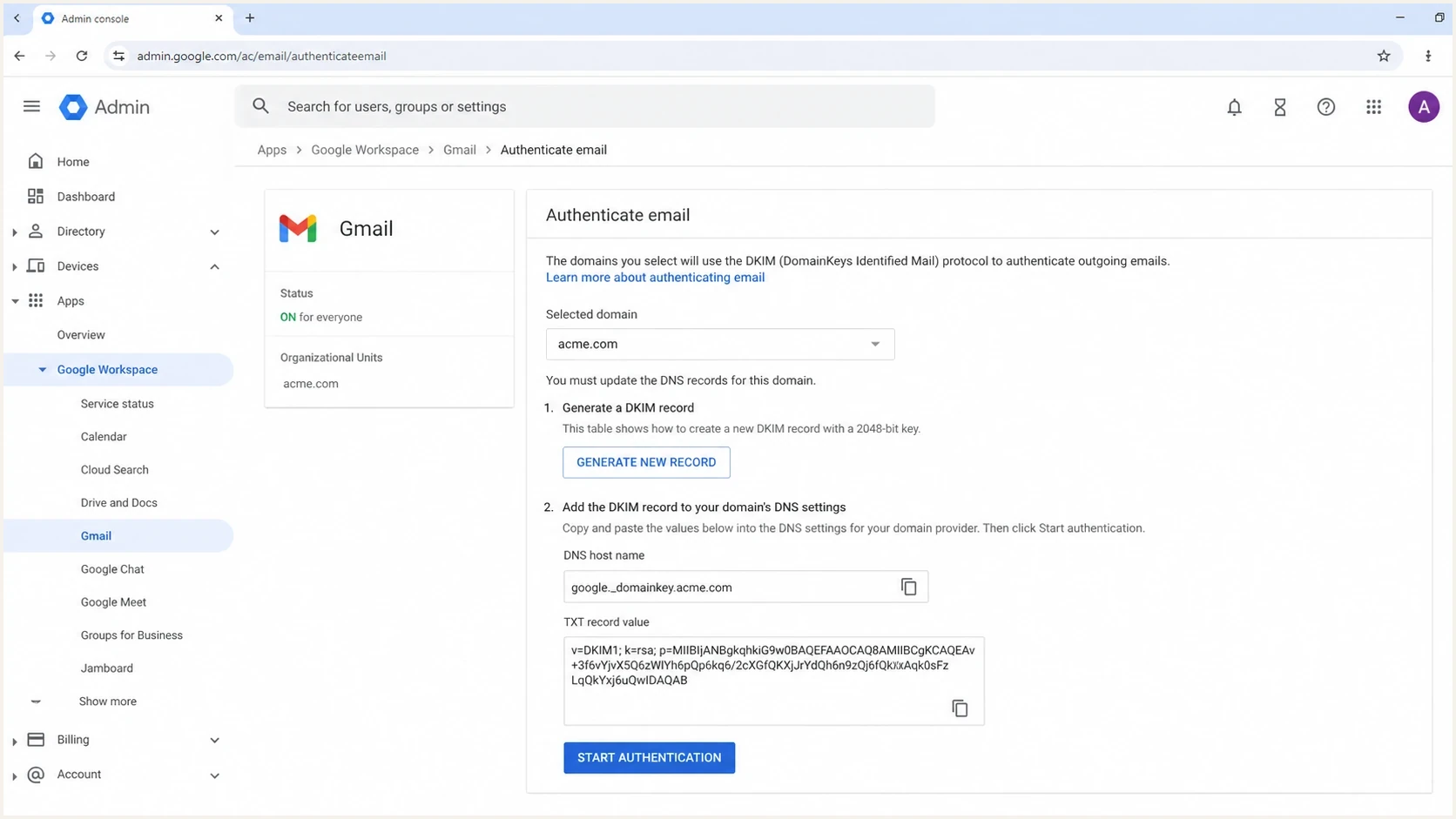
Google Admin Console DKIM setup screen showing a DNS host name and TXT record value.
If you are helping a client and do not have DNS access, the handoff is still clear. Send the client the failing d= and s= values, ask the ESP for the matching public key, then have the DNS owner publish it. A missing public key often appears as no DKIM record found in separate DNS validation results.
What to check after publishing the key
After the DNS record is published, allow time for positive or negative DNS cache TTLs to expire, then test with a fresh message. Old messages do not become authenticated retroactively in mailbox headers. The receiver wrote the result at the time it processed the email.
Check the public DNS record first, then send mail and inspect Authentication-Results. A domain health check can also show whether SPF, DMARC, rDNS, or TLS policy has separate gaps after the DKIM key works.
Post-fix checks
- Header result: A new message should show DKIM pass for the expected signing domain.
- DMARC alignment: With relaxed alignment, the passing DKIM domain and visible From domain share an organizational domain. Strict alignment requires an exact match.
- Old selectors: Keep previous DKIM records published until delayed or queued mail has aged out.
- Failure type: If the error changes to bad signature, troubleshoot content changes after signing.
How Suped helps confirm the fix
A one-off header check solves the immediate no-key question. Ongoing DMARC monitoring shows whether the same selector is failing across real mail streams, which source is responsible, and whether DMARC is relying on SPF as a backup.
Suped is our DMARC reporting and email authentication platform. It groups aggregate report data by sending source so a missing DKIM key can be tied to the affected domain and source, then checked again after the DNS repair.

Issue steps to fix dialog showing the issue overview, tailored fix steps, and verification action
The workflow is to validate the selector, publish the key, send a fresh test, then monitor aggregate reports. Suped's automated issue detection and alerts help show whether the selector failure continues across later mail.
Views from the trenches
Best practices
Extract the d= domain and s= selector from headers before changing DNS or escalating.
Check the selector hostname in public DNS, not only inside the ESP setup screen or admin UI.
Keep old DKIM keys published during sender migrations until all queued mail has aged out.
Common pitfalls
Treating no key for signature as harmless lets unsigned campaigns keep failing authentication.
Publishing the key under the wrong subdomain makes the TXT record invisible to receivers.
Removing a rotated selector too early breaks delayed mail that still carries old signatures.
Expert tips
Ask for the selector, signing domain, TXT value, and expected host, then verify all.
Use DMARC reports to find which source is signing with the missing selector at volume.
Set alerts for new DKIM failures so one campaign does not reveal the issue weeks later.
Expert from Email Geeks says the first check is whether the DKIM key exists in public DNS for the selector and signing domain shown in the header.
2025-04-10 - Email Geeks
Expert from Email Geeks says no key for signature means the public key was not published or was not reachable at the exact selector hostname.
2025-04-10 - Email Geeks




