Decoding DKIM temperror: what it is and how to fix it

Published 12 Jul 2025
Updated 22 Sep 2026
12 min read
Summarize with
Updated on 22 Sep 2026: We added practical checks for DNS migrations, delegated CNAMEs, trusted headers, and low-TTL lookup pressure.
A DKIM temperror means the receiving mail server tried to verify a DKIM signature, but hit a temporary problem before it could finish. The signature was not proven valid, and it was not proven permanently broken either. In most cases, the receiver could not retrieve the DKIM public key from DNS because of a timeout, SERVFAIL response, DNSSEC problem, broken CNAME path, resolver rate limit, or provider-side DNS issue.
The fix is practical: identify the signing domain and selector, query the DKIM record through recursive and authoritative DNS, repair the TXT or CNAME record, remove DNSSEC failures, shorten fragile CNAME chains, and monitor whether the error rate drops after resolver caches refresh. Treat dkim=temperror as an infrastructure signal first, not a content problem.
- Fast answer: DKIM temperror is usually a temporary DNS lookup failure for the DKIM key.
- Main check: Read the d= domain and s= selector from the DKIM-Signature header.
- Business impact: Repeated temperrors remove that signature as a DMARC pass path, so DMARC must rely on a qualifying SPF pass or another DKIM signature whose domain matches the From domain.
- Best next step: Run a focused DKIM checker test, then confirm the same result from every authoritative nameserver.
What DKIM temperror means
DKIM verification has two parts. First, the receiver reads the DKIM-Signature header to find the signing domain and selector. Second, it builds a DNS name, retrieves the public key, and uses that key to verify the message signature. Temperror happens when the receiver cannot complete verification for a temporary reason, most often during the public-key lookup.
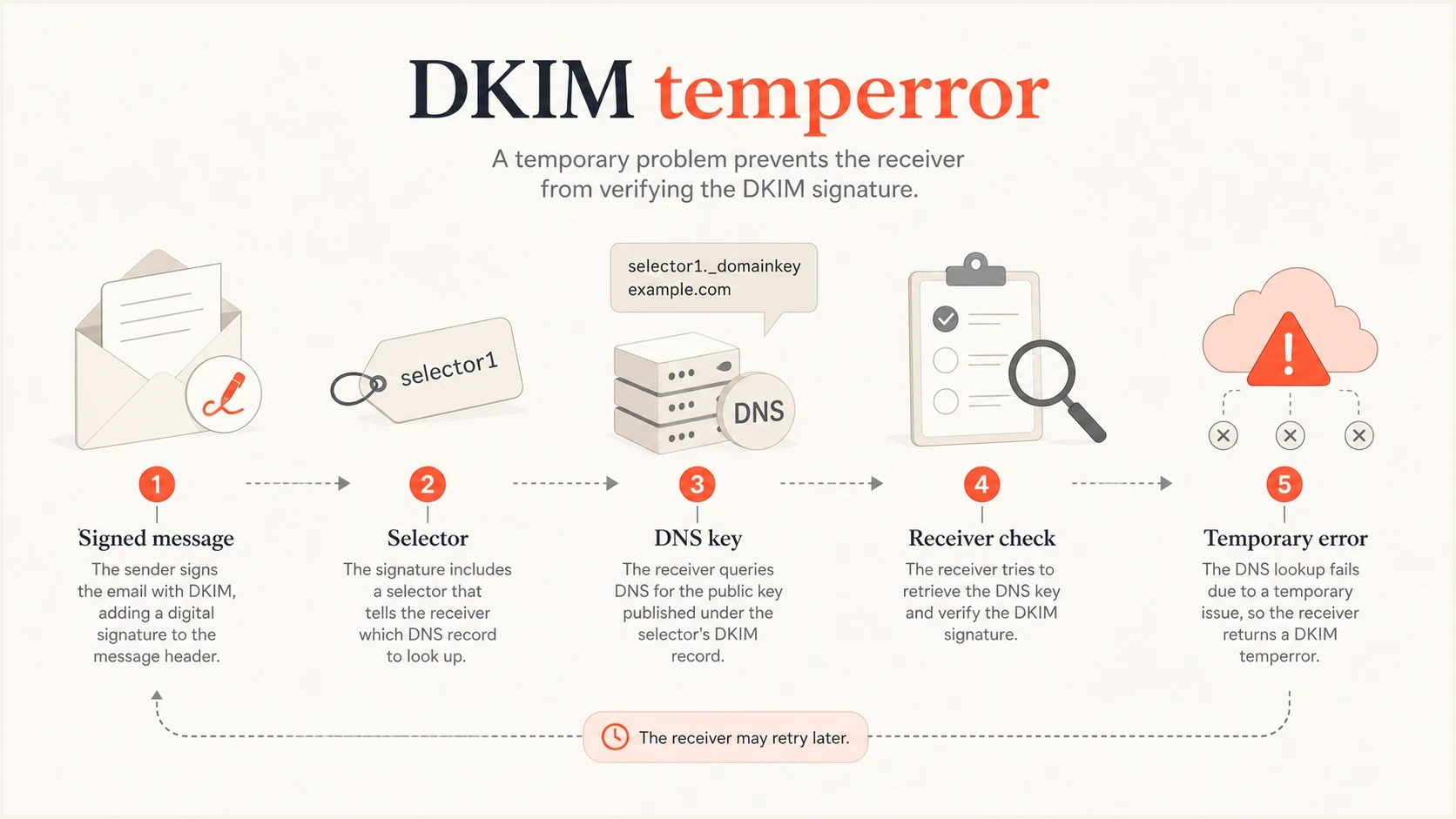
DKIM temperror flow showing a signed message, selector, DNS key lookup, receiver check, and temporary error.
The important distinction is temporary versus permanent. A DKIM permerror tells you the receiver found something unrecoverable, such as an invalid record, an authoritative no-key answer, or unrecoverable signature syntax. A DKIM temperror tells you the receiver hit a transient lookup or processing condition, so a later attempt can produce a final result after DNS or provider health recovers.
Do not fix the wrong layer
If the header says dkim=temperror, start with DNS and selector lookup health. Message content, HTML formatting, and campaign copy are not the usual cause of a temporary DKIM evaluation error.
- Check DNS: Look for timeout, SERVFAIL, lame delegation, or DNSSEC validation failure.
- Check selector: Confirm the selector in the message has a matching public key in DNS.
- Check trend: A single temperror can be receiver-side noise, but repeated failures point to a fault that needs investigation.
- Check DMARC: DMARC fails if no passing DKIM signature has the required domain match and SPF also lacks that match.
Authentication-Results exampletext
Authentication-Results: mx.receiver.example;
  dkim=temperror header.d=example.com header.s=selector1
  reason="DNS timeout while retrieving DKIM key";
  spf=pass smtp.mailfrom=bounce.example.com;
  dmarc=pass header.from=example.com
Common causes
Most DKIM temperror cases come down to DNS availability or key publishing. The receiver needs a clean answer for a name like selector._domainkey.example.com. Anything that makes that answer slow, inconsistent, unreachable, or bogus under DNSSEC can produce a temporary result.
|
|
|
|---|---|---|
Timeout | Slow or unreachable DNS | Query authoritative DNS |
SERVFAIL | DNSSEC, delegation, or zone fault | Repair the failing DNS layer |
Intermittent pass | Nameserver or resolver inconsistency | Compare every server |
CNAME failure | Broken or slow target chain | Query every CNAME hop |
New selector | Publication or negative-cache gap | Verify authority, then retest |
Very low TTL | Frequent live DNS queries expose latency | Use the provider-supported TTL |
Common DKIM temperror signals and first fixes.
An authoritative NXDOMAIN or no-key answer should produce a permanent result, while a query that does not respond can produce a temporary result. Receiver labels still vary, so inspect the exact DNS answer and the reason text in Authentication-Results instead of relying on the result label alone. A very short TTL does not make a valid key fail, but it increases repeat lookups and makes authoritative DNS latency more visible.
Temperror pattern
- Lookup issue: The receiver cannot get a reliable DNS answer for the key.
- Intermittent results: The same selector passes at one receiver and fails at another.
- Retry helps: A later message can pass without changing the DKIM signature.
- DNS detail: Timeout, SERVFAIL, or validation failure appears in diagnostics.
Permerror pattern
- Record issue: The receiver gets a final answer, but the key is missing or unusable.
- Consistent results: The same selector fails repeatedly across receivers.
- Retry fails: Waiting does not fix a bad key format or missing selector.
- Record detail: Invalid syntax, empty key, or authoritative no-key answer appears.
For related temporary authentication behavior outside DKIM, the SPF version has its own failure path. The most useful comparison is SPF temperror, because both results usually start with DNS, but the lookup rules and limits differ.
How receivers handle DKIM temperror
DKIM temperror is a verification result, not a universal delivery instruction. RFC 8601 defines it as an error that is likely transient, while DKIM allows a receiving mail server that cannot fetch the public key to return a temporary SMTP reply. Under RFC 9989, the temperror does not create a DKIM-authenticated identifier for DMARC, but a qualifying pass through another signature or SPF can still satisfy DMARC. The receiver's local policy decides what happens to the message.
- Accepted mail: The receiver can accept the message, record dkim=temperror, and continue its other checks.
- Deferred mail: A temporary SMTP 4xx response tells the sending mail server to retry delivery later.
- Multiple signatures: A temperror on one DKIM signature does not cancel a pass from another valid signature.
- DMARC fallback: A qualifying SPF pass or a pass from another DKIM signature can still produce a DMARC pass.
Do not assume DKIM will be retried
Only an SMTP deferral causes the sending mail server to retry delivery. If the receiver accepts the message with dkim=temperror, there is no guarantee that it will evaluate that message again after DNS recovers.
How to diagnose it
Start with a real failed message, not a guess. The DKIM-Signature header contains the two values you need: the signing domain and the selector. If the header has d=example.com and s=selector1, the DKIM public key should be published at selector1._domainkey.example.com.
Use the Authentication-Results header added by the final trusted receiving system. A copied header from an earlier relay or an untrusted sender is not reliable evidence of the receiver's DKIM result.
DNS checks for a DKIM selectorbash
dig TXT selector1._domainkey.example.com +short

dig CNAME selector1._domainkey.example.com +short

dig NS example.com +short

dig TXT selector1._domainkey.example.com @authoritative.example.net +dnssec

dig TXT selector1._domainkey.example.com @resolver.example.net

dig TXT selector1._domainkey.example.com +tcp

dig TXT selector1._domainkey.example.com +trace
The first lookup shows the normal answer, and the CNAME lookup catches delegated provider keys. Compare each authoritative nameserver with a recursive resolver to separate publishing faults from resolver faults. DNSSEC data can expose a bogus validation path, while the TCP query helps identify large or truncated responses that fail over UDP. If a CNAME target returns SERVFAIL, fix the target zone or ask the sending provider to repair the delegated key path.
DKIM checker
Check selector records and public key configuration.
?/7tests passed
After the DNS test, send a fresh message through the same source and inspect the new Authentication-Results header. A fixed lookup should change the result to dkim=pass. If the result changes to dkim=fail or permerror, the temporary lookup problem is gone and you now have a signature or record problem to fix.
If your local DNS test passes while receiver headers still show temperror, compare timing and cache behavior. A receiver can retain an earlier positive or negative answer until its TTL expires. Retest with a newly sent message after the relevant cache TTL, but do not wait on caches if an authoritative nameserver still returns the wrong answer.
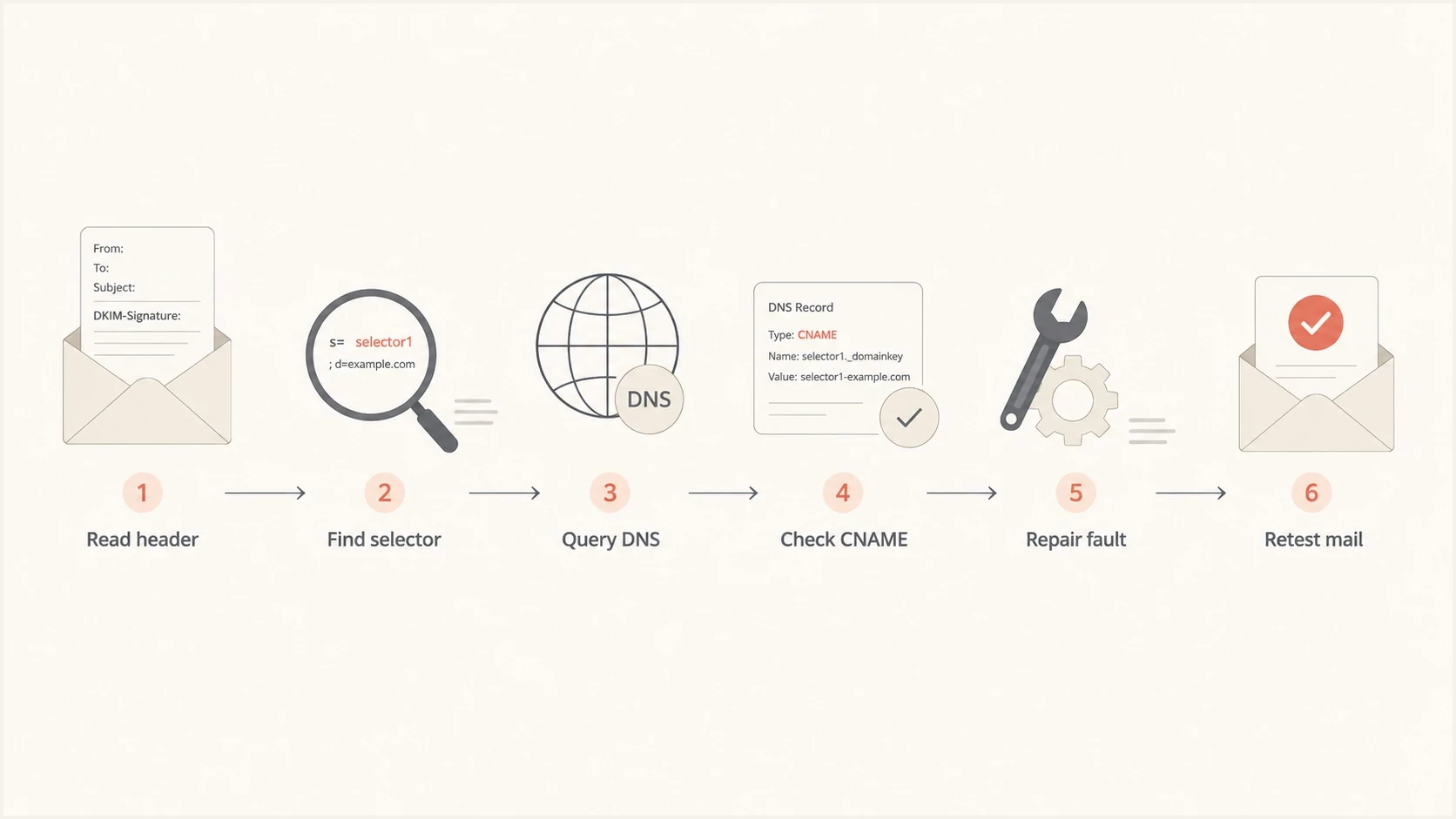
Flowchart for diagnosing DKIM temperror by reading the header, finding the selector, checking DNS, repairing the fault, and retesting.
How to fix DKIM temperror
The fix depends on which part of the lookup failed. Do not rotate keys first unless you know the published key is wrong. Key rotation creates more moving parts, and it can leave old mail signed with a selector that no longer resolves.
- Find the source: Use DMARC aggregate data, headers, or sending logs to identify which platform signs the message.
- Confirm the selector: Copy the selector from the failed email instead of checking a selector you expect to be used.
- Repair DNS: Fix broken TXT answers, failed CNAME targets, records omitted during a DNS migration, inconsistent nameservers, and DNSSEC validation errors.
- Reduce fragility: Avoid long CNAME chains and use reliable authoritative DNS for high-volume sending domains.
- Retest with mail: Send through the same stream and inspect the receiver result, not just DNS output.
- Monitor reports: Use DMARC reporting to verify that the same source and selector stop producing temporary DKIM errors.
Example DKIM TXT recorddns
selector1._domainkey.example.com. 300 IN TXT (
  "v=DKIM1; k=rsa; "
  "p=MIIBIjANBgkqhkiG9w0BAQEFAAOCAQ8A..."
)
Example delegated DKIM selectordns
selector1._domainkey.example.com. 300 IN CNAME s1.example.net.
When the selector uses a CNAME, both names matter. The name under your domain must resolve, and the provider target must return a valid DKIM key. Keep a delegated DKIM CNAME in DNS-only mode if your DNS host offers an HTTP proxy, and do not publish TXT data at the same selector name because a CNAME cannot coexist with other record data. If your domain answers correctly but the target fails, your DNS zone is not the whole problem.
Fix priorities
Prioritize temperrors by sending volume and DMARC risk. A failing production invoice stream deserves faster action than a low-volume test sender.
- High risk: DKIM temperror appears and no other authentication path satisfies DMARC.
- Medium risk: DKIM temperror repeats on a source that sends customer-facing mail.
- Lower risk: One receiver reports a single error and follow-up messages pass.
- Hidden risk: The source is small today but will soon send at higher volume.
How Suped helps with the workflow
Suped's product is useful when DKIM temperror stops being a one-off header and becomes an operational problem. Raw DMARC XML can show DKIM temporary failures, but it does not provide a clean owner, source, selector, and fix path. Suped groups authentication results by sending source, highlights issues, and gives steps to fix them.
Suped's DMARC monitoring workflow connects the error to the sending source, selector, DNS record, and verification step, so the investigation does not stay buried in raw reports.

Issue steps to fix dialog showing the issue overview, tailored fix steps, and verification action
For DKIM temperror, the practical value is tracing the error by sender, selector, domain, and time window. That comparison separates an isolated receiver timeout from a persistent DNS or delegated-provider failure. Suped also shows SPF domain-match results beside DKIM, so you can see whether affected messages still pass DMARC.
If you are still setting up visibility, start with a broad domain health check to catch DNS and authentication gaps. For ongoing reporting, DMARC monitoring shows which senders and selectors produce the errors over time.
DKIM temperror triage bands
Use these operational categories to decide when a temporary DKIM error needs action.
Clean
No recurrence
No repeated errors after a fresh send.
Watch
One receiver
An isolated failure appears at one receiver.
Investigate
One source
Failures repeat for one source or selector.
Fix now
DMARC impact
The errors remove the remaining DMARC pass path.
These categories are operational triage, not protocol rules. A single message can fail because of a receiver-side DNS timeout. A repeated pattern across receivers points back to your authoritative DNS, a delegated key target, or a recently changed selector.
Edge cases to watch
Some DKIM temperror cases look like normal DNS trouble at first, but the cause sits one layer deeper. Check these edge cases when the expected record exists and simple lookups pass.
- DNSSEC mismatch: Validating resolvers can return SERVFAIL while non-validating lookups appear normal.
- Split authority: One authoritative nameserver has the new selector and another still has old data.
- Incomplete DNS migration: A nameserver move can omit DKIM TXT or CNAME records that were present in the old zone.
- Proxied CNAME: An HTTP proxy can hide a delegated DKIM target, so the selector CNAME must remain DNS-only.
- Provider rotation: A sender rotates to a new selector before the corresponding DNS record is live.
- Oversized answers: Large DNS responses can be truncated over UDP. Broken TCP fallback or blocked network paths can turn that condition into a timeout.
- Resolver rate limiting: A shared recursive resolver can throttle a busy mail gateway and make failures specific to that receiver.
- Forwarded mail: Forwarding does not cause a DNS temperror by itself, but it can add signatures and headers that complicate analysis.
If the error changes into a body hash failure after DNS is repaired, you are in a different category. The next diagnostic path is DKIM body hash troubleshooting, which usually involves message modification after signing.
If the receiver says no key for signature, confirm whether DNS returned an authoritative negative answer or failed temporarily. A confirmed missing key needs selector publishing, while a lookup failure needs DNS repair. The related case is no DKIM record errors.
Fix the temporary error first
DKIM temperror is not a verdict that your DKIM signature is bad. It means the receiver could not complete verification at that moment. The fastest fix path is to work outward from the failed message: header, selector, DNS name, CNAME target, authoritative nameservers, DNSSEC, then a fresh mail test.
Once the lookup is stable, the result becomes clear. It passes, or it exposes a separate DKIM record or signing fault. That order matters because it keeps you from rotating keys, editing mail templates, or changing DMARC policy before the temporary lookup problem is solved.




