Demystifying the SPF TempError in your DMARC reports

Updated on 22 Sep 2026: We added SPF identity checks and sharper DNS diagnostics for recurring TempErrors.
An SPF TempError in a DMARC report means the receiving mail server tried to evaluate SPF, but the check hit a temporary problem before it could finish. The usual causes are DNS timeouts, SERVFAIL responses, unreachable authoritative name servers, or a temporary problem inside a third-party SPF include. It is not the same as a normal SPF fail, and it does not always mean your SPF record is wrong.
The practical question is whether DMARC still passed. If the message had a valid DKIM pass using a signing domain that DMARC accepts, DMARC can pass even when SPF returns TempError. If DKIM also failed, or if DMARC did not accept the DKIM signing domain as a match for the header From domain, the message normally has no authentication path that DMARC can accept, so the report will show a DMARC failure.
Do not treat every TempError as a broken SPF record
Treat one isolated SPF TempError as a signal to inspect, not a reason to rewrite DNS. Repeated TempErrors from the same source, receiver, include domain, or time window need action because they can turn legitimate mail into DMARC failures.
The fastest way to handle it is to separate three questions: which server reported the TempError, which sender path triggered it, and whether another authentication method still passed DMARC. That keeps the investigation focused.
What SPF TempError actually means
SPF depends on DNS. For DMARC, the receiver checks the MAIL FROM identity (also called the envelope sender or return-path), fetches its SPF TXT record, follows mechanisms such as include, and decides whether the connecting IP is authorized. TempError means that process could not complete because a transient problem got in the way. A domain with no SPF policy normally returns none, while malformed records and lookup-limit violations normally return PermError.
SPF fail
- Decision: The receiver completed SPF and decided the IP was not authorized.
- Cause: The connecting IP matched no permitted mechanism and the SPF policy produced fail.
- Fix: Authorize the legitimate sender or correct the envelope sender domain it uses.
SPF TempError
- Decision: The receiver could not finish the SPF check at that moment.
- Cause: A DNS timeout, SERVFAIL response, resolver fault, or unavailable SPF dependency interrupted evaluation.
- Fix: Identify the unstable DNS lookup, then repair the DNS path or escalate it to its owner.
DMARC reports have two SPF-related areas. The auth_results section shows the raw SPF result, including temperror. The policy_evaluated section shows whether SPF passed with a domain that meets DMARC's identifier-matching rules for the header From domain. A raw TempError cannot provide that DMARC pass, so policy_evaluated records SPF as fail.
Example DMARC aggregate report fragmentXML
<feedback xmlns="urn:ietf:params:xml:ns:dmarc-2.0">
  <record>
    <row>
      <source_ip>192.0.2.25</source_ip>
      <count>1</count>
      <policy_evaluated>
        <disposition>none</disposition>
        <dkim>fail</dkim>
        <spf>fail</spf>
      </policy_evaluated>
    </row>
    <identifiers>
      <envelope_from>bounce.example.com</envelope_from>
      <header_from>example.com</header_from>
    </identifiers>
    <auth_results>
      <spf>
        <domain>bounce.example.com</domain>
        <result>temperror</result>
      </spf>
    </auth_results>
  </record>
</feedback>
That example does not mean SPF evaluated to a hard fail. The raw SPF result was TempError. Because SPF produced no pass that met DMARC's domain-matching rules, the policy result for that SPF path was fail.
How current DMARC reports record the result
RFC 9989 defines current DMARC evaluation, and RFC 9990 defines aggregate reporting. RFC 9990 keeps the raw SPF result separate from the SPF identifier-match result, which is why temperror can appear in auth_results while fail appears under policy_evaluated.
Check which SPF identity failed
SPF can evaluate the domain presented in MAIL FROM and the domain presented in HELO or EHLO. DMARC relies on SPF validation of the MAIL FROM identity. For a normal message, start with the envelope_from value and the SPF domain under auth_results, not the visible From address.
- Normal message: Trace the SPF policy for the MAIL FROM domain shown in the report or Authentication-Results header.
- Bounce message: A delivery status notification can use a null reverse-path. SPF then derives the MAIL FROM identity from postmaster at the HELO/EHLO domain.
- Missing envelope domain: Check the message's Authentication-Results or Received-SPF header for smtp.helo, helo, client-ip, and the reported problem.
- Correct test target: Query the exact evaluated domain. A healthy SPF record on the visible From domain does not clear a TempError on a return-path or HELO hostname.
Why this matters for DMARC
A separate HELO check can help a receiver make an SPF decision, but DMARC does not use an independently checked HELO identity. The exception is a null reverse-path, where SPF defines the MAIL FROM identity using the HELO domain.
Why TempError appears in reports
Most SPF TempError patterns come back to DNS reliability or lookup complexity. SPF records often depend on include, redirect, a, mx, or exists lookups controlled by mail platforms, CRMs, billing systems, support desks, and other senders. If one lookup in that chain has a temporary DNS problem, the whole SPF evaluation can return TempError.
|
|
|
|---|---|---|
Many receivers | Authoritative DNS or delegation | Each authoritative name server |
One receiver | Receiver resolver or network path | Same-time results from other receivers |
One sender | Included domain's DNS | Full include chain |
Random spikes | Latency, packet loss, or overload | Repeated queries with timestamps |
After DNSSEC change | DNSSEC validation failure | DS, DNSKEY, and RRSIG records |
Common SPF TempError causes and what to check first.
A lookup-heavy SPF record can also raise risk. The SPF 10-DNS-lookup limit normally creates PermError when exceeded, not TempError. But long dependency chains still mean more DNS requests, more latency, and more reliance on third-party name servers. That increases the chance that a receiver times out before SPF finishes.
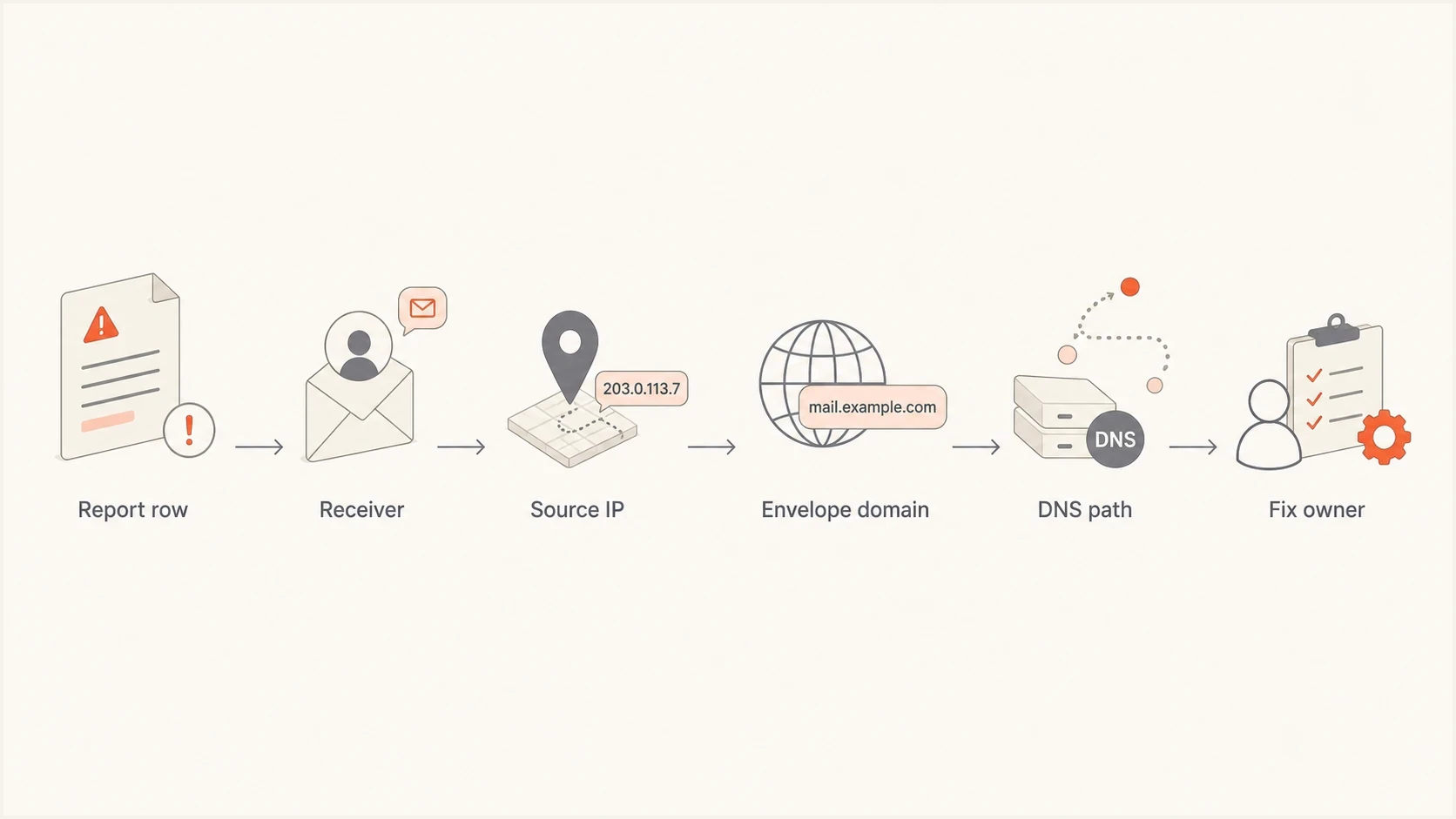
SPF TempError troubleshooting flow from DMARC report row to DNS fix owner.
How urgent is an SPF TempError?
Use the pattern, not one row, to decide urgency.
Low
Isolated
One small spike, DKIM still passes, no delivery complaints.
Medium
Repeated
Repeated rows for the same sender or receiver over several reports.
High
DMARC fail
SPF TempError plus DKIM fail on a real production stream.
Critical
Policy risk
TempErrors affect high-volume mail while policy is quarantine or reject.
What receivers do after SPF TempError
SPF defines TempError as a transient evaluation result, but the receiver's local policy decides what happens to the message. A receiver can accept the message for further filtering or temporarily reject the SMTP transaction so the sending server tries again.
- Temporary rejection: RFC 7208 recommends SMTP reply code 451 and enhanced status code 4.4.3 when a receiver rejects for SPF TempError.
- Sender retry: A sending mail server normally queues a 4xx response and retries later, when the DNS lookup can succeed.
- Accepted message: If the receiver accepts the message, DKIM with a signing domain that DMARC accepts can still produce a DMARC pass.
- No DKIM fallback: If SPF provides no pass and DKIM provides no pass from a signing domain that DMARC accepts, DMARC fails and the receiver applies policy plus any local override.
A later pass does not erase the original report
A retry can succeed after the DNS condition clears. The earlier TempError still describes what the first receiver evaluation saw, so investigate repeated rows by report window and receiver instead of assuming a later successful test disproves them.
How to troubleshoot SPF TempError
Start with the report row, not the SPF record. The same domain can have several legitimate senders, each using a different envelope domain, return-path, DKIM selector, and DNS dependency chain. A broad DNS rewrite before source identification wastes time.
- Locate: Find the receiver, report date range, source IP, envelope domain, evaluated SPF domain, optional SPF scope, header From domain, raw SPF result, DKIM result, and final DMARC result.
- Identify: If the reverse-path was null or the envelope domain is absent, capture the HELO/EHLO hostname from the message headers or mail logs.
- Group: Group rows by source IP and evaluated SPF domain. If every row points to one platform, focus there first.
- Compare: Check whether other receivers saw the same sender pass during the same time window.
- Trace: Follow every DNS-triggering mechanism and modifier, then look for slow, failing, truncated, or inconsistent responses.
- Confirm: Send a fresh test message and inspect Authentication-Results and Received-SPF for the receiver's result and explanation.
- Escalate: If the failing lookup belongs to a sender platform, provide the exact domain, timestamp, receiver, DNS response, and any human_result text from the aggregate report.
DNS checks to runBASH
dig TXT example.com

dig TXT example.com +time=2 +tries=1

dig TXT example.com +trace

dig TXT example.com +tcp

dig TXT example.com +dnssec

dig TXT example.com +dnssec +cdflag

dig @ns1.example.net TXT example.com
Repeat the lookup and query each authoritative name server directly. Timeouts from one authoritative server point to an availability or delegation problem. If a UDP response is truncated and the TCP query fails, blocked TCP fallback can explain intermittent results. If a normal validating query returns SERVFAIL but the same query with +cdflag returns data, inspect the DS, DNSKEY, and RRSIG chain for a DNSSEC fault. Record timestamps because one later success does not reproduce the receiver's earlier DNS path or cache state.
SPF checker
Find SPF syntax issues, lookup limits, and weak records.
?/16tests passed
For a quick record check, the Suped SPF checker helps validate syntax, mechanisms, includes, and lookup behavior. If the issue is lookup depth or fragile dependency chains, SPF flattening can reduce DNS dependency risk when it has ongoing change tracking. Static flattened records can become stale when a provider changes its sending IP ranges. Flattening does not repair unstable authoritative DNS or a receiver-side resolver fault.
Fixes that actually reduce TempErrors
The right fix depends on where the temporary error occurs. If your own authoritative DNS is slow or unstable, fix that first. If a third-party include fails, isolate the sender and open a support case with evidence. If the SPF record is large and fragile, simplify the sender model.
Simple SPF record patternDNS
example.com. 3600 IN TXT "v=spf1 include:_spf.example.net -all"
Best practice for production domains
- Keep: Use one SPF TXT record per domain and remove obsolete senders.
- Measure: Track lookup count, DNS latency, and which include domains your mail depends on.
- Pair: Make sure important senders use DKIM with a domain that DMARC accepts.
- Stage: Move DMARC policy forward only after report data shows stable authentication.
Short-term response
- Check: Confirm whether DKIM from a signing domain that DMARC accepts saved the affected messages.
- Trace: Identify the failing include or DNS response.
- Document: Save the report row, resolver output, time window, and receiver.
- Watch: Keep policy steady while you confirm whether the error repeats.
Long-term control
- Reduce: Remove stale SPF includes and merge duplicate sender paths.
- Delegate: Use hosted SPF when DNS updates are slow or split across teams.
- Alert: Monitor repeated TempErrors before they become delivery incidents.
- Protect: Keep DKIM healthy so DMARC has a second path when SPF is unavailable.
For domains with many senders, Suped's Hosted SPF gives one managed place to update authorized senders without handing DNS access to every team. That matters when TempErrors are tied to old includes, rushed sender additions, split ownership, or SPF records that only one person knows how to safely edit.
How Suped helps with this workflow
Suped's product helps when the issue is broader than one DNS query. Its DMARC workflow groups sender identity, SPF and DKIM results, repeated failure patterns, alerts, and managed authentication controls so a team can trace a TempError to the source that owns the failing lookup.

Issue steps to fix dialog showing the issue overview, tailored fix steps, and verification action
A useful TempError investigation needs the source, authenticated domains, affected receivers, trend, and suggested fix in the same workflow. Suped's issue view turns aggregate report rows into an issue list with source context and next actions.
What to verify before changing policy
- Volume: The TempError affects enough legitimate mail to matter.
- Source: The sender is known and authorized by the business.
- Fallback: DKIM passes with a domain that DMARC accepts for critical streams.
- Trend: The same TempError pattern is still happening after the first report window.
When SPF TempError needs action
SPF TempError is a temporary evaluation failure, not a final statement that your sender is unauthorized. The risk becomes serious when it repeats, affects important mail, and leaves DMARC with no DKIM pass from an accepted signing domain.
- Ignore: A one-off low-volume TempError where DMARC still passes and no pattern returns.
- Investigate: Repeated TempErrors tied to the same sender, receiver, include domain, or DNS provider.
- Fix: DNS instability, stale SPF includes, fragile sender chains, and missing DKIM coverage.
- Monitor: Authentication trends before enforcing quarantine or reject on high-volume domains.
The clean outcome is stable DNS, a small SPF dependency chain, DKIM that works for important senders, and DMARC reports that show the same sources passing consistently over time.




