How to troubleshoot DKIM implementation issues and understand ARC-Seal in email headers?

Published 20 Apr 2025
Updated 11 Aug 2026
12 min read
Summarize with
Updated on 11 Aug 2026: We added a step-by-step ARC chain validation workflow and tightened the DKIM checks for domain matching, selectors, canonicalization, and receiver results.
The direct answer is this: if a received email has no DKIM-Signature line, the final receiver has no DKIM signature to verify, even if a DKIM DNS record exists. The outbound system usually did not sign that route, although an intermediary can also strip the header. A DNS record only publishes the public key. The outbound mail system still has to sign the message with the matching private key before it leaves.
The d=google.com value that appears under ARC-Seal is not your domain's DKIM signature. It means Google added an Authenticated Received Chain seal while handling the message. ARC helps preserve authentication results across forwarding and relay hops. It does not prove that your domain is signing mail with DKIM, and it does not replace DKIM.
The fastest sanity check is simple: compare headers before and after the DKIM change. If the headers are identical and there is still no DKIM-Signature header, the sending service has not started signing.
What a working DKIM implementation looks like
A working DKIM setup has two separate pieces. First, DNS contains a public key at a selector hostname such as default under _domainkey. Second, the actual mail platform signs outbound messages with a matching private key. Check both because many DKIM failures come from stopping after the DNS step.
DKIM DNS record patterndns
default._domainkey.example.com. 3600 IN TXT (
  "v=DKIM1; k=rsa; "
  "p=MIIBIjANBgkqhkiG9w0BAQEFAAOCAQ8A..."
)
That DNS record is necessary, but it is passive. Receivers do not look it up unless the message tells them which selector and signing domain to check. That instruction comes from the DKIM-Signature header added by the outbound mail server.
DKIM header patterntext
DKIM-Signature: v=1; a=rsa-sha256; c=relaxed/relaxed;
 d=example.com; s=default;
 h=from:to:subject:date;
 bh=abc123...;
 b=def456...;
- Signing domain: The d= value must share the organizational domain with the visible From domain under relaxed DMARC matching, or match it exactly under strict matching, for DKIM to satisfy DMARC.
- Selector: The s= value tells the receiver which DNS hostname contains the public key.
- Canonicalization: The optional c= value defines how headers and the body are normalized before verification. If it is absent, the default is simple/simple.
- Signed headers: The h= list identifies signed header fields. The From field must be signed, and changes to other listed fields can invalidate verification.
- Body hash: The bh= value proves the canonicalized body received is the body that was signed.
- Signature: The b= value is the cryptographic signature that receivers verify with the public key in DNS.
DKIM checker
Check selector records and public key configuration.
?/7tests passed
The first DKIM troubleshooting pass
Start with headers, not DNS. DNS shows whether a public key exists. Headers show whether the actual email was signed. A clean DKIM troubleshooting pass answers five questions in order.
- Header exists: Look for DKIM-Signature. If it is absent, signing is not active for that path or an intermediary removed the header. Inspect the earliest available outbound copy to distinguish the two cases.
- Domain matches: Check whether d= matches the visible From domain under the domain's DMARC mode.
- Selector resolves: Use s= plus d= to query the exact DKIM TXT or CNAME record.
- Result is clear: Read Authentication-Results at the final receiver for pass, fail, none, policy, neutral, temperror, or permerror.
- Route is right: Confirm the message left through the system that owns the DKIM private key.
For a focused DNS check, use the DKIM checker and verify the selector record before testing a live message. For a wider check across DKIM, SPF, and DMARC, the domain health checker shows whether the domain still has an authentication path that satisfies DMARC's domain rules if DKIM fails.
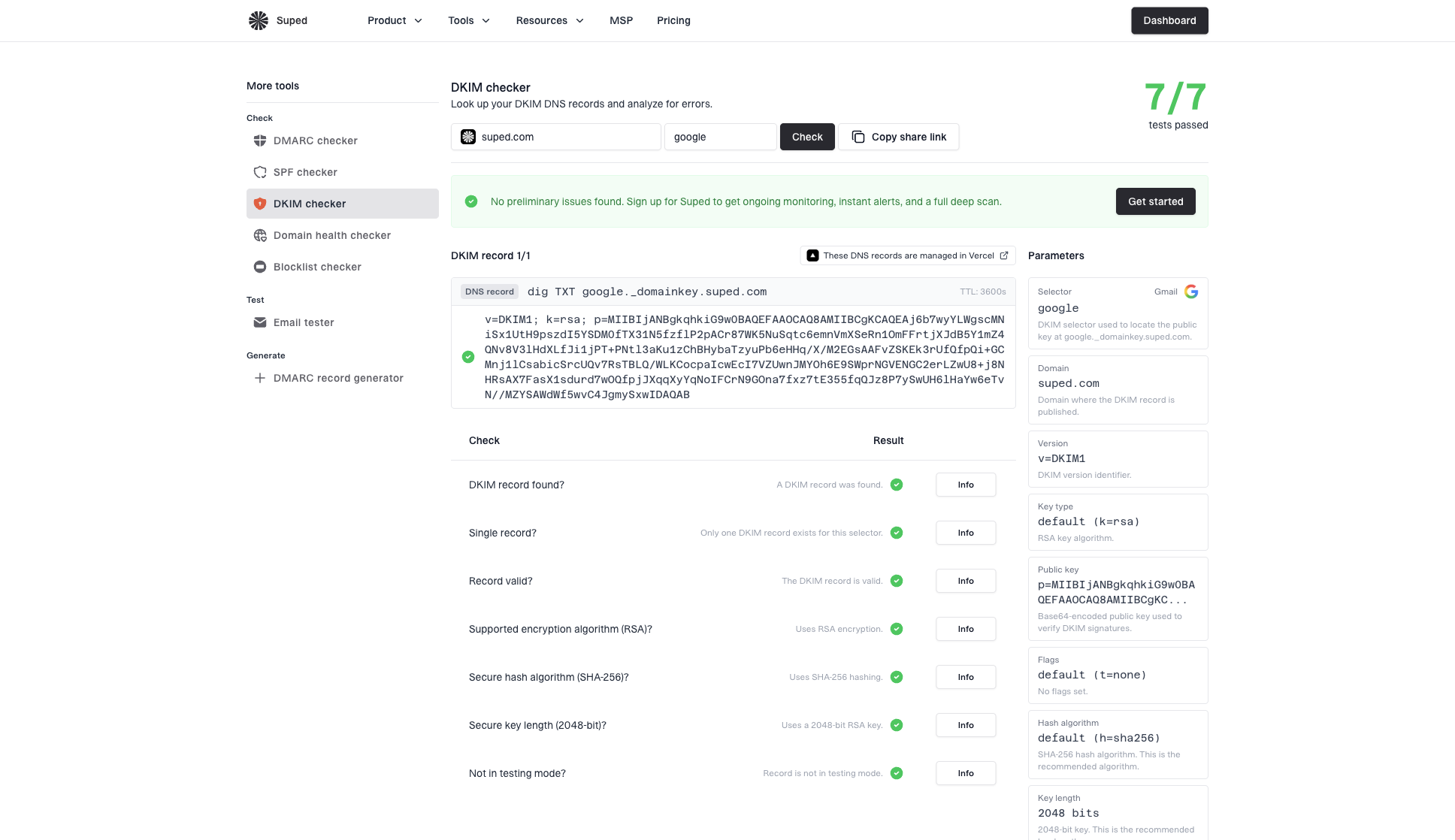
DKIM checker sample results showing selector, DKIM DNS record, validation checks, parameters, and share link
Suped's product connects this one-time check to ongoing monitoring. It groups DKIM, SPF, and DMARC results by sending source, then shows which source is failing and what to check next. This is useful when the question changes from does this record exist to which sender is broken.
Common DKIM implementation issues
When DKIM is missing after a host says it is configured, treat that as a sending configuration issue first. The public key can be correct and the message can still leave unsigned. That happens with web hosts, CRMs, billing systems, newsletters, help desks, and custom SMTP routes.
|
|
|
|---|---|---|
No DKIM | Signing off | Outbound path |
Wrong d= | Vendor domain | DMARC domain match |
Missing key | DNS or selector error | Exact lookup name |
Body fail | Content changed | Footer or relay edits |
Intermittent | Split routing or rotation | Source and selector map |
Use the symptom to decide whether to inspect DNS, the sending route, or message modification after signing.
DNS-only setup
- Public key: The TXT record exists, but no sender has been told to use it.
- Headers: The message has no DKIM-Signature line.
- Outcome: Receivers report dkim=none or omit DKIM entirely.
Active signing setup
- Private key: The sending system has the private key and signs outbound mail.
- Headers: The message includes d= and s= values.
- Outcome: Receivers can verify the signature against the DNS key.
Query the exact selector._domainkey.example.com name and confirm that it returns one usable public key. DNS interfaces can split a long TXT value into quoted strings, which receivers concatenate, but whitespace inserted inside p= corrupts the key. If the provider uses a CNAME, do not publish a TXT record at the same owner name. During key rotation, keep the old public key available until messages signed with it have cleared normal delivery and retry queues.
If the record exists but the message has no signature, work through record exists but no signature as a separate path. If the signature exists but bh= fails, the problem is usually message modification after signing, so use a body-hash workflow for body hash failures.
How to read ARC-Seal without confusing it for DKIM
ARC stands for Authenticated Received Chain and is specified in RFC 8617. It is used when a message passes through an intermediary, such as a forwarder or mailing list, and the final receiver needs context about authentication results seen earlier in the route. ARC-Authentication-Results records the intermediary's checks, and ARC-Message-Signature protects the message at that hop. ARC-Seal protects the chain state.
ARC header patterntext
ARC-Seal: i=1; a=rsa-sha256; d=google.com; s=arc-20240605;
 cv=none; b=abc123...
ARC-Message-Signature: i=1; a=rsa-sha256; d=google.com;
 s=arc-20240605; bh=def456...; b=ghi789...
ARC-Authentication-Results: i=1; mx.google.com;
 dkim=pass header.d=example.com; spf=pass smtp.mailfrom=example.com
The important detail is the header name. ARC-Seal with d=google.com means Google sealed the ARC set. A DKIM-Signature with d=example.com means that domain signed the message. Those headers provide different authentication evidence.
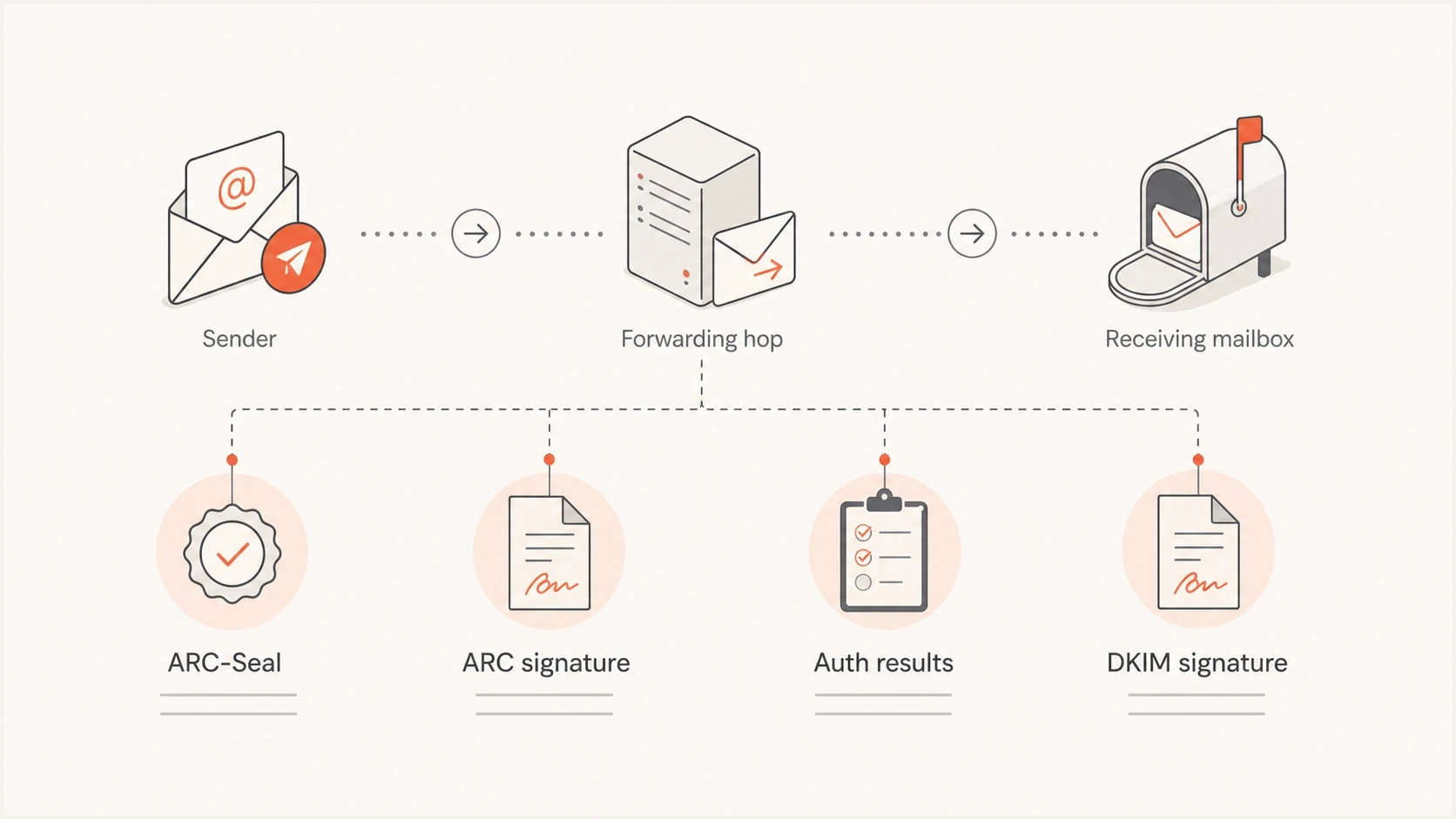
ARC headers preserve earlier authentication results across forwarding hops
|
|
|
|---|---|---|
d= | Sealer domain | Signer domain |
s= | Sealer key | DKIM key |
i= | ARC instance | Optional identity |
cv= | Prior chain status | Not used |
ARC fields look similar to DKIM fields, but the header name changes the meaning.
A receiver that trusts an ARC sealer can use a valid chain when forwarding breaks SPF or DKIM later in the path. Cryptographic validation and trust are separate decisions. A passing chain preserves what an intermediary reported, while the final receiver decides whether to trust that sealer and how to handle the message.
How to troubleshoot an ARC chain
One visible ARC-Seal header does not prove that the chain passes. Validate each ARC set as a unit, then separate the technical result from the receiver's trust decision.
- Check complete sets: Each instance must contain one ARC-Authentication-Results, one ARC-Message-Signature, and one ARC-Seal with the same i= value.
- Check sequence: Instance values must start at i=1 and increase without gaps or repeated values.
- Read chain status: The first seal must use cv=none. Later seals use cv=pass when the prior chain validated. cv=fail means the prior chain did not validate.
- Verify signatures: Use each seal's d= and s= values to locate its public key. A missing or stale public key can break signature checks. Modification after sealing can also break validation.
- Read the receiver result: Look for arc=pass, arc=fail, or arc=none in the final receiver's authentication results, then confirm whether the latest sealer is trusted by that receiver.
An arc=pass result does not force inbox delivery. ARC can inform a receiver's DMARC decision, but content filtering and local policy still apply. Do not add a trusted ARC sealer unless it is an intermediary the organization uses and has verified.
A practical header decision path
When only one raw header is available, use this decision path. It keeps ARC, DKIM, SPF, and DMARC separate and avoids chasing the wrong domain value.
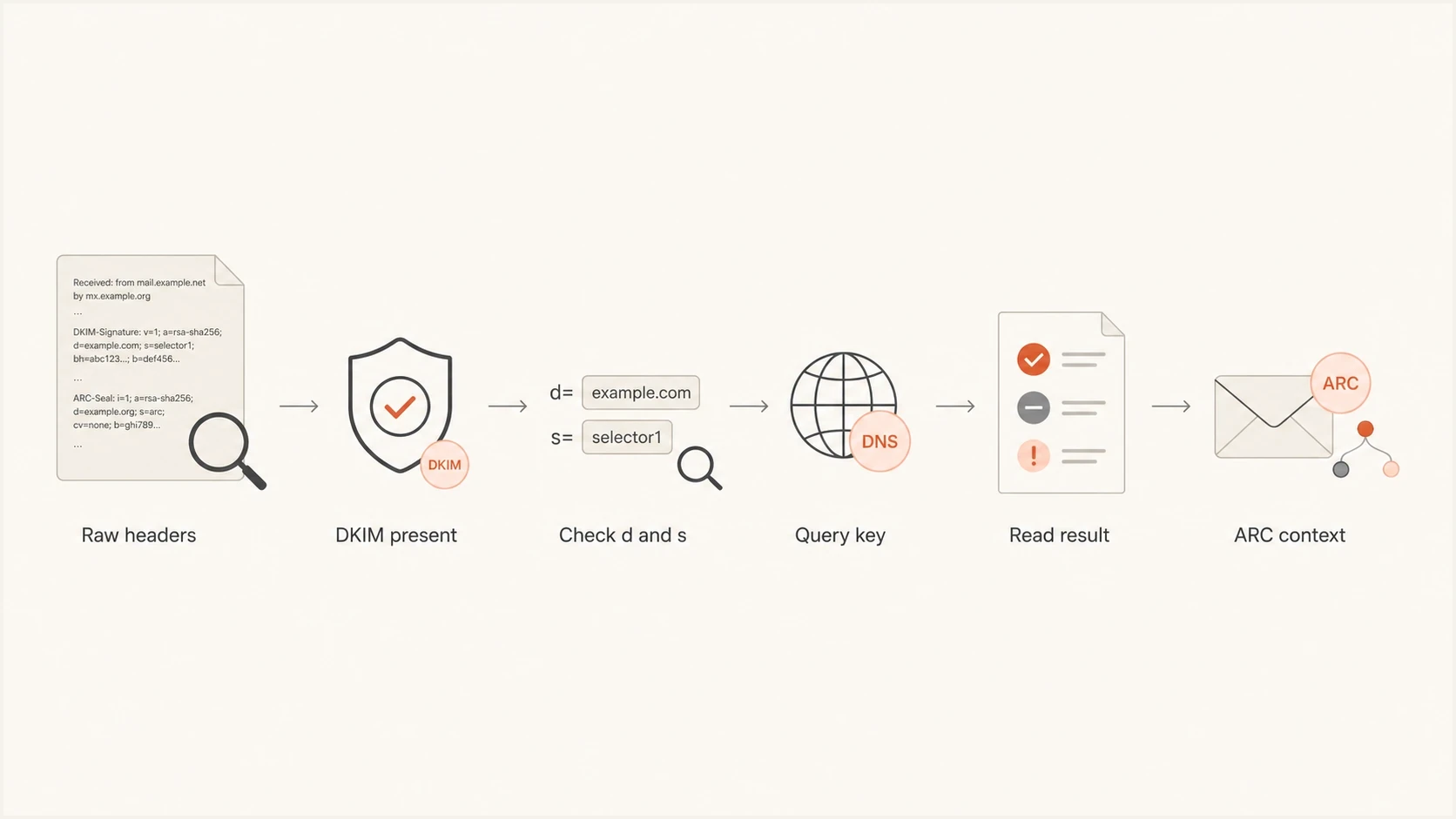
Decision path for separating DKIM checks from ARC context
Header evidence levels
Use the strongest evidence available before changing DNS or mail routing.
No DKIM header
Stop
Signing did not happen on this message.
Header, no key
Fix DNS
DNS or selector is wrong.
Header, fail
Trace
Check key mismatch or content changes.
Header, pass
Continue
Move to DMARC domain matching and reputation checks.
- Collect samples: Send test messages through every real route, including webmail, SMTP, apps, and automation.
- Compare headers: Save one before and one after the change, then compare the authentication headers.
- Check receiver view: Use the final receiver's Authentication-Results rather than assumptions from the sender.
- Map sources: Keep a list of each system sending as the domain and the DKIM selector it uses.
Suped's DMARC monitoring workflow shows which sources pass or fail DKIM and DMARC over time. It adds alerts and remediation steps so teams can verify that a DKIM fix remains effective across every sending route.
What to do when a host says DKIM is done
When a web host or mail provider says DKIM is configured, ask for evidence tied to a real sent message. The right proof is not a screenshot of DNS. The right proof is a received header showing a DKIM signature from your domain and a pass result at a mailbox outside the provider's system.
- Ask plainly: Which outbound server signs the message, and which selector does it use?
- Send externally: Test with two independent external mailbox providers and a mailbox you control, then inspect the full headers.
- Avoid assumptions: Do not treat a visible DKIM TXT record as proof that signing is active.
- Check all routes: Webmail, SMTP clients, website forms, and app mail can use different paths.

Issue steps to fix dialog showing the issue overview, tailored fix steps, and verification action
For teams with several sending services, move DKIM out of one-off support tickets and into repeatable monitoring. Suped's product identifies affected sources, provides steps to check, and continues monitoring after the fix. Its multi-tenant dashboard lets MSPs and agencies keep evidence separated by client domain.
Check propagation and ownership before blaming the host. DKIM records live in DNS, but the private key lives wherever outbound signing runs. If the provider rotates selectors, migrates mailboxes, or changes a CNAME target, old guidance becomes stale quickly. Keep the current selector, provider, signing owner, and last verified date with the domain record. That turns the next support conversation into evidence: the message, its header, the selector lookup, and the receiver result. A provider cannot close the issue as a DNS problem when the received message still shows no DKIM signature.
For low-volume personal or business domains, reputation has no shortcut. Start authenticated, send wanted mail, avoid sudden bursts, and keep the same domain and sending routes stable. Small senders often begin neutral, then build receiver history slowly.
Views from the trenches
Best practices
Check the actual received headers before changing DNS again or opening a support ticket.
Keep one clean test mailbox outside the sender's platform for authentication checks.
Record each sending source, selector, and signing domain so route issues are visible.
Common pitfalls
Treating a DKIM TXT record as proof of signing causes long troubleshooting loops.
Reading ARC-Seal d values as DKIM signer domains leads teams to chase the wrong issue.
Testing only one mail route misses unsigned webmail, form mail, or app-generated messages.
Expert tips
Use the receiver's Authentication-Results header as the final source of truth every time.
Ask the provider which private key and selector their outbound servers are using.
For low-volume domains, focus on steady wanted mail rather than forced warmup tricks.
Marketer from Email Geeks says the d value under ARC-Seal belongs to the ARC sealer, and large mailbox providers add those seals to preserve authentication context.
2019-03-21 - Email Geeks
Expert from Email Geeks says a message with no DKIM-Signature header has not been signed, even when a public key already exists in DNS.
2019-03-21 - Email Geeks
The reliable way to close the issue
Prove DKIM at the message level. Publish the DNS key, enable signing in the outbound system, send through the real route, and inspect the received headers. If DKIM-Signature is missing at the final receiver, inspect the earliest outbound copy. If it is absent there, fix the sender configuration. If it existed earlier and disappeared, inspect the relay path. If the signature exists and fails, move to selector, key, canonicalization, or content-change troubleshooting.
Read ARC-Seal as forwarding and receiver context. A d=google.com value under ARC-Seal is normal for mail handled by Google. It is not evidence that Google signed DKIM for your domain, and it is not evidence that your domain's DKIM setup works.
Suped keeps this workflow active after the first fix. Its DMARC reporting groups authentication results by source, highlights new DKIM failures, and supports verification after a sender or selector changes.




