How to implement DKIM without a TXT record?

Updated on 13 Aug 2026: We updated this guide with the current Microsoft 365 CNAME format and clearer standards-based implementation guidance.
You implement DKIM without publishing the public key as a TXT record in your own DNS by publishing a CNAME record at the DKIM selector host. That CNAME points to a hostname controlled by your email provider, and the provider publishes the final DKIM TXT record there. Your domain still participates in DKIM, but you do not store the long public key directly in your zone.
The important caveat is that DKIM still depends on DNS. RFC 6376 defines dns/txt as the supported key query method. When selector._domainkey.example.com is a CNAME, DNS follows the alias during that TXT query and retrieves the public key at the target. The CNAME delegates the lookup, it does not become a DKIM key record itself. This setup is common when a third-party sender manages signing and key rotation.
- Direct answer: Use a DKIM CNAME record such as selector1._domainkey pointing to the sender's DKIM host.
- What changes: Your DNS contains a CNAME, not the long v=DKIM1 TXT value.
- What stays true: The final destination must still return a valid DKIM public key.
- Best use case: Provider-managed DKIM where the sender controls signing and key rotation.
How CNAME-based DKIM works
DKIM has two halves: the sender signs the message with a private key, and the receiving server verifies that signature with the matching public key in DNS. The signature header contains the selector in the s= tag and the signing domain in the d= tag. The verifier combines those values to query DNS.
For example, if an email has d=example.com and s=selector1, the receiver queries selector1._domainkey.example.com. If that name is a TXT record, the receiver reads the DKIM key directly. If that name is a CNAME, DNS follows the alias and reads the TXT record at the destination.
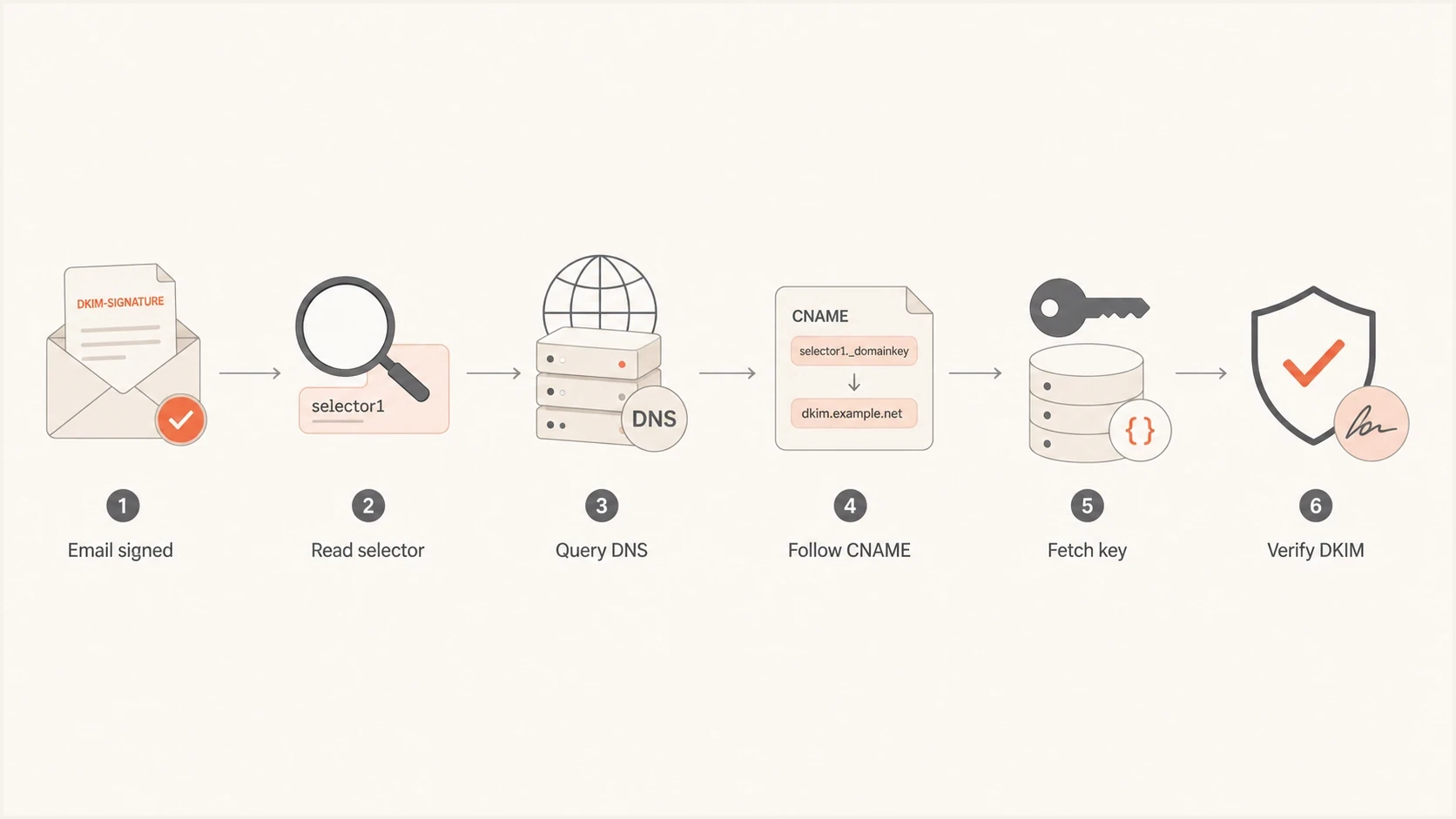
Flowchart showing DKIM verification following a CNAME to a hosted public key.
Typical CNAME-based DKIM setupdns
s1._domainkey.example.com.  CNAME  s1.dkim.sender.net.
s2._domainkey.example.com.  CNAME  s2.dkim.sender.net.
In that setup, your DNS zone has only the two CNAME records. The sender's DNS zone contains the final DKIM TXT values. This avoids copy and paste errors, long TXT record splitting issues, and emergency DNS changes when a sender rotates keys.
A DKIM CNAME is not a shortcut around authentication. It is DNS delegation at the selector hostname. The receiving server still verifies the message against a public key, and DKIM still fails if the final TXT record is missing, malformed, or mismatched.
When a DKIM CNAME is the right choice
DKIM CNAMEs fit when a third-party sender owns the signing infrastructure and has a stable pattern for delegated keys. This includes business mail platforms, help desk systems, billing tools, event platforms, and marketing senders. The sender generates the DKIM pair, signs outbound mail, hosts the public key, and tells you which CNAME records to publish.
The strongest reason to use a CNAME is operational control. If a provider rotates a key, upgrades key length, changes signing infrastructure, or needs to recover from a private key exposure, they can update the target TXT record. You do not need to edit your domain's DNS each time.
Direct TXT
- Ownership: You publish the full public key in your own DNS zone.
- Change process: You update DNS whenever the DKIM key changes.
- Failure mode: Long TXT values can be split incorrectly by DNS panels.
CNAME delegation
- Ownership: You publish a short alias to the sender's DKIM host.
- Change process: The sender can rotate the hosted public key.
- Failure mode: The CNAME target must remain live and valid.
The most common mistake is thinking a CNAME makes DKIM provider-agnostic. It does not. If you point your selector to one sender, that selector belongs to that sender's signing setup. A different sender needs its own selector and its own DNS record.
|
|
|
|
|---|---|---|---|
Direct key | TXT | Self-managed mail | Manual rotation |
Hosted key | CNAME | Third-party sender | Provider dependency |
Delegated zone | NS | Many selectors | Higher DNS risk |
Common DKIM publication models
Step-by-step implementation
The implementation is simple when the sender gives you the exact selector hostnames and targets. Treat it as a change that needs verification, because DKIM failures are easy to miss until receiving systems start treating the stream with more suspicion.
- Confirm the signing domain: Make sure the provider signs with your organizational domain or a subdomain that has DMARC alignment, not only the provider's domain.
- Get the selectors: Collect every selector the provider requires, often two records for rotation.
- Publish CNAME records: Add each selector under _domainkey and point it to the provider's exact target.
- Enable signing: Turn on DKIM in the sender's admin panel only after DNS has resolved.
- Send a real test: Inspect the delivered message headers and confirm dkim=pass with the expected domain.
- Monitor DMARC: Watch aggregate reports to confirm the new source is passing DKIM with DMARC alignment at scale.
Example DKIM CNAME recordsdns
s1._domainkey.example.com.  CNAME  s1.domainkey.u12345.sender.net.
s2._domainkey.example.com.  CNAME  s2.domainkey.u12345.sender.net.
Some DNS providers want the host field without the domain, such as s1._domainkey. Others want the full hostname. Some add the root domain automatically. If you enter the full hostname into a panel that appends the domain, you can accidentally create s1._domainkey.example.com.example.com, which will never validate.
DKIM checker
Check selector records and public key configuration.
?/7tests passed
After publishing the records, check the selector with a DKIM checker. A good result should show that the selector resolves, follows the CNAME if present, finds a valid v=DKIM1 record, and exposes a usable public key.
Do not put a CNAME and TXT record at the same selector hostname. DNS does not allow a CNAME to coexist with other data at the same name. If a provider asks for a CNAME, remove any old TXT record using that exact selector.
What receivers actually see
Receivers do not care whether the public key started as a direct TXT record or behind a CNAME. They care that the DNS query returns a valid public key and that the cryptographic signature matches the message body and signed headers.
The visible result appears in the authentication headers. A passing DKIM result usually shows the signing domain, selector, and result. For DMARC, the key question is whether the DKIM d= domain has alignment with the visible From domain.
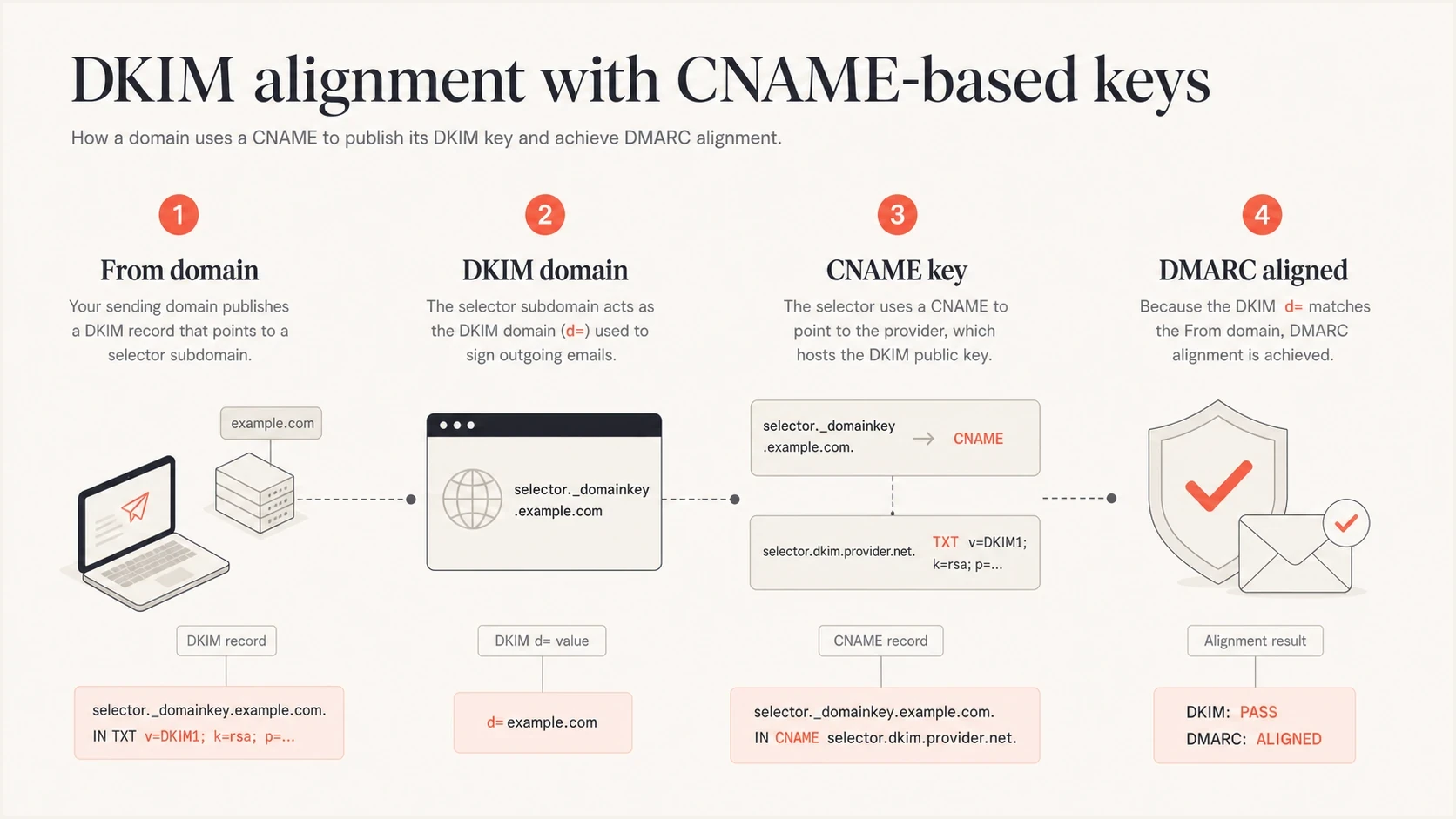
Infographic showing From domain, DKIM domain, hosted key, and DMARC alignment.
Authentication result after CNAME DKIM workstext
Authentication-Results: mx.example.net;
  dkim=pass header.d=example.com header.s=s1;
  spf=pass smtp.mailfrom=bounces.example.com;
  dmarc=pass header.from=example.com
That header tells you the receiver found the DKIM key and verified the signature. It does not tell you whether the key was directly published as TXT or reached by CNAME. For troubleshooting, query the selector hostname and inspect the DNS chain.
For DMARC, CNAME-based DKIM works when the d= domain has alignment with the visible From domain. A valid DKIM signature can still fail DMARC if it is signed only with the provider's unrelated domain.
CNAME DKIM and Microsoft 365
Microsoft 365 is a familiar example of DKIM without a customer-hosted TXT key. For a custom domain, Microsoft asks you to publish two CNAME records under your domain. Those records point to Microsoft-controlled hostnames, and Microsoft hosts the final DKIM public keys.
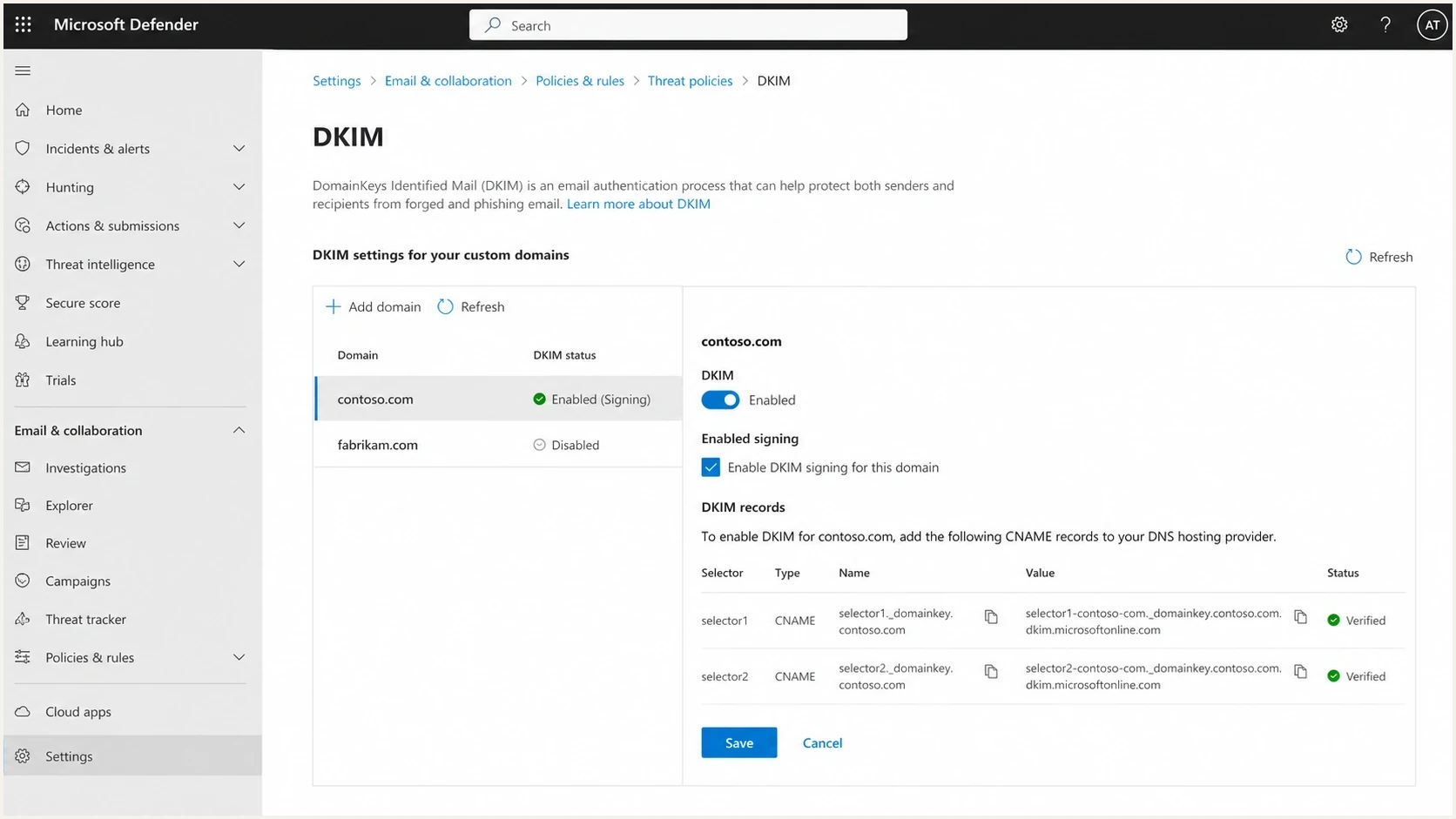
Microsoft Defender portal DKIM settings with selector CNAME records for a custom domain.
The pattern places selector hostnames under your domain and the target hostnames under Microsoft's DKIM infrastructure. The Microsoft DKIM guide documents the required CNAME setup for custom domains.
For custom domains added since May 2025, the target contains a generated partition character and ends under dkim.mail.microsoft. Existing custom domains can retain the older target format under onmicrosoft.com.
Current Microsoft-style DKIM CNAME patterndns
selector1._domainkey.x.co.  CNAME  selector1-x-co._domainkey.x.r-v1.dkim.mail.microsoft.
selector2._domainkey.x.co.  CNAME  selector2-x-co._domainkey.x.r-v1.dkim.mail.microsoft.
The partition character and target names depend on the tenant and domain, so do not copy this example into production. Copy both values from the admin console, use a TTL of at least 3600 seconds, and verify DNS before enabling signing.
Common mistakes that break CNAME DKIM
CNAME-based DKIM is easier than managing long TXT keys, but it has a few sharp edges. Most failures come down to the wrong hostname, the wrong target, an old record at the same name, or assuming that a DNS pass means emails are actually signed.
- Wrong selector: The record exists, but the email is signed with a different selector in the DKIM header.
- Double domain: The DNS panel appends the root domain after you already entered the full hostname.
- Coexisting records: A CNAME is added where an old TXT record still exists, causing invalid DNS.
- Target typo: A copied target has a missing character, extra domain suffix, or wrong tenant value.
- Unsigned mail: The DNS is valid, but the sending platform has not enabled DKIM signing for the stream.
- No DMARC alignment: DKIM passes, but the signing domain does not have alignment with the visible From domain.
DNS providers can also complicate CNAME setup when proxying, flattening, or UI-specific host fields alter the published answer. A DKIM selector alias must remain an ordinary DNS-only CNAME record. If the record appears correct but will not validate, compare the requested hostname with the actual DNS name and record type returned by lookup. A related provider-specific issue is covered in Cloudflare CNAME DKIM.
A valid DKIM DNS record does not prove your outbound mail is DKIM-signed. Always send a real email and inspect the delivered headers. If you see no DKIM-Signature header, the problem is in the sending platform, not the selector DNS.
If you cannot find the selector, look at the DKIM-Signature header from a delivered message. The selector is the value after s=. If there is no DKIM-Signature header at all, the sender has not signed that message. The separate problem of finding keys without a known selector is covered in find DKIM selector.
How this affects deliverability and DMARC
CNAME-based DKIM does not hurt deliverability by itself. Receivers evaluate the final DKIM result, domain alignment, sender reputation, message content, complaint rate, bounce rate, and prior engagement. A CNAME behind the key is normal and accepted.
The deliverability risk appears when teams assume DKIM is done after DNS validates. A domain can have perfect selector records but no signed outbound mail, or DKIM can pass with a provider domain that does not satisfy DMARC alignment. In both cases, DMARC can rely only on SPF alignment. That creates fragile authentication, especially with forwarding and mailing lists.
DKIM rollout checkpoints
Use these checkpoints before treating a CNAME-based DKIM setup as complete.
DNS resolves
Required
The selector follows the CNAME and returns a valid key.
Mail is signed
Required
Real outbound messages include a DKIM-Signature header.
DKIM passes
Required
Receivers report dkim=pass for delivered messages.
DMARC alignment
Required
The DKIM signing domain has alignment with the visible From domain.
Suped's product supports this workflow by showing which sources pass SPF, DKIM, and DMARC, which sources remain unverified, and which failures need action. This gives you evidence from real traffic after a selector goes live and as providers rotate keys.
Issues page showing top issues, verified sources, unverified sources, and authentication pass rates
For a broader view, use DMARC monitoring to confirm that the source is configured and consistently passing authentication with DMARC alignment across real traffic.
Check the domain as a whole after a DKIM change. A selector can be correct while the domain still has weak SPF, missing DMARC reporting, or another sender failing alignment.
?
What's your domain score?
Deep-scan SPF, DKIM & DMARC records for email deliverability and security issues.
A full domain health check is useful after you change DKIM because it also catches SPF, DMARC, and related DNS issues that affect the same sending domain.
Can you avoid both TXT and CNAME records
For normal DKIM on a domain you control, no. A receiver must be able to discover the public key through DNS. If there is no TXT record, no CNAME to a TXT record, and no delegated DNS zone serving the selector, the receiver cannot verify the signature.
The closest alternative is NS delegation for _domainkey or for a selector subtree. That hands authority for part of your DNS namespace to another DNS service. It works, but CNAME records are easier to audit for most hosted senders and limit delegation to individual selector names.
Example delegated _domainkey zonedns
_domainkey.example.com.  NS  ns1.sender-dns.net.
_domainkey.example.com.  NS  ns2.sender-dns.net.
NS delegation is more useful when a platform needs to manage many selectors under the same domain, or when a large organization has a separate DNS workflow for email authentication. For single sender onboarding, CNAME records are usually cleaner. More detail on this pattern is available in DKIM aliasing.
|
|
|
|---|---|---|
CNAME | Yes | Sender hosts keys |
NS delegation | Yes | Many selectors |
No DNS key | No | Never for DKIM |
Options when you do not want a long TXT key
Views from the trenches
Best practices
Use CNAME records for hosted DKIM when the sender owns signing and key rotation.
Verify both DNS resolution and real message headers before calling DKIM complete.
Keep each provider on its own selector so key changes do not affect other senders.
Common pitfalls
Teams validate the selector but forget to enable DKIM signing in the sender admin.
DNS panels append the root domain, creating selector names that never get queried.
Old TXT records remain at the selector, which conflicts with the new CNAME record.
Expert tips
Check DMARC aggregate data after setup because alignment matters more than DNS alone.
Use two selectors where supported so the sender can rotate keys without downtime.
Document the owner of each selector so future DNS cleanup does not break a sender.
Marketer from Email Geeks says Gmail can react harshly when a message looks unusual, so sender authentication should be checked alongside rendering and content signals.
2025-01-21 - Email Geeks
Marketer from Email Geeks says DKIM without a visible TXT record usually means the selector points through a CNAME to a hosted public key.
2025-01-21 - Email Geeks
The practical answer
Use a DKIM CNAME when your email provider supports hosted DKIM keys. Publish the selector CNAMEs exactly as provided, wait for DNS to resolve, enable signing, send a real message, and verify that DKIM passes with a signing domain that has DMARC alignment.
Do not treat the absence of a TXT record in your own DNS as suspicious by itself. It is normal when the selector is delegated by CNAME. The hard requirement is that the full DNS chain returns the correct DKIM public key and that your sender signs the mail with the matching private key.
Suped's product connects the DNS setup to real authentication outcomes through issue detection, guided fixes, DMARC monitoring, alerts, SPF and DKIM visibility, and deliverability signals. Use it to confirm provider-managed selectors keep passing after onboarding and key rotation.




