How to find DKIM record without selector?

Published 4 Jul 2025
Updated 25 Sep 2026
11 min read
Summarize with

Updated on 25 Sep 2026: We updated this guide with clearer header retrieval and DKIM lookup troubleshooting.
You cannot reliably find a DKIM record for any random domain without the selector. DKIM public keys live at a selector-specific DNS name, so the selector is part of the address. The DNS name is built as selector._domainkey.domain. Without the selector, you do not know which DNS name to query.
The practical answer is to get a signed email, read the s= value from the DKIM-Signature header, read the d= signing domain from the same header, then query the DNS TXT record at that combined name. If you cannot get an email sample, use sender or DNS access, DMARC reports, outbound sender documentation, or a short list of selector guesses. Treat MX records as clues only.
- Best path: Use a real message header and query the exact selector and signing domain.
- Owner path: Search the DNS zone or sending configuration for records whose names contain ._domainkey.
- Fallback path: Try candidate selectors only after checking sender configuration, DNS records, DMARC data, and known outbound sources.
- Common mistake: Entering s or s= as the selector looks up the wrong DNS name.
Why DKIM needs a selector
A domain can publish more than one DKIM key at the same time. The selector tells the receiver which key to use for a specific signature. That is why DKIM does not use one fixed TXT record at the root domain. Each selector has its own DNS name under _domainkey.
How a DKIM header maps to DNSdns
DKIM-Signature: v=1; a=rsa-sha256; d=example.com; s=selector1; ...

DNS TXT name:
selector1._domainkey.example.com
In that example, selector1 is the selector value. The lookup field does not want s= or s=selector1. It wants the value only, such as selector1, plus the signing domain.
There is no normal DKIM directory
Public DNS does not provide a standard query that lists every DKIM selector under a domain. A lookup must name the exact record. This supports key rotation and separation between sending systems. If you control the DNS zone, however, you can search its record list for hostnames containing ._domainkey.
How to find the selector from a real email
Start with the raw message headers. Do not use the visible From address alone. DKIM uses the signing domain inside the DKIM-Signature header, and that domain can differ from the visible From domain. Header fields can wrap across several lines, so read the complete DKIM-Signature field when locating s= and d=.
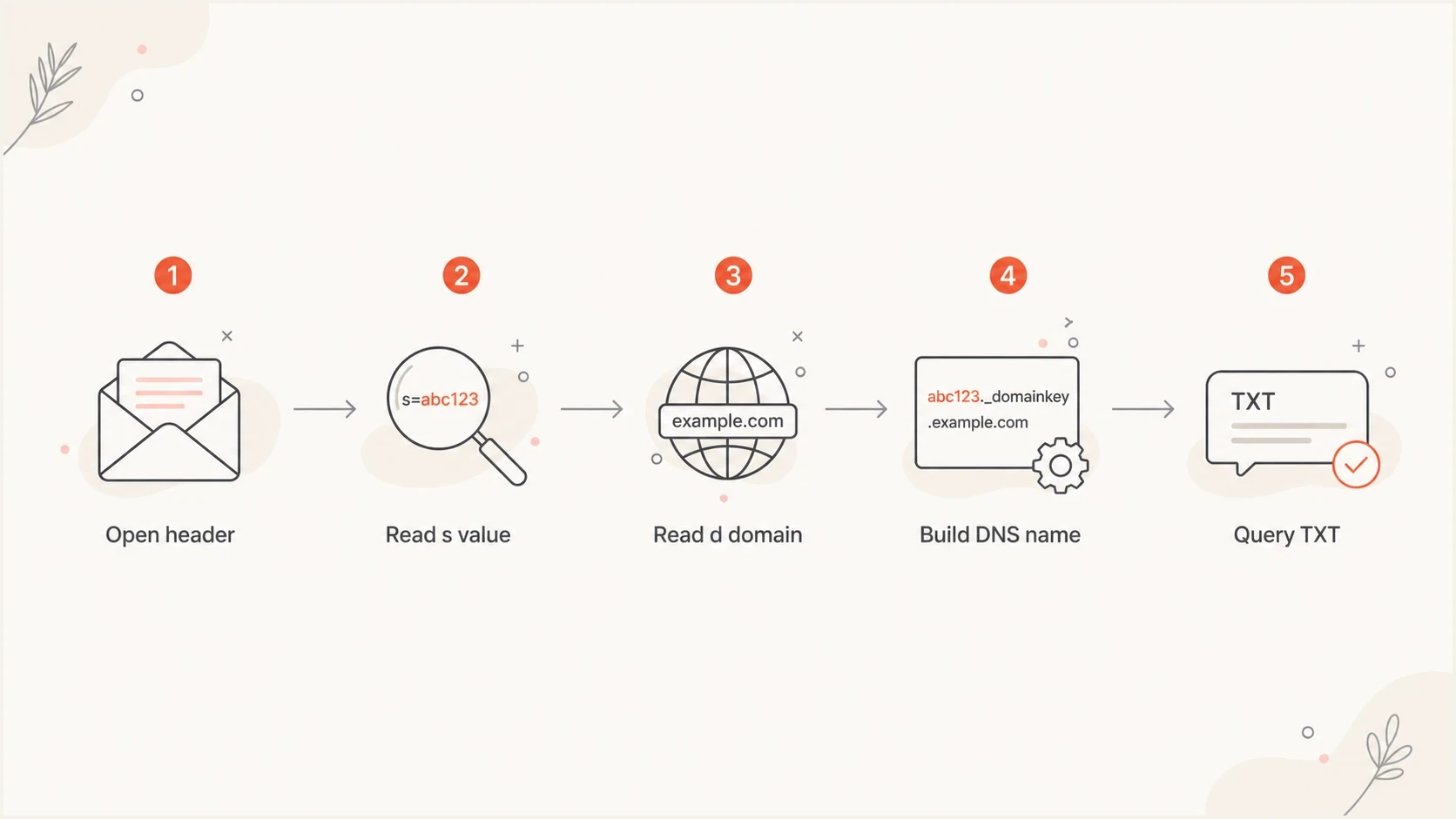
Flowchart showing DKIM selector discovery from message header to DNS TXT lookup.
Header fields to readtext
From: Brand Team <news@example.com>
DKIM-Signature: v=1; a=rsa-sha256; d=example.com;
 s=brand2026; c=relaxed/relaxed; h=from:subject:date; ...
- Read the selector: Find s= in the DKIM-Signature header and copy the value after it.
- Read the domain: Find d= in the same header and copy that signing domain.
- Build the name: Combine the selector, _domainkey, and the signing domain.
- Query DNS: Look up TXT and CNAME data at that name, then validate the final DKIM key record, especially its p= value.
DNS query examplesbash
dig TXT brand2026._domainkey.example.com
dig CNAME brand2026._domainkey.example.com

nslookup -type=TXT brand2026._domainkey.example.com
nslookup -type=CNAME brand2026._domainkey.example.com
How to open the full message headers
Open the delivered message and look in its message menu for an option such as "Show original", "View source", or "View message details". Copy the complete source instead of the shortened header summary because DKIM-Signature fields often wrap across lines.
- Send a current sample: Use the exact sending system and From domain you need to investigate.
- Open the received copy: Inspect the message after delivery so you also have the receiver's authentication result.
- Search the full source: Find every DKIM-Signature: field and record each d= and s= pair.
- Keep the original formatting: Treat indented continuation lines as part of the header field above them.
A forwarded copy can hide the evidence
Ordinary forwarding creates a new message and does not reliably preserve the original transport headers. Ask for the original message as an attached message or EML file when you cannot inspect it at the receiving mailbox.
How to choose among multiple DKIM signatures
A message can contain more than one DKIM-Signature header. Each signature has its own d= and s= pair, so each one maps to a separate DNS query. Do not assume the first signature in the header is the only relevant one.
Two signatures and receiver resultstext
DKIM-Signature: v=1; d=example.com; s=brand2026; ...
DKIM-Signature: v=1; d=relay.example.net; s=outbound; ...

Authentication-Results: receiver.example;
 dkim=pass header.d=example.com header.s=brand2026;
 dkim=pass header.d=relay.example.net header.s=outbound
- List every pair: Read d= and s= from each DKIM-Signature field.
- Check the receiver result: Use the Authentication-Results field added by your receiving system to match header.d and header.s with its DKIM result.
- Identify the DMARC-relevant signature: For DMARC, at least one passing DKIM signature must have a signing domain that matches the visible From domain under the domain's alignment mode.
- Query the relevant records: Build and test a DNS name for each selector and signing-domain pair you need to investigate.
Trust the result added by your receiver
An Authentication-Results field can be inserted before delivery, so use the field your receiving system created at its trusted boundary. The DKIM-Signature field supplies the selector and signing domain, while the trusted receiver result tells you whether verification passed.
When you do not have a message
Without a message header, you are discovering or inferring the selector rather than performing an exact lookup. That difference matters because a failed guess does not prove DKIM is missing. It only proves that one guessed selector did not return a key.
Work through a short candidate list, then stop once the evidence gets weak. A list of common DKIM selectors helps, but it is still guessing unless you have sender-side evidence. MX records identify inbound mail handling and do not prove which system signs outbound messages.
Methods that work
- Header evidence: A raw message gives the exact selector and signing domain.
- Sender access: A sending configuration page often shows the required selector.
- DNS access: A zone record list can reveal hostnames containing ._domainkey.
- DMARC data: Aggregate reports can expose selectors used by observed mail streams.
Methods that mislead
- Blind scanning: A domain can have selectors you did not guess.
- Wrong domain: Checking the visible From domain fails when DKIM signs with another domain.
- MX inference: An inbound MX provider does not prove that the same system signs outbound mail.
- Literal tag use: Putting s= into a selector field creates a bad query.
- Stale DNS: A published key can belong to a selector that current mail no longer uses.
|
|
|
|---|---|---|
selector1 | Common numbered pattern | Guess only |
selector2 | Paired rotation pattern | Guess only |
default | Default configuration | Guess only |
dkim | Role-based name | Guess only |
mail | Role-based name | Guess only |
Common selector guesses are candidates, not proof of current signing.
How to check a DKIM selector in DNS
Once you have a selector candidate, test it directly. Suped's DKIM checker takes the selector and domain, then shows whether the DNS record exists, whether the public key parses, and which key parameters are present.
DKIM checker
Check selector records and public key configuration.
?/7tests passed
A DKIM DNS response must contain a p= tag. A nonempty value holds the public key, while an empty value means the key is revoked. v=DKIM1 is recommended rather than required; when present, it must be the first tag. Some senders publish a CNAME at the selector name and point it to a hosted TXT record. If a TXT query shows only an alias or no final key, query the CNAME explicitly, follow its target, and validate the target's TXT record.
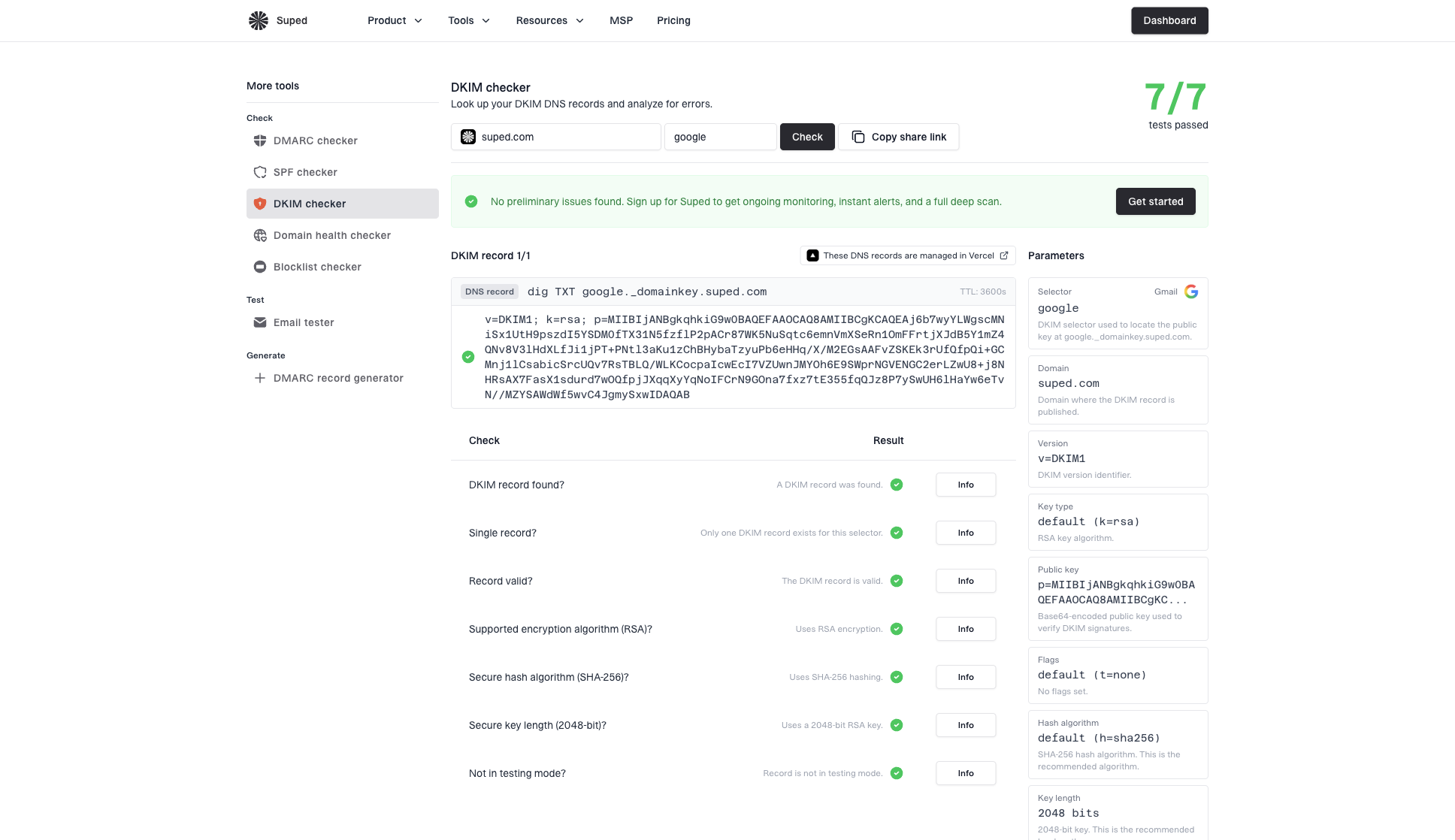
DKIM checker sample results showing selector, DKIM DNS record, validation checks, parameters, and share link
Example DKIM TXT recorddns
selector1._domainkey.example.com. 300 IN TXT "v=DKIM1; k=rsa;"
 "p=MIIBIjANBgkqhkiG9w0BAQEFAAOCAQ8A..."
DNS can split one TXT resource record into several quoted character-strings, as in the example. A verifier joins those strings before parsing the DKIM tags. Publishing multiple TXT resource records at the same selector name is different and makes the key result unusable.
A found key is not the same as passing DKIM
A DNS record can exist while messages still fail DKIM. The sender must sign the email and the signature must survive transit. For DMARC, a passing signature also needs a signing domain that meets DMARC alignment with the visible From domain.
Use DMARC data to discover selectors over time
For a domain you own or manage, DMARC aggregate reports are a better long-term source than selector guessing. RFC 9990 is the current aggregate reporting standard and requires the selector for each reported DKIM signature, along with its signing domain and result. Existing report generators can still emit older RFC 7489-format data, where the selector was optional, so some reports provide only the signing domain, result, and source IP.
Suped's DMARC monitoring parses those reports, groups mail by source, and highlights authentication failures with fix steps. In Suped's product, use the source data to identify a reported selector, compare its DKIM result and DMARC alignment, then validate that exact selector in the DKIM checker. This keeps selector discovery tied to observed mail.
Treat the evidence in this order: a current signed message gives the exact selector for that message; sender and DNS access show configured records; DMARC reports show selectors observed by participating receivers; generic guesses create candidates. MX data only suggests where inbound mail goes and is weaker evidence for outbound signing. Run a domain health checker scan after the narrow DKIM lookup when you also need to check the domain's SPF and DMARC configuration.
DMARC records drawer showing filters, record rows, authentication results, and CSV export
Common failure cases
Most failed DKIM lookups come down to a small set of mistakes. Separate DNS existence from signing behavior. DNS answers whether a selector record exists and parses. Message headers show whether an email used that selector, while Authentication-Results records the receiver's verification result.
|
|
|
|---|---|---|
No record | Wrong selector | Read header |
No record | Wrong domain | Use d= |
CNAME only | Hosted key | Follow CNAME |
Empty p= | Revoked key | Check current selector |
Several TXT records | Ambiguous key set | Remove duplicate record |
Key found | No signature | Check sender |
Permerror | Bad key syntax | Validate tags |
Use the symptom to decide the next check.
Do not conclude DKIM is missing too early
- Wrong selector: A failed guess does not prove the sender has no DKIM key.
- Wrong domain: The lookup must use the signing domain, which can differ from the visible From domain.
- Revoked selector: A record with an empty p= exists in DNS but cannot verify a signature.
- Wrong conclusion: A found key does not prove current mail is signed or meets DMARC alignment.
A practical guessing workflow
When guessing is the only route, keep it structured. Start with selectors suggested by the sending system or DNS naming pattern, then test a short set of common values and stop. Endless selector probing wastes time because a selector can be any valid value chosen by the signer.
- Find outbound senders: Check sending documentation, admin configuration, DNS records, and known sending sources. Use MX records only as a clue.
- Create candidates: Test documented selector values, recent key names, and a short set of common defaults.
- Validate records: Confirm the DNS answer is one DKIM TXT record or a CNAME that resolves to one.
- Confirm with mail: Send or request a current message when you need proof of signing.
Candidate list formattext
selector1._domainkey.example.com
selector2._domainkey.example.com
default._domainkey.example.com
dkim._domainkey.example.com
mail._domainkey.example.com
If several records exist, do not assume all are active. Old selectors often stay published during key rotation or after a sender migration. A current DKIM-Signature header tells you which selector signed that message. Some paired configurations publish a secondary selector before it is used, so compare DNS with a current sent sample.
Views from the trenches
Best practices
Read each DKIM-Signature header, then query its selector and signing domain pair.
Search your DNS zone for _domainkey names when you control the domain's DNS records.
Use DMARC reports for managed domains because observed traffic can reveal selectors.
Treat guessed selectors as candidates, then confirm them with a current signed email.
Common pitfalls
Entering s= as the selector creates the wrong DNS query and leads to false errors.
Checking the From domain fails when the DKIM d= domain belongs to another sender.
Assuming a found DNS key proves that current messages use that selector is unsafe.
Treating separate TXT records like split quoted strings makes an invalid key look valid.
Expert tips
Match header.s and header.d in trusted receiver results when signatures are multiple.
Follow CNAME chains because a sender can host the final DKIM key on another domain.
Check for an empty p= value because it marks a revoked key that cannot verify mail.
Keep the old selector through the DNS TTL and message verification transition period.
Marketer from Email Geeks says the selector and signing domain are both required because together they form the DKIM DNS name.
2021-07-27 - Email Geeks
Marketer from Email Geeks says the DKIM-Signature header is the cleanest source because the selector appears in the s= tag.
2021-07-27 - Email Geeks
What to do when the selector is unknown
To find a DKIM record, you need the selector. The reliable route is to read s= and d= from each relevant DKIM-Signature header, then query selector._domainkey.domain. Without a header or sender-side access, use DMARC-derived evidence or a limited candidate list.
For one-off testing, use Suped's DKIM checker with the candidate selector and signing domain. For domains you manage, Suped's product connects reported selectors to real sending sources, DKIM results, and DMARC alignment so you can investigate the affected mail stream before changing DNS.




