A list of the most common DKIM selectors and how to use them

Published 11 Jul 2025
Updated 22 Sep 2026
12 min read
Summarize with

Updated on 22 Sep 2026: We refreshed common selector patterns and tightened the setup guidance for DNS publication, signing activation, key security, rotation, and retirement.
Common DKIM selectors worth checking include selector1, selector2, google, s1, s2, k1, k2, mte1, mte2, ctct1, ctct2, default, dkim, mail, mandrill, and provider-generated tokens. A DKIM selector is the label that tells receivers where to find a sender's DKIM public key in DNS. The full lookup normally follows this pattern: selector dot _domainkey dot signing domain.
Treat selector names as hints, not proof. A selector can be anything the sender chooses, so a domain can use google without using Google, or selector1 without using Microsoft. The reliable workflow is simple: read the selector from the DKIM-Signature header, query the matching DNS name, confirm the key exists, and check whether that DKIM result matches DMARC requirements.
Common DKIM selectors by provider
This practical list is a starting point when message headers are not available. It is not a complete internet-wide inventory because DKIM selectors are not published in a directory. They are discovered through headers, provider setup screens, DNS records, and operational notes. A selector list gets an investigation moving, but it does not replace reading the signed message or copying the records shown in the sender's current setup screen.
|
|
|
|---|---|---|
selector1 | Publish the exact CNAME target shown for the domain. | |
selector2 | Publish it with selector1 so Microsoft can rotate keys. | |
google | Publish the TXT key generated in the Admin console. | |
s1 and s2 | Twilio SendGrid | Common CNAME pair for managed key rotation. |
k1 and k2 | Mailchimp marketing | Copy both current CNAME values from the domain authentication screen. |
mte1 and mte2 | Mailchimp Transactional | Current CNAME pair for transactional sending domains. |
ctct1 and ctct2 | Constant Contact | Publish both CNAME values generated during self-authentication. |
Generated token | Amazon SES | Copy every generated CNAME token exactly. |
default | Generic or self-hosted mail | Verify ownership because the name is not provider-specific. |
dkim or mail | Custom applications and SaaS senders | Confirm the exact signing domain and DNS record. |
mandrill | Legacy Mailchimp Transactional | Use as a historical clue, then check current settings. |
smtpapi | Legacy SendGrid integrations | Check old mail and migration records. |
Common selector patterns and where they are often seen.
For day-to-day troubleshooting, the selector itself matters less than the source that signs with it. The same domain can have one selector for employee mail, another for invoices, a third for password resets, and a separate selector for a newsletter sender. That is normal. The risk starts when nobody knows which selectors are active, which keys are stale, or which senders authenticate but fail the DMARC domain match.
Fast selector rule
Use common selectors to start the investigation, then switch to message headers and DMARC data. Guessing selectors from DNS alone misses senders that are not currently mailing you and keys that exist but are no longer used.
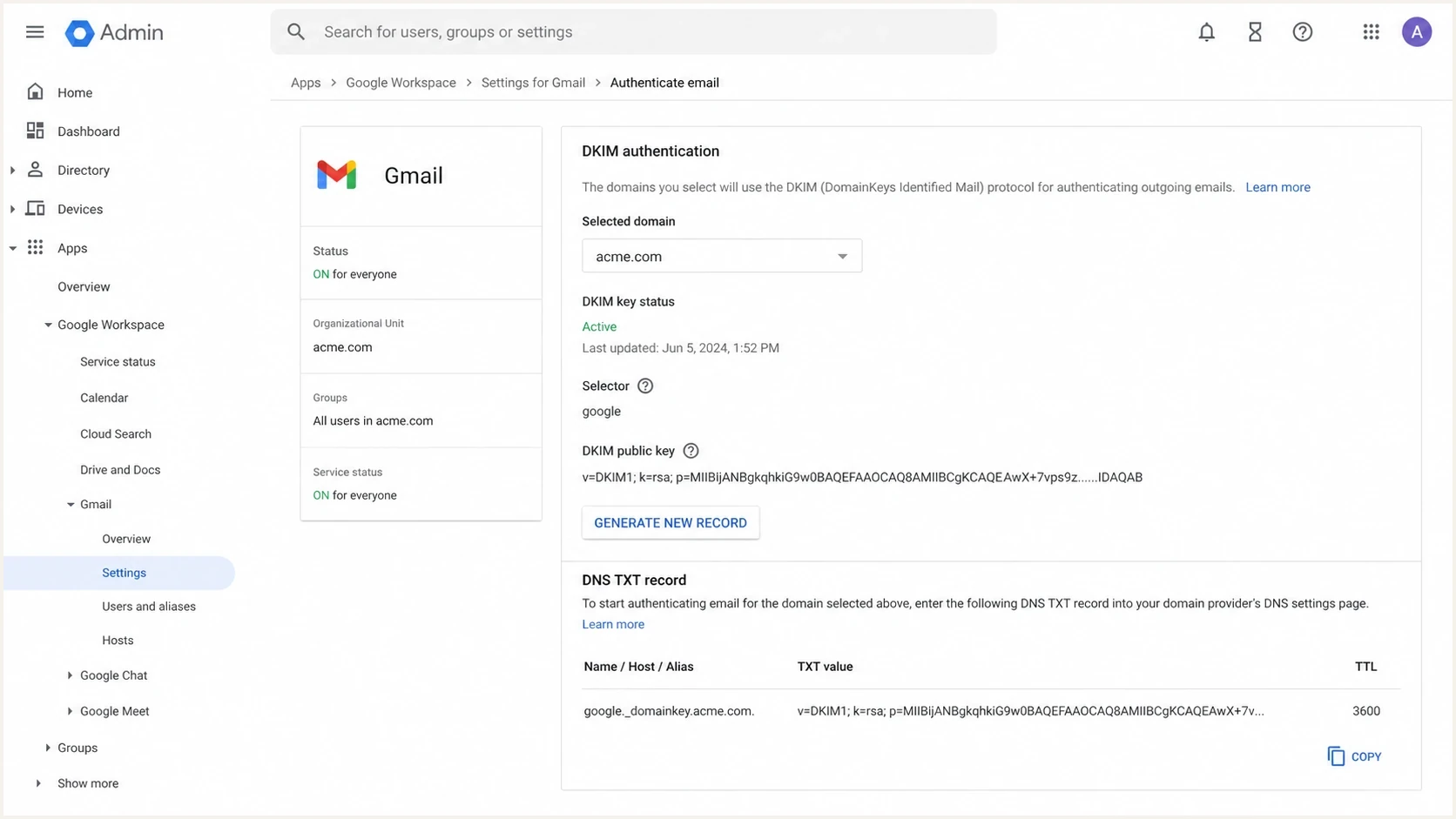
Google Admin console DKIM settings showing a selector and DNS record instructions.
How selectors work in DNS
A DKIM selector is stored in the s= tag inside the DKIM signature. If a message is signed with s=google and d=example.com, the receiver checks the public key at google._domainkey.example.com. If that DNS record has the right public key and the message body and signed headers still match after the declared canonicalization, DKIM passes.
Example DKIM TXT recordDNS
google._domainkey.example.com. 3600 IN TXT "v=DKIM1; k=rsa; p=MIIBIjANBgkqh..."
Some providers ask you to publish a TXT record, while others ask for a CNAME that points to a provider-controlled host. Receivers still request TXT data at the selector name. A direct TXT record returns the public key there, while DNS follows a CNAME to the provider's TXT key. The CNAME model lets the provider rotate keys behind the alias without asking you to replace the public key.
TXT selector
- Control: You publish the public key in your DNS zone.
- Rotation: You update DNS when the key changes.
- Risk: Long values can be pasted or split incorrectly.
CNAME selector
- Control: The provider hosts the public key target.
- Rotation: The provider can rotate behind the alias.
- Risk: A broken or conflicting target breaks DKIM for that sender.
The DNS owner and the sending platform must agree on the exact selector name.  Google commonly uses google. Microsoft 365 commonly uses selector1 and selector2. A custom application can use billing2026 if that is what the signer writes into the header.
How to query a DKIM selector in DNS
Build the lookup name with the selector and the d= signing domain from the message header. Query TXT at that name for the public key. If the provider supplied a CNAME, inspect the alias as well and confirm that its target resolves to the expected DKIM key.
Query a direct TXT selectorBASH
dig +short TXT google._domainkey.example.com
nslookup -type=TXT google._domainkey.example.com
Query a provider-managed CNAME selectorBASH
dig +short CNAME selector1._domainkey.example.com
nslookup -type=CNAME selector1._domainkey.example.com
- TXT answer: Expect a DKIM key record with a non-empty p= value.
- CNAME answer: Confirm the target matches the provider's setup value and that a TXT query through the alias returns a public key.
- No answer: Recheck the selector, signing domain, record type, DNS publication, and propagation.
- Multiple records: Remove conflicting records at the selector name because a receiver needs one usable key result.
Watch for duplicated domain names
Many DNS panels append the zone name automatically. Entering the full hostname can create a record such as google._domainkey.example.com.example.com. Check the published name after saving, not only the text shown in the DNS form.
How to find the selector from an email
The most accurate way to find a DKIM selector is to open the raw message headers and inspect the DKIM-Signature field. Look for two tags: s= for selector and d= for signing domain. You need both. A selector without the signing domain is not enough because the same selector can exist under many domains.
Selector inside a DKIM-Signature headertext
DKIM-Signature: v=1; a=rsa-sha256; d=example.com; s=google;
 h=from:to:subject:date; bh=abc123...; b=def456...
- Open headers: Use the raw message view in the receiving mailbox.
- Find signature: Search for DKIM-Signature.
- Read tags: Copy the selector from s= and the domain from d=.
- Query DNS: Look up selector dot _domainkey dot signing domain.
- Confirm result: Check that DKIM passes and matches the visible From domain.
If you do not have a message yet, send a test email through the sender you are configuring. After it arrives, inspect the result with a focused DKIM checker so you can see the selector, signing domain, public key record, and validation result in one place.
DKIM checker
Check selector records and public key configuration.
?/7tests passed
This matters when the domain has multiple signatures. For example, a message can carry one DKIM signature from the sending platform and another from an outbound security gateway. Receivers evaluate each signature independently. DMARC passes through DKIM when at least one valid signature uses a signing domain that matches the visible From domain, so read the signing domain and selector together.
How to use common selectors during setup
Common selectors help most during setup and audits. They give you a shortlist of likely DNS names to check, and they help identify which provider signed a real message. They should not become a naming policy by themselves. A good selector name stays stable in normal operations and remains easy to distinguish during key rotation.
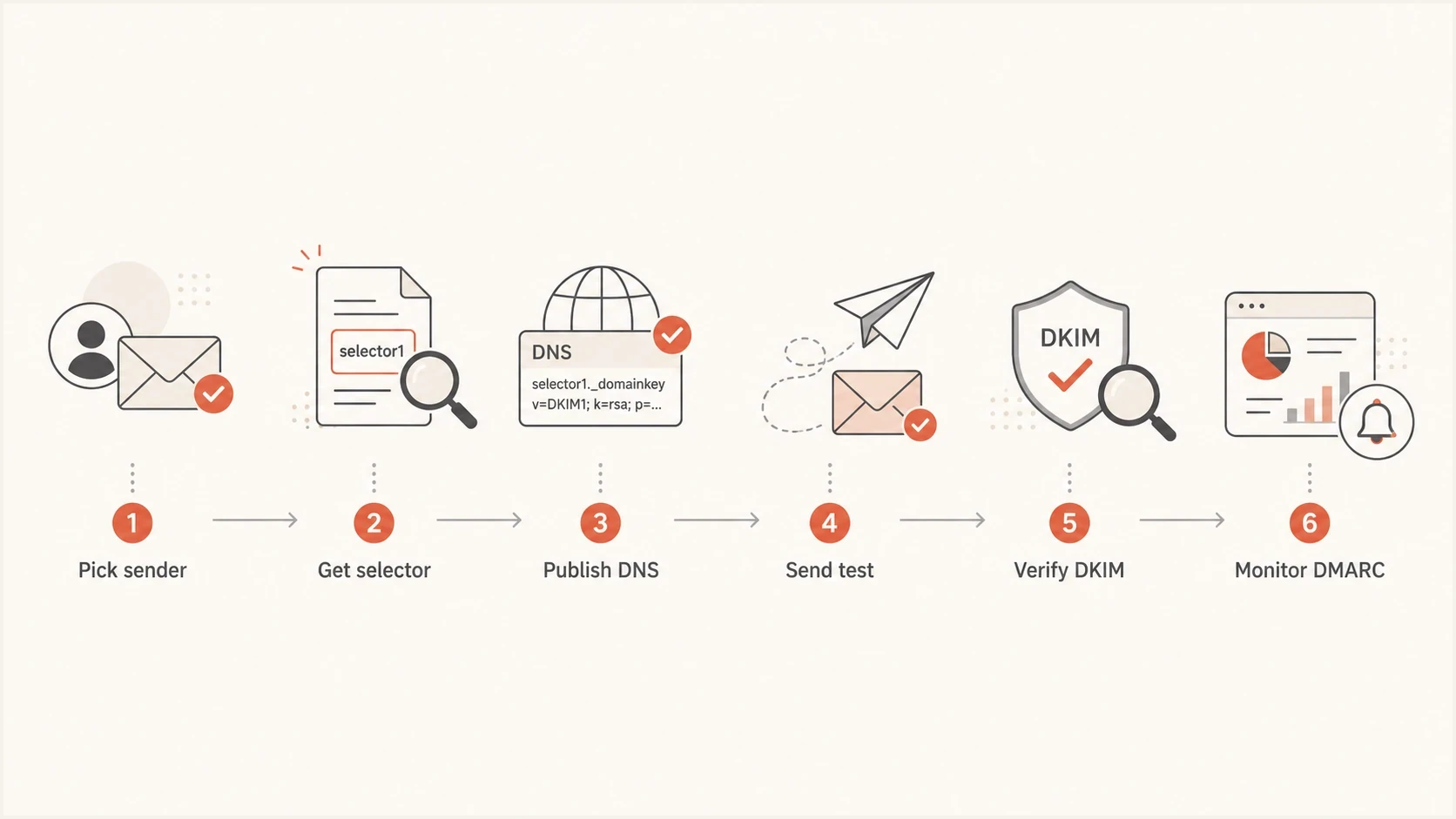
Flowchart showing the DKIM selector setup path.
For a new sender, start in the sender's authentication screen because the platform often generates the exact selector and DNS target. Publish what the platform expects. After the platform validates DNS, enable DKIM signing if activation is a separate step. Publishing the record alone does not make a sender add DKIM signatures. If you control the signer, such as a self-hosted mail server or custom MTA, choose a selector with a purpose and a date or sequence.
|
|
|
|---|---|---|
mta1 | One mail host | Clear, but tied to host naming. |
k2026a | Key rotation | Easy to track by year. |
billing | Application mail | Useful when application ownership is stable. |
s1 | Simple rotation | Short, but less descriptive. |
Selector names that work well for owned infrastructure.
Do not reuse one private key everywhere
A shared selector and private key across unrelated systems creates avoidable exposure. If one system leaks the private key, every sender using that key has to rotate at the same time. Separate selectors by provider or sending system.
A selector record can exist before the first message is sent. That is fine. Avoid leaving old selectors active forever after the matching private key is retired. Old public keys do not sign new mail by themselves, but stale records make audits harder and create confusion during authentication investigations.
How to test selectors and catch failures
A selector test has two layers. First, check DNS: does the selector record exist, and does it contain a valid DKIM public key or a valid CNAME target? Second, check a real message: did the sender sign with that selector, and did the receiving system validate the signature?
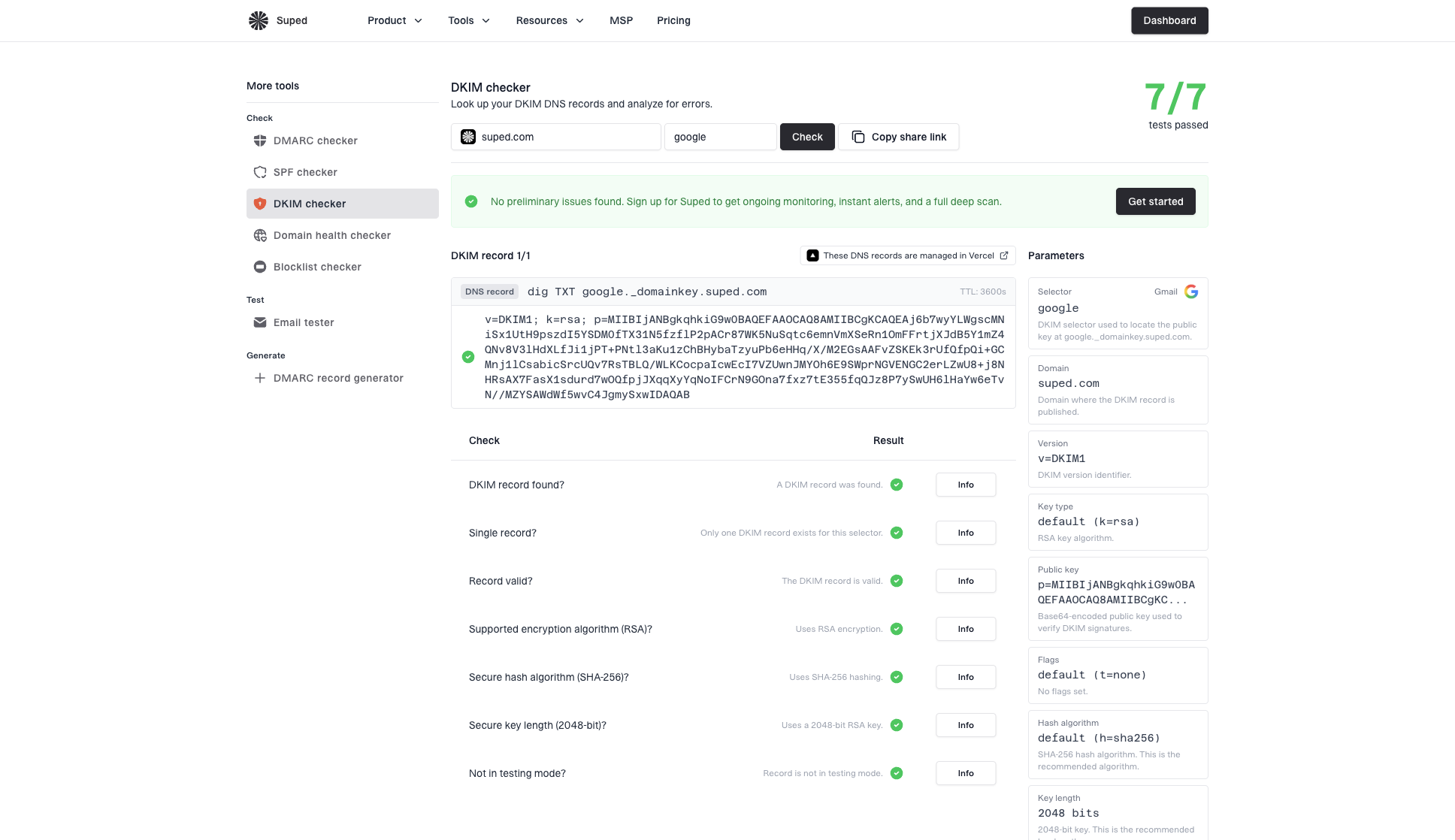
DKIM checker sample results showing selector, DKIM DNS record, validation checks, parameters, and share link
Suped's product supports both checks. The DKIM checker shows the selector, DNS record, parsed parameters, and validation checks. Suped's DMARC monitoring then ties authentication results to sending sources and message volume, which separates a published but unused selector from one that is active in production mail.
- Missing record: The selector in the header points to a DNS name that returns no DKIM key.
- Wrong target: A CNAME points to the wrong provider host or has not propagated.
- Bad key: The public key is truncated, split incorrectly, or pasted with extra characters.
- Domain mismatch: DKIM passes, but its signing domain does not match the visible From domain for DMARC.
- Body change: A downstream system modifies signed content beyond what canonicalization tolerates and invalidates the signature.
During an audit, pair selector checks with a broader domain health check. That catches related SPF lookup problems, missing DMARC reporting, weak DMARC policy, and DNS mistakes that do not appear when you inspect one selector.
?
What's your domain score?
Deep-scan SPF, DKIM & DMARC records for email deliverability and security issues.
A green DNS check is not the finish line. A valid selector record proves only that a DNS name returns a usable record. It does not prove the sender uses it, the signature survives transit, or DMARC passes. Production DMARC reports answer those questions across real mail.
Selector naming and rotation practices
Selector names should support rotation. Pairs or dated sequences make it clear which key is current and which key is next. For example, s1 and s2 work well for alternating keys. A dated pair such as k2026a and k2026b makes audit history clearer.
Selector rotation readiness
A simple way to judge whether a DKIM selector setup is easy to rotate.
Good
Separate keys
Each sender has its own selector and documented owner.
Watch
Shared key
Several senders share a selector but owners are known.
Fix
Unknown owner
One selector is reused widely and no owner is listed.
A clean rotation usually follows a two-selector pattern. Publish the new public key under a new selector, configure the signer to use it, send test mail, and monitor real DMARC results. Do not overwrite the key at an active selector because cached DNS answers and queued messages can make valid mail fail. Remove the old DNS record only after the expected mail queue lifetime, DNS TTL, and a documented rollback window have passed.
Two-selector rotation exampleDNS
s1._domainkey.example.com. 3600 IN TXT "v=DKIM1; k=rsa; p=OLDKEY..."
s2._domainkey.example.com. 3600 IN TXT "v=DKIM1; k=rsa; p=NEWKEY..."
For a self-managed key, use rsa-sha256 with a 2048-bit RSA key when the signer and DNS host support it. RSA signers must use at least 1024 bits, and SHA-1 must not be used. A 2048-bit public key often needs multiple quoted TXT strings because each DNS character-string has a 255-byte limit; resolvers join those strings into one record. Follow the provider's generated format and verify the published result. For a deeper key-size discussion, see recommended key length.
A practical selector policy
- Per sender: Give each platform or mail stream its own selector when you control the key.
- Document owner: Record who owns the signer and where the private key lives.
- Use pairs: Keep a next selector ready for rotation.
- Monitor reports: Confirm real mail passes DKIM and matches DMARC.
How this connects to DMARC monitoring
DKIM selectors are a setup detail. DMARC monitoring turns them into operational evidence. A domain with ten selectors can be healthy if each selector maps to an approved sender and passes the DMARC domain match. A domain with two selectors can be risky if one is attached to an unknown sender or a stale platform still sending mail.
Suped DMARC dashboard showing email volume, authentication health, and source breakdown
Suped's product groups DMARC aggregate data by sending source and authentication result. Use that view to confirm which sources are active, whether DKIM matches the visible From domain, and how much real mail a selector problem affects.
With DMARC monitoring, selector problems appear next to the sending source, volume, pass rate, and policy impact. That helps separate harmless tests from a misconfigured vendor or a sender that policy should reject.
Selector-only check
- Scope: Confirms one DNS record at one moment.
- Blind spot: Does not show real sending volume.
- Best use: Setup validation and focused troubleshooting.
DMARC monitoring
- Scope: Shows real authentication across sources.
- Blind spot: Needs reporting data to build history.
- Best use: Ongoing protection and policy rollout.
What to do next
Start with the common selector list, but do not stop there. The exact selector for a real message comes from the DKIM-Signature header. The operational risk depends on whether that signature passes, matches DMARC, and belongs to an approved sending source.
For a small setup, publish the selector your provider gives you, activate signing when required, send a test message, and verify the header. For a larger setup, keep an inventory of each selector's signing domain, owner, sending source, record type, key size, publication date, last-seen date, rotation status, and retirement status. Suped can connect that inventory work to DMARC reports so active sources and authentication failures remain visible during rotation.
- First step: Find s= and d= in a real message header.
- Second step: Query selector dot _domainkey dot signing domain.
- Third step: Confirm DKIM passes and its signing domain matches the visible From domain.
- Fourth step: Document ownership and plan key rotation.




