How to configure DomainKeys DKIM for email authentication and is it still relevant?

Updated on 11 Aug 2026: We updated this guide for current DKIM configuration and DMARC alignment requirements.
The practical answer is: configure modern DKIM for production email, and treat old DomainKeys as a lab-only protocol. DKIM is still relevant because mailbox providers use it to verify that a message was signed by a domain that controls the matching public key in DNS. DomainKeys, the older Yahoo-originated protocol that used the DomainKey-Signature header, is obsolete for normal deliverability work.
For a new sending domain, publish the TXT record or CNAME delegation supplied by the email platform at selector._domainkey, configure the MTA or email platform to add a DKIM-Signature header, send a real message, then verify the DNS key and the signed message. A quick DNS-only check can start with a DKIM checker, but the final proof comes from a real message that passes DKIM and then passes DMARC using an aligned domain with the visible From address.
Current requirements for bulk mail to personal Gmail and Yahoo Mail accounts include both SPF and DKIM, plus a DMARC policy. DKIM must also match the visible From domain under DMARC alignment rules when it supplies the passing authentication path for DMARC. A valid DKIM signature supports authentication, but it does not guarantee inbox placement.
Do not spend production effort trying to make legacy DomainKeys accepted by modern receivers. Sender adoption does not matter when receivers no longer validate the old protocol. Big senders that still emit DomainKeys headers usually have old signing code that was never removed.
Configure modern DKIM first
A clean DKIM setup has four moving parts: a private key, a public key available through DNS, a selector, and a signing rule. The private key stays on the sending system or with the email platform. The public key is published directly in a TXT record or reached through a provider-supplied CNAME. The selector tells receivers which DNS name to query. The signing rule tells the MTA or platform which domain and selector to use.
- Choose: Pick the signing domain, such as emails.example.com, and a selector such as default, s1, or 2026a.
- Generate: Create a private and public key pair. For RSA, sign with RSA-SHA256 and use a 2048-bit key unless the provider requires another supported option. RSA keys below 1024 bits are invalid for DKIM.
- Publish: Add the public key as a TXT record at selector._domainkey.your-sending-domain, or publish the exact CNAME records supplied by a managed platform.
- Sign: Configure the outbound mail system to sign with the matching selector, domain, and private key.
- Verify: Send a message and inspect the authentication result, rather than relying only on DNS.
Modern DKIM TXT recorddns
default._domainkey.emails.example.com. TXT (
  "v=DKIM1; k=rsa; "
  "p=MIIBIjANBgkqhkiG9w0BAQEFAAOCAQ8A..."
)
The DNS name above means the selector is default and the signing domain is emails.example.com. If the outgoing message says d=emails.example.com and s=default, a receiver queries that exact DNS location for the public key.
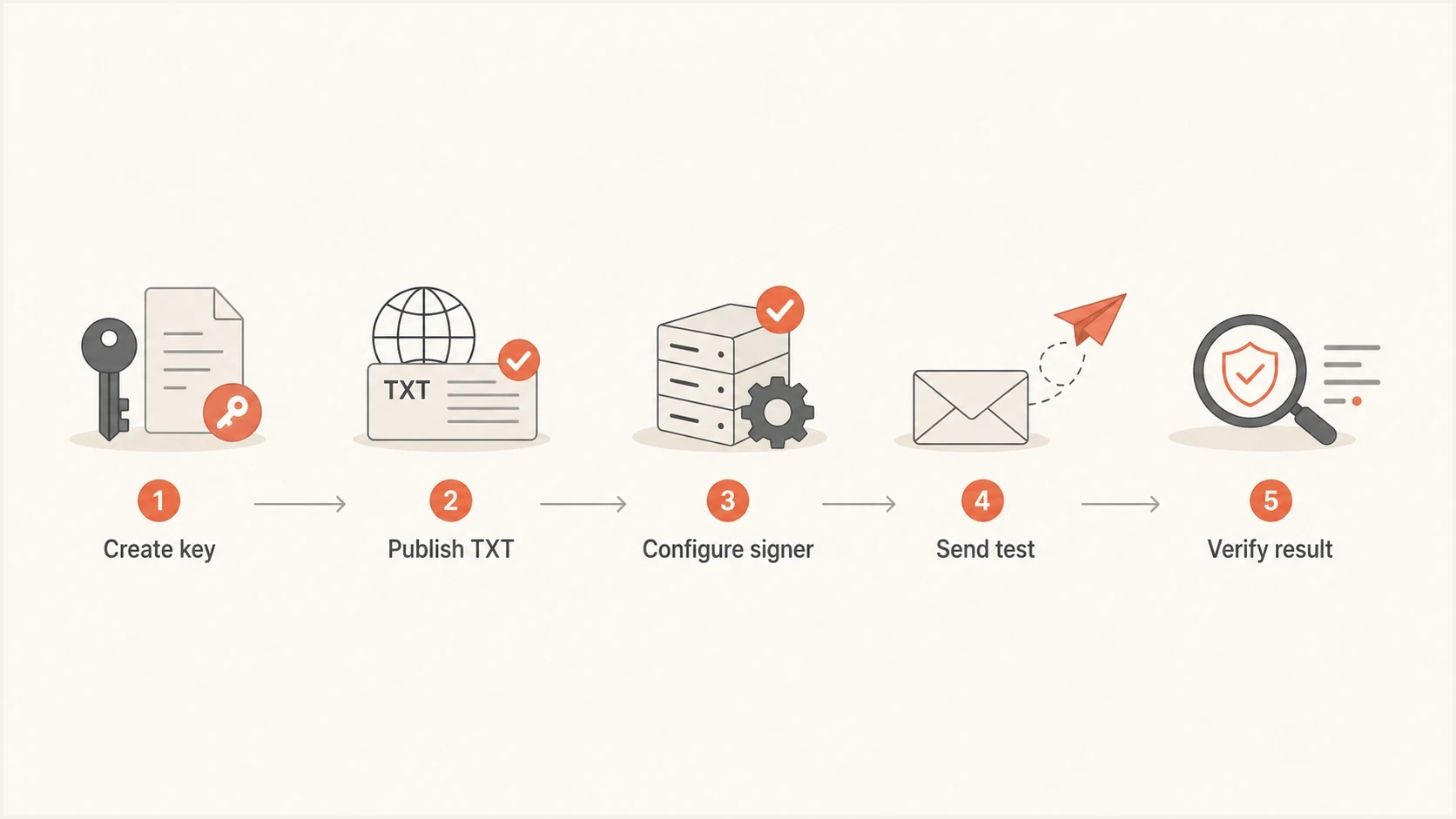
Flowchart showing the DKIM setup path from key creation to verification.
Plan DKIM for every sending source
DKIM is configured per sending source and signing domain, not once for an entire organization. Inventory every system that sends as the domain, including the primary mail platform, transactional systems, support platforms, and marketing platforms. Each source needs a provider-supported signing setup and a signing domain that works with the visible From domain.
- Inventory: Map each sending source to its visible From domain, DKIM signing domain, selector, DNS record type, and owner.
- Delegate: Publish the exact TXT value or CNAME target supplied by that source. Do not convert one record type into the other.
- Alignment: For relaxed DMARC alignment, the DKIM d= domain and visible From domain must share the same organizational domain. Strict alignment requires an exact domain match.
- Separate: Give independent platforms different selectors so each key can be rotated or removed without affecting another source.
A message can show dkim=pass and still fail DMARC when the passing d= domain is not aligned with the visible From domain. Messages can also contain multiple DKIM signatures. One valid, aligned signature is enough for DKIM to supply the passing DMARC authentication path.
A dedicated subdomain can separate a third-party mail stream from the main domain while keeping relaxed DMARC alignment. For example, a visible From address at example.com can match a DKIM signing domain at mail.example.com under relaxed alignment. Confirm the exact domain plan before publishing records because a provider-controlled d= domain outside example.com will not match.
What to publish in DNS
When the public key is published directly, the DKIM TXT value normally starts with v=DKIM1. That version tag makes the record unambiguous for modern DKIM validators. A managed platform can instead provide CNAME records that point the selector to keys it hosts. Keep a self-managed private key off DNS, off ticket comments, and out of shared docs. If the private key leaks, publish a new selector, switch signing only after it resolves, and retire the old record after delayed mail has aged out.
|
|
|
|---|---|---|
Selector | default | Key lookup |
Domain | emails.example.com | Signing scope |
Version | DKIM1 | Record version |
Key type | RSA 2048 | Key algorithm and size |
Compact DKIM DNS labels
Most broken DKIM records are not conceptually wrong. They fail because of DNS formatting: incorrect zone-file quoting for a long TXT value, spaces inserted into the public key, a selector typo, the wrong record type, or publication under the wrong domain.
- Name: Use selector._domainkey plus the exact signing domain used in the DKIM header.
- Value: Keep the public key as continuous base64 text inside a TXT value, or use the provider's CNAME target without alteration.
- TTL: Lower it at least one existing TTL period before a planned rotation, then raise it after the new selector is stable.
DKIM checker
Check selector records and public key configuration.
?/7tests passed
Where legacy DomainKeys fits
DomainKeys and DKIM share similar concepts, but they are not the same protocol. DKIM uses the DKIM-Signature header. Legacy DomainKeys used DomainKey-Signature. DKIM is the standard that matters for production authentication and DMARC. DomainKeys is useful only when studying old infrastructure or testing an old MTA that still claims to sign it.
Modern DKIM
- Header: Uses DKIM-Signature on the outbound message.
- DNS: Publishes v=DKIM1 at the selector DNS name.
- DMARC: Can satisfy DMARC when the signing domain matches the visible From domain rules.
- Use: Use it for every production sending source.
Legacy DomainKeys
- Header: Uses DomainKey-Signature on older messages.
- DNS: Uses a legacy key record and optional policy record.
- DMARC: Does not solve current DMARC requirements.
- Use: Keep it to old-system labs and controlled tests.
If you still want to configure DomainKeys for learning, publish it separately from the working DKIM setup. Do not put legacy DomainKeys policy tags into a modern DKIM record and expect that to improve deliverability.
Legacy DomainKeys public key recorddns
dklegacy._domainkey.emails.example.com. TXT (
  "k=rsa; t=y; "
  "p=MIIBIjANBgkqhkiG9w0BAQEFAAOCAQ8A..."
)
Legacy DomainKeys policy recorddns
_domainkey.emails.example.com. TXT "t=y; o=~"
Do not reuse the same selector blindly
The tricky part is that DKIM and DomainKeys both use names under _domainkey. That does not mean two TXT values should be published at the same selector name. Some validators dislike multiple TXT records at a DKIM key name, and operationally it creates needless confusion.
- Best: Use one selector for production DKIM and a different selector for any legacy DomainKeys lab.
- Avoid: Do not publish a DKIM1 record and a legacy DomainKeys record at the same owner name.
- Remember: The selector in the message header must match the selector in DNS.
A visible DomainKeys header is not proof that DomainKeys works. It only proves the sender added the header. A receiver or test environment must parse the legacy header, retrieve the matching key, check the body hash, and report the result.
How to test the result
Testing has two layers. First, confirm the DNS record or delegated CNAME is readable. Second, send real email and confirm the message passes authentication at the receiver. DNS validation catches selector, syntax, record-type, and key-format problems. Message testing catches signing-domain mistakes, body changes after signing, missing signatures, and key mismatches.
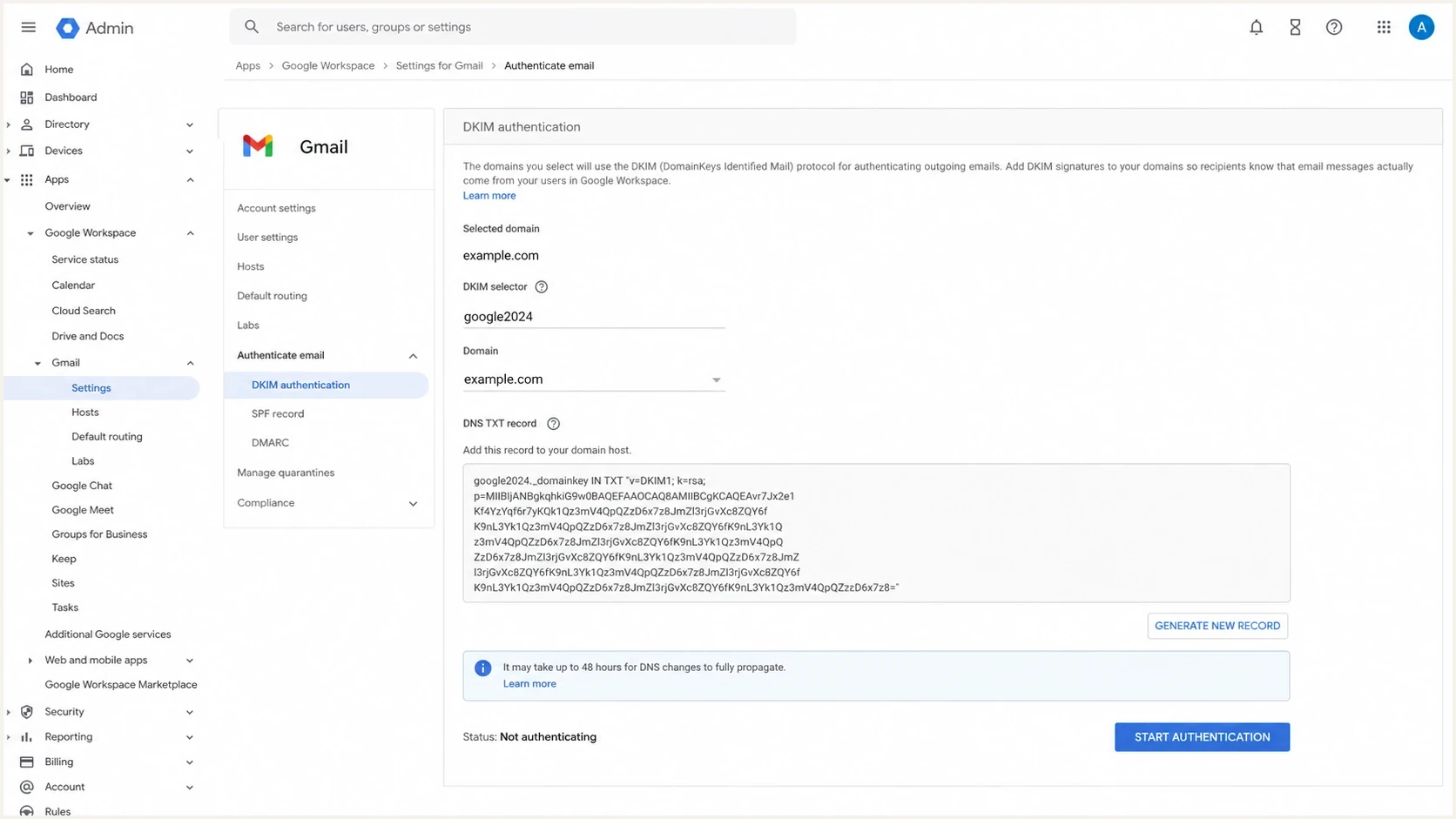
Google Workspace Admin Console screen showing DKIM setup controls.
Hosted mail platforms handle much of the signing configuration. For example, the Google setup docs and Microsoft DKIM docs both center the workflow on generating or assigning selectors, publishing the supplied DNS records, and enabling signing after DNS resolves.
For a self-managed MTA, send to a mailbox that exposes authentication results and review the raw headers. The key lines are the DKIM result, selector, signing domain, and DMARC result. If the record exists but messages are not signed, use a targeted guide for DKIM not signing before changing DNS again.
Email tester
Send a real email to this address. Suped shows a results button when the test is ready.
?/43tests passed
Why big senders still show DomainKeys
When a big sender still emits a DomainKeys header, it does not prove the old protocol has deliverability value. It usually means the sender layered DKIM on top of an older signing implementation and never removed the older header. In some environments, leaving it enabled cost less engineering time than deleting and retesting an old path.
That difference matters. Sending a header and receiving benefit are separate things. A receiver that does not evaluate DomainKeys will not reward or penalize it in the same way it treats DKIM. Old signatures also fail silently when no one monitors them. The business risk is not that DomainKeys fails. The risk is that the team mistakes an old header for a current authentication control.
Relevance by use case
A practical classification of DomainKeys work by operational value.
Production DKIM
High
Required for a serious sender program.
DMARC rollout
High
DKIM helps when the signing domain matches DMARC rules.
Legacy DomainKeys
Low
Useful for controlled historical testing only.
DomainKeys in production
Avoid
Adds complexity without modern receiver value.
How Suped fits into the workflow
DKIM setup is not finished when DNS resolves. Ongoing checks need to show which sources are sending, which ones pass, which ones fail, and whether those failures affect DMARC. That is where DMARC monitoring matters more than a one-time record check.
DMARC record detail view showing SPF, DKIM, DMARC, rDNS diagnostics, and DNS records
Suped's product connects DKIM, SPF, DMARC, blocklist (blacklist) monitoring, and deliverability signals in one place. The practical workflow is simple: add the domain, validate DNS, watch real traffic, get alerts when authentication changes, then follow issue-specific steps to fix the source.
For ongoing operations, Suped's product provides automated issue detection, real-time alerts, hosted DMARC, hosted SPF, SPF flattening, hosted MTA-STS, and MSP multi-tenancy. The point is not to check DKIM once. The point is to keep every sending source visible after teams add new platforms, change DNS, or rotate keys.
For a broader snapshot before setting policy, run a domain health check and review DKIM, SPF, and DMARC together. A DKIM pass alone is useful, but it does not tell the whole authentication story.
Common DKIM mistakes to avoid
Most DKIM failures come from small mismatches. Check these before assuming the cryptography is the problem.
- Selector: The selector in the message header must match the selector in DNS exactly.
- Domain: The key lookup must use the d= signing domain, and that domain must match the visible From domain under the selected DMARC alignment mode when DKIM supplies the DMARC pass.
- Forwarding: Mailing lists and gateways can alter a signed body and break DKIM after it leaves the sender.
- Rotation: Publish the new selector before cutover, confirm a signed message passes, and keep the old selector live long enough for queued or delayed mail.
- Changes after signing: If a platform rewrites a signed header or the message body after signing, test the final delivered message again.
When a failure persists, troubleshoot the message header and DNS record together. The fastest route is to compare the header values with the live TXT record or CNAME chain and then work through the causes covered in DKIM failures.
Views from the trenches
Best practices
Use separate selectors for DKIM and any DomainKeys lab so DNS tests stay clear later.
Validate a signed message, not only the DNS TXT value, before trusting the setup.
Keep DomainKeys testing in isolated systems because modern receivers ignore it now.
Common pitfalls
Treating a visible DomainKeys header as proof of receiver-side validation is unsafe.
Publishing legacy policy tags inside a DKIM1 record creates confusion without benefit.
Reusing one selector for multiple key formats makes DNS troubleshooting harder later.
Expert tips
Rotate DKIM with a new selector first, then remove the old key after mail queues clear.
Use DMARC aggregate data to find sources that send without valid DKIM signatures.
For DomainKeys study, build a lab receiver that verifies the old signature format.
Expert from Email Geeks says DomainKeys adds processing and message bytes, while modern receivers do not use it.
2021-10-26 - Email Geeks
Marketer from Email Geeks says a historical lab is the right place to test DomainKeys because current software rarely validates it.
2021-10-26 - Email Geeks
Use DKIM, leave DomainKeys in the lab
The correct production configuration is modern DKIM: a provider-supplied TXT key record or CNAME delegation, a matching private key on the sender or managed platform, a DKIM-Signature header on outbound mail, and verification through real messages. DomainKeys is not worth production time unless a very old closed environment explicitly requires it.
For learning, use a separate selector and a controlled receiver that can validate DomainKey-Signature. For deliverability, spend the effort on DKIM that passes, SPF that stays within lookup limits, DMARC reporting that shows real sources, and alerts that catch drift before it becomes a policy problem.




