How does a missing DKIM DNS TXT record affect email deliverability?


Updated on 31 Jul 2026: We clarified the exact DKIM failure result, multiple-signature behavior, DMARC fallback rules, and DNS caching checks for missing selector records.
A missing DKIM DNS TXT record means the receiving mail server cannot find the public key needed to verify the DKIM signature. The DKIM standard defines this as a permanent failure for that signature. Authentication reports often show dkim=permerror, dkim=fail, or similar wording such as no key for signature, depending on the receiver.
Is that worse than not signing at all? At the DKIM layer, both outcomes fail to provide a validated signature. DKIM guidance does not require receivers to penalize a bad signature more than no signature. A missing key is still more urgent operationally because it proves that the signing and DNS configuration disagree, and it can remove the DKIM path to DMARC pass.
Treat this as a production issue, not a cosmetic DNS issue. If the mail is signed, the key needs to exist, match the selector, and be readable by receivers before volume is sent.
The short answer
A missing DKIM TXT record causes the affected signature to fail DKIM verification. That removes a valid authentication signal and can increase spam placement or rejection risk when no other aligned authentication path produces DMARC pass. Inbox placement still depends on the receiver's policy and the sender's other signals.
- DKIM result: The receiver sees a DKIM signature but cannot retrieve the public key, so that signature returns a permanent failure instead of pass.
- DMARC result: DMARC passes when at least one DKIM signature passes with an aligned domain, or SPF passes with an aligned MAIL FROM domain.
- Deliverability risk: The risk is highest for bulk mail, forwarded mail, and streams with no other aligned authentication result.
- Fix priority: Publish the correct selector record, check authoritative DNS and caches, then test a fresh message before resuming volume.
Only pass counts
A failed DKIM signature and no DKIM signature are both non-pass outcomes. The practical difference is diagnostic: a missing key on signed mail identifies a broken authentication setup, while no signature means that sender did not use DKIM for the message.
The fastest way to confirm the DNS side is to check the selector with a DKIM checker. That tells you whether the public key is present, readable, and formatted in a way receivers can use.
What actually breaks
DKIM works by placing a cryptographic signature in the message header. That signature includes a signing domain and a selector. The receiver combines those values to look up the public key in DNS at a name like selector._domainkey. If the TXT record is missing, the receiver cannot verify that signature.
What the receiver is trying to verifytext
DKIM-Signature: v=1; a=rsa-sha256; d=example.com; s=selector1;
Authentication-Results: mx.example.net;
  dkim=permerror (no key for signature) header.d=example.com
The missing TXT record is not the only possible DKIM key problem. The record can exist but contain the wrong key, invalid syntax, a broken split string, or a selector mismatch. Those are separate failure modes, but the affected signature still does not pass. If the record exists and validation still fails, inspect the invalid RSA key next.
One failed signature does not automatically make every DKIM result fail. A message can carry multiple DKIM signatures, and receivers evaluate them independently. Another valid signature can still pass DKIM and satisfy DMARC if its signing domain aligns with the visible From domain.
|
|
|
|
|---|---|---|---|
No key | PERMFAIL | Signature unusable | High without fallback |
Wrong key | PERMFAIL | Signature invalid | High without fallback |
No signing | None | No DKIM result | Depends on SPF |
Valid key | Pass | Signature verified | Lowest |
Common DKIM DNS outcomes
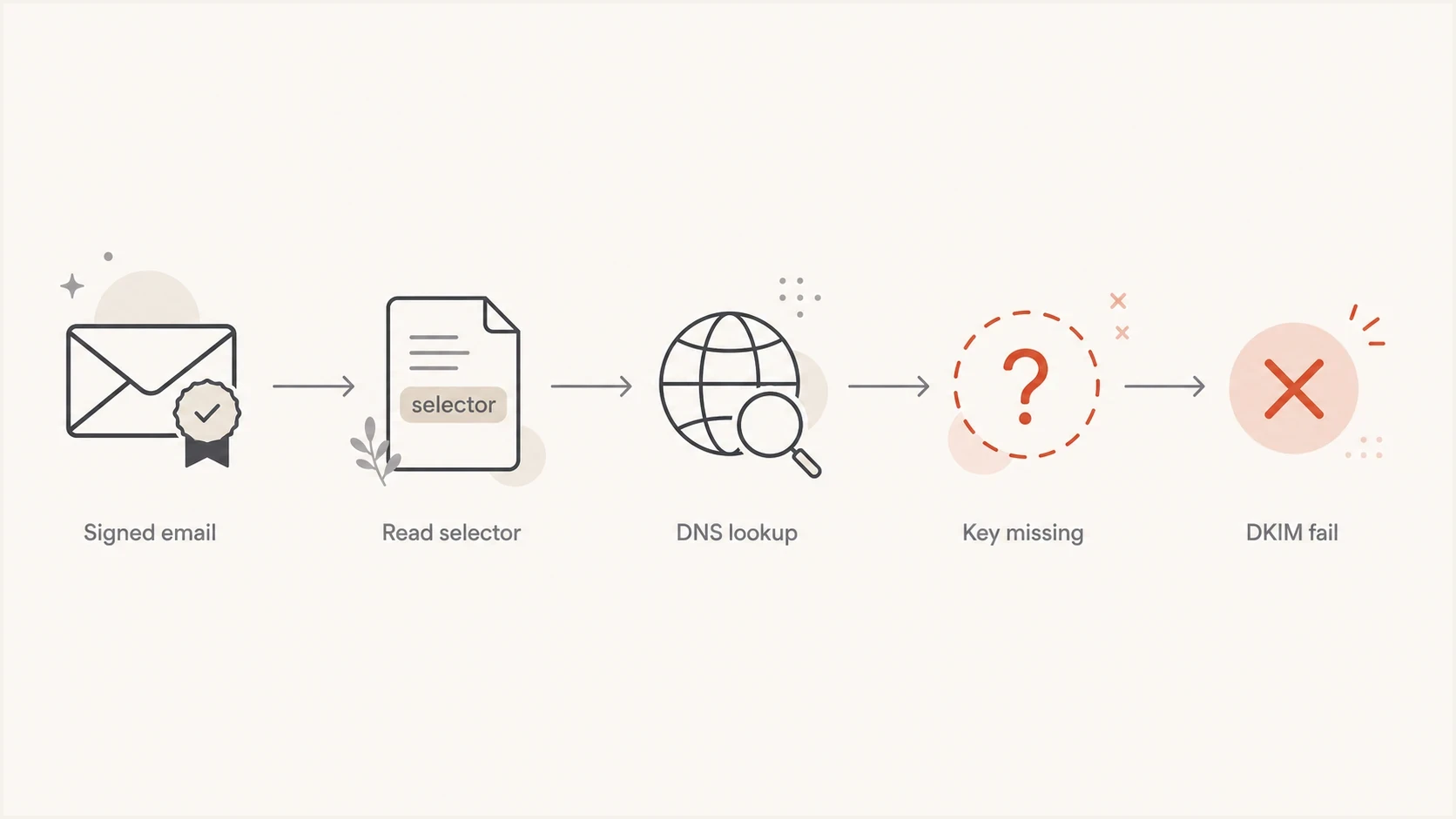
A flowchart showing signed email failing DKIM when the selector key is missing.
Why deliverability gets worse
The deliverability impact starts with the loss of a validated authentication signal. DKIM does not guarantee inbox placement, and a missing key does not create one universal receiver response. It gives the receiver one less verified identity to use alongside DMARC, reputation data, message characteristics, and its filtering policy.
The most important caveat is DMARC. One aligned mechanism can still produce DMARC pass, so a message can pass when SPF validates the aligned MAIL FROM domain. Current DMARC guidance still tells fully participating domain owners to deploy both SPF and DKIM, and it says not to rely only on SPF when the domain publishes p=reject.
DKIM is also the more durable authentication path through many forwarding flows because SPF often breaks when another server resends the message. The DKIM signature can survive forwarding when the signed headers and body remain unchanged.
Signed but missing key
- Signal: The message has a DKIM signature, but that signature cannot be validated.
- DMARC: That signature cannot satisfy DMARC, so another aligned DKIM signature or SPF must carry the result.
- Operations: The selector, DNS zone, signing configuration, or sending service needs correction.
Not signed at all
- Signal: There is no DKIM proof for the receiver to evaluate.
- DMARC: The message depends on SPF for a passing DMARC result.
- Operations: The sender needs DKIM enabled for that mail stream.
Do not assume SPF provides a fallback without checking the exact MAIL FROM domain and receiver result. A message can pass SPF for a vendor bounce domain and still fail DMARC if that domain does not align with the visible From domain.
Worst case
The highest-risk case is mail with no valid aligned DKIM signature, SPF using a non-aligned domain, and DMARC at quarantine or reject. That combination gives the receiver no authenticated path for the visible From domain.
Risk by authentication path
How to prioritize missing DKIM TXT records during troubleshooting.
Low
Pass
An aligned DKIM signature passes for the visible From domain.
Warning
Fallback
DKIM fails, but SPF passes with an aligned MAIL FROM domain.
Critical
No path
No DKIM signature passes with alignment, and SPF has no aligned pass.
How to diagnose it
Start with the message header, not the DNS zone. The header tells you which signing domain and selector the sender actually used. Then check DNS for that exact name. A common mistake is publishing a key for one selector while the mail stream signs with another.
Selector lookup patterntext
Header says: d=example.com; s=selector1
DNS name:   selector1._domainkey.example.com
Expected:   TXT record with v=DKIM1 and a public key
If you manage several mail sources, test each one separately. Invoices, password resets, marketing campaigns, helpdesk replies, and executive mailboxes can use different selectors. One source can pass DKIM while another fails because it uses an old selector.
DKIM checker
Check selector records and public key configuration.
?/7tests passed
For a broader view, run a domain health checker after the DKIM check. A missing DKIM record can appear beside SPF lookup issues, missing DMARC reporting, delegation errors, or other DNS mistakes on the sending domain.
- Header: Find the DKIM-Signature header and copy the d= and s= values.
- DNS: Look up the exact selector record under _domainkey at every authoritative nameserver.
- Fresh test: Send a new message after DNS is visible and confirm that its Authentication-Results header shows DKIM pass.
- DMARC: Confirm that a passing DKIM signing domain or SPF MAIL FROM domain aligns with the visible From domain.
How to fix the missing DKIM record
Publish the exact DKIM DNS record expected by the signing system. That normally means adding a TXT record at the selector name, although some senders provide a CNAME that resolves to their hosted key. The receiver needs the selector lookup to return a usable DKIM public key.
Example DKIM TXT recorddns
selector1._domainkey.example.com. 3600 IN TXT (
  "v=DKIM1; k=rsa; "
  "p=MIIBIjANBgkqhkiG9w0BAQEFAAOCAQ8A..."
)
Do not guess the selector or copy a key from a different domain. DKIM keys are specific to the signing domain and selector. During a planned rotation, publish the new key before the sender starts using it and keep the old selector live long enough for delayed mail signed with the old key to arrive.
Safe repair sequence
- Pause: Slow or pause the affected mail stream if volume is large.
- Publish: Add the exact TXT or CNAME record provided by the sender.
- Verify: Check authoritative DNS, allow relevant caches to expire, and send a fresh test email.
- Resume: Return volume gradually while watching DKIM, DMARC, bounce, and complaint results.
If the DNS record is present but messages still show no DKIM signature, the problem is in the sender configuration rather than the DNS key. That is a different failure path, and the right fix starts with confirming why the mail is not DKIM signed.
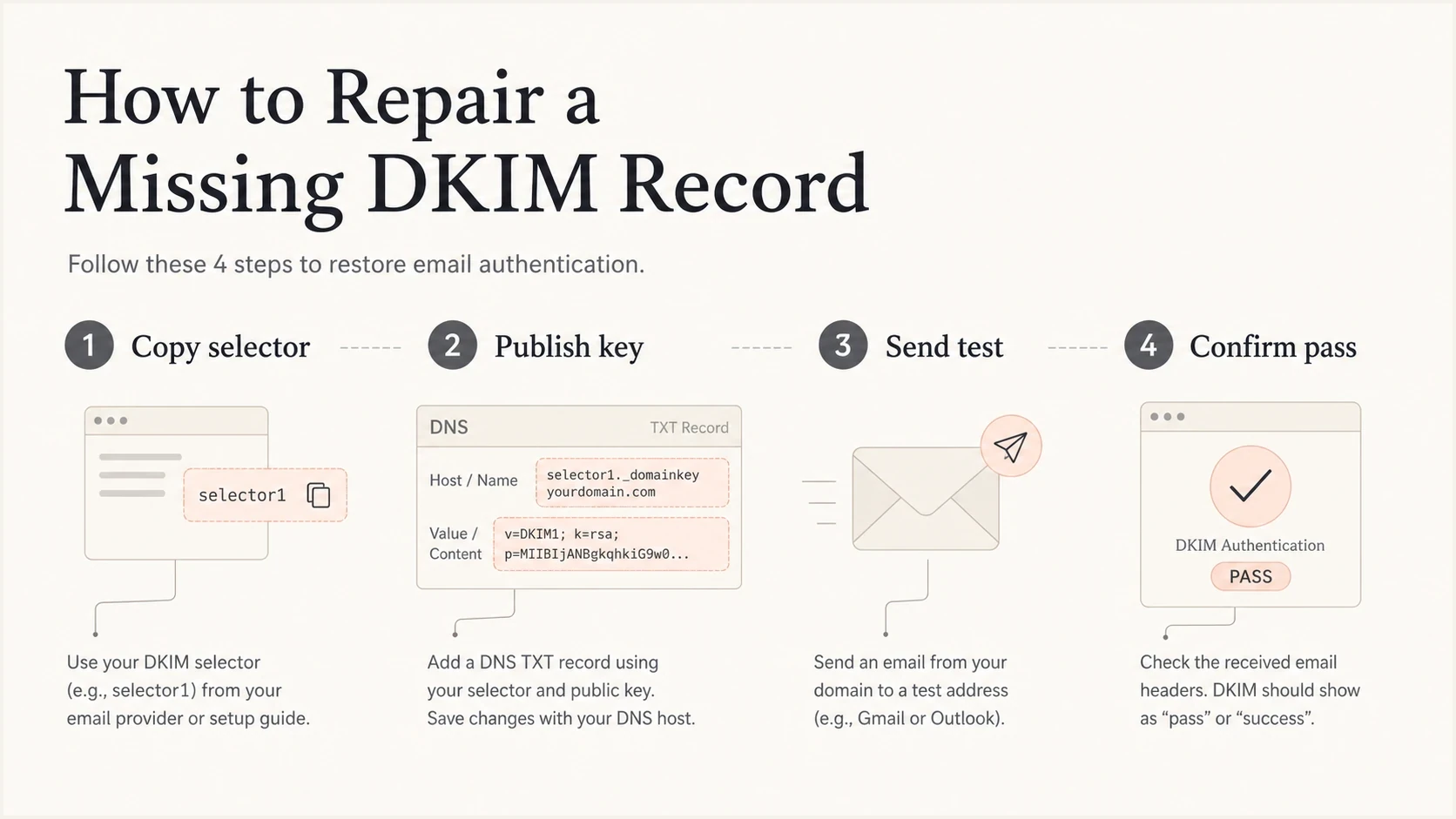
An infographic showing the four steps to repair a missing DKIM record.
Why the fix can appear delayed
Publishing the key does not force every recursive DNS resolver to forget an earlier missing-record answer. Resolvers can cache NXDOMAIN, which means the selector name did not exist, or NODATA, which means the name existed without a TXT answer. This negative cache can remain until its TTL expires.
The TXT TTL is not the whole wait
When the record was previously absent, the relevant wait can be the zone's negative-cache TTL derived from its SOA record. The new TXT record's TTL does not erase a negative answer that a resolver already cached.
Intermittent DKIM results need a wider DNS check. If one authoritative nameserver returns the key and another returns no record, different receivers can get different answers. If every authoritative server is correct but public recursive resolvers disagree, wait for negative caches to expire and keep the affected volume low.
- Query every authoritative nameserver for the exact selector name and record type.
- Compare answers through more than one public recursive resolver to detect stale caches.
- Send a fresh message after the DNS answer is visible, because an old message header will keep its original Authentication-Results.
- Resume normal volume only after representative receivers report DKIM pass for the affected selector.
Where Suped fits
Suped's product connects selector checks with evidence from live mail. A one-off DKIM lookup tells you whether one record exists now. Ongoing DMARC monitoring shows which sending sources are affected, how much mail they send, and whether another aligned authentication path still passes.
The practical workflow is to identify the affected source, record the signing domain and selector used in real mail, assign the DNS correction to the right owner, then watch the DKIM and DMARC pass rates recover. Suped keeps those steps in one issue workflow.

Issue steps to fix dialog showing the issue overview, tailored fix steps, and verification action
That workflow goes beyond a green DNS check. A selector can validate while one sending source still uses an old selector, and DNS answers can differ during a faulty change. Suped uses DMARC report data to show the source that is still failing and to confirm recovery after the repair.
- Issue detection: Suped groups missing or broken DKIM patterns by real sending source.
- Fix ownership: The issue record gives the DNS owner or sending-platform owner a concrete task.
- Change alerts: Suped can flag a DKIM or DMARC failure spike after a selector change.
- Recovery check: DMARC data confirms whether the affected source returns to aligned pass.
Views from the trenches
Best practices
Publish the selector before sending signed mail, then confirm real headers show DKIM pass.
Keep old selectors live during rotation so delayed mail can still verify after delivery.
Monitor DMARC reports daily during changes so missing keys are caught before volume grows.
Common pitfalls
Turning on signing before DNS propagation finishes creates visible DKIM failures at receivers.
Assuming SPF saves every send ignores forwarding, shared bounce domains, and domain matching.
Deleting a selector right after rotation breaks verification for mail still in transit.
Expert tips
Test one message per source after every DNS change, using the exact production path.
Use selector names that identify the sending system so failures reach the right owner.
Alert on DKIM fail spikes, not only DMARC fail spikes, because SPF can hide early issues.
Marketer from Email Geeks says a missing public key makes the DKIM signature fail, and that non-pass result is what receivers act on.
2024-04-12 - Email Geeks
Expert from Email Geeks says failed DKIM and absent DKIM are both unsigned for DKIM itself, but filters can still treat a visible failure as useful evidence.
2024-04-12 - Email Geeks
What to do next
A missing DKIM DNS TXT record makes the affected signature fail because receivers cannot retrieve the public key. At the DKIM layer, that signature does not pass. The message can still have another valid signature, and DMARC can still pass through aligned SPF, but the missing key leaves the intended DKIM path broken.
Publish the exact selector record, check every authoritative nameserver, allow negative caches to expire, and test a fresh message. Keep the affected stream paused or reduced until representative receivers report consistent DKIM and DMARC pass results.




