Why was there a sudden increase in Spamhaus CSS listings?

Published 4 Aug 2025
Updated 23 Sep 2026
12 min read
Summarize with
Updated on 23 Sep 2026: We added SMTP identity and outbound traffic checks, and clarified how CSS listings are verified and cleared.
A sudden increase in Spamhaus CSS listings means Spamhaus detected low-reputation patterns across more sending IPs in a short period. The cause can be a shared provider incident, a listbomb-related event, a detection change, compromised infrastructure, or a genuine decline in sending quality. Simultaneous listings alone do not prove which explanation applies.
The direct answer is this: CSS is automated, reputation-driven, and based on multiple events and heuristics. It reacts to unsolicited mail indicators, poor list hygiene, compromised or misconfigured systems, snowshoe spam, and other signs of low reputation. A sender can pass DMARC, SPF, and DKIM and still hit CSS because authentication does not establish that recipients requested the mail.
The practical response is to verify whether the listings are active, group them by provider and sending stream, pause risky mail, preserve bounce evidence, and check whether delivery is affected. Quick clearing can indicate a provider correction or delisting, but CSS listings also generally expire three days after the last detection. Treat clearing as one timeline signal, not proof of a false positive.
The short answer
Spamhaus CSS, or Combined Spam Sources, is an automatically produced IP-based DNSBL for sending sources associated with low-reputation email. Spamhaus describes Spamhaus CSS as a blocklist that covers individual IPv4 addresses (/32) and IPv6 networks (/64 or larger). A CSS listing concerns the sending IP, not the visible From domain, so it can surprise teams that only watch DMARC aggregate pass rates.
- Provider-level event: Many unrelated customers can be affected when a shared pool, routing change, or upstream traffic problem causes broad CSS exposure.
- Listbomb traffic: A wave of subscription bombing can push normal mail streams into suspicious patterns, especially when confirmation mail is sent to unconsenting recipients.
- Batch correction or expiry: IPs can clear after a provider review, a delisting decision, or the normal expiry window after detections stop. Clearing alone does not identify which occurred.
- Real abuse or poor practice: Compromised accounts, weak form controls, purchased lists, poor suppression, and misconfigured systems can cause CSS listings even when authentication passes.
Do not treat a spike as proof of one cause
The fastest mistake is to assume the listing is only a Spamhaus error or only a sender fault. Check timing, affected IPs, bounce text, campaign IDs, shared pool status, complaint movement, and provider confirmation. Automatic expiry means clearing without a sender-side change is useful evidence, but it is not conclusive.
Why CSS can rise suddenly
CSS is not a slow-moving compliance checklist. Its automated heuristics respond to recent reputation signals, and Spamhaus can adjust detections as abuse patterns change. That is why a team can see no issue in the morning and then see multiple IPs on a blocklist (blacklist) by the afternoon. A detection change explains timing, but it does not make the underlying traffic acceptable.
|
|
|
|---|---|---|
Shared pool | Many customers on related IPs see bounces. | Check provider status and pause bulk sends. |
Listbomb | Confirmation mail volume spikes. | Throttle forms and suppress bad addresses. |
Detection change | Listings appear across similar sending patterns. | Compare timing and behavior before blaming the rule. |
Batch correction or expiry | Listings clear together or after detections stop. | Document timing and seek provider confirmation. |
Real abuse | Complaints and traps rise with a campaign. | Stop the source and gather evidence. |
Common patterns behind a sudden CSS listing increase.
These patterns can overlap. A listbomb can hit a shared provider pool, and a detection update can expose several customers with the same weak consent or list-hygiene problem. Spamhaus can also revise a batch after review, so the incident timeline needs traffic evidence and provider confirmation.
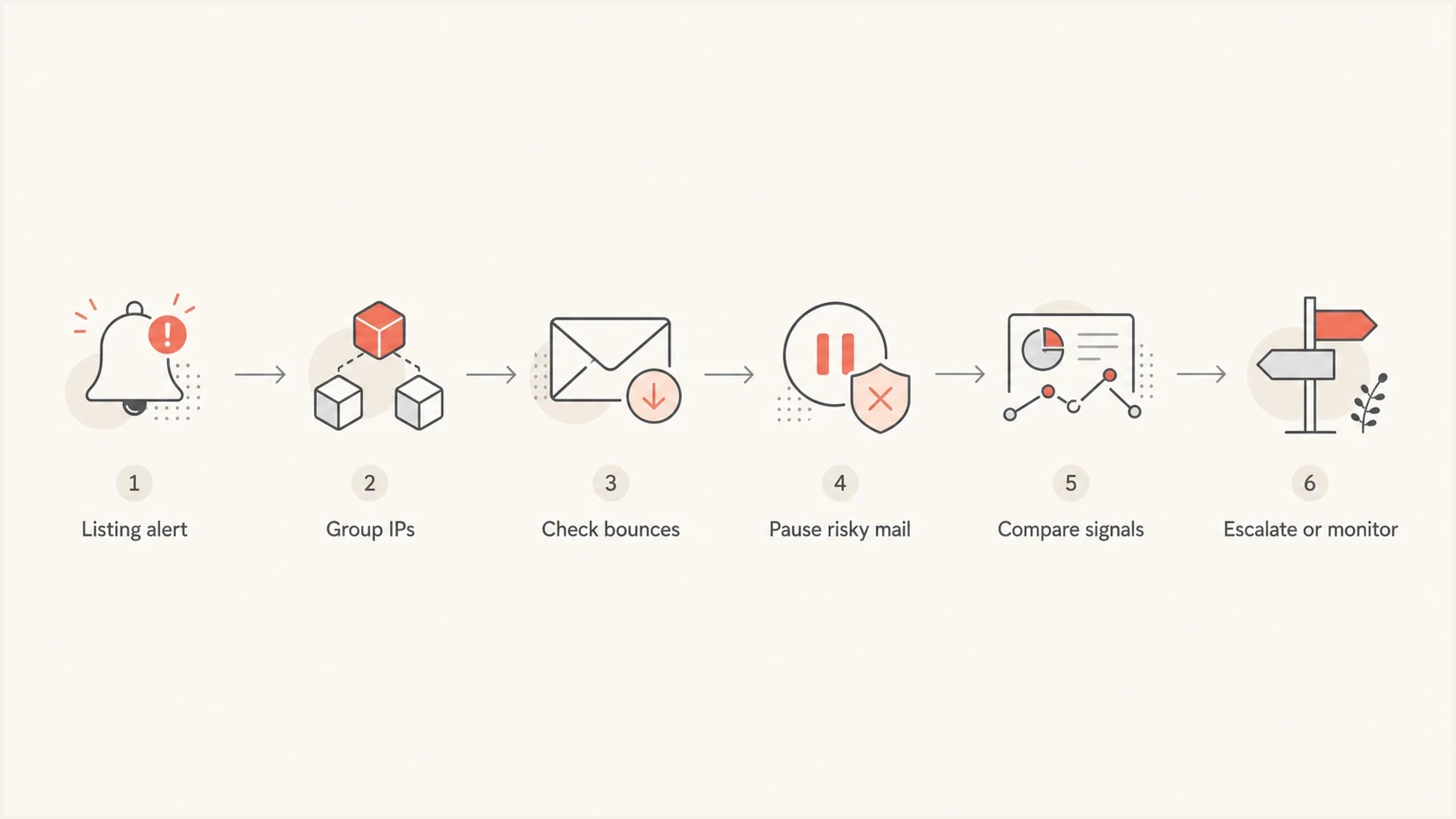
Flowchart for triaging a sudden Spamhaus CSS listing spike.
How to triage the first hour
The first hour matters because the wrong reaction can make the incident harder to diagnose. Do not start by rewriting SPF, rotating DKIM selectors, or changing DMARC policy. Those controls matter, but CSS is about sending IP reputation and observed behavior.
- Confirm the listing: Query the listed IPs through an eligible resolver and record the exact time, returned code, and affected IP range.
- Confirm delivery impact: Check whether recipients are rejecting, deferring, filtering, or accepting the mail. A listing without related bounces needs a measured response.
- Group by source: Separate dedicated IPs, shared pools, transactional mail, marketing mail, and any recently added sender.
- Read bounces: Look for recipient domains, SMTP codes, rejected sending IPs, and CSS references. Do not rely only on dashboard summaries.
- Pause risky streams: Hold nonessential campaigns and any automation tied to complaints, stale lists, or form abuse.
- Check authentication: Use the domain health check to verify DMARC, SPF, and DKIM while keeping the focus on reputation.
Example Spamhaus DNSBL lookupBASH
# Reverse 192.0.2.44 and query ZEN
# 192.0.2.44 becomes 44.2.0.192

dig +short 44.2.0.192.zen.spamhaus.org

# 127.0.0.3 means CSS data
# 127.255.255.0/24 responses are errors, not listings
Blocklist checker
Check your domain or IP against 144 blocklists.







CSS is available through either the SBL or ZEN query zone, and it does not have a separate CSS query zone. Do not query both SBL and ZEN for the same check. If a direct DNSBL lookup returns no result or an error code, verify the resolver before recording the IP's status. A public or open resolver can return NXDOMAIN or 127.255.255.254 instead of a valid listing answer, while any 127.255.255.0/24 response is an error, not a listing.
If CSS bounces are affecting recipients, preserve the original SMTP text. A copied bounce line with the recipient domain, sending IP, and timestamp is more useful than a generic claim that "Spamhaus blocked us." If Outlook or Hotmail recipients are part of the failure pattern, the process to fix a Spamhaus CSS listing is often a mix of traffic control, evidence, and provider coordination.
Check SMTP identity and hidden outbound traffic
A sudden CSS increase across mail you recognize can still come from infrastructure outside normal campaign logs. Spamhaus recommends checking forward and reverse DNS plus HELO/EHLO. For each sending IP, the HELO/EHLO hostname should be fully qualified and resolve to that IP, and the IP's PTR record should point to the same hostname.
- Map public egress: Compare each listed IP with NAT gateways, load balancers, shared pools, and IPv6 ranges. Campaign logs can miss traffic that leaves through another route.
- Restrict outbound SMTP: Allow destination port 25 only from authorized mail servers, then review firewall logs for blocked attempts from other devices.
- Inspect applications and accounts: Review CMS forms, signup and password-reset flows, SMTP credentials, scheduled jobs, and recently changed plugins for unexpected sends.
- Check related domains: Look for domain listing signals and unfamiliar DNS records tied to affected traffic. IP and domain reputation can move together.
Do not rotate IPs before fixing egress
Moving the same traffic to a fresh IP transfers the cause and removes useful timeline evidence. Correct the SMTP identity, compromised source, or unauthorized route first, then restore legitimate mail gradually.
False positive or real sending issue
The difference between a corrected batch and a real sending problem changes which streams should stop, which settings should remain untouched, and what the provider needs to escalate. The goal is to decide whether to monitor a clearing event or intervene before the next mail burst creates a fresh detection.
Signals pointing to a batch incident
- Coordinated clearing: The affected IPs fall off CSS together and the provider confirms a review, correction, or shared cause.
- Wide spread: The affected IPs cross customers, subnets, or mail types without one campaign link.
- Stable traffic signals: Complaints, unsubscribes, bounce composition, and send volume do not shift materially.
- Provider evidence: The sending platform acknowledges the event and coordinates review across affected customers.
Signals pointing to real risk
- Campaign link: The listed IPs map to one send, one list, or one automation.
- Complaint jump: Complaint rate rises before or during the listing window.
- Form abuse: Signup or invite flows create mail to people who did not request it.
- Repeated return: The IP delists, resumes sending, and lands back on CSS after a new detection.
Authentication can still be perfect in both columns. Use a separate checklist for IPs listed despite DMARC. DMARC proves identity alignment. CSS evaluates reputation signals tied to IP behavior.
Use DNS and traffic evidence together
The Spamhaus CSS FAQs explain current CSS behavior, but Spamhaus generally does not provide the message samples behind a listing. Use server logs, bounce records, role accounts, feedback loops, and checks for related domain listings to identify the exposed mail stream.
How CSS listings clear and return
CSS uses a rolling detection window rather than a fixed incident schedule. Spamhaus says listings generally expire three days after the last detection, while chronic abuse can keep them active longer. The countdown depends on the last signal Spamhaus saw, not the time your team first noticed the blacklist entry.
- Automatic expiry: A listing generally clears three days after detections stop, so a clean lookup does not prove that a false positive was corrected.
- New detections: More qualifying traffic can extend the listing or cause it to return after removal.
- Delisting requests: The party authoritative for the IP can request delisting after fixing the cause, but CSS self-removals are limited. A customer on a shared pool usually needs the provider to handle that process.
- IPv6 scope: CSS lists IPv6 at /64 or larger, so moving to another address inside the same listed range does not create clean separation. Activity across several /64 blocks can lead to broader aggregation.
Do not wait out an active cause
The three-day window starts after the last detection. Continuing the same traffic can keep the listing active or trigger a return, so stop the cause before treating expiry as a recovery plan.
What to do if the listings are active
If the IPs are still listed, move in two tracks: reduce live damage and build the evidence needed for a clean review. Avoid mass resends or moving unchanged traffic to a fresh IP until the cause of the block is known. Either action can create more bounces, complaints, and fresh detections.
Incident response timing
These are operational triage targets, not Spamhaus expiry windows.
Observe and verify
0-15 min
Confirm listings, collect bounces, and group affected IPs.
Contain mail
15-60 min
Pause nonessential sends and inspect recent traffic changes.
Escalate with evidence
60+ min
Open provider review with IPs, timestamps, bounces, and mitigations.
- Stop risky mail: Pause high-volume marketing, cold outreach, reactivation, and any stream with weak consent.
- Protect transactional mail: Separate critical receipts, password resets, and account messages from bulk pools when routing allows it.
- Control listbomb vectors: Rate-limit signups, add verification friction, and suppress recipients tied to automated abuse.
- Prepare delisting evidence: Document the fix, affected IPs, sample bounces, campaign IDs, and the time you stopped the cause.
Longer term, use blocklist monitoring so a CSS or blacklist event is tied to domain, IP, sender, and timing before people start guessing. A simple list of affected IPs is not enough when the event crosses subnets.
Where Suped fits
Suped's product gives teams a shared investigation view for DMARC sources, SPF and DKIM status, blocklist monitoring, sender grouping, and alerts. During a CSS spike, that context helps separate an authentication change from an IP reputation event without treating a DMARC pass as proof that the traffic was wanted.

Blocklist monitoring page showing domain and IP checks across blocklists with importance and status
A practical workflow is to open the affected domain after a blocklist (blacklist) alert, identify which sending source uses the listed IP, compare authentication health, and match the listing time to campaign or transactional traffic. Suped connects those records so the team can decide whether to contain traffic, correct DNS drift, or escalate a shared-infrastructure issue.
- Investigation context: Suped places blocklist events beside DMARC source data and authentication status for the affected domain.
- Alerts: Teams can record the listing window early enough to preserve bounces and compare recent mail activity.
- DNS controls: Hosted DMARC, Hosted SPF, SPF flattening, and Hosted MTA-STS can reduce manual DNS work when authentication changes are actually required.
- Multi-domain review: MSPs and larger teams can compare affected domains and clients while retaining source-level context.
For background on how blocklists and blacklists work, keep the general blocklists resource nearby. For daily operations, use an alerting workflow that identifies which source changed and preserves the evidence needed for the response.
Views from the trenches
Best practices
Compare listed IPs by subnet, sender, and tenant before assuming one shared cause.
Keep recent bounce, complaint, and campaign records ready for precise delisting evidence.
Track when CSS listings appear and clear, because short spikes need a different response.
Common pitfalls
Opening separate tickets for every IP wastes time when one shared event caused listings.
Treating authentication passes as proof of innocence misses listbomb and traffic signals.
Retrying blocked mail too quickly can turn a temporary blocklist issue into complaints.
Expert tips
Use suppression and queue controls before resends, so recovered mail avoids a second spike.
Separate dedicated IP issues from shared pool issues, because ownership changes the fix path.
Watch recipient-specific bounces, since CSS impact varies by mailbox filtering decisions.
Marketer from Email Geeks says they saw no CSS movement on their own traffic, which made provider-specific investigation more useful than broad panic.
2021-04-19 - Email Geeks
Marketer from Email Geeks says several sending platforms saw listbomb-related CSS listings, so the spike was not isolated to one subnet.
2021-04-19 - Email Geeks
The practical takeaway
A sudden Spamhaus CSS increase is an IP reputation event. Passing DMARC, SPF, and DKIM answers a separate authentication question. It tells you that the mail authenticated and aligned, but it does not establish consent, list quality, system security, or the reputation of the sending IP.
When a spike crosses unrelated IPs, compare provider evidence and traffic before calling it a batch mistake. When it repeats or maps to a campaign, stop the source and fix the traffic. Build the decision around a timeline, grouped IPs, bounce evidence, authentication checks, and the three-day rolling expiry window.




