Why is Proofpoint blocking my Sendgrid IP address and how can I resolve it?

Updated on 28 Jul 2026: We updated this guide with Proofpoint's current response codes, delisting path, connection checks, and separate steps for shared and dedicated SendGrid IPs.
Proofpoint is blocking your SendGrid IP because its Dynamic Reputation system has associated the address or recent mail stream with spam-like behavior, malicious activity, or unusual sending patterns. A dedicated SendGrid IP is unique to your account, but it is not guaranteed to have a clean history. Proofpoint can judge the IP before it reads your message body. The fix is to verify the exact rejection, check whether it is a Proofpoint IP block or a broader blacklist/blocklist issue, submit a complete delist request, and pause or slow the mail that is causing risk while the IP rebuilds trust.
DMARC is worth fixing, but it is not the direct fix for a pre-DATA IP block. Split the work into two tracks: resolve the Proofpoint IP decision, then make sure the domain identity is clean with SPF and DKIM plus DMARC so receivers have fewer reasons to distrust the mail after the connection is accepted.
- Rejection stage: If the rejection happens before DATA, Proofpoint made an IP or connection decision before DMARC was evaluated.
- IP history: Dedicated means assigned to you now. It does not mean the IP has never sent mail before.
- ESP reputation: Proofpoint can weigh SendGrid source reputation alongside the exact sending IP.
- Fix path: Gather logs, verify connection identity and authentication, submit a delist request, and involve SendGrid support with evidence.
Why Proofpoint blocks a SendGrid IP
The most common reason for a direct IP rejection is reputation, not newsletter content. Proofpoint receives a connection from the SendGrid IP, checks IP and domain reputation, DNS and protocol compliance, traffic behavior, and local customer rules, then decides whether to accept, defer, or reject. Poor recent signals, a cold sending pattern, or history that predates your account can trigger a block even when your account dashboard looks healthy.
A SendGrid score inside your account is not the same as Proofpoint's receiver-side view. SendGrid sees your sending behavior inside its platform. Proofpoint sees mail arriving across its protected customer base. Those views often disagree, especially after a migration to a newly assigned dedicated IP.
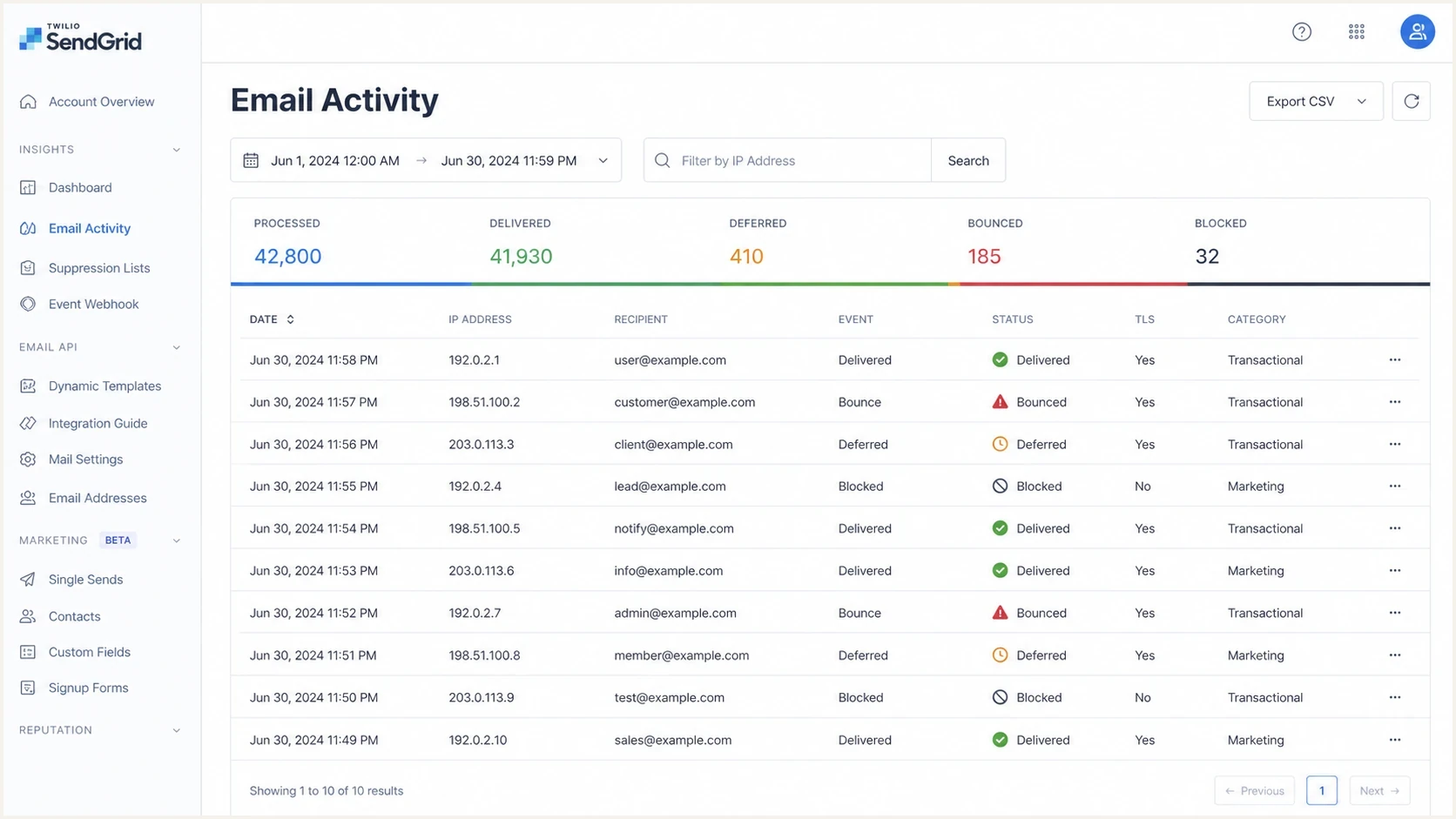
Twilio SendGrid email activity screen showing delivery events, bounces, deferrals, and blocked messages.
- Recycled IP: The IP was used before your account received it, and old reputation can follow it.
- Cold IP: A sudden newsletter launch from a quiet IP looks risky to some gateways.
- Network score: Some receivers judge the source network as well as the exact IP.
- Recipient reaction: Complaints, stale addresses, and low engagement can weaken trust fast.
- Connection identity: Forward DNS and reverse DNS/PTR should identify the intended sending host. HELO/EHLO should use that fully qualified name, and the connection should support STARTTLS.
- Message identity: SPF, DKIM, or DMARC problems do not cause every IP block, but they reduce the margin for error after message data is accepted.
Proofpoint is not required to trust a SendGrid IP because SendGrid assigned it to one customer. The IP has to earn trust through accepted mail, stable volume, low complaints, clean recipients, consistent authentication, and valid connection identity.
How to confirm the block
Start with SMTP evidence. Do not diagnose this from a missing newsletter alone. You need the bounce, deferral, or delivery log line that shows who rejected the message and at what stage of the SMTP session it happened.
Representative Proofpoint responses
554 Blocked - Proofpoint reputation block for IP 203.0.113.10
421 Deferred - unusual or unexpected sending patterns from 203.0.113.10
550 5.7.1 Rejected by the receiving organization's local policy
A 554 Proofpoint block or 421 Proofpoint deferral tied to the sending IP points to Dynamic Reputation. A broader blacklist or blocklist issue shows up across multiple receivers. If SendGrid shows no Proofpoint SMTP error, investigate content filtering or a local recipient rule instead of assuming the IP is listed.
First diagnostic checks
- Exact IP: Confirm the IP in the SMTP log matches the SendGrid IP you are investigating.
- Exact domain: Check whether the affected recipients are behind the same gateway or different Proofpoint customers.
- Exact stage: A rejection before DATA points to IP or connection reputation rather than message authentication.
- Exact repeatability: Send one controlled test, then compare it with production campaign failures.
For a broader view, check the IP against known blocklists and keep blocklist monitoring active while the IP warms. If your logs show temporary failures, this Proofpoint deferral guide is the next related path to compare against your evidence.
Blocklist checker
Check your domain or IP against 144 blocklists.







If Proofpoint is the only place rejecting the IP, treat it as a Proofpoint-specific reputation issue. If multiple receivers reject the same IP, widen the work to list hygiene, sending volume, DNS, and SendGrid support escalation before you submit repeated delist requests.
A 421 deferral is temporary. Let SendGrid retry the message while you reduce new volume. SendGrid retries deferred messages for up to 72 hours, after which the delivery event can appear as blocked even though the original receiver response was a deferral.
Shared versus dedicated SendGrid IPs
Confirm whether the rejected address belongs to a shared SendGrid pool or is dedicated to your account before opening a delist request. The SMTP evidence stays the same, but ownership changes who can remediate the IP and who should contact Proofpoint.
Shared IP
- Ownership: SendGrid controls the IP and other accounts can affect its reputation.
- Escalation: Give SendGrid support the full rejection and affected recipient evidence.
- Warmup: Individual warmup does not apply because the pool already carries mixed traffic.
Dedicated IP
- Ownership: Your account controls current traffic and should submit the initial delist request.
- Connection identity: Confirm SendGrid reverse DNS links the address to the intended sending domain.
- Warmup: Increase wanted mail gradually, and warm the IP again after more than 30 inactive days.
Do not claim that you fixed other senders on a shared pool. Document what your account changed, then let SendGrid handle network-level remediation. On a dedicated IP, document recipient cleanup and sending controls because the current traffic belongs to your account.
Fix sequence for Proofpoint and SendGrid
Do not keep pushing the same volume into the same rejection. That gives Proofpoint more negative evidence. The fastest practical path is to reduce risk first, then ask for review with a clean, specific request.
- Stop the noisy stream: Pause the affected newsletter segment or cut it to your most engaged recipients.
- Collect evidence: Save the sending IP, timestamps, sender domain, recipient domains, and full rejection text.
- Open Proofpoint review: Use the Proofpoint Postmaster delist request shown for the blocked IP, then avoid duplicate or vague requests.
- Escalate inside SendGrid: Ask SendGrid to review the IP history, outbound patterns, and affected delivery events. Their SendGrid support article explains what they expect when messages are blocked.
- Check local policy: If Proofpoint's reputation status is clear but one organization still rejects, ask its mail administrator to review the recipient gateway rule.
- Warm again: Resume gradually only after the block is removed or deferrals clearly decline.
- Keep replacement as a last resort: Do not rotate IPs to evade a block. If SendGrid confirms persistent pre-existing history after remediation, ask whether replacement is appropriate and warm the replacement as new.
What to include
- IP evidence: The exact SendGrid IP, not only the sender domain.
- SMTP proof: The rejection line, status code, date, and time.
- Mail type: Transactional, newsletter, or marketing, with consent details.
- Fixes made: Suppression cleanup, volume reduction, and authentication checks.
What to avoid
- Vague requests: Messages that only say users are missing emails.
- Repeated blasts: Sending full volume while the block is under review.
- DNS guessing: Changing DMARC policy before proving the rejection stage.
- Support loops: Sending separate cases with different facts.
Where DMARC helps and where it does not
DMARC helps receivers understand whether your visible From domain matches authenticated mail. It reduces spoofing risk and gives you reporting. It does not remove a Proofpoint IP block that happens before the receiving server accepts message content.
That distinction matters because changing your DMARC policy from p=none to p=reject can make forwarding and legacy sender problems more visible. It is good security work, but it is not the lever that tells Proofpoint to accept a blocked IP.
IP block
- Decision point: Connection or early SMTP stage.
- Main signal: IP reputation, traffic behavior, and receiver policy.
- Fix owner: The sender coordinates SendGrid and Proofpoint review.
DMARC result
- Decision point: After message headers and authentication are evaluated.
- Main signal: Domain identity and policy plus the SPF and DKIM results.
- Fix owner: The domain owner and every approved sending source.
Do not confuse the two fixes
If Proofpoint rejects before DATA, a DMARC record change will not make that specific rejection disappear. Add or repair DMARC because it is the right identity control, then keep the Proofpoint IP case moving separately.
Starter authentication records
v=DMARC1; p=none; rua=mailto:dmarc@example.com; fo=1
v=spf1 include:sendgrid.net -all
Before moving to enforcement, run a domain health check and confirm every legitimate sender passes SPF or DKIM in a way DMARC can use. In Suped's product, this workflow shows DMARC policy, SPF and DKIM status, verified and unverified sources, plus steps to fix each issue.
DMARC record detail view showing SPF, DKIM, DMARC, rDNS diagnostics, and DNS records
Warm the dedicated IP after delisting
Delisting is not a reputation reset. It only means Proofpoint no longer has the same block decision at that moment. The IP still needs stable, wanted mail so the next campaign does not recreate the same problem.
For newsletters, warm with the cleanest subscribers first: recent openers, recent clickers, recent customers, and people who signed up recently. Old lists and inactive subscribers wait until the IP has a track record. Keep each increase at no more than twice the prior volume while delivery signals stay healthy.
If you operate multiple dedicated IPs, keep marketing traffic separate from transactional or user mail. A marketing complaint spike should not put password resets or account notices on the same damaged IP reputation.
Complaint rate guardrails
Use these bands as operating limits while a SendGrid IP is cold.
No baseline
new IP
Keep volume small until the IP has enough accepted mail.
Healthy
<0.1%
Continue the warmup with engaged recipients.
Needs attention
0.1-0.3%
Slow volume and inspect the segment.
Stop and inspect
>0.3%
Pause the stream and clean the list before sending more.
|
|
|
|
|---|---|---|---|
Volume | Gradual | Spike | Slow |
Complaints | Low | Rising | Pause |
Bounces | Clean | High | Suppress |
Engagement | Stable | Drop | Segment |
Warmup signals to watch during the first campaigns.
The goal is to prove the IP sends wanted mail, then increase volume at a pace that receivers can evaluate without sudden complaint or bounce spikes.
What to send in the delisting request
A good Proofpoint request is short, factual, and complete. If you need more detail on how Proofpoint blocks behave, compare your case with this Proofpoint contact path. SendGrid's provider insight docs also explain why provider-side and blocklist data need to be reviewed together.
Proofpoint delisting request template
Subject: Proofpoint block review for SendGrid IP

IP: 203.0.113.10
Sending domain: example.com
Provider: Twilio SendGrid
Affected recipient: user@recipient.example
Mail type: opted-in newsletter
Authentication: SPF pass, DKIM pass, DMARC p=none
Recent change: moved to dedicated IP on [YYYY-MM-DD]

Sample rejection:
554 Blocked - Proofpoint reputation block for IP 203.0.113.10

Remediation:
Paused affected campaign.
Removed hard bounces and stale recipients.
Reduced volume and resumed warmup only after review.
After you submit
- Watch logs: Look for accepted mail, fewer 421 deferrals, or removal of the 554 block.
- Keep quiet: Do not keep retrying large campaigns while the review is open.
- Update SendGrid: Give support the Proofpoint case details and any new bounce evidence.
- Retest slowly: Use a small engaged segment before you return to normal newsletter volume.
How Suped supports monitoring after delisting
After the IP is unblocked, the ongoing job is visibility. Suped's product keeps DMARC monitoring, SPF and DKIM checks, blacklist/blocklist monitoring, hosted SPF, hosted DMARC, hosted MTA-STS, and real-time alerts in one workflow. This helps when a sending problem involves DNS and authentication data plus provider and receiver behavior.

Blocklist monitoring page showing domain and IP checks across blocklists with importance and status
For this SendGrid and Proofpoint problem, Suped helps separate questions that often get mixed together: is the IP on a blacklist or blocklist, is the domain authentication healthy, did a new source appear, and did a receiver-side failure spike after a campaign?
- Issue detection: Suped turns DMARC and authentication failures into specific steps to fix.
- Real-time alerts: Teams see failure spikes quickly instead of waiting for users to complain.
- Hosted SPF: Sender changes can be managed without repeated DNS edits or lookup-limit problems.
- Hosted MTA-STS: TLS policy can be published with two CNAME records and no web hosting.
- MSP dashboard: Agencies can monitor many client domains, reports, and reputation signals centrally.
After a delisting, send a real message through an email tester so you can inspect headers, authentication results, and obvious deliverability problems before returning to a full campaign.
Email tester
Send a real email to this address. Suped shows a results button when the test is ready.
?/43tests passed
That test does not replace Proofpoint review, but it catches mistakes that make a new IP look worse than it needs to: broken DKIM, missing SPF authorization, a DMARC record with no reporting address, or an unrecognized sender source.
Views from the trenches
Best practices
Capture the exact SMTP rejection before changing DNS or asking for delisting help.
Warm any dedicated SendGrid IP with your cleanest, most engaged recipients first.
Keep domain authentication correct, but diagnose IP blocks from SMTP logs first always.
Track blacklists and blocklists continuously so a new listing is seen early during warmup.
Common pitfalls
Treating a dedicated IP as new, even when it has prior sending history and receiver memory.
Trusting only the ESP reputation score when Proofpoint has its own decision system.
Changing DMARC policy to reject before confirming forwarding and source behavior carefully.
Resending the same campaign at full volume while a block is under review by Proofpoint.
Expert tips
Ask SendGrid for IP history and remediation notes when Proofpoint blocks a new IP early.
Use p=none for DMARC discovery, then move policy only after sources pass cleanly.
Separate pre-DATA IP rejects from message-level authentication failures in reports always.
Document list hygiene actions so delisting requests show real operational change clearly.
Marketer from Email Geeks says a dedicated SendGrid IP still needs a warmup period, and some receivers judge the wider sending network as well as the exact IP.
2023-03-29 - Email Geeks
Marketer from Email Geeks says a high score inside SendGrid does not prove Proofpoint will accept the mail, because receiver-side reputation data is separate.
2023-03-29 - Email Geeks
How to stop Proofpoint blocking the IP
Proofpoint is blocking your SendGrid IP because Dynamic Reputation sees spam-like behavior, malicious activity, an unusual sending pattern, or weak connection identity associated with the address. Resolve it by proving the rejection, reducing risky volume, submitting a complete Proofpoint delist request, and getting SendGrid to inspect the IP history and outbound traffic.
Fix DMARC, SPF, and DKIM at the same time because those controls protect your domain identity and improve receiver trust after the message is accepted. Do not treat DMARC as the direct fix for a pre-DATA IP block. Once the block is lifted, warm the IP again with your best recipients and monitor both authentication and blacklist/blocklist status so the same issue is caught early.




