
How to troubleshoot ProofPoint deferrals and IP reputation issues?

Updated on 21 Oct 2026: We clarified Proofpoint retry handling, reputation checks, and escalation steps for delayed mail.
If Proofpoint returns a 421 Deferred response with IP_REPUTATION, treat it as temporary throttling tied to the sending IP and unusual or unexpected sending patterns. It is not proof of a current public blocklist or blacklist entry. The fastest path is to confirm the SMTP evidence, check whether the mail later delivers, rule out authentication and DNS defects, stop suspicious outbound traffic, reduce risky sending, and escalate with the full SMTP reply, timestamps, recipient domains, and retry results.
The confusing part is that the Proofpoint error can point to an IP lookup page even when the lookup returns clean. A clean result confirms that no current block is shown when the IP is checked. It does not explain an earlier deferral or guarantee immediate acceptance at every Proofpoint-protected domain.
The short answer
Do not keep refreshing the lookup page when Proofpoint defers mail for IP reputation. Build a case file with the full SMTP response, source IP, sender domain, envelope sender, message IDs, retry history, eventual delivery status, sending volume, complaint and unsubscribe handling, and recent authentication results. Use that evidence to stop local abuse, correct technical issues, and reach the team that owns the sending IP or Proofpoint account.
What the 421 Proofpoint deferral means
A Proofpoint 421 deferral is a temporary SMTP response. The receiving system has not accepted the message, but it has not issued a permanent rejection. Your sending system retries according to its queue schedule until the message is accepted or its configured queue lifetime expires. A later delivery and a final non-delivery therefore need separate tracking.
Example Proofpoint 421 response
421 Deferred - see https://proofpoint.com/postmaster/?ip=1.2.3.4
Proofpoint's Postmaster guidance maps 421 Deferred to throttling of the sending IP for unusual or unexpected patterns. Domain reputation, content, and authentication affect broader filtering, but they should not be presented as the direct meaning of this specific 421 response. Treat the code as an IP-level clue, then check the wider sender setup for conditions that weaken recovery.
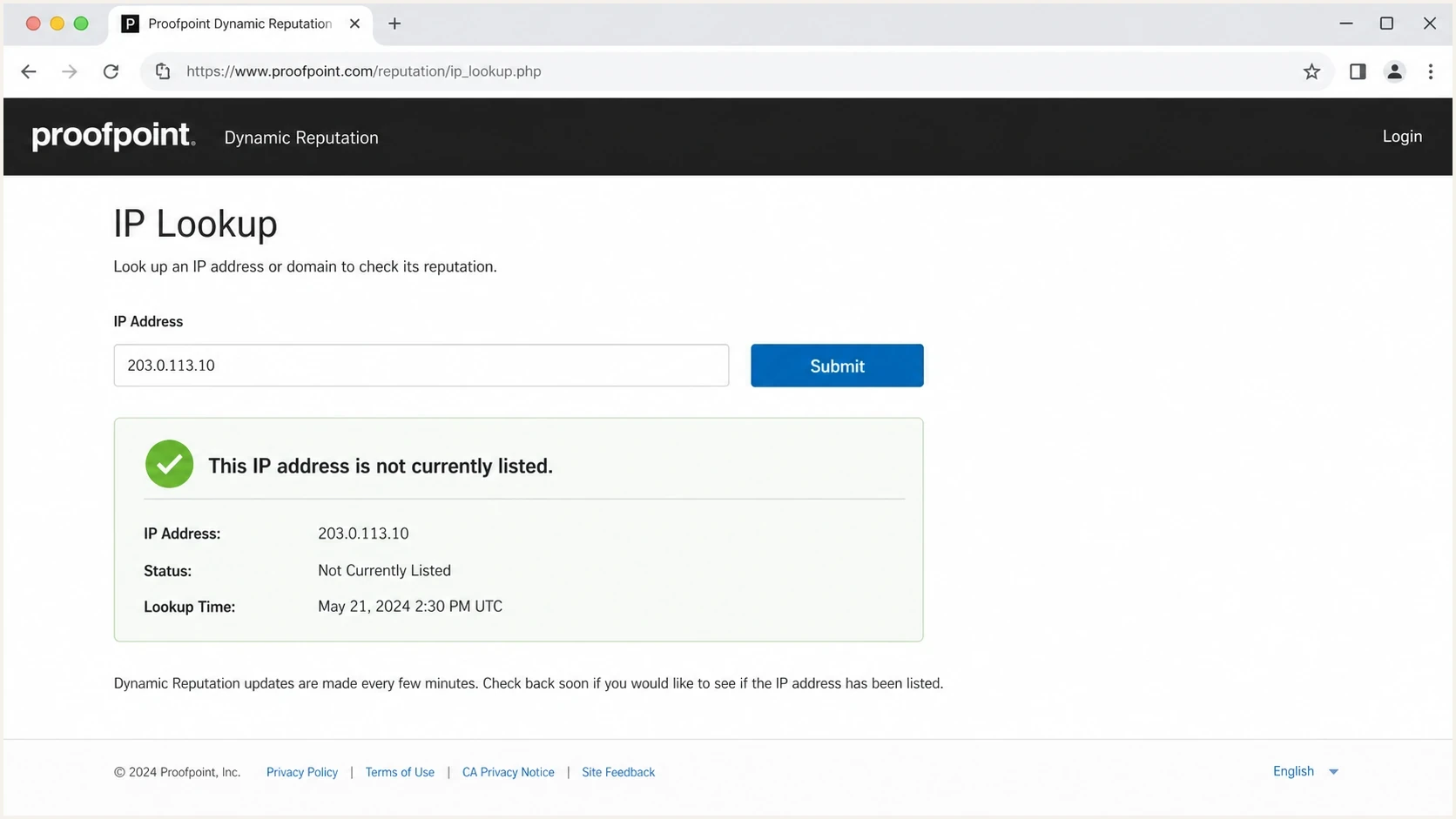
Proofpoint Dynamic Reputation lookup showing an IP that is not currently blocked.
What a clean lookup proves
- Proofpoint is not showing a current Dynamic Reputation block for the checked IP.
- There is no current block for a repeat delist request to remove.
- The result documents the IP status at the time of the check.
What it does not prove
- Dynamic reputation changes quickly, so a clean result does not erase an earlier 421 event.
- A protected recipient can still defer mail while local policy or reputation signals change.
- The lookup does not validate SPF, DKIM, DMARC, rDNS, HELO, TLS, consent, or list hygiene.
Fast triage checklist
Start with evidence that separates a Proofpoint-only pattern from a general deliverability problem. Group results by recipient domain and receiving gateway, then compare the same campaigns at other mailbox providers. This shows whether one IP, one recipient group, or the whole sending stream needs attention.
- Keep the full remote SMTP response, UTC timestamp, receiving MX hostname, recipient domain, source IP, envelope sender, queue ID, and message ID. Record whether the deferral happened at connection or later in the SMTP exchange.
- Separate messages that later deliver from messages that expire in the queue.
- Map affected domains to Proofpoint gateways where possible instead of treating all domains as equal.
- Confirm SPF, DKIM, and DMARC results, then check rDNS, HELO or EHLO, and TLS separately.
- Document opt-in source, confirmation flow, suppression timing, and complaint handling.
- Route the case to the team that owns the sending IP or the recipient's authorized Proofpoint support contact.
Set urgency by queue age and business impact rather than a universal deferral percentage. Compare unique deferred messages with all messages attempted for the same IP and recipient group in a fixed time window; repeated retries are not additional messages. Escalate critical mail or messages nearing queue expiry even when the affected share is small.
Manage SMTP retries and the deferred queue
A 421 closes the SMTP connection, so the sending mail transfer agent (MTA) must reconnect for a later attempt. SMTP retry guidance requires a delay between attempts. Use the sending platform's normal retry schedule with backoff.
- Keep the original message queued. Repeated manual resends create additional queued copies and duplicate deliveries.
- Reduce new sending and concurrent SMTP connections to affected destinations. Ask the sending platform to adjust destination-specific rate limits where needed.
- Track the oldest queued message and configured queue lifetime. Prioritize critical mail before its delivery deadline or queue expiry.
- After acceptance improves, release the backlog gradually so queued retries and new campaigns do not create another burst.
Check whether the sending platform labels a 421 as a soft bounce while still retrying, or ends delivery after its retry limit. A removed reputation hold does not trigger an immediate retry; the next attempt follows the queue schedule.
Check authentication and DNS before chasing reputation
Proofpoint's current Postmaster guidance calls for valid forward and reverse DNS, a fully qualified HELO or EHLO hostname that matches rDNS, current SPF, DKIM, and DMARC records, STARTTLS support, and standards-compliant headers and MIME. These controls do not erase an IP reputation event, but defects create separate reasons for delayed or blocked mail and weaken an escalation. Check that the PTR hostname resolves back to the sending IP. The PTR and HELO hostname do not need to equal the visible From domain.
Run a broad domain health check first, then send a real message through an email tester. DNS checks show what is published. A sample sent through the same production route tests real authentication; use recipient-side headers when available to verify results at Proofpoint.
For DMARC to pass, at least one passing SPF or DKIM result must authenticate a domain that matches the visible From domain under the configured relaxed or strict rules. SPF uses the envelope sender domain; DKIM uses the signing domain. This requirement is defined in RFC 9989.
Email tester
Send a real email to this address. Suped shows a results button when the test is ready.
?/43tests passed
DMARC aggregate reports add authentication evidence from receivers that provide reports. Suped's DMARC monitoring shows authentication pass rates, unknown senders, and policy gaps. Suped's product keeps that evidence beside SPF and DKIM diagnostics. Keep the sending platform's queue logs for retry evidence because DMARC reports do not show every SMTP deferral.
DMARC record detail view showing SPF, DKIM, DMARC, rDNS diagnostics, and DNS records
Confirm the source IP and stop abusive traffic
The IP in the Proofpoint response is the public source IP that connected to the recipient. It can belong to an outbound relay or shared sending pool rather than the application or server where the message originated. Verify that egress path before changing DNS or submitting a request for the wrong IP.
- Match the IP in the 421 response to the relay, NAT gateway, or sending pool that made the SMTP connection.
- Look for compromised accounts, infected systems, open relay behavior, form abuse, or sudden tenant-level volume.
- On a shared IP, ask the sending platform whether another sender affected the pool and whether traffic can be isolated.
- Stop the bad traffic, secure affected systems, and document the remediation before requesting a reputation review.
Short delays can clear automatically
Proofpoint's PDR FAQ says short delay status usually clears automatically within minutes. This is not a delivery deadline or a guaranteed recovery time. Continuing suspicious traffic can turn a temporary delay into a block or cause the status to return. Fix the source before resuming normal volume.
Separate 421 deferrals from 550 or 554 rejections
A sender can have a Proofpoint-specific reputation problem without appearing on every major blocklist or blacklist. The reverse is also true: a public listing can explain broad delivery trouble even when Proofpoint is only one of several systems reporting a problem. Check both, but follow the SMTP status that actually occurred.
|
|
|
|---|---|---|
421 Deferred | Temporary IP throttling | Track retries and stop unusual traffic |
550 or 554 with Proofpoint reputation block text | Permanent rejection of that attempt; read the full response for the cause | Check PDR status, remediate, and request delisting for a confirmed PDR block |
Clean lookup | No current PDR block | Contact the affected recipient organization |
Authentication failure | Separate trust defect | Fix DNS or signing |
250 after message DATA | Gateway accepted the message; inbox placement is a separate result | Ask the recipient administrator to trace missing mail and check quarantine |
Use the exact SMTP response and lookup status to choose the next action.
Investigate relevant public listings in parallel with the Proofpoint case. Suped's blocklist monitoring tracks domain and IP listings with severity and status. A clean public blacklist (blocklist) result does not exclude Proofpoint's own reputation signals.

Blocklist monitoring page showing domain and IP checks across blocklists with importance and status
If Proofpoint shows the IP as blocked, follow the official Proofpoint delisting process after remediation. If the lookup shows no current block but an organization still defers the mail, contact that recipient's mail administrator. Proofpoint states that an outside sender cannot open a support case directly, but the recipient organization's authorized contact can. Hosted senders should also involve the platform's deliverability team because it owns the egress logs and IP.
Fix the sending pattern that Proofpoint sees
A fresh dedicated IP has little reputation history. If a B2B sender moves substantial volume onto it before positive acceptance signals accumulate, corporate gateways can defer aggressively. Proofpoint recommends gradual increases and says not to exceed twice the previous volume. Use accepted mail to engaged recipients as the baseline. Slower unwanted mail still damages reputation. That 2x limit is a ceiling, not a target or a fixed daily warm-up schedule.
Sending changes that help
- Start with consenting recipients who recently replied or purchased, rather than selecting the recovery audience by opens alone.
- Remove old event scans, purchased names, partner swaps, and unclear consent sources.
- Avoid sudden jumps, stop-start bursts, and large one-off campaigns during recovery.
- Keep marketing traffic apart from transactional or person-to-person mail.
Signals that hurt
- A non-working newsletter form weakens the evidence that every address has clear consent.
- Marketing campaigns and transactional notices on one IP blur reputation.
- Counting only final bounces hides how many messages spent hours being deferred.
- Compromised accounts or shared tenants can keep the IP in a delay cycle.
The consent check matters because Proofpoint evaluates whether traffic from the IP looks wanted by the receiving population. If the website signup flow is broken, or records come from sources that recipients do not recognize, technical fixes will not carry the whole recovery. Confirm that marketing mail has a working unsubscribe link and one-click unsubscribe headers, and process opt-outs promptly; Proofpoint specifies within two days.
Illustrative recovery ramp
Illustration only, not a Proofpoint timetable or a promise of recovery by day 10. Pause increases when deferrals return, and keep each increase below the published 2x ceiling.
Daily engaged-recipient volume
Escalate Proofpoint deferrals with SMTP evidence
If you send through an ESP, that platform owns the logs and operational path needed to resolve a difficult Proofpoint deferral on its IP. The useful request is an escalation to its deliverability team with enough data to reproduce the pattern. For mail sent directly to a Proofpoint-protected organization, the recipient's mail administrator has the customer support path.
For detailed escalation steps, see contacting Proofpoint support. Keep the request short and attach a structured evidence table.
Escalation template
Subject: Proofpoint 421 / IP_REPUTATION deferrals on sending IP

Sender domain: example.com
Sending IP: x.x.x.x
Platform account: account name or ID
First and latest occurrence: YYYY-MM-DD HH:MM UTC
Receiving MX hostname and SMTP stage: hostname; connection or later stage
Affected recipients: addresses, domains, and share of attempted messages
Message and queue IDs: representative samples
SMTP response: full remote response, including any enhanced status code
Retries: attempt count, timing, final status, and oldest queued message
Queue lifetime: configured expiry and next scheduled retry
Authentication: SPF result, DKIM result, DMARC result
Recent actions: abuse stopped, volume reduced, weak segments paused
Request: review repeated deferrals and escalate through the responsible support contact
What to include
- Provide representative message IDs and queue IDs, with recipient domains and UTC timestamps.
- Show which samples delivered later and which expired after retry.
- List the exact abuse cleanup, suppression, ramp, and authentication fixes already completed.
- Quantify the affected share, affected domains, and campaign names.
Proofpoint's contact guidance says inquiries can take 72 hours and do not always generate a reply. A duplicate-ticket warning indicates an open investigation. Follow up on the existing request through delist-request@proofpoint.com rather than submitting repeated requests. Continued deferrals with a clean PDR result belong with the recipient's mail administrator.
Where Suped fits in the workflow
Suped's product cannot force Proofpoint to accept a message. Its role in this workflow is to reduce unknowns before escalation by showing whether authentication passes, which senders use the domain, and whether the domain or IP has blocklist or blacklist exposure.
Issues page showing top issues, verified sources, unverified sources, and authentication pass rates
The practical Suped workflow is to add the domain, verify DMARC reporting, review authentication sources, investigate unrecognized senders, check SPF DNS lookup complexity, turn on alerts for sudden failure spikes, and keep blocklist monitoring active while the sending pattern is repaired. MSPs and agencies can repeat the same checks across client domains in the multi-tenancy dashboard.
Views from the trenches
Best practices
Record every SMTP response with timestamp, recipient domain, IP, and retry outcome.
Validate consent paths and public signup forms before claiming the list is confirmed.
Ask the sending platform to escalate once the evidence shows a repeated pattern.
Common pitfalls
Refreshing the Proofpoint lookup can waste time when the IP is not publicly listed.
Generic support tickets stall when they lack message IDs, queue history, and domains.
Reducing volume fails when old, weak, or unclear-permission segments remain active.
Expert tips
Treat deferrals and final non-delivery as separate metrics during reputation recovery.
Keep the case focused on one IP, one domain, and a short set of reproducible samples.
Fix visible acquisition defects because they weaken the sender's consent narrative.
Marketer view
Marketer from Email Geeks says a Proofpoint deferral does not guarantee the IP will appear in the public lookup, even when the SMTP response points there.
2024-08-12 - Email Geeks
Marketer view
Marketer from Email Geeks says concrete advice requires the sending domain, IP address, consent path, and evidence of how addresses were acquired.
2024-08-12 - Email Geeks




