Why does Outlook say my domain is listed in Spamhaus when it is not?

Updated on 28 Jul 2026: We clarified how to trace Outlook's Spamhaus rejection to the exact SMTP identity, rejecting gateway, and responsible operator.
Outlook says your domain is listed in Spamhaus when it is not because the rejection text is tied to the SMTP identity Microsoft evaluated, not always the domain you typed into a public lookup. In the common 550 5.7.1 S8001 or S8002 cases, Microsoft is usually referring to a HELO domain, Mail From domain, sending IP, reverse DNS name, cached dataset result, or an inaccurate rejection reason that only the receiving network can trace.
If Spamhaus shows no current listing, do not keep asking Spamhaus to remove something that is not listed. Use the bounce as the source of truth, extract every identity in the SMTP path, check each one, then decide whether the fix belongs with your DNS, mail host, sender platform, Microsoft support, or a short waiting period after a recent removal.
What the Outlook error means
The wording matters. A bounce that says Helo domain is listed in Spamhaus is not the same as a bounce that says MailFrom domain is listed in Spamhaus. Both can look like a normal domain blacklist problem to the sender, but they point to different checks inside the SMTP conversation.
Sanitized Outlook rejectiontext
Action: failed
Status: 5.0.0
Remote-MTA: dns; hotmail-com.olc.protection.outlook.com
Diagnostic-Code: smtp; 550 5.7.1 Service unavailable,
Helo domain is listed in Spamhaus. To request removal from this list
see https://www.spamhaus.org/query/lookup/ (S8001)
[DBAEUR03FT004.eop-EUR03.prod.protection.outlook.com]
This rejection comes from Microsoft's receiving infrastructure, not the Outlook app on a computer or phone. The Remote-MTA and the server name in square brackets identify the gateway that issued the SMTP response.
A Microsoft Q&A thread shows the same pattern with an S8002 rejection for a Mail From domain. The Spamhaus DBL documentation says DBL data can be used against the HELO string, Mail From domain, rDNS-linked domain, and domains found later in message content. That explains why a visible From domain can look clean while another related identity triggers the rejection.
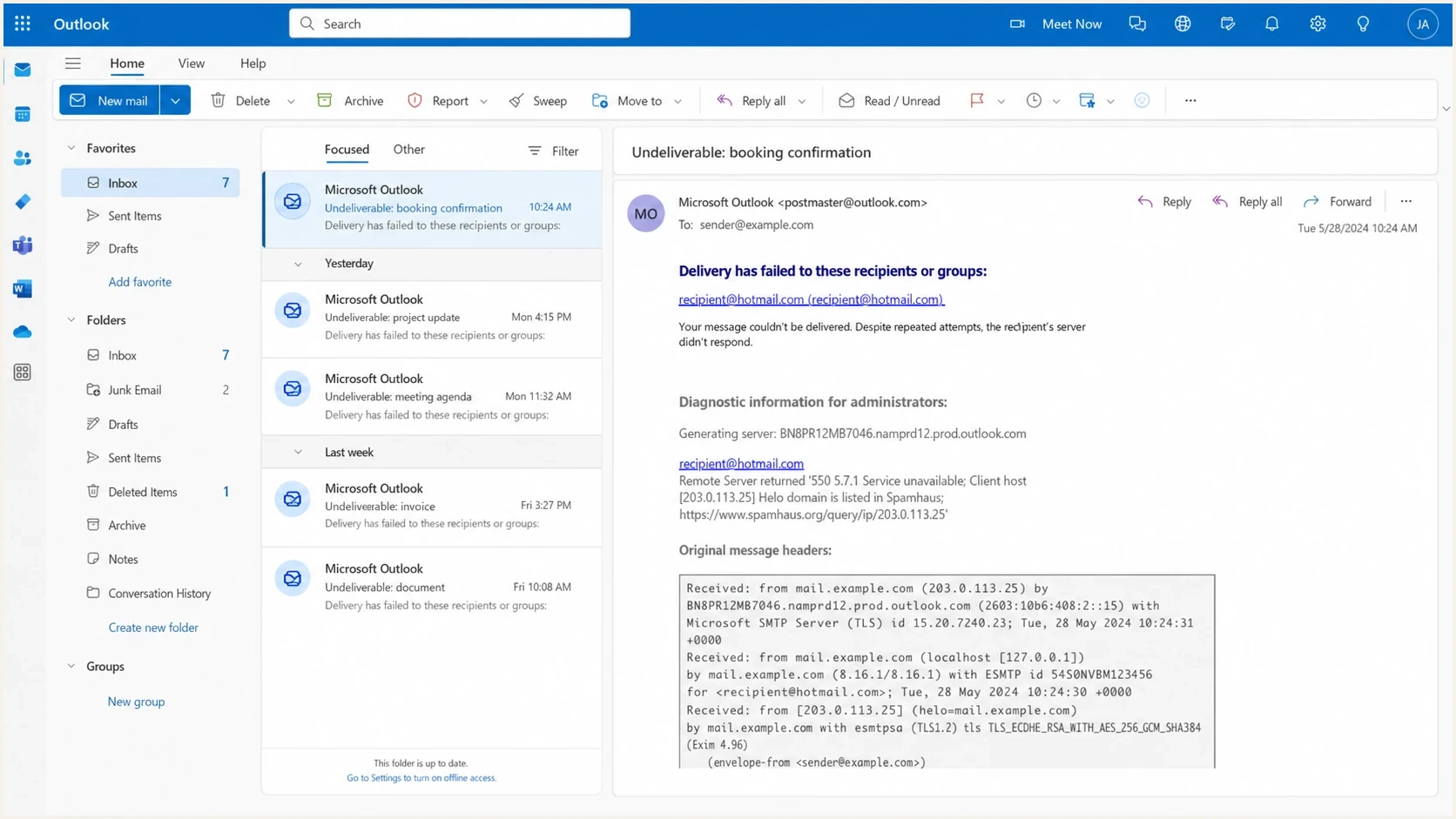
Microsoft Outlook on the web showing a bounce message with a Spamhaus-related SMTP rejection.
|
|
|
|---|---|---|
HELO | Server greeting name | HELO, PTR, and A |
Mail From | Envelope sender | Return-Path domain |
S8001 | HELO-domain rejection | Announced HELO name |
S8002 | Mail From rejection | Envelope domain |
Common Outlook rejection terms and what to check first.
Read the literal identity
Do not reduce the error to "my domain is blacklisted" too early. Outlook tells you which SMTP identity failed, and that identity decides the next move.
- HELO: Check the hostname your sending server announces when it connects.
- Mail From: Check the envelope sender domain, not just the visible From header.
- Sending IP: Check the exact outbound IP that connected to Microsoft.
- Content domains: Check link domains in the message body when SMTP identities look clean.
Why the lookup can be clean
A clean Spamhaus lookup does not prove Outlook invented the error. It proves the object you checked is not currently visible as listed in that lookup. The missing piece is often an object mismatch, DNS resolver problem, or delayed receiver update after a recent removal.
- Wrong object: You checked the visible From domain, but Outlook rejected the HELO, Mail From domain, IP, rDNS name, or a link domain.
- Recent removal: Spamhaus says some networks take longer to catch up after removal, with normal clearing in one to two hours and rare sync problems lasting longer, as noted in the Spamhaus FAQ.
- Resolver issue: The receiving system can use a DNS resolver that returns stale or incorrect DNSBL data instead of the current authoritative result.
- Inaccurate bounce: Some delivery status notifications cite a blocklist or blacklist for no valid reason. Only the network that issued the rejection can trace that decision.
- Recent change: A new HELO name, sending IP, mail host, or envelope sender can expose a problem that did not affect earlier mail.
What senders often check
- Website domain: The public brand domain that appears in the address.
- Root domain: The organizational domain without subdomains.
- Visible From: The address a recipient sees in the mail client.
What Outlook can check
- SMTP HELO: The name your server gives during connection.
- Envelope sender: The return-path domain used for SPF.
- Message links: Domains inside headers, redirects, and body links.
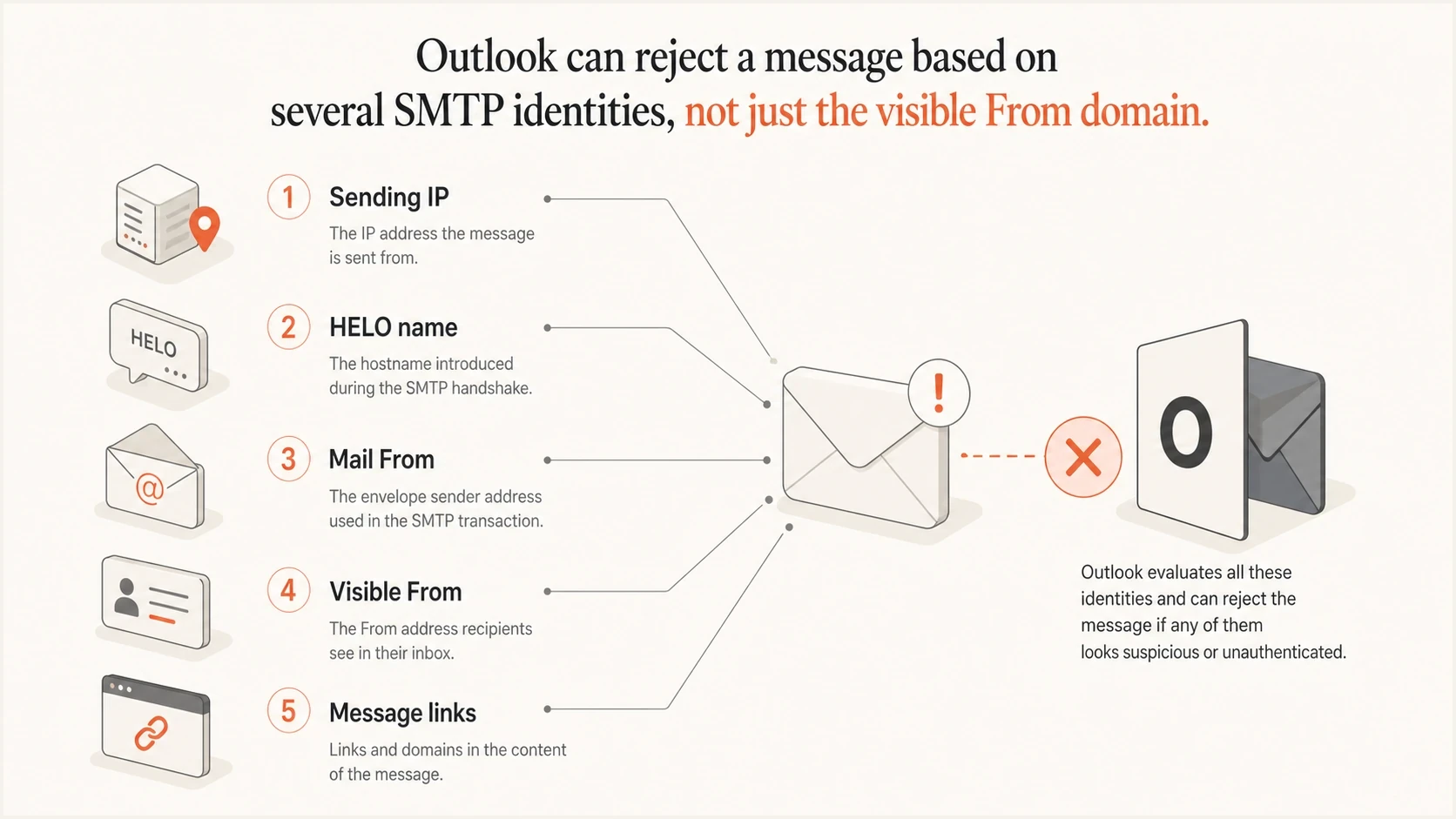
SMTP identities that Outlook can evaluate before accepting email.
Confirm where the rejection happened
Before changing DNS, confirm which mail server issued the rejection. Outlook is the mailbox brand, but the SMTP response can come from Microsoft's receiving gateway, your own mail gateway, or an intermediate provider. The rejecting server controls the lookup that produced the block.
- Read Remote-MTA: Find the hostname that accepted the connection and returned the diagnostic code.
- Check the bracketed host: A name ending in prod.protection.outlook.com points to Microsoft's receiving infrastructure.
- Trace a different host: If the host belongs to your gateway or mail provider, send that operator the full bounce because its resolver or filtering rule generated the result.
- Identify the owner: On shared sending infrastructure, the provider often controls the outbound IP, PTR, HELO, and Mail From domain.
Do not fix an identity you do not control
If the rejected HELO, PTR, sending IP, or envelope domain belongs to a provider, changing your visible From domain or unrelated DNS records will not repair it. Give the provider the full NDR, UTC timestamp, Microsoft gateway name, and rejected identity.
The fastest diagnostic path
Use a fixed order to keep the investigation grounded. Start with the non-delivery report, not a generic blocklist (blacklist) search. Then test the exact identities and compare the result with a real message sent to a Microsoft mailbox.
- Keep the NDR: Save the full bounce text, including S8001 or S8002, timestamp, remote MTA, and diagnostic code.
- Extract identities: Write down sending IP, HELO name, Mail From domain, visible From domain, DKIM d= domain, and message link domains.
- Check ownership: Mark which identities belong to you and which are controlled by your mail provider.
- Check the domain: Run a focused lookup, then use a broader domain health checker to catch SPF, DKIM, DMARC, and reputation issues at the same time.
- Send a test: Send a real message and inspect the headers with an email tester so you confirm the actual SMTP and authentication path.
- Escalate clean cases: If every identity is clean and the problem affects only Microsoft recipients, use the Outlook blocking guide to prepare evidence for Microsoft.
Identity checklisttext
Sending IP: 203.0.113.25
PTR name: mail.example.com
HELO name: mail.example.com
Mail From: bounce.example.com
Visible From: example.com
DKIM d=: example.com
DMARC domain: example.com
Message links: example.com, links.example.com
For a one-off rejection, the checklist is enough. For a sending domain tied to revenue or customer operations, continuous blocklist monitoring preserves historical evidence because a single clean lookup after the fact does not prove what Microsoft saw when it rejected the message.
Blocklist checker
Check your domain or IP against 144 blocklists.







If the blocklist checker shows a live listing, treat it as an active reputation issue. If it stays clean across the exact HELO, Mail From, IP, and link domains, treat the Outlook error as a Microsoft-specific block, stale blacklist signal, or inaccurate rejection reason and keep the evidence together.
What to fix first
The fix depends on whether you find a live listing. When nothing is listed, the wrong move is changing random DNS records. That adds noise and makes later support harder. Keep the mail path stable, collect evidence, and correct only the identity that fails a real check.
How long to wait after a clean result
Use timing as a guide after confirming the exact Outlook bounce identity is not listed.
Normal sync
0-2 hours
A recent removal or cache mismatch often clears without DNS changes.
Watch closely
2-24 hours
Keep testing the same identity and avoid changing unrelated records.
Escalate
24+ hours
A clean object with continuing Microsoft-only blocks needs receiver-side review.
Do not chase a fake delisting
If Spamhaus does not list the identity, there is no Spamhaus removal request to make for that identity. The useful work is proving the mismatch and fixing any adjacent mail setup issue that makes Microsoft less confident in the sender.
- Clean Spamhaus: Send Microsoft the bounce, timestamp, sending IP, HELO, and lookup result.
- Broken HELO: Use a real hostname with matching forward and reverse DNS.
- Bad SPF: Authorize the actual sending service and stay under DNS lookup limits.
- Failed DMARC: Fix SPF or DKIM alignment before changing policy enforcement.
If you find a real Spamhaus listing, identify the dataset, fix the reason it was listed, then request removal through the proper process. The Spamhaus blocking guide is useful when the lookup shows an actual domain or IP listing.
Where Suped fits
Suped is our DMARC and email authentication platform, built for the parts of this problem that need evidence over time: DMARC monitoring, SPF and DKIM visibility, blocklist checks, real-time alerts, and sender source detection. It does not delist a domain that is not listed. It helps you see what changed, which identity failed, and what to fix next.

Blocklist monitoring page showing domain and IP checks across blocklists with importance and status
For teams managing more than one domain, this matters because Outlook complaints rarely arrive with complete context. Suped keeps DMARC, SPF, DKIM, blocklist monitoring, and sender evidence together. That gives you a cleaner escalation packet when Microsoft is the only receiver blocking mail.
- Evidence: Track current and historical listings for the IPs and domains tied to your senders.
- Authentication: Find SPF, DKIM, and DMARC alignment gaps before they become receiver-side blocks.
- Alerts: Get real-time alerts when failures or listings appear instead of discovering them through bounces.
- Scale: Use MSP and multi-tenancy views when multiple client domains need the same workflow.
If you are still mapping the basics, start with blocklists and the exact bounce evidence. Then move into monitoring once the sender path is stable.
When it is really Spamhaus
Sometimes Outlook is right. A Spamhaus blocklist or blacklist result can hit the domain, the IP, or a domain mentioned in the message. The dataset tells you what type of problem you are solving.
|
|
|
|
|---|---|---|---|
DBL | Domain | Domain reputation | Check use |
CSS | IP | Outbound mail | Stop source |
PBL | IP | Policy range | Use relay |
XBL | IP | Compromise | Clean host |
Dataset clues to separate domain and IP reputation problems.
Signs you have a real listing
- Many receivers: More than Microsoft rejects or junks the same sender.
- Consistent object: Every bounce points to the same IP, HELO, or envelope domain.
- Live lookup: The exact object appears on a current Spamhaus dataset.
- Recent abuse: Logs show compromised forms, list bombing, malware, or unauthorized SMTP use.
If the bounce refers to Spamhaus SBL or XBL wording, the troubleshooting path changes because the issue often sits with the sending IP or host. For bounce patterns like that, use the Spamhaus bounce guide and keep the Outlook-specific evidence separate.
What to do next
The direct answer is simple: Outlook is not always talking about the public domain you checked. It is often talking about the SMTP HELO, envelope sender, sending IP, cached blocklist data, or an inaccurate rejection reason generated by the receiving network.
- If clean: Keep the evidence and escalate to Microsoft when only Microsoft recipients reject the mail.
- If listed: Fix the root cause, then request removal for the exact listed object.
- If unclear: Send a fresh test message and compare headers, authentication results, and the next bounce.
- If recurring: Use Suped to monitor authentication, sender sources, blocklist events, and DMARC reporting over time.
The best practical outcome is a clear record of what Outlook rejected, what Spamhaus currently shows, and what changed in your mail path before the rejection started.




