What causes bounces related to Spamhaus SBL-XBL database and how to troubleshoot?

Updated on 25 Sep 2026: We updated this guide with current Spamhaus DNSBL return codes and active XBL containment steps.
A bounce that says 550 5.7.0 and mentions the Spamhaus SBL-XBL database means the receiving mail server rejected your connection because it believes your sending IP is on a Spamhaus IP blocklist (blacklist). That is the direct answer. The part that needs care is whether the IP was actually listed when the rejection happened.
When the sending IP is clean in current Spamhaus checks, treat the bounce as unresolved until the timing and DNS response are verified. Common causes include a recently removed listing, a stale local copy of Spamhaus data, a broken DNSBL lookup, blocked public-mirror access, generic reverse DNS on the receiver's query source, or a recipient MTA that mistakes a Spamhaus error response for a positive listing.
- Main cause: The recipient system thinks the connecting IP matches SBL or XBL.
- Most missed detail: The checked IP must be the outbound SMTP IP, not the sender domain or tracking domain.
- Best first move: Collect the full bounce, message ID, timestamp, recipient domain, and connecting IP before changing anything.
- Do not assume: A Spamhaus name inside a bounce is not proof that Spamhaus currently lists your IP.
Why this bounce happens
The phrase SBL-XBL usually appears because a receiving server is using Spamhaus IP reputation data during the SMTP conversation. The Spamhaus SBL covers direct spam sources and infrastructure connected to spam operations. The Spamhaus XBL covers IPs associated with compromised or infected systems. Spamhaus recommends its combined Zen zone for IP-based mail filtering. Zen combines SBL, XBL, and PBL data, so the receiver must parse the returned code before deciding why an IP matched. An SBL-XBL label can still appear when a receiver queries the older combined zone or uses a legacy rejection template.
That flow is normal when the query is correct and the MTA parses the response code correctly. The confusion starts when the receiver's software, resolver, or cached dataset is wrong. A sender can get a Spamhaus bounce even when a later lookup is clean, so separate the rejection message, the listing state at send time, and the current listing state before escalating.
|
|
|
|---|---|---|
Real SBL | The outbound IP is listed for abuse. | Stop the abuse and follow the listing instructions. |
Real XBL | The IP or a device behind it looks compromised. | Restrict unauthorized SMTP traffic and clean the affected device. |
Recent removal | The IP was listed when mail was rejected but is clean now. | Check timing and allow receiver data to sync. |
Resolver issue | The receiver cannot query correctly. | Ask for DNSBL configuration checks. |
Bad logic | A lookup error is treated as listed. | Send evidence and request retest. |
Wrong IP | The checked address is not the SMTP IP. | Use logs to find the connecting IP. |
Common causes behind SBL-XBL bounces
For background, it helps to understand how blocklists work at the SMTP layer. A receiver can reject during connection, before message content is accepted, so the bounce often has little to do with subject lines, templates, or DMARC.
First confirm whether the IP is actually listed
The first diagnostic step is to identify the exact IP that connected to the recipient MX. Do not check the visible From domain, the envelope sender domain, or the domain in a tracking link and assume that result explains an IP-based rejection. SBL and XBL decisions usually happen against the connecting IP.
Bounce example
550 5.7.0 Your server IP address is in the SpamHaus SBL-XBL database, bye
A real listing investigation starts with the bounce and the mail logs. Record the sender host, outbound IP, recipient domain, timestamp with timezone, and full SMTP reply. If you use a shared email platform, ask the platform for the outbound IP used for that recipient.
- Find the IP: Use MTA logs, message trace data, or provider support data to confirm the SMTP source.
- Check current status: Run a current Spamhaus check against the same IP.
- Read the response: Record the A and TXT answers, then distinguish a reputation code from a DNSBL error code.
- Map recipients: If only the same few domains reject while others accept, suspect their receiving setup.
- Keep timing: A listing that existed earlier but is clean now points toward removal timing, cache, sync, or delayed retry behavior.
Blocklist checker
Check your domain or IP against 144 blocklists.







If the IP is listed, do not jump straight to delisting. A real Spamhaus listing is a symptom. The fix depends on whether the cause is compromised infrastructure, spam complaints, poor list acquisition, an abused web form, a misconfigured server, or a customer on shared infrastructure.
If the IP is not listed, save the clean lookup result with the bounce evidence. Also compare the lookup time with the rejection time. A clean result supports recipient escalation, but it does not rule out a listing that was removed between those two events.
How to contain an active XBL listing
An XBL listing often points to a compromised device behind the public IP, not the legitimate mail server itself. A spambot can open direct SMTP connections and bypass the normal MTA, so the mail server logs can look clean while the shared public IP remains listed.
- Contain outbound SMTP: At the network edge, allow destination TCP port 25 only from approved mail servers. This stops unauthorized direct delivery while you investigate.
- Find the source: Review network egress logs, including firewall or NAT records, for devices making repeated outbound port 25 connections.
- Clean the device: Isolate the affected system, remove the infection or rebuild it, apply updates, and secure any exposed accounts.
- Verify before removal: Confirm that the abusive traffic has stopped, follow the listing instructions, and watch for a repeat listing.
If a shared sending platform owns the IP, send the provider the full bounce and message details. The provider controls the host, network logs, and removal request. Ask for the affected IP's incident status and whether your traffic has been moved only after the abuse source is contained.
An SBL listing follows a different path
For an SBL listing, use the case details attached to the IP and involve the network owner or provider named there. Do not submit repeated removal requests before the listed abuse source has been stopped.
How to interpret Spamhaus return codes
A DNSBL response must be interpreted by its exact return code. For an IP that is not listed, the expected DNS answer is NXDOMAIN. In current public IP zones, a 127.0.0.* response identifies the underlying Spamhaus dataset, while 127.255.255.* identifies a query error and must not trigger a rejection. Because Zen also contains PBL, a Zen result is not automatically an SBL or XBL result.
|
|
|
|---|---|---|
NXDOMAIN | The queried IP is not listed. | Do not reject on Spamhaus reputation. |
127.0.0.2 | SBL data | Investigate the SBL listing details. |
127.0.0.3 | CSS data in the SBL family | Investigate the automated spam-source listing. |
127.0.0.4 | XBL data | Find the compromised system or device. |
127.0.0.9 | DROP data, returned with SBL | Treat it as a serious network-level listing. |
127.0.0.10 | PBL data maintained by an ISP | Check whether the IP should send mail directly. |
127.0.0.11 | PBL data maintained by Spamhaus | Check whether the IP should send mail directly. |
127.255.255.252 | DNSBL name typing error | Correct the receiver's DNSBL configuration. |
127.255.255.254 | Query through a public or open resolver, or a source with generic reverse DNS | Fix resolver access and do not reject the sender. |
127.255.255.255 | Excessive query volume | Correct query access and do not reject the sender. |
Relevant Spamhaus IP DNSBL responses
A receiving server can start seeing 127.255.255.254 after Spamhaus enforces its public-mirror access policy on the receiver's DNS query source. That can happen even when the sending IP has not changed. The receiver must correct its query path and must not convert the error into a blacklist or blocklist rejection.
Test through the receiver's DNS resolverBASH
dig @DNS_RESOLVER 2.0.0.127.zen.spamhaus.org A +short
dig @DNS_RESOLVER 1.0.0.127.zen.spamhaus.org A +short
Test the resolver used by the MTA
A command-line lookup can use a different resolver from the mail server. Ask the recipient administrator to test a known listed address and a known unlisted address through the same resolver path used by the MTA. The listed test should return valid reputation codes, and the unlisted test should return NXDOMAIN.
When clean IPs still bounce
Clean IPs still produce SBL-XBL bounces when the receiving server has old data or broken lookup logic. A recent removal is another explanation. Spamhaus advises allowing up to 24 hours for XBL updates to reach networks that do not sync at the same speed. Give extra weight to a receiver-side fault when the bounce text repeats at a small group of recipient domains, the message lacks useful DNSBL detail, and no listing appears around the rejection time.
Real sender problem
- Listing present: The outbound IP appears in current Spamhaus data.
- Broad impact: Many unrelated recipient domains reject the same IP.
- Specific evidence: The rejection includes a valid reputation return code.
- Fix owned: Your team or provider must remove the abuse source.
Recipient-side problem
- Listing absent: The same IP is clean in checks made around the rejection time.
- Narrow impact: Only a few domains reject while normal delivery continues elsewhere.
- Error response: The lookup returns 127.255.255.* instead of a reputation code.
- Fix external: The recipient postmaster must correct filtering.
Do not chase delisting without evidence
A delisting request is useful only when there is an active listing and the underlying cause has been fixed. When the IP is clean and no valid historical listing is evident, the work is evidence collection and recipient escalation, not IP rotation or emergency DNS changes.
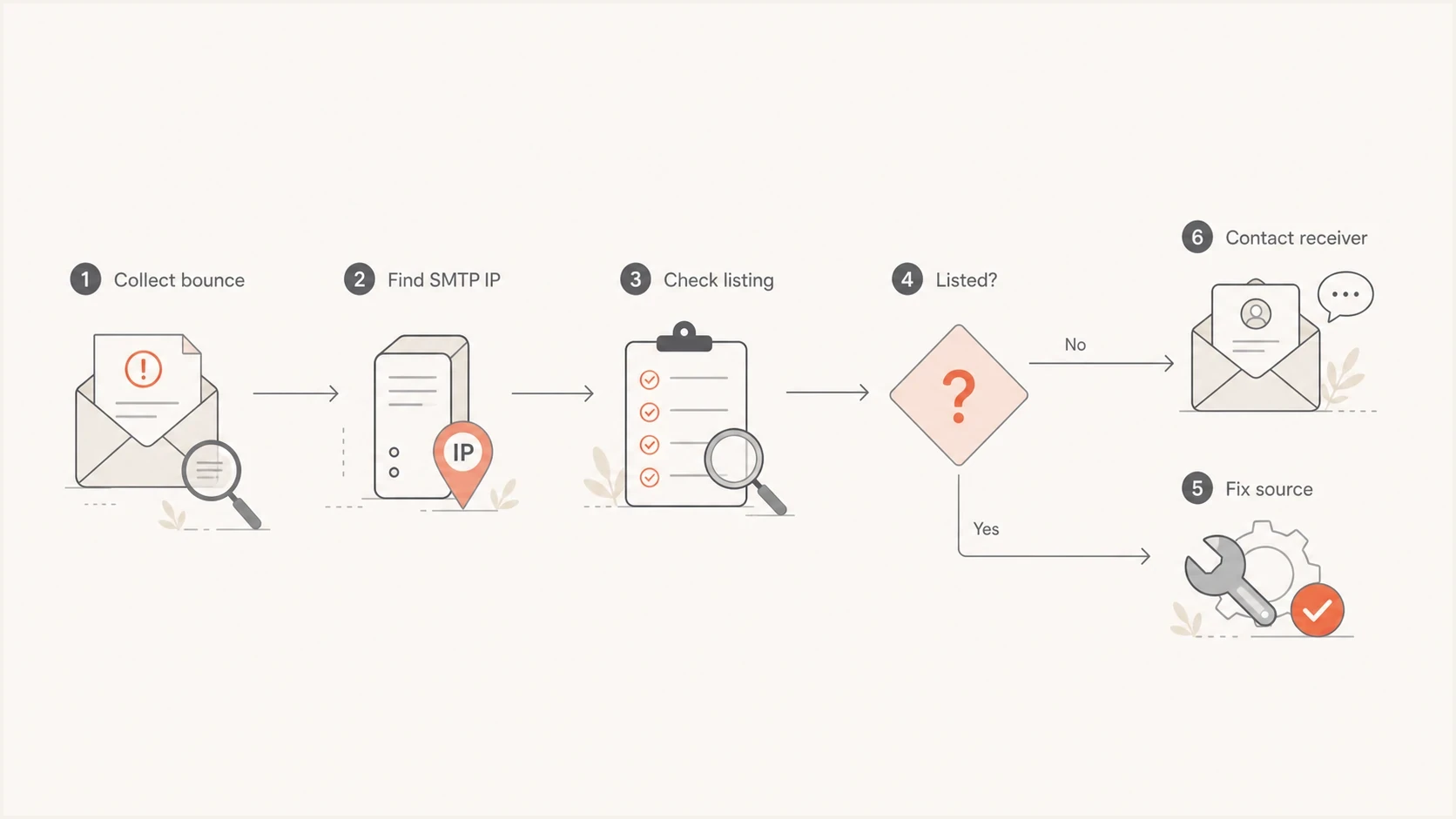
Decision flow for checking an SBL-XBL listing, fixing its source, or contacting the receiver.
How to troubleshoot step by step
Troubleshoot these bounces as an incident with a narrow scope. The goal is to prove whether the sending IP had a valid listing, the receiver used a stale result, or the receiver mistook a DNSBL error for a listing. That distinction prevents wasted work.
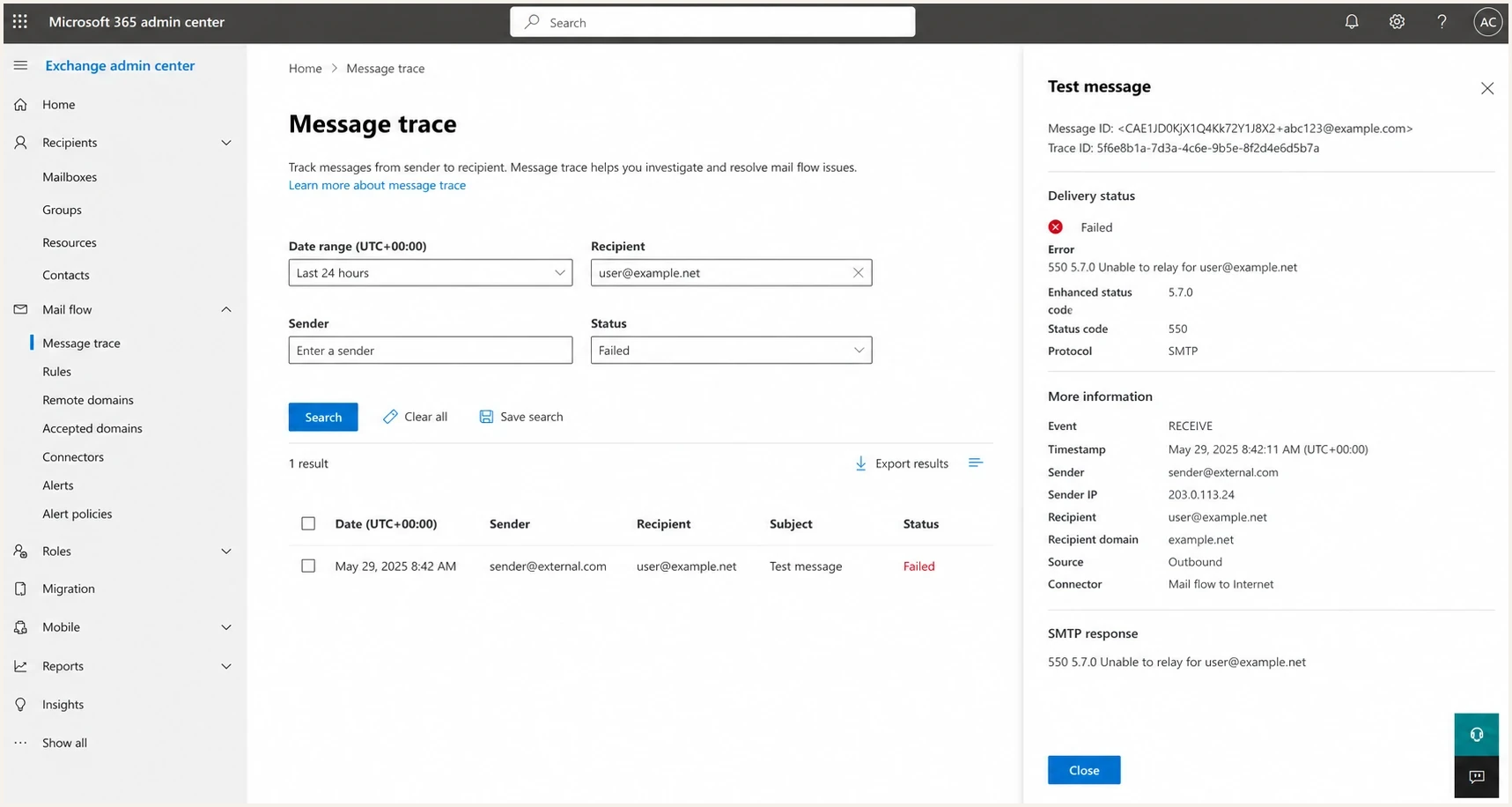
A Microsoft 365 Exchange admin center message trace screen showing a failed SMTP response.
- Save evidence: Keep the full bounce, headers if available, campaign ID, message ID, and send time.
- Find the IP: Confirm the exact outbound IP used for that recipient and that send attempt.
- Check the IP: Look for active SBL, CSS, XBL, or combined Spamhaus results against that IP.
- Read the code: Separate valid reputation answers from 127.255.255.* query errors.
- Review the pattern: Compare rejecting domains, accepting domains, bounce count, and first-seen time.
- Escalate cleanly: Send the recipient postmaster a concise note with evidence and a same-resolver retest request.
A real send test can also show whether authentication, headers, and routing look normal outside that failing recipient. Suped's email tester gives you a report from an actual received message instead of only a DNS lookup.
Recipient escalation note
Hello,

Our message to user@example.net was rejected with this SMTP reply:
550 5.7.0 Your server IP address is in the SpamHaus SBL-XBL database, bye

The connecting IP was 203.0.113.24 at 2026-05-22 10:14 UTC.
A current Spamhaus lookup for that IP shows no active SBL or XBL listing.

Please check whether your MTA has stale DNSBL data, uses a blocked resolver,
or handles a 127.255.255.* query error as a positive listing. Please retest
through the same DNS resolver used by the MTA.

Thank you.
Keep the note short. The person on the receiving side needs enough data to reproduce the lookup and find the local failure. Long explanations about sender reputation usually slow the process down.
How to read the bounce text
The exact wording matters. A useful DNSBL rejection identifies the checked IP and includes a lookup response or reference. A generic rejection that only says the server IP is in SBL-XBL is weaker evidence. It can still describe a real listing, but it needs verification.
Signals the rejection is suspect
- No response detail: The bounce does not include the DNSBL answer or a useful reference.
- Error code: The receiver treated a 127.255.255.* answer as a listing.
- Narrow volume: Only one or two bounces appear while the same IP delivers elsewhere.
- Same domains: The failures cluster around the same recipient operators.
Spamhaus has its own bounced email guidance that separates hard bounces, soft bounces, and policy blocks. A 5xx policy block is serious, but the rejection string still needs to be tied to a valid listing response before you treat it as an IP reputation incident.
If the bounce uses a standard SMTP enhanced status code but the text is vague, compare it with broader SMTP bounce codes. The numeric code tells you the class of failure. The text tells you the receiver's local policy reason.
Where Suped fits in the workflow
Suped is our DMARC and email authentication platform. For SBL-XBL investigations, it keeps blocklist monitoring next to DMARC, SPF, DKIM, and sending-source data, which helps teams compare a bounce with the source that sent the message and the authentication state at the time.

Blocklist monitoring page showing domain and IP checks across blocklists with importance and status
For a quick standalone review, run Suped's domain health check and then move into monitoring if the domain has recurring issues. Suped's blocklist monitoring can flag IP or domain reputation changes before a bounce spike becomes the first signal.
- Source context: Connect a bounce to the sending sources visible in DMARC data.
- Blocklist alerts: Track reputation changes without waiting for recipient complaints.
- Authentication checks: Keep SPF, DKIM, and DMARC evidence available during investigation.
- Incident evidence: Pair monitoring history with the bounce, SMTP IP, and recipient pattern.
The practical Suped workflow
Use Suped to watch the domain and sending sources continuously, then attach the relevant monitoring evidence when contacting a recipient. That gives the receiving postmaster current context instead of a single pasted error string.
When to escalate SBL-XBL bounces
A small handful of SBL-XBL bounces does not justify emergency infrastructure or campaign changes without proof. If the failures are isolated to a few recipient domains and current checks are clean, preserve the evidence and watch for a broader pattern.
Escalation thresholds for SBL-XBL bounces
Use recipient spread and listing evidence to decide whether the issue is isolated or an active reputation incident.
Low noise
Isolated
Isolated recipients, clean checks, and no valid reputation response.
Watch
One operator
Failures cluster at one recipient operator while other delivery succeeds.
Investigate
Several operators
Unrelated recipient operators reject the same outbound IP.
Critical
Active listing
A current lookup returns a valid listing code and delivery impact is broad.
Overreaction can create new deliverability problems. IP switching can disrupt warmup, while panic-driven suppression or DNS edits can hide the original cause and remove valid recipients. Prove the listing state, measure the recipient spread, and escalate when the evidence supports it.
If the same IP is actively listed, the response changes. Stop the offending traffic, identify the compromised host or abusive source, fix the cause, and work through the proper removal path. The related guide on Spamhaus IP blocks covers that remediation process.
Views from the trenches
Best practices
Keep bounce samples, listed IPs, TXT answers, and recipient domains in one note.
Verify the connecting SMTP IP before checking any blocklist or blacklist result.
Compare rejecting domains against successful domains before changing infrastructure.
Give recipient postmasters a concise retest request with timestamps and lookup proof.
Common pitfalls
Mistaking a copied rejection string for proof of a current Spamhaus listing wastes time.
Checking the sender domain instead of the outbound IP misses the actual DNSBL target.
Changing IPs during a small recipient-side fault can create fresh warmup problems.
Ignoring missing TXT details makes it harder to spot broken receiver implementations.
Expert tips
Treat missing TXT details as a sign that the recipient filter needs closer review.
When clean checks follow old bounces, allow for cache and local data sync delays.
A few daily bounces at the same domains usually need evidence, not emergency changes.
Track SBL-XBL rejects separately so real listings do not hide inside normal bounces.
Expert from Email Geeks says clean IPs that fail at the same recipient domains point to receiver DNSBL configuration or stale local data.
2021-10-18 - Email Geeks
Marketer from Email Geeks says small daily counts of identical SBL-XBL bounces often come from misconfigured systems and should be tracked without panic.
2021-10-19 - Email Geeks
What to do after an SBL-XBL bounce
SBL-XBL bounces happen because a recipient server believes Spamhaus lists the connecting IP. The fix depends on the response behind that decision. If a valid reputation code confirms a listing, remove the abuse source and follow the listing instructions. If the IP is clean and the receiver returned a DNSBL error code, gather evidence and ask the receiving domain to check resolver access and MTA logic.
- Real listing: Fix compromise, spam source, server identity, or customer abuse before delisting.
- Clean result: Compare the lookup time with the bounce time and allow for recent removal.
- Resolver error: A 127.255.255.* response is not reputation data and must not cause rejection.
- Best evidence: A full bounce, exact SMTP IP, timestamped lookup result, and recipient-domain pattern usually settle the question.




