Why aren't my webpages loading for AT&T customers even if they're not blocklisted?

Published 18 Nov 2025
Updated 9 Aug 2026
11 min read
Summarize with
Updated on 9 Aug 2026: We added source-IP checks and clarified how AT&T security controls affect webpage access.
If webpages are not loading for AT&T customers and the domain or IP is not on obvious blocklists, the most likely cause is not an email blacklist problem. Treat it as a web delivery problem first: DNS resolution, IPv6, TLS, redirects, CDN routing, web application firewall rules, browser security, AT&T security filtering, or the customer's local network.
A clean blacklist or blocklist result only tells you that a listed reputation source is not naming the domain or IP. It does not prove the site is reachable over HTTP or HTTPS, and it does not prove that an ISP security product, recursive resolver, browser, router, or antivirus product accepts the redirect chain.
The direct answer is this: AT&T customers can fail to load your webpages because something in the path between their device and your final content breaks before the page renders. The right first move is to reproduce the failure from an affected AT&T connection and capture the exact failure stage.
Why a clean blacklist check does not prove reachability
Blacklists and blocklists are useful evidence, but they answer a narrow question. They usually tell you whether a domain or IP appears in a reputation list used for mail filtering, web filtering, or abuse scoring. They do not test whether a browser can resolve the hostname, connect to the right address, complete TLS, follow redirects, pass a bot challenge, and receive a usable HTML response.
Blacklist or blocklist issue
- Signal: A known listing names the domain, URL, or IP.
- Scope: Multiple networks or security products block the same destination.
- Fix: Remove the abuse cause, then request delisting where supported.
Web path issue
- Signal: The browser shows a connection, DNS, TLS, or redirect error.
- Scope: Only some AT&T users, devices, browsers, or access types fail.
- Fix: Correct DNS, TLS, redirects, edge rules, or client filtering.
The browser message "This site can't be reached" is a clue. It often appears before the browser receives a normal web page. That pushes the investigation toward name resolution, network reachability, certificate negotiation, and redirect handling. It does not behave like a typical email rejection, where an SMTP server returns a bounce with a policy code.
Separate AT&T web access from AT&T mail filtering
AT&T mail filtering and AT&T web access are different paths. A domain can have clean DMARC, SPF, DKIM, and mail reputation while its website still fails for some AT&T customers because the web chain has a DNS, TLS, redirect, CDN, or endpoint security problem.
If the same domain also has AT&T email bounces, handle that as a separate mail issue. The email path has different evidence, including SMTP replies, reverse DNS, HELO identity, DKIM signing, and DMARC results. The web path needs browser errors, DNS answers, traceroutes, HTTP headers, and TLS results. A related email guide on AT&T blocking email can help when the symptom is a mail rejection rather than a webpage load failure.
The same IP is not enough
Other domains loading on the same IP does not clear this domain. HTTPS sites use the hostname through SNI, Host headers, certificates, redirects, HSTS, and per-domain security rules. One hostname can fail even when another hostname on the same server works.
What to check first from an AT&T endpoint
Start by getting one clean reproduction from an affected AT&T connection. Use an AT&T home connection if the reports are from home broadband, or AT&T mobile data if the reports are from mobile. Testing only from a non-AT&T network gives you a false sense of closure.
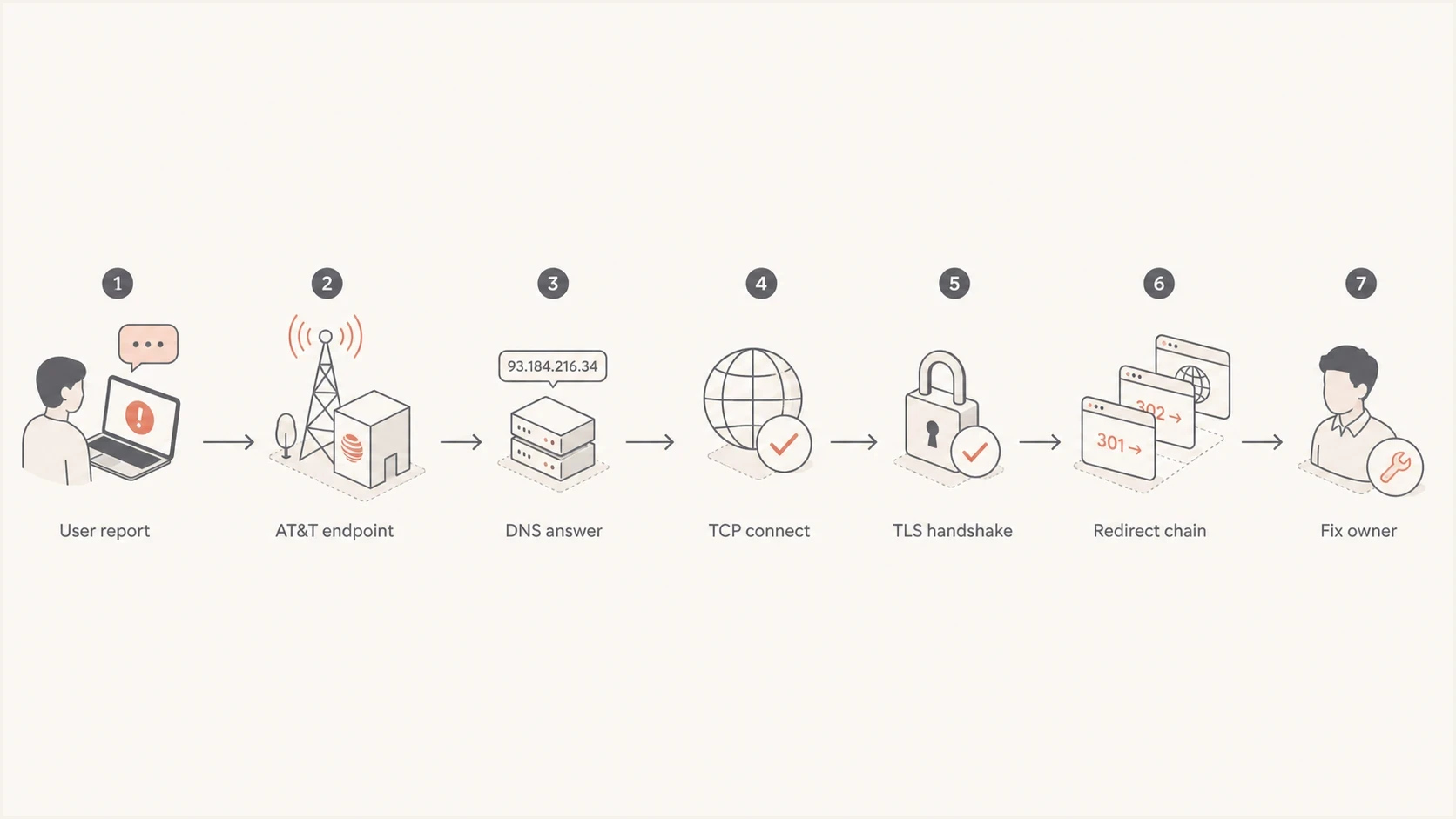
Flowchart showing how to isolate DNS, TCP, TLS, and redirect failures.
Ask the affected user or IT team for the exact URL, browser error code, access type, timestamp with timezone, device, browser, DNS resolver, and whether a VPN, private relay, antivirus product, ad blocker, or AT&T security feature is active. A domain health check is useful for the domain's authentication and DNS baseline, but the affected endpoint still has to be tested.
Basic commands from the affected networkBASH
dig example.com A
dig example.com AAAA
dig example.com CNAME
curl -4 -I -L https://example.com
curl -6 -I -L https://example.com
openssl s_client -connect example.com:443 -servername example.com
traceroute example.com
- DNS: Confirm the affected resolver returns the expected A, AAAA, and CNAME answers. Investigate SERVFAIL, CNAME loops, and DNSSEC validation errors.
- IPv6: Compare forced IPv4 and IPv6 requests so a broken IPv6 path cannot hide behind browser fallback.
- TLS: Verify the certificate matches the hostname and includes a valid chain.
- Redirects: Follow every hop and look for HTTP downgrade or hostname changes.
If headers and small responses work but full pages, downloads, or large assets stall, test for packet loss and path MTU problems. Do not change MTU based on a guess. Capture the failing request and compare it with a working network first.
Redirects, TLS, and edge challenges cause many false blocklist scares
The fastest practical fix is often in the redirect chain. A URL that starts on HTTPS, redirects to a path, then redirects to HTTP on another hostname, then relies on a security challenge or hidden frame is fragile. Some browsers, security products, and ISP filters treat that chain as risky even when the domain is not on a major blacklist.
Fix the canonical URL first
Make the first URL redirect directly to the final HTTPS URL. Avoid HTTPS to HTTP downgrades, avoid unnecessary cross-domain hops, and avoid returning a 403 page that depends on JavaScript to reveal the actual content.
- Best: HTTPS request goes straight to the final HTTPS page.
- Risky: HTTPS request downgrades to HTTP or changes hostnames.
- Broken: A 403 challenge page tries to load final content indirectly.
|
|
|
|---|---|---|
No DNS | Resolver | A, AAAA, and CNAME |
Timeout | Network | Trace route |
Cert error | TLS | SNI |
403 or 429 | Edge | WAF rule and source IP |
Blank page | Browser | Console |
Common symptoms and the first place to look.
This is also why the wording of the customer report matters. "It does not load" is not enough. Get the browser error code, the final URL shown in the address bar, and whether the failure happens after clicking an email link or after typing the address directly. If it starts inside an email, an email tester can help separate authentication and link handling from the website problem.
Check security filtering and local DNS behavior
When only some AT&T customers fail, local security controls deserve attention. AT&T Secure Family can apply web and app filters on a managed device, while ActiveArmor internet security can scan or block traffic through an eligible AT&T home gateway. Browser settings, router security, parental controls, antivirus filtering, and ad blockers can also change the result. One working AT&T home connection does not clear AT&T mobile access, and one working browser does not clear another browser on the same network.
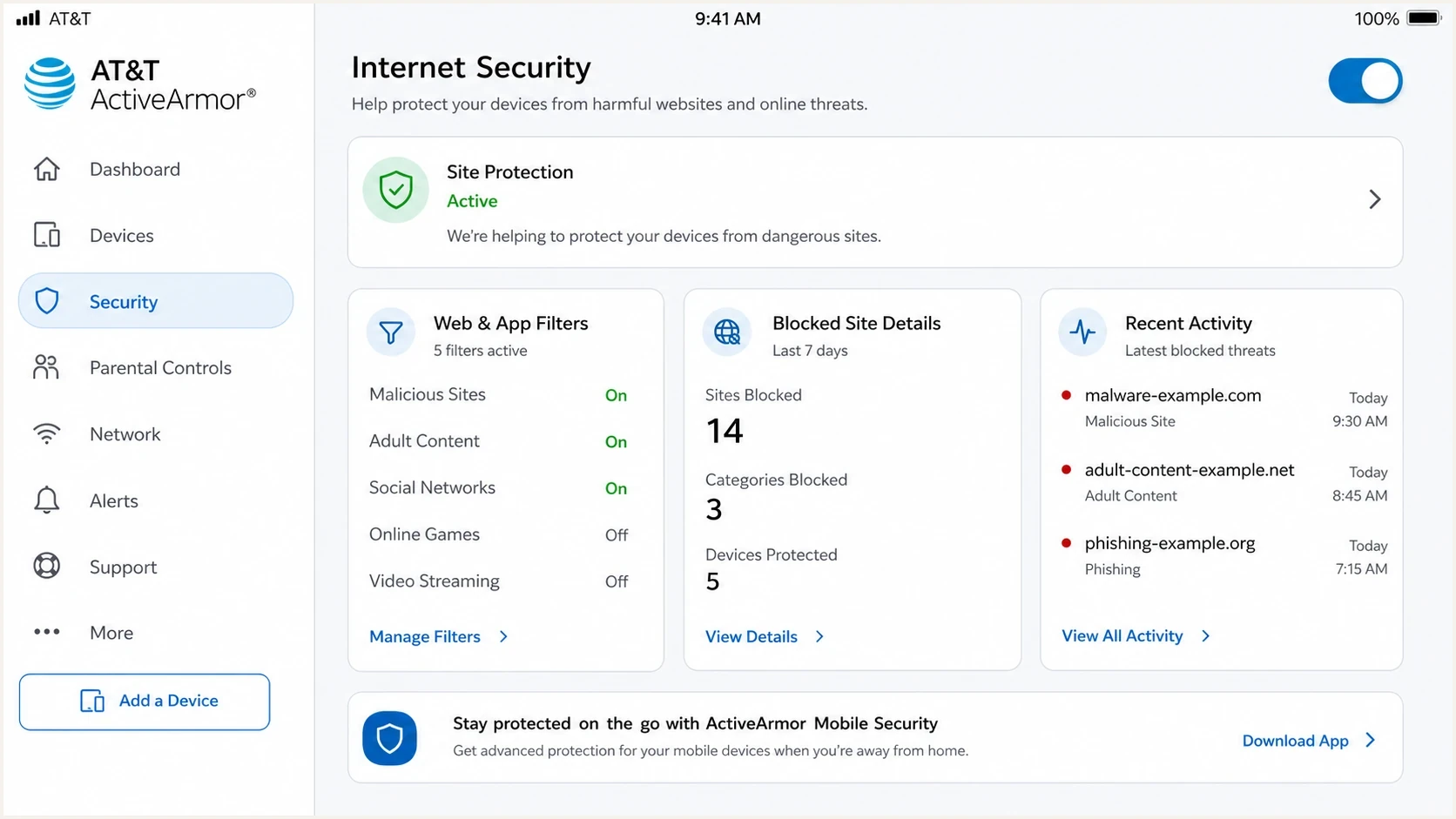
AT&T ActiveArmor settings screen showing web filtering and blocked activity.
AT&T documents AT&T web filters in Secure Family for customer-side controls, where a blocked app can appear to have no internet connection. ActiveArmor internet security can also produce a webpage-blocked event on supported home gateways. Check the control that applies to the affected connection before escalating a network claim.
- Compare: Test the affected AT&T connection against mobile data and a non-AT&T connection.
- Disable: Temporarily turn off VPN, private relay, antivirus web shield, and filters.
- Retest: Open the exact same URL in a clean browser profile.
- Record: Capture screenshots, timestamps, DNS answers, and the public source IP.
If every device on one AT&T home connection fails, record the current public IP and DNS answers before restarting the gateway and affected device once. A restart can clear stale local state, but it is not proof of an AT&T-wide fault. If access returns, compare the before-and-after evidence and check whether the public IP changed.
If the problem only appears when a browser extension is active, treat it as an endpoint blocking problem rather than an ISP routing problem. Teams often lose hours on blacklist checks when the real cause is extension filtering or link rewriting. A related guide on ad blockers covers that pattern in more detail.
Check the visitor IP and route
If the exact URL fails on AT&T home internet but loads over mobile data or a VPN, both the route and public source IP have changed. That result narrows the problem, but it does not prove that AT&T blocked the site. The destination's CDN or WAF can deny one address or an AT&T address range, while a routing or peering fault can prevent the request from reaching the destination at all.
Destination-side denial
The request appears in CDN, WAF, or origin logs with a deny action or an HTTP 403, 429, or 503 response. Check the source IP, rule ID, rate limit, and bot decision.
Network path failure
No request reaches the edge at the affected timestamp, and TCP or TLS times out. Compare IPv4 and IPv6 paths, destination addresses, and tests across separate AT&T connections.
Treat a changed public IP as a test
If a different public IP restores access, preserve the old and new addresses with timestamps. Fix the destination's reputation rule, rate limit, or security policy instead of relying on the address change. An AT&T gateway restart does not guarantee a new public IP.
Use blocklist checks as evidence, not the conclusion
A blacklist and blocklist check still belongs in the evidence packet because it helps rule out a known reputation listing. It should not be the only test. Use it alongside DNS, TLS, redirects, and affected-network reproduction.
Blocklist checker
Check your domain or IP against 144 blocklists.







For ongoing monitoring, Suped's blocklist monitoring keeps domain and IP reputation alongside DMARC, SPF, DKIM, and deliverability signals. If monitoring stays clean while affected requests fail, assign the incident to the web path and investigate DNS, TLS, redirects, WAF rules, or source-IP handling.

Blocklist monitoring page showing domain and IP checks across blocklists with importance and status
When to escalate to AT&T or your hosting provider
Escalate only after you can show where the failure occurs. Hosting and CDN providers usually act faster when you bring exact redirect headers, TLS output, WAF event IDs, source IPs, and destination IPs. AT&T support has a better path when you can show separate affected customers on AT&T networks with the same error and timestamps.
Evidence strength for escalation
Use stronger evidence before asking a provider to investigate an AT&T-specific failure.
Weak
Low
One customer report with no error code.
Useful
Medium
Browser error, URL, access type, and timestamp.
Strong
High
Reproduced from AT&T with DNS, TLS, and redirects captured.
- Hosting: Escalate broken redirects, bad TLS, 403 pages, or WAF blocks.
- DNS: Escalate wrong resolver answers, validation failures, stale records, or split IPv6 behavior.
- AT&T: Escalate repeated failures across separate AT&T customers and locations when destination logs show no denial.
- Customer: Escalate local filters only after clean tests on another device fail.
Use this order: fix the redirect chain, confirm HTTPS works directly, check DNS answers from the affected resolver, compare IPv4 and IPv6, review WAF logs, then test with AT&T security controls disabled. If the issue survives that process, the escalation has enough substance for a network or hosting provider to investigate.
Views from the trenches
Best practices
Reproduce from the affected network before assuming an ISP-wide blacklist issue.
Capture DNS, TLS, redirect, and browser evidence before opening provider tickets.
Fix HTTPS downgrade redirects before blaming customer devices or AT&T filtering.
Common pitfalls
Treating clean blocklist results as proof that the website path is healthy enough.
Ignoring hostname-specific TLS, SNI, HSTS, and WAF rules on shared hosting setups.
Escalating to AT&T without timestamps, resolved IPs, exact browser errors, or logs.
Expert tips
Ask for AT&T home versus mobile details because those paths can differ sharply too.
Test the final HTTPS URL directly to remove redirect noise from the diagnosis first.
Use blacklist checks as one evidence point, not as the full root-cause test alone.
Marketer from Email Geeks says DNS and TLS should be inspected from an AT&T endpoint before treating the issue as reputation filtering.
2025-11-11 - Email Geeks
Marketer from Email Geeks says a site loading on one AT&T home connection weakens the case for a network-wide AT&T block.
2025-11-11 - Email Geeks
What causes the AT&T-only failure
Your webpages are not loading for AT&T customers because a web-layer failure is breaking the request path. A missing blacklist or blocklist listing does not rule out DNS resolver differences, broken IPv6, TLS issues, redirect downgrades, WAF challenges, source-IP denials, AT&T security filters, or local endpoint controls.
Start with evidence from an affected AT&T endpoint. Then fix the canonical HTTPS route so the first URL goes directly to the final secure page. Keep Suped watching reputation, DMARC, SPF, DKIM, and blocklist signals, but let the web diagnostics decide the root cause of the page load failure.




