Why is AT&T blocking my emails and what can I do?

Updated on 28 Aug 2026: We updated this guide for Yahoo's direct routing of AT&T consumer mail and its current sender requirements.
AT&T consumer email now routes directly to Yahoo Mail for att.net, currently.com, worldnet.att.net, sbcglobal.net, bellsouth.net, pacbell.net, prodigy.net, swbell.net, ameritech.net, snet.net, flash.net, wans.net, and nvbell.net. Yahoo announced the direct MX routing change on June 24, 2025. For these domains, diagnose current blocks as Yahoo-family delivery problems unless the receiving host and SMTP response explicitly identify an AT&T-operated DNSBL or RBL path.
Start by collecting the exact SMTP response. A dashboard label that says blocked is not enough. The full response often tells you whether Yahoo saw invalid users, a policy rejection, a reverse DNS failure, a content issue, an IP-level reputation problem, or a temporary deferral. Without that response, it is easy to clean the wrong thing and keep the real problem active.
If you are blocked right now, pause sends to unengaged AT&T addresses, pull the bounce transcript from your ESP or SMTP provider, review DNS authentication, compare the same campaign against Yahoo and AOL recipients, and check your IP and domain through a blocklist monitoring workflow. Then resume gradually with recently engaged recipients first.
The direct fix
The fix depends on the SMTP response, but the order is consistent. Collect the raw bounce, affected recipient domains, sending IPs, sending domain, campaign type, and segment that generated the block. Then separate a temporary deferral from a permanent rejection, and separate an isolated recipient issue from a wider Yahoo-family reputation problem.
- Get the full bounce: Ask your ESP or SMTP provider for the full SMTP transcript, including the status code, remote host, and reason text.
- Confirm the destination: Check the live MX and receiving host so you know which gateway returned the response.
- Pause risky segments: Stop sending to AT&T recipients who have not opened, clicked, purchased, logged in, or shown recent intent.
- Clean invalid users: Remove hard bounces, repeated temporary failures tied to invalid users, obvious typos, and any address source without clear consent.
- Verify authentication: Confirm SPF, DKIM, and DMARC pass for the visible From domain used in the blocked mail.
- Check reputation signals: Look for domain or IP blocklist and blacklist listings, complaint spikes, volume jumps, low engagement, poor reverse DNS, and missing unsubscribe headers.
- Resume in stages: Send first to recent AT&T engagers, watch bounces by domain, then expand only when the block rate stays low.
Do not file a vague support request first
A support request that says "AT&T mail is blocked" lacks the evidence needed for a useful answer. Include the sending IP, sending domain, recipient domain, timestamps, full SMTP response, sample headers, list source, suppression policy, receiving host, and what you changed.
Legacy AT&T invalid-recipient cluetext
451 4.7.7 Excessive userid unknowns from 203.0.113.10 alph753
451 4.7.7 Excessive userid unknowns
Older AT&T gateway logs can contain that response. It points to too many invalid recipients, usually because of stale acquisition sources, poor suppression, or weak signup controls. For a current delivery event, use the live Yahoo response code returned by the receiving host.
Why AT&T consumer mail gets blocked
Yahoo is now the inbound gateway for the listed AT&T consumer domains. That means current sender requirements, reputation decisions, temporary deferrals, and permanent rejections come through Yahoo's delivery system. Check the live receiving host and SMTP response when you investigate custom domains, historic logs, or an explicit AT&T DNSBL response.
Yahoo can temporarily defer AT&T consumer-domain mail when a sender increases volume too quickly, generates complaints, hits invalid users, or shows unusual traffic. Permanent rejections can point to an invalid address, failed authentication, unacceptable content, RFC problems, or another policy failure. The response text decides whether to retry, clean addresses, fix authentication, or prepare an escalation.
|
|
|
|---|---|---|
Invalid users | Too many bad recipients | Suppress bounces |
IP reputation | Shared or dedicated IP risk | Review sources |
Rate limiting | Volume or traffic spike | Throttle sends |
Reverse DNS | PTR or hostname issue | Fix PTR |
Authentication | SPF, DKIM, or DMARC fail | Validate DNS |
Complaints | Recipients reject mail | Tighten targeting |
Blacklist | Listed IP or domain | Confirm listing |
Yahoo deferral | Temporary sender deprioritization | Read the code |
Common AT&T consumer-domain blocking causes and what to check first.
Separate the causes into SMTP signals and recipient behavior. SMTP signals include the sending IP, HELO identity, reverse DNS, TLS, SPF, DKIM, DMARC, receiving host, and recipient validity. Behavior includes complaints, engagement, spam-folder placement, unsubscribe use, and whether recipients asked for the mail.
Technical blockers
- Authentication: SPF, DKIM, or DMARC fails for the domain in the visible From address.
- Reverse DNS: The sending IP has no PTR record, a generic hostname, or a name that does not fit the sending domain.
- SMTP identity: The HELO name, envelope domain, and signing domain do not fit the sending setup.
Reputation blockers
- List quality: The campaign hits too many unknown AT&T users or stale accounts.
- Engagement: The AT&T segment has a weak recent response compared with your other mailbox-provider segments.
- Complaints: Recipients mark the mail as unwanted, especially after reactivation or cold outreach.
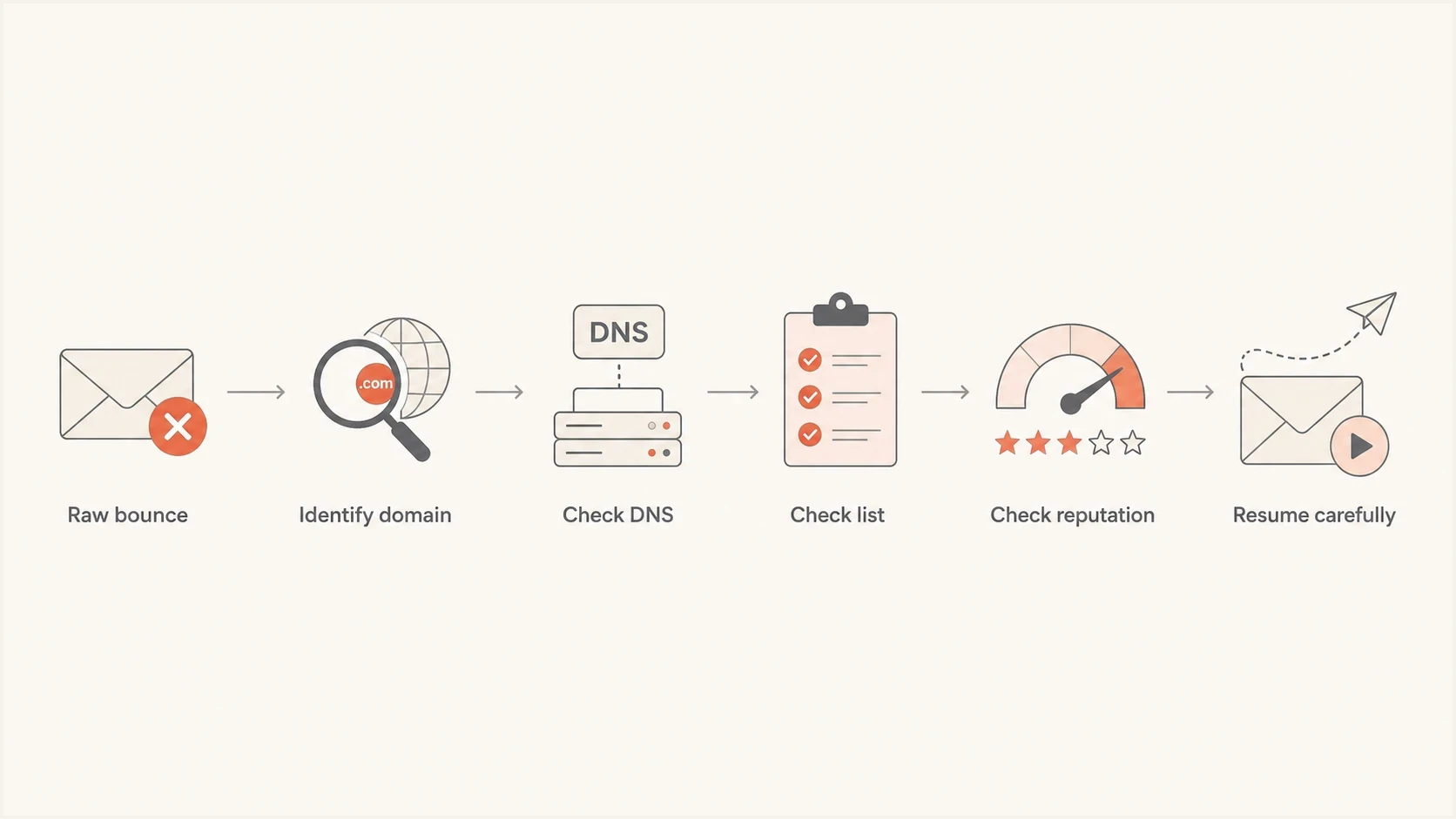
AT&T email blocking diagnosis flowchart covering bounce codes, DNS, list quality, reputation, and safe restart.
AT&T consumer domains now use Yahoo routing
The routing change matters because the AT&T brand in a recipient address no longer identifies a separate AT&T inbound filter. Yahoo announced that mail for the listed AT&T consumer domains would come directly to Yahoo instead of passing through a separate gateway. Treat att.net, sbcglobal.net, bellsouth.net, currently.com, and the other named domains as Yahoo-family destinations for current sender troubleshooting.
Historic logs can still contain AT&T-specific DNSBL, RBL, abuse_rbl, or alph-style responses. Preserve that wording when you investigate an older incident. For a new incident, the receiving hostname and full response should point to Yahoo's current error categories unless a separate AT&T-operated system handled the message.
|
|
|
|---|---|---|
Listed AT&T domain plus Yahoo MX | Yahoo gateway | Use Yahoo sender fixes |
Explicit AT&T DNSBL text | AT&T network or historic path | Verify host and preserve evidence |
Only one mailbox fails | Recipient setting or address | Check filters and spelling |
DMARC fail | Sender authentication | Fix domain match |
Use the receiving host and bounce text together before deciding who owns the fix.
The practical test uses the same campaign, sending IP, time window, and recipient cohort. Similar deferrals at Yahoo, AOL, and AT&T consumer domains point to one Yahoo-family reputation or policy issue. A response tied to an individual mailbox points to recipient validity, mailbox settings, or a personal block instead.
Meet Yahoo's sender requirements for AT&T domains
Yahoo's sender requirements now apply to the listed AT&T consumer domains. Meeting them does not guarantee inbox placement, but failing them can lead to spam placement, temporary deferrals, or permanent rejection.
- All senders: Authenticate with SPF or DKIM, keep the spam complaint rate below 0.3%, publish valid forward and reverse DNS, and send RFC-compliant mail.
- Bulk senders: Use both SPF and DKIM, publish DMARC with at least p=none, and make sure the SPF domain or DKIM signing domain matches the visible From domain.
- Marketing mail: Add a functioning List-Unsubscribe header with one-click support, show a visible unsubscribe link in the message, and honor requests within two days.
- Complaint processing: Enroll each DKIM signing domain in Yahoo's domain-based complaint feedback loop, or confirm that your ESP enrolls it and suppresses complainants.
Treat 0.3% as a ceiling
Yahoo identifies 0.3% as its spam complaint enforcement threshold. Aim lower because the rate is calculated against messages delivered to the inbox, which can differ from the denominator in your own reports.
Read the SMTP response first
Ask for the raw event data. You want the line returned by the receiving server, not only your provider's normalized label. If your provider cannot expose it in the UI, support can usually retrieve it from logs for a specific message ID, timestamp, and recipient.
A 421 or 451 response is temporary, so the sending server should retry according to its queue policy while you investigate repeated deferrals. A 553 or 554 response is permanent. Do not keep retrying a permanent failure, and suppress an address when the response says the recipient does not exist.
Useful fields to requesttext
recipient domain: sbcglobal.net
sending IP: 203.0.113.10
sending domain: mail.example.com
visible From: news@example.com
message ID: abc123@example.com
timestamp: 2026-05-24T14:03:00Z
receiving host: hostname from the SMTP transcript
SMTP response: full remote server response
Generic bounce labels hide the next step
If your report only says blocked, you still do not know whether to clean addresses, fix reverse DNS, improve authentication, throttle volume, add unsubscribe controls, or contact the receiving network. The raw response decides the path.
For the listed AT&T consumer domains, look at the Yahoo receiving host and SMTP text together. Investigate complaint rate, recent volume, DKIM domain match, List-Unsubscribe, recipient validity, and Yahoo-family delivery. If the response explicitly names an AT&T email block list or AT&T-operated host, preserve that evidence before escalating. AT&T's own email support material is mainly for mailbox users, so senders still need the SMTP transcript and provider support.
Fix list quality before asking for removal
A response that explicitly reports excessive unknown users indicates an urgent list hygiene problem. The receiver is seeing too many addresses that do not exist or no longer accept mail. That usually points to stale data, typo-heavy collection, purchased lists, scraped addresses, or a signup path that lets fake addresses enter the database.
- Suppress hard bounces: Remove any AT&T-family address that has returned a permanent failure or repeated unknown-user signal.
- Segment by recency: Keep recent clickers, purchasers, account users, and form submitters separate from inactive recipients.
- Stop cold mail: Do not mix cold outreach with customer, transactional, or opted-in marketing mail on the same reputation path.
- Secure signup: Use confirmation, rate limits, form protection, and typo correction for AT&T-family domains.
- Retire stale records: If a recipient has no meaningful activity for months, reduce frequency or stop sending until they re-engage.
Working invalid-recipient guardrails
These are internal list-quality guardrails, not published Yahoo enforcement thresholds.
Healthy
Under 1%
Normal list quality for a permission-based segment.
Investigate
1-3%
Clean the source before increasing volume.
Pause
Over 3%
Stop the segment and remove invalid users.
A 30% block rate is not normal. If it is concentrated in people who have not engaged in 90 days, do the cleanup before asking for help. Split the AT&T audience by recent engagement and mail the most active group first, then watch bounces and complaints.
Email tester
Send a real email to this address. Suped shows a results button when the test is ready.
?/43tests passed
Use an email tester when you need to send a real message and inspect headers, authentication, content signals, and common delivery issues. It gives you a clean technical baseline before you test with real AT&T recipients.
Check authentication and DNS
Authentication failures do not explain every block, but Yahoo requires every sender to use SPF or DKIM. Bulk senders need SPF, DKIM, and a valid DMARC policy of at least p=none, with either the SPF domain or DKIM signing domain matching the visible From domain. Also check forward and reverse DNS for every sending IP.
Baseline DMARC recorddns
_dmarc.example.com. 3600 IN TXT "v=DMARC1; p=none; rua=mailto:dmarc@example.com"
That record starts monitoring only. It does not block spoofed mail yet, but it gives you reporting visibility. Once legitimate sources pass consistently, move to quarantine or reject in stages. In Suped, DMARC monitoring groups sending sources and turns aggregate reports into source-level tasks.

Issue steps to fix dialog showing the issue overview, tailored fix steps, and verification action
For AT&T consumer-domain blocks, Suped helps spot a sender not covered by SPF, a DKIM selector that stopped resolving, a vendor signing with the wrong domain, a DMARC domain-match failure, or one stream failing on an otherwise healthy domain. The fix steps sit next to the failing source.
What good authentication looks like
- SPF: The sending IP or service is authorized without exceeding DNS lookup limits.
- DKIM: The message has a valid signature using a selector that resolves in DNS.
- DMARC: SPF or DKIM passes and its domain matches the visible From domain.
- Reverse DNS: The sending IP has a valid, non-generic hostname that fits the sending domain.
For a broad DNS and authentication review, run a domain health check before you contact support. It gives you one view of DMARC, SPF, and DKIM issues.
?
What's your domain score?
Deep-scan SPF, DKIM & DMARC records for email deliverability and security issues.
Check blocklists and blacklist signals
A public blocklist or blacklist listing is not always the reason Yahoo blocks mail to an AT&T consumer domain, but it belongs in the evidence set. Yahoo also uses internal reputation, authentication, traffic patterns, and recipient behavior. If your sending IP or domain appears on a relevant blocklist, fix the cause before requesting removal or sender support.
- Check the exact IP: A shared pool can inherit trouble from other senders, while a dedicated IP points back to your own sending.
- Check the domain: Domain reputation can follow you even when you switch IPs or ESPs.
- Check timing: Match the listing time to campaign volume, complaints, bounce spikes, and acquisition changes.
- Fix first: Removal without a source fix often leads to relisting and a weaker reputation pattern.
Blocklist checker
Check your domain or IP against 144 blocklists.







If you find a listing, document the list name, affected IP or domain, first-seen time, removal instructions, and sending source. Suped's blocklist monitoring keeps this evidence next to DMARC and authentication data instead of splitting it across reports.
Use the related AT&T blocklist removal process only when the receiving host and response explicitly name an AT&T DNSBL, RBL, or abuse_rbl path. For Yahoo-routed AT&T consumer domains, follow the Yahoo response code and sender remediation path instead.
When to contact your ESP or AT&T
Contact your ESP first if you send through shared or managed infrastructure. It controls the sending IPs, queues, bounce logs, domain-level throttling, and receiver support relationship. If its dashboard only shows a generic blocked status, ask for the raw SMTP responses.
For the listed AT&T consumer domains, use Yahoo sender remediation and ask your ESP to escalate through Yahoo's sender support path when repeated responses remain after cleanup. Use the official AT&T postmaster help path only when the receiving host or full response identifies an AT&T-operated block. AT&T lists abuse_rbl@abuse-att.net for DNSBL or RBL blocks, but that address is not the default support path for Yahoo-routed consumer domains.
Do not confuse sender-side rejection with recipient mailbox settings. AT&T has a user-facing block address article for individual users, but bulk-sender delivery problems need sender evidence rather than a recipient's blocked-address list. If one recipient is missing mail, check their blocked addresses, filters, spam folder, mailbox status, and the spelling of the address.
Work with your ESP when
- Shared IP: You do not directly control the sending IP or mail queue.
- Hidden logs: The UI shows only normalized bounce labels.
- Throttling needed: You need provider-level rate limits for Yahoo-hosted AT&T domains.
Escalate to the receiver when
- Evidence is clear: The raw response and receiving host identify the correct support path.
- Fixes are done: Invalid users, authentication, and reputation issues have been addressed.
- Failures continue: The same diagnostic code persists across controlled tests.
Support request checklisttext
Sending IPs
Sending domains
Affected AT&T consumer recipient domains
Full SMTP responses and diagnostic codes
Receiving hosts for each recipient domain
DNSBL or RBL wording if present
Sample timestamps with time zone
Campaign type and consent source
Recent suppression and cleanup steps
Authentication results for SPF, DKIM, and DMARC
Do not resume full volume because a support case is open. A receiver can change a reputation decision, but its systems will still react to unknown users, complaints, missing unsubscribe controls, or authentication failures.
How to recover safely
Recovery is staged. The goal is to show Yahoo's gateway for AT&T consumer domains that your next mail stream has valid recipients, strong identity, easy unsubscribe, and wanted content.
|
|
|
|---|---|---|
Pause | All risky segments | Diagnose and clean |
First restart | Recent engagers | Send low volume |
Next sample | Known customers | Monitor bounces |
After stable results | Lightly engaged | Expand gradually |
Inactive segment | Unengaged users | Reconfirm or suppress |
A practical recovery sequence for AT&T consumer-domain blocking.
Do not mail the inactive AT&T segment during recovery. If the business needs reactivation, wait for stable delivery, use a small sample, make the message clearly permission-based, and keep one-click unsubscribe working. If those recipients still do not respond, suppress them.
Safer AT&T restart mix
A recovery send should start with the recipients most likely to want the mail.
Recent
Light
Inactive
Suped fits this workflow when you need one place to monitor DMARC, SPF, DKIM, blocklist and blacklist signals, Yahoo-family authentication results, and source-level issues during recovery. This is useful when several vendors send for the same domain because one failing stream can affect the domain's reputation.
Views from the trenches
Best practices
Pull raw SMTP responses before changing DNS, content, volume, or provider settings.
Treat listed AT&T consumer domains as Yahoo destinations for current delivery fixes.
Restart with recently engaged AT&T recipients, then expand only after results stay clean.
Common pitfalls
Treating a generic blocked label as the full bounce reason leads to consistently bad fixes.
Sending inactive AT&T users during recovery can extend reputation problems and deferrals.
Using the legacy AT&T blocklist path for a Yahoo response delays the correct remediation.
Expert tips
Ask your ESP for remote server text, host, timestamp, and message ID in one ticket.
Map AT&T consumer domains separately so provider issues do not hide in averages.
Use DMARC data and bounce data together to find the stream creating sender risk.
Marketer from Email Geeks says the first step is to read the bounce detail because the response normally explains why the receiving server refused the message.
2023-06-08 - Email Geeks
Marketer from Email Geeks says a 451 response for excessive unknown users means the sender needs to validate contacts and secure the signup process.
2023-06-13 - Email Geeks
The practical answer
Mail to an AT&T consumer address gets blocked when Yahoo's gateway sees risky recipients, weak reputation, complaints, broken authentication, poor DNS, unusual traffic, or unwanted content. The exact cause sits in the SMTP response, so start there and record the receiving host.
The fastest safe path is to pause inactive AT&T recipients, get the raw bounce, clean invalid addresses, confirm SPF, DKIM, DMARC, forward and reverse DNS, and unsubscribe headers, check blocklist and blacklist status, then restart only with engaged recipients. Compare the result with Yahoo and AOL because the listed AT&T domains now use Yahoo's gateway. If rejection continues after those fixes, escalate through your ESP with the full evidence package. Use an AT&T postmaster path only when the host and response explicitly identify an AT&T-operated block.
Suped's product connects authentication monitoring, source diagnostics, hosted SPF and DMARC workflows, alerts, and blocklist monitoring in one place. It does not replace list hygiene or consent, but it makes the technical cause easier to find and document.




