How do I get removed from AT&T's email blocklist?

Published 13 Jun 2025
Updated 6 Aug 2026
11 min read
Summarize with

Updated on 6 Aug 2026: We updated the AT&T blocklist steps for Yahoo's current mail routing and a safer bounce-led removal process.
For a current block affecting an AT&T consumer email domain, start with the live SMTP rejection and the recipient domain's MX record. Yahoo moved AT&T consumer domains to direct Yahoo mail routing in 2025, so the old AT&T DNSBL:RBL 521 blacklist process is no longer the default path. Follow the contact or review route in the current rejection. Use abuse_rbl@abuse-att.net only when that live bounce explicitly directs you there.
A complete blocklist removal request includes the blocked sending IP, full SMTP rejection, timestamps with a time zone, recipient domain, sending domain, mail stream type, approximate volume, and completed remediation. Pause or sharply reduce mail to the affected gateway while the block is active. Repeated blocked attempts can prolong the incident and hide whether the fix worked.
Historical AT&T block bouncetext
553 5.3.0 (unknown mail system-related status)
alph773 DNSBL:RBL 521 <128.17.1.207>_is_blocked.
For assistance forward this error to abuse_rbl@abuse-att.net
- Confirm: Capture the current rejection, recipient domain, timestamp, remote host, and exact sending IP.
- Identify: Check the recipient domain's MX record to find the gateway handling the mail now.
- Stabilize: Stop retrying the blocked mail stream at normal volume.
- Fix: Correct the security, list quality, authentication, or traffic issue behind the block.
- Submit: Use the route named in the live diagnostic and include a concise remediation summary.
- Follow up: If there is no reply after a couple of business days, add one clean follow-up to the same case or thread.
What the bounce and MX record mean
A historical AT&T rejection containing DNSBL:RBL and 521 identified an IP reputation block at the SMTP layer. In many examples, the actual SMTP reply starts with 553 5.3.0 and 521 appears inside AT&T's diagnostic text. Do not treat 521 as a universal delisting code.
This provider-level block differs from a recipient blocking one address in mailbox settings. If only one recipient has blocked the sender, that recipient must remove the address from their blocked list. If multiple valid recipients fail with the same remote-host response, investigate the sending IP and gateway. Low visible complaint counts do not prove the traffic is clean because provider filtering data is not fully exposed through complaint reports.
|
|
|
|---|---|---|
553 5.3.0 | Permanent system-level rejection | Treat it as a delivery failure, not a mailbox complaint row. |
DNSBL:RBL | Historical IP reputation signal | Check the timestamp, blocked IP, remote host, and current MX. |
521 in the text | AT&T diagnostic token | Read the complete reply instead of routing by this number alone. |
For assistance | Bounce-specific contact direction | Use that route only when it appears in the current rejection. |
Common parts of a historical AT&T block bounce and how to act on them.
If the block appeared during IP warming, inspect the affected cohort before requesting review. A small number of blocked recipients can still indicate stale addresses, recycled accounts, unclear consent, high prior inactivity, or sudden volume jumps. For the broader causes, see why AT&T blocks mail before submitting another request.
Do not request review before fixing the cause
A delisting request that only says "please unblock us" gives the receiving provider no reason to trust the next send. Keep the first message short and make the routing evidence and completed fix obvious.
- Evidence: Provide the exact bounce, IP, timestamps, sending domain, and mail stream.
- Routing: Record the recipient domain, remote host, and MX result.
- Remediation: State what changed in security, targeting, suppression, authentication, or volume.
- Control: Explain how the same blacklist event will be prevented.
Check the current mail gateway first
Yahoo announced in June 2025 that AT&T consumer domains would move to direct Yahoo MX routing. The affected domains include att.net, currently.com, worldnet.att.net, sbcglobal.net, bellsouth.net, pacbell.net, prodigy.net, swbell.net, ameritech.net, snet.net, flash.net, wans.net, and nvbell.net. For current delivery incidents, the live MX answer and SMTP rejection take priority over an old AT&T blocklist or blacklist example.
Check a recipient domain's MXbash
dig +short MX att.net
dig +short MX sbcglobal.net
Run the lookup when the incident occurs and save the result with the bounce. MX records can change, so an old screenshot or support article does not prove which system rejected current mail. Match the remote host in the SMTP transcript to the live gateway before choosing a contact path.
- Current Yahoo gateway: Follow the current provider's rejection and review process, not the historical AT&T abuse mailbox.
- Live AT&T instruction: If a current bounce explicitly names abuse_rbl@abuse-att.net, forward that exact error there.
- Shared sending IP: Ask the sending provider that owns the address space to investigate and submit the case.
- Single-recipient issue: Check mailbox blocking and address validity before treating it as an IP blacklist event.
What to fix before requesting review
Check the sender side before contacting the receiving provider. A false positive can be cleared, but a real reputation problem returns when the next campaign repeats the same behavior. Review recent mail logs for unauthorized sending, compromised accounts, unexpected scripts, forwarding loops, list-quality problems, and sharp volume changes.
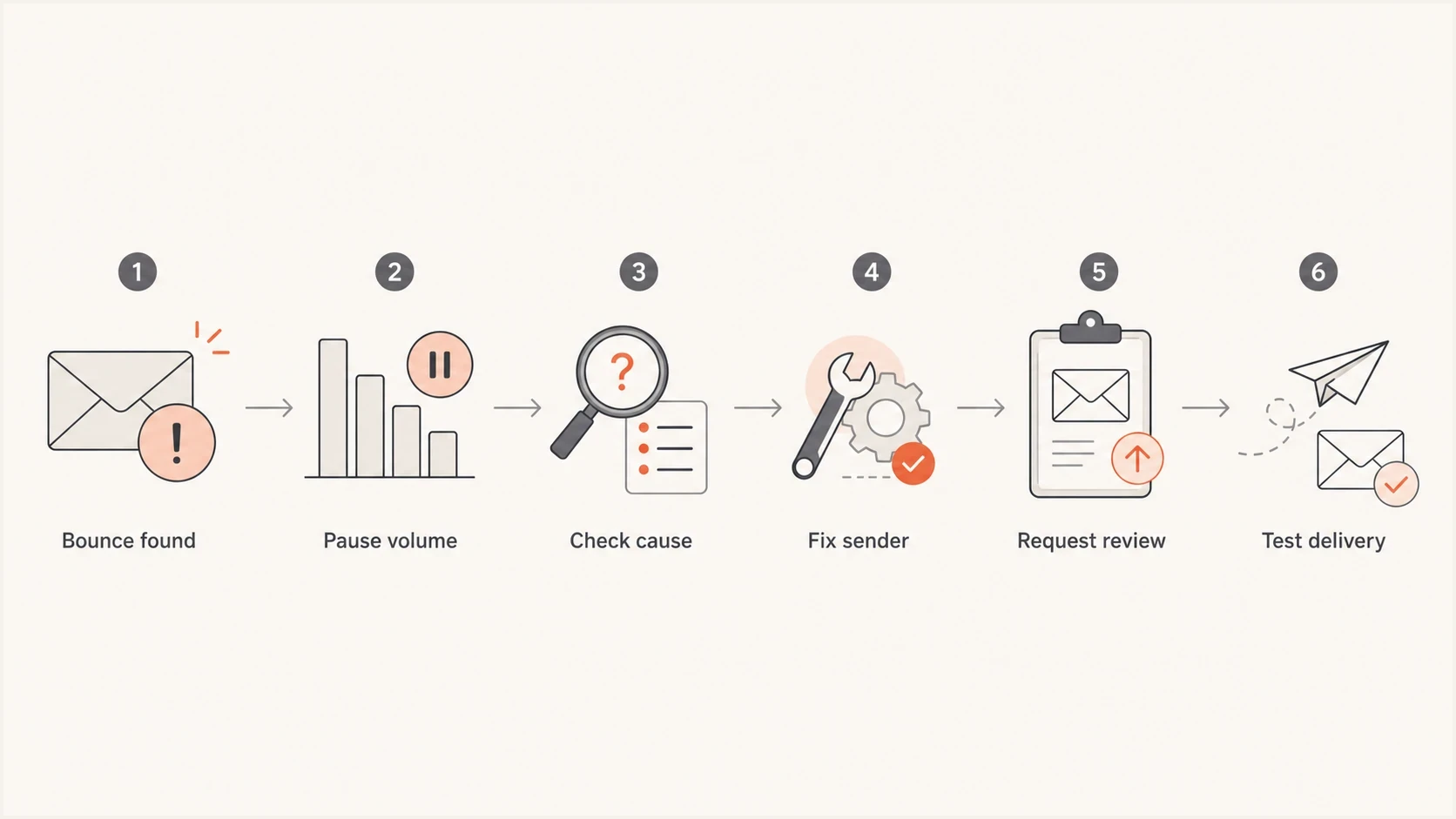
AT&T blocklist removal flow: capture the bounce, pause volume, fix the cause, request review, and test delivery.
- Security: Disable compromised accounts, rotate affected credentials, and stop unauthorized scripts or relays.
- Forwarding: Inspect automatic forwarding into AT&T legacy domains because forwarded unwanted mail can damage the sending IP's reputation.
- Consent: Remove addresses that lack clear opt-in, recent engagement, or a defensible source.
- Suppression: Confirm hard bounces, unsubscribes, and complaints are suppressed across every sending system.
- Authentication: Verify SPF, DKIM, and DMARC pass for the exact domain used in the campaign.
- Infrastructure: Check reverse DNS, HELO identity, TLS, and whether the IP has a stable sending role.
- Cadence: Restart with lower volume to the affected gateway and watch early bounce signals.
Minimum authentication baselinedns
_dmarc.example.com. TXT "v=DMARC1; p=none; rua=mailto:dmarc@example.com"
example.com. TXT "v=spf1 include:send.example.net -all"
selector1._domainkey.example.com. TXT "v=DKIM1; k=rsa; p=BASE64KEY"
Those records are examples, not values to copy. SPF and DKIM must authenticate the real sending path, while DMARC reporting shows whether either authenticated domain matches the visible From domain. Run the domain through Suped's domain health checker and fix relevant failures before requesting a review.
How to write the request
Write the request as a concise incident note. Avoid long history, marketing language, and blame. The receiving provider needs enough information to find the rejection and enough evidence that the next send will not repeat the unwanted pattern. One complete case is better than several thin messages.
Current delisting request templatetext
To: [contact named in the current SMTP rejection]
Subject: Block review request for [sending IP] to [recipient domain]

Hello,

Please review this SMTP rejection:

[Paste the full rejection exactly as received]

Sending IP: [IP address]
Sending domain: [domain]
Recipient domain: [AT&T legacy domain]
Remote MX or gateway: [hostname]
Mail stream: [transactional, account, or permission-based bulk mail]
Observed timestamps: [UTC timestamps]
Approximate blocked volume: [count]

Actions completed:
- Paused or throttled traffic to the affected gateway.
- Stopped any unauthorized sending and secured affected accounts.
- Removed invalid, inactive, and unengaged recipients.
- Rechecked SPF, DKIM, DMARC, rDNS, and HELO identity.
- Confirmed complaint and unsubscribe suppression.

Please review the sending IP for removal from the applicable blocklist.

Thank you.
If the current rejection contains the historical AT&T instruction to forward the error to abuse_rbl@abuse-att.net, use that address and keep the full error intact. If the response comes from the current Yahoo gateway, use the route specified by that response instead.
Good request
- Specific: Names the IP, domain, full bounce, timestamps, and affected mail stream.
- Traceable: Records the recipient domain, remote gateway, and live MX result.
- Accountable: Explains what was corrected without arguing about the block.
- Controlled: Shows traffic was paused or reduced during review.
Weak request
- Vague: Says delivery is broken without including the rejection or IP.
- Misrouted: Uses an old AT&T contact without checking the current MX and bounce.
- Defensive: Insists there are no complaints without showing what was checked.
- Risky: Keeps sending at the same rate while asking for removal.
If the bounce came from a dedicated IP on an email platform, send the same evidence to the platform support team. If it came from a shared IP, the platform usually needs to submit or support the request because it owns the sending address space and other tenants affect the same IP reputation.
How long a block review takes
There is no fixed removal time for an AT&T-domain block. The current receiving gateway's process applies, and a response does not guarantee immediate delivery recovery. Keep affected traffic controlled, recheck bounce logs, and confirm that no new rejection pattern appears while the case is open.
Review follow-up cadence
A practical cadence after submitting one complete blocklist review request through the route in the current rejection.
Initial request
Day 0
Send once after remediation and gateway checks are complete.
Clean follow-up
Day 2-3
Add one short status request to the same case or thread.
Provider escalation
Day 5+
Ask the sending IP owner to assist if a different company controls the address space.
Avoid opening a new case every day. Keep the conversation threaded so the reviewer can see the original evidence and remediation. For other blocklist and blacklist operators, use a consistent delisting workflow and adapt the evidence to the current operator's requirements.
What to do during review
Silence is not approval. Keep sends to the affected gateway conservative until bounce logs show the block has cleared and valid recipients accept mail again.
- Throttle: Restart with a smaller, more engaged recipient segment.
- Measure: Watch SMTP rejections, not only opens and clicks.
- Document: Keep the MX evidence, completed fixes, test results, and follow-up dates.
- Recheck: Repeat the MX lookup before recovery testing if the incident spans several days.
How to verify removal
Verify removal through delivery behavior, not a polite reply alone. Send a small controlled test to valid recipients on the affected domain, then check whether the SMTP rejection has stopped. Use real mail with the same sending domain, IP, headers, and authentication path that was blocked.
A seed or test send does not replace production monitoring, but it gives an early signal. Suped's email tester helps inspect authentication and message signals before volume increases.
Also check whether the IP or domain appears on public blocklists. A clean public blacklist check does not prove the receiving gateway has cleared its private reputation data, but an outside listing can explain why the traffic drew more scrutiny.
Blocklist checker
Check your domain or IP against 144 blocklists.







Suped's product lets teams correlate DMARC, SPF, and DKIM results with IP or domain reputation, blocklist events, and delivery signals. During an AT&T-domain incident, Suped can help record affected sources, identify authentication failures, monitor blacklist changes, and check recovery across multiple sending domains.
The practical value is faster incident detection and cleaner evidence. Suped alerts can surface unverified sources, authentication changes, blocklist events, and domain-health issues before the next warmup increase. That workflow is where blocklist monitoring helps.

Blocklist monitoring page showing domain and IP checks across blocklists with importance and status
Prevent the next AT&T-domain block
After removal, keep the mail stream predictable: stable volume, permission-based recipients, correct authentication, secured sending accounts, and fast reaction to negative signals. A block during warming usually points to a mismatch between sending volume and the quality or recency of the recipient cohort.
Healthy warmup
- Segment: Starts with recent, active subscribers before older recipients.
- Increase: Raises volume only after bounces and complaints stay controlled.
- Review: Checks SMTP logs by current gateway, not only total campaign metrics.
- Secure: Monitors accounts and applications for unauthorized outbound mail.
Risky warmup
- Mix: Combines active recipients with old, cold, or unclear-source addresses.
- Rush: Continues the schedule after a gateway-specific block appears.
- Average: Uses global open or click rates to dismiss provider-level failures.
- Assume: Routes every AT&T legacy domain by brand history instead of live MX data.
High opens and clicks from delivered messages do not cancel block bounces from another part of the same segment. During warmup, group AT&T legacy domains by live MX routing and review gateway-specific SMTP results before increasing volume.
- Use cohorts: Send first to recent clickers and buyers, then expand only after stable delivery.
- Check routing: Track recipient domains and their current MX operator instead of relying on old brand groupings.
- Audit sources: Remove legacy imports, partner lists, and addresses without a clear opt-in trail.
- Watch replies: Track human complaints and support inbox replies as part of sender health.
AT&T-domain blocklist removal checklist
For a current AT&T consumer domain, confirm the live MX and SMTP rejection first. Stop normal retries, fix the sender-side cause, then use the review route named by the current gateway. Send to abuse_rbl@abuse-att.net only when the live bounce explicitly gives that instruction.
After the block clears, do not jump back to the original warmup schedule. Start with the most engaged recipients, monitor gateway-level SMTP results, and keep authentication plus blocklist monitoring active. That keeps a one-time blacklist removal from turning into a repeated incident.




