Why do website pages fail to load or display content with ad blockers?

Published 3 May 2025
Updated 10 Aug 2026
12 min read
Summarize with

Direct answer
Website pages fail to load or display content with ad blockers because the page depends on scripts, domains, URL paths, CSS selectors, cookies, or anti-adblock checks that match filter rules. Network filters can stop a resource from loading, while cosmetic filters and script-based rules can hide or alter content after the HTML arrives. If one affected item is responsible for rendering a form, download, video player, paywall gate, consent banner, or content module, the visible page can stall on a spinner or show a blank area.
Updated on 10 Aug 2026: We added filter-list troubleshooting, false-positive reporting, and clearer fallback guidance for blocker-related page failures.
The key point is that the blocker does not need to block the whole website. It only needs to block one dependency that the page author made essential. This happens often on landing pages where the first HTML response loads fine, then JavaScript tries to fetch a third-party form or content experience. The browser shell is present, but the actual content never arrives.
For a visitor, the practical fix is to test with the blocker paused for that site, try a clean browser profile, or inspect the blocked request. For a site owner, the real fix is to stop making important content depend on ad-like third-party scripts without a server-rendered fallback.
Why ad blockers break page loading
Most ad blockers work by applying filter lists to network requests, cosmetic selectors, script behavior, and privacy-sensitive storage. A request does not get blocked because it is an ad in a moral sense. It gets blocked because its domain, path, query string, script name, or behavior matches a rule. That distinction matters because legitimate content can look like tracking infrastructure.
- Blocked script: A form loader, tag manager, personalization script, or analytics library is blocked before it can render the page module.
- Blocked domain: The content is fetched from a marketing, tracking, CDN, or lead capture host that appears on a privacy list.
- Hidden element: A cosmetic rule hides an element whose class or ID looks like an ad slot, even when it contains useful content.
- Broken gate: An anti-adblock or consent script blocks access, but its own code path fails and leaves no readable fallback.
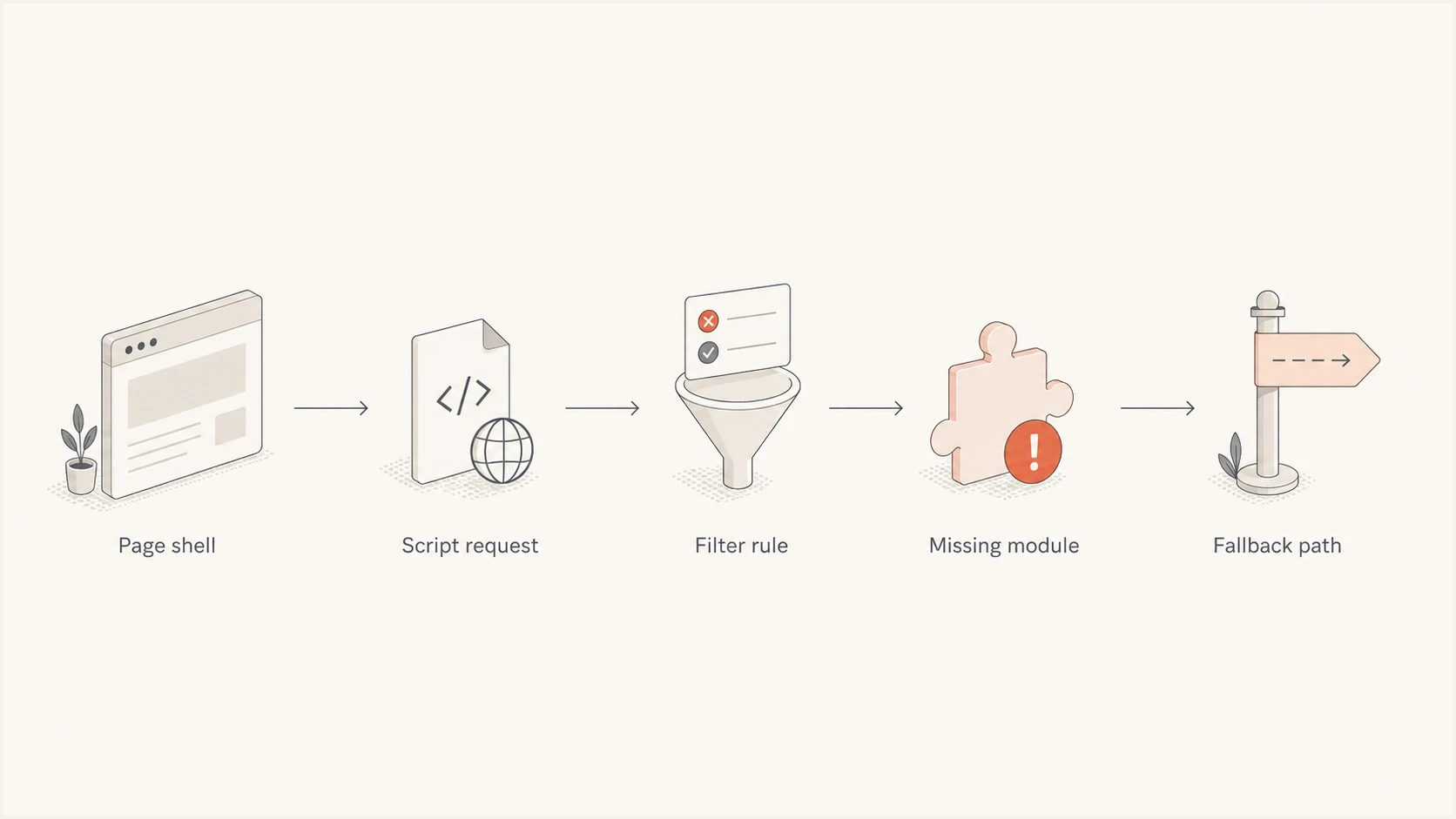
A flowchart showing how one blocked script can remove a page module.
Risk by dependency
The more important the blocked resource is, the more visible the failure becomes.
Low
Low impact
Analytics or pixels fail, but the core page remains readable.
Moderate
Partial loss
A secondary module fails, such as comments or recommendations.
High
Page failure
Forms, routing, or client-side rendering fail and users see a spinner.
Critical
Access blocked
The page blocks access before it can explain what the user needs to do.
The fastest way to confirm it
Split the diagnosis into two passes. First, load the page in the failing browser with the ad blocker enabled. Then load the same URL in a clean profile, a private window where extensions are disabled, or another browser. If the clean profile works and the failing profile does not, the blocker, its filter lists, or another privacy extension is the leading cause.
What DevTools often showstext
GET https://forms.example-vendor.com/forms2.min.js
Status: blocked by client
Initiator: landing-page.js
Effect: form container keeps the loading spinner
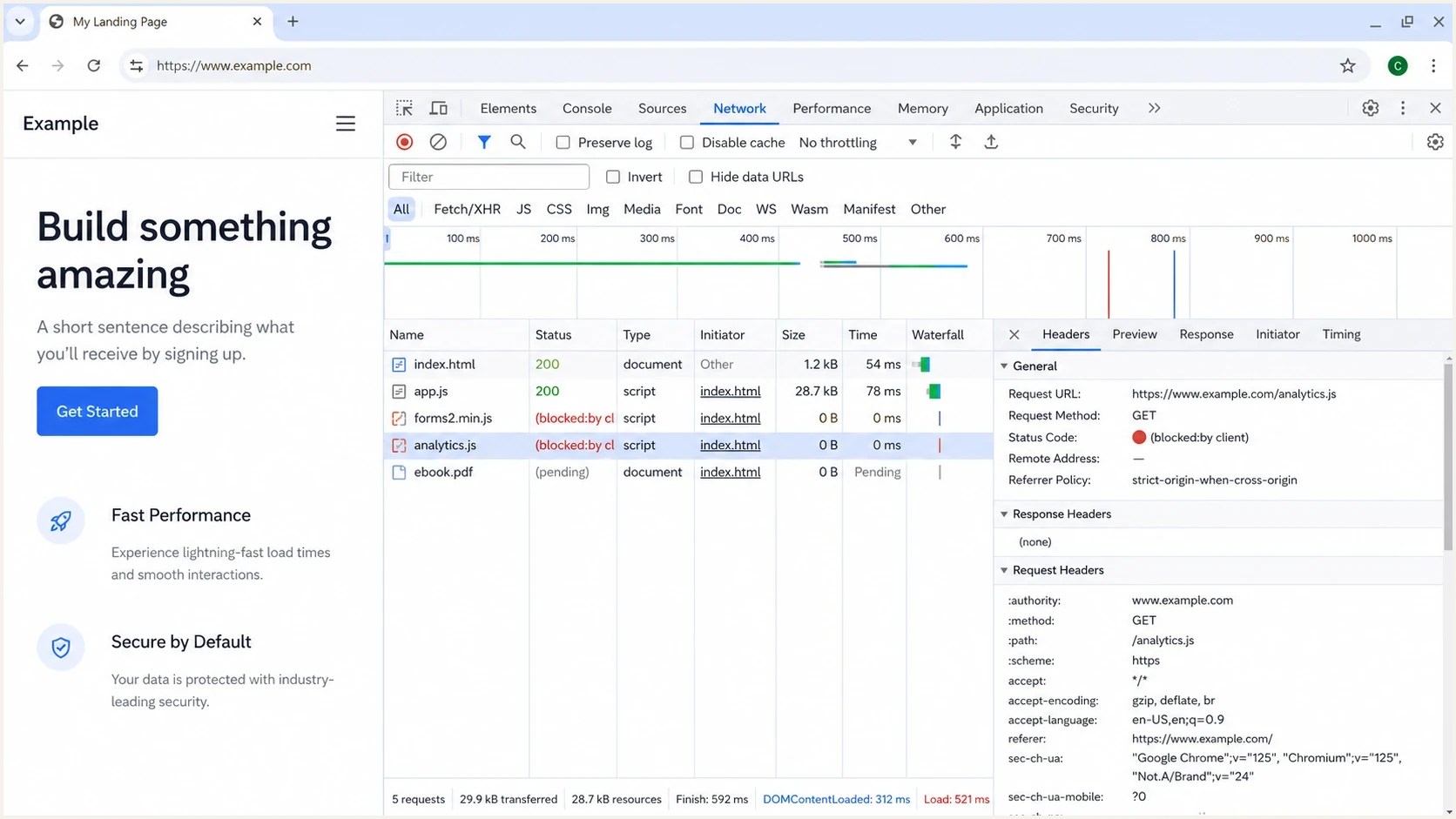
Google Chrome DevTools showing a script blocked by the client.
- Open DevTools: Use the Network tab, reload the page, and filter for blocked, failed, or missing requests.
- Check the console: Look for errors that mention blocked client requests, undefined form objects, or missing vendor libraries.
- Disable selectively: Pause the blocker for that site only, then reload. Do not change several browser settings at once.
- Trace dependency: Find what used the blocked script. The first blocked request is usually more useful than the last error.
A false warning also happens when a site says an ad blocker is installed even after the user disabled extensions. Treat those browser reports as a separate branch of the investigation: clear site data, check managed browser policies, and test from another network before blaming the content page.
When the blocker or filter list needs attention
A broken page does not always mean the site's code changed. A stale or recently changed filter list can create a false positive, a custom rule can hide more than intended, an extension error can leave filtering in an inconsistent state, and stored site data can preserve a stale detection result. If many unrelated sites break at once, check the blocker before diagnosing each site separately.
- Restart and reload: Restart the browser, reload the extension if the browser offers that control, then hard-refresh the affected page.
- Update filter lists: Fetch the latest list versions and retest. A corrected rule can resolve a false positive without a site change.
- Remove custom rules: Temporarily disable personal filters and test with other privacy extensions off, one change at a time.
- Test a clean profile: If the extension works in a new profile, inspect the original profile for bad stored site data and extension conflicts.
Isolate the rule before making an exception
If the blocker exposes its filtering log or resource view, use it to identify the request and the matching rule. Site owners can then reproduce the issue with the same list and submit a focused false-positive report. Visitors should prefer a site-specific allowlist entry over disabling protection everywhere.
Common failure patterns
The same symptom can come from several different failures. A spinner usually means the page expected JavaScript to replace a loading state. A blank content area usually means rendering happened on the client and one required dependency never ran. A missing button or form usually means the blocked item was the thing that created the conversion path.
|
|
|
|---|---|---|
Spinner | Form script | Network |
Blank area | Client render | Console |
No video | Player host | Requests |
Hidden form | Lead gate | HTML |
Warning | Detection bug | Clean profile |
Fast symptom mapping for ad blocker page failures.
Fragile page
The page depends on a third-party script before it shows useful content.
- Render gate: The form, download, or article body appears only after JavaScript succeeds.
- Ad-like names: Paths such as ads, tracking, metrics, or pixel increase the chance of filter matches.
- No fallback: The page leaves the loading state in place when a dependency is blocked.
Resilient page
The page keeps the content path available even when optional scripts fail.
- Server HTML: The core text, form, and call to action exist in the first page response.
- First-party path: Critical assets load from the site domain with neutral names.
- Clear fallback: The user sees a useful link or form if enhancement scripts fail.
A common marketing page failure
A third-party marketing form, tag manager, or hosted content script gets blocked. The landing page has already painted a loading state, but the script that replaces it never runs. The user gets a spinner and no visible error.
How to fix it as a site owner
The durable fix is not to ask every visitor to disable their ad blocker. Design the page so the main content does not disappear when a nonessential dependency is blocked. Analytics and form-enhancement scripts can remain, but they should not decide whether the page has readable content.
Start with the highest-value path. If the page is a whitepaper page, the user needs the title, short description, form, privacy text, and a backup route. If it is a video page, the user needs a poster and transcript plus a playable source path. If it is a checkout page, the user needs the cart and payment route to remain usable.
Resilient fallback patternhtml
<div id="lead-form">
  <form action="/download" method="post">
    <label for="email">Email</label>
    <input id="email" name="email" type="email" required>
    <button type="submit">Send me the file</button>
  </form>
  <p class="fallback-note">
    If the enhanced form does not load, this form still works.
  </p>
</div>
<script src="/assets/forms.js" defer></script>
Fix the dependency, not the visitor
- Render first: Put the important text and form markup in the initial HTML where practical.
- Name carefully: Avoid ad-like names for critical assets, directories, IDs, and classes.
- Fail visibly: Replace endless spinners with plain text instructions or a working fallback form.
- Respect access: Do not bypass paid or gated routes. Offer a visible route that follows the site's intended exchange.
Remove unnecessary anti-adblock gates. A gate that blocks the page before explaining the requirement creates a worse failure than the ad blocker itself. If the business requires a message, keep it small and specific, then show it after the page has enough visible content to make sense.
When a shared filter list causes the false positive, reproduce the issue with that list enabled and record the exact blocked URL or cosmetic selector. Rename an ad-like critical resource when practical. If the name cannot change, report the minimal reproducible case to the filter-list maintainers and keep the fallback active while the rule is reviewed.
How email teams should test linked pages
This problem matters for email because campaigns often send users to gated landing pages, hosted downloads, tracked redirects, and vendor-hosted assets. A campaign can authenticate correctly and still send people to a page that fails after the first paint. Test the page as part of the message journey, not as an isolated web QA task.
For the email-side path, Suped's email tester helps inspect a real sent message, including authentication, content checks, and link-related signals. That does not replace browser extension testing, but it catches message problems before they get confused with page-rendering problems.
When the issue is browser-specific, separate it from similar email symptoms. Broken tracking links and blocked vendor images can look related, but the root cause is different when an extension blocks a landing page script.
Suped's domain health checker helps rule out DNS, DMARC, SPF, and DKIM issues around the sending domain. Suped's blocklist monitoring also helps separate a blocklist or blacklist reputation issue from a browser-level content block.
Email tester
Send a real email to this address. Suped shows a results button when the test is ready.
?/43tests passed
After the email test, click the message link in Chrome, Safari, Firefox, and a browser profile with a common ad blocker enabled. The email test shows whether the message and domain setup are clean. The browser test shows whether the landing page survives privacy filtering.
Suped is our DMARC and email authentication platform for the email-side workflow. Teams can use it to monitor DMARC results, check SPF and DKIM, test a sent message, and monitor blocklist or blacklist status before verifying that the destination page renders with common blockers.
Developer checklist
When reviewing a page that fails with an ad blocker, look for the first technical dependency that turns a normal block into a user-visible failure. Isolate the first fragile point, fix it, then retest the page with the blocker enabled.
- Confirm scope: Test the same URL with the blocker on, blocker off, and a clean profile.
- Find first block: Use the Network tab or the blocker's filtering log to identify the first blocked request tied to the failed area.
- Map dependency: Check whether the blocked resource renders content, submits a form, or controls routing.
- Simulate failure: Use browser request blocking to reproduce the missing dependency and confirm the page exits its loading state.
- Add fallback: Keep a plain HTML path for critical content, forms, downloads, and navigation.
- Retest send path: If the page is reached through email, test the full click path after the page fix.
Do not treat a spinner as a cosmetic bug
An endless spinner is a broken state. It usually means the page has no timeout, no fallback, and no user-facing error path. Fixing that failure improves the page for ad blocker users, privacy-focused browsers, strict corporate networks, and users with intermittent third-party script failures.
Views from the trenches
Best practices
Test gated pages with a common ad blocker before sending campaign traffic to the page.
Keep a direct content URL available when the form loader controls the main download.
Design the page so blocked scripts leave readable copy, a form, or a clear next step.
Common pitfalls
Depending on one third-party form script turns a small block into a blank page for users.
Naming key assets ads, tracking, or analytics invites rule matches even for useful content.
Blocking detection scripts without a fallback locks legitimate visitors out of content.
Expert tips
Use DevTools to find the first blocked script, then check what depended on it before changing code.
If a resource is gated, offer a visible route that respects the normal access path.
Avoid anti-adblock gates that fail before the page can explain the requirement to users.
Marketer from Email Geeks says a landing page that loads shell content and then spins usually has a blocked form or content script, so test with the blocker on and off.
2019-03-07 - Email Geeks
Expert from Email Geeks says marketing form JavaScript can land on privacy filter lists, and the page needs a non-JavaScript or first-party fallback.
2019-03-07 - Email Geeks
Make critical page content blocker-resistant
A page fails with an ad blocker when a blocked resource is required for visible content. Identify the blocked dependency, decide whether it is truly critical, and make the page useful without it. Visitors can confirm the cause with a clean profile and DevTools. Site owners need server-rendered core content and clear fallbacks on stable first-party asset paths.
For email campaigns, do not stop at authentication success. Test the message, the tracked click, the landing page, and the page under common blockers. That full path is what the recipient experiences.




