Why are images from a reputable vendor's email blocked by my network?

Updated on 13 Aug 2026: We added image-proxy and remote-content checks so you can identify where the request fails before changing network policy.
The short answer is that your network is not judging the vendor's email reputation at that moment. It is judging the image URL as a web request. If the same image URL fails in a browser while you are on the company network, the block is almost certainly coming from a firewall, secure web gateway, DNS filter, browser policy, proxy, or endpoint security rule.
Treat this as a URL and web filtering investigation first when the exact URL fails only on the corporate network. If it works in the same browser but not in the email, check the mail client's remote-content setting and image-proxy path before escalating the firewall. DMARC, SPF, and DKIM can all pass while the remote image host still gets blocked because it sits on a shared CDN, uses an odd-looking branded domain, redirects through a flagged host, has a poor category, or appears on a blocklist (blacklist).
Fast answer
The most useful first test is simple: open the exact image URL on mobile data, then open it again on the corporate network. If mobile data works and the corporate network blocks it, the corporate web path is the likely cause. If both browser tests work, compare mail clients and check whether an image proxy or privacy setting is involved.
- Most likely: A web security control has classified the image host, CDN, redirect, or URL path as blocked.
- Not enough: A reputable sending domain does not automatically make every image hostname trusted.
- Best evidence: The blocked URL, timestamp, fetch path, HTTP result, firewall category, and CNAME chain.
Why the network blocks the image URL
Remote images in HTML email are fetched over HTTP or HTTPS. Depending on the mail client, the request comes directly from the recipient's device or through the mail provider's image proxy. A direct request enters the corporate web filtering path, where the network can evaluate the URL, hostname, IP, TLS certificate, category, reputation score, and redirect chain before allowing or blocking it.
That explains why a vendor can send a properly authenticated message yet still have its images blocked. Email authentication checks domain identity associated with the message. Web filtering checks the asset location, and mail-client privacy controls decide whether remote content should load at all. These controls are operationally related, but they make separate decisions.
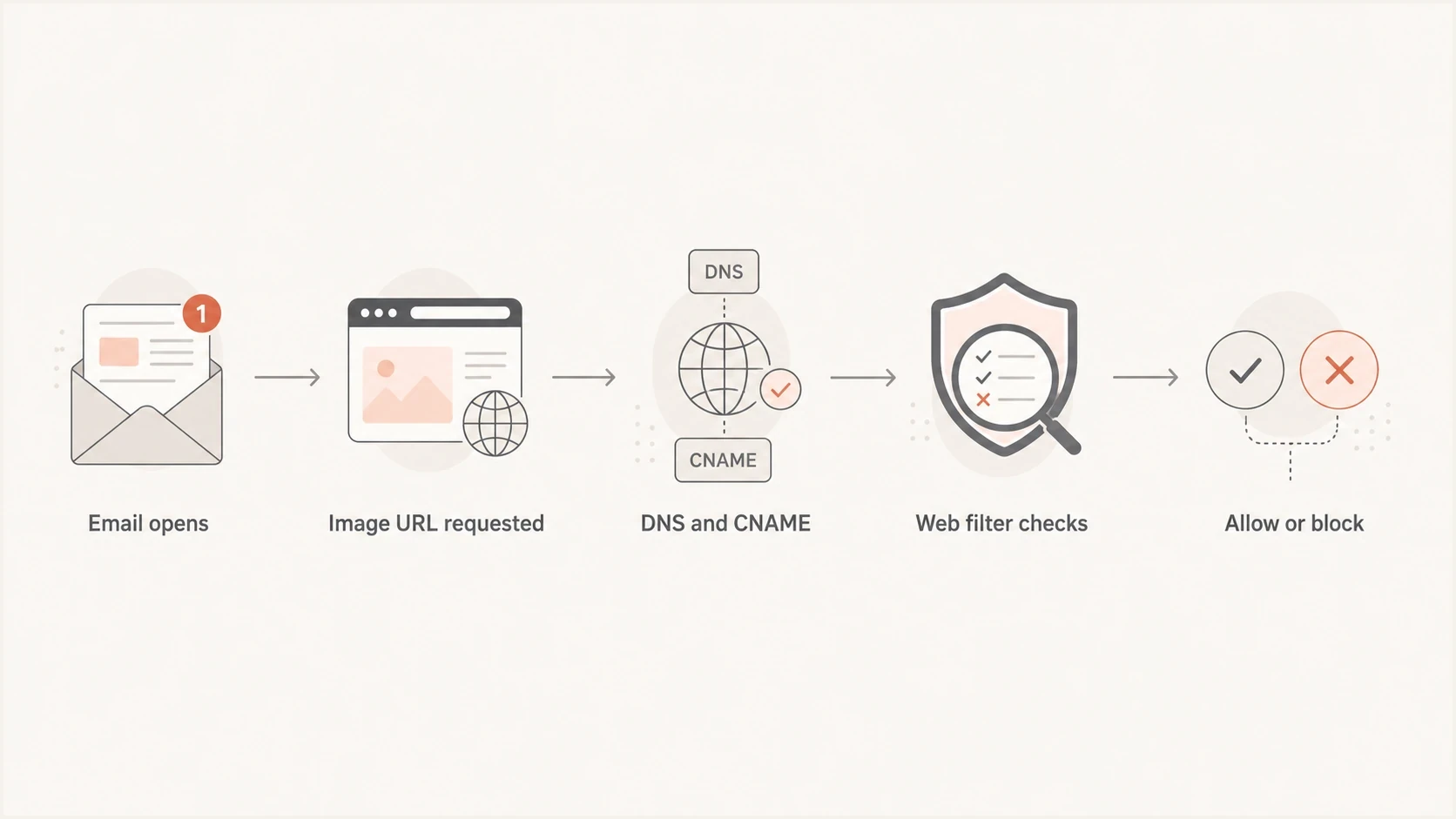
Flowchart showing how an email image request reaches a web filter.
Email authentication
- Scope: Checks domain identity and whether SPF or DKIM aligns with the visible From domain.
- Signals: SPF, DKIM, DMARC alignment, authentication results, and policy.
- Limit: It does not prove that each linked image host is trusted by your network.
Image URL access
- Scope: Checks whether the device or image proxy can retrieve the remote asset.
- Signals: URL category, CDN reputation, redirects, TLS, HTTP response, and policy.
- Limit: It can block a real vendor because the asset host has separate risk signals.
A common pattern is a vendor using a third party image host or CDN with a hostname that does not clearly connect to the vendor brand. A corporate web filter has no reason to assume that a strange image domain is safe just because the email's From domain looks familiar. The same issue comes up when teams use CDN image domains that do not match the rest of their email identity.
Check who fetches the image
A browser test identifies the corporate path only when the mail client fetches the image from the same device and network. Some mail clients fetch remote images through a provider-run proxy, which means the vendor's server sees the proxy rather than the recipient's address. Other clients block remote content locally for privacy until the user or administrator allows it.
If the image URL works in a browser on the corporate network but remains blank in the message, inspect the message source and compare another mail client. Check for a remote-content warning, a rewritten image URL, an HTTP error returned to the proxy, or an origin rule that requires cookies, a session, a browser-specific header, or a permitted source address.
|
|
|
|---|---|---|
Fails only on company network | Direct device fetch | Check web filter logs |
Browser works, email fails | Client or image proxy | Check remote-content settings and response logs |
Fails in every client | Origin or shared proxy issue | Check HTTP status, TLS, and access rules |
Works after manual approval | Privacy policy | Review sender or site exception |
Use the fetch path to choose the next investigation.
Do not assume an allowlist will help
An internal firewall allowlist cannot fix a fetch made entirely by an external image proxy. Confirm the request source and the blocking control before changing policy.
What to check first
Start with evidence that cleanly separates a network block from an email rendering issue. Do not begin by asking whether the vendor is reputable. Begin by proving where the block happens and what identifier the control is blocking.
- Off-network test: Open the exact image URL on a phone using mobile data, not company Wi-Fi.
- Exact URL: Copy the image source, not the email click tracking URL or a shortened link.
- Client comparison: Open the same message in another approved client and note any remote-content warning.
- DNS chain: Resolve the hostname and record every CNAME target before the final address.
- HTTP result: Record the status code, content type, redirect locations, and cache headers.
- Firewall log: Ask IT for the category, rule name, threat label, and device that blocked it.
- Vendor proof: Ask whether the image host is public, requires cookies, uses a CDN, or restricts proxy traffic.
Basic URL and DNS checksBASH
host images.vendor-assets.example
host cdn-target.example
curl -I https://images.vendor-assets.example/path/image.png
openssl s_client -connect images.vendor-assets.example:443 -servername images.vendor-assets.example
|
|
|
|---|---|---|
Works off-network | Internal policy | Check logs |
Browser works, client fails | Client or proxy path | Compare fetches |
CNAME to CDN | Shared host | Ask vendor |
Odd domain | Extra scrutiny | Request branding |
Category block | Policy match | Review rule |
Short signals that help separate policy, reputation, client, and setup problems.
If the URL fails everywhere, the vendor has a hosting outage, broken TLS, expired object, bad redirect, rate limit, or access control issue. If it fails only inside your network, the immediate decision came from your security stack. If it fails only inside the mail client, investigate remote-content policy and image proxying before blaming the network.
Why reputation still matters
Reputation does matter, but the relevant reputation is not always the vendor's main sending domain. A filter can judge the registered domain, exact hostname, CDN hostname, IP range, redirect destination, certificate name, and past behavior on that infrastructure.
This is why a commercial CDN can still be involved in a block. A CDN is normal, but a shared CDN has shared exposure. If the provider does not police customer abuse tightly, some corporate filters apply more scrutiny to hosts or paths on that network. If the vendor chose a random-looking domain that CNAMEs into the CDN, the setup can look worse than it is.
Important distinction
A blocked image URL is not the same as a blocked email. Your mail server accepted the message. A network, provider proxy, or client policy then rejected or skipped a separate request for remote content.
- Email accepted: MX and mailbox controls allowed the message into the mailbox.
- Image blocked: A later control rejected or suppressed the remote URL request.
- Fix path: Collect fetch-path evidence and a vendor explanation of the asset host.
For reputation checks, review blocklist (blacklist) status for the sending domain, asset domain, and relevant IPs. Suped's blocklist monitoring keeps these reputation alerts near the authentication data, which helps correlate a public listing with the message and asset-host investigation.

Blocklist monitoring page showing domain and IP checks across blocklists with importance and status
A blacklist result still needs context. Some blocks are private category decisions, not public blocklist events. Others are caused by a CNAME target, not the visible hostname. Treat blocklist data as one signal, then confirm it against the actual request path, firewall log, HTTP response, and DNS chain.
How DMARC fits in
DMARC shows whether SPF or DKIM authenticated in alignment with the visible From domain, but it does not authenticate the image file or judge message content. A message can pass DMARC while loading images from a domain that has no visible relationship to the sender. That separation is the part many investigations miss.
Authentication can pass while the image host differsTXT
From: Vendor <news@vendor.example>
DKIM-Signature: d=vendor.example
SPF result: pass for vendor.example
DMARC result: pass
Image src: https://assets-random.example/email/image.png
DMARC still provides useful scope. It shows whether the message identity passed an aligned authentication check before the investigation moves to the web request. If authentication fails, investigate that failure separately. It does not explain why the same image URL is blocked in a browser.
For a message-level check, send the vendor email through Suped's email tester and inspect authentication, headers, rendering clues, and delivery issues before escalating the URL block.
Email tester
Send a real email to this address. Suped shows a results button when the test is ready.
?/43tests passed
For a broader domain view, use Suped's domain health checker to confirm the public DNS posture around DMARC, SPF, and DKIM. It will not explain why one corporate firewall or image proxy blocked one URL, but it shows whether the vendor's core email authentication has obvious weaknesses.
Suped's product keeps DMARC monitoring, SPF and DKIM visibility, hosted SPF, hosted DMARC, hosted MTA-STS, blocklist monitoring, alerts, and fix steps in one place. For this issue, the workflow is practical: verify the email identity, then give IT and the vendor a focused asset-host investigation.
What to ask the vendor to fix
A reputable vendor should be able to explain its image-hosting setup without making you guess. If the answer is vague, ask for specifics. The goal is not to force every image onto the root sending domain. The goal is to make the asset chain clean, publicly retrievable, branded where sensible, and defensible to security teams.
- Branded host: Ask whether images can load from a subdomain that clearly belongs to the vendor.
- Clean CNAME: Ask for the exact CNAME target and whether it is dedicated or shared.
- TLS health: Ask them to confirm the certificate covers the image hostname correctly.
- Public access: Ask them to remove cookie, session, source-address, or header requirements from email assets.
- Redirect path: Ask them to remove avoidable redirects before the final image object.
- Proxy access: Ask whether their origin, firewall, or rate limits reject mail-provider image proxies.
- Abuse controls: Ask how the CDN or hosting provider handles abusive customers on shared hosts.
Weak setup
The email is branded, but the images load from a random-looking domain that points into a shared CDN. The vendor cannot quickly explain who controls it, why that hostname was chosen, or whether proxy requests can retrieve the files.
- Risk: Security teams see an unfamiliar domain and apply stricter web rules.
- Cost: Recipients lose images even though the email itself was accepted.
Strong setup
The image hostname has clear ownership, sane DNS, valid TLS, public access, limited redirects, predictable cache behavior, and a vendor support team that can map the visible hostname to the CDN target.
- Benefit: Security teams have a clear host to assess and allow when policy permits.
- Proof: The vendor can provide DNS, CDN, access, and ownership details without delay.
Vendor questions to sendTXT
Can you confirm who owns this image hostname?
Does it CNAME to a shared or dedicated CDN target?
Can images be served from a branded vendor subdomain?
Are the assets public without cookies or a browser session?
Do origin rules or rate limits block image-proxy requests?
Can you confirm there are no extra redirects before the asset?
When to escalate internally
Internal escalation works best when you bring facts instead of a general complaint that a vendor's images do not load. Your IT or security team can usually identify the exact block reason when the request crossed the corporate network, but they need the original URL and a timestamp close to the failed request.
Evidence packet for IT
- URL: Include the exact image URL copied from the message source.
- Time: Include the request time, timezone, device, mail client, and network.
- Scope: State whether the URL works on mobile data, in a browser, or in another mail client.
- DNS: Include the visible hostname, CNAME target, and final resolved address.
- HTTP: Include status codes, redirects, content type, and any block page.
Security teams have a reason to restrict access when a URL looks risky, especially if the hostname is unbranded, newly seen, categorized oddly, or tied to shared infrastructure. That does not mean the vendor is malicious. It means the asset setup creates more friction for protected networks.
Escalation confidence
Use these evidence levels to decide how firmly to push the vendor or internal team.
Low
Weak evidence
Only one user reports missing images, and the exact URL has not been tested.
Medium
Likely policy
The exact URL works off-network but fails on the corporate network.
High
Actionable
Firewall logs name the blocked host, category, rule, and timestamp.
Critical
Vendor fix
The host has reputation issues or a repeated blacklist pattern.
If the vendor works in email, expect a clear answer. Its support team should know the difference between email authentication, asset hosting, and image proxying, and should be able to explain why images come from that domain. A reputable name is helpful, but clean infrastructure choices matter more when corporate controls make the final decision.
Views from the trenches
Best practices
Test the exact image URL off-network before blaming the mailbox or email platform.
Capture the full CNAME chain so IT can see the CDN and the visible asset hostname.
Ask vendors to use branded asset hosts when the audience includes protected networks.
Common pitfalls
Assuming a known sending brand makes every third party image hostname trusted internally.
Checking only DMARC results when the failing request is a separate web request path.
Sending IT a screenshot without the URL, timestamp, network, and category detail.
Expert tips
Treat random-looking asset domains as operational risk, even when the vendor is real.
Ask whether the CDN target is shared, because shared abuse can affect clean senders.
Separate public blocklist data from private firewall categories during review process.
Marketer from Email Geeks says the first split is whether the same image loads on mobile data outside the company network.
2024-09-30 - Email Geeks
Marketer from Email Geeks says this pattern usually points to a firewall, browser policy, proxy, or similar web security control.
2024-09-30 - Email Geeks
How to resolve blocked email images
Images from a reputable vendor's email are blocked because a remote-content control evaluates the image separately from the message. The decision can come from a mail-client privacy setting, provider image proxy, URL category, domain reputation, CDN reputation, redirect, TLS failure, DNS filter, endpoint policy, or an internal allow or deny rule. The vendor's email authentication can pass while the image host still fails.
The fastest path is to prove the split: test off-network, compare the browser and mail client, capture the exact URL, resolve the CNAME chain, record the HTTP result, pull the firewall log when one exists, and ask the vendor to explain the asset host. If the host looks random, points to a shared CDN, blocks proxy fetches, or lacks clear brand ownership, ask the vendor to clean it up rather than treating it as a one-off annoyance.
Suped supports the authentication and reputation parts of this investigation with DMARC visibility, SPF and DKIM checks, hosted SPF, hosted DMARC, hosted MTA-STS, blocklist monitoring, alerts, and fix steps. A network or proxy block still needs request-path evidence, while Suped gives you a clear view of the email identity and domain reputation around the message.




