Does using a different domain for CDN hosted images in emails affect deliverability?

Published 7 Aug 2025
Updated 27 Jul 2026
11 min read
Summarize with

Updated on 27 Jul 2026: We added guidance on image proxy caching, CDN uptime, burst traffic, and stable asset URLs.
Short answer: using a different domain for CDN-hosted images in emails does not automatically hurt deliverability. If the email sends from mail.mycompany.com and the images load from cdn.myothercompany.com, mailbox providers care much more about authentication, recipient engagement, complaint rates, sending reputation, and message quality than whether the image hostname exactly matches the sending domain.
The caveat is simple: the image domain has its own reputation signals. A company-owned CDN domain with a clear business purpose, valid HTTPS, stable DNS, and no blocklist or blacklist history is usually fine. A raw shared host, an unknown domain, a domain with abuse history, or a public bucket hostname can create filtering risk because the URLs inside the message look less trustworthy.
- Keep the CDN: If the domain is owned by your company and already supports normal web traffic, do not upload thousands of images into the email platform just to match the From domain.
- Prefer a branded host: A hostname such as images.mycompany.com or assets.mycompany.com is cleaner than a raw third-party bucket or generic shared CDN hostname.
- Test the final email: Send the real rendered message, because filters evaluate the actual HTML, image URLs, redirects, tracking links, and authentication results together.
Why the mismatch usually is not the issue
The image host is not the same thing as the authenticated sending domain. SPF checks whether the sending IP is authorized for the envelope sender domain. DKIM validates a cryptographic signature for the signing domain and confirms that protected message content was not changed in transit. DMARC checks whether the visible From domain aligns with the authenticated SPF or DKIM domain. None of those checks require every image URL to sit under the same domain as the visible From address.
That distinction matters because it keeps the fix focused. If mail from your email platform fails DMARC, then image hosting is not the root cause. Fix sending authentication, policy, domain matching, or source authorization. Ongoing DMARC monitoring gives you the evidence to separate authentication failures from content-related filtering.
Authentication and image hosting are separate checkstext
From: offers@mail.mycompany.com
Return-Path: bounce@mail.mycompany.com
DKIM d=mail.mycompany.com

HTML image source:
https://cdn.myothercompany.com/products/12345/front.jpg
What not to change first
Do not move 9,000 product images into an email platform just because the CDN uses another company-owned domain. That creates asset management work, increases the chance of stale images, and usually does not address the factors that decide inbox placement.
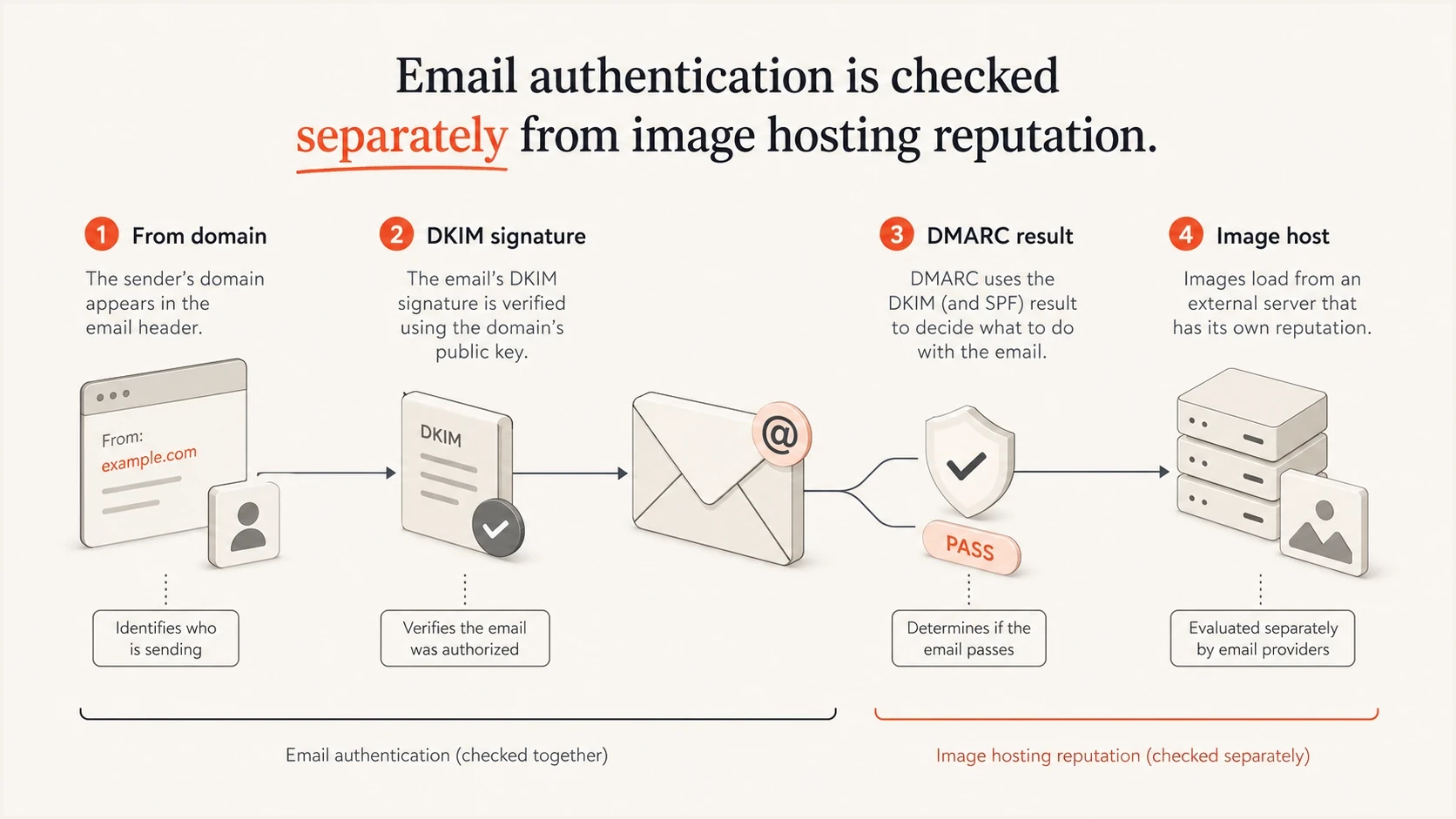
Authentication checks shown separately from the image host used in email HTML.
Where an image domain can hurt
A different image domain becomes a deliverability issue when the domain itself looks risky. Filters inspect URLs inside the email body, not just the From address. They can consider the domain reputation, redirect behavior, HTTPS status, age, hosting patterns, and whether the domain appears on a blocklist or blacklist.
The highest-risk pattern is not "different domain." The highest-risk pattern is "untrusted URL." A generic shared CDN hostname, public storage URL, URL shortener, or recently registered asset domain forces the mailbox provider to trust a domain that has weak or mixed history. If the domain already has poor reputation, image loading can become one more negative signal in the content scan.
|
|
|
|---|---|---|
Owned subdomain | Low | Clear ownership and consistent brand signals. |
Owned web domain | Low | Normal site traffic can support trust. |
Shared host | Medium | Reputation is mixed with other users. |
Short URL | High | Obscured destination can trigger filtering. |
Listed domain | High | A listing can affect URL reputation checks. |
Compact risk guide for image host choices.
Check reputation before changing the architecture. Suped's blocklist monitoring helps track domain and IP listings so a CDN or sending issue does not sit unnoticed until a campaign underperforms.
Image domain risk levels
A practical way to rank the image hostname before a campaign send.
Low risk
Owned
Company-owned, stable DNS, HTTPS, and no listing signals.
Review
Mixed
Shared host, generic hostname, redirects, or inconsistent branding.
High risk
Listed
Listed domain, unknown ownership, abuse history, or masked URLs.
The cleaner CDN setup
For a large catalog, keep images on the existing CDN and expose them through a controlled, branded hostname. That can be a subdomain of the main brand domain, the email sending domain, or another company-owned domain with a good web reputation. The point is ownership and trust, not a forced exact match with the sending domain.
Clean setup
- Controlled host: Images load through a hostname the company owns and can monitor.
- Stable HTTPS: Every asset loads over a valid certificate without certificate errors.
- Predictable paths: Product image URLs follow a consistent pattern and avoid redirect chains.
Risky setup
- Raw host: The email exposes a generic storage or shared CDN domain.
- Weak ownership: The domain is not clearly tied to the brand or the website.
- Messy redirects: Image requests hop across unrelated domains before loading.
A branded CNAME can preserve the existing CDN workflow, but the DNS record alone is not enough. Add the custom hostname to the CDN configuration, confirm its origin routing, provision a valid TLS certificate, and test the public image response before updating email templates. This also gives internal teams a clear hostname that stays under company control.
Branded CDN hostname exampledns
images.mycompany.com. 300 IN CNAME cdn.vendor.example.net.
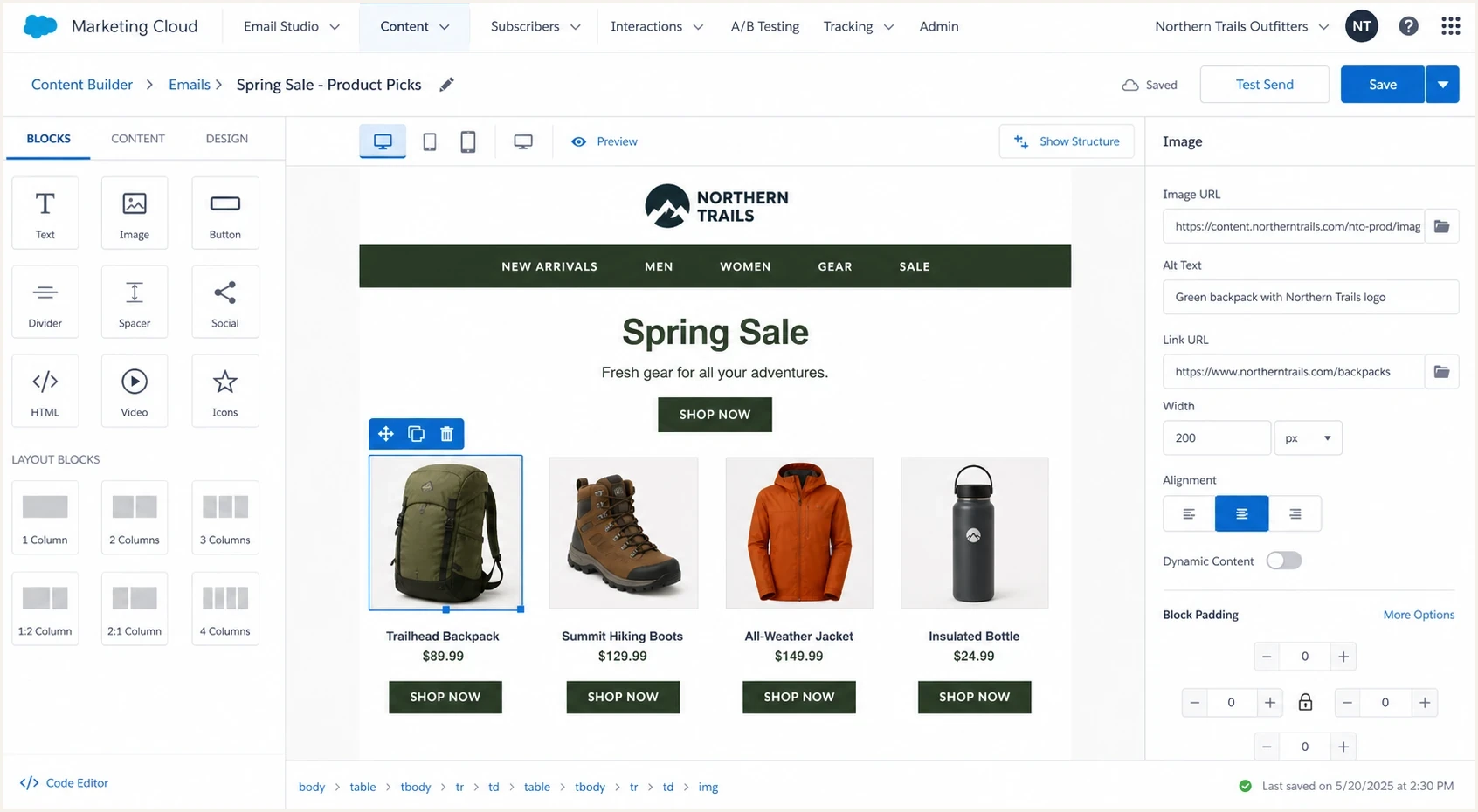
Salesforce Marketing Cloud Content Builder showing a CDN image URL in an email image block.
How CDN performance affects the email after delivery
Deliverability and image rendering are separate outcomes, but poor rendering can still reduce campaign performance. Mailbox providers and email clients often fetch remote images through security proxies. The CDN must allow anonymous HTTPS requests, return a successful response with the correct image content type, and avoid cookie, referrer, or IP-based access rules that block proxy requests.
Image proxies can cache a fetched asset. Replacing a file behind the same URL after sending does not guarantee that recipients will see the new version immediately. Use a versioned URL when an image must change, and do not reuse an existing product URL for unrelated content.
- Keep URLs available: Use persistent public URLs that remain valid in forwarded and archived messages. Avoid signed links that expire soon after the send.
- Plan for peak requests: A large campaign can create a concentrated wave of image fetches. Confirm that CDN caching and the origin can handle the expected peak.
- Test relevant regions: Measure image load time in the locations where recipients live, including slower mobile connections.
- Version urgent replacements: Purging the CDN does not clear every mailbox provider's proxy cache. Publish a new URL when recipients must receive a corrected asset.
How to test before sending
Testing matters because the final email is what filters see. A template preview does not prove that DKIM survives, the HTML stays clean, the image URLs resolve quickly, or the tracking layer avoids extra redirects. Send a real test through the same platform, with the same image domain, tracking settings, and personalization rules used in production.
A practical test starts with authentication and then moves into content. Use Suped's email tester for the real send, then inspect whether the message passes SPF, DKIM, and DMARC, whether the image URLs load, and whether the report flags issues that point at content or domain reputation.
Email tester
Send a real email to this address. Suped shows a results button when the test is ready.
?/43tests passed
Run a broader domain health check on the sending domain and related hostnames before a high-volume send. It catches basic DNS and authentication mistakes that often get blamed on images after the fact.

Email tester sample report showing total score, email preview, issue summary, and per-section results
- Send the real build: Use the same audience rules, tracking settings, and dynamic product image logic as the campaign.
- Check authentication: Confirm SPF, DKIM, and DMARC pass with the domains you expect.
- Inspect URLs: Look for raw shared hosts, long redirect chains, broken HTTPS, and mismatched brand domains.
- Watch placement: Seed tests and small real sends can reveal image or content issues before the main launch.
How Suped fits into this workflow
Suped's product helps separate a CDN image concern from the rest of a sending-readiness check. It shows whether the domain is authenticated, whether unknown sources are sending, whether a policy change will break mail, whether an IP or domain is listed, and whether a specific test email has content-level issues.
Suped connects DMARC, SPF, and DKIM monitoring with blocklist monitoring, email testing, real-time alerts, automated issue detection, and specific fix steps. That gives the team one workflow for verifying the sending source and ruling out authentication or reputation problems before changing the image architecture.
How Suped supports this case
- Verify sources: Confirm the email platform is the expected sender and is passing authentication.
- Monitor reputation: Track blocklist or blacklist entries that affect sending domains, IPs, and related infrastructure.
- Fix issues: Use the issue view to move from a warning to a specific DNS or platform change.
- Review at scale: Use multi-tenancy when several brands, regions, or client domains need oversight.
The result is a clearer answer. If DMARC passes, the sending source is verified, the CDN domain is clean, and the test email has no URL issues, the separate image domain is not the thing to fix.
When to change the image domain
Changing the image domain makes sense when the current domain creates trust problems that are visible in the message. That does not mean every email asset must move into the sending platform. It usually means mapping the CDN through a better hostname, cleaning redirects, or separating risky legacy assets from campaign assets.
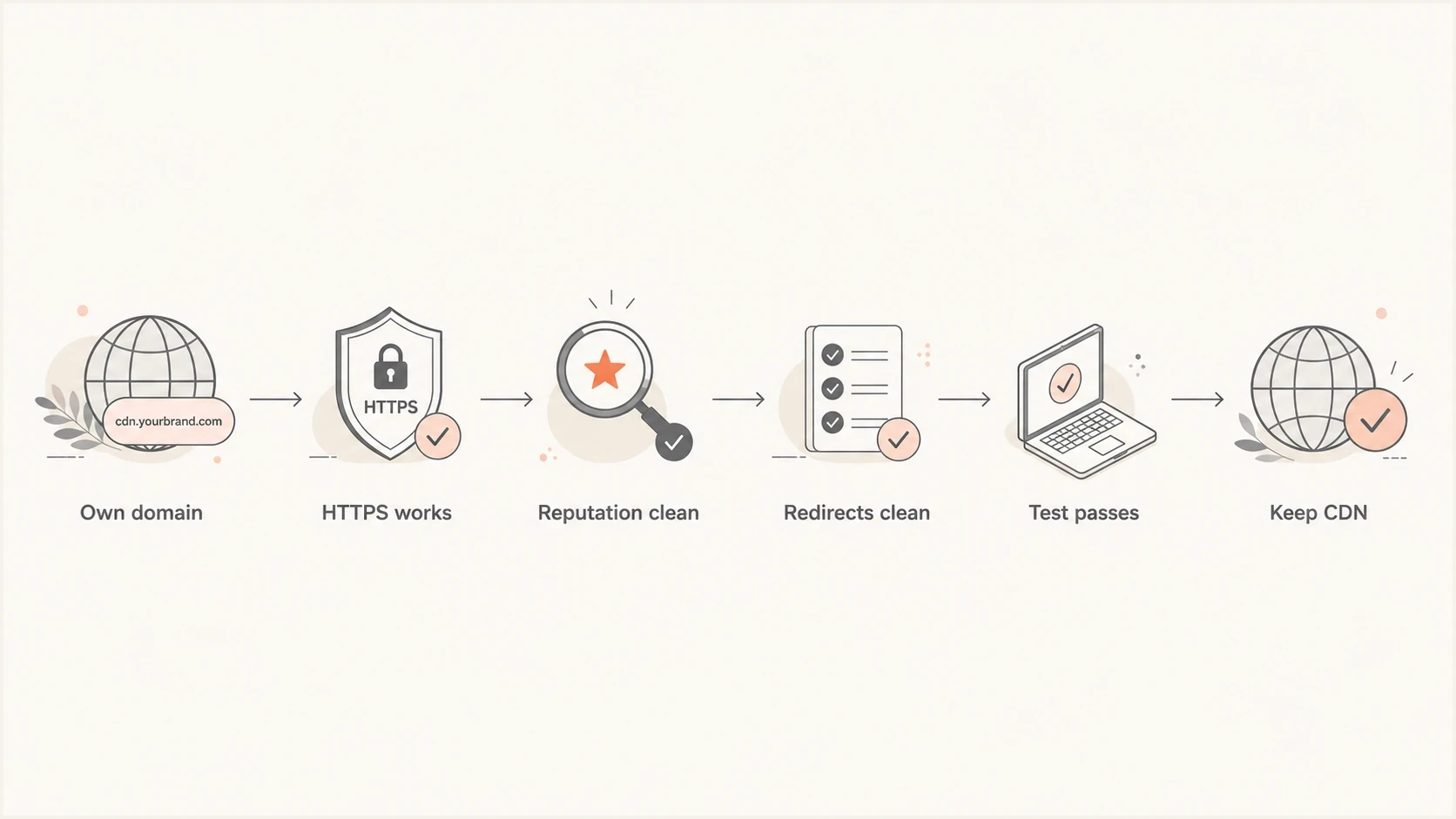
Decision flow for keeping a separate CDN image domain in marketing emails.
Change the image hostname if it uses an unrelated public bucket name, fails HTTPS, sits on a listed domain, has a history of abuse, or creates redirects through unrelated hosts. Do not change it just because it differs from the sending domain. If the campaign is also image-heavy, review email file size separately, because clipping and slow loading create their own problems.
Do not hide the destination
Avoid shortening or masking image and click URLs to make them look shorter. Filters and recipients both trust clear, consistent domains more than obscured destinations.
Views from the trenches
Best practices
Use a company-owned image hostname so CDN scale does not weaken brand trust signals.
Run real test sends with final tracking, redirects, dynamic images, and authentication.
Monitor sending and asset domains for blocklist or blacklist signals before launches.
Common pitfalls
Uploading large image catalogs into the ESP to solve a hostname mismatch wastes effort.
Using raw shared storage URLs can mix your reputation with unrelated senders or sites.
Checking only SPF, DKIM, and DMARC misses broken images, redirects, and listed domains.
Expert tips
Map the CDN to a branded subdomain when security, legal, or brand teams need clarity.
Treat the image domain as a URL reputation input, not an authentication matching input.
If a test fails, isolate authentication, URL reputation, HTML weight, and engagement data.
Marketer from Email Geeks says a separate image domain should not affect deliverability by itself when the domain is controlled and reputable.
2023-03-22 - Email Geeks
Marketer from Email Geeks says the main risk is using a domain that the sender does not control, such as a shared public storage hostname.
2023-03-22 - Email Geeks
The practical answer
A different CDN domain for email images is acceptable when the domain is owned, trusted, stable, and clean. For a catalog with thousands of product images, keeping the existing CDN is usually the right operational choice. Map it to a branded hostname if you want cleaner signals, but do not treat exact domain matching as a deliverability requirement.
The right order is authentication first, URL reputation second, rendering and load behavior third, then placement testing. If those checks pass, the CDN architecture can stay in place and the team can focus on the campaign factors that actually move inbox placement.




