Why are Yahoo/AOL blocking my emails and what can I do about it?

Updated on 25 Aug 2026: We added Yahoo Sender Hub Insights guidance and sharpened how we interpret complaint data and SMTP responses.
Yahoo and AOL block or defer email when Yahoo Mail's systems think your mail is unwanted, risky, too fast, or not authenticated well enough. Treat it as a sender reputation incident: slow down, isolate the affected Yahoo/AOL traffic, review the exact bounce codes, audit authentication, remove risky segments, check URLs and content, then rebuild volume with your most engaged recipients.
The common symptoms are 421 or 451 temporary failures, TSS04 or other TS responses, 553 or 554 policy rejections such as PH01 or BL01, sudden Yahoo/AOL engagement collapse, heavy soft bounces, inbox placement dropping to spam, or mail accepted only after long retry periods. A 4xx response is a temporary deferral, while a 5xx response is a permanent failure for that delivery attempt. Keep your diagnosis grounded in data by checking whether the issue follows one IP, domain, return-path, link domain, campaign type, acquisition source, forwarded-mail path, or recipient segment.
- Immediate action: pause or sharply reduce Yahoo/AOL volume instead of hammering retries into the same temporary failures.
- Main diagnosis: compare affected and unaffected mail streams by IP, domain, content, URL set, list source, forwarding path, and engagement depth.
- Authentication baseline: verify SPF, DKIM, DMARC alignment, reverse DNS, resolvable MAIL FROM and Header From domains, one-click unsubscribe, and ARC if forwarding is involved.
- Recovery path: restart with recent clickers and other verified human activity, then increase Yahoo/AOL volume only when deferrals fall.
Why Yahoo/AOL block mail
Yahoo-hosted consumer mail domains, including Yahoo and AOL, use the same practical receiver logic most large mailbox providers use: they look at whether recipients want the mail, whether the sending identity has a stable history, whether the technical authentication passes, and whether the message content or linked domains carry risk. A blocklist or blacklist listing can matter, but Yahoo/AOL blocking often happens without a public listing that a sender can simply remove.
Complaint rate does not always mean the same thing in your sending platform and at the receiver. Yahoo Sender Hub Insights calculates its spam complaint rate against messages delivered to the inbox, not total sent or accepted volume. Yahoo can also evaluate spam-folder behavior, deleted-without-reading behavior, URL reputation, forwarded spam, and engagement patterns that a normal complaint feedback loop does not expose. Keep the Yahoo rate below 0.3 percent, and treat any upward trend as a reason to inspect the affected DKIM domain and audience.
|
|
|
|---|---|---|
High complaints | 421 or TSS04 | Tighten consent |
Weak engagement | Few clicks or replies | Send active |
URL risk | Content block | Audit links |
Auth failure | DMARC fail | Fix DNS |
Volume spike | TSS04 | Back off |
Policy rejection | 554, PH01, or BL01 | Fix cited cause |
Forwarded spam | TS errors | Audit forwarding |
IP listing | Blacklist | Check source |
Common Yahoo/AOL block causes and what they usually mean.
Do not treat TSS04 as a normal retry
A temporary response can say to try later, but ongoing TSS04 volume means Yahoo/AOL wants less pressure from that stream. Repeated retries can make the trend worse because the receiver still sees the envelope, sender, recipient pattern, and message content before deciding whether to accept it. When the same TS or TSS pattern lasts more than 48 hours after a clear backoff, gather diagnostics and open a Yahoo Sender Support Request.
A normal retry schedule is fine for a small, isolated 4xx soft bounce. It is a different situation when 20 percent, 30 percent, or more of a Yahoo/AOL segment starts deferring. At that point, shift from routine MTA retries to reputation analysis. Do not retry a 5xx response as though it were temporary. Read the full SMTP response because the status class and diagnostic tag identify whether to reduce pressure, correct the message or authentication, or suppress an invalid recipient.
Current Yahoo/AOL sender requirements
Yahoo's sender requirements are now part of normal Yahoo/AOL troubleshooting. AOL is included because these requirements apply across consumer email brands hosted by Yahoo Mail. Yahoo does not publish a fixed daily volume threshold for classifying a bulk sender, so do not assume a stream falls outside the rules because it is below another provider's threshold.
- Authentication: all senders need SPF or DKIM at minimum. Bulk senders need both SPF and DKIM, plus a valid DMARC policy of p=none or stronger, and DMARC must pass.
- DMARC alignment: the visible From domain needs to match the authenticated SPF domain or DKIM signing domain closely enough for DMARC to pass. Relaxed alignment is acceptable, and a working rua tag is strongly recommended for monitoring.
- Spam complaints: keep Yahoo spam complaints below 0.3 percent. Yahoo calculates the Sender Hub Insights rate against mail delivered to the inbox, so it can differ from an account-wide sent-volume rate.
- Complaint feedback: enroll every DKIM signing domain in Yahoo's Complaint Feedback Loop where your setup supports it, process ARF reports quickly, and investigate any sudden report flatline against send volume, DKIM d= values, the enrolled domain, and the report mailbox.
- Unsubscribe handling: marketing and subscribed mail needs a functioning List-Unsubscribe header with one-click support, a visible body unsubscribe path, and unsubscribe requests honored within two days.
- DNS and headers: check forward DNS, reverse DNS, non-generic PTR naming, valid HELO or EHLO, DKIM keys of at least 1024 bits, RFC-compliant headers, and valid MAIL FROM and Header From domains.
- Subdomain validity: make sure every sender subdomain used in MAIL FROM or Header From resolves cleanly and has the DNS authority Yahoo/AOL needs to verify it.
- Forwarding and lists: use ARC where forwarding is part of the mail path, and keep list software from breaking authentication or hiding the sender identity.
- List hygiene: remove invalid recipients, stop mailing unclear-consent data, and separate transactional mail from bulk marketing streams.
- Server security: secure outbound queues, stop open relay behavior, rate-limit compromised accounts, and filter user-generated mail before it leaves your infrastructure.
Why this matters during a block
Yahoo/AOL blocks are often described as reputation problems, but missing sender requirements can keep a reputation recovery from working. Fix the requirement gap first, then reduce volume and rebuild recipient trust.
How to diagnose the block
Start with segmentation. Pull Yahoo, AOL, and related Yahoo-hosted consumer mail domains into their own report. Then split that traffic by sending IP, DKIM domain, bounce domain, visible From domain, campaign, list source, forwarding path, and engagement band. If one IP fails while another sends similar content without trouble, that points to IP reputation or routing. If the same content fails everywhere, look harder at URLs, message type, and recipient reaction.
Separate technical acceptance from inbox placement. A message can be accepted but filtered to spam, accepted after many retries, or refused during SMTP. Those are different problems. A sender with heavy deferrals needs a different recovery plan than a sender whose Yahoo mail lands in spam after clean acceptance.
If only one AOL user says your mail is missing, check the recipient-side path before treating it as a broad sender block. AOL filters, spam-folder placement, third-party mail client settings, and a setting that blocks all senders except contacts can make mail look blocked even when Yahoo/AOL delivery is healthy for the wider list.
Signals to trust
- Bounce code: 421, 451, TSS04, policy rejection, or permanent failure changes the response.
- Stream split: one IP, domain, or forwarded-mail path failing is more actionable than a blended account-level metric.
- Human activity: recent clicks, purchases, replies, and account use give a cleaner restart pool than opens alone.
- URL set: tracking, redirect, affiliate, and landing-page domains can carry separate risk.
Signals to treat carefully
- Average rate: account-wide complaint averages hide Yahoo-specific recipient behavior.
- Seed result: seeds do not behave like real subscribers with history and complaints.
- Open event: privacy systems and scanners can create opens without human engagement.
- Generic advice: a best-practices reply still means something in the stream needs work.
Use a domain-level check before you change sending strategy. Suped's domain health checker puts DMARC, SPF, DKIM, and related DNS signals in one place. That does not prove Yahoo/AOL will accept your next send, but it prevents wasted recovery work on a stream that has an obvious authentication defect.
?
What's your domain score?
Deep-scan SPF, DKIM & DMARC records for email deliverability and security issues.
If authentication is clean, send a controlled test message from the same mail stream. Do not use a stripped-down message that hides the real problem. Test a simple text version, the production template, the production links, and a version with alternate tracking links. Suped's email tester helps review the message itself, including authentication results and content signals.
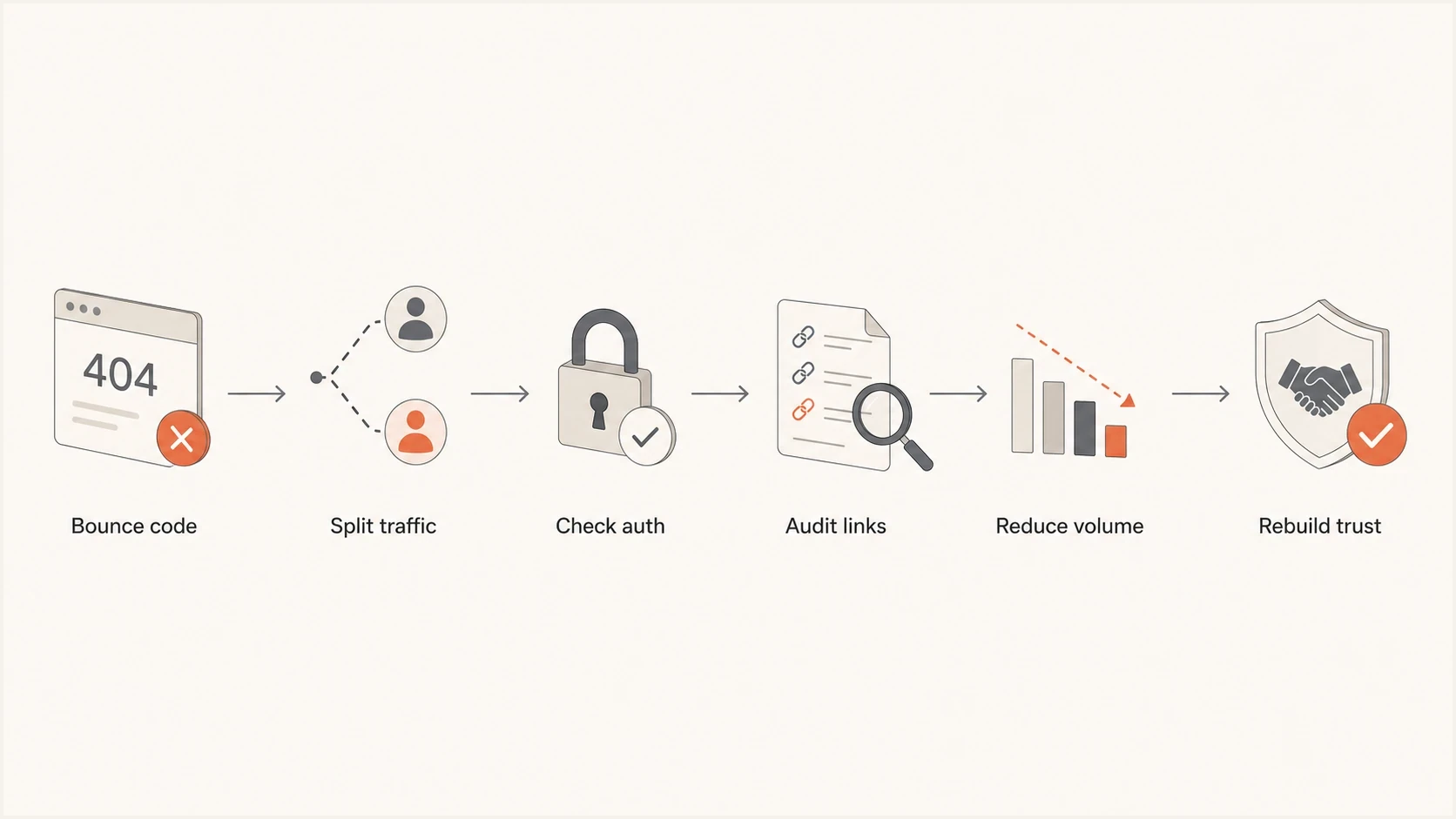
Flowchart showing Yahoo and AOL block diagnosis through bounce codes, authentication, links, volume reduction, and recovery.
When only one stream fails
Not every Yahoo/AOL issue is a broad domain block. Sometimes the problem is a narrow mail path: password resets, forwarded mail, list mail, replies from a hosted mailbox, or one AOL account with local settings. Treat that stream as its own sender before changing the whole program.
- Password reset mail: check the reset IP, return path, visible From domain, DKIM signer, reset URL domain, rDNS, HELO, and full SMTP response. A reset stream can fail while newsletters still deliver.
- Forwarded mail: automatic forwarding to Yahoo/AOL can pass unwanted mail through your server and make complaints land on your IP or domain. Use ARC where forwarding is part of the product and inspect outbound queues for abuse.
- Mailing lists: list software can alter content and break authentication. Use a list address in the From field and put the original sender in Reply-To when that is the cleaner authentication path.
- Single AOL mailbox: ask the recipient to check spam, filters, block settings, contacts-only blocking, and third-party mail client rules before opening a sender-wide incident.
- Evidence split: separate SMTP rejection, accepted-but-spam placement, delayed delivery, and no send attempt. Each one points to a different fix.
Use production samples
A hand-built test message often misses the real failure. Use the actual transactional template, production link domains, real envelope sender, and the same sending IP that failed. Then compare it with a clean stream that Yahoo/AOL accepts.
What to do first
The first response should protect reputation. If Yahoo/AOL is returning heavy temporary failures, reduce or pause that recipient group. Keep Gmail, Microsoft, Apple, and other domains on their normal plan only if their metrics are healthy. Do not let one receiver incident force a full program shutdown unless the same root cause appears everywhere.
- Back off: stop high-frequency retries and reduce Yahoo/AOL volume to a small engaged segment.
- Collect evidence: save bounce samples, timestamps, message IDs, full headers, sending IPs, envelope domains, visible From domains, DKIM domains, link domains, and campaign IDs.
- Verify DNS: check SPF lookup limits, DKIM signing, DMARC alignment, rDNS, HELO, TLS posture, unsubscribe headers, and sender-domain DNS validity.
- Audit content: review every visible URL, tracking domain, redirect chain, unsubscribe link, reset link, and landing page.
- Rebuild slowly: restart with recent clickers and other verified human activity, then add active recipients in measured daily steps.
Minimum authentication baselinedns
_dmarc.example.com.  TXT  "v=DMARC1; p=none; rua=mailto:dmarc@example.com"
example.com.         TXT  "v=spf1 include:mail.example.net -all"
selector._domainkey.example.com. TXT "v=DKIM1; k=rsa; p=PUBLICKEY"
That example is not a complete production policy. It shows the minimum records that should be visible before deeper deliverability work. If you already have DMARC at quarantine or reject, do not roll it back casually. Instead, confirm that legitimate Yahoo/AOL-bound traffic passes aligned SPF or aligned DKIM. In Suped, check the DMARC dashboard for source-level failures, then open issue details for the exact fixing steps.

Issue steps to fix dialog showing the issue overview, tailored fix steps, and verification action
Suped brings DMARC, SPF, DKIM monitoring, blocklist monitoring, hosted SPF, SPF flattening, and real-time alerts into the same incident workflow. Use it to decide whether Yahoo/AOL blocking coincides with an authentication change, a new sending source, a blocklist or blacklist event, or more than one of those conditions.
When the issue is reputation or content
Many Yahoo/AOL blocks are reputation problems that show up as SMTP errors. The sending pattern can look risky even when authentication passes. High-volume affiliate mail, shared leads, co-registration data, political mail, financial offers, insurance, mortgage, job-search lists, forwarded mail from hosted users, and heavy newsletter programs all need tighter evidence of consent than senders often expect.
Pay close attention to addresses collected by another brand, another partner, or a lead seller. The recipient might have consented to something, but Yahoo/AOL judges whether the recipient appears to want this sender's mail now. If users ignore, delete, mark spam, or rarely engage with that stream, the legal status of the signup will not save delivery.
Yahoo/AOL restart bands
A practical way to choose which recipients to reintroduce after heavy deferrals.
Safe restart
0-7 days
Clicked, purchased, or replied recently
Careful expansion
8-30 days
Recent activity beyond opens alone
Hold back
31+ days
No clear recent activity
Content matters even when the rejection arrives before the message is accepted. During SMTP, Yahoo/AOL can evaluate the sender, envelope, recipient, headers, and message body. If the same IP and domain can deliver simple content but fails with production content, the issue probably involves URLs, redirects, template elements, subject matter, or user reaction to that offer.
Content audit checklist
- Tracking links: check whether link domains differ by campaign, affiliate, or brand.
- Redirect chains: remove unnecessary hops and avoid mixed reputation across domains.
- Unsubscribe path: make it obvious, working, and consistent with the visible sender.
- List-Unsubscribe: verify one-click headers for marketing mail and honor requests within two days.
- Forwarding behavior: find auto-forwarded spam, compromised users, list mail, and user-generated messages that leave through your server.
- Offer source: separate first-party subscribers from partner, affiliate, or rented audiences.
Also check blocklist and blacklist status, but keep the expectation realistic. A public listing can explain sudden blocking, especially with shared infrastructure or compromised hosts. It is not the only cause. Suped's blocklist monitoring keeps IP and domain listings visible beside authentication and deliverability signals, which helps teams avoid chasing the wrong cause.
Blocklist checker
Check your domain or IP against 144 blocklists.







How to recover Yahoo/AOL delivery
Recovery should look like a warm-up, even if the IP is old. Age helps, but it does not override current recipient signals. If Yahoo/AOL has already throttled or blocked you, the recovery plan has to show a different pattern: lower volume, clearer consent, better engagement, and cleaner content.
- Day one: send only to recent Yahoo/AOL clickers, purchasers, repliers, and recipients of account-critical mail.
- Day two: add recipients with other recent human activity only if deferrals and spam placement stay low.
- Day three: increase gradually by domain, not by total list size.
- Ongoing: stop expansion immediately if TSS04, 421, or 451 rates rise again.
Do not retry permanent 553 or 554 failures as if they were temporary deferrals. Remove invalid addresses, fix policy or authentication failures, and inspect the rejected content before sending that stream again. Temporary errors call for reduced pressure. Permanent errors call for correction.
Submit to Yahoo sender support when you have a clean evidence pack, but do not wait on a custom explanation. For repeated TS or TSS errors that remain after more than 48 hours of corrective action, include the exact SMTP response, diagnostic code, timestamps, sending IPs, DKIM domains, and sample message IDs. The response often points back to sender requirements. That still tells you to change the sending behavior before filing another ticket.
|
|
|
|---|---|---|
Pause Yahoo | Stops pressure | Lost revenue |
Retry all | Saves queue | Worse trust |
Clicker restart | Clean signal | Small reach |
New IP | Fresh route | Looks evasive |
Fix URLs | Removes risk | Needs testing |
Recovery choices and tradeoffs.
Do not move blocked Yahoo/AOL mail to a fresh IP unless you also fix the behavior that caused the block. A fresh route can help when one IP has a narrow reputation issue, but it can also look like reputation evasion if the same list, links, and cadence continue unchanged. If you need a deeper Yahoo-specific path, the guides on Yahoo throttling and Yahoo IP blocks cover the narrower cases.
Use Yahoo Sender Hub Insights
Yahoo added Insights to Sender Hub in 2025. It shows aggregated delivered-message counts and spam complaint rates for verified DKIM domains across Yahoo-managed domains. Use this receiver-side evidence beside SMTP logs, DMARC reports, campaign data, and complaint feedback. Yahoo's Insights announcement explains the current metrics and activation process.
- Verify the DKIM domain: add and verify each signing domain that carries Yahoo/AOL traffic.
- Activate Insights: allow 24 to 48 hours for data to appear, subject to Yahoo's minimum daily volume.
- Read the denominator correctly: the complaint rate uses messages delivered to the inbox, so it can run higher than a rate based on sent or accepted mail.
- Match the reporting window: Insights uses UTC, so normalize campaign timestamps before comparing a spike with your logs.
- Check the rollup scope: mail using the same DKIM domain is combined even when it has different visible From domains or sending programs.
Use Insights to confirm whether Yahoo's complaint rate and delivered volume changed for the affected DKIM domain. Then use Suped's DMARC dashboard to identify which legitimate services use that domain, whether authentication still aligns, and whether an unknown source appeared near the same time. Insights measures Yahoo-side outcomes, while Suped supplies the source and authentication evidence needed to act on them.
Do not blend unlike denominators
A Yahoo complaint rate based on inbox-delivered mail cannot be compared directly with a platform rate based on sent volume. Track each rate with its own denominator and use direction of change, campaign timing, DKIM-domain scope, and bounce trends to connect the evidence.
What to monitor after recovery
After the first recovery sends, monitor Yahoo/AOL separately for at least two weeks. A single clean send does not prove trust has returned. Look for stable acceptance, low deferrals, consistent authentication pass rates, and a Yahoo Sender Hub Insights complaint rate that stays below 0.3 percent before expanding beyond the most engaged audience. Also review complaint feedback by DKIM domain where your setup supports it. No Yahoo CFL or FBL reports is not a clean signal by itself; it can mean no eligible complaints, a DKIM enrollment mismatch, a mailbox routing issue, parser failure, or report retention loss.
Signals to track during recovery
A simple model for balancing accepted mail against deferrals and failures.
Accepted
Deferred
Failed
Use Suped's real-time alerts to catch authentication failures, sudden DMARC source changes, and blocklist (blacklist) changes before they become a full sending incident. Hosted SPF and SPF flattening can help when sender sprawl has pushed SPF toward lookup-limit errors. Hosted MTA-STS can enforce TLS without requiring teams to build the policy hosting themselves.
For a broader explanation of how blocklists and blacklists fit into sender reputation, use the blocklists guide. For Yahoo/AOL specifically, keep the main focus on recipient permission, engagement, sending pressure, content, and narrow streams such as password resets or forwarded mail.
A clean recovery signal
The best sign is several Yahoo/AOL sends in a row where accepted volume rises, temporary failures stay low, the Insights complaint rate remains controlled, DMARC alignment stays clean, and verified human engagement holds after each volume step.
Views from the trenches
Best practices
Reduce Yahoo/AOL volume first, then restart with recent clickers and known active subscribers.
Compare affected and clean streams by IP, domain, content, links, source, and engagement band.
Keep bounce samples, timestamps, and campaign IDs ready before opening a postmaster case.
Common pitfalls
Treating TSS04 as a routine retry can keep pressure high and worsen sender reputation.
Relying on account-wide complaint rates hides Yahoo-specific filtering and user behavior.
Moving the same list and content to a new IP can look like evasion, not a real fix.
Expert tips
Test simple and production content separately to isolate sender reputation from URL risk.
Audit partner and affiliate data harder because consent clarity drives receiver trust.
Watch blocklist and blacklist status, but do not ignore engagement and content signals.
Expert from Email Geeks says heavy TSS04 responses mean the sender should back off volume and let trend lines recover before rebuilding.
2022-03-28 - Email Geeks
Expert from Email Geeks says Yahoo/AOL can evaluate message content and URLs before returning a rejection, so changed content still matters.
2022-03-25 - Email Geeks
The practical answer
Yahoo/AOL are blocking your emails because their systems see a risk signal in your sending stream. The risk can be recipient complaints, weak engagement, content or URL reputation, authentication problems, public blocklist or blacklist listings, aggressive retry behavior, missing unsubscribe support, forwarded spam, or a sending pattern that looks unwanted.
Stop pushing volume into the block, isolate the exact stream, fix authentication and content issues, remove weak or unclear-permission segments, then rebuild slowly with engaged Yahoo/AOL recipients. Use Yahoo Sender Hub Insights for the receiver's delivered-volume and complaint-rate view. Use Suped for DMARC, SPF, DKIM, blocklist monitoring, and source-level alerts that help turn those trends into specific fixes.




