Why are Sendgrid verification emails blocked by Mimecast when project invites are not?

Published 29 May 2025
Updated 31 Jul 2026
13 min read
Summarize with
Updated on 31 Jul 2026: We added SendGrid event-state checks, clarified DMARC domain matching, and tightened the Mimecast escalation steps.
SendGrid verification emails get blocked by Mimecast while project invites pass because Mimecast is judging more than the shared sending domain. The likely difference is the visible From address, the 5321.MailFrom address, the source IP or IP pool, a recipient-side user entry, the verification template content, or a URL inside the verification email. A 550 Envelope blocked - User Entry response points most strongly to a recipient-side Mimecast rule, not a broad SendGrid outage.
Use a paired-message investigation: take one delivered project invite and one rejected verification email, compare every sender and content signal, then ask the receiving mail admin for the exact Mimecast policy hit. The fact that both messages use SendGrid and the same brand domain does not prove Mimecast sees the same sender or sending IP.
Why the same domain is not enough
In this scenario, the project invite and verification email share the same SendGrid bounce address, but the visible sender changed from noreply@ to support@. That difference alone can trigger a user-managed block, a policy exception, or an impersonation control. Some receiving gateways treat the local part as part of the identity, especially for automated account emails.
SendGrid's blocked guidance helps with bounce handling and recipient outreach, but it will not expose the private Mimecast rule that matched inside the recipient's tenant.
- Envelope sender: Compare the 5321.MailFrom value, also called Return-Path, on both messages.
- Header sender: Compare the 5322.From address, including the local part before the at sign.
- Source IP: Check whether the two events used the same SendGrid IP and IP pool.
- Domain match: Confirm SPF, DKIM, and DMARC results for each message, including the authenticated domain match with the visible From domain.
- Message body: Compare links, template copy, subject line, headers, and tracking settings.
|
|
|
|
|---|---|---|---|
Envelope | same | same | less likely |
From local | noreply@ | support@ | strong clue |
Source IP | compare | compare | reputation clue |
Template | project | account | content clue |
URL | invite | verify | scan clue |
Compact comparison of the two message types.
What Mimecast user entry means
A Mimecast SMTP response like 550 Envelope blocked - User Entry usually means the block came from recipient-side state: a managed sender entry, a blocked sender list, a gateway policy, or a user-level rule. The word Envelope matters, but User Entry matters more. It indicates that the receiving system matched a rule inside that Mimecast tenant.
That is different from public blocklists (blacklists), where a domain or IP appears on a shared reputation list. A user entry is narrower. It can affect one recipient company, one department, or one mailbox, even when the same SendGrid IP and domain deliver elsewhere.
Mimecast blocked-sender policy precedence also matters. A domain-level block can still win when the specific address appears in a permitted-sender entry, so the recipient admin must inspect the matched policy and any broader blocked-sender rule.
Do not assume a SendGrid-wide block
If a Mimecast user entry caused the rejection, changing SendGrid IP pools or retrying the same verification template usually wastes time. The fix sits with the recipient's Mimecast policy, unless a message difference made the policy match.
- Best evidence: A Mimecast admin screenshot or log line with the policy name and match reason.
- Weak evidence: Only knowing that the bounce came through SendGrid and mentioned Mimecast.
- Fast test: Send the verification template from the same visible From as the invite.
- Clean fix: Ask the recipient admin to remove or correct the exact user entry and any higher-precedence domain block.
Recipient-side block
The message is valid enough to leave SendGrid, but Mimecast rejects it before delivery because a local rule matched.
- Scope: Often limited to one organization or mailbox.
- Owner: The recipient's Mimecast admin has the decisive log.
- Fix: Remove the block entry or permit the exact verified sender without a conflicting broader block.
- Risk: A broad permit rule can hide future authentication mistakes.
Sender-side issue
The message has an authentication, reputation, or content problem that receiving systems can detect consistently.
- Scope: Usually visible across several protected recipients.
- Owner: Your team controls DNS, templates, sender identity, IP pools, and links.
- Fix: Correct the sender setup, authenticated domain match, IP reputation, or message content.
- Risk: Changing only the template misses a damaged sending domain or IP.
The authentication chain to inspect
Start with the raw headers. The bounce address shown in SendGrid is useful, but the original delivered invite headers and rejected verification event details are still required. The important split is 5321.MailFrom for SMTP return handling and 5322.From for the sender the user sees.
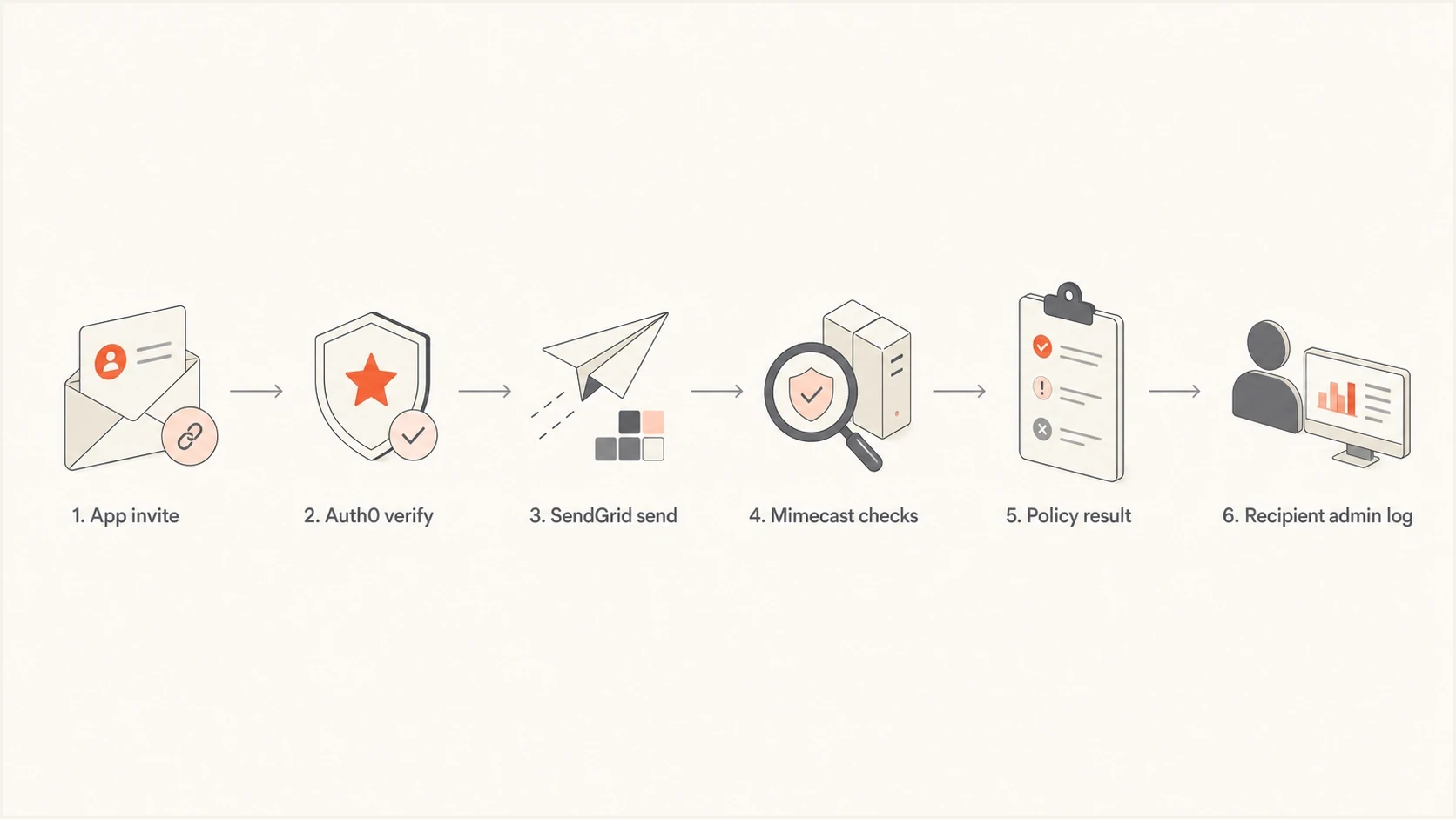
Flowchart showing how an Auth0 verification email reaches Mimecast through SendGrid.
If the invite and verification email both pass SPF, DKIM, and DMARC, the next question is identity and content, not basic authentication. If one fails DMARC while the other passes, fix that first because Mimecast policies can combine authentication results with reputation and user rules.
An SPF pass alone does not establish a DMARC pass. The authenticated 5321.MailFrom domain must match the visible From domain under DMARC rules, or a DKIM signature with a matching domain must pass. Compare the exact Authentication-Results values instead of checking only whether SPF says pass.
Header fields to comparetext
Return-Path: <bounces+id=user=example.net@em5118.example.com>
From: Example App <support@example.com>
DKIM-Signature: d=example.com; s=s1; ...
Authentication-Results: mx.example.net; spf=pass; dkim=pass; dmarc=pass
Expected matching resultstext
spf=pass smtp.mailfrom=em5118.example.com
dkim=pass header.d=example.com
dmarc=pass header.from=example.com
Do not publish a generic SPF example unchanged. A domain must have one SPF record that accounts for all authorized senders, and a SendGrid domain-authentication setup can use a branded return-path subdomain through CNAME records. Validate the records that belong to the actual sending domain.
A domain health check is a fast way to confirm that DNS is not the hidden cause. It will not reveal a private Mimecast user entry, but it keeps the investigation focused when SPF, DKIM, or DMARC has a separate problem.
?
What's your domain score?
Deep-scan SPF, DKIM & DMARC records for email deliverability and security issues.
Why Auth0 can change the message
Auth0 can trigger the verification email while SendGrid still handles delivery. That means the transport provider is the same, but the API payload, template, headers, visible sender, reply-to address, subject line, and verification link can differ. Mimecast can evaluate those differences before it decides to accept or reject the message.
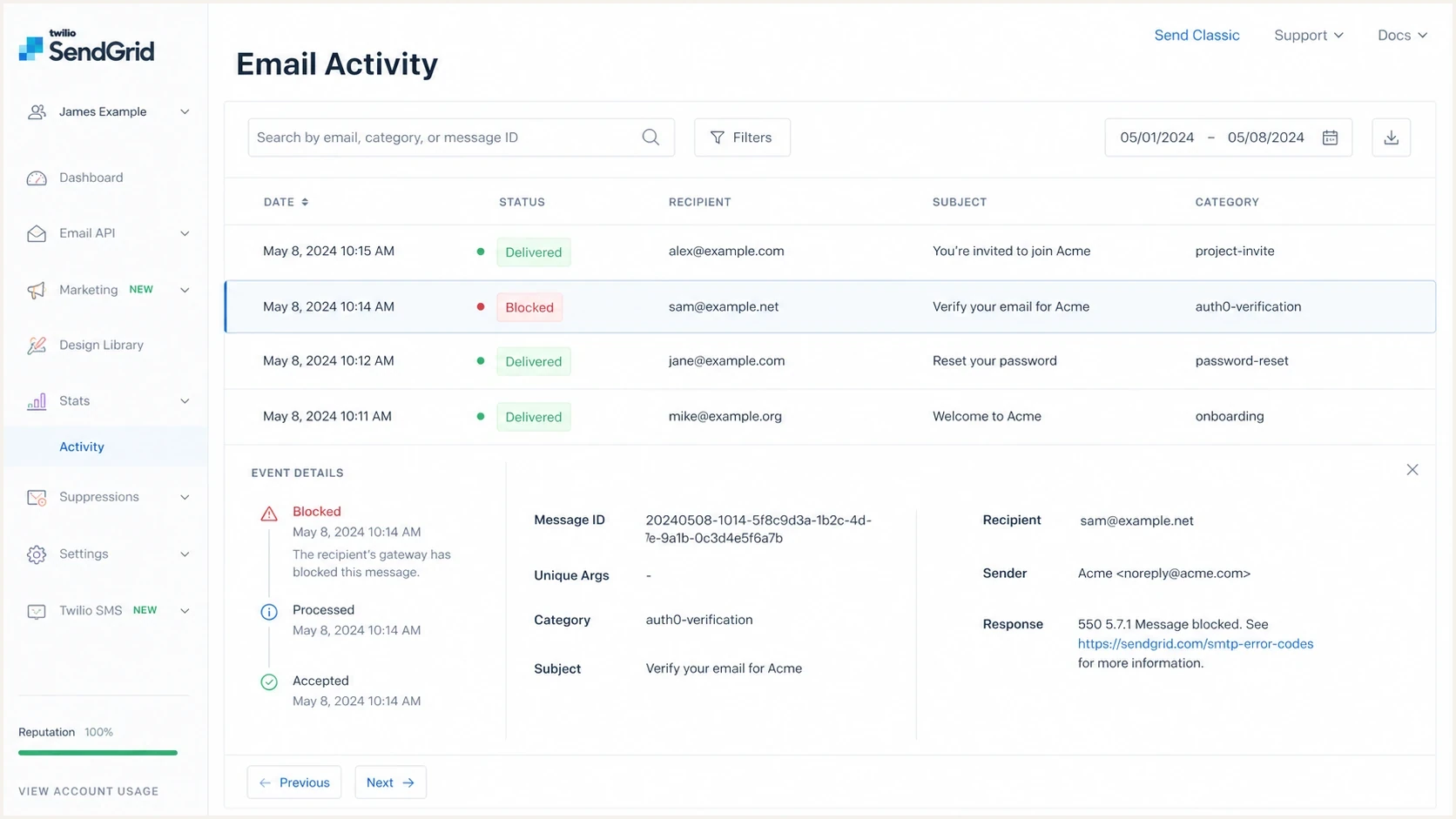
Twilio SendGrid Email Activity showing delivered invite and blocked verification events.
- From local part: The verification template can use support@ while the invite uses noreply@.
- Template ID: The account email can have different headers, subject text, and preheader text.
- Verify link: Tokenized URLs can be inspected differently from project invite URLs.
- Reply-to value: A support desk address can match a user entry even if the domain matches.
- Category data: SendGrid logs can separate invite and verification events for paired testing.
Do not stop at both are sent by SendGrid. The sending system is only one part of the evidence. The verification email is a different message class, and Mimecast can treat it as a different sender relationship.
How to prove the exact cause
The fastest path is controlled comparison. Start with one affected company, one delivered invite, and one blocked verification email. Then collect enough data for a Mimecast admin to confirm the policy result.
For a broader receiving-gateway test plan, use a Mimecast test plan. For this specific case, the job is narrower: prove whether the block follows the visible sender, the source IP, the template, the URL, or a private user entry.
- Collect samples: Export the delivered invite headers and the rejected verification event.
- Record event data: Save the status, reason, bounce classification, source IP, message ID, SMTP ID, and timestamps.
- Match envelope: Confirm the 5321.MailFrom domain and bounce address are identical.
- Swap sender: Test verification with the same visible From address as the invite.
- Swap template: Test the verification link inside the invite template structure.
- Ask Mimecast: Request the policy name, user entry, matched value, recipient scope, and rejection timestamp.
- Check reputation: Look for public blocklist or blacklist signals after the paired test identifies the actual sending IP and domain.
A practical email tester can capture authentication and content signals from a real message. It will not imitate every private Mimecast rule, but it gives you a clean baseline before you ask the recipient admin to inspect logs.
Email tester
Send a real email to this address. Suped shows a results button when the test is ready.
?/43tests passed
Ask for the policy hit
The recipient admin should look for the SMTP rejection timestamp, sender address, envelope sender, policy name, and user entry that caused the block. If the organization uses Mimecast anti-spoofing, ask whether that policy contributed to the rejection or whether the user entry alone caused it.
- Policy name: Confirms whether this was a user block, impersonation rule, or gateway rule.
- Matched value: Shows whether support@, the domain, the envelope, or a URL matched.
- Timestamp: Lets you connect the Mimecast log to the exact SendGrid event.
- Recipient scope: Shows whether the block affects one mailbox or the whole tenant.
Separate the rejection from later SendGrid drops
The first failed verification attempt and later attempts can stop at different systems. A Mimecast 5xx response records the receiving server's permanent rejection. A later SendGrid event can be a drop caused by an existing suppression, which means the new message never reached Mimecast.
- Original 5xx rejection: Treat the human-readable SMTP reason as the evidence. SendGrid generally does not retry a permanent 5xx response.
- Temporary 4xx deferral: SendGrid retries deferred delivery for up to 72 hours, so follow the event history before treating it as final.
- Later dropped event: A reason such as Bounced Address means SendGrid stopped the attempt before delivery. Resolve the original cause, then review the suppression deliberately.
- Correlation data: Retain the message ID, SMTP ID, recipient, category, status, reason, classification, and UTC timestamp for each attempt.
SendGrid event fields to retaintext
event
type
status
reason
bounce_classification
sg_message_id
smtp-id
timestamp
category
This distinction prevents a later dropped verification email from being misread as a new Mimecast policy decision. It also explains why a retest can fail immediately even after the recipient admin changes the Mimecast rule.
Where Suped fits
Suped's product helps with the parts you control: DMARC monitoring, SPF and DKIM visibility, sending-source review, alerts, and blocklist monitoring. It cannot remove a recipient user's explicit Mimecast block, but it can show whether the authenticated domains match the visible From domain and whether the active IP or domain has a blocklist or blacklist signal before you escalate.
DMARC record detail view showing SPF, DKIM, DMARC, rDNS diagnostics, and DNS records
For this workflow, Suped's product keeps sender authentication, source monitoring, and blocklist or blacklist checks together. Use that evidence to separate a sender-side issue from a private Mimecast rule before the support team contacts the recipient's mail admin.
- Authentication view: See DMARC, SPF, and DKIM failures by source before blaming Mimecast.
- Source history: Check whether an unexpected sending source or authenticated-domain change appeared.
- Issue detection: Get issue details and fix steps for sender-controlled authentication problems.
- Blocklist evidence: Check the actual sending IP and domain before starting a blacklist delisting process.
- Real-time alerts: Catch sudden authentication failures before customers report them.
What to change after confirmation
Once the recipient admin confirms the policy hit, fix the smallest cause that explains the rejection. Do not broadly permit all SendGrid mail unless the recipient has decided that risk is acceptable. A narrow correction is easier to audit and less likely to hide future problems.
If the user entry matched
- Remove entry: Ask the recipient to remove the blocked sender value.
- Check precedence: Confirm that a broader blocked-domain policy will not override an address-level permit.
- Permit narrowly: Permit the exact verified sender rather than all SendGrid traffic.
- Retest once: Review any SendGrid suppression, then send one verification email and confirm acceptance in both logs.
- Document scope: Record whether the fix affects one user or the whole tenant.
If your message caused it
- Use one sender: Send invite and verification mail from the same visible address.
- Clean links: Use branded domains and avoid shorteners in account emails.
- Keep replies: Use reply-to for support instead of changing the From identity.
- Recheck auth: Confirm that SPF or DKIM has the required domain match and that DMARC passes after template changes.
If the verification link is the trigger, check the tracking domain and redirect chain. Mimecast can treat an account verification URL differently from a project invite URL, especially when the link includes a long token, a different host, or a redirect through an unrecognized domain.
Views from the trenches
Best practices
Capture both 5321.MailFrom and 5322.From before treating two emails as equivalent.
Pair one delivered invite with one blocked verification email and compare every sender field.
Ask for the Mimecast policy name and matched value instead of relying on the bounce text.
Keep account lifecycle mail on one verified sender identity unless a policy requires a split.
Common pitfalls
Assuming the visible domain is enough can hide a local-part block inside Mimecast.
Changing SendGrid settings first can waste time when a recipient user entry caused the block.
Treating all verification links as harmless can miss URL reputation or redirect issues.
Skipping raw headers leaves teams guessing about envelope values and DMARC results.
Expert tips
Test support@ versus noreply@ with the same template before changing DNS or IP pools.
Have the recipient admin export the Mimecast event row with timestamp and policy name.
Keep SendGrid categories for invite and verification traffic to make comparisons faster.
Use monitoring to prove SPF, DKIM, DMARC, and blacklist status before escalation.
Expert from Email Geeks says the visible sender domain is not enough evidence. The 5321.MailFrom and local part must match before two SendGrid messages are comparable.
2024-02-08 - Email Geeks
Marketer from Email Geeks says a failure that happens nearly every time should be tested with paired samples rather than treated as a one-off recipient complaint.
2024-02-08 - Email Geeks
Why verification fails while invites pass
The project invite passes and the verification email fails because Mimecast sees a meaningful difference between the two messages, even when SendGrid and the domain look the same. In the example, the visible From local part changed from noreply@ to support@, and the verification template has different content and links. The 550 User Entry text means the receiving Mimecast tenant has the evidence needed to confirm the exact rule.
Prove the cause by comparing the raw sender fields, source IPs, authenticated domain matches, and event states, then test the verification template with the invite sender and ask the recipient admin for the policy hit. If authentication or reputation is weak, fix that first. If those checks are clean, the answer sits in Mimecast policy state, not in SendGrid transport.




