How can I test email deliverability to mailboxes protected by Mimecast?

Published 5 May 2025
Updated 30 Jul 2026
10 min read
Summarize with

Updated on 30 Jul 2026: We added deployment-aware testing steps for Mimecast gateway and API-based protection, plus clearer Message Center evidence checks.
Yes, but split the test into two parts. You can test your sending setup, authentication, content, and obvious reputation signals before the message reaches the recipient's protection layer. You cannot get a reliable public Mimecast score because the final result depends on the recipient's deployment, tenant policy, internal lists, user rules, and mailbox routing. First confirm whether Mimecast is in the SMTP path. For an MX-based gateway deployment, the most reliable test is a controlled send to a real Mimecast-protected mailbox followed by Message Center evidence from that tenant.
That distinction matters. A bounce or SMTP rejection tells you the message was not accepted at some point in the receiving path. It does not tell you whether a different tenant would accept it, or whether an accepted message landed in the inbox, junk folder, quarantine, or a hold queue. If the recipient uses API-based protection, Mimecast may not handle the SMTP connection at all. In either deployment, the conclusive evidence sits with the receiving organization.
- Live mailbox: Send a controlled message to a real recipient protected by Mimecast and ask the admin for deployment-specific tracking detail.
- Seed coverage: Use a B2B seed test only if it includes Mimecast-protected inboxes and shows final placement as well as SMTP delivery.
- Your side: Validate SPF, DKIM, DMARC, rDNS, TLS, content, URLs, and sender reputation before testing the recipient.
- Recipient side: Confirm which system accepted the message, which policy acted on it, and where it finished.
First confirm how Mimecast protects the mailbox
Mimecast supports MX-based gateway protection and API-based protection for Microsoft 365. MX-based protection routes inbound mail through the Mimecast gateway. API-based protection connects to Microsoft 365 through the Graph API without changing MX records or mail flow. The deployment determines which SMTP response, tracking view, and mailbox evidence matter.
|
|
|
|
|---|---|---|---|
MX-based gateway | Recipient MX records route inbound mail to Mimecast, or the admin confirms a Mimecast delivery route. | Mimecast Message Center, SMTP transcript, and final mailbox result. | The gateway action, policy result, handoff, and placement. |
API-based protection | MX records route directly to Microsoft 365 and the admin confirms Mimecast API protection. | Microsoft 365 message trace, mailbox result, and the relevant Mimecast API investigation. | What happened after Microsoft 365 accepted and processed the message. |
Confirm the deployment before choosing the test evidence.
Do not infer the route from branding
A company can use Mimecast without putting its gateway in front of the mailbox. Check the recipient domain's current MX route and ask the recipient admin which deployment protects the mailbox. Organizations can also use more than one protection path, so the admin's confirmation carries more weight than a single DNS observation.
What a Mimecast test can and cannot prove
Separate Mimecast deliverability testing into external evidence and recipient evidence. External evidence shows the message's technical condition and the response returned by the receiving path. Recipient evidence shows what that organization's protection and mailbox systems did with it.
Can prove without tenant access
- DNS state: SPF, DKIM, DMARC, MX, and MTA-STS records resolve as expected.
- Authentication result: The received message shows whether SPF and DKIM passed and whether either authenticated identifier matches the visible From domain for DMARC.
- Sender state: The sending IP and domain are not showing common blocklist (blacklist) symptoms.
- Content risk: A plain message and a branded message produce different filtering symptoms.
Needs recipient visibility
- SMTP action: For an MX-based deployment, Mimecast accepted, deferred, or rejected the message during the connection.
- Policy action: A protection policy held, deleted, tagged, or rewrote the message after acceptance.
- Admin rules: The customer has sender blocks, permitted sender entries, URL controls, or attachment rules.
- Mailbox state: The message reached the inbox, junk folder, quarantine, or a downstream mailbox rule.
No universal Mimecast score
Mimecast combines product controls with customer configuration. A public checker cannot tell you that every Mimecast customer will accept the same message. Treat outside tests as evidence about your sender and route, not a global pass or fail result.
|
|
|
|
|---|---|---|---|
SMTP | Accepted, deferred, or rejected | SMTP transcript, NDR, or gateway logs | No inbox proof |
Recipient policy | Protection action |  Mimecast or Microsoft 365 logs Mimecast or Microsoft 365 logs | Private to customer |
Authentication | Observed sender identity results | Received headers | No policy proof |
Placement | Inbox, junk, or quarantine | Mailbox | Needs access |
Use the signal that matches the question you are trying to answer.
For MX-based recipient proof, ask for a screenshot or export from Message Center in the Mimecast Administration Console. Useful detail includes the action, reason, sender IP, envelope sender, recipient, policy name, and delivery route. Search soon after the send because accepted messages usually remain in Accepted Messages for two to six hours before moving into Archive Search.
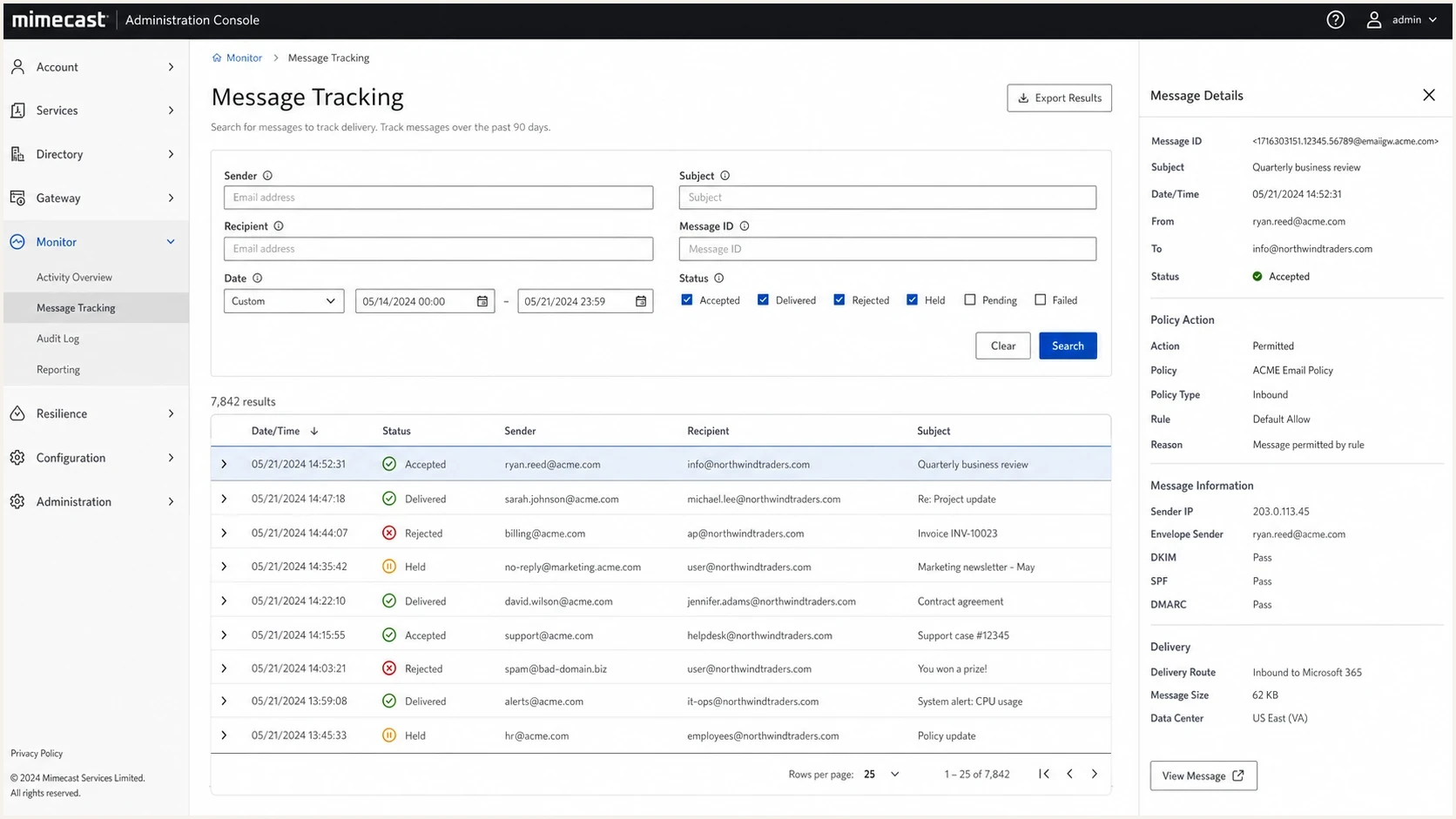
Mimecast Administration Console message tracking screen with delivery status and policy details.
How to run a controlled Mimecast test
Use a test matrix that changes one variable at a time. Start with a plain text message from the production sending route, then add the normal template, links, tracking, and attachments one at a time. This shows whether the problem sits in the sender identity, the message body, a URL, or the recipient policy.
- Target: Choose a real mailbox protected by Mimecast and confirm the recipient admin can view the relevant logs.
- Baseline: Send a plain text message with no tracking links, attachments, or heavy branding.
- Evidence: Save the send time, sending IP, envelope sender, Header From, recipient, subject, and Message-ID.
- Logs: Ask the recipient admin for the protection action, reason, route, and final mailbox state.
- Variation: Add the normal template, then links, then attachments, and retest after each change.
- Pattern: Compare rejections, holds, and placements across tests instead of treating one send as final.
Test evidence checklist
Sender IP:
Envelope sender:
Header From:
Recipient:
Subject:
Message-ID:
UTC send time:
SMTP response:
Mimecast deployment:
Protection action:
Final placement:
Avoid changing the sending domain, template, sender IP, and links in the same test. When everything changes at once, the policy reason becomes harder to use. Controlled tests give the recipient admin a clean timeline to inspect.
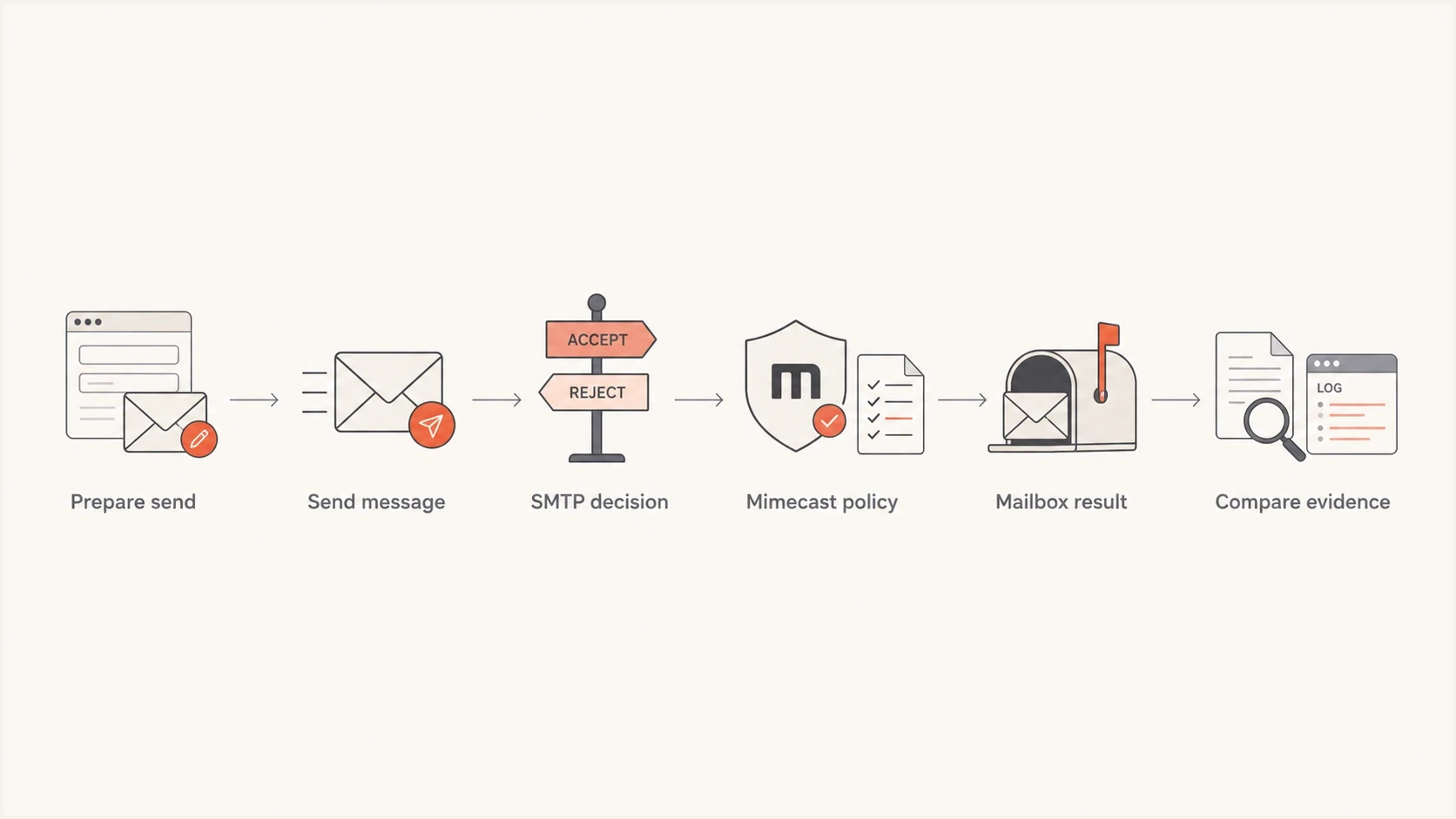
Flowchart showing the test path from sending a message to comparing Mimecast evidence.
Check authentication before blaming Mimecast
Before asking a recipient admin to search logs, send the same message to Suped's email tester. It catches sender authentication, header, routing, and content issues before the recipient test. Pair it with a domain health check, then keep DMARC monitoring and blocklist monitoring running while you retest.
Email tester
Send a real email to this address. Suped shows a results button when the test is ready.
?/43tests passed
This does not replace the recipient test. It proves how the message was formed and authenticated before the protected mailbox handled it. For campaign mail, also compare sending volume, invalid-recipient rate, complaints, and genuine engagement. Sudden volume changes or poor audience quality damage sender reputation even when SPF, DKIM, and DMARC are correct.

Email tester sample report showing total score, email preview, issue summary, and per-section results
Clean DMARC staging recordDNS
v=DMARC1; p=none; rua=mailto:dmarc@yourdomain.com; fo=1
Where Suped fits
 Suped is our DMARC and email authentication platform. For this problem, Suped handles the sender-side evidence. It cannot access a customer's private Mimecast tenant, so use it before requesting recipient logs.
- Issue detection: Find authentication failures and DNS changes, then follow the related repair steps.
- Alerts: Track changes in failure rates, sending sources, and policy outcomes.
- Hosted records: Manage hosted DMARC, hosted SPF, SPF flattening, and hosted MTA-STS with less DNS maintenance.
- Reputation: Pair blocklist monitoring (blacklist monitoring) with DMARC evidence.
- Scale: Use MSP and multi-tenant dashboards to compare domains and clients.
Use logs to separate rejection, quarantine, and inbox placement
Deliverability becomes confusing when transport, policy, and placement are treated as the same result. Transport tells you whether the receiving gateway accepted the message. Policy tells you what the protection layer did after inspection. Placement tells you where the user found it. For SMTP responses, treat a 4xx response as temporary and a 5xx response as permanent, then preserve the exact enhanced status code and response text.
Sample rejection evidence
550 5.7.1 Message rejected due to security policy
Diagnostic: rejected by recipient gateway
Action: ask recipient admin for Mimecast message tracking
Log fields to request
- Message ID: Ask for the exact Message-ID or internal tracking ID.
- Action: Accepted, rejected, held, deferred, rewritten, or delivered.
- Reason: Policy name, reputation reason, content reason, URL reason, or malware rule.
- Route: Whether the protection layer passed the message to the mailbox platform.
- Placement: Inbox, junk, quarantine, hold queue, or downstream deletion.
For an MX-based deployment, search Message Center using the sender, recipient, and UTC time. Rejected and Deferred Messages covers protocol failures, Held Messages covers content scanning holds, and Accepted Messages or Archive Search covers accepted mail and its transmission data. A message absent from Message Tracking may have failed before it reached Mimecast, so compare the sender's SMTP transcript or NDR. The existing Mimecast deliverability guidance also covers sender reputation, engagement practices, and sending infrastructure.
When results differ by recipient
If one Mimecast-protected company accepts and another rejects, treat it as a recipient-specific result. Use a recipient-specific Mimecast rejection checklist before changing the sender setup. Each customer controls sender rules, URL settings, attachment policy, and its protection deployment.
- Tenant policy: One customer blocks a sender, while another accepts the same authenticated mail.
- Envelope sender: A tenant can block the bounce domain even when the visible From domain looks fine.
- URL state: A tracking domain, redirect chain, or linked hostname can trigger a different action.
- Authentication drift: Different sending routes can produce different SPF, DKIM, and DMARC results.
- Blocklist hit: A domain or IP listing on a blocklist (blacklist) can trigger rejection or extra scrutiny.
Do not overfit one test
A single recipient test tells you how that organization handled that message at that time. It does not certify deliverability to every Mimecast customer. Build a pattern across controlled sends, recipient logs, authentication checks, and blocklist evidence.
How to get a conclusive result
To test delivery to a Mimecast-protected mailbox, confirm the deployment, send a controlled message to a real protected mailbox, capture the relevant recipient logs, and separately prove your sender authentication and reputation. No public checker can reveal a private tenant decision or final mailbox placement.
Suped provides the sender-side workflow through DMARC reporting, authentication checks, alerts, hosted records, blocklist monitoring (blacklist monitoring), and multi-domain reporting. Pair that evidence with the recipient's Mimecast or Microsoft 365 records when you need the final result.




