Why does email deliver to one recipient but get rejected for another with Mimecast?

Published 9 Jul 2025
Updated 10 Aug 2026
12 min read
Summarize with
Updated on 10 Aug 2026: We clarified how to separate a true Mimecast rejection from a downstream delivery failure and tightened the recipient-level troubleshooting steps.
Yes, Mimecast can deliver the same email to one recipient and reject it for another. The most common reason is recipient-level handling: one mailbox has a permitted or Auto Allow entry, while the other has a personal block, a different group policy, or no recipient-specific bypass. The first check is still the exact non-delivery report, because the failure can also occur after Mimecast accepts the message and tries to hand it to the recipient's mail server.
A 554 "Email rejected due to security policies" response is a permanent SMTP rejection. If the reason includes MCSpamSignature, Mimecast says the trigger can be a virus signature or a spam score above the maximum threshold. Other 554 reasons cover malicious QR code detection, message size, mail loops, geographical restrictions, and configuration errors. Plain text email is not exempt because URLs, quoted content, sender reputation, and recipient policy can still affect the decision.
The direct answer: identify which server issued the final response, preserve the complete bounce, verify sender authentication and reputation, then ask the recipient admin to match the event in Mimecast. The sender cannot see Mimecast's internal spam score for an MCSpamSignature rejection.
Why this happens
Email delivery is not one decision for every recipient. The receiving path can evaluate the sending IP, sender domain, authentication, content, URLs, attachments, recipient address, recipient policy, and routing target. Mimecast also keeps recipient-specific Managed Senders entries, so one internal recipient can permit, block, or automatically permit a sender while another recipient has no such entry.
Separate sender-side evidence from recipient-side evidence. Sender-side evidence points to the sending domain, mail server, content, IP reputation, or authentication. Recipient-side evidence points to the mailbox, group policy, Managed Senders list, Auto Allow entry, held-message action, or the downstream route used for that recipient.
|
|
|
|---|---|---|
One recipient gets 5xx | Recipient policy | Check rejection |
Whole domain rejects | Sender or tenant policy | Check auth |
4xx then delivery | Temporary deferral | Review retries |
Mimecast accepts, mailbox fails | Downstream route | Check mail server |
Use this table to sort the first clues before changing sender configuration.
This distinction matters because changing DNS after a one-recipient rejection often wastes time. If SPF, DKIM, or DMARC fails, address that sender-side problem. If authentication passes and another recipient in the same tenant accepts the same message, check recipient-specific controls and routing before changing DNS.
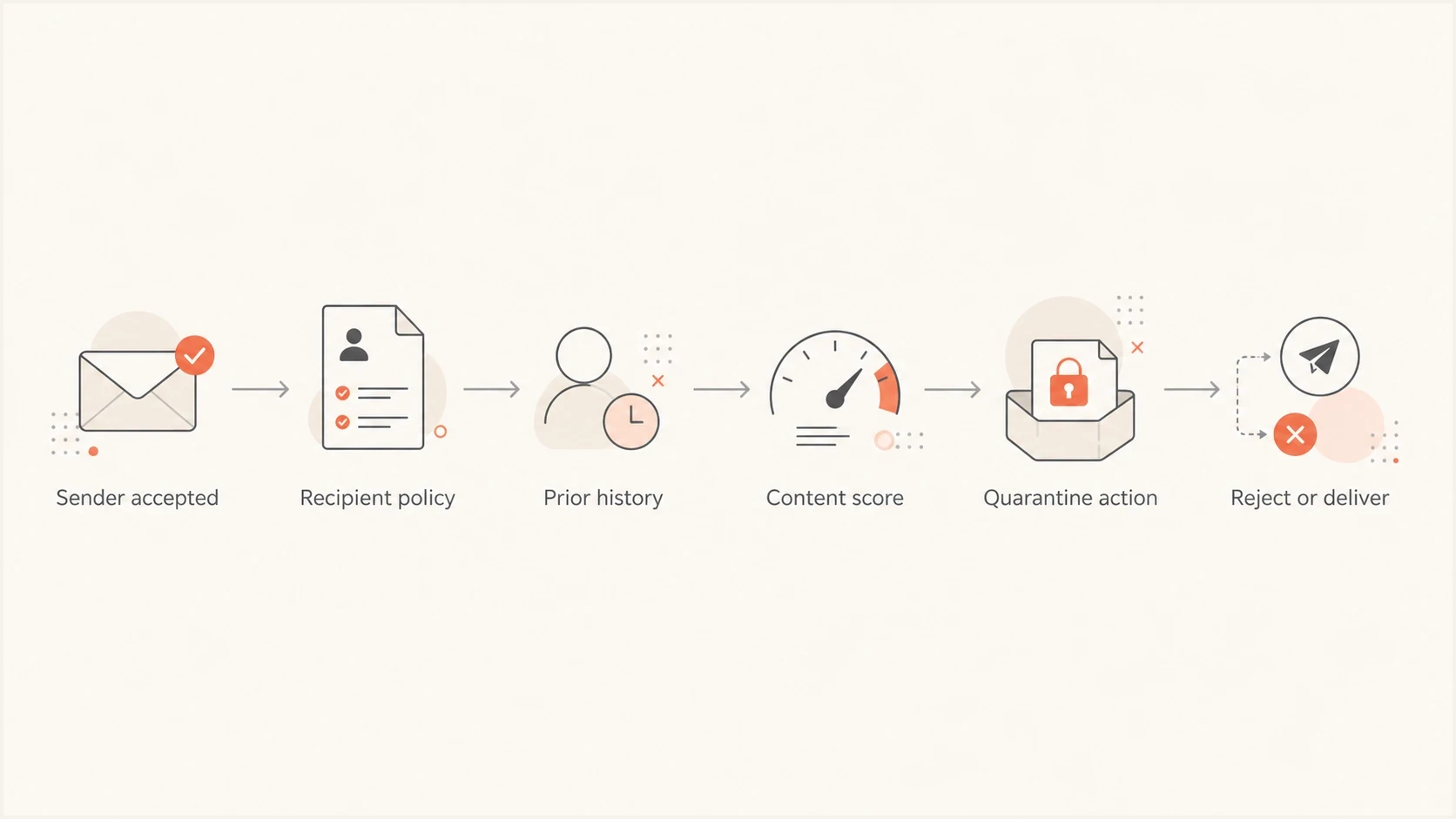
A Mimecast decision path can split by recipient policy and history.
What the 554 rejection means
A 554 rejection is a permanent SMTP failure, not a temporary delay. Mimecast rejects the message during the SMTP conversation, logs the connection in the Rejection Viewer, and does not retain the rejected message for release. After the cause is addressed, the sender must send the message again.
Typical bounce texttext
554 Email rejected due to security policies
[nv_1Qqk-OrSuvvG9nR619g.us139]
Read the complete reason text rather than the number alone. The wording does not by itself prove malware or a global sender reputation problem. Mimecast lists policy-specific causes in its SMTP error code guidance. For MCSpamSignature, the spam score is not available in the Administration Console, so the rejection record and exact reason string are the useful recipient-side evidence.
Do not over-read the bounce
- Scope: A one-recipient 554 is not proof that every mailbox at the company rejects you.
- Status: A 554 is permanent, so normal SMTP retries will not turn it into delivery.
- Storage: A protocol-rejected message is not a held message and cannot be released.
- Cause: The exact reason string determines which policy or check to investigate.
Confirm which system rejected the message
A message can fail at the Mimecast gateway or after Mimecast accepts it for delivery. The non-delivery report should show the reporting server, remote response, status code, and retry history. Those fields identify the troubleshooting path more reliably than the recipient's description that Mimecast blocked the email.
|
|
|
|---|---|---|
Mimecast returns 5xx | Permanent gateway rejection | Rejection Viewer and policy |
Mimecast returns 4xx | Temporary gateway deferral | Retry log and deferral reason |
Mimecast retries downstream | Gateway accepted the message | Recipient mail server and route |
Connection reset or timeout | Transport or server failure | Connector, firewall, and server logs |
Match the failure evidence to the system that needs attention.
Do not ask for quarantine release when the NDR shows a protocol-level 554. Ask the admin to find the rejection, correct the policy or recipient entry if appropriate, and confirm when the sender should resend. If logs show repeated downstream attempts instead, the recipient's mail server, connector, firewall, or mailbox state needs investigation.
Recipient-level controls that change the result
Two people at the same company do not always have the same filtering profile. Mimecast gives each user a Managed Senders list containing blocked, permitted, and Auto Allow entries. An Auto Allow entry can be created when the internal user sends mail to an external address. Group policies and routing can also target an individual address or group.
Delivered recipient
- Auto Allow: The recipient previously sent mail to the external address.
- Permitted sender: A personal or policy entry bypasses applicable spam checks.
- Policy: The mailbox belongs to a group with a different action or route.
Rejected recipient
- No entry: The sender receives the normal spam and reputation checks.
- Personal block: The sender address or domain is blocked for that recipient.
- Policy: A stricter group rule or different route applies to the mailbox.
A permitted or Auto Allow entry can explain why one recipient receives the message, but it does not guarantee acceptance for another recipient. It also does not bypass every protection layer. A configured Blocked Senders policy and default virus checks can still take precedence, depending on the policy involved.
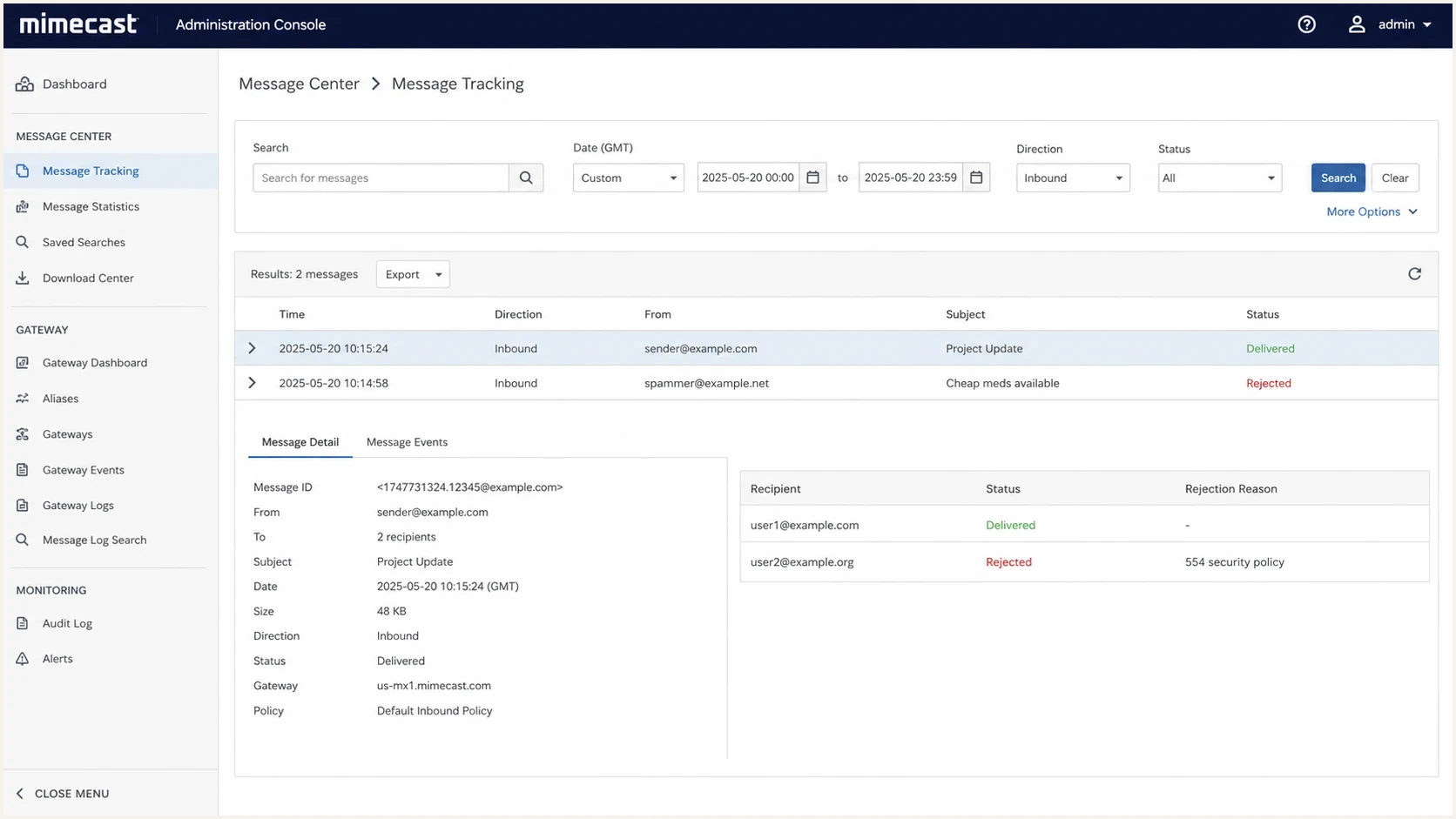
Mimecast Administration Console can show different outcomes per recipient.
How to troubleshoot it
Use a fixed order that keeps sender-side, gateway, recipient-policy, and downstream evidence separate. The goal is to determine whether the failure came from the message, the sender, a Mimecast policy, or the recipient's mail environment.
- Capture: Save the full NDR, reporting server, exact status text, Mimecast reference, time, recipient, and message ID.
- Locate: Determine whether Mimecast rejected the SMTP session or accepted the message and failed downstream.
- Compare: Confirm whether other recipients in the same tenant accepted the same message.
- Retest: After preserving the original, send a new plain-text message without links, attachments, signatures, or quoted content.
- Authenticate: Check SPF, DKIM, DMARC, reverse DNS, and the actual sending source.
- Escalate: Give the evidence to the recipient admin and request the matching rejection, deferral, or delivery event.
The clean retest matters. Long reply chains can carry old URLs, tracking links, calendar content, disclaimers, or quoted text that changes filtering. If a fresh message passes but the thread fails, compare the content. If both fail only for one recipient, recipient-specific controls or downstream delivery become stronger leads.
For a sender-side sanity check, send a controlled message through the email tester and compare its headers, authentication results, content clues, and sending path with the bounced message.
Email tester
Send a real email to this address. Suped shows a results button when the test is ready.
?/43tests passed
Do not keep resending the same failed message to the same person. Repeated attempts add noise and make it harder for the recipient admin to isolate the original event. A 5xx response also requires a new send after remediation, while a correctly configured sender should retry a 4xx response automatically.
Sender checks that still matter
Even when the rejection looks recipient-specific, sender configuration still matters. A weak configuration can push a message over a policy threshold for a recipient who has no bypass. Check the domain records, actual sending source, visible From domain, DKIM signing domain, SMTP envelope sender, reverse DNS, and sending IP reputation.
For a fast baseline, run a domain health checker before asking the recipient to change policy. It shows visible authentication and DNS issues that can contribute to filtering.
Minimal DMARC monitoring recorddns
_dmarc.example.com TXT "v=DMARC1; p=none; rua=mailto:dmarc@example.com"
A monitoring policy does not instruct receivers to reject or quarantine. Aggregate DMARC reports show sending sources and authentication patterns over reporting periods, but they do not trace an individual message ID. Use them to confirm whether the relevant source is authorized and whether similar mail passes DMARC through SPF or DKIM.
DMARC record detail view showing SPF, DKIM, DMARC, rDNS diagnostics, and DNS records
Suped is our DMARC and email authentication platform. For a Mimecast rejection, its practical role is to verify sending sources, review SPF and DKIM results, diagnose DNS records, and check blocklist or blacklist signals around the failure. That evidence helps determine whether the issue extends beyond one recipient.
When the recipient admin needs to act
There are cases the sender cannot fix alone. If authentication passes, another recipient in the same organization receives the message, and a fresh low-risk message still fails for one mailbox, the recipient admin needs to inspect the relevant Mimecast or downstream logs. For a protocol-level 554, they should use the Rejection Viewer and check the exact reason, applicable policy, route, and recipient's Managed Senders entries. The internal spam score for an MCSpamSignature rejection is not available in the Administration Console.
What to ask for
- Event: The rejection, deferral, or delivery record for the exact recipient and time.
- Response: The complete SMTP reason and Mimecast reference string.
- Controls: The applicable policy, route, and personal Managed Senders entry.
- Remedy: Whether to correct a policy, permit the sender, repair downstream delivery, or request a resend.
If the admin confirms a sender reputation or content issue, fix the sender side before requesting an exception. If they confirm a personal block, the correction is local to that recipient. If the message is held, an authorized user can release it. If Mimecast rejected it during SMTP, it cannot be released and the sender must resend after the cause is addressed.
What to fix on your side
The right sender-side fix depends on the evidence. If the only evidence is a one-recipient 554 caused by a personal block, keep changes narrow. If you find authentication gaps, an unauthorized source, or reputation changes around the rejection time, fix those because they affect future delivery beyond Mimecast.
How strongly the evidence points to sender action
Use the evidence pattern to decide whether to fix the sender, ask the recipient admin, or do both.
Low
Recipient review
One recipient rejects and a clean retest passes elsewhere.
Medium
Fix and retest
One recipient rejects, but content or reputation clues exist.
High
Sender fix
Multiple recipients or domains reject the same sender.
Healthy
Admin action
Authentication passes and rejection is local to one mailbox.
In Suped, use the source breakdown, authentication pass rates, issue list, and reputation signals around the rejection period. DMARC monitoring helps confirm whether the sending source is authorized, while blocklist monitoring checks for domain or IP blocklist and blacklist listings near the event. Use that evidence in the handoff to the recipient admin.

Issue steps to fix dialog showing the issue overview, tailored fix steps, and verification action
Suped keeps sender-side evidence in one workflow: authentication status, verified sources, DNS diagnostics, blocklist and blacklist checks, and issue alerts. It does not replace the recipient admin's Mimecast or mail-server logs, but it supplies the sender evidence needed to interpret those logs.
Views from the trenches
Best practices
Log the exact bounce code, timestamp, sender, recipient, and message ID before changing DNS.
Compare accepted and rejected recipients before treating the case as a sender-wide failure.
Test with a fresh plain-text message and one normal reply to isolate content and history.
Ask the recipient admin for Mimecast event details when a 554 block repeats again.
Common pitfalls
Assuming one delivered recipient proves the sender has no authentication or reputation issue.
Changing SPF or DMARC records before checking whether the recipient made a local block.
Resending the same message many times, which can make filtering signals look worse quickly.
Treating quarantine, rejection, and spam placement as the same problem inside logs.
Expert tips
Keep transactional, personal, and marketing mail separated enough to read failures cleanly.
Use DMARC aggregate data to confirm whether the sending source is approved and passes DMARC.
Track blocklist and blacklist changes around the rejection time, not after evidence goes stale.
Document recipient-side fixes, because allow entries and personal settings are easy to forget.
Marketer from Email Geeks says the same message can be accepted for one recipient and rejected for another because conversation history, contacts, and per-user controls affect filtering.
2024-03-12 - Email Geeks
Marketer from Email Geeks says a 554 security policy rejection often needs the recipient admin's Mimecast event details, because the sender cannot see the internal score.
2024-04-18 - Email Geeks
The practical answer
A Mimecast 554 rejection for one recipient while another receives the same email usually points to a recipient-specific policy, Managed Senders entry, routing difference, or downstream mailbox behavior. A permitted or Auto Allow entry can let one mailbox pass while a personal block or normal filtering applies to another.
Preserve the NDR, identify which server issued the final response, run one controlled test, verify authentication and reputation, then ask the recipient admin for the matching event. Suped supports the sender side of that workflow with DMARC visibility, SPF and DKIM diagnostics, sender-source monitoring, and blocklist or blacklist checks.




