Why are my emails being blocked by Apple Mail and Proofpoint?

Updated on 23 Sep 2026: We clarified how to separate Proofpoint PDR blocks from recipient policy and added Apple's current bulk-sender checks.
Your emails are being blocked on the route to iCloud Mail or by a recipient using Proofpoint because the receiving side has judged your sending IP, domain, message stream, authentication, or recipient response pattern risky enough to reject or defer. Apple Mail is the app, while iCloud Mail is the receiving service for icloud.com, me.com, and mac.com addresses. The quickest way to identify the responsible layer is the SMTP reply. If the bounce explicitly says the sending IP is listed by Proofpoint.com, or it names PDR, DNSBL, or a Proofpoint reputation lookup, treat it as an IP reputation block or delay. A Proofpoint brand reference without a listed IP can instead point to recipient policy, authentication, content filtering, or quarantine. If the reply says local policy at an Apple domain, treat it as iCloud Mail filtering and use the bounce details to prove scope.
Do not start with subject-line rewrites when the error is an IP or blocklist (blacklist) rejection. Save the full SMTP response, check whether the issue hits every Apple recipient or only one campaign, then reduce the risk signals that caused the block: burst volume, complaints, stale addresses, authentication gaps, and inconsistent sending identity.
- Bounce text: The SMTP code tells you whether this is Proofpoint PDR, recipient policy, iCloud Mail local policy, a temporary deferral, or a permanent reject.
- Sending IP: A dedicated IP usually means your own traffic created the reputation signal, while a shared IP adds pool risk.
- Recipient behavior: Spam complaints, repeated non-response, deletes without reading, and stale segments all add negative signals.
- Permanent fix: Delisting can remove the immediate block, but lasting recovery comes from better sending behavior and consistent authentication.
Read the SMTP reply first
The SMTP reply is the evidence. Without it, iCloud Mail and Proofpoint look like one problem because they affect the same recipients. With it, you can separate an Apple local policy response from a Proofpoint Dynamic Reputation (PDR) blocklist or blacklist listing, a recipient-configured gateway rule, a content rejection, or a rate limit.
A 421 or another 4xx response is a temporary deferral and calls for backoff rather than rapid retries. Proofpoint says a temporary PDR delay normally clears automatically, usually within minutes, after the triggering traffic stops. A 550 5.7.1 response that says the sending IP is listed by Proofpoint.com points to a permanent PDR block. A line such as message rejected due to local policy points to iCloud Mail rules. For a deeper explanation of that path, see Apple local policy.
SMTP evidence to savetext
SMTPCode: 550
EnhancedCode: 5.7.1
Reason: sending IP listed by Proofpoint.com
Sending IP: 203.0.113.24
Receiving domain: icloud.com
Message type: transactional
First seen: 2026-07-22 09:15 UTC
|
|
|
|---|---|---|
IP listed by Proofpoint.com | PDR IP block | Check named IP |
Proofpoint without a listed IP | Gateway or recipient policy | Trace the policy result |
Apple local policy | iCloud policy filter | Prove scope |
421 or other 4xx | Temporary deferral | Use backoff |
550/554 or other 5xx | Permanent reject | Stop and remediate |
Authentication failure | SPF, DKIM, or DMARC issue | Fix identity |
Common bounce clues and what they mean.
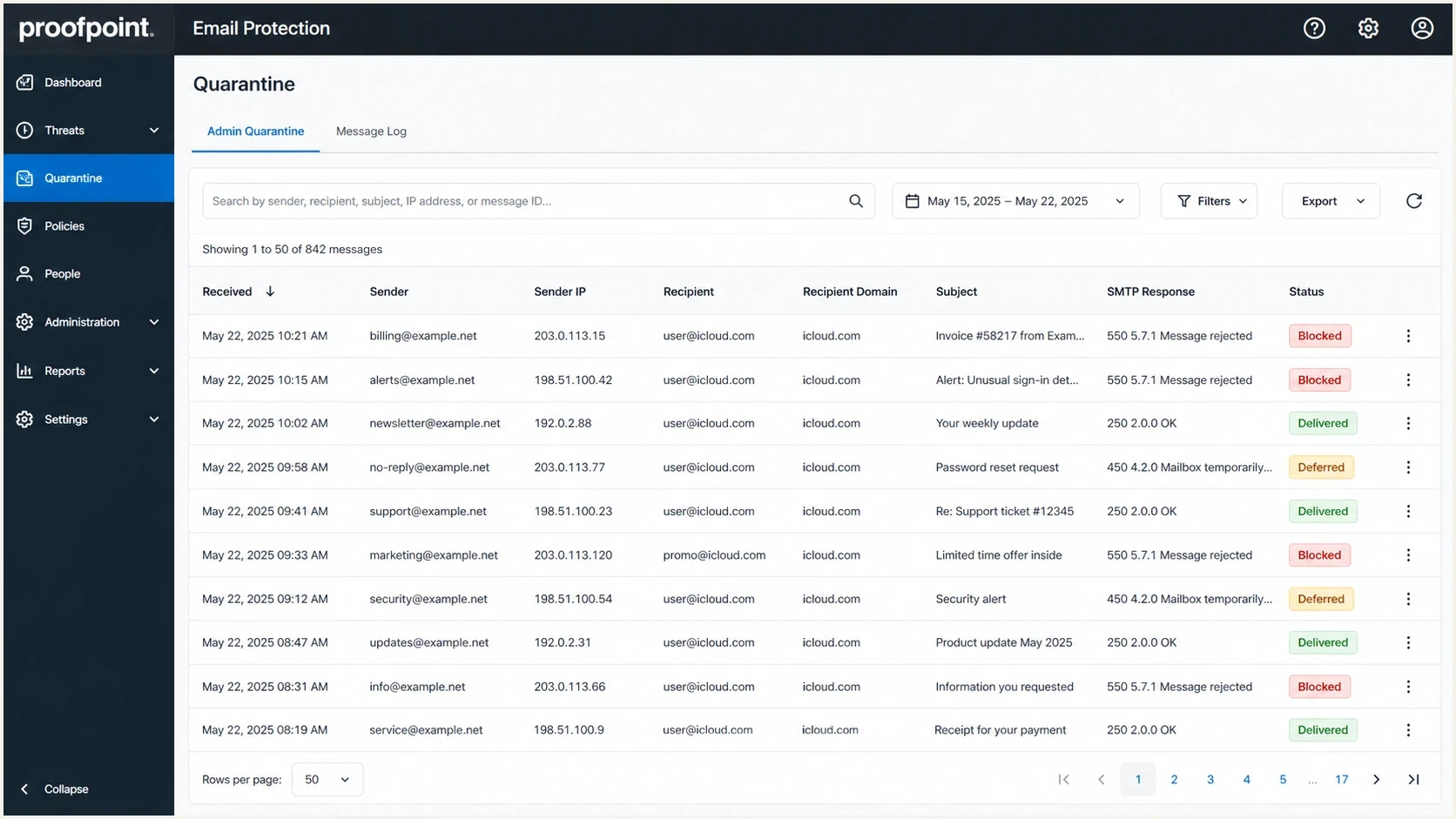
Proofpoint Email Protection message log showing blocked Apple-domain messages.
Separate PDR from recipient policy
Proofpoint Dynamic Reputation is an IP reputation system, but organizations using Proofpoint can also apply their own gateway rules. The product name in a bounce does not prove that the IP is on the PDR blocklist (blacklist). Match the response to the exact sending IP, receiving host, enhanced status code, and stated reason before requesting removal.
|
|
|
|---|---|---|
Bounce says the IP is listed by Proofpoint.com | PDR IP reputation block | Fix the source, then submit the named IP |
Proofpoint response names spam, authentication, or a local rule | Message or recipient gateway policy | Correct the stated cause or ask the recipient administrator |
Remote server accepted the message, then quarantined it | Post-acceptance filtering | Recipient administrator reviews the message trace |
Only one organization rejects the same message | Customer-specific policy is more likely | Compare successful and failed recipient traces |
How to route a Proofpoint-related delivery event.
Check the IP in the rejection
Mail can leave through more than one IP. A clean result for your usual IP does not clear the different IP named in the bounce. Shared email services should also ask the provider whether another sender in the pool triggered the listing.
Why blocking can appear suddenly
iCloud Mail delivery can change suddenly even when nothing obvious changed in your email platform. Reputation systems work on thresholds. Each bad signal adds pressure: high complaint rates, stale addresses, negative recipient responses, fast volume spikes, failed authentication, and mail that recipients did not request. When the total crosses the receiver's limit, the visible result is a block. Do not use opens alone as a recovery signal because Apple Mail Privacy Protection preloads message content. Use clicks, replies, complaints, and bounce trends instead.
A Proofpoint PDR rejection can happen at the IP layer before message content becomes the main issue. In that case, a content keyword test has limited value. The receiving system has already judged the connection or sending source, so changing one word in the email does not repair the underlying reputation signal.
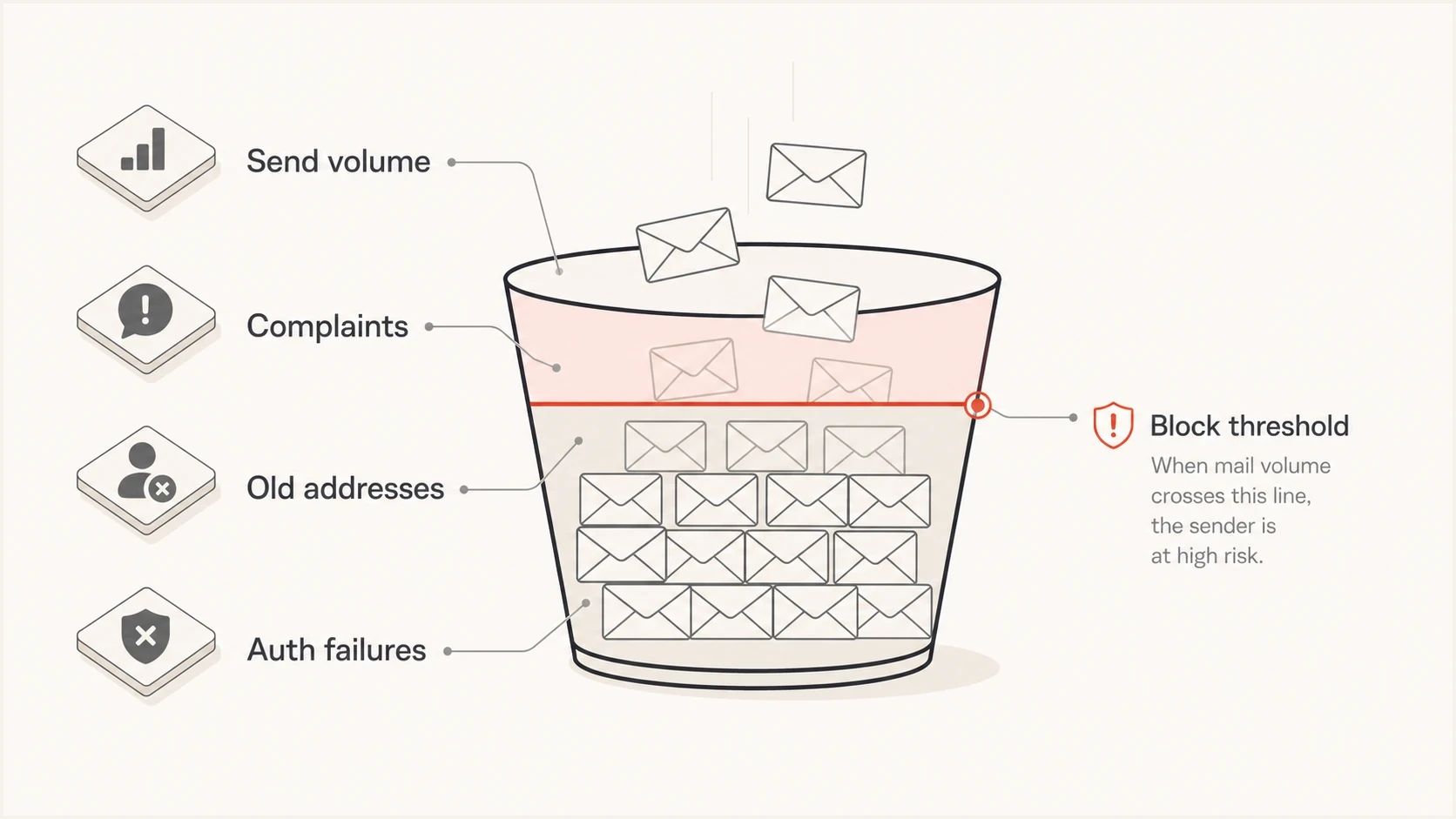
Infographic showing reputation signals filling a risk bucket until mail is blocked.
IP-level block
- Main clue: The bounce names PDR, DNSBL, blocklist, blacklist, or says the sending IP is listed by Proofpoint.com.
- Best fix: Reduce volume pressure, remove weak segments, secure the source, and request review with clear evidence.
- Bad fix: Only rewriting copy while the same IP keeps sending the same risky stream.
Message-level block
- Main clue: Only one template, link set, or campaign fails while other mail still delivers.
- Best fix: Test the full message, links, headers, and sending identity before resending.
- Bad fix: Assuming the whole IP is blocked when only one message stream is affected.
The practical question is not whether Apple changed a filter on a specific day. It is whether your current traffic has enough positive signals to stay below the threshold after that filter is applied. Look for behavior and infrastructure changes before asking for delisting.
What to check before asking for delisting
Before contacting Apple or Proofpoint, build a clean diagnosis. Check authentication, sending source, list quality, and blocklist status in one pass. Suped's domain health checker checks DMARC, SPF, DKIM, and related domain signals so the incident starts with a consistent DNS review.
- Scope: Confirm whether every message to icloud.com, me.com, and mac.com fails, or only one campaign or sending IP fails.
- IP status: Check the exact sending IP named in the bounce against Proofpoint PDR and relevant common blocklists (blacklists). A clean public result does not rule out recipient-side policy or content filtering.
- Authentication: Verify SPF authorizes the actual source, the DKIM signature validates, the sending domain publishes DMARC, and at least one authenticated identifier has the required domain match with the visible From address for DMARC.
- Format and forwarding: Confirm bulk mail complies with RFC 5321 and RFC 5322, and add ARC headers when your system forwards messages.
- Volume: Compare Apple-domain volume with the sender's normal daily and hourly baseline, then note campaign bursts and repeated retries.
- List quality: Suppress inactive Apple recipients, recent complainers, hard bounces, and addresses with no clear consent trail.
- Consent and opt-out: Confirm recipients explicitly subscribed, the unsubscribe link works, and suppressed addresses cannot be reactivated by an old import.
?
What's your domain score?
Deep-scan SPF, DKIM & DMARC records for email deliverability and security issues.
Run a real send test after the DNS and source checks are clean. Suped's email tester helps inspect headers, authentication results, and content-level signals for a message that actually left your system.
Do not resend the whole backlog
If Apple or Proofpoint starts rejecting a large batch, pausing is part of the fix. Replaying thousands of queued messages into the same receiver often confirms the bad pattern and extends the block.
- Pause first: Stop the affected Apple-domain stream while you collect evidence.
- Retry later: Use a small controlled retry after authentication, volume, and list issues are fixed.
- Protect other mail: Separate transactional mail from marketing campaigns if they share infrastructure.
Check DNS and server identity
Authentication records are only part of sender identity. iCloud Mail expects reverse DNS for sending IPs and consistent sending domains, IPs, and From addresses. Proofpoint also identifies an invalid or generic PTR record as a common cause of delivery trouble. A passing SPF record does not repair a missing PTR or an unrelated HELO/EHLO name.
|
|
|
|---|---|---|
PTR or reverse DNS | Sending IP resolves to a mail hostname | Missing, generic, or unrelated PTR |
Forward DNS | PTR hostname resolves back to the IP | Hostname returns another IP or no result |
HELO/EHLO | Uses the server's valid FQDN | Uses localhost, a bare IP, or an unrelated name |
From identity | Consistent name, address, and domain per stream | Identity changes between similar sends |
DMARC domain match | SPF or DKIM has the required domain match for DMARC pass | Authentication passes only for an unrelated domain |
Server identity checks to complete before a delisting request.
If your hosting or mail provider controls the PTR, ask that provider to map the sending IP to the mail server's fully qualified hostname. Retest forward and reverse resolution after DNS propagation, then include the corrected hostname and IP in the review request.
Permanent fixes that actually reduce blocks
There is no permanent fix that consists only of filling out a delisting form. A delisting request asks Apple or Proofpoint to reconsider the source. Your mail stream has to show why the block should stay removed.
|
|
|
|---|---|---|
Burst volume | Throttle | Fewer 4xx deferrals |
Old list | Suppress | Fewer bounces |
Identity gaps | Fix DNS and domain matching | DMARC pass |
Weak consent | Remove source | Fewer complaints |
Mixed mail | Separate streams | Cleaner logs |
Fixes that address the cause rather than only the symptom.
For Apple domains, use a dedicated throttle lane based on the last stable hourly volume. Sending one large batch to iCloud, me.com, and mac.com creates a sharp reputation signal. Smaller batches give the receiver time to accept mail normally and give you time to stop when deferrals rise.
Apple-domain retry exampletext
Start below the last stable hourly volume
Increase only while 4xx deferrals fall
Pause the Apple-domain lane if 4xx or 5xx errors rise
Retry temporary 4xx deferrals with backoff
Do not retry permanent 5xx rejects without remediation
The same thinking applies to dedicated IPs. A dedicated IP removes shared pool noise, but it also makes your own sending pattern the main reputation input. Check for compromised accounts or unauthorized outbound mail before treating the listing as a campaign-only issue. For deeper escalation detail, use these Proofpoint contact steps after the traffic and server changes are in place.
Apple-domain recovery decisions
Compare current errors with the sender's established baseline instead of using one universal percentage.
Healthy
Normal baseline
Temporary deferrals return to normal and permanent rejects do not repeat.
Watch
Above baseline
Temporary deferrals rise above normal, so volume and retries need slowing.
Stop
Repeated 5xx
The same permanent rejection repeats after a controlled test.
Where Suped fits
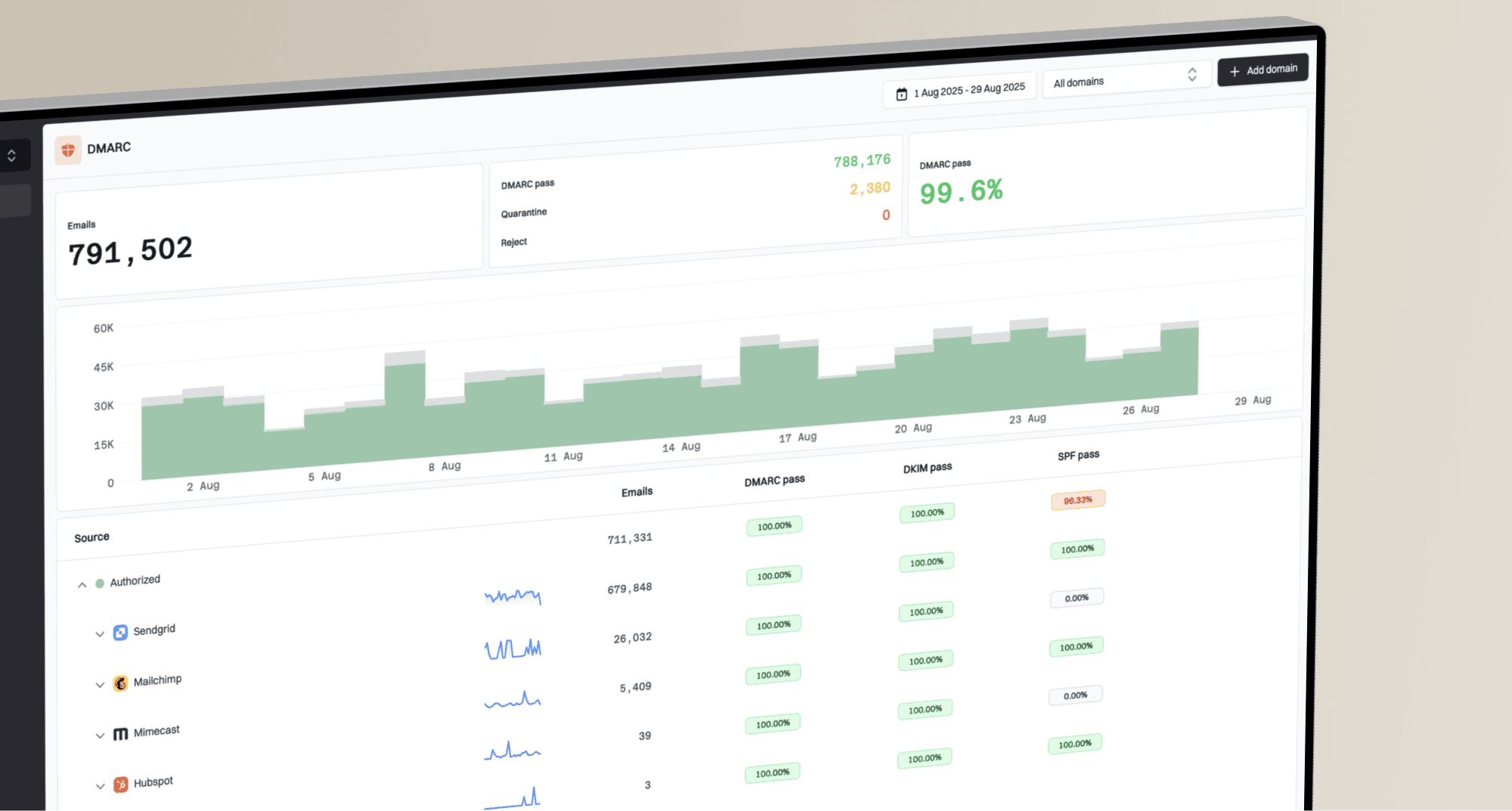
Suped's product supports this incident workflow by connecting DMARC, SPF, DKIM, blocklist and blacklist monitoring, and deliverability signals in one place. That makes it easier to tie an Apple or Proofpoint rejection to the affected domain, source, authentication result, and recent change.
During an Apple or Proofpoint incident, seeing a block is only the first step. The useful work is connecting that block to the exact domain, source, policy, and trend. Suped's blocklist monitoring keeps that evidence with ongoing DMARC operations instead of treating it as a separate panic check.

Blocklist monitoring page showing domain and IP checks across blocklists with importance and status
- Issue detection: Suped flags authentication failures and monitored blocklist changes with steps to investigate them.
- Alerts: Teams can be notified when failures, new sending sources, or reputation changes appear.
- Hosted records: Hosted DMARC, hosted SPF, SPF flattening, and hosted MTA-STS reduce repetitive DNS work.
- Multi-domain work: MSPs and agencies can manage many domains without losing the source detail needed for an escalation.
The practical Suped workflow
Start with the affected domain, confirm authentication and source identity, inspect blocklist status, then use alerts to catch the next spike before it becomes a wider Apple-domain outage.
When to contact Apple or Proofpoint
Contact Apple or Proofpoint after collecting evidence and reducing the bad signal. Apple does not offer a bulk-sender allow list or a feedback loop. For unresolved iCloud Mail delivery issues, Apple lists icloudadmin@apple.com as its postmaster contact and asks for the company name, email domain, affected sending IPs, SMTP errors, and a detailed timeline. For a permanent PDR listing, include the blocked recipient, mail type, exact IP, and any network problem you fixed.
What to include and where to send it
- Timeline: State when the block started and whether it followed a campaign, import, account compromise, or volume increase.
- Evidence: Include exact SMTP replies, sending IPs, hostnames, and affected Apple domains.
- Audience: Explain how recipients opted in, how often they receive mail, and how they opt out.
- Fixes: List throttling, suppression, authentication, server identity, and stream separation work already completed.
- Route: Use Apple's postmaster path for iCloud Mail policy errors, the PDR process for an explicitly listed IP, and the recipient administrator for customer policy or quarantine.
Do not file repeated PDR requests for a temporary delay. Proofpoint says delay status normally clears automatically once the triggering traffic stops. If a hard block remains after remediation, submit the exact IP named in the rejection with evidence of the source fix.
If Proofpoint reports that the IP is not blocked, stop repeating the same delisting request. Confirm that the bounce names the IP you checked, then ask the affected recipient organization's mail administrator to trace the rejection. The remaining cause is another sending IP, a recipient-side rule, or content filtering.
If the block clears, keep the throttle in place until temporary deferrals and permanent rejects stay at their normal baseline. Sending the same backlog at full speed can recreate the pattern that caused the block.
Views from the trenches
Best practices
Save the SMTP reply, sending IP, message stream, and affected Apple domain before changing mail.
Throttle Apple domains separately when a campaign spike drives sudden 550 or 5xx rejection volume.
Check authentication and list quality together, because clean SPF and DKIM do not cancel complaints.
Common pitfalls
Running keyword checks while the bounce points to an IP block wastes the first response window.
Assuming a dedicated IP removes shared risk ignores how your own recipients train Apple filters.
Sending the same backlog after a temporary unblock usually refills the risk bucket quickly.
Expert tips
Keep a smaller Apple retry lane so deferrals cool down without delaying every other domain.
Send postmaster requests with acquisition, opt-out, and suppression details, not vague appeals.
Use DMARC reports to separate authenticated traffic from unknown sources before escalation.
Marketer from Email Geeks says the bounce text decides whether the block is Apple's policy or a Proofpoint reputation response.
2026-02-18 - Email Geeks
Marketer from Email Geeks says sudden blocking can happen when risk crosses a threshold, even when the sending pattern did not change that day.
2026-03-04 - Email Geeks
Practical takeaway
When iCloud Mail or Proofpoint blocks your emails, answer the question with the SMTP reply first. If the error points to PDR, a DNSBL, or an IP explicitly listed by Proofpoint.com, treat it as an IP reputation and blocklist issue. If Proofpoint appears without a listed IP, check recipient policy and message filtering. If the response points to Apple local policy, prove whether the block is domain-wide, campaign-specific, or rate-related.
The fix is usually a mix of throttling, suppression, authentication and server identity cleanup, and a specific postmaster escalation. A delisting request creates a review opportunity. Better mail behavior keeps the same blacklist or blocklist problem from returning.