Why are email clients being blocked by AT&T and how was it resolved?

Updated on 29 Jul 2026: We updated this guide for AT&T's current mail routing, DNSBL escalation path, and outage context.
The short answer is that the sending accounts affected in the reported July 2023 incident were blocked during an AT&T mail filtering outage that hit selected sender IPs across multiple platforms. The pattern did not point to one sender, one email service provider, or one shared authentication mistake. It pointed to an AT&T-side filtering or reputation event, and delivery recovered after the receiver issue cleared and affected IPs were reviewed.
In this context, email clients means customer sending accounts, client domains, or mail streams, not desktop mail apps. Some senders saw blocks to AT&T-hosted recipient domains. Others using different infrastructure saw no impact. Some affected senders had only a subset of dedicated IPs blocked.
- Cause: A temporary AT&T mail filtering outage in July 2023 created IP-specific blocking against otherwise separate senders.
- Scope: Blocks appeared across different platforms, domains, and dedicated IP pools, which was a strong receiver-side signal.
- Resolution: The impacted IPs were escalated for review, and most delivery recovered after AT&T's weekend issue was fixed.
- Caveat: A sender should still check DNS, bounce codes, authentication, and reputation before treating every AT&T block as an outage.
What actually happened
The key signal in the July 2023 reports was correlation. Multiple senders reported AT&T blocks beginning around the same weekend. The affected senders were not all on the same platform. Some were on different sending systems with their own dedicated IP addresses. That pattern matters because normal sender-side reputation problems usually follow a clear source, such as one campaign, one client, one warmed IP range, one bad authentication setup, or one sudden complaint spike.
This incident did not behave that way. Affected mail streams varied, and the blocking was uneven. Some clients had only a few IPs blocked, while nearby IPs remained usable. Other clients had no issue at all. That unevenness supports a two-track response: prove the local sending system is healthy, then collect enough evidence for the receiving team to check the block.
The direct answer
The reported 2023 AT&T blocking was resolved after the weekend mail issue was corrected and affected IPs were checked through the receiver escalation channel. The practical fix was not a global DNS change. It was incident confirmation, affected IP collection, escalation, and verification that delivery returned.
|
|
|
|---|---|---|
Many platforms | Receiver issue | Compare reports |
Some IPs only | IP scoped | List IPs |
Weekend start | Incident timing | Keep timestamps |
Fast recovery | Block cleared | Retest delivery |
Signals that pointed to a receiver-side blocking event.
What changed in AT&T mail routing
The 2023 incident is historical context, not a map of current routing. In June 2025, AT&T recipient domains began moving from a separate gateway to direct Yahoo routing. The change covers att.net, currently.com, sbcglobal.net, bellsouth.net, pacbell.net, and several legacy AT&T domains. A new rejection can resemble the old incident while coming from a different receiving system.
Check the recipient domain's live MX records and the remote server named in the full SMTP response before escalating. The brand in the recipient address does not prove which gateway made the decision. Use the current route and exact error text to choose the support path.
- Yahoo-routed rejection: Follow the current receiver guidance named by the Yahoo gateway error.
- AT&T DNSBL/RBL rejection: AT&T publishes abuse_rbl@abuse-att.net for accidental blocklist or blacklist decisions.
- 4xx response: Treat it as temporary, use controlled backoff, and preserve repeated response samples.
- 5xx response: Treat it as a rejection, stop repeated attempts to that recipient, and fix or escalate the stated cause.
How to separate an AT&T outage from a sender problem
AT&T blocking can happen for normal reputation reasons too. A blocklist or blacklist issue, a missing reverse DNS record, a broken DKIM selector, a new IP with poor warmup, or a complaint spike can all produce delivery failures. Passing SPF, DKIM, and DMARC confirms authenticated identity, but it does not override IP reputation, recipient complaints, or sending behavior. The answer also changes depending on whether the receiver rejected the connection, deferred the message, or accepted it and filtered it later.
The first job is to find the layer where the failure happened. Start with the raw bounce, not a dashboard summary. The exact SMTP code, enhanced status code, recipient domain, sending IP, HELO name, timestamp, remote host, and queue ID show whether this is a network-level block, an IP reputation block, or a content and policy issue.
Provider-side incident
- Pattern: Many unrelated senders fail at the same receiver during the same window.
- Scope: Only certain IPs fail, even when adjacent mail streams are clean.
- Fix: Collect affected IPs, escalate, pause retries where needed, and retest.
Sender-side issue
- Pattern: One domain, list, campaign, or sending source shows the highest failure rate.
- Scope: Failures follow one authentication path, IP pool, or content stream.
- Fix: Repair DNS, reduce risk mail, handle complaints, and request review.
Bounce clues worth preservingtext
550 5.7.1 Connections not accepted from 203.0.113.10
553 5.3.0 DNSBL:RBL block for sending IP
421 4.7.0 Temporarily deferred by receiving system
550 5.7.1 Reverse DNS missing or mismatched
If the bounce references a listed IP, start with blocklist monitoring and confirm whether the IP or sending domain appears on major blocklists (blacklists). If the bounce references DNS or identity, move through SPF, DKIM, DMARC, PTR, and HELO checks before asking the receiving team to recheck the sender.
?
What's your domain score?
Deep-scan SPF, DKIM & DMARC records for email deliverability and security issues.
How the 2023 AT&T block was resolved
The path that resolved the reported incident was evidence-first escalation. The team did not try random DNS edits or change every domain's DMARC policy. They narrowed the issue to AT&T, gathered the impacted IPs, and had those IPs checked. Most delivery recovered after AT&T's outage was fixed, with reports showing recovery earlier that Monday morning Pacific time.
This order matters because receiving teams need exact data. A vague request like "our mail is blocked" is slow to act on. A request with sender IPs, affected recipient domains, bounce text, timestamps, message counts, and examples gives the postmaster team enough information to verify and clear a false block.
- Confirm: Group affected recipient domains by live MX records and compare the remote hosts and bounce patterns.
- Collect: Build a list of sending IPs, domains, timestamps, and the exact SMTP responses.
- Verify: Check SPF, DKIM, DMARC, reverse DNS, HELO identity, and visible blocklist status.
- Escalate: Use the route named in the bounce; for an AT&T DNSBL/RBL error, send the evidence and affected IPs to abuse_rbl@abuse-att.net.
- Retest: Send controlled test mail after the block clears and watch the next campaign.
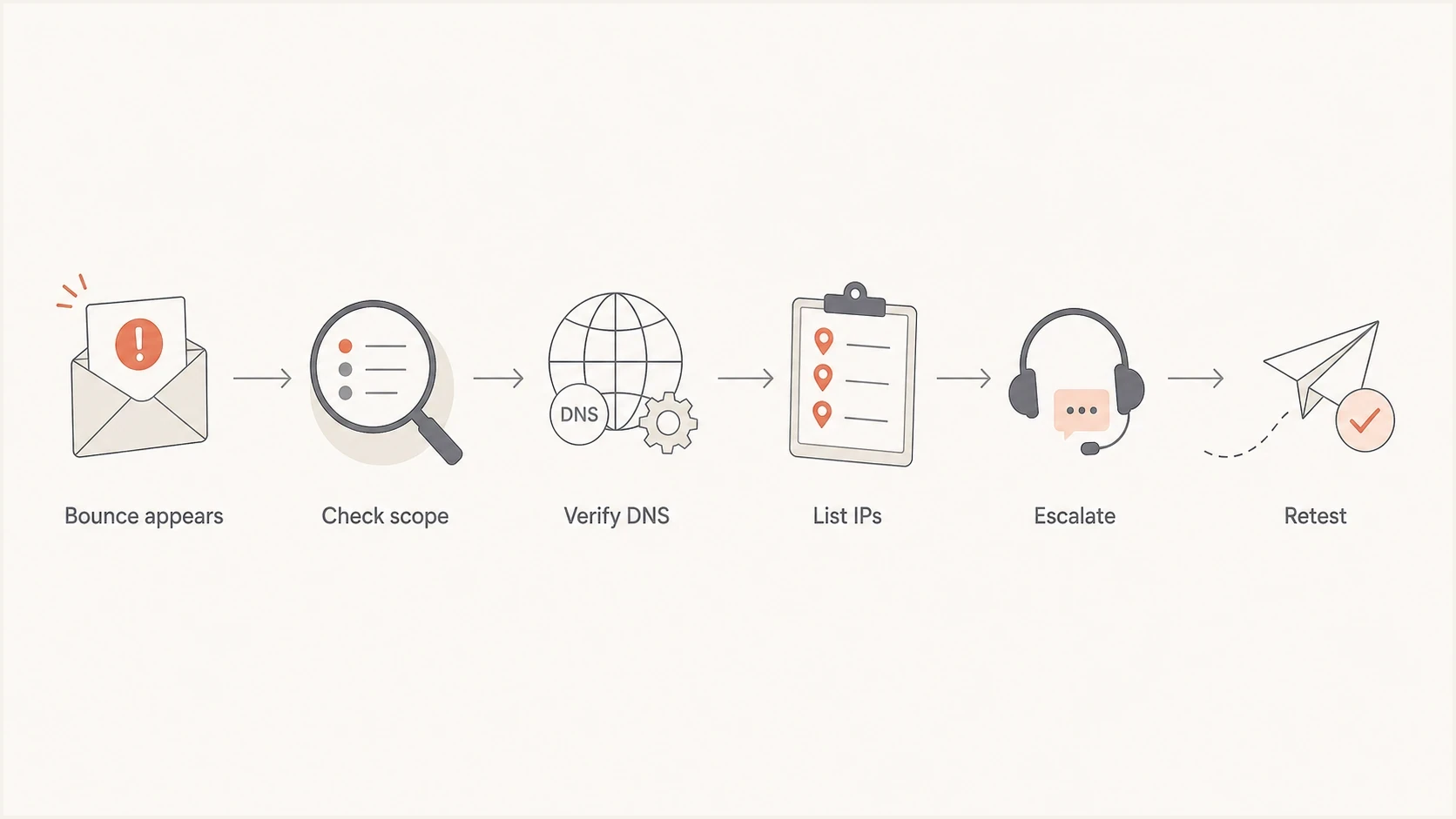
AT&T email block resolution flowchart with bounce review, DNS checks, IP escalation, and retesting.
For AT&T-specific next steps, document the evidence and follow the route identified by the live MX records and bounce. The guide to AT&T blocklist removal covers the request format in more detail, including the exact IP and SMTP data to provide.
What to check before escalating an AT&T block
Even when the timing points to a receiver incident, check the sender's own configuration. Receiver outages and local sender problems can overlap. If a domain has broken DKIM or a sending IP has no reverse DNS, the receiving team has a valid reason to reject or defer mail, and the sender loses time by escalating before fixing the obvious issue.
The minimum set is DNS authentication, IP identity, reputation status, and recent sending behavior. Use a domain health check for the domain-level basics, then send a real message through an email tester to inspect the actual headers and authentication outcome.
|
|
|
|---|---|---|
SPF | Authorized IP | Missing include |
DKIM | Valid signature | Bad selector |
DMARC | Authenticated pass | No aligned pass |
PTR | Matches HELO | Missing rDNS |
Lists | No listing | IP listed |
Compact pre-escalation checklist.
DNS records to validatedns
_dmarc.example.com. 3600 IN TXT "v=DMARC1; p=none; rua=mailto:d@example.com"
example.com. 3600 IN TXT "v=spf1 include:send.example.net -all"
s1._domainkey.example.com. 3600 IN TXT "v=DKIM1; k=rsa; p=MIIB..."
Do not overcorrect during a receiver incident
When the evidence points to a receiver-side incident, avoid emergency DNS edits, sudden IP moves, or aggressive retry storms. Those changes can create a second problem after the original AT&T block clears.
- Retries: Throttle failed queues so the receiving gateway does not see repeated pressure.
- Routing: Use backup routes only when they are warmed and authenticated.
- DNS: Fix clear errors, but do not rewrite working records just to look active.
Where Suped fits
Suped is our DMARC and email authentication platform. During an AT&T blocking incident, it helps shorten the time between "something is broken" and "we know the affected source and next action" by putting DMARC results, source IPs, DNS changes, and blocklist or blacklist status in one workflow.
Use Suped to confirm which sources passed authentication before the block started, flag domains with separate SPF or DKIM problems, and preserve IP status changes alongside bounce evidence. Its alerts and issue steps support the core decision: fix a sender-side problem or prepare a receiver escalation packet.

Blocklist monitoring page showing domain and IP checks across blocklists with importance and status
For agencies and managed service providers, the multi-tenant view supports cross-client comparison. If several clients report AT&T blocks at the same time, an MSP can compare domains, sources, policies, and reputation signals without logging into separate systems. That makes a shared receiver-side event easier to identify while still exposing a client with a separate local problem.
Blocklist checker
Check your domain or IP against 144 blocklists.







A practical AT&T escalation packet
The fastest escalation packet is short and complete. Do not send long campaign histories or screenshots first. Send the facts that let the receiving side search logs and identify the block. If more information is needed, the receiving team will ask.
AT&T currently publishes abuse_rbl@abuse-att.net for DNSBL blocklist or blacklist help. For a domain now routed directly to Yahoo, follow the path indicated by the current MX host and SMTP error instead of assuming the historical AT&T route applies. The broader blocklists context still matters because receiving filters combine internal reputation with external listing signals.
Include these fields
- Sender IPs: List only the affected IPs, plus whether each is dedicated or shared.
- Domains: Include the visible From domain, bounce domain, and HELO name.
- Bounces: Paste exact SMTP responses with timestamps, remote hosts, and recipient domains.
- Authentication: State SPF, DKIM, and DMARC pass status for a current test message.
- Volume: Show recent AT&T recipient volume and whether retries were throttled.
After the receiving team confirms or clears the issue, keep monitoring for at least a few sending cycles. A resolved receiver outage can hide a remaining domain-level issue, especially when queues drain and delayed messages hit recipients in a short period.
Views from the trenches
Best practices
Keep raw AT&T bounces with sender IPs, recipient domains, exact times, and SMTP text.
Compare affected IPs across clients before changing DNS, routing, or sending volume.
Throttle retries during receiver incidents so queues do not increase suspicion or load.
Retest after clearing with small seeded messages before resuming normal production sends.
Common pitfalls
Assuming every AT&T block is sender reputation without checking shared incident timing.
Sending vague postmaster requests that omit sender IPs, bounces, times, and domains.
Changing working SPF, DKIM, or DMARC records during a temporary receiver-side issue.
Ignoring partial impact when only some dedicated IPs are blocked and others pass cleanly.
Expert tips
Separate AT&T-side failures from downstream filtering before escalating the case.
Keep a living incident sheet with IPs, bounces, owners, timestamps, and current status.
Pair public blocklist checks with live message tests to avoid false confidence in reviews.
Record the recovery time so future AT&T spikes can be compared quickly with prior data.
Marketer from Email Geeks says the strongest clue was that unrelated clients on different platforms saw AT&T blocks during the same weekend.
2023-07-31 - Email Geeks
Marketer from Email Geeks says the impact was uneven, with some clients blocked on only certain IPs while other mail streams stayed clean.
2023-07-31 - Email Geeks
The practical takeaway
The reported July 2023 AT&T blocks were resolved as a receiver-side incident, not as a broad sender authentication rebuild. The right response was to prove scope, collect IP-level evidence, verify the sender basics, escalate cleanly, and retest once the receiver-side issue cleared.
The same symptoms can come from normal receiver filtering. Treat every incident as evidence-driven. If unrelated senders fail at the same time, investigate a receiver incident. If one domain, IP, campaign, or authentication path fails, fix the sender problem first. For a current AT&T-domain case, let the live MX records and exact remote host determine the escalation owner. Suped helps teams keep those signals in one place so the response is faster and less reactive.




