What steps can be taken to resolve iCloud email blocking issues?

Published 28 Apr 2025
Updated 29 Jul 2026
11 min read
Summarize with
Updated on 29 Jul 2026: We updated this guide for Apple's bulk sender requirements and current DMARC reporting standards.
The fastest way to resolve iCloud email blocking is to treat it as an evidence problem first, not a guessing problem. Determine whether Apple is rejecting the message at SMTP time, deferring it temporarily, accepting it but placing it in junk, or filtering it after receipt. Those are different failures, and they need different fixes.
The practical order is simple: capture the bounce, confirm SPF, DKIM, DMARC, and rDNS, check the sending IP and domain against blocklist and blacklist data, inspect recent volume or content changes, pause risky traffic, then escalate with Apple or your sending provider if the evidence points to an Apple-side block. Suped, our DMARC and email authentication platform, fits this workflow because it brings DMARC monitoring, SPF and DKIM diagnostics, hosted SPF, hosted DMARC, blocklist monitoring, and deliverability signals into one place.
- Confirm the symptom: Separate hard bounces, soft deferrals, junk placement, and missing mail before changing DNS or content.
- Prove authentication: Send a real test message, inspect headers, and make sure the visible From domain has an aligned SPF or DKIM domain and a published DMARC policy.
- Check reputation: Look for domain, IP, and linked-host listings even when Apple's bounce text does not name a blacklist.
- Escalate with proof: Send timestamps, bounce text, IPs, domains, headers, and the changes already made.
Start with the exact failure
Start by asking one blunt question: blocked, bulked, bounced, or delayed? A hard SMTP rejection means the message was refused by Apple's inbound mail system. A soft bounce means Apple asked the sender to retry later. Junk placement means Apple accepted the email but did not put it in the inbox. Missing mail can also come from recipient-side iCloud rules, full storage, or user filtering, which is why Apple's consumer Apple Mail help is useful when the problem affects one recipient rather than many recipients.
For sender-side troubleshooting, the bounce text matters more than a general reputation score. An iCloud-specific problem can affect a sender whose mail still reaches other mailbox providers. That does not rule out a reputation problem. It means Apple has made its own filtering decision, and the right fix depends on the exact evidence.
|
|
|
|---|---|---|
5xx reject | Apple refused the message | Save bounce text |
4xx defer | Apple asked for retry | Throttle volume |
Junk folder | Message was accepted | Review content |
No bounce | Recipient issue possible | Check mailbox |
Use this table to classify the iCloud issue before changing records or campaigns.
Example bounce evidencetext
host mx01.mail.icloud.com said:
554 5.7.1 Message rejected due to local policy.
Diagnostic-Code: smtp; 554 5.7.1 blocked
A local policy rejection is not a full root cause. It is a clue. Apple can reject for reputation, authentication, rate, content, user complaints, compromised sending, or an undisclosed reputation signal. If the bounce pattern started suddenly across several clients or brands, check for a shared sending IP pool, shared tracking domain, shared DKIM signing domain, shared sending infrastructure, and a recent content or list-source change.
Check authentication before changing content
Apple requires bulk senders to use SPF and DKIM and to publish a DMARC policy. For DMARC to pass, the return-path domain must pass SPF and match the visible From domain, or the DKIM signing domain must pass DKIM and match the visible From domain. Valid SPF and DKIM records do not guarantee DMARC success if the live message uses different domains.
Start with a broad domain health check, then send a real message to a test mailbox and inspect the headers. DNS can look correct while the live message fails because the sending provider used a different envelope domain, selector, or sending stream.
Do not skip live-message testing
A DNS-only check tells you what is published. A live message test tells you what iCloud actually receives. Use both because a passing record does not prove that the production campaign is using that record.
- SPF result: Check the return-path domain and the sending IP that Apple saw.
- DKIM result: Confirm the selector, signing domain, key length, and body hash pass.
- DMARC result: Confirm the visible From domain aligns with a passing SPF or DKIM domain.
- rDNS result: Confirm the sending IP has a PTR hostname that resolves forward to the same IP.
Troubleshooting DMARC recorddns
v=DMARC1; p=none; rua=mailto:dmarc@example.com;
ruf=mailto:dmarc-fail@example.com; fo=1;
adkim=r; aspf=r
If DMARC reporting is not already enabled, add reporting before jumping straight to enforcement changes. A temporary monitoring policy such as p=none helps identify which senders are passing and which are failing. Suped's DMARC monitoring groups sources, shows authenticated and unauthenticated streams, and converts failures into issue steps instead of requiring raw XML review.
Email tester
Send a real email to this address. Suped shows a results button when the test is ready.
?/43tests passed
After the live test, use an email tester report to compare what the DNS says against what the message proves. If authentication passes but iCloud still rejects, move to reputation, blocklists, complaints, cadence, and content.
Meet Apple's bulk sender requirements
Authentication is only part of Apple's published requirements for bulk mail. Apple says every requirement must be met, so a clean DNS setup will not compensate for weak consent records, inconsistent sender identity, or poor suppression handling.
- Consent and unsubscribe: Send only to explicit subscribers, never use purchased, rented, or appended lists, and provide an immediate unsubscribe link.
- Message standards: Comply with RFC 5321 and RFC 5322, and add ARC headers when forwarding mail.
- Stable identity: Use consistent sending IPs, domains, From names, and From addresses, with valid reverse DNS.
- Separate streams: Keep marketing and transactional traffic separate so one stream does not damage the other.
- List maintenance: Process temporary and permanent SMTP errors, remove repeated bounces and inactive subscribers, and never reactivate suppressed addresses.
iCloud Mail does not provide a bulk-sender allowlist or a complaint feedback loop. Maintain your own engagement thresholds, bounce rules, complaint controls, and suppression records instead of waiting for Apple to identify individual complainers.
Check blocklists and sender reputation
When iCloud blocks or bounces mail, check both the IP and the domain for blocklist and blacklist entries. Apple does not disclose every signal behind its filtering decisions. A listing is useful diagnostic evidence, but it does not prove that the blocklist caused Apple's rejection.
A good reputation review covers the visible From domain, return-path domain, DKIM signing domain, tracking domain, image host, and the sending IP. The domain can be clean while the IP is listed, and the IP can be clean while a URL in the message has a blacklist problem. This is why blocklist monitoring should run continuously, not only after a crisis.
Blocklist checker
Check your domain or IP against 144 blocklists.







If a listing appears, do not request removal before fixing the cause. Removal requests work poorly when the same traffic pattern continues. Check for purchased lists, old inactive segments, complaint spikes, compromised forms, risky affiliate traffic, and sudden volume changes. For a deeper primer on the mechanics, keep a short blocklists guide close to the team that handles sender incidents.
Suped combines DMARC source analysis, issue detection, SPF management, hosted DMARC, hosted MTA-STS, blocklist monitoring, alerts, and multi-domain views. During an iCloud incident, those workflows help a team separate authentication failures, blacklist signals, and upstream sending sources without presenting a listing as proof of Apple's decision.

Blocklist monitoring page showing domain and IP checks across blocklists with importance and status
What to check when Apple does not name the listing
- Sending IP: Check the exact IP used for the failed iCloud delivery attempt.
- Brand domain: Check the visible From domain and any root domain used in the message.
- Tracking host: Check click, open, image, and redirect hosts included in the campaign.
- Shared pool: Ask the sending provider whether other senders on the same pool triggered Apple blocks.
Repair the traffic Apple is reacting to
Once authentication and blacklist checks are clean or actively being fixed, look at what changed in the traffic. iCloud can react sharply to a cold IP sending too much, an old list segment waking up, high complaint behavior, broken unsubscribe handling, recycled spam-trap risk, or content that resembles previous unwanted mail.
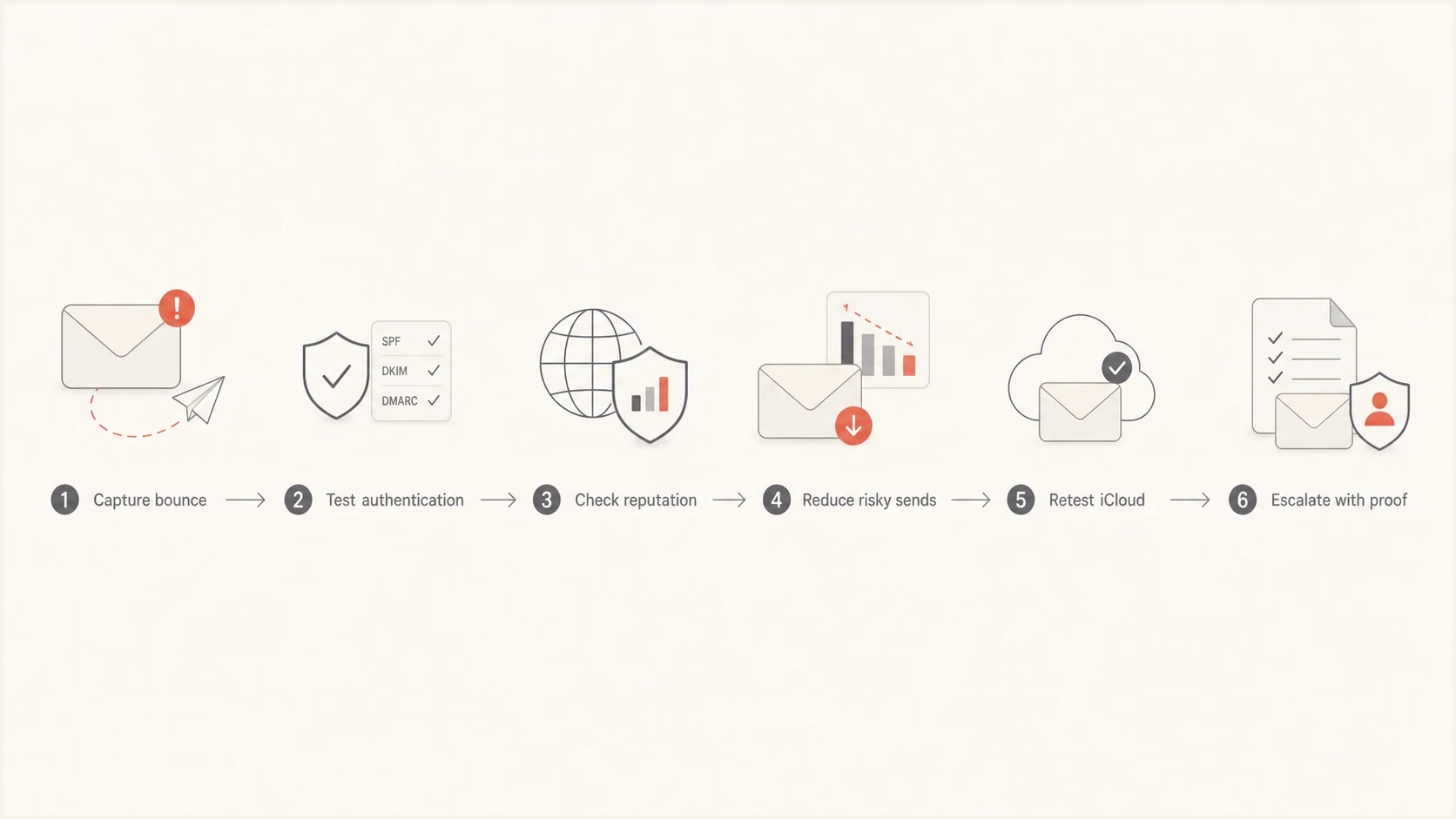
Flowchart showing the iCloud email blocking recovery path
Reduce risk before asking anyone to unblock the sender. Pause non-essential mail to Apple's iCloud Mail domains, including mac.com, me.com, and icloud.com. Keep transactional mail running where legally and operationally required, then restart marketing sends only to recently engaged recipients. This stops repeating the signal that caused the block while evidence is gathered.
Risky reaction
- Resend everything: Repeating the same blocked traffic gives Apple more negative evidence.
- Change random DNS: Unplanned record edits create new failures and hide the real cause.
- Request removal first: A delisting request fails when the traffic source is still active.
Controlled recovery
- Limit iCloud sends: Send only to recent openers, clickers, purchasers, and active users.
- Fix evidence gaps: Verify headers, bounces, records, and source attribution first.
- Retest gradually: Increase iCloud volume only after blocks and deferrals drop.
Content changes should be targeted. Remove link shorteners, reduce redirect chains, verify every linked host, simplify templates, and make unsubscribe easy to find. If the issue affects one campaign but not another, compare subject lines, link domains, image hosts, list source, and complaint rate. If the issue affects every iCloud send from a stream, focus on authentication, IP reputation, domain reputation, complaint behavior, or Apple escalation.
When the problem is iCloud-specific, broader deliverability pages can still help with pattern recognition. Keep the iCloud-focused notes on why iCloud blocks mail and Apple bounce errors nearby when comparing symptoms.
Escalate only after you have proof
Escalation works best when it reads like an incident report, not a complaint. Apple or a sending provider's deliverability team needs the failed recipient domain, timestamps with timezone, sending IP, envelope sender, visible From domain, DKIM selector, bounce transcript, message headers, campaign sample, list source, and the remediation already completed.
Escalation packet
- Identity proof: Sending domain, envelope domain, DKIM domain, selector, and IP address.
- Failure proof: Full SMTP bounce, affected iCloud domains, timestamps, and message IDs.
- Fix proof: Authentication results, blacklist cleanup, volume reduction, and list hygiene actions.
- Sample proof: One raw message sample and one recent successful delivery attempt if available.
If you send through a provider, start with its deliverability team because it can see pool-level behavior and Apple responses across customers. If you operate your own mail servers and still cannot resolve the issue after following Apple's requirements and reviewing the logs, email icloudadmin@apple.com. Include the company name, email domain, affected sending IPs, SMTP errors, when the issue started, and a detailed description. iCloud Mail has no bulk-sender allowlist, so ask for a review of the remaining block rather than allowlisting.
For ongoing prevention, Suped's alerts and automated issue detection reduce the time between a new failure and the first investigation. The product keeps authentication results, SPF management, DMARC policy staging, blocklist monitoring, and deliverability clues close enough for a team to act before iCloud blocking affects a full campaign.
Views from the trenches
Best practices
Separate hard blocks, deferrals, and spam placement before DNS or content changes.
Check both IP and domain blacklist status, even when Apple gives a generic bounce.
Escalate with bounce text, headers, timestamps, IPs, domains, and completed fixes.
Common pitfalls
Assuming iCloud names the blocklist can leave a hidden blacklist problem unresolved.
Changing DNS records without a live test can create new authentication failures.
Resending blocked campaigns too quickly can strengthen the same negative signal.
Expert tips
Keep one clean seed send and full headers ready so escalation starts with evidence.
Compare affected and unaffected iCloud sends to isolate content, list, or IP changes.
Ask the sending provider about pool-level Apple issues before changing brand DNS.
Marketer from Email Geeks says a sudden iCloud block across several clients usually needs pattern analysis before anyone edits DNS records.
2023-07-21 - Email Geeks
Marketer from Email Geeks says the first split should be blocked, bulked, bounced, or delayed because each symptom points to a different fix.
2023-07-22 - Email Geeks
The practical path out
Resolving iCloud blocking comes down to disciplined triage. Capture the actual failure, prove authentication with a live send, check blacklist and blocklist status for every sending asset, meet Apple's bulk-sender requirements, reduce risky traffic, repair the source of the signal, then escalate with a clean evidence packet.
Treating iCloud as a provider with random behavior hides useful evidence. The data is usually spread across bounces, headers, DNS, sending logs, reputation checks, and DMARC reports. Suped centralizes authentication monitoring, issue steps, SPF management, hosted DMARC, hosted MTA-STS, blocklist monitoring, and alerts so teams can investigate repeat iCloud incidents in one workflow.




