What is gmsil.com and is it a legitimate domain or a spam trap?

Published 10 Jul 2025
Updated 23 Sep 2026
12 min read
Summarize with
Updated on 23 Sep 2026: We updated this guide with current domain evidence and a safer split between transactional and marketing mail.
gmsil.com is a real, long-registered domain associated with Group Marketing Services, Inc., not an obviously fake domain. Current public signals show an active business website, a registration dating to 1997, configured mail infrastructure, and documented business use of the domain for staff email. Those signals do not make every gmsil.com address safe to keep in a marketing list.
The practical answer is to treat gmsil.com as a legitimate business domain while treating unexpected consumer-style addresses there as probable gmail.com typos. No public evidence establishes gmsil.com as a spam trap, although trap operators normally keep trap identities secret. Suppress or verify an address unless the person clearly has a relationship with Group Marketing Services.
- Direct answer: It is a legitimate domain, not a confirmed spam trap.
- List risk: It is one character away from gmail.com, so it attracts accidental signups and form typos.
- Sending rule: Do not keep mailing it just because the MX accepts mail or bounces are absent.
- Monitoring need: Use blocklist monitoring to catch blocklist or blacklist changes after suspect sends.
What gmsil.com is
The domain gmsil.com has current public business signals. The website identifies Group Marketing Services, Inc. and describes insurance-related broker support. Public WHOIS data lists a registration date of November 21, 1997, an expiry date in 2033, and GoDaddy nameservers. Blue Cross and Blue Shield of Illinois's current general-agent directory also lists Joshua P. Garrett at a gmsil.com address. These facts support legitimate business use, although they do not prove mailbox ownership, consent, or safety for any address in a list.
The important distinction is between domain legitimacy and address legitimacy. A domain can belong to a real business while receiving mail that was never meant for that business. gmsil.com differs from gmail.com by a single-character substitution between adjacent keyboard keys. If a list has many personal-looking addresses there, the likely cause is poor collection quality rather than evidence that those people work with Group Marketing Services.
|
|
|
|---|---|---|
Website | Real business | Not list consent |
Old WHOIS | Stable domain | Not inbox intent |
MX accepts | Can receive | Not safe to mail |
One-edit typo | High list risk | Needs context |
Public signals and what they do, and do not, prove.
Validity is not permission
A successful DNS lookup, a valid MX record, or the absence of a hard bounce only proves that mail can be accepted somewhere. It does not prove that the address belongs to the person who submitted it, that the mailbox is read, or that the recipient consented to marketing.
Why gmsil.com resembles a typo trap
Marketers worry about gmsil.com because it looks like a classic typo destination, not because it looks disposable. The A and S keys are next to each other, so a single mistyped character turns gmail.com into gmsil.com. Fast form entry, stale autofill data, and poorly controlled lead feeds can concentrate bad addresses at a near-match domain.
A spam trap, sometimes called a honeypot email address, is monitored to identify senders with poor permission or list-hygiene practices. A typo trap uses a misspelled domain for that purpose. A lookalike domain is not automatically a trap, and public DNS cannot settle the question because trap identities are generally concealed.
A typo domain can still create the same warning signs as a spam trap even when its owner did not create it for that purpose. If the domain accepts all local parts, a sender might see no hard bounce. If nobody reads the mailbox, there will be no reliable human engagement. Security and filtering systems can also open messages or scan links, creating activity that is not useful consent evidence. For more on that last point, see trap clicks.
Confirmed spam trap
- Purpose: Created or repurposed to identify senders with poor list practices.
- Evidence: A trap notification or reputation signal tied to matching send records.
- Action: Stop mailing, isolate the acquisition source, and remediate reputation.
Likely typo domain
- Purpose: Legitimate domain that receives mail intended for another domain.
- Evidence: One-character similarity, low relationship fit, and no clear consent signal.
- Action: Suppress consumer-looking addresses and fix capture validation.
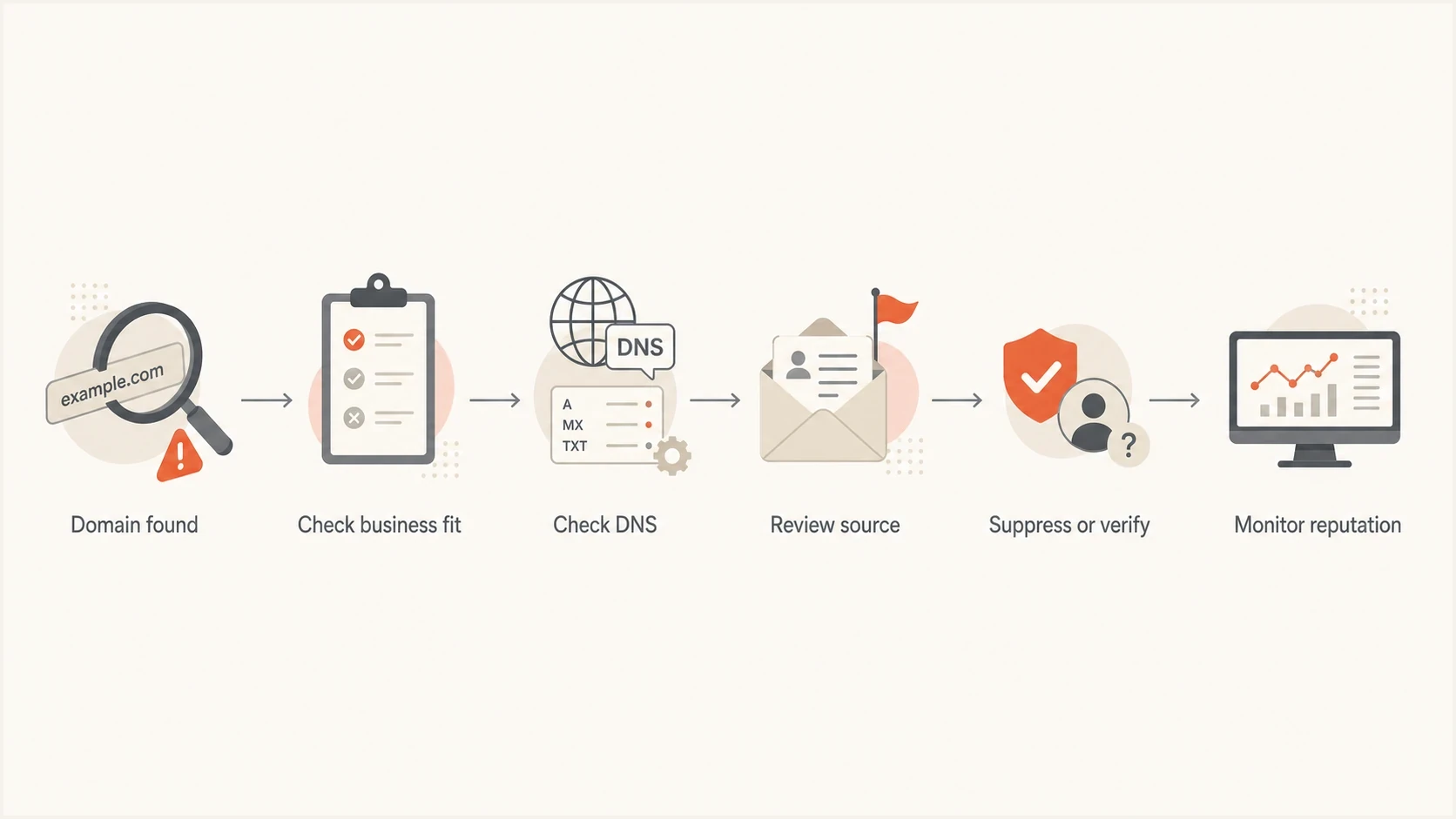
Flowchart for checking gmsil.com as a possible Gmail typo domain before sending email.
How to assess a gmsil.com address before sending
Use a layered check for domains like this because no single signal is enough. Start with identity and business context, then review DNS, list provenance, and behavior. If the domain belongs to a business that has no reason to appear in a consumer list, treat that mismatch as a data quality finding.
A domain health check gives a fast read on DNS, DMARC, SPF, DKIM, and mail posture. It cannot tell whether a submitted address is a typo. SPF, DKIM, and DMARC on a recipient domain describe mail that domain sends, so their presence does not prove that an individual recipient mailbox exists or has granted permission.
?
What's your domain score?
Deep-scan SPF, DKIM & DMARC records for email deliverability and security issues.
For list hygiene, add a separate typo-domain rule. The rule should not declare every address at gmsil.com fake. It should require stronger proof before an address enters a campaign, especially when the local part looks personal and the acquisition path is paid lead generation, sweepstakes, co-registration, or an offline import.
Technical checks to runBASH
dig MX gmsil.com

dig TXT gmsil.com

dig TXT _dmarc.gmsil.com

# Then compare the address source with the expected business context.
- Business fit: Ask whether the person plausibly works with Group Marketing Services.
- Typo distance: Compare the domain with gmail.com and other common mailbox domains.
- Source quality: Identify the form, import, partner, or vendor that supplied the address.
- Consent proof: Require confirmed opt-in or a direct business relationship before marketing.
- Reputation watch: Check for blocklist and blacklist changes after any historic sends.
What to do with gmsil.com addresses
The safest operational policy is conditional suppression. Do not add the domain to a global blacklist or blocklist without context because a real person at Group Marketing Services can have a real address there. Suppress it from consumer acquisition flows unless the user passes a stronger verification step.
For B2B systems, keep the domain available behind normal account verification. For B2C signups, newsletter forms, lead magnets, contest entries, and purchased lists, treat it as a risky typo and prevent the address from entering bulk sends. That is a data quality control, not a claim that the domain owner has done anything wrong.
How to classify gmsil.com addresses
Risk changes based on how the address entered the database.
Low risk
Verified relationship
Known employee, existing account, or direct B2B relationship.
Medium risk
Needs verification
Form signup with confirmation pending or unclear business context.
High risk
Suppress
Purchased, appended, sweepstakes, or consumer-looking Gmail typo.
A practical suppression rule
Suppress gmsil.com addresses when the source is consumer acquisition, the user typed the address once, and no confirmation event exists. Allow an individual address only after the person confirms it or support verifies the business relationship.
Example list ruleTEXT
IF domain = gmsil.com
AND source IN paid_lead, sweepstakes, import, co_reg
AND confirmed_opt_in = false
THEN suppress_reason = likely_gmail_typo
Separate transactional mail from marketing mail
Do not apply one sending decision to every message class. If an established customer previously confirmed a gmsil.com address, necessary user-triggered and account notices can continue while promotional mail is paused for review. If the address came from a new, unconfirmed signup, keep it out of both marketing and sensitive transactional flows until ownership is resolved.
- New signup: Send only a neutral confirmation message, then withhold marketing until confirmation.
- Verified account: Keep necessary user-triggered mail running while pausing optional campaigns for review.
- Sensitive content: Do not send personal data or account details to an address flagged as an unresolved typo.
- Bulk incident: Pause non-triggered sends to the affected segment while auditing collection sources.
Record confirmation state and message purpose separately. That lets the sending system protect necessary account communication without using a transactional label to bypass consent or typo controls.
How to prevent gmsil.com typos at signup
Point-of-collection controls prevent more typo-trap exposure than cleaning a list after a campaign. Detect the near-match while the person is still on the form, ask whether they meant gmail.com, and require an explicit choice. Do not silently rewrite the domain because a legitimate Group Marketing Services address would be changed incorrectly.
- Suggest, do not replace: Show the likely Gmail correction and let the user accept or reject it.
- Confirm ownership: Keep the contact out of marketing until confirmed opt-in is complete.
- Record provenance: Store the form, partner, import, or campaign that supplied the address.
- Enforce checks server-side: Rate-limit forms and validate submissions after receipt so bots cannot bypass browser-only rules.
Do not send sensitive content to verify a typo
A confirmation message can reach the wrong domain owner. Keep it limited to a neutral confirmation link, exclude personal account details, and expire the link quickly. If the user corrects the domain before submission, send only to the corrected address.
Why bounce data can mislead you
A domain can accept mail through a hosted filter, catch-all mailbox, quarantine, archive, or sink mailbox. None of those paths has to produce a hard bounce that tells the sender the address was wrong. A sender can therefore mail many typo addresses without seeing an obvious bounce warning.
Open and click data also has limits. Security systems scan links, load images, and inspect URLs. Infrastructure protecting ordinary mailboxes or spam traps can create automated events. A click from a suspect address is not proof that a real person requested the email.
Weak evidence
- No bounce: The receiving system accepted the SMTP transaction.
- Open event: A pixel loaded, often through a proxy or scanner.
- Single click: A link was followed, but the actor is unclear.
Stronger evidence
- Confirmed signup: The mailbox owner completed a confirmation path.
- Business match: The address fits the company and relationship.
- Recent reply: A human responded from the address.
How Suped fits into the workflow
Suped's product provides the monitoring layer around this decision. It does not declare every gmsil.com address bad. Suped brings DMARC results, SPF and DKIM health, issue detection, alerts, blocklist and blacklist checks, and domain-level deliverability signals into the same workflow.
When a risky typo-domain send coincides with authentication failures, an unexpected sending source, or blocklist movement, Suped helps trace the affected domain and source before the team changes DNS or resumes sending. Use the evidence to isolate the acquisition path and correct the underlying list problem.

Blocklist monitoring page showing domain and IP checks across blocklists with importance and status
For teams managing many brands or client domains, Suped's MSP and multi-tenancy dashboard applies the same monitoring and reporting process across the portfolio. A questionable domain found in one list can be investigated without manually checking every sender.
Practical monitoring setup
- Authentication: Monitor DMARC, SPF, and DKIM so unexpected sending sources are visible.
- Reputation: Track blacklist and blocklist changes after risky campaign sends.
- Source tracing: Match reputation movement with the affected domain, campaign, and acquisition path.
- Operations: Use alerts and issue steps so remediation does not depend on manual digging.
Checks before you blocklist or blacklist the domain
Before adding gmsil.com to a permanent blocklist or blacklist, check whether the address source is the real problem. Blocking a typo domain keeps bad addresses out of the next send, but it does not fix the form, import process, partner feed, or purchased list that produced them.
Label these addresses by risk and keep a record of why each one was suppressed. If a real customer or broker contact later appears at the domain, support can verify and restore that individual address without removing the broader guardrail.
- Find source: Report the forms, campaigns, vendors, and imports creating the addresses.
- Correct typos: Prompt users when a domain is one edit away from a common mailbox provider.
- Require proof: Use confirmed opt-in for any address that hits a typo-domain rule.
- Watch fallout: Use blocklist basics to decide when reputation signals need escalation.
Apply the same process to other suspicious domains: compare spelling distance, business fit, list source, engagement quality, and reputation impact.
Views from the trenches
Best practices
Treat near-miss domains as data quality signals, not automatic proof of malicious intent.
Keep suppression reasons visible so support can restore a real business contact later.
Use confirmation and source tracking before any risky typo-domain address enters campaigns.
Common pitfalls
Relying on no hard bounces hides catch-all routing, filtering, quarantine, and sink mailboxes.
Suppressing every odd domain hides acquisition problems without fixing bad collection paths.
Reading scanner clicks as consent leads teams to keep addresses that never had permission.
Expert tips
Track typo domains separately so product teams can fix forms, imports, and validation rules.
Review suspect domains by relationship fit first, then DNS, then engagement and reputation.
Pair typo-domain suppression with DMARC and blacklist monitoring after risky campaigns.
Expert from Email Geeks says gmsil.com has real business signals, so legitimacy and list risk should be judged separately.
2024-09-18 - Email Geeks
Marketer from Email Geeks says large send volume to gmsil.com with no hard bounces points to a typo capture problem.
2024-10-03 - Email Geeks
Is gmsil.com legitimate?
gmsil.com has credible public business signals, so available evidence does not support labelling the domain owner as malicious or the domain as a confirmed spam trap. Its similarity to Gmail still makes unverified, consumer-style addresses risky for marketing sends.
Suppress likely typo addresses, verify real business contacts, and fix the collection path that generated them. After historic exposure, monitor DMARC, SPF, DKIM, blocklist, and blacklist signals. That converts an ambiguous domain finding into a defined sender-reputation workflow.




