What filtering methods do Optimum, Windstream, and CenturyLink use for email, and how can I troubleshoot content-related blocks?

Published 26 Jun 2025
Updated 21 Sep 2026
12 min read
Summarize with

Updated on 21 Sep 2026: We clarified the difference between SMTP rejections and junk placement, then added current provider-specific evidence for content and blocklist troubleshooting.
Optimum, Windstream, and CenturyLink do not publish one shared filter stack, so the direct answer is this: treat their rejections as a mix of provider policy, legacy residential mail infrastructure, blocklist and blacklist checks, authentication checks, recipient feedback, and content scanning. When the bounce says 554 5.7.1 with P4 and the diagnostic text explicitly says spam content, or when it says a content scanner rejected the message, treat it as a content or fingerprint rejection until the evidence proves otherwise. The 5.7.1 status by itself is broader and can describe other permanent policy failures.
Optimum publicly states that it uses third-party blocklists, RFC compliance checks, secure-server checks, and a requirement for mail hosts to accept bounces in its Optimum policy. CenturyLink documents shared settings for centurylink.net and several legacy domains in its CenturyLink settings, including centurytel.net, embarqmail.com, and qwest.net. Windstream webmail has recipient-level allow and block controls plus message filters, so recipient actions can affect later placement for that mailbox.
- A content-specific diagnostic means the message body, links, subject, template, attachment, or tracking fingerprint is part of the rejection.
- Related patterns can appear across Optimum, Windstream, CenturyLink, MyCtl.net, Qwest, Embarq, and CenturyTel because consumer ISP mail systems often use inherited infrastructure.
- Even a small block rate matters when the same provider group or message version produces the rejection repeatedly.
How these providers filter email
Do not assume all three providers run the same commercial filter. The safer operating model is that they each combine multiple signals, then apply local thresholds. A message can pass SPF, DKIM, and DMARC and still fail because the filter dislikes a URL, a phrase pattern, an image-to-text mix, a reused template, an attachment, or a fingerprint seen in unwanted mail.
|
|
|
|---|---|---|
Blocklist and blacklist data, RFC compliance, server security, bounce acceptance, reputation signals, recipient blocking, and content filtering. | IP, P4, subject, URLs. | |
Spam filtering, prior recipient spam reports, message-standard checks, recipient controls, and reputation signals. | IP, subject, body, attachment, signature, recipient domain. | |
Automatic spam handling, blocked-sender controls, message filters, legacy-domain mail settings, and content checks. | Domain family, 554 5.7.1, timestamps. |
Provider signals to check before editing content.
For CenturyLink-family domains, the consolidation point matters. If centurylink.net, centurytel.net, embarqmail.com, qwest.net, and myctl.net react the same way, group them together during analysis instead of treating each one as a new problem. That avoids noisy conclusions when the same underlying mail path is involved.
Typical content-related SMTP repliestext
smtp;554 5.7.1 [P4] Message blocked due to spam content.
smtp;554 5.7.1 Spam detected by content scanner. Message rejected.
smtp;550 5.7.1 [reference token] This message does not comply with required standards.
Windstream documents the third pattern as a spam-filter decision. Its guidance says the sender or recipient address, subject, attachment, body, signature, phone number, image, or logo can contribute, so preserve both the exact reply and the original sent message.
Do not over-read the infrastructure clue
Smaller ISP and legacy domains can use inherited or hosted mail infrastructure, but the bounce text matters more than a vendor guess. If the provider says content scanner, start with content isolation. If it says listed IP, start with reputation and a blocklist or blacklist check.
Separate rejection from junk placement
An SMTP rejection, spam-folder placement, and a recipient block rule are different outcomes. An SMTP rejection produces a bounce because the receiving system refused the message. Junk placement happens after acceptance. A blocked-sender entry or message rule applies inside a recipient's mailbox and can affect only that account.
- If a full SMTP reply exists, classify its code, diagnostic text, and rejection stage before asking the recipient to change mailbox settings.
- If the provider accepted the message but placed it in junk, ask the recipient to mark it as not spam and review the sender entry in webmail.
- If only one mailbox is affected, check its blocked-sender list and message filters before changing campaign content.
- If the same SMTP rejection repeats across recipients, treat it as a sender, content, policy, or reputation issue rather than a mailbox preference.
CenturyLink says marking a message as not spam changes future handling for that sender. Kinetic webmail also provides address or domain allow and block controls plus message filters. These recipient actions can repair delivery for one mailbox, but they do not remove a network-level rejection affecting many recipients.
Account for the Q.com retirement
CenturyLink completed the move of Q.com users to myctl.net, and Q.com is no longer an active email domain. Remove q.com addresses from current seed lists, monitoring groups, and block-rate calculations. A new failure to q.com now points to a retired recipient domain, not proof that CenturyLink rejected the message content.
Use myctl.net for current testing. Keep older q.com results only as historical evidence, and label them so a pre-migration content pattern is not compared directly with post-migration delivery.
Why content blocks happen
Content blocks usually do not mean one forbidden word was present. More often, the filter scored the whole message: subject, body copy, visible links, hidden tracking links, redirect chain, template structure, attachments, signature or contact details, image hosting, sending pattern, and recipient feedback. The final block can look sudden even when the underlying signal has been building for weeks.
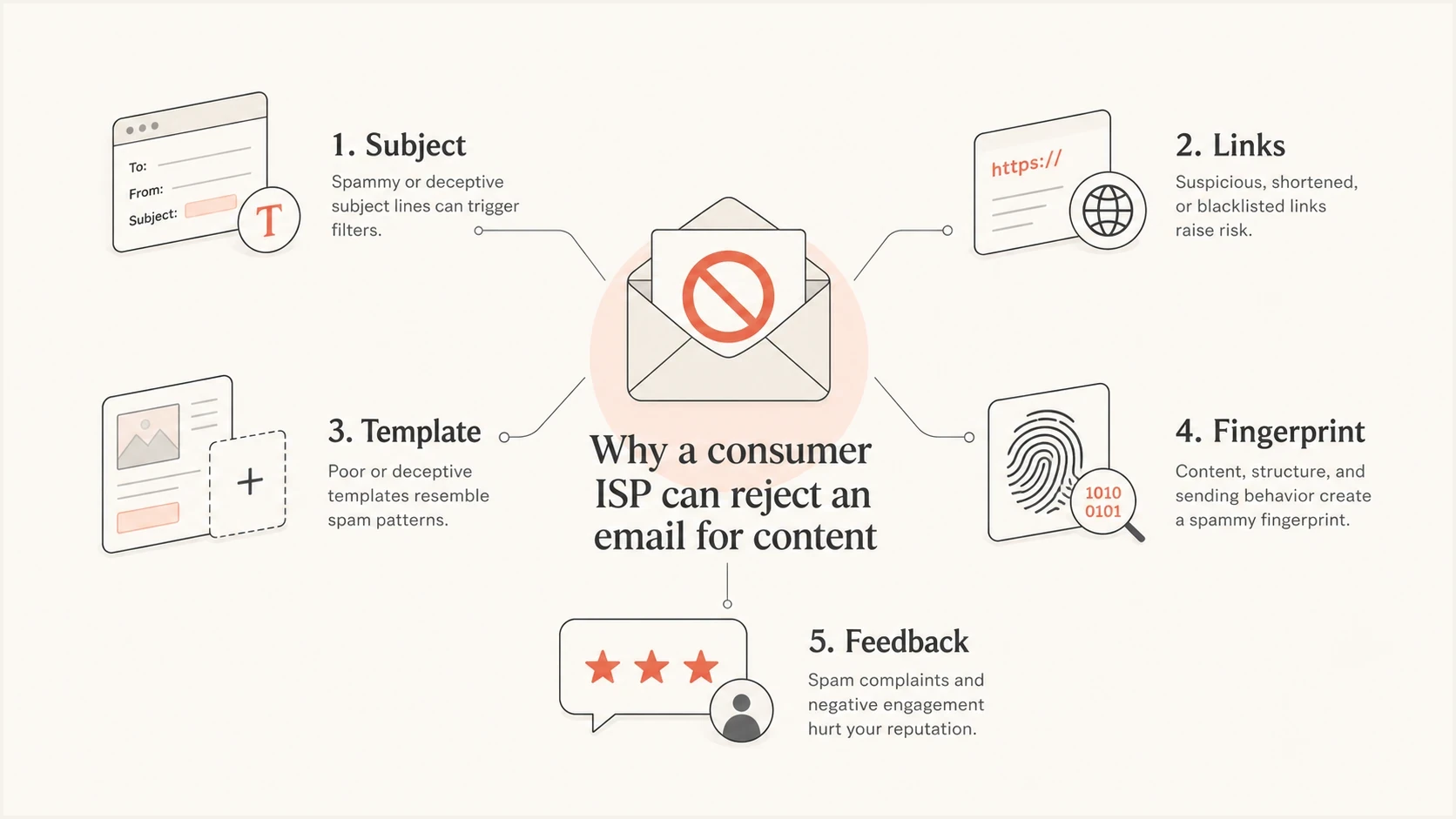
Email content filter signals including links, template fingerprints, subject lines, and feedback.
The strongest content clues are usually links and fingerprints. Links include the visible destination, tracking domain, redirect host, query parameters, and final landing page. Fingerprints include HTML structure, image dimensions, footer text, tracking pixels, and wording patterns that repeat across campaigns. If unwanted mail uses the same link host or template family, a legitimate sender can get caught by association.
Authentication problem
- SPF fails, DKIM fails, or DMARC identifier matching fails.
- Failures follow the sending source, not one creative version.
- Repair DNS, signing, identifier matching, and unauthorized sender handling.
Content problem
- A scanner says the message was rejected for spam content.
- Failures follow subject, link set, template, or copy version.
- Isolate the trigger, then change only the element that proves causal.
This is also why a message can pass authentication and still be blocked. If that is your exact situation, compare it with authentication still passes before changing DNS. If the bounce wording points at acceptable use or content, the separate content-policy blocks path is a better match.
Troubleshooting workflow
Troubleshoot these blocks with a controlled test matrix. Keep the sending identity stable while changing one message element at a time. If you change the subject, body, link host, HTML, images, and sending IP together, you learn almost nothing.
First identify where the rejection occurred. A rejection after the message body or end-of-DATA, paired with an explicit content diagnostic, supports content testing. A rejection at connection, MAIL FROM, or RCPT TO points toward a connection, sender, recipient, authentication, or reputation decision. Treat a 5xx reply as permanent for that attempt and stop automatic retries to the failed recipients while you investigate. A 4xx reply is temporary and should follow the sender's normal retry schedule.
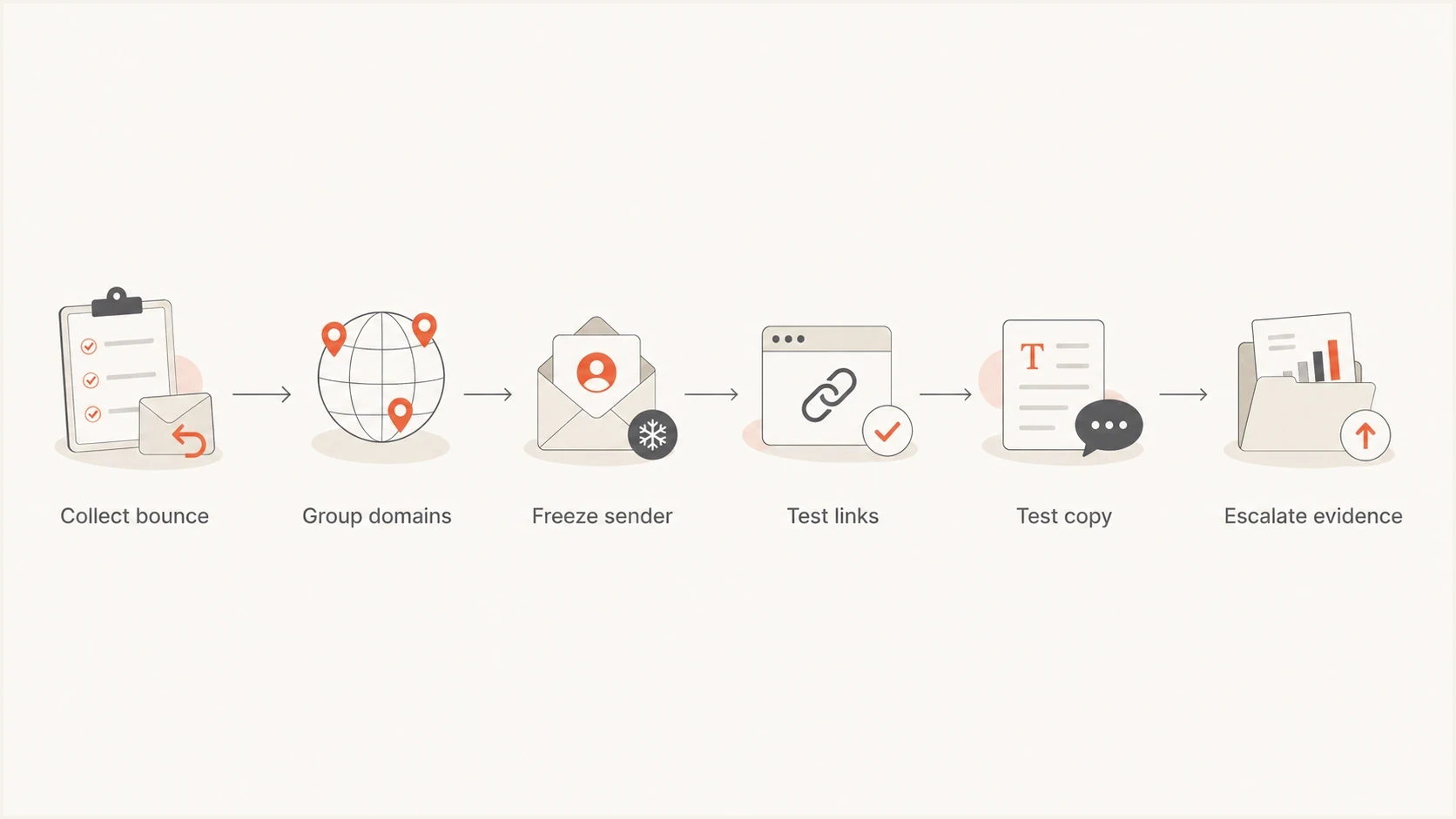
Content block troubleshooting flow from SMTP evidence collection through provider escalation.
- Save the full SMTP reply, rejection phase, timestamp, sending IP, envelope sender, visible From domain, subject, recipient domain, and message version.
- Put optonline.net, windstream.net, centurylink.net, centurytel.net, embarqmail.com, qwest.net, myctl.net, and similar legacy domains into provider groups.
- Keep the same IP, DKIM domain, envelope domain, visible From, and sending cadence while testing content.
- Send a plain, short control message with no attachments, images, links, or signature block and use a neutral subject.
- Add the original subject, copy, HTML, images, attachments, signature, tracking links, and footer back one at a time.
- If the block returns when one variable returns, fix that element before changing infrastructure.
Simple content test matrixtext
A: Same sender, plain text, no links, neutral subject
B: Same sender, original subject only
C: Same sender, original body copy only
D: Same sender, original links only
E: Same sender, original HTML template only
F: Same sender, original attachment only
G: Same sender, original signature or contact block only
H: Same sender, original message restored
A real seed test is useful here because it shows what the message looks like after it leaves your platform. Use an email tester to inspect headers, authentication, body structure, link behavior, and obvious risk signals before sending more volume into the affected domains.
Email tester
Send a real email to this address. Suped shows a results button when the test is ready.
?/43tests passed
Common fixes include removing a bad link chain, replacing a tracking domain with poor history, simplifying HTML, correcting a misleading visible URL, removing a rejected attachment, or separating transactional content from marketing language. If a more aggressive version wins on click or conversion metrics but creates provider-specific blocks, keep the commercial result in view and fix the proven content signal before restoring volume.
Check reputation before rewriting everything
A content scanner reply still deserves a reputation check. The filter can combine a borderline content score with an IP or domain reputation score. If either side gets worse, the same message starts bouncing. Start with blocklist basics when you need to separate a true listing from a content-only issue.
Optimum says it rejects mail transfers from IP addresses on the third-party blocklists it uses. Because Optimum does not operate those lists, resolve a confirmed blocklist or blacklist entry with the relevant listing operator rather than asking Optimum to remove it.
Content block rate triage
Compare each provider group with its normal baseline because there is no universal safe block rate.
Watch
Isolated
Scattered bounces with no repeatable provider or content pattern.
Investigate
Above baseline
Repeatable bounces at one provider group or one creative version.
Act
Sustained
Content scanner replies persist across affected ISP domains.
Check domain DNS and authentication health at the same time. A domain health check catches missing or broken DMARC, SPF, and DKIM records before you spend hours rewriting a message that was also failing a basic trust signal.
?
What's your domain score?
Deep-scan SPF, DKIM & DMARC records for email deliverability and security issues.
What to check before escalation
- Confirm that SPF passes, DKIM passes, and DMARC passes for the visible From domain.
- Check that sending IPs and domains are not on a relevant blocklist or blacklist.
- Verify that links, subject, HTML, attachments, images, signature, and footer each pass a one-variable test.
- Keep full bounces, timestamps, target domains, and sample message IDs.
Using Suped during triage
Suped's product helps keep authentication and reputation evidence in one workflow. Teams can use Suped's DMARC source data and issue alerts to rule out SPF, DKIM, DMARC, or sender inventory faults, then use blocklist monitoring to check blocklist and blacklist status before running controlled content tests.

Issue steps to fix dialog showing the issue overview, tailored fix steps, and verification action
Provider-specific content blocks often start as a messy set of symptoms. One team sees a few Optimum bounces, another sees Windstream complaints, and someone else notices a CenturyLink-family domain rejecting a creative version. Suped helps keep the evidence tied to the domain and source instead of scattered across campaign reports and mailbox screenshots.
Without a central workflow
- Bounces, DNS checks, and campaign tests live in separate places.
- Teams spend time proving whether authentication or content is involved.
- Small provider blocks can sit unnoticed until a larger domain reacts.
With Suped
- DMARC, SPF, DKIM, source, and reputation issues are visible together.
- Issue detection points to the likely cause and the fix steps.
- Alerts help catch authentication or reputation drift before it spreads.
When to escalate
Escalate only after you have a narrow finding. A provider postmaster or support desk can work with specific evidence. They cannot do much with "our emails are blocked" and no SMTP replies, IPs, subjects, or timestamps.
For Optimum-specific issues, package the evidence before using an Optonline postmaster route. For Windstream's documented 550 5.7.1 standards rejection, keep the reference token and a saved copy of the exact message that produced it. If mail was accepted but placed in junk, recipient allow listing or marking it as not spam can help an individual mailbox, but it does not fix a broad content trigger.
Provider escalation packet
- Include full SMTP replies, not summaries or screenshots alone.
- List affected recipient domains and the approximate block rate.
- Provide IPs, envelope sender, From domain, DKIM domain, and message IDs.
- Show the variable test that proves the block follows a link, template, attachment, signature, or subject.
- Document any copy, link, DNS, or reputation change already completed.
Views from the trenches
Best practices
Group bounces by provider, domain, IP, subject, and URL set before changing copy again.
Test one content variable at a time, starting with links, tracking domains, and subject line.
Keep SPF, DKIM, and DMARC passing so content tests are not mixed with authentication faults.
Common pitfalls
Treating a 554 content rejection as an IP-only blocklist or blacklist issue wastes time.
Changing several links, the subject, and HTML together hides the actual filter trigger.
Ignoring small ISP domains loses useful early warning signals before larger blocks appear.
Expert tips
Keep a clean control message so every test proves whether one content element changed results.
Capture the exact SMTP reply, timestamp, sending IP, From domain, subject, and target domain.
Review complaint-prone wording and link reputation when aggressive copy lifts clicks but blocks.
Expert from Email Geeks says these consumer mailbox domains often rely on proprietary filtering, and CenturyLink, Qwest, and parts of Embarq should be treated as related infrastructure when patterns repeat.
2024-02-11 - Email Geeks
Marketer from Email Geeks says a 554 5.7.1 P4 reply is a content-scanner rejection, so IP reputation alone does not explain the block.
2024-05-03 - Email Geeks
Apply the narrowest proven fix
Do not guess the filter vendor and rewrite the whole campaign. Classify the bounce, group the affected domains, keep the sender constant, and prove which message element triggers the rejection. In these Optimum, Windstream, and CenturyLink cases, links and fingerprints deserve the first close look.
Once the trigger is clear, fix the specific element, then keep watching authentication, blocklist or blacklist status, and provider-specific bounce rates. That gives you a defensible fix instead of a broad creative change that hides the original cause.




