Is my email being blocked due to an acceptable use policy or content?

Updated on 8 Aug 2026: We clarified how to separate sender-side AUP enforcement, recipient content filtering, and broader reputation blocks.
Yes. If the bounce, SMTP response, or provider notice mentions AUP, policy, prohibited content, message content, suspicious links, or abuse prevention, a sending platform or receiving system has blocked the email under a policy or content rule. It is not always a full sender block. When the same sender has a normal sending history and only occasional failures, treat it first as a message-level, campaign-level, or recipient-policy block.
That distinction matters. A blocklist (or blacklist) listing, poor IP reputation, or failed authentication can affect broad portions of mail. AUP and content filtering often hit a specific message because of the words, URLs, promoted domains, attachments, redirects, or recipient-side policy rules inside that message.
Start by separating infrastructure from content. Check whether DMARC, SPF, DKIM, PTR records, TLS, IP reputation, domain reputation, and message format are healthy, then test the exact email that failed. If infrastructure is clean and the failures are intermittent, inspect the advertised domains, tracked links, subject line, attachment type, and any text that resembles financial, credential, compliance, or account-action language.
Is AUP or content causing the block?
An acceptable use policy block means the receiving system or sending platform decided the message violates a rule about what mail it allows. A content block means a filter disliked something inside the message. In practice, the two overlap because many AUP systems enforce content rules automatically.
- Bounce wording: AUP, policy violation, prohibited content, message rejected, content rejected, or security policy points to policy or content filtering.
- Failure pattern: A few failed recipients inside an otherwise healthy campaign usually point to content, recipient policy, or a specific promoted domain.
- Broad failures: Many failures across different messages and recipients point more toward authentication, reputation, throttling, or a blocklist (blacklist) issue.
- Code context: SMTP 5.7.1 means delivery was not authorized or the message was refused. The code alone does not prove a content violation.
- Sender proof: Passing DMARC, SPF, and DKIM helps but does not override a recipient content decision.
Fast rule of thumb
If the same domain sends most mail successfully but one template fails, isolate the content. If every template starts failing at the same provider, inspect authentication, reputation, sending volume, and blocklist status.
Likely content or AUP issue
- Intermittent pattern: Failures appear on one campaign, one template, or one set of links.
- Policy wording: The bounce references AUP, content, policy, security settings, or message restrictions.
- URL clue: A specific promoted domain or tracking redirect appears only in failed mail.
Likely reputation or authentication issue
- Broad pattern: Multiple templates fail across many recipients or mail streams.
- Technical wording: The bounce references SPF, DKIM, DMARC, PTR, relay, IP reputation, or rate limits.
- Listing clue: The sender IP or domain appears on a blocklist or blacklist used by the receiver.
What AUP and content blocks look like
AUP blocks are often vague because the receiver does not want to publish a filter recipe. The response might say the message violates policy without naming the exact word, URL, or attachment that triggered the decision. That is frustrating, but the wording still gives you direction.
Illustrative SMTP responsestext
550 5.7.1 Message rejected due to policy restrictions
554 5.7.1 Message refused due to content policy
550 5.7.1 This message violates acceptable use policy
554 5.7.1 Security or policy settings rejected this message
550 5.7.1 URL or domain in message has poor reputation
Those replies do not all mean the same thing. SMTP 5.7.1 is a broad enhanced status code for delivery not authorized or message refused. The rest of the diagnostic and the system that issued it determine whether the cause is content, authentication, relay authorization, a local rule, or another security policy.
|
|
|
|---|---|---|
AUP | Policy rule | Copy, offer, links |
Content | Message filter | Body, subject |
URL | Link reputation | Promoted domains |
Attachment | File rule | File type, archive |
5.7.1 | Delivery refused | Full diagnostic text |
Common clues in policy and content bounces
The most useful signal is consistency. If the bounce follows the message, not the IP or domain, the message is the suspect. Send a plain-text version without links to a controlled test address. Then add back the subject line, body sections, tracking links, promoted domains, images, and attachments one at a time.
Find where the rejection happened
Before changing content, identify which system made the decision. A message refused by the sending platform under its AUP never reached the recipient's mail server. A remote rejection appears after the sending server connects to the recipient domain. A message accepted and placed in spam was delivered, so it has a placement problem rather than an SMTP block.
- Submission-time refusal: The sending application or API rejects the message and provides no remote mail server response. Review the platform AUP, account status, and event log.
- Remote SMTP refusal: The log names the recipient's mail server and includes its SMTP reply. Preserve that full reply and focus the investigation on the receiver's reason.
- Accepted but placed in spam: The remote server returned success, but the message reached spam. Investigate placement, reputation, complaints, and engagement instead of treating it as a bounce.
- Recipient-specific rule: Only one company or mailbox rejects the message. Ask its administrator about local gateway rules, allowlists, and restricted attachments.
How to prove whether content caused the block
Use a controlled isolation test. The goal is not to guess the forbidden word. Change one variable at a time until the failure moves. If the failure disappears when links are removed, URLs are the suspect. If it disappears when the subject changes, the subject is the suspect.
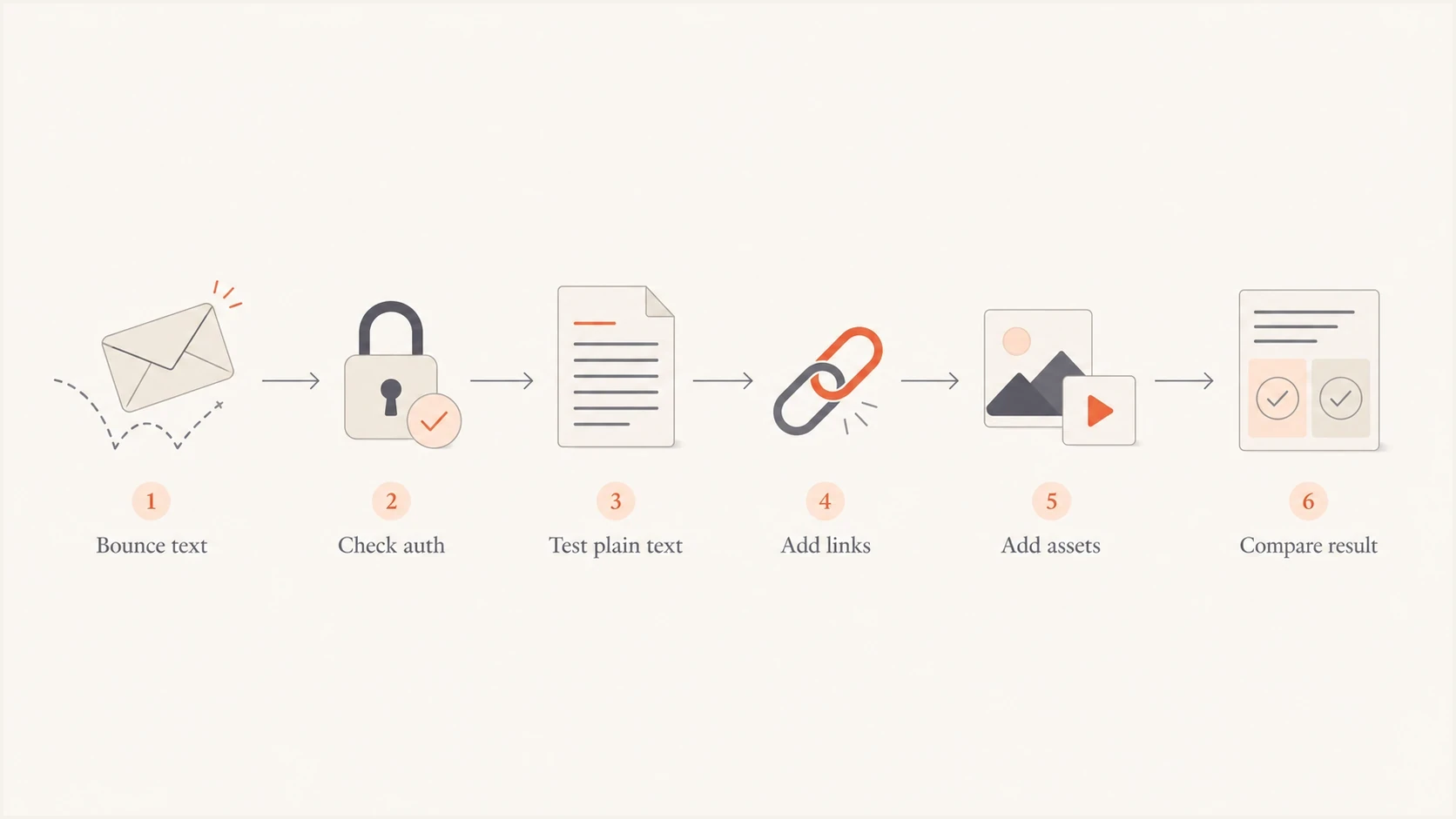
A flowchart for isolating content-related email blocks.
- Capture the evidence: Save the full bounce, SMTP code, sending IP, message ID, recipient domain, timestamp, subject, and template version.
- Check authentication: Confirm SPF, DKIM, and DMARC pass for the same mail stream before blaming content.
- Strip the message: Send the same message as plain text with no tracking, images, attachments, or shortened links.
- Add elements back: Restore one item at a time, starting with the promoted domain, then tracking links, images, and attachments.
- Compare outcomes: If the block returns after one element is restored, you have a strong lead.
Email tester
Send a real email to this address. Suped shows a results button when the test is ready.
?/43tests passed
A practical test includes a real send, rather than DNS inspection alone. The email tester helps inspect the delivered message, authentication results, headers, and content-related signals in one report. It will not know every private receiver rule, but it shortens the path to the obvious issues.
Content elements to check first
Content filters look at the complete message. That includes visible words, hidden HTML, linked domains, redirects, images, attachments, sender identity, and past engagement. A message can look harmless to the sender while still matching a receiver rule.
- Promoted domains: Check every domain in the body, including landing pages, image hosts, unsubscribe domains, tracking domains, and redirects.
- Redirect chains: Long tracking chains, mixed domains, or mismatched link branding can trigger content and reputation filters.
- Subject and message format: Missing subjects, malformed headers, invalid message structure, or urgent account and billing language can trigger format or policy rules.
- Attachments: Blocked file types, files hidden in archives, malicious macros, and password-protected archives often fail before reputation is considered.
- HTML quality: Broken markup, hidden text, image-only layouts, or missing plain-text parts can increase filtering risk.
- Permission and list quality: Unclear consent, stale recipients, invalid addresses, and complaint history make future policy or reputation blocks more likely.
- Unsubscribe handling: Promotional mail needs a clear working unsubscribe path. High-volume subscription mail to personal Gmail accounts also needs one-click unsubscribe headers.
Do not stop at the visible copy
Intermittent content blocks can come from a single advertised domain, not the sender IP. Check the actual domains in the message source, including tracking and image domains.
This is where many teams lose time. They keep asking whether their IP is blocked while the failed message advertises a domain that has its own poor reputation. The receiver can reject mail because of a linked domain even when the sending domain has clean authentication.
Do not ignore authentication and reputation
AUP wording does not excuse skipping the basics. Receivers often combine policy signals with authentication and reputation signals. A clean message from a weakly authenticated domain gets less benefit of the doubt. A risky-looking message from a strongly authenticated domain still gets blocked if the content trips a hard rule.
Suped DMARC dashboard showing email volume, authentication health, and source breakdown
In Suped, the practical workflow is to confirm the mail stream is legitimate, authenticated, and expected. Suped's DMARC monitoring shows which services are sending and whether SPF and DKIM pass for the visible From domain. That tells you whether the failed message came from an approved sender or an unverified source pretending to be you.
?
What's your domain score?
Deep-scan SPF, DKIM & DMARC records for email deliverability and security issues.
For a quick external check, use the domain health checker to review DMARC, SPF, DKIM, and related DNS signals. If those checks fail, fix them before spending hours rewriting copy.
Policy checks go beyond DMARC
For personal Gmail recipients, every sender needs SPF or DKIM, valid forward and reverse DNS, TLS, RFC 5322 message format, and a user-reported spam rate below 0.3%. Senders above 5,000 messages a day also need SPF, DKIM, DMARC, domain alignment, and one-click unsubscribe for marketing or subscription mail.
How to read the failure pattern
The same bounce wording means different things depending on how widely it appears.
Isolated
One template
Usually message, URL, or recipient policy related.
Provider-specific
One provider
Check the provider diagnostic and compare other destinations.
Widespread
Most traffic
Inspect authentication, reputation, blocklists, and sending volume.
When it is a blocklist or blacklist issue instead
A blocklist or blacklist issue usually has a wider blast radius. You will see repeated failures from the same sender IP, domain, or shared infrastructure. Some receivers give clear blocklist references, while others only return a policy rejection.
The hard part is that blocklist, blacklist, content, and AUP symptoms overlap. A linked domain can have reputation problems. A sending IP can be listed because of complaints. A corporate gateway can reject a message because one URL is on an internal deny list that you cannot query publicly.
Blocklist checker
Check your domain or IP against 144 blocklists.







For ongoing monitoring, Suped's blocklist monitoring ties domain and IP listings to the same workspace as DMARC, SPF, DKIM, and deliverability checks. This keeps reputation evidence beside authentication data instead of in a separate monthly lookup.
If you only need a quick explanation of common listing types, the blocklists guide is a useful reference before you decide whether removal, traffic cleanup, or content isolation is the right next step.
Provider-specific blocks need provider-specific evidence
If one mailbox provider rejects the same message repeatedly, collect its exact SMTP response and compare it with other providers. For broad ISP blocking despite passing authentication, this major ISP guide covers the wider triage path.
Classify the block by failure pattern
When the evidence is messy, work through the failure pattern instead of relying on the bounce wording alone. The table prevents the common mistake of assuming every policy error has the same fix.
|
|
|
|---|---|---|
One template | Content | Strip and rebuild |
One URL | Link reputation | Replace or clean |
One provider | Local policy | Compare responses |
All templates | Reputation | Check listings |
New sender | Trust gap | Increase volume slowly |
Auth fails | DNS issue | Fix records |
How to classify the block
For corporate recipients, local policy can be stricter than consumer mailbox filtering. A company can reject messages with certain file types, categories of links, or external banners even when the mailbox provider itself would accept them. That is why a single-domain failure should not be generalized too quickly.
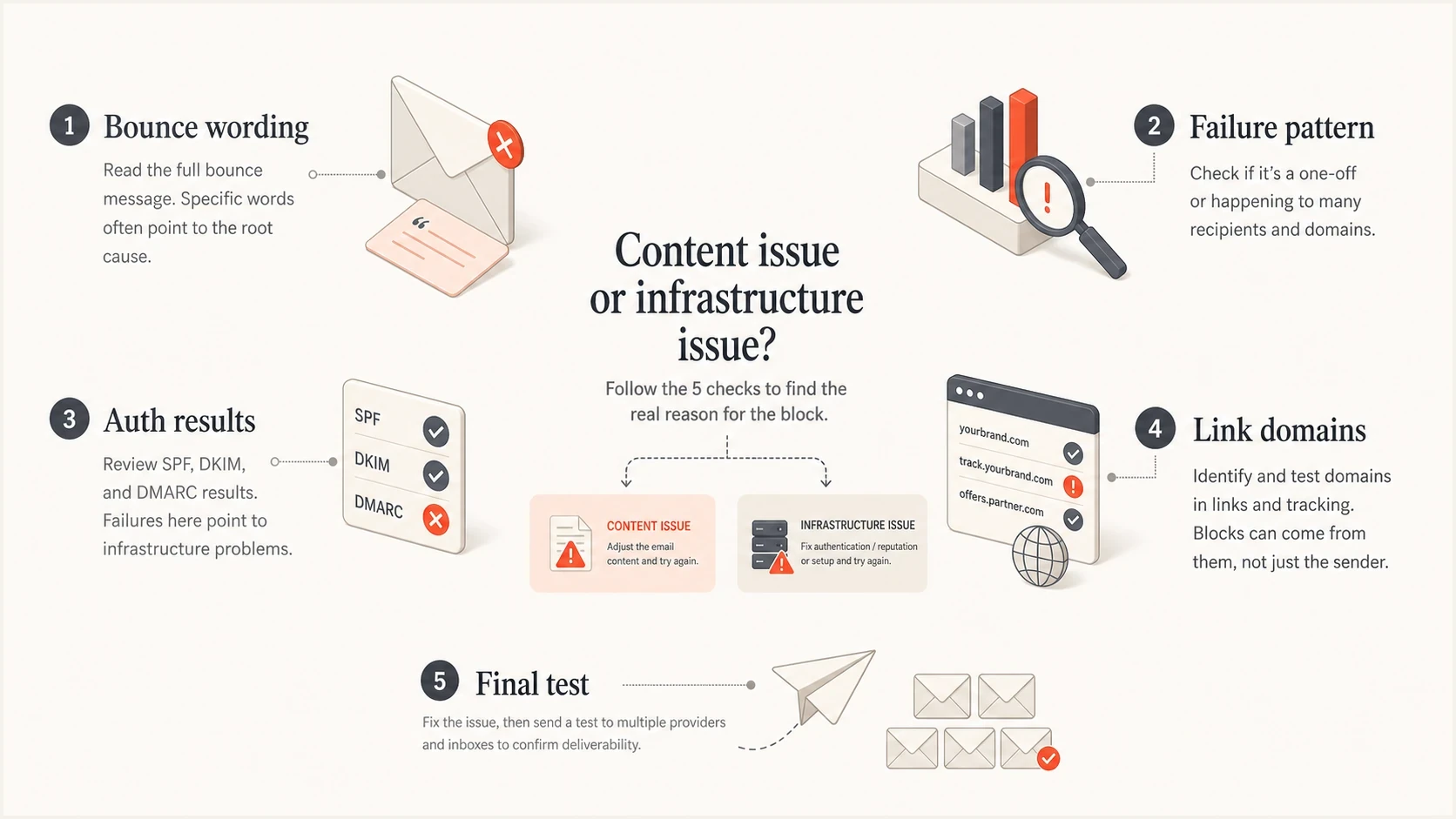
Five checks for deciding whether content or infrastructure caused an email block.
What to change in the message
Once the problem follows the message, change the smallest number of things needed to prove the cause. Large rewrites make the result hard to interpret. Controlled edits remove one suspect at a time.
- Replace risky links: Use a branded tracking domain and remove unnecessary redirects.
- Clean the HTML: Remove hidden text, broken tags, large image-only sections, and unused template code.
- State the request plainly: Rewrite account, billing, password, and deadline language so the requested action is clear without manufactured urgency.
- Remove attachments: Host documents on a trusted page when the attachment is not essential.
- Match identities: Keep the visible From domain, return path, DKIM domain, and link branding consistent.
A small isolation plantext
Test 1: Plain text, no links
Test 2: Add the subject line
Test 3: Add the main landing page link
Test 4: Add tracking links
Test 5: Add images
Test 6: Add the attachment or hosted file link
If test 3 fails, inspect the landing page domain, redirects, TLS, page content, and reputation. If test 4 fails, inspect the tracking domain and redirect chain. If test 6 fails, inspect file type, hosting domain, and whether the link forces authentication or downloads a file automatically.
How Suped fits into the workflow
Suped cannot rewrite a receiver's acceptable use policy, and no DMARC platform can force a provider to accept a message it dislikes. Suped's role in this workflow is narrower: confirm authentication, identify legitimate sending sources, monitor blocklist or blacklist events, and surface configuration issues before content testing begins.
Manual triage
- Data spread: Bounces, DNS records, authentication reports, and listings live in separate places.
- Slow comparison: Teams manually compare records, senders, and message samples.
- Limited history: It is hard to know whether a rejection is new or part of a pattern.
Suped workflow
- Unified evidence: DMARC results, authentication checks, blocklist monitoring, and deliverability insights sit together.
- Configuration issues: Suped flags authentication and DNS problems with steps to fix them.
- Operational alerts: Alerts help teams react when authentication failures rise or listing status changes.
For MSPs and teams managing many domains, Suped's multi-tenant dashboard groups authentication results, sending sources, and domain issues so the same AUP-versus-content investigation can be repeated consistently across clients.

Issue steps to fix dialog showing the issue overview, tailored fix steps, and verification action
When to contact the receiver or provider
Contact the receiver or sending provider after you have evidence. A vague ticket that says mail is blocked rarely gets useful action. A ticket with the SMTP response, message ID, timestamp, sending IP, authenticated domain, recipient domain, and a short summary of your isolation tests has a better chance.
What to include in the ticket
- Exact response: Paste the full bounce or SMTP transcript without editing the diagnostic text.
- Message identifiers: Include message ID, sending IP, timestamp with timezone, and recipient domain.
- Authentication proof: State whether SPF, DKIM, and DMARC passed for the visible From domain.
- Isolation result: Explain which content element appears to trigger the rejection.
Some postmaster paths are slow or unhelpful. That does not change the triage process. If the provider will not clarify the exact policy rule, reduce risk inside the message and keep the sending infrastructure clean enough that there is no secondary reason to reject it.
Views from the trenches
Best practices
Compare the failed template against a plain-text control before changing several items at once.
Review every advertised domain in the message source, including tracking and image hosts.
Save SMTP evidence with timestamps so a provider can trace the exact rejection event.
Common pitfalls
Assuming every policy error is an IP block wastes time when one URL caused the failure.
Submitting vague postmaster tickets without headers or tests often leads to generic replies.
Fixing copy while DMARC, SPF, or DKIM is failing leaves a second rejection path open.
Expert tips
Treat intermittent AUP wording as a message-level signal until the failure pattern widens.
Test the landing page and redirect chain separately because link reputation can drive blocks.
Keep authentication monitoring active so content testing starts from a clean baseline.
Marketer from Email Geeks says AUP wording usually points toward acceptable use policy enforcement, so content should be investigated early.
2019-01-28 - Email Geeks
Marketer from Email Geeks says a history of mostly successful sending with occasional failures makes a message-specific block more likely.
2019-01-28 - Email Geeks




