What does the email error '552 5.2.0 sender rejected AUP#POL' mean and how to resolve it?

Published 7 May 2025
Updated 29 Jul 2026
12 min read
Summarize with
Updated on 29 Jul 2026: We clarified how to isolate sender, message, account, and receiver causes behind 552 5.2.0 AUP#POL rejections.
The error 552 5.2.0 sender rejected AUP#POL means the server that issued the response rejected the sending source under an acceptable use or policy rule. It is not proof that the recipient mailbox is invalid, full, or disabled.
In Cox and related ISP cases, common causes include reputation or infrastructure trust around the sending IP, reverse DNS, sender domain, or a filtering provider behind the ISP. Provider-specific policy responses can also cover message content, prohibited attachments, account restrictions, or a destination-side configuration problem. A clean SPF, DKIM, and DMARC setup helps, but it does not override a receiving network's other policy checks.
- Direct answer: Treat it as a provider-specific policy block. Identify which server issued it, then investigate the sending path, message, authentication results, and receiver pattern.
- Bounce handling: Do not immediately suppress the recipient as invalid. Pause the affected route and re-test only after the suspected sender or message issue changes.
- Fastest fix path: Collect the SMTP transcript, rejecting host, reply stage, sending IPs, HELO/EHLO name, PTR hostname, envelope sender, visible From domain, and timestamps, then run a controlled plain-text test.
What AUP#POL means
AUP normally means acceptable use policy. POL is best read as policy. Put together, AUP#POL is a provider-specific rejection label, not a public standards-based SMTP diagnostic. The phrase sender rejected points at the sending identity or route, but the exact policy behind the label depends on the server that issued it.
The code combination is confusing. The leading 5 marks a permanent failure for that attempt. In the enhanced status-code standard, 5.2.0 means other or undefined mailbox status, while SMTP 552 has historically been used for too much mail data. Neither meaning fits this custom policy text cleanly, so read the rejecting server, SMTP stage, and diagnostic sentence together. Do not treat it as a mailbox storage problem without matching evidence.
Do not classify this as a normal hard bounce against the recipient address on the first event, and do not repeatedly retry the same message unchanged. A 5xx response is permanent for the current attempt, while the recipient address can still exist and accept mail from other senders.
|
|
|
|---|---|---|
552 | Permanent SMTP failure used in a provider-specific way | Read the full response |
5.2.0 | Other or undefined mailbox status in the standard | Do not assume mailbox full |
sender rejected | Sender identity or route was refused | Check IP, domain, and account |
AUP#POL | Provider policy label | Isolate the policy trigger |
How to read the bounce parts
Why it happens after a platform migration
A platform migration changes more than the application that sends the campaign. It changes IPs, hostnames, HELO names, PTR records, DKIM selectors, envelope sender handling, bounce domains, and sometimes the visible sending domain. To a receiver, Platform A and Platform B are different senders even when the brand, content, and list are the same.
This matters because a receiver can reject the new sender before recipient-level logic matters. Compare the old and new sending paths side by side, especially if only Cox, CenturyLink, Embarqmail, Mediacom, Q.com, Shentel, SRT, or similar ISP domains are rejecting.
Old platform
- Known path: The receiver has history for the sending IPs, PTR names, and domains.
- Existing reputation: Good or bad signals have already accumulated over time.
- Hidden handling: Prior suppression rules can mask recipient or ISP-specific problems.
New platform
- New identity: The receiver judges a different IP, rDNS name, and mail stream.
- Fresh risk: A brand-new PTR domain or low-trust hostname can trigger policy rejection.
- Visible spike: Warmup can still look abrupt to smaller ISP filters.
One useful clue in this pattern is the domain found in the PTR record for the sending IP. A very new or unrelated PTR domain can contribute to a policy rejection, especially when the hostname does not match the claimed sending identity. Domain age alone does not prove the cause, so confirm it with controlled tests and the rest of the sending path.
What to check first
Start by identifying which server issued the response and at which SMTP stage. Then isolate sender infrastructure, message policy, authentication, and receiver scope. If the receiving system rejects the sender at policy level, suppressing valid recipients will not address the root cause.
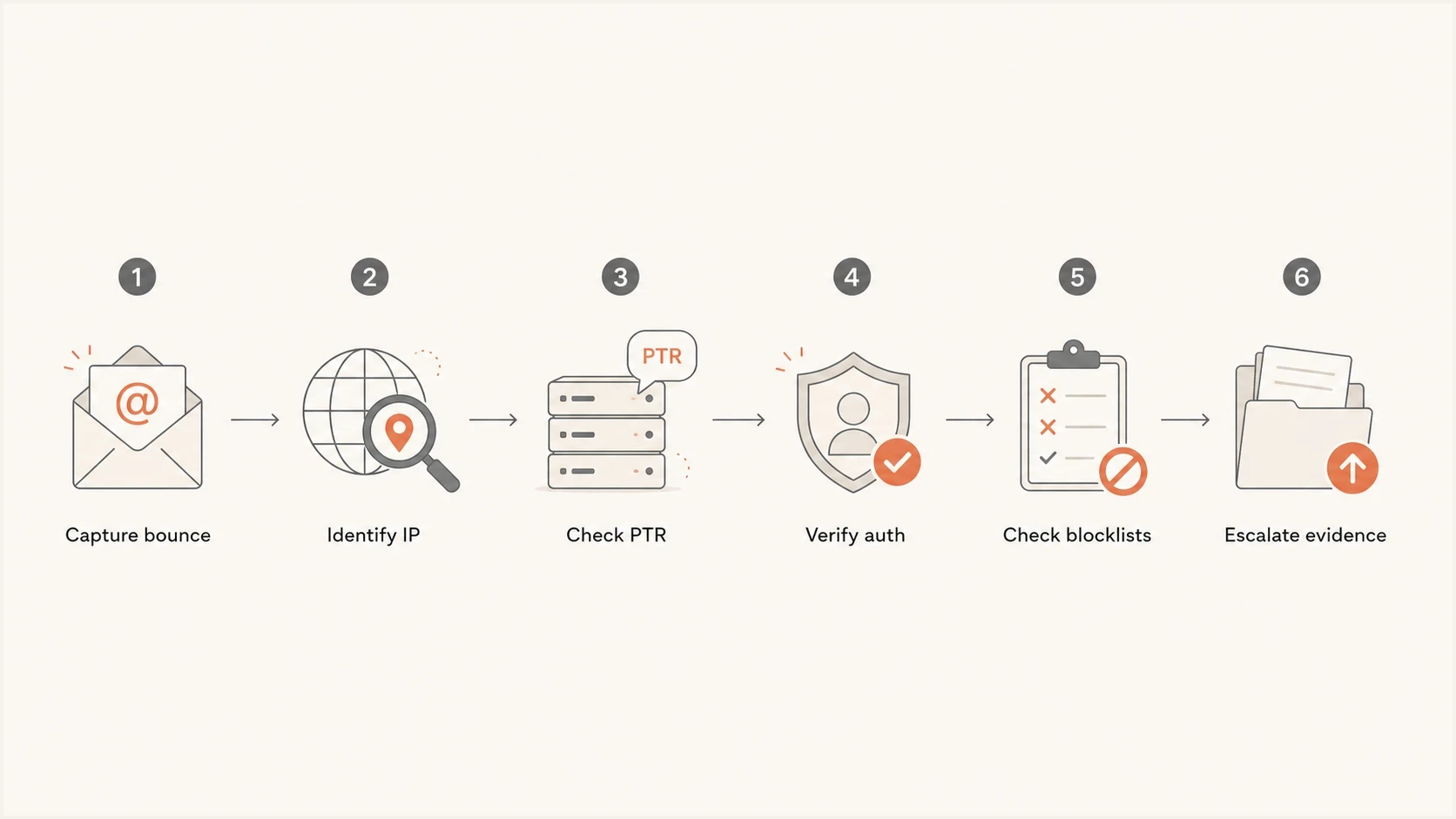
A six-step flowchart for diagnosing a 552 AUP#POL sender rejection.
- Collect evidence: Keep the full DSN, SMTP transcript, rejecting host, command stage, recipient domain, sending IP, timestamp, queue ID, envelope sender, visible From address, and sending platform.
- Check rDNS: Confirm the sending IP has a PTR record, the PTR hostname resolves forward, and the hostname does not use a brand-new or unrelated domain.
- Check the return path: Confirm the envelope sender domain resolves and has working mail routing for bounces. Remove stale routes that fail connection checks.
- Test message policy: Send a plain-text message without attachments, signatures, tracked links, or the original template. If it passes, add elements back one at a time.
- Check authentication: Verify SPF, DKIM, and DMARC results on real mail, not only DNS syntax.
- Check reputation: Look for domain or IP blocklist (blacklist) entries, sudden complaint patterns, or traffic that suggests an account or key was compromised.
?
What's your domain score?
Deep-scan SPF, DKIM & DMARC records for email deliverability and security issues.
A broad domain health check is useful here because it catches routine DNS problems that waste time, including broken mail routing, SPF syntax errors, DMARC record issues, DKIM lookup failures, and related domain hygiene problems.
How to inspect the receiving side
The recipient domain's MX records do not always tell the whole story. A domain can point to one hostname, while the SMTP banner reveals the filtering infrastructure that is handling inbound mail. Check the banner when the same rejection appears across multiple ISP domains.
MX and banner checksbash
host -t mx centurylink.net

# Then connect to the listed MX host.
telnet mx.centurylink.net 25

# Read the 220 banner. It can reveal the filtering system.
If the banner shows a third-party filtering network, the ISP front door is not the only party involved in the decision. That does not mean the sender should bypass the ISP's published support route. It means the escalation should include the exact receiving host, banner, SMTP response, sender infrastructure details, and whether rejection occurred after MAIL FROM, RCPT TO, or end of DATA.
The most useful escalation packet has facts, not theories: sending IPs, PTR hostnames, HELO/EHLO names, MAIL FROM, visible From, recipient domains, timestamps with timezone, bounce samples, controlled-test results, and a short statement of the authentication results on real messages.
Public reports show similar AUP-style policy rejections at specific providers. A Cox rejection example shows why the provider route matters, and a vtext thread shows that the same policy label can appear outside one ISP brand and after the end-of-DATA command.
How to isolate the policy trigger
The server and SMTP stage narrow the cause before any DNS change. If an authenticated outgoing SMTP server issues the response, check the sending account, credentials, rate limits, and signs of compromise. If the destination MX issues it, compare sender paths and message variants. A rejection after end of DATA means the receiver had the full message, so attachments, URLs, content, authentication headers, and reputation all remain relevant.
|
|
|
|---|---|---|
Your outgoing SMTP server rejects before delivery | Account or submission policy | Verify SMTP authentication, account status, volume, and compromise signals |
Plain text passes but the original message fails | Message or attachment policy | Add back the attachment, URLs, signature, and template elements one at a time |
One sending path fails at the same recipient domain | IP, PTR, domain, or platform reputation | Compare the failing path with an accepted path and fix the differing identity |
Several unrelated senders fail at one ISP | Receiver filter change or incident | Pause unchanged retries, preserve samples, and use the provider's support route |
Controlled tests for AUP#POL
Do not change several variables at once. A new IP, new PTR, altered authentication, and edited content in one test can restore delivery without revealing the policy trigger, which makes the next incident harder to diagnose.
How to resolve it
Resolution depends on whether the policy applies to the account, sending path, message, or receiving system. Fix the isolated cause, then ask the receiving side to re-evaluate if a provider-level block remains. Use this order.
Rejection pattern bands
Use the scope of failures to choose the first investigation.
Message-specific
One message
Plain text passes but the original message fails. Inspect attachments, URLs, size, and template elements.
Provider-specific
One ISP group
The same stream passes elsewhere but fails at one ISP group. Inspect receiver policy and sender reputation there.
Sender-wide
Multiple providers
Multiple receiving networks reject the same path. Inspect account status, authentication, infrastructure, and compromise.
- Remove message triggers: Replace prohibited attachment types, reduce oversized files, and remove the specific URL or template element identified by controlled testing.
- Fix PTR trust: Use a stable reverse DNS hostname on a domain that matches the sending service and resolves forward to the sending IP where possible.
- Repair sender DNS: Fix broken return-path routing, publish valid SPF, keep DKIM selectors live, and make DMARC pass on real messages.
- Secure the account: Reset exposed credentials or keys, stop unexpected traffic, and confirm the authenticated sender is permitted to use the envelope and visible From addresses.
- Slow the affected stream: Pause or reduce volume to the affected ISP group while a sender-side issue is active. Continuing unchanged at full rate can reinforce the policy decision.
- Escalate cleanly: Contact the receiving ISP or filtering provider with full evidence, including controlled-test results, and avoid vague appeals that only say the mail is legitimate.
Authentication baselinedns
_dmarc.example.com.  TXT  "v=DMARC1; p=none; rua=mailto:dmarc@example.com"
example.com.         TXT  "v=spf1 include:send.example.net -all"
selector._domainkey.example.com. TXT "v=DKIM1; k=rsa; p=..."
The DNS records above are only a baseline. For this error, confirm that the live message path passes authentication and that the sending identity, PTR hostname, account behavior, and message comply with the receiving policy.
Where blocklists and authentication fit
AUP#POL is not the same thing as a named blocklist listing, but blocklist and blacklist signals can contribute to a policy decision. Check both the sending IP and the domains in the message path, including the visible From domain, return-path domain, DKIM d= domain, tracking domain, and PTR domain.
Blocklist checker
Check your domain or IP against 144 blocklists.







Suped's DMARC and email authentication platform supports this workflow by bringing DMARC, SPF, DKIM, blocklist monitoring, and deliverability signals into one place. That is useful when a sender rejection sits between authentication and reputation, because teams can compare DNS results with blocklist alerts and sending-source changes.

Blocklist monitoring page showing domain and IP checks across blocklists with importance and status
A manual blocklist check is useful during triage. For production sending, automated alerts catch failures that appear after a migration, DNS change, or new IP assignment instead of waiting for a planned audit.
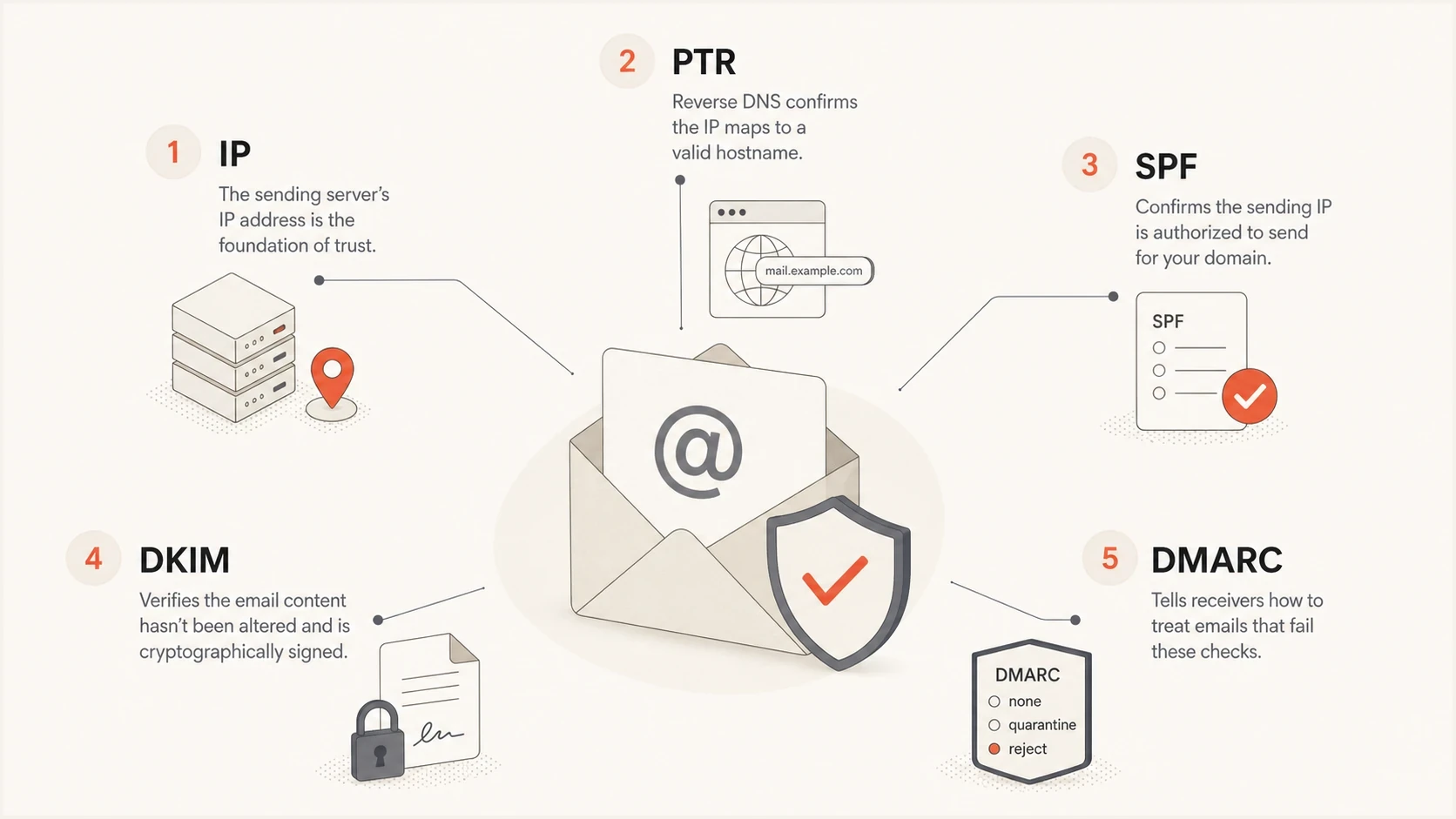
An infographic showing the sender checks behind an AUP#POL rejection.
How to decide whether to suppress the recipient
This error should not automatically remove the recipient from your list. The rejection names the sender, not the recipient. If the same recipient accepted mail from the old platform and other mailbox providers accept mail from the new platform, the first action is sender or message remediation.
Suppress the recipient when
- Mailbox signal: The bounce says the mailbox does not exist or the user is unknown.
- Repeat failure: The same address fails after sender remediation and re-testing.
- No engagement: The recipient is old, inactive, and not worth risking recovery sends.
Pause or retry later when
- Sender signal: The bounce says sender rejected, policy, AUP, reputation, or blocked.
- ISP pattern: The failures cluster at one receiving network or filtering provider.
- Migration timing: The issue began when the sending platform, IP, or DNS changed.
If your ESP forces this into a hard-bounce bucket, export the raw bounce reason and create a separate operational category such as sender-policy rejection. That keeps list hygiene intact while giving deliverability work the right data.
For broader SMTP context, compare this with a general SMTP 552 error and with other 550 and 554 errors. The classification should follow the diagnostic text, rejecting server, and enhanced code rather than the first three digits alone.
Views from the trenches
Best practices
Keep complete bounce evidence with IPs, timestamps, sender domains, and SMTP response text.
Check the receiving MX banner because it can identify the filtering system behind the ISP.
Separate sender-policy bounces from invalid-recipient bounces before suppressing contacts.
Common pitfalls
Treating every 552 as a recipient hard bounce can remove valid subscribers incorrectly.
Checking SPF, DKIM, and DMARC only in DNS misses failures in the real message path.
Ignoring PTR domain age can miss a policy trigger that authentication checks do not catch.
Expert tips
Compare old and new platform infrastructure before assuming the mailbox provider changed.
Use a stable PTR hostname and avoid fresh reverse-DNS domains for production mail streams.
Escalate with concise evidence so receiving networks can reproduce the exact rejection.
Marketer from Email Geeks says sender rejected should be treated as a sender-specific rejection, since two platforms can look like different senders to the same ISP.
2023-09-27 - Email Geeks
Marketer from Email Geeks says a permanent SMTP response can still describe the current sender condition rather than proving the recipient address is bad.
2023-09-27 - Email Geeks
What to do next
The email error 552 5.2.0 sender rejected AUP#POL means the issuing server rejected the message under a provider policy. Do not delete the recipient by default. Identify the rejecting server and SMTP stage, then test whether the trigger is the account, sending path, message, or receiving system.
Start with a plain-text test and the sending IP's PTR hostname, then verify return-path routing, SPF, DKIM, DMARC, blocklist or blacklist status, and the receiving-side MX banner. If the issue remains, escalate with complete evidence. Suped's platform handles the ongoing part of this workflow through authentication monitoring, hosted SPF and DMARC, blocklist monitoring, and sender health alerts, which helps teams spot policy failures after migrations or DNS changes.




