What causes Proofpoint to block or defer emails sent to iCloud addresses and how can I resolve it?

Updated on 2 Aug 2026: We updated this guide for RFC 9989 and iCloud's current forwarding and escalation guidance.
Proofpoint blocks or defers email to iCloud, me.com, and mac.com addresses when its filtering sees risk in the sending IP, sending domain, message stream, or traffic pattern. The fastest way to resolve it is to separate hard blocks from temporary deferrals, then fix the signal that Proofpoint is reacting to.
If the response includes 421 4.7.0 Deferred, treat it as throttling, not a permanent bounce. If the visible delivery report later shows 554 5.4.7 [internal], the sending system usually retried until its own queue timed out. That final 554 can look like a Proofpoint block, but the key event was the earlier 421 deferral.
In practice, pause broad marketing sends to Apple mailbox domains, keep essential transactional mail flowing at a controlled rate, check authentication, review recipient demand, and ask the ESP to reduce concurrency. Suped's product connects DMARC, SPF, DKIM, blocklist monitoring, and delivery signals so the technical checks can be reviewed in one workflow.
Why Proofpoint defers or blocks iCloud mail
An Apple MX response that contains a Proofpoint DNSBL URL shows that Proofpoint reputation data influenced that SMTP decision. It does not prove that every Apple delivery path uses the same filter or that the sending IP appears on a public blacklist or blocklist. Proofpoint can slow the SMTP transaction, defer delivery, or reject the message depending on the signal and policy outcome.
A deferral means Proofpoint is asking the sender to try again later. A block means Proofpoint has reached a stronger negative decision. Those two cases need different responses. Re-warming a dedicated IP without changing audience selection, cadence, complaints, bounce handling, or authentication usually does not solve a 421 pattern. It only repeats the same traffic at a slower starting point.
Read the SMTP code before changing strategy
A 4xx response asks for retry. A 5xx response says the message failed permanently. When both appear in one report, the earlier transfer failure often tells you more than the final generated bounce.
- 4xx: Temporary deferral, usually controlled by retries and throttling.
- 5xx: Permanent failure, usually requires reputation, policy, or list remediation.
- Internal: A sending server or ESP queue can give up after repeated temporary failures.
Typical deferral patterntext
554 5.4.7 [internal] message timeout
(exceeded max time, last transfail:
421 4.7.0 Deferred - see Proofpoint DNSBL lookup)
That example says the sender did not get a clean delivery window before the retry period ended. Do not treat it as proof of a permanent blacklist or blocklist entry by itself. Treat it as a sign that Proofpoint is slowing the mail stream and that the sender needs to reduce risk signals before pushing volume back up.
What Proofpoint is likely reacting to
Proofpoint does not need one single bad event to defer a sender. It can react to a blend of IP reputation, domain reputation, connection behavior, message similarity, user feedback, complaint risk, and historical traffic quality. That is why some senders see no obvious listing in a lookup page but still get heavy deferrals.
|
|
|
|---|---|---|
421 | Temporary throttling or evaluation | Slow Apple-domain traffic |
554 | Permanent failure or queue timeout | Read the full bounce |
IP | Reputation or listing concern | Check blacklist and blocklist status |
Domain | Authentication or reputation concern | Validate DMARC |
Volume | Too much mail too quickly | Reduce concurrency |
Common Proofpoint and iCloud delivery signals
The most useful split is between technical legitimacy and recipient demand. Technical legitimacy means SPF, DKIM, DMARC, rDNS, HELO, and TLS are set up correctly. Recipient demand starts with explicit subscription and is supported by clicks, replies, purchases, logins, unsubscribes, and direct complaints. iCloud does not offer a bulk-sender feedback loop, and Apple Mail Privacy Protection makes raw opens unreliable.
When a sender has strong authentication but weak Apple-domain engagement, the fix is not another DNS change. It is a traffic quality change. Send less mail to inactive Apple recipients, segment recent clickers and customers, reduce repeated campaign pressure, and do not retry the same audience at full speed.
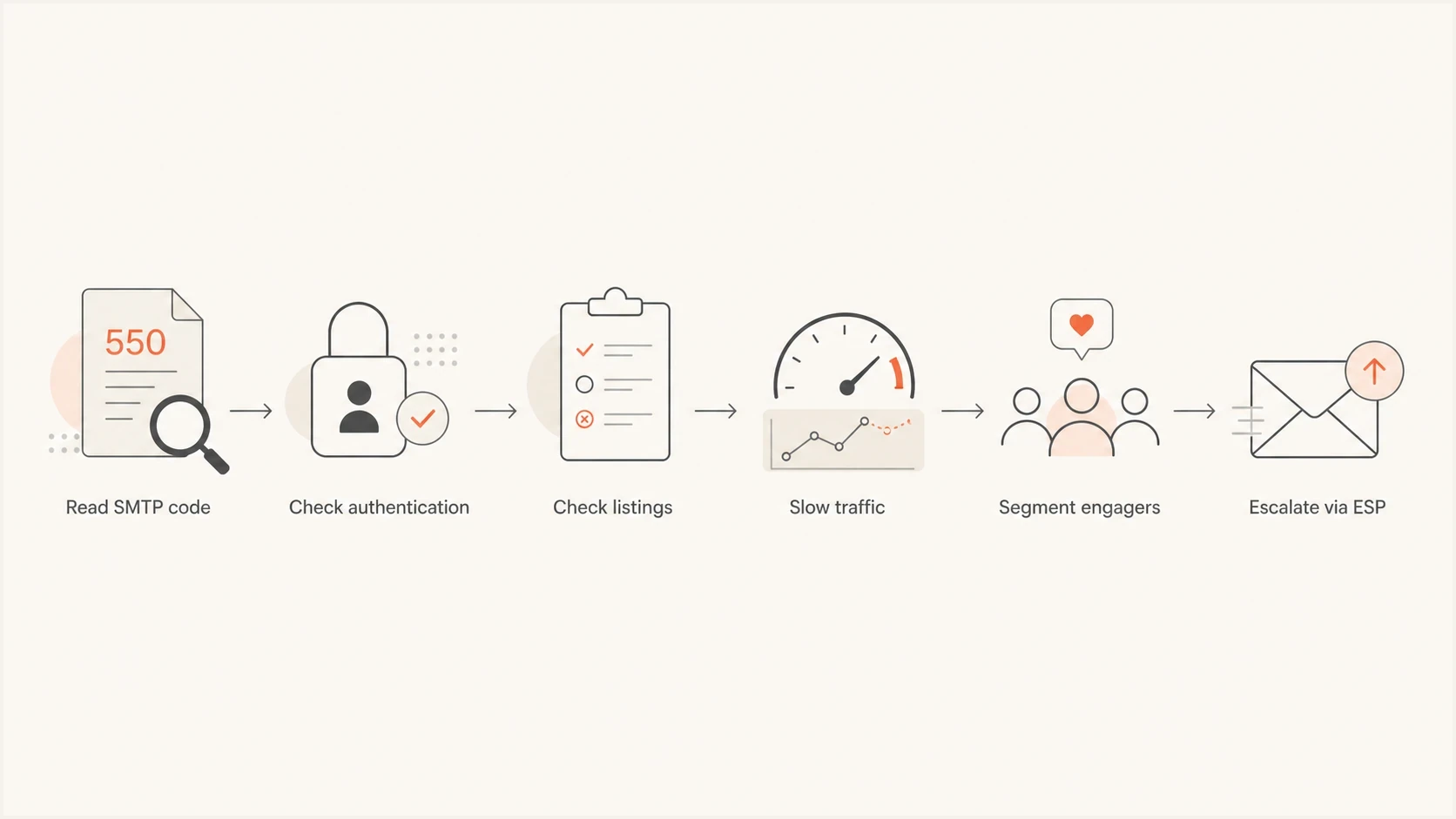
Flowchart for troubleshooting Proofpoint deferrals to iCloud.
Forwarded mail and shared relay IPs
Forwarding changes the diagnosis. When a routing service accepts a message and sends it onward to iCloud, the connecting IP belongs to that relay. A 554 response with a Proofpoint DNSBL URL that names the relay IP points first to the relay's shared reputation or routing, not automatically to the original author's domain.
- Match the IP: Compare the address in the SMTP response with the forwarding provider's actual outbound IP.
- Escalate to the owner: The relay operator controls shared pool cleanup, route changes, and any review of its IP.
- Preserve authentication: SPF often breaks after forwarding unless the envelope sender is rewritten. DKIM can survive an unchanged message, and Apple requires ARC headers on forwarded mail.
- Contain carefully: An alternate forwarding destination can restore urgent access, but it does not repair the affected relay IP or route.
Changing DMARC on the original domain will not clear a reputation block against a relay IP. Suped's DMARC reporting can show whether forwarded sources still pass and match the visible From domain, while the relay operator handles the connecting IP's blacklist or blocklist status.
How to resolve the deferrals
Start with evidence. Pull the full SMTP transcript or bounce detail for several failed messages, rather than only the friendly ESP status. Collect the first Proofpoint response, retry history, final queue timeout, sending IP, envelope sender, DKIM selector, and campaign or mail stream.
- Classify: Split failures into 421 deferrals, true 5xx blocks, timeouts, and unrelated mailbox errors.
- Throttle: Ask your ESP to reduce connections, reduce messages per connection, and slow only the Apple-domain lane.
- Segment: Restart with recent Apple engagers first, then add older cohorts only after deferrals fall.
- Authenticate: Confirm SPF passes, DKIM passes, DMARC matches the visible From domain, rDNS resolves, and the HELO name is valid.
- Comply: Send only to explicit subscribers, provide immediate unsubscribe handling, and keep sending domains and From identities consistent.
- Monitor: Track Apple-domain SMTP outcomes, clicks, conversions, unsubscribes, direct complaints, and spam-trap indicators.
- Escalate: If deferrals persist after cleanup, ask the ESP to contact Proofpoint with IPs, logs, timestamps, and remediation steps.
The most important operational change is slowing the sending pattern, not simply waiting. A cold pause followed by the same blast pattern can trigger the same Proofpoint response. A controlled lane gives Proofpoint fewer negative signals per hour while the sender proves the mail stream has real demand.
What usually fails
- Pause-only: Waiting a week without changing audience quality only delays the same failure.
- Full blast: Returning every Apple recipient to the queue at once recreates the bad pattern.
- DNS-only: Fixing authentication cannot repair weak engagement by itself.
What usually works
- Lane control: Limit Apple-domain throughput separately rather than slowing every recipient domain.
- Engager-first: Send first to people with recent clicks, purchases, replies, or logins.
- Evidence pack: Give the ESP IPs, timestamps, SMTP responses, domains, and cleanup actions.
For a dedicated IP, assume the sender owns the pattern until proven otherwise. For a shared IP, the issue can come from another sender on the same pool, so the ESP has to investigate the pool reputation and routing choices.
What to check in DNS and authentication
Authentication is not the whole story, but it is the baseline. If SPF or DKIM fails, or DMARC does not match the visible From domain, Proofpoint and iCloud have less reason to trust the mail. Validate the sending domain before asking anyone to review reputation.
?
What's your domain score?
Deep-scan SPF, DKIM & DMARC records for email deliverability and security issues.
Use a domain-level check to confirm DMARC, SPF, and DKIM before changing volume again. Suped's domain health checker supports that initial triage, and Suped's paid platform keeps monitoring the same signals.
Conservative DMARC starting pointdns
_dmarc.example.com TXT "v=DMARC1; p=none; rua=mailto:dmarc@example.com"
This example omits pct because RFC 9989 made the tag historic. A p=none policy remains useful for collecting reports while legitimate sources are identified.
For a sender already under delivery pressure, do not jump straight to a stricter DMARC policy unless reports show all legitimate mail matches the right domain. Suped can show which sources pass, which fail, and which authenticated sources remain unverified. That matters when marketing, product, billing, and support mail use different platforms.

Issue steps to fix dialog showing the issue overview, tailored fix steps, and verification action
The DNS checks that affect receiver trust are specific. SPF needs to include the correct sending service and stay under lookup limits. DKIM needs a valid public key for the selector used in the message. DMARC needs the authenticated domain to match the visible From domain. Reverse DNS and HELO should match a real sending identity.
How blocklists and blacklists fit in
A Proofpoint DNSBL lookup URL in an SMTP error matters, but a clean public result does not prove that Proofpoint likes the traffic. Blocklist and blacklist data is only one input. Proofpoint can still defer based on reputation or traffic behavior that is not exposed as a simple public listing.
Blocklist checker
Check your domain or IP against 144 blocklists.







Check the IPs and domains against a blocklist checker, then treat the results as one part of the diagnosis. If an IP is listed, fix the cause before asking for removal. If it is clean, keep working through authentication, traffic rate, and audience quality.
Use blacklist data carefully
A blocklist or blacklist lookup is useful, but it does not explain every Proofpoint deferral. A clean lookup and a 421 can both be true at the same time.
- Listed: Remove spam sources, fix authentication, suppress bad recipients, then request delisting.
- Clean: Investigate throttling, engagement, complaints, and per-domain volume.
- Mixed: Compare listed IPs with actual sending IPs in the failed messages.
Suped's blocklist monitoring watches IP and domain reputation alongside authentication status. That makes it easier to see whether an Apple-domain problem coincides with a listing event, a DMARC failure, or a changed sending source.
When to escalate Proofpoint and iCloud failures
If you send through an ESP, involve them early. They control queue behavior, connection limits, retry timing, pool assignment, and sometimes the relationship path into Proofpoint. A sender can fix list quality and authentication, but the ESP often has to change throttle settings or open the reputation conversation.
Give the ESP a tight packet of evidence. Include sending IPs, sending domains, envelope sender domains, timestamps with time zone, the exact SMTP response, a sample message ID, and the cleanup actions already taken. Do not send only a screenshot of a dashboard that says deferred.
If the rejection comes from an iCloud MX and continues after remediation, contact the iCloud postmaster at icloudadmin@apple.com. Include the company name, email domain, affected sending or relay IPs, exact SMTP errors, incident start time, and completed fixes. iCloud has no bulk-sender allowlist, so provide evidence instead of asking to be allowlisted.
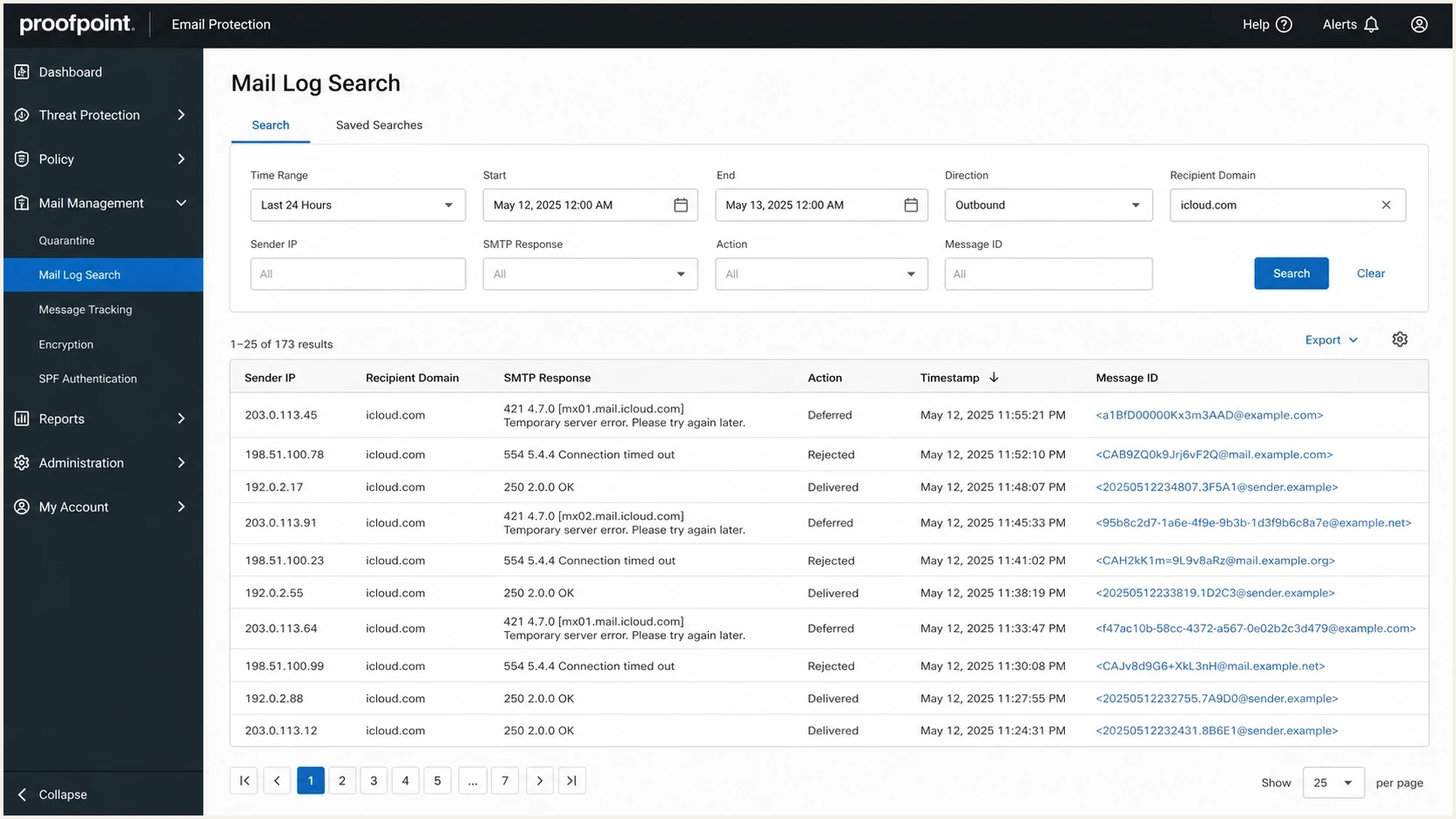
Proofpoint mail log screen showing iCloud deferrals and SMTP responses.
If the mail is important transactional traffic, separate it from bulk marketing wherever possible. Shared reputation between receipts, password resets, lifecycle campaigns, and old reactivation campaigns makes troubleshooting harder and can put critical mail at risk.
|
|
|
|---|---|---|
Concurrency | ESP | Reduce sessions |
Audience | Sender | Suppress inactives |
DMARC | Sender | Fix domain match |
Sending IP listing | ESP | Request review |
Relay IP | Relay provider | Remediate shared pool |
Persistent Apple rejection | Sender or ESP | Contact iCloud postmaster |
Who should handle each fix
Apple-domain issues sometimes overlap with Apple Mail routing and third-party filtering behavior. For more Apple-specific troubleshooting, the related guide on iCloud blocking is useful when the error points more toward Apple than Proofpoint.
A practical recovery plan
For a sender seeing a 30% deferral or timeout rate to iCloud, use a measured recovery plan. The goal is to stop sending patterns that look unwanted, prove the authenticated mail stream is clean, and make retries routine again.
Apple-domain recovery target
A practical plan should move deferrals down before volume returns to normal.
Deferral rate
Day one is for containment. Pause nonessential Apple-domain marketing, suppress recent hard bounces and complainers, remove stale unengaged Apple recipients, and confirm that transactional mail has its own sending path. If all mail shares one dedicated IP, lower total Apple-domain throughput while the problem is active.
Days two to five are for controlled proof. Send only to the strongest Apple-domain segment, then watch SMTP outcomes by hour. Do not judge recovery by aggregate opens because Apple Mail Privacy Protection distorts them. Use clicks, replies, conversions, unsubscribes, direct complaints, and actual SMTP outcomes.
After the deferral rate drops, add volume in small steps. If deferrals rise again, the last added cohort is the first suspect. The recovery plan also tests list quality. The ESP can keep a separate Apple-domain throttle until the stream has several stable sending days.
The strongest fix is measurable
A good recovery plan changes the inputs and tracks the output. If campaign targeting, inactive recipients, authentication, and connection behavior do not change, Proofpoint has no reason to respond differently.
Suped's product supports the technical side of this workflow while the marketing team fixes audience selection. DMARC monitoring shows whether sources authenticate and match the From domain. Real-time alerts flag authentication breakage. Blocklist monitoring shows whether a blacklist or blocklist event appeared during the incident.
Views from the trenches
Best practices
Separate 421 deferrals from 554 failures before changing sending volume or DNS again.
Throttle Apple-domain traffic while sending first to recent, high-intent recipients.
Give the ESP exact SMTP logs, timestamps, IPs, domains, and remediation details.
Common pitfalls
Treating an internal timeout as a Proofpoint hard block leads to the wrong fix path.
Pausing mail without changing audience quality often brings the same issue back.
Assuming a clean lookup means reputation is clean misses behavioral filtering risk.
Expert tips
Keep transactional and marketing mail on separate streams when recovery starts properly.
Measure recovery by SMTP outcomes, complaints, clicks, and unsubscribes together.
Ask for fewer connections and less mail per connection, not only lower volume levels.
Expert from Email Geeks says a 421 response is a temporary deferral, so senders should slow the stream and focus on wanted mail.
2024-09-05 - Email Geeks
Expert from Email Geeks says the internal timeout matters because the sender's mail server gave up after repeated temporary failures.
2024-09-05 - Email Geeks
Proofpoint and iCloud troubleshooting summary
Proofpoint defers or blocks email to iCloud addresses because it sees a reputation, authentication, content, or sending-pattern risk. A 421 4.7.0 message means temporary throttling, and a later 554 internal timeout often means the sending system retried until it gave up.
Read the exact SMTP response, identify who owns the connecting IP, slow the Apple-domain lane, send first to engaged recipients, validate DMARC, SPF, DKIM, and rDNS, check blacklist and blocklist status, and involve the ESP with clean logs if the pattern continues. Suped's platform can cover the technical work through authentication monitoring, DMARC source analysis, blocklist monitoring, and change alerts.




