What are the most important email blacklists to monitor and how do you check them?

Published 19 May 2025
Updated 1 Aug 2026
11 min read
Summarize with
Updated on 1 Aug 2026: We clarified blacklist priorities and added safer DNSBL checking guidance for preventing repeat listings.
The most important email blacklists to monitor are Spamhaus Zen (SBL, CSS, XBL, and PBL), Spamhaus DBL, SURBL, URIBL Black, the Barracuda Reputation Block List, Invaluement's IP and URI lists when you have licensed access, and SpamCop for B2B routes where recipient filters still use it. Do not give every blacklist the same weight. A listing deserves an urgent alert when it affects real recipient traffic, appears in bounce logs, or points to a root cause that will damage sender reputation.
That distinction matters because blacklist and blocklist data is uneven. Some lists are direct rejection sources. Some are reputation inputs inside larger filtering systems. Some correlate with bad sending practices but do not cause much blocking by themselves. Treat the list name, listing type, recipient mix, and bounce evidence as one decision, not as separate alarms.
- Critical: Spamhaus IP and domain listings, especially SBL, CSS, XBL, Zen, and DBL.
- High: SURBL, URIBL Black, Barracuda, and current Invaluement data.
- Contextual: SpamCop, PBL, and niche blacklist signals when your logs show impact.
- Low priority: Retired hostnames, broad whole-provider listings, and lists with no visible delivery effect.
The short list to monitor
For a sender, the short list should focus on lists that either block mail directly or feed filtering decisions at receiving systems. If you need a baseline explanation before ranking them, the blocklist basics page covers the core concepts without turning every listing into an emergency.
|
|
|
|
|---|---|---|---|
Critical | Spamhaus Zen | SBL/CSS/XBL/PBL | Read return code |
Critical | Spamhaus DBL | Bad domain | Audit links |
High | SURBL | Abused URLs | Review content |
High | URIBL Black | Bad URLs | Check domains |
High | Barracuda | IP reputation | Check bounces |
Medium | Invaluement | IP and URI | Use licensed feed |
Context | SpamCop | Complaint spikes | Check audience |
A practical priority order for sender-side blacklist monitoring.
Spamhaus stays at the top because its IP and domain datasets are widely consumed and the listing category usually gives a clear starting point. SBL points to a source or support issue. CSS points to automated low-reputation email activity. XBL points to exploited systems or compromised hosts. PBL is policy data, so the question is whether the listed IP should be sending direct-to-MX mail at all. DBL shifts the investigation to domains, URLs, and brand infrastructure.
SURBL and URIBL matter because the sending IP can be clean while the message body carries a listed domain. That happens with compromised tracking domains, poor affiliate links, old shorteners, or landing pages that have been abused elsewhere. If a URI blacklist fires, check the visible links, redirect chain, tracking domain, and any shared assets used across campaigns.
How to rank a listing
A blacklist entry is not automatically a deliverability incident. Rank it by evidence. The strongest evidence is a bounce that names the blacklist or a provider pattern that starts at the same time as the listing. The weakest evidence is a dashboard showing a hit on a list that no recipient in your traffic appears to use.
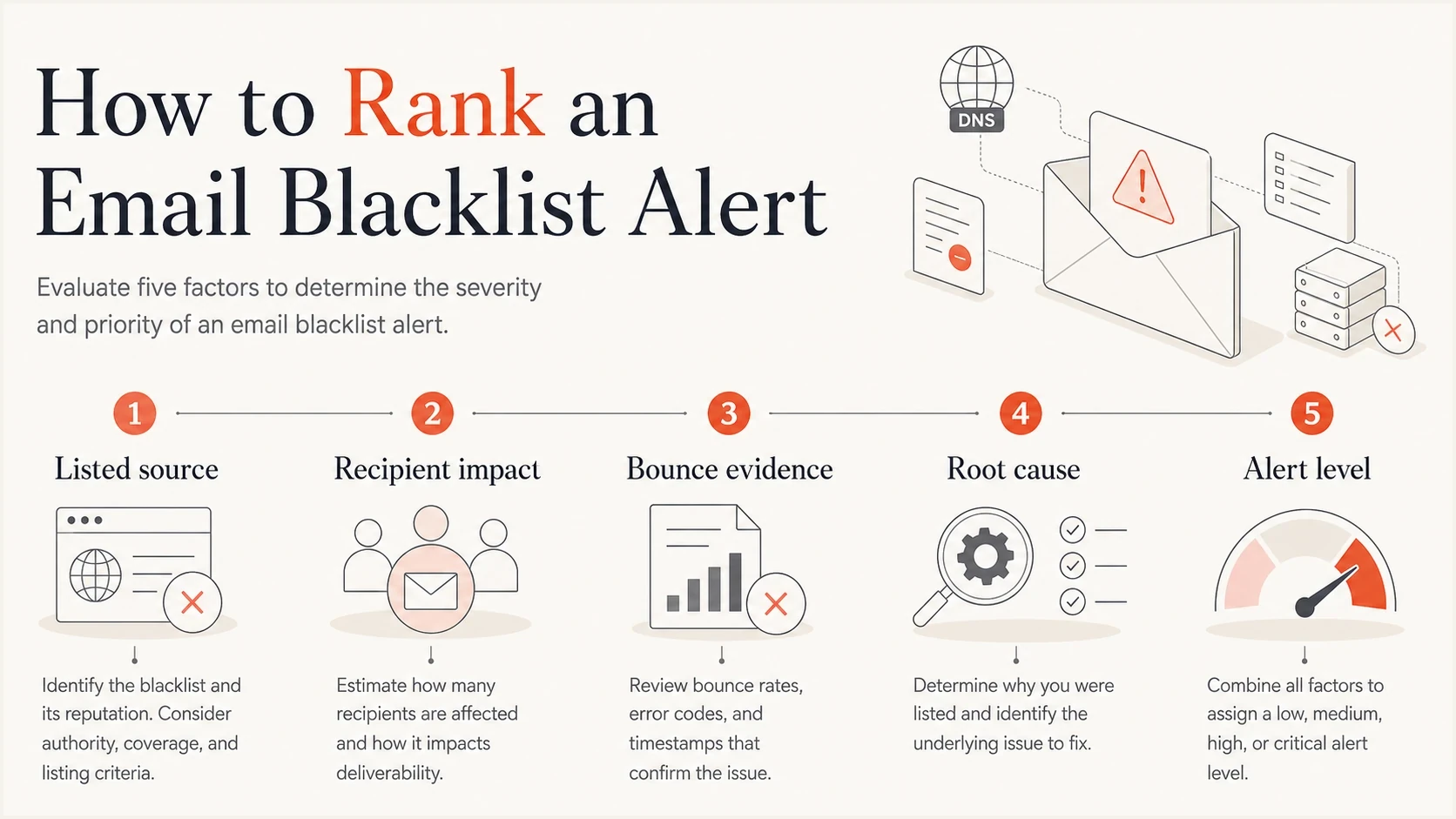
A simple model for ranking blacklist alerts by source, recipient impact, bounce evidence, root cause, and alert level.
IP blacklist
An IP blacklist usually points at the outbound server, shared pool, compromised account, infected host, or a sending behavior issue tied to that IP.
- Owner: Mail operations or the sending provider usually owns the first fix.
- Evidence: SMTP rejections and sudden provider-specific deferrals matter most.
URI blacklist
A URI blacklist usually points at a domain inside the message body, including tracking, image, redirect, and landing page domains.
- Owner: Marketing operations, web, and security teams often need to work together.
- Evidence: Body-based filtering, spam folder placement, and listed links drive priority.
Alert severity by impact
Use impact, not list count, to decide how loud the alert should be.
Critical
Block
Listed on a major list and bounces confirm blocking.
High
Risk
Major list hit with a likely recipient overlap.
Context
Watch
Known list hit with no visible rejection pattern.
Ignore
No alert
Retired, noisy, or irrelevant listing source.
How to check IP and domain listings
Start a one-off blacklist check with the operator's web lookup or an authorised DNS query. Use continuous monitoring when you need repeated checks across sending IPs and domains, stored history, and alerts based on impact. Monitoring matters because listings can appear between campaigns, during a warmup, or after a compromised source starts sending.
For an IPv4 DNS-based blacklist (DNSBL) check, reverse the octets and append the blacklist zone. Domain and URI lists use the registrable domain in the relevant zone. IPv6 DNSBL checks use a reversed nibble format, so follow the operator's documentation or use its web lookup. If the DNSBL guide is new to you, keep it open while testing so the query pattern makes sense.
DNSBL query patternsBASH
# Follow each operator's access policy and replace the documentation IP
# Reverse 192.0.2.1 for an IPv4 DNSBL query
dig +short 1.2.0.192.zen.spamhaus.org A
dig +short 1.2.0.192.b.barracudacentral.org A

# Query a domain or URI list
dig +short example.com.dbl.spamhaus.org A
dig +short example.com.multi.surbl.org A
dig +short example.com.black.uribl.com A
Decode the response before acting
NXDOMAIN normally means the item is not listed. A 127.x response is not automatically a positive result. Spamhaus uses 127.255.255.0/24 for query errors, while URIBL uses 127.0.0.1 when it refuses a query. A refused query proves neither listed nor clean status. Read the operator's current return-code documentation before creating an alert or blocking mail.
Public or shared resolvers can be refused because the blacklist operator cannot attribute or limit their traffic. Some zones require registration, an authorised resolver, or licensed access. Barracuda DNS access requires the querying source to be registered, and high-volume SURBL use requires an approved data feed. Test both a documented listed test point and an unlisted test point before trusting an automated result.
Do not assume every list has a public DNS zone that anyone can query. Invaluement is a good example: the current ivmSIP, ivmSIP/24, and ivmURI datasets require licensed access, and old public-looking hostnames can produce inaccurate results. If your provider shows Invaluement results, confirm that it uses current licensed data rather than retired names.
Blocklist checker
Check your domain or IP against 144 blocklists.







A one-off lookup answers the question "Am I listed right now?" It does not answer what changed, how long the listing existed, which mailstream caused it, or whether the listing touched real recipient volume. A useful monitoring workflow adds history, alert thresholds, related authentication checks, and a way to tie the listing to sending sources.
If the listing is domain-related, run a broader domain health checker check as well. A listed domain often sits beside SPF, DKIM, DMARC, MTA-STS, or DNS issues that make the investigation harder than it needs to be.
Lists that deserve context
SpamCop is the classic example of a blacklist that deserves context. Do not treat every SpamCop hit like a Spamhaus SBL issue, but do not ignore it for B2B senders. Some recipient security gateways and managed filtering stacks still use SpamCop data, and complaint-driven listings can point at a real list quality problem.
Do not alert on retired hostnames
Do not build alerts around old CBL hostnames as a separate modern source when Spamhaus XBL or Zen is already checked. Be careful with old Invaluement hostnames because current access uses licensed query patterns. Bad input data creates false alarms, and false alarms train teams to ignore the next real blacklist event.
Broad whole-provider listings need the same restraint. A blacklist that lists large cloud ranges or entire sending providers can still reveal risk, but it should not trigger the same response as a confirmed block at a major recipient. Look for bounce text, customer complaints, support tickets, and provider-specific rejection patterns before escalating.
- SpamCop: Watch it for B2B and complaint-sensitive traffic, then confirm impact in bounces.
- CBL: Treat old CBL hostnames as legacy noise when XBL coverage already exists.
- PBL: Investigate only if an outbound MTA is listed against its expected role.
- Niche lists: Keep them quiet unless your traffic or bounce logs prove recipient impact.
Where Suped fits
Suped's blocklist monitoring is built around this problem: alert on meaningful IP and domain blacklist events without drowning the team in low-value noise. The practical goal is to know when a listing appears, which source it affects, and what to fix next.

Blocklist monitoring page showing domain and IP checks across blocklists with importance and status
Suped's product brings blocklist checks, DMARC reporting, SPF and DKIM visibility, hosted SPF, SPF flattening, hosted DMARC, hosted MTA-STS, real-time alerts, and deliverability insights into one workflow. During a blacklist incident, that workflow helps connect a bad source, an authentication gap, a risky domain, or a sending practice issue to the affected asset.
The useful part after detection is the next step: which DNS record needs work, which sending source is unverified, whether SPF is close to its lookup limit, and whether a domain or IP reputation signal changed at the same time. MSPs and agencies also need multi-tenant reporting so one noisy client does not hide a critical listing for another. The free plan gives smaller senders monitoring before they need a larger operational setup.
What to do after a listing
The fastest way to recover is to prove the cause before asking for removal. Delisting without a fix leads to relisting, and repeated relisting is worse than the first incident. Start with the listed asset, the listing type, the sending source, and the recipient evidence.
- Identify: Confirm whether the listing is for an IP, domain, URL, or policy category.
- Correlate: Compare the listing time with campaign sends, bounces, complaints, and source changes.
- Fix: Stop the bad traffic, remove risky links, close compromised accounts, or correct routing.
- Authenticate: Recheck SPF, DKIM, DMARC, rDNS, TLS policy, and sending-source authorization.
- Request: Ask for removal only after the operational cause is fixed and evidence is ready.
After the fix, send a controlled test message through an email tester and inspect the headers, authentication results, and content signals. For a broader reputation view, keep a domain reputation guide nearby so the team does not treat the blacklist as the only symptom.
Simple incident notesTEXT
Asset listed: sending IP, domain, or URL
List name: source and listing category
First seen: date and time
Evidence: bounce text, logs, or monitoring alert
Cause: compromised account, content, data, or routing
Fix: action completed before delisting
Follow-up: monitor for relisting and volume changes
How to prevent repeat listings
Prevention starts with an inventory of every sending IPv4 and IPv6 address plus every domain used in headers, links, tracking, images, and redirects. Add new assets to monitoring before warmup, then watch them after DNS changes, routing changes, or credential incidents.
- Consent and list hygiene: Use confirmed opt-in where appropriate, suppress hard bounces and complaints promptly, and never send to purchased lists.
- Account and server security: Require MFA, rotate exposed credentials, close open relays, patch hosts, and rate-limit accounts.
- Stable sending: Warm new IPs, investigate unexplained volume spikes, and separate mailstreams when their risk differs.
- Authentication and DNS: Keep SPF, DKIM, and DMARC accurate, with matching PTR and HELO identity for sending hosts.
- Link and domain control: Use domains you control, audit redirects and affiliate links, and isolate compromised tracking assets.
Authentication does not prevent a blacklist or blocklist entry by itself. It limits unauthorized use, makes legitimate sources easier to identify, and gives investigators better evidence when a listing appears. Complaint controls, consent, secure infrastructure, and clean URLs still decide most preventable cases.
Views from the trenches
Best practices
Rank listings by bounce evidence, provider reach, and whether the list affects your mailstream.
Monitor IP lists and URI lists separately because fixes and owners differ inside the team.
Keep alerting tight so low-impact blacklists do not bury genuine Spamhaus or URI issues.
Common pitfalls
Treating every blacklist as urgent creates alert fatigue and hides the listings that block mail.
Querying retired hostnames can produce false results that send the investigation the wrong way.
Ignoring bounce logs leaves you guessing which blacklist affected recipient delivery.
Expert tips
Use a short critical list first, then add more blacklists only when traffic proves impact.
For SpamCop, weigh your audience; B2B routes with matching bounces justify closer attention.
For Invaluement, rely on licensed access or reputable feeds, not retired public hostnames.
Marketer from Email Geeks says Spamhaus and SURBL stay near the top of the concern list because they can affect filtering decisions quickly.
2024-05-02 - Email Geeks
Marketer from Email Geeks says SpamCop still matters for some B2B senders, especially when recipients use security gateways that consume its data.
2024-05-02 - Email Geeks
The practical answer
The most important email blacklists to monitor are the ones that affect your recipient mix and point to a fixable cause. In practice, that means Spamhaus Zen and DBL first, URI lists like SURBL and URIBL close behind, Barracuda and current Invaluement data where relevant, and SpamCop when your B2B route makes it meaningful.
The checking workflow should be simple: monitor the important lists, confirm the listing with an authorised query or feed, decode the response, correlate it with bounces and traffic, fix the cause, then request removal. A smaller, accurate alert set beats a giant blacklist panel that treats every hit like a crisis.




