What are the best and most trustworthy URL RBLs?

Updated on 19 Aug 2026: We added current guidance on URL RBL access limits, return codes, and false listing results.
The most trustworthy URL RBLs for email filtering are Spamhaus DBL, SURBL, and URIBL. They belong in the top tier because they have established listing processes and produce useful signals when a domain or URL appears in a message body.
The next tier is Invaluement and Abusix. Invaluement's ivmURI provides another curated view of domains found in spam. Abusix adds domain and short-link signals, but its keyed zones and return codes require correct implementation. PhishTank is useful threat intelligence, but community voting and removal timing make it less predictable for primary blocking decisions.
- Best overall: Spamhaus DBL, SURBL, and URIBL should be the first URL RBLs to check.
- Best complements: Invaluement and Abusix add useful signals when their access and response rules are implemented correctly.
- Best caution: PhishTank helps with research, but it should not decide blocking by itself.
What a URL RBL is checking
A URL RBL, often called a URIBL or URI DNSBL, checks domains or URLs found inside the message body. That is different from an IP blacklist or blocklist that checks the sending IP. A message can come from a clean sending IP and still contain a listed domain, tracking host, redirect, or landing page.
That difference matters for deliverability. URL RBLs can affect marketing mail, newsletters, onboarding messages, password resets, and support replies because many legitimate emails contain links. If a shared tracking domain, shortened link, redirect host, or compromised landing page gets listed, good mail can look risky even when SPF, DKIM, and DMARC pass.
URL reputation data also appears outside a simple inbound mail gateway. Some organizations use the same kind of domain and URL intelligence in DNS firewalls, RPZ-style feeds, browser protection, web gateways, and post-delivery click checks. A URL blacklist or blocklist issue can therefore hurt the click path even when the message itself is accepted.
Short answer
For a serious email program, monitor Spamhaus DBL, SURBL, URIBL, Invaluement, and Abusix. Treat PhishTank as extra intelligence, not as the core trust source.
If you need a deeper primer on how these lists work, the practical starting point is RBL basics. For a broader glossary of blacklist and blocklist types, keep the distinction simple: URL RBLs inspect links, IP blocklists inspect senders, and domain blocklists can overlap with both depending on the list.
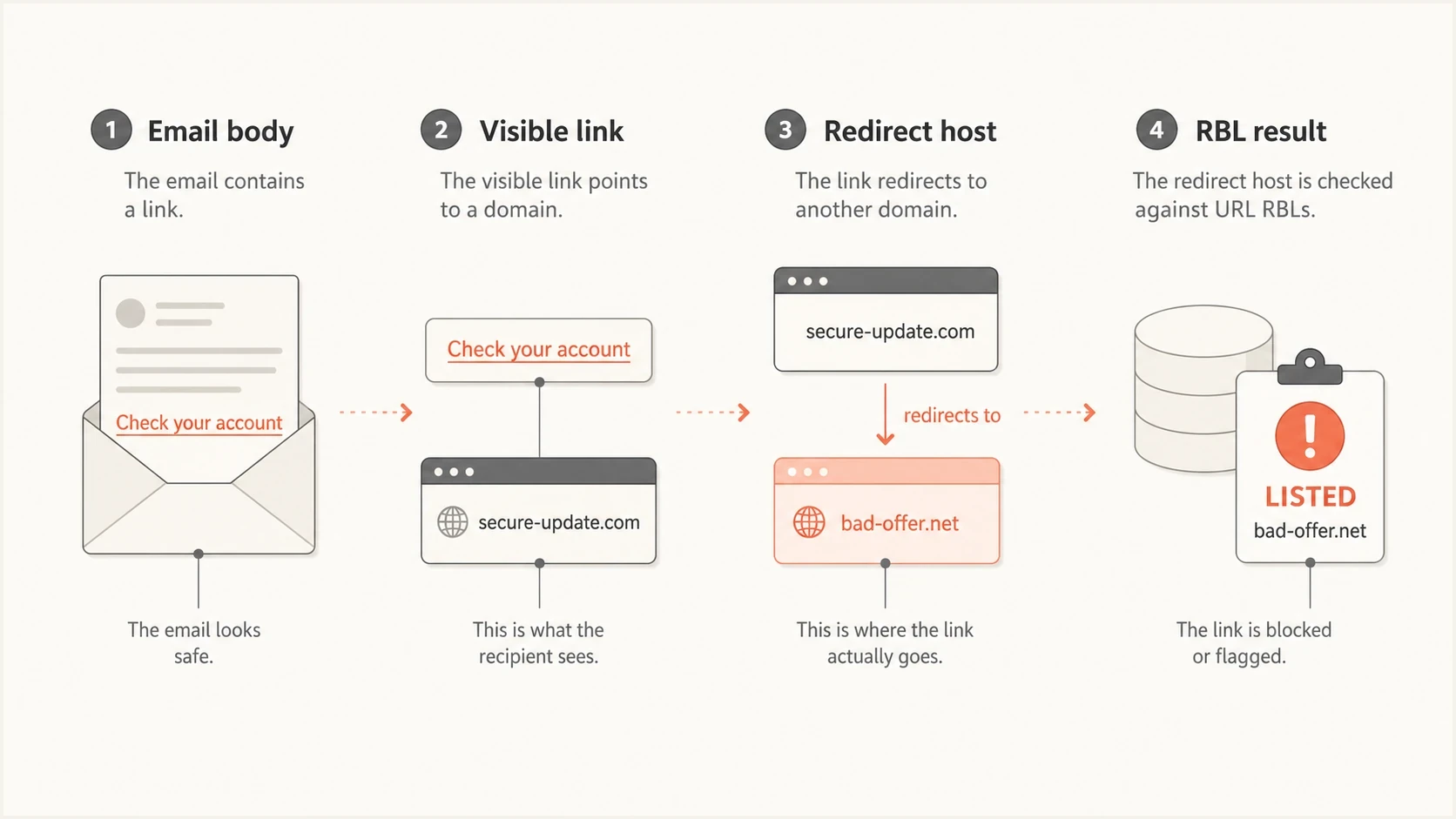
Infographic showing how a URL RBL checks email body links, redirect hosts, and RBL results.
The URL RBLs to prioritize
Do not rank URL RBLs by raw number of hits. A list that catches everything but creates noisy false positives is hard to operationalize. A list that catches less, but does so with high accuracy and a clear listing model, is usually more useful for deliverability work.
|
|
|
|
|---|---|---|---|
1 | Spamhaus DBL | Domain reputation | Domain-only queries and error codes |
2 | SURBL | Message URLs | Free-query usage limits |
3 | URIBL | Body domains | Blocked-query responses |
4 | Invaluement ivmURI | Extra URI signal | Subscription access |
5 | Abusix | Domains and short links | Keyed zones and return codes |
Research | PhishTank | Threat intelligence | Community reports |
A practical priority order for URL RBL and URIBL checks.
Spamhaus DBL is the first URL RBL to check when the question is domain reputation. It is a domain-only blocklist, so it should not be used as an IP DNSBL. An IP query against the DBL can return a positive-looking code even though it is not a valid domain check. The same DBL signal can apply to domains in message-body URLs, headers, HELO strings, Mail From domains, and related domain checks. For a focused explanation, read the Spamhaus DBL page.
SURBL and URIBL are also top-tier choices for domains found in the message body, including tracking links and redirect paths. They publish different datasets, access policies, and response codes, so a mail filter must follow each provider's implementation rules. If a shared host is listed, isolate the exact hostname and redirect chain before deciding whether the sender, provider, or landing page caused the problem.
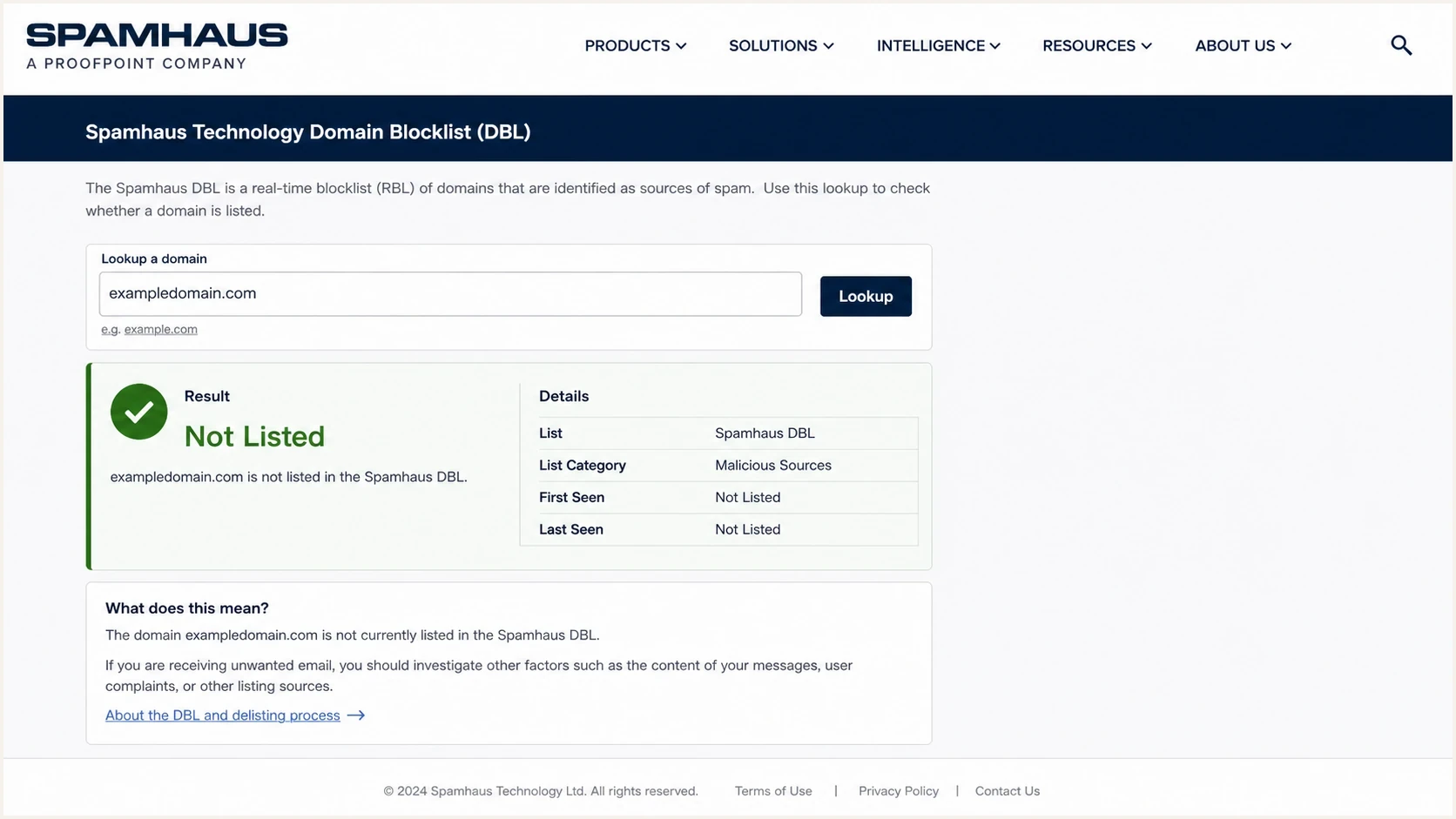
Spamhaus DBL lookup interface showing a domain blocklist result for URL reputation.
Invaluement's ivmURI belongs in the same review set when another URI-specific signal is useful. Abusix's domain data includes domains found in spam message bodies and can identify domains reached through short links, so it adds context when redirect abuse is suspected.
PhishTank is different. It can identify suspicious or abusive URLs, but its community voting model makes it less consistent than centrally managed RBLs. Use it to support an investigation, not to decide that a sender has a primary URL RBL problem.
How to judge trustworthiness
The most trustworthy URL RBL is the one that gives a stable, explainable, receiver-relevant signal. The useful question is whether the listing can be reproduced, understood, and fixed.
High-trust signal
- Consistent process: Listings follow a managed policy, not only crowd votes.
- Clear scope: The result shows whether the domain, subdomain, host, or URL path matters.
- Receiver use: Mailbox filters and security gateways understand and act on the signal.
Lower-trust signal
- Unclear voting: The listing depends heavily on public reports without strong review.
- Slow removal: The issue is resolved, but the listing remains for too long.
- Weak context: The result does not tell you what to investigate next.
Score a URL RBL result across five checks: whether the listed asset is actually in the email, whether it is visible or hidden behind a redirect, whether the domain is controlled by the sender, whether the listed host is shared, and whether the listing appeared before the deliverability issue started.
How to treat URL RBL severity
A practical way to decide how urgently to respond to a URL RBL or blacklist hit.
Monitor
Low
One research-only hit with no receiver evidence.
Investigate
Medium
One trusted URL RBL lists a domain in active mail.
Act now
High
Top-tier RBL hit plus bounces, spam placement, or complaints.
The practical mistake is treating every blacklist or blocklist result the same. A listed customer-owned landing domain deserves a different response from a listed shared tracking host. A listed redirect chain deserves a different response from a listed root domain.
Illustrative DNS-style URL RBL queriesbash
dig +short A example.com.dbl.spamhaus.org

dig +short A example.com.multi.surbl.org

dig +short A example.com.multi.uribl.com
These examples show the shape of DNS-based checks, not production-ready commands. Production systems must normalize URLs, resolve redirects safely, handle public suffixes correctly, use the access method assigned by each provider, and parse every response according to that provider's rules.
Access and return codes matter
A DNS answer does not automatically mean a domain is on a blacklist or blocklist. URL RBL providers can return special addresses for a public resolver, excessive query volume, an invalid zone, or missing authorization. A filter that treats every 127.x response as a listing can reject legitimate mail.
|
|
|
|---|---|---|
Spamhaus DBL | Public resolver or excessive queries | Treat 127.255.255.252, 127.255.255.254, and 127.255.255.255 as errors |
SURBL | Free service has volume and user limits | Confirm eligibility before production use |
URIBL | Shared or high-volume DNS can be refused | Do not treat 127.0.0.1 as a listing |
Abusix | Production zones use an access key | Parse the documented code for the queried zone |
Access failures that must stay separate from valid URL RBL listings.
Validate the lookup path
- Check access: Confirm that the account, zone, and query volume fit the provider's policy.
- Check the resolver: Shared public DNS can trigger blocked or refused responses.
- Check the code: Match the full response against the provider's current documentation.
- Check the outcome: Keep listed, not listed, refused, and lookup failed as separate states.
Test points are useful for proving that a resolver can reach a zone and that the filter interprets replies correctly. Run them before enabling rejection, after changing DNS infrastructure, and whenever a sudden wave of listings appears across unrelated domains.
New domains and URL RBLs
Newly registered and newly observed domains deserve separate handling when they appear inside email links. They are not the same. A domain can have an old registration date but only recently appear in passive DNS or mail telemetry. Age and first-seen data are risk signals, not proof of abuse.
This matters most for tracking domains, redirect hosts, short campaign domains, and landing pages. A new domain can have no public blacklist hit and still receive cautious treatment because filters have not seen stable DNS, normal web content, low complaint rates, or benign link behavior over time.
- Fresh tracking domain: Use it in controlled mail before placing it in a large campaign.
- New redirect host: Keep HTTPS, DNS, and destinations stable while reputation builds.
- Newly delegated domain: Treat a fresh-domain flag as context, not as a final verdict.
- Repurposed domain: Check old reputation, current hosting, and live message behavior before scaling.
How to use URL RBL results
Start by extracting every domain in the message body, including visible links, image hosts, tracking links, unsubscribe links, and redirect destinations. Then separate sender-owned domains from shared infrastructure. That split prevents the wrong team from chasing the wrong fix.
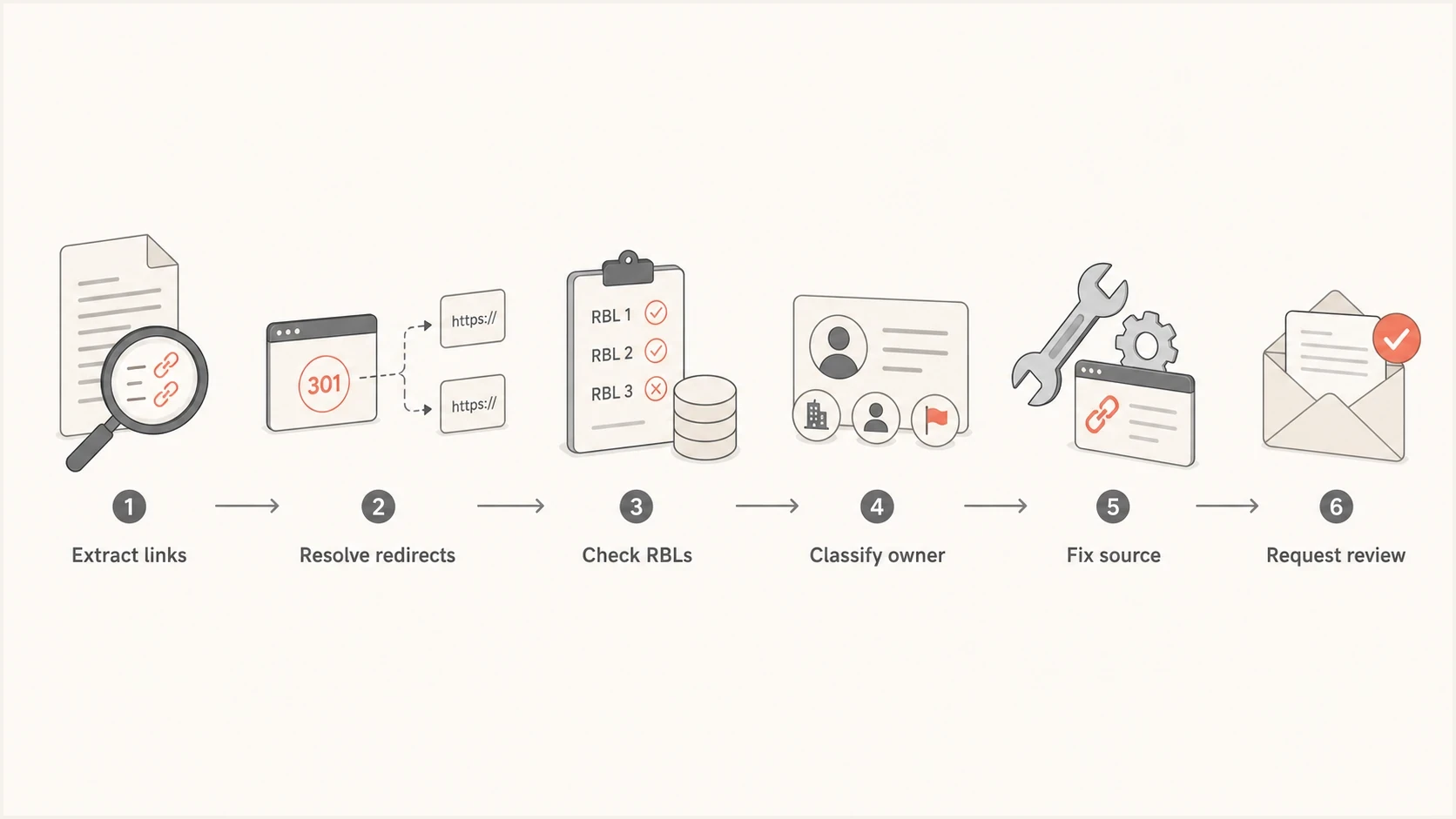
Flowchart for investigating a URL RBL listing by checking links, redirects, ownership, cleanup, and review.
The order matters. If a tracking domain is listed, changing the campaign copy does not fix the root issue. If a customer landing page is compromised, asking the email provider to rotate tracking links does not clean the listed content. If a shortened URL redirects through multiple hosts, the middle hop can be the problem even when the final landing page looks clean.
Shared shortener domains need extra care because a domain-only lookup cannot identify which customer's path caused abuse. Prefer a branded redirect domain you control, retain a link inventory, and inspect the full path. Some URL intelligence checks normalize or hash the hostname and path instead of listing the whole shared domain.
- Extract everything: Check every domain and redirect, not only the visible link text.
- Classify ownership: Separate sender domains, email provider domains, CDN hosts, and link shorteners.
- Compare signals: Treat multiple top-tier hits as more urgent than a single research hit.
- Fix the cause: Remove abuse, close redirect gaps, or isolate bad shared traffic.
- Document cleanup: Use dates, URLs, screenshots, and evidence when requesting review.
A one-off lookup is useful, but it misses timing. Monitoring can capture when a listing first appears, identify the affected domain, and connect the change to a campaign, DNS update, or content change. That is why blocklist monitoring is an operational process, not a weekly manual check.
Blocklist checker
Check your domain or IP against 144 blocklists.







When you run a check, do not stop at listed or not listed. Look at which asset is listed, whether it appears in live mail, whether the response is valid, and whether the asset belongs to you or to shared infrastructure. That context decides whether the next step is content cleanup, provider escalation, domain replacement, or monitoring.
If you want a broader manual starting point, the public blocklists resource helps frame the difference between a URL RBL, an IP blacklist, and a domain blocklist. If the concern is whether a real message is affected, send the message through an email test and inspect the link, authentication, and content results together.
Where Suped fits
Suped is not a URL RBL. Suped's product supports the monitoring and response workflow with DMARC reporting, SPF and DKIM visibility, blocklist and blacklist monitoring, alerts, and steps to investigate changes.
That matters because URL RBL issues rarely happen in isolation. A domain can have a clean DMARC policy and still have a listed link host. A sender can pass SPF and DKIM and still use a compromised landing page. A shared IP can look fine while the branded tracking domain is the problem.

Blocklist monitoring page showing domain and IP checks across blocklists with importance and status
Suped's product gives teams one place to compare domain health, email authentication, transport security, and blocklist status across multiple domains. For MSPs and agencies, the multi-tenant dashboard keeps client domains separate while preserving an operational view.
Practical workflow
- Detect fast: Alerts identify new blocklist and blacklist changes between scheduled reviews.
- Diagnose clearly: DMARC, SPF, DKIM, and reputation signals can be compared in one view.
- Fix with context: Issue details point to the affected domain, source, and next action.
For a quick domain-wide check before deeper monitoring, run a domain health check. It is not a replacement for ongoing monitoring, but it gives a fast view of authentication and reputation basics.
Mistakes that lead to bad decisions
The most common mistake is overreacting to a single weak signal. Another is ignoring a strong signal because the sender IP looks clean. URL RBLs sit between content, reputation, and infrastructure, so the investigation has to include each area.
Do not treat all listings equally
A Spamhaus DBL listing on a branded sending domain deserves urgent investigation. A stale community-sourced phishing report on an old redirect deserves review, but it does not carry the same operational weight.
Another mistake is checking only the root domain. URL RBLs can care about subdomains, hostnames, and redirect domains. If mail uses links like go.example.com, click.example.net, or a vendor tracking host, each asset needs its own review. The same applies to unsubscribe URLs and image hosts.
For domain and IP blocklists, spam traps, complaints, rapid volume spikes, and poor list acquisition often explain a listing. For URL RBLs, the evidence is usually closer to the message body: a listed link host, a compromised landing page, an abused redirector, or shared tracking traffic from another sender.
- Root-only checks: A clean root domain does not prove every tracking host is clean.
- Ignoring redirects: A bad intermediate hop can cause filtering even when the final page is clean.
- Weak evidence: A single research hit needs supporting evidence before major remediation.
- Delayed cleanup: Listings can persist when abuse is fixed but review requests lack evidence.
The best response is measured. Confirm the listed asset, connect it to real mail, fix the cause, then request review with evidence. If the listed asset sits on shared infrastructure, escalate with message samples, timestamps, and the exact redirect chain.
Views from the trenches
Best practices
Check URL RBLs at the registered domain level, then inspect subdomain hits separately.
Treat tracking domains as shared reputation assets, not disposable campaign plumbing.
Keep removal requests factual, with proof of cleanup and a clear timeline of changes.
Common pitfalls
Assuming one clean RBL result means every URL in the message has a clean reputation.
Using PhishTank as a blocking source without checking whether the report has aged out.
Fixing the visible link but leaving redirect chains and tracking hosts with the issue.
Expert tips
Compare the same URL across DBL, SURBL, URIBL, Invaluement, and Abusix before action.
Pair URL RBL monitoring with DMARC, SPF, and DKIM data to separate cause from noise.
For shared infrastructure, ask the provider which customer or redirect caused the listing.
Marketer from Email Geeks says Spamhaus DBL, SURBL, and URIBL are the strongest first choices for URL RBL checking because they are managed consistently.
2022-04-21 - Email Geeks
Marketer from Email Geeks says Invaluement has become a strong supporting signal and belongs in the same review set as the main URL RBLs.
2022-04-21 - Email Geeks
Practical recommendation
For a short list, monitor Spamhaus DBL, SURBL, URIBL, Invaluement, and Abusix. Treat PhishTank as supporting intelligence, not as the deciding source for deliverability action.
For day-to-day operations, use a workflow that checks the right lists, validates response codes, ties findings to real mail, separates owned domains from shared infrastructure, and alerts the right person before a small listing becomes a larger deliverability problem.
Suped's product covers the operational layer with blocklist and blacklist monitoring beside DMARC, SPF, DKIM, and domain health signals. The RBL identifies a reputation signal. Suped helps the team connect that signal to the affected domain and the next investigation step.




