Understanding email greylisting and how it works


Updated on 22 Sep 2026: We updated this guide with current retry-window guidance and safer receiver-side greylisting practices.
Email greylisting, also spelled graylisting, is a temporary SMTP deferral. The receiving mail server refuses an initial delivery attempt with a soft failure, then evaluates the message again when the sending server retries after a delay. The basic idea behind greylisting is simple: real mail servers queue and retry mail, while low-effort spam software often gives up. Modern abuse traffic can retry too, so greylisting is only one filtering signal.
Greylisting is a delay signal, not proof that the sender is bad. It differs from a hard rejection, a spam-folder decision, a DMARC failure, or a blacklist (blocklist) listing. A greylisted message remains in the sender's mail queue. The sender needs to retry correctly and keep its authentication and DNS identity consistent enough for the next evaluation.
The direct answer is this: greylisting remembers a first-time sender pattern, temporarily rejects that attempt, and clears the greylisting test when a later retry matches the receiver's timing and identity rules. Other delivery controls still apply after the retry. The delay can be minutes or hours, depending on the recipient's policy and the sender's retry schedule.
How greylisting works
A receiving server often evaluates a combination of the sending IP, envelope sender, and recipient address. This is the greylisting triplet. RFC 6647 recommends the source IP, RFC5321.MailFrom, and first RFC5321.RcptTo as a practical tuple, but implementations vary. Some defer at the connection, EHLO or HELO, MAIL FROM, RCPT TO, or DATA stage. The server returns a temporary SMTP reply such as 421, 450, or 451, often with an enhanced status such as 4.7.1. A compliant sender keeps the message queued and tries again later.
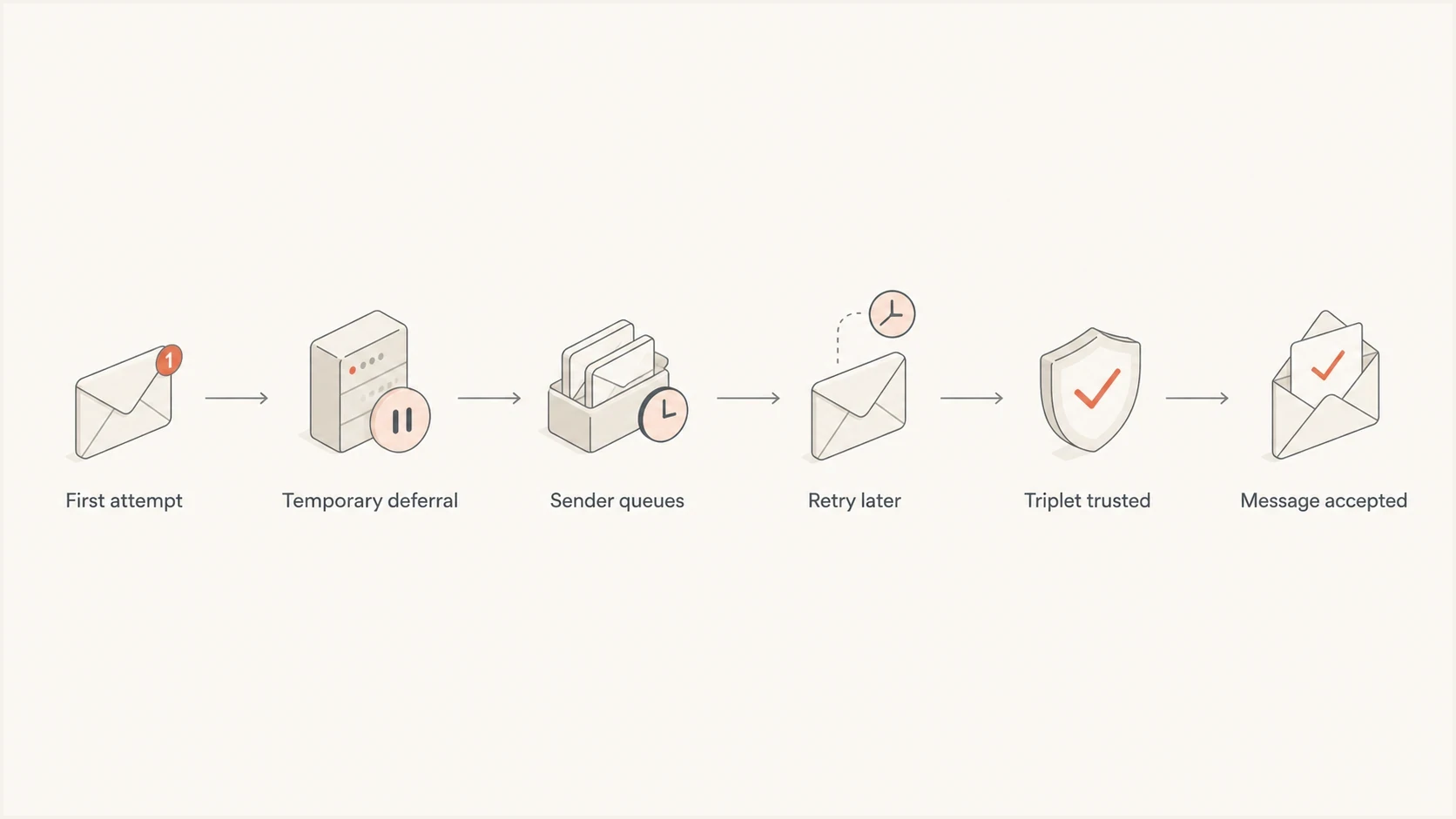
Flowchart showing a first email attempt deferred, retried, then accepted.
After the retry succeeds, many greylisting systems cache the sender pattern for a limited period. Later messages with the same pattern can pass without the same delay. Greylisting is therefore most visible during first contact, after an outbound IP change, or when a new mail stream starts. RFC 6647 recommends a configurable acceptance window and gives one minute to 24 hours as the default range for recognizing a retry, although each receiver controls its policy.
Typical SMTP greylisting responsetext
S: 220 mx.recipient.example ESMTP
C: EHLO mail.sender.example
C: MAIL FROM:<bounce@example.com>
C: RCPT TO:<person@recipient.example>
S: 451 4.7.1 Please try again later

# A compliant sender queues the message and retries later.
- The connecting IP often identifies the source, although shared or rotating outbound pools can complicate matching.
- The SMTP envelope sender helps the receiver distinguish one sending stream from another.
- The recipient address can be included so one successful delivery does not exempt every mailbox path.
- The retry must arrive after the minimum delay and before the receiver forgets the first attempt.
What greylisting looks like in practice
The most common user-visible symptom is a delayed first message. A password reset, invoice, signup confirmation, or first reply arrives late, then later messages arrive normally. That pattern suggests greylisting when the SMTP record also shows an initial temporary deferral and a later accepted retry.
Do not treat every delay as greylisting
Greylisting has a specific SMTP pattern: a temporary 4xx reply whose text or policy context indicates a retry challenge, followed by a later accepted attempt. A 4xx reply alone can also indicate throttling, a full mailbox, a temporary DNS failure, or a receiver resource problem.
|
|
|
|---|---|---|
Greylist 4xx, then 250 | Greylisting completed | Retry timestamps |
Repeated generic 4xx | Other temporary deferral | Full SMTP reply |
5xx rejection | Permanent failure | Bounce text |
Accepted, then spam | Post-acceptance filtering | Message headers |
Queue never retries | Sender queue issue | MTA configuration |
Fast symptom mapping for email delays.
A blacklist or blocklist issue behaves differently. A listed IP or domain often receives a clear rejection, repeated filtering, or degraded placement across multiple recipients. This email blacklist explainer covers that separate failure mode.
Greylisting compared with blocking
Greylisting is one kind of temporary deferral, sometimes reported as a soft bounce. A soft bounce is a reporting label rather than a specific SMTP reply. Blocking is a refusal or filtering decision, and a hard block commonly returns a 5xx reply. Some reputation or rate controls also use 4xx replies, so the status text and retry history matter more than the first digit alone.
Greylisting
- The SMTP result is a temporary 4xx reply.
- The sender keeps the message queued and retries later.
- The common user impact is delayed first delivery.
- Diagnosis focuses on the reply text, retry behavior, and tuple matching.
Blocking
- A hard rejection commonly returns a final 5xx reply.
- The sender must correct the stated cause before redelivery can succeed.
- The user sees failed delivery or filtering instead of a short first-message delay.
- Diagnosis focuses on policy, reputation, authentication, or abuse signals.
When delay and reputation signals overlap, check blocklists and authentication alongside the SMTP logs. A greylisting retry can succeed even when a separate reputation problem exists.
Why legitimate senders get greylisted
Legitimate senders get greylisted when the recipient has not seen the evaluated sending pattern before or its cached record has expired. It does not mean the sender is malicious. The receiver is testing whether the SMTP client can retain the message and return after a temporary failure.
How to read greylisting delays
RFC 6647 recommends one minute to 24 hours as a default window for recognizing a retry. The receiver's policy and the sender's queue schedule still control the actual delay.
Too soon
Under 1 min
A repeat attempt can fail again when the receiver's minimum wait has not passed.
Acceptance window
1 min-24 hr
RFC 6647 gives this as the recommended default range, not a mandatory setting.
Outside the default
24+ hr
The receiver can treat a late retry as a new attempt after its cached record expires.
- A new outbound IP or host has no delivery history with the recipient.
- A first-time sender and recipient combination creates a new tuple.
- A sudden traffic increase can trigger cautious temporary handling that resembles greylisting.
- Poor reverse DNS, an inconsistent HELO name, or failed authentication can add separate trust problems.
- Retries that arrive outside the accepted window, through another IP, or at an MX host without shared state can look new.
- VERP-style return paths and other per-message envelope senders can prevent an exact MAIL FROM tuple from matching.
Authentication still matters
Greylisting itself is not an SPF, DKIM, or DMARC failure. Passing authentication also does not guarantee exemption. Clean authentication removes separate reasons for the receiver to slow, filter, or reject the message after the retry.
Limits of greylisting
Greylisting tests delivery behavior, not message intent. Spam sent through a full mail server or a compromised account can retry correctly, so a successful retry does not prove that a message is wanted. Greylisting can still stop clients that do not retry and can give reputation systems more time to collect evidence, but it should not be the receiver's only abuse control.
- Rotating outbound IP pools can send the retry through a different IP, causing a strict triplet check to treat it as new.
- Low-volume senders can fall out of the receiver's cache and face the same delay repeatedly.
- Time-sensitive messages can arrive after a login code or reset link has expired, and related messages can arrive out of order.
- Inbound MX servers that do not share greylisting state can defer the same message more than once.
Receiver-side safeguards
Use carefully scoped allowlists for known, authenticated sources. Share greylisting state across inbound MX hosts. Measure false deferrals and expire old exceptions. An allowlist should bypass the greylisting delay only, not every abuse check.
How recipients should configure greylisting
Receiver configuration determines whether greylisting removes low-effort abuse without repeatedly delaying legitimate mail. RFC 6647 favors a configurable tuple and retry window, while operational data should decide which connections face the check.
- Log greylisting decisions before broad enforcement so accepted mail, delayed mail, and false deferrals can be measured.
- Use the source IP, envelope sender, and first recipient as a baseline tuple, then account for trusted sending pools and variable return paths.
- Set a configurable retry window that covers normal MTA schedules and retain successful entries long enough to prevent repeated first-contact delays.
- Share greylisting records across every inbound MX host that can receive retries for the same domain.
- Apply exceptions only to verified sources with known retry problems, and keep authentication, reputation, and content checks active.
Selective greylisting can focus the delay on unknown or poor-reputation connections instead of every new sender. Review the logs after policy changes and remove rules that create more legitimate delay than useful filtering.
How to diagnose greylisting
Start with the SMTP transcript or MTA log, not the inbox complaint. The key question is whether the recipient returned a greylisting-related temporary response and later accepted the same delivery. Without that sequence, greylisting is only a hypothesis.
- Capture the full first SMTP reply, including its three-digit code, enhanced status code, and text.
- Confirm that the sender kept the message in its mail queue and attempted delivery again.
- Compare the sending IP, destination MX host, and SMTP envelope values across attempts to find a tuple or state change.
- Check whether the retry arrived after the receiver's minimum wait and before its record expired.
- Look for a later 250 acceptance, a final 5xx response, or another temporary deferral.
- Investigate authentication, DNS identity, rate limits, and blacklist or blocklist status when deferrals continue.
An SMTP 451 error does not identify the cause by itself. Read the complete response because the same code can describe greylisting or another temporary condition. A test message can confirm sender authentication and structure, but delivered headers do not preserve an earlier SMTP deferral. Suped's email tester supports that identity check by showing SPF, DKIM, DMARC, and message details.

Email tester sample report showing total score, email preview, issue summary, and per-section results
Suped's domain health checker can catch missing DNS records and broken authentication that would otherwise confuse the diagnosis. The SMTP logs remain the source of truth for the greylisting event itself.
Email tester
Send a real email to this address. Suped shows a results button when the test is ready.
?/43tests passed
How to reduce greylisting delays
A sender cannot force a recipient to disable greylisting, but it can make the retry easy to recognize. Stable infrastructure, correct DNS identity, compliant queue behavior, and working authentication reduce avoidable failures around the greylisting event.
Use controlled retry behavior
Keep retry behavior conservative and configurable. An immediate retry can hit the same minimum wait, while an excessively slow retry creates visible delays. Respect timing stated in the SMTP reply when present, use increasing backoff, and avoid repeated rapid connections. RFC 5321 says the general retry interval should be at least 30 minutes, while allowing more responsive strategies when the client understands the temporary failure.
Generic retry policy checklisttext
On a temporary 4xx reply:
- Keep the message in the queue
- Delay the next attempt
- Increase the wait after repeated failures
- Preserve the delivery identity where possible
- Stop retrying when the queue lifetime expires

On a permanent 5xx reply:
- Do not keep retrying the same delivery unchanged
- Keep established mail streams on stable outbound IPs when operationally practical.
- Make PTR records, forward DNS, and the SMTP HELO identity consistent.
- Publish valid SPF, sign with DKIM, and use a DMARC policy supported by monitoring.
- Configure shared outbound pools so a retry is recognized as the same source where possible.
- Introduce new sending paths with steady volume instead of abrupt traffic spikes.
- Separate temporary 4xx deferrals from 5xx rejections and post-acceptance spam placement in reporting.
Where DMARC and Suped fit
DMARC does not stop greylisting by itself. SPF or DKIM passing also does not guarantee that a recipient skips the delay. Authentication gives the receiver a clearer sender identity when it evaluates the retry and applies its remaining controls.
Suped's product supports the parts of this workflow that sit outside the SMTP queue. It shows sending sources and authentication changes alongside blocklist monitoring. That helps a team rule out DMARC drift or blacklist and blocklist reputation while the MTA logs confirm whether the recipient used greylisting.
Suped DMARC dashboard showing email volume, authentication health, and source breakdown
Suped does not replace the SMTP transcript for this diagnosis. Its role is to expose sender changes and authentication failures that can coexist with a temporary deferral, then keep those issues visible after the delayed message has arrived.
SMTP and MTA evidence
- Queue logs show the exact 4xx reply and the command that triggered it.
- Retry timestamps reveal whether the sender waited and returned.
- A later 250 reply confirms that the receiving server accepted responsibility for the message.
Suped evidence
- DMARC data shows the sending source and its authentication results.
- Alerts surface authentication changes that can widen a delivery incident.
- Blocklist monitoring checks whether blacklist or blocklist reputation is a separate factor.
When greylisting points to a deeper issue
Greylisting should clear after a compliant retry that matches the receiver's policy. If the same mail stream keeps seeing long delays, repeated deferrals, or hard failures, treat it as a broader deliverability incident. The question then becomes why the receiver continues to defer or reject the mail.
|
|
|
|---|---|---|
Same greylist reply after retry | Tuple or state mismatch | Compare attempt identities |
Different 4xx replies | Throttling or receiver issue | Read every full reply |
Mixed 5xx replies | Permanent blocking | Review bounce reasons |
Authentication failures | Sender identity gap | Correct DNS or signing |
Blacklist or blocklist listing | Separate reputation problem | Investigate the listing cause |
Escalation clues after repeated greylisting.
The common escalation mistake is retrying harder. More connection attempts do not create trust when the receiver has asked the sender to wait. Correct identity problems, remove invalid recipients, separate mail streams where needed, and keep the retry pattern predictable.