What is an email blacklist and how does it work?

Updated on 22 Sep 2026: We added practical prevention guidance and clarified how to diagnose and resolve blocklist listings.
An email blacklist, also called an email blocklist, is a list of IP addresses, sending domains, or URLs that mail filters treat as risky. It works by giving receivers a fast reputation signal. When a message arrives, the receiving system checks the sending IP, the domain, and sometimes links in the message against public and private lists before it accepts, filters, delays, or rejects the mail.
The direct answer has an important caveat: being on a blocklist (blacklist) does not always mean every email bounces. Some receivers reject the message during SMTP. Some move it to spam. Others use the listing as one score among authentication, complaint, content, and engagement signals. Treat a blocklist as a reputation sensor, not a final verdict.
For a sender, the practical work is simple to describe and harder to operate: find what was listed, identify why it was listed, fix the source of the bad signal, request removal when the list allows it, and watch closely for relapse. Suped's product supports that operating loop by combining authentication data with blocklist monitoring, alerts, and issue-level fix steps.
What gets listed
A blacklist is not always a list of email addresses. Most blocklists focus on technical identifiers that receivers can check quickly during mail delivery. The exact identifier matters because the fix is different for a listed IP, a listed domain, and a listed URL.
- An IP address can be listed when recent traffic, complaints, spam traps, or abuse reports make the sending server look risky.
- A domain or subdomain can be listed when it is tied to unwanted mail, poor authentication, suspicious links, or repeated policy failures.
- A URL domain in the message body can be listed when it appears in unwanted mail, even if the sending IP has no listing.
- An individual sender address is less common as a public listing target, but private filters still track address-level abuse patterns.
- A network range can be listed when the problem is tied to a hosting network, provider segment, or repeated abuse across nearby IPs.
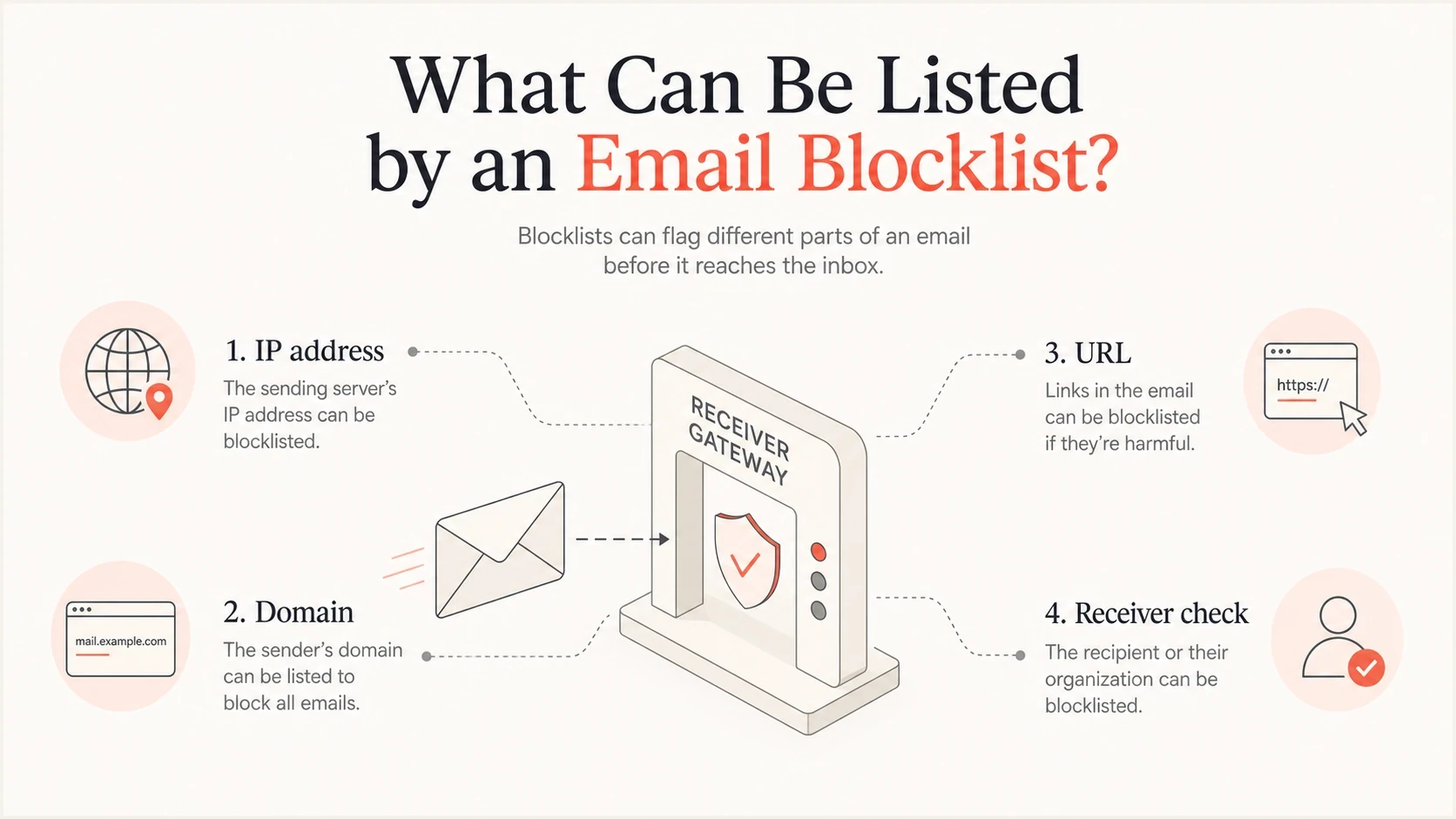
Infographic showing IP address, domain, and URL identifiers checked by an email receiver against blocklists.
How a blacklist check works
The common technical model is a DNS-based blocklist (DNSBL), sometimes called a real-time blocklist (RBL). A receiver takes the connecting IP address, reverses the order of the octets, appends the list's zone, and asks DNS for a result. If DNS returns a listed answer, the receiver applies its own mail policy. The lookup is fast enough to happen during the SMTP conversation.
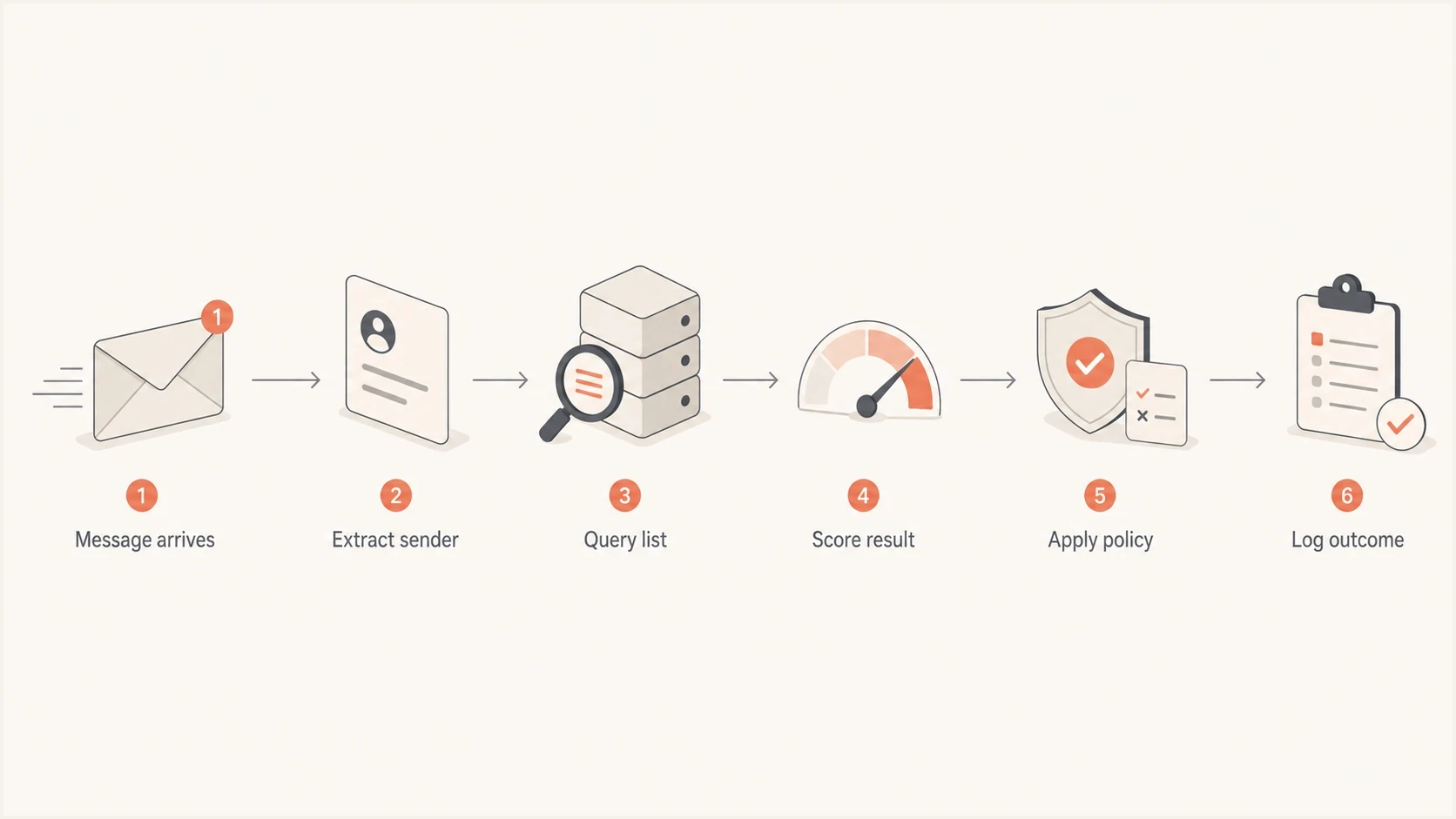
Flowchart showing a DNSBL check from message arrival through the receiver's delivery decision.
Example DNSBL style lookuptext
5.2.0.192.dnsbl.example
A 127.0.0.2
TXT "Listed for recent unwanted mail reports"
For example, if the connecting IP is 192.0.2.5, the query form becomes 5.2.0.192 plus the blocklist zone. A returned address such as 127.0.0.2 signals a listing and can identify which listing type matched, but each list defines its own response codes. A text response can give a short reason or a removal reference.
The result is not always a final decision
A listed response is a signal. The mailbox provider still decides what to do with that signal. The same listing can produce a hard rejection at one receiver, a spam-folder placement at another receiver, and no visible effect at a receiver that does not use that list.
How blocklists decide what to list
Each blacklist or blocklist has its own data sources and listing policy. Some lists react to evidence of unwanted mail. Others publish policy-based listings for infrastructure that should not send email directly, such as dynamic address ranges. A listing means the identifier met that operator's criteria. It does not prove that every message from the sender is spam.
- Messages sent to spam traps or honeypots can expose harvested addresses, stale lists, or a compromised sending system.
- Recipient complaints and network abuse reports can show that people or operators consider the traffic unwanted.
- Sudden volume changes, repeated invalid-recipient attempts, and unusual connection patterns can raise risk.
- Open relays, compromised hosts, dynamic IP ranges, or other policy violations can trigger an infrastructure listing.
Not every list calculates or publishes a numerical score. Many DNSBLs return a listed or not-listed result with a reason code. The receiving system decides how much weight to give that result alongside its own sender reputation and message signals.
Public lists versus private lists
The word blacklist often gets used as if there is one central database. There is not. Public blocklists can be queried by many systems, while private lists live inside mailbox providers, gateways, and filtering stacks. A sender can look clean on public checks and still have private reputation trouble at a large receiver.
Public blocklists
- They are often queryable through DNS or a public lookup page.
- They usually focus on IPs, domains, URLs, or network ranges.
- They often have a defined delisting path after the root cause is fixed.
- They can affect many receivers when the list is widely used.
Private receiver lists
- They are usually hidden inside a mailbox provider or security gateway.
- They often use local complaints, engagement, and receiver history.
- Their effect usually improves through cleaner sending, not a public form.
- They can hurt delivery at one receiver while other receivers behave normally.
Separate a blacklist investigation into public listing checks and receiver-specific delivery evidence. The public side answers whether a known list has a visible record. The private side answers whether a receiver is still treating the sender as risky. For more background on list categories, the blocklist guides are useful when the terminology starts to blur.
|
|
|
|
|---|---|---|---|
Public DNSBL | IP reputation | Reject or throttle | Fix cause first |
Private list | Receiver history | Spam placement | Review logs |
URI list | Link reputation | Filtering | Audit links |
Range list | Network abuse | Wider blocking | Escalate provider |
Common blacklist and blocklist categories
Why senders end up listed
Most listings are not random. They come from a pattern that looks unsafe to the list operator or receiver. The pattern can be obvious, such as a compromised mailbox sending a large burst, or subtle, such as a new shared IP that has traffic from many unrelated senders.
- A stolen mailbox, API key, or SMTP credential can send unwanted mail through otherwise legitimate infrastructure.
- On a shared IP, another sender can damage IP reputation and create delivery pressure for everyone on that pool.
- Purchased, scraped, stale, or poorly permissioned lists can create complaints and spam-trap hits.
- Sudden volume growth without warmup can make receivers treat the sender as abnormal.
- SPF, DKIM, and DMARC failures can make it harder for receivers to verify the identity behind the mail.
- Continuing to send to invalid recipients after hard bounces can produce the same bad signals that suppression should stop.
Authentication does not guarantee freedom from every blacklist, but it removes uncertainty during an investigation. Start with a domain health check because SPF, DKIM, DMARC, reverse DNS, and sending identity need to be understood before a removal request.
Blocklist checker
Check your domain or IP against 144 blocklists.







A clean check does not cancel receiver complaints, and a listed result does not explain the cause by itself. Ask what changed in traffic, identity, infrastructure, or recipient response before the listing appeared.
How to avoid an email blacklist
Blacklist prevention depends more on sending behavior than on wording tricks. Build a mail program that produces clear permission, low complaint rates, stable infrastructure, and fast suppression when recipients leave or addresses fail.
- Send subscription mail only to people who asked for it, and keep evidence of how each address joined the list. Never buy or scrape recipient lists.
- Suppress hard bounces and repeated soft bounces, then process unsubscribes and complaint feedback promptly. Repeated delivery to bad or unwilling recipients raises blacklist risk.
- Increase volume gradually and send at a steady rate. Sudden bursts from a new IP or domain can look abnormal even when the mail is legitimate.
- Authenticate legitimate sources with SPF and DKIM, publish DMARC, and configure valid forward and reverse DNS for sending IPs.
- Secure mailboxes, API keys, SMTP credentials, and web forms so an attacker cannot send through trusted infrastructure.
- Give marketing recipients a visible unsubscribe link and support one-click unsubscribe where required. An easy exit reduces spam complaints.
Watch complaints before they become a listing
For bulk mail to personal Gmail accounts, keep the user-reported spam rate below 0.1% and prevent it from reaching 0.3%. Yahoo requires bulk senders to remain below 0.3%. These thresholds are compliance limits, not promises of inbox placement.
How a listing affects email delivery
A blacklist listing changes how much trust a receiver gives the message. The receiver can reject the message during SMTP, accept it and send it to spam, slow down delivery, add extra filtering, or use the signal only when other risk indicators appear. The effect depends on the list, the receiver, and the sender's existing reputation.
SMTP responses show the immediate effect. A 4xx response is a temporary deferral, so the sending server should retry. A 5xx response is a permanent rejection for that delivery attempt and normally produces a bounce. Read the accompanying text because it can name the blacklist or receiver policy involved.
Prioritize a listing when it appears in a bounce response or matches a measurable delivery change, such as higher rejection rates or more spam-folder placement. An entry on an obscure list with no delivery effect still deserves review, but it should not trigger disruptive infrastructure changes without supporting evidence.
Blocklist impact levels
The same listing can have different delivery effects depending on how receivers use it.
Informational
Watch
Visible listing, no immediate delivery loss seen.
Moderate
Investigate
More spam placement, delays, or limited throttling.
High
Fix now
Clear rejects or delivery loss at affected receivers.
Critical
Stop traffic
Widespread blocking tied to active abuse or compromise.
Do not rush removal before fixing the cause
A removal request before the sending problem is fixed often leads to a short clean period followed by relisting. Some operators apply longer holds or stricter review after repeated relisting.
Bounce messages and SMTP codes show the receiver's action. Delivery logs and complaint data reveal the scope. DMARC aggregate reports connect authentication results to sending sources, but they do not report inbox placement. Together, these signals show whether the listing is the main issue or one symptom of a broader reputation problem.
How to check an email blacklist
Use a short investigation sequence because blacklist incidents get messy when every possible cause is chased at once. Identify the scope before taking action: what is listed, which mail streams are affected, and which receivers are reacting.
- Identify the connecting IP in delivery logs or message headers, then check the From domain, Return-Path domain, subdomains, and linked domains. Do not assume the organizational domain is the listed identifier.
- Send a real message through the affected system and review it with an email tester to inspect authentication, headers, and content signals.
- Read bounce messages for SMTP codes, text reasons, and receiver names. A bounce often names the list or policy that blocked the mail.
- Compare SPF, DKIM, and DMARC pass rates before and after the problem started.
- Map the listing time against deployments, campaign sends, sender changes, DNS updates, and complaint spikes.

Blocklist monitoring page showing domain and IP checks across blocklists with importance and status
Suped's product supports this step by keeping DMARC, SPF, DKIM, blocklist status, and deliverability signals in one place. It turns raw reports into tracked issues, sends alerts, and provides fix steps so a team can compare the listing with authentication and sending-source data.
How to get delisted without making it worse
The right removal process starts before the removal form. If the sender keeps producing the same signal, delisting is temporary. Pause the affected stream instead of sending more mail while the cause is still active.
Risky removal process
- Requesting removal without knowing which stream caused the listing is guesswork.
- Sending the same traffic while asking the list to clear the record keeps the cause active.
- Leaving SPF, DKIM, and DMARC failures unresolved weakens the evidence behind the request.
- Treating relisting as bad luck misses a persistent cause.
Clean removal process
- Find the exact IP, domain, campaign, or credential involved.
- Pause the bad source before sending more mail.
- Use logs, authentication results, and bounce data to confirm the fix.
- Monitor after delisting so the same signal does not return.
Minimal authentication checklisttext
SPF: one valid TXT record with authorized senders
DKIM: active selector for each sending source
DMARC: policy present with aggregate reports enabled
Bounces: reviewed for listing source and receiver response
Complaints: unsubscribes and abuse reports processed quickly
After the cause is fixed, follow the listing operator's removal instructions exactly. Keep the request factual. Explain what was listed, what caused the problem, what changed, and when the change was made. If the listed IP belongs to a hosting or email provider, contact that provider because some operators accept removal requests only from the network owner. Avoid blaming the list. The fastest successful removals are usually the plainest ones.
Where DMARC fits
DMARC does not remove a domain or IP from a blacklist by itself. It tells receivers whether authenticated mail matches the domain shown in the From address, provides a policy for failed checks, and gives domain owners aggregate visibility into sending sources. That visibility matters during a blacklist incident because unknown senders, forwarding breakage, and misconfigured vendors often hide inside aggregate traffic.
Basic DMARC reporting recorddns
Name: _dmarc.example.com
Type: TXT
Value: "v=DMARC1; p=none; rua=mailto:dmarc@example.com"
A practical monitoring loop
- Track SPF, DKIM, and DMARC pass rates for every legitimate source.
- Watch blocklist, bounce, complaint, and delivery signals together.
- Fix the source of failures before requesting delisting or increasing volume.
- Move the DMARC policy forward only after legitimate traffic is verified.
Suped's product connects DMARC reports and blocklist alerts to the sending source and remediation task. This helps a team tie a blacklist listing to the mail source, authentication state, and next fix in the same workspace.
What to do next
An email blacklist is a reputation list that receivers use to judge whether a sender, domain, URL, or network has been tied to risky mail. It works through fast lookups, often DNS-based, and the result feeds into the receiver's local filtering policy.
Respond by checking exactly what is listed, confirming whether real delivery is affected, and fixing the traffic or authentication issue before requesting removal. Keep monitoring after delisting. A blocklist incident is usually a symptom of something measurable, and the fix starts when the signal is tied back to the source.




