Is gmail10p.com a legitimate domain or a spamtrap?

Published 12 May 2025
Updated 20 Aug 2026
10 min read
Summarize with
Updated on 20 Aug 2026: We added account recovery steps and clarified how to classify gmail10p.com when public reputation signals disagree.
gmail10p.com is not a legitimate Gmail domain. Treat it as a disposable email domain and a high-risk recipient domain, not as a normal consumer mailbox provider. It is better to suppress addresses at this domain than to keep mailing them because one or two addresses appear to open or click.
The direct answer has one caveat: disposable does not automatically mean formal spam trap. A spam trap is usually an address or domain operated to detect bad acquisition and poor list hygiene. Available evidence supports treating gmail10p.com as a disposable or temporary email domain that can accept mail, but that does not prove every address is a trap.
- Do not treat gmail10p.com as Gmail or as a trusted mailbox provider.
- Expect disposable-domain signals, brand-lookalike naming, and low business value.
- Suppress it, block new signups, and investigate how it entered your list.
What gmail10p.com appears to be
The most useful operational classification is disposable and high risk. Public lookup datasets disagree on the disposable label, but several classify gmail10p.com as temporary or high risk. Combined with its Gmail-lookalike name and reports linking it to fake accounts and account changes, those signals justify blocking it without claiming that every mailbox is a confirmed spam trap.
Public lookup results report Cloudflare Email Routing MX hosts such as route1.mx.cloudflare.net, route2.mx.cloudflare.net, and route3.mx.cloudflare.net. Valid MX records mean the domain can route mail. They do not prove it is Gmail, a stable consumer mailbox, or a subscriber with consent.
The domain's mail routing can also make a bounce look ambiguous. A temporary failure such as 451 with wording like Failed to egress tells you the receiving side had a routing or delivery problem. It does not prove the mailbox belongs to a person, and it does not make the domain safe.
Observed bounce pattern
451 4.3.0 Failed to egress. 0QL3NKO1HAJZ
|
|
|
|---|---|---|
Lookalike name | Do not trust | |
Disposable listings | Strong risk signal | Suppress |
Valid MX | Can receive mail | Still review |
Clicks | Weak trust signal | Do not rescue |
Operational signals for gmail10p.com
Do not confuse deliverability with legitimacy
A domain can have MX records and still be disposable, abusive, abandoned, automated, or used for fake accounts. Deliverable does not mean valuable. Treat gmail10p.com as a domain to block at signup and suppress in marketing systems.
Disposable domain, spam trap, or typo
The confusion usually comes from treating three different ideas as one thing. A typo domain is an accidental misspelling. A disposable domain is created so users can receive short-lived mail without using a permanent address. A spam trap is used to detect senders who mail addresses they should not have collected or kept.
Available evidence supports classifying gmail10p.com as disposable for list-hygiene decisions, even though public lookup results can disagree. Do not call every address at that domain a confirmed spam trap without trap-owner evidence. For acquisition forms, marketing lists, and customer data quality, the operational response is still suppression.
Disposable domain
- Disposable domains create short-lived inboxes for signups, trials, and verification messages.
- Common signals include valid MX records plus low identity value and public disposable-domain listings.
- Block signups unless you have a strong reason to allow temporary inboxes.
Spam trap
- Spam traps detect poor list collection, scraping, appending, or stale address handling.
- Warning signals include deliverability damage, complaints, blacklist or blocklist hits, and suspicious engagement.
- Stop mailing and trace the source before the next campaign.
A useful next read is this spam trap guide if you need the mechanics behind traps, recycled addresses, pristine traps, and typo traps.
Why clicks do not prove it is safe
The tricky part is that gmail10p.com can appear in engagement exports. A click or open does not prove a real subscriber chose to interact. Security scanners, link preview systems, mailbox routing, automated testing, and trap operators can all create activity that looks like human engagement.
Do not use engagement as a rescue signal for a disposable domain. If an address is at gmail10p.com, the domain-level risk outweighs the address-level click. Ask "why did we accept this domain, and what else came through the same source?" instead of relying on a click.
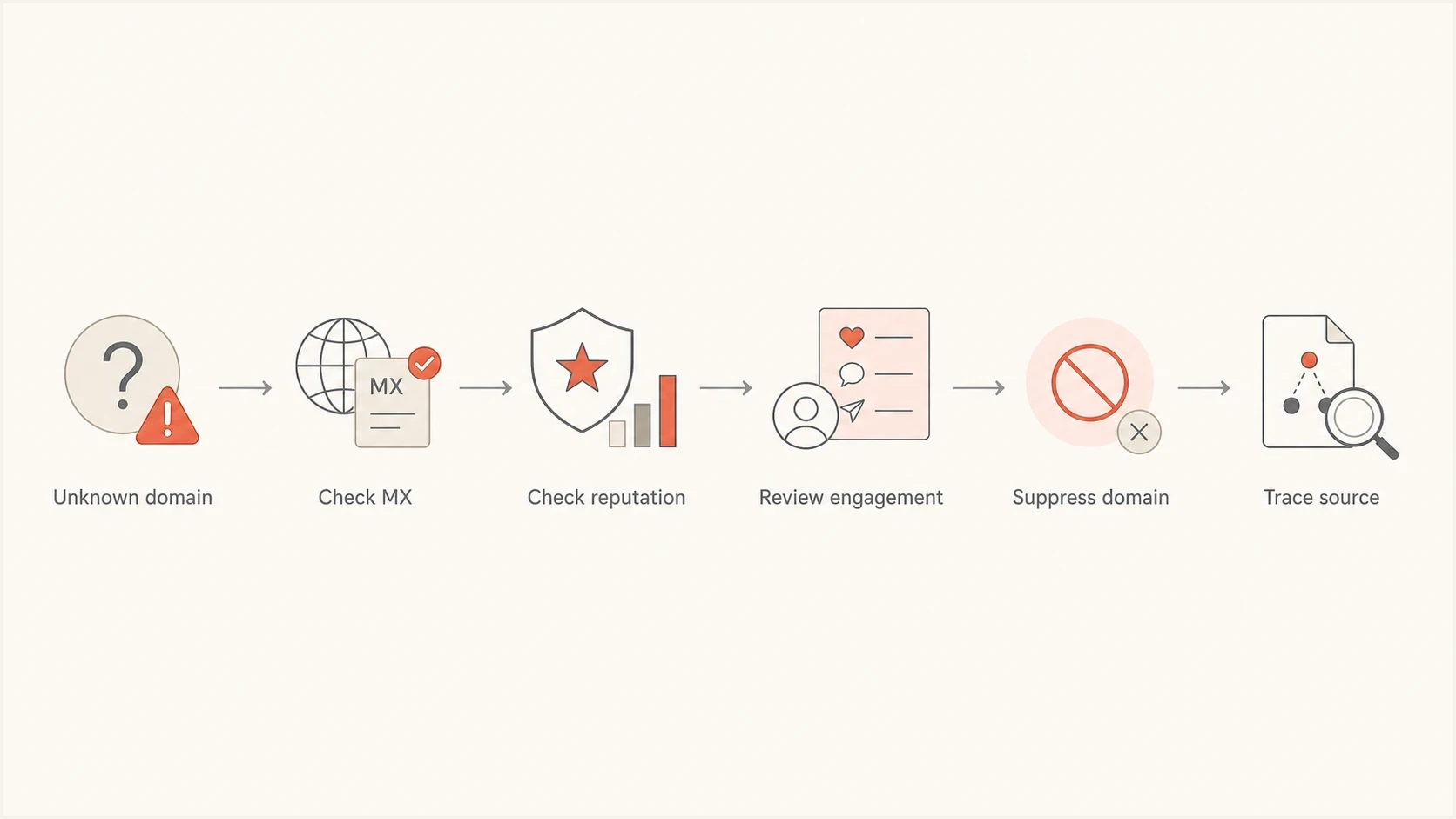
Decision flow for checking MX records, reputation, engagement, and source before suppressing gmail10p.com.
The click rule
A suspicious domain with a click is still suspicious. Review the address source, event timestamp, user agent, and surrounding list segment, but do not keep sending because of that click alone. For more detail, see why trap clicks happen.
What to do if gmail10p.com is in your list
The practical handling is straightforward. Do not spend time trying to prove whether a specific gmail10p.com mailbox belongs to a trap operator or a temporary inbox user. Remove the risk, then fix the intake path that allowed it.
If gmail10p.com appears in signup, password reset, login recovery, or account email-change events, treat it as an account-integrity signal too. Temporary domains are often used for fake registrations, anonymous trials, password resets, and account changes that need extra verification.
- Add gmail10p.com to a suppression or blocked-domain list across marketing, product, support, and CRM systems.
- Find every address at the domain, including historical bounces, signups, imports, and API submissions.
- Review related brand-like variants and similar disposable domains that entered through the same forms or uploads.
- Identify the acquisition source, form, partner upload, or list import that introduced the address.
- Block disposable domains at signup and require additional verification for risky account changes.
- Watch bounce rates, complaints, and blocklist or blacklist status after suppression.
Example suppression logicjavascript
if (recipientDomain === "gmail10p.com") {
  blockSignup = true;
  suppressMarketingSend = true;
  requireManualReview = true;
}
Check the sender side as well. If a suspicious recipient appeared in a campaign, confirm that the sending domain still has clean authentication and no new blacklist or blocklist issues. Suped's product keeps DMARC, SPF, DKIM, and blocklist monitoring in the same workflow, so the team can connect a bad list source with authentication failures or reputation changes.
Blocklist checker
Check your domain or IP against 144 blocklists.







What to do if an account email changed to gmail10p.com
If a security notice says an online account's email was changed to an address at gmail10p.com, treat that as an account-takeover indicator. You do not need, and usually cannot, access the attacker's temporary inbox. Recover the affected account through the platform's official app or website.
- Open the affected platform directly and use its official account recovery process. Do not rely on links in unexpected messages.
- Preserve the change notice, timestamps, username, previous email address, and screenshots for support or fraud reports.
- Secure the original email account, change reused passwords, sign out unknown sessions, and enable multi-factor authentication.
- Review connected accounts and payment settings, then warn contacts if the compromised account sent messages.
Do not try to claim the temporary inbox
Access to a disposable inbox does not establish account ownership and can expose more information to an attacker or untrusted site. The affected platform's recovery process should verify ownership using prior account details and trusted contact methods.
For account operators, flag email changes to newly seen disposable domains, require step-up verification, and notify the previous address. These controls address account takeover before the new address reaches marketing or support systems.
How to judge similar domains
gmail10p.com is one example of a broader pattern: a domain that looks close enough to a household mailbox brand to pass casual review, while behaving like a temporary inbox service. Use a repeatable test so the decision does not depend on a single lookup or a single bounce.
Start with the domain string. If it contains a famous mailbox brand with extra characters, treat that as a risk signal. Then check whether it has working MX records, whether public sources classify it as disposable, whether your own data shows bounces or fake-account behavior, and whether engagement looks automated.
- Brand-shaped variants with extra numbers, swapped letters, and added suffixes need review.
- MX records prove routing, not trust, consent, ownership, or subscriber value.
- A risky domain from a paid lead source is a stronger warning than one manual test account.
- Opens and clicks need user agent, timing, and journey context before you trust them.
- Clusters of related domains with the same naming style deserve domain-level blocking, not one-off cleanup.
For a wider checklist, use the suspicious domains guide. If you want to check your own domain's authentication posture while investigating a bad segment, run the domain health checker after you isolate the recipient issue.
?
What's your domain score?
Deep-scan SPF, DKIM & DMARC records for email deliverability and security issues.
Where Suped fits into the workflow
A suspicious recipient domain creates two separate questions: how it entered the list, and whether sending to it affected sender reputation. Keep those checks connected so a campaign does not repeat the same list-quality problem.
Suped's product connects recipient-list cleanup with DMARC failure analysis and blocklist monitoring. After suppressing gmail10p.com and related addresses, use the campaign date and sending source to review authentication failures, source anomalies, and blacklist or blocklist changes.

Blocklist monitoring page showing domain and IP checks across blocklists with importance and status
Treat gmail10p.com as a recipient-list problem first. Then use Suped to check whether the campaign caused sender-side fallout before the next send.
Best practical setup
- Block disposable recipient domains before they reach campaigns.
- Keep DMARC, SPF, and DKIM monitored with alerts for sudden failure changes.
- Watch sending domains and IPs for blocklist and blacklist changes after large sends.
- Use one place for alerts, issue detection, sender inventory, and fix steps.
Views from the trenches
Best practices
Suppress brand-like disposable domains and review the source before the next campaign.
Treat a valid MX record as routing evidence only, not proof of a real subscriber.
Review clicks on suspicious domains with timing, user agent, and source context.
Keep disposable-domain blocking, bounce review, and reputation checks in one workflow.
Common pitfalls
Keeping a risky domain because it clicked can let automated activity bias hygiene rules.
Calling every odd domain a trap hides the key fix: better intake and suppression.
Ignoring temporary bounce wording can delay action on clearly disposable domains.
Checking only one public source can miss disagreement across reputation datasets.
Expert tips
Separate recipient-domain risk from sender reputation so each issue gets a clean fix.
Use domain-level suppression for disposable clusters, then inspect campaign fallout.
Audit the acquisition source whenever one odd domain appears with similar variants.
Do not let past engagement override a clear disposable-domain risk classification.
Marketer from Email Geeks says gmail10p.com should be treated as a typo-like disposable domain, not as a normal Gmail destination.
2024-04-10 - Email Geeks
Marketer from Email Geeks says a failed-egress bounce points to receiving-side routing trouble, but the domain still looks high risk.
2024-04-10 - Email Geeks
Should you block gmail10p.com?
Yes. gmail10p.com is best handled as a disposable, high-risk domain. Do not classify it as legitimate Gmail, and do not rely on a click or a temporary bounce to justify continued sending.
Suppress the domain, block it at signup, investigate the acquisition source, review related variants, and monitor sender reputation for any blocklist or blacklist fallout. Repeated sightings point to a wider list-quality control gap that needs earlier detection.
For broader context on how blocklists work, the blocklists guide explains why suspicious recipient activity, poor list hygiene, and authentication problems often show up together.




