How to resolve QQ.com IP block issues and improve email delivery?

Published 20 Jun 2025
Updated 2 Aug 2026
12 min read
Summarize with
Updated on 2 Aug 2026: We added current guidance for named RBL rejections, reverse DNS checks, DMARC under RFC 9989, and controlled QQ recovery.
The fastest way to resolve QQ.com IP block issues is to identify whether QQ is blocking your sending IP globally or whether individual QQ users have blocked your mail. If the bounce points to QQ detail code 0/92 and says the recipient rejected the message, treat it as a user-level filter first, not a standard IP delisting case.
For that specific pattern, the practical fix is to suppress those QQ recipients, confirm where the addresses came from, and only resume if the user removes the block or reconfirms through another channel. In parallel, fix sender-side reputation signals so the remaining QQ mail has clean authentication, stable volume, low complaints, and low unknown-user rates.
Do not assume every QQ.com rejection is an IP blacklist issue. The Chinese phrase 用户设置个人黑名单或者过滤器拒收 means the user set a personal blacklist or filter to reject the mail. That needs recipient-level cleanup, not a generic blocklist removal request.
What the QQ.com rejection means
A QQ.com rejection that includes an opaque token, the sending IP, and a QQ detail page is often more specific than it looks. The important clue is whether the failure affects all QQ recipients or only a subset. If other QQ subscribers still receive mail from the same IP, the issue is not a total QQ block. It is a segmented problem: some recipients, folders, filters, or list-quality signals are causing rejections.
Example QQ rejection patterntext
Mail is rejected by recipients
[opaque-token IP: 143.55.239.24].
QQ detail code: 0/92
With partial failure, separate the problem into two tracks. First, handle the affected recipients as blocked or filtered contacts. Second, check whether sender reputation problems are making QQ more likely to reject the mail.
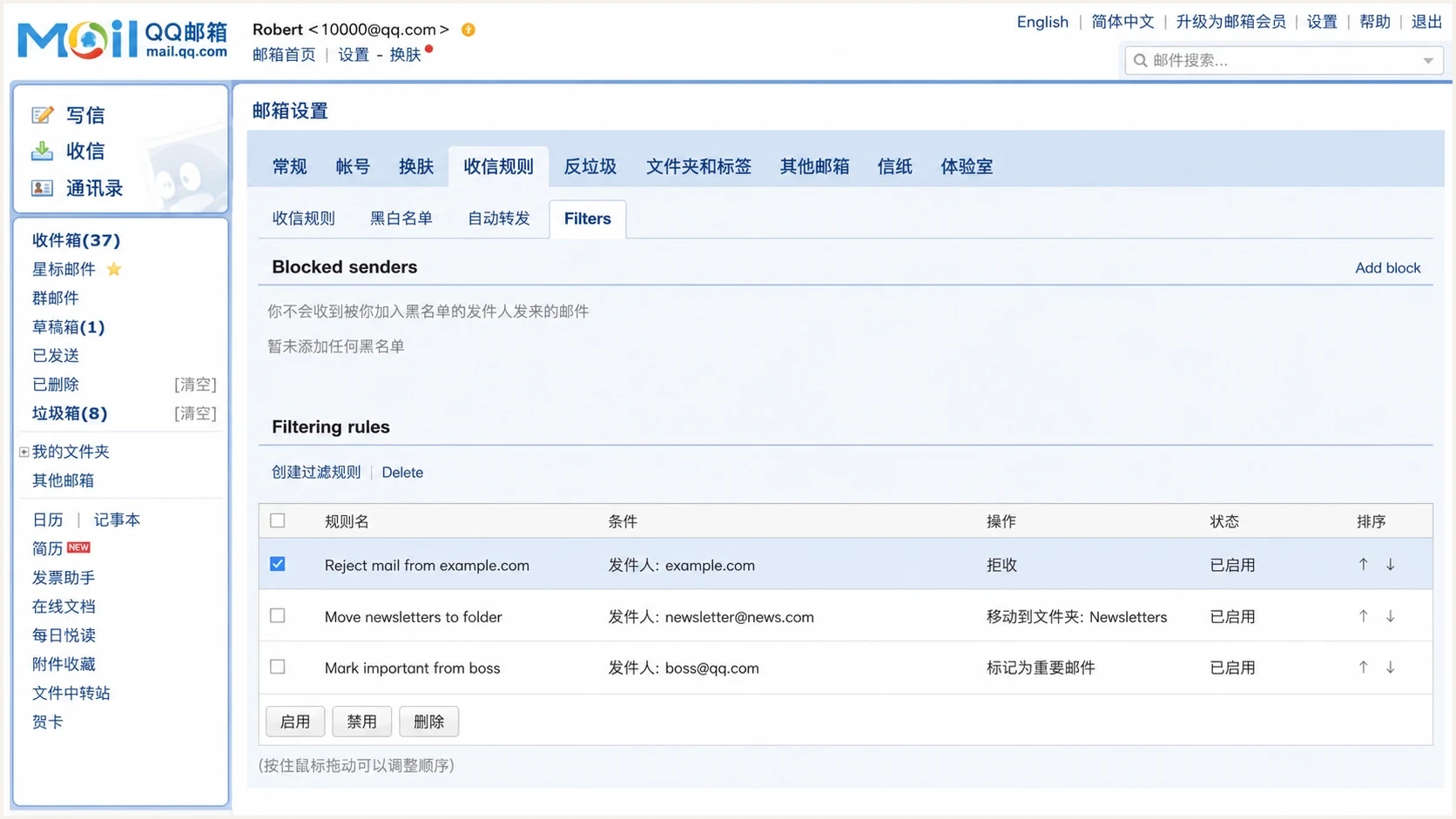
QQ Mail settings showing a personal blacklist and sender filter controls.
User-level rejection
- Scope: Only some QQ recipients reject mail while others still receive it.
- Cause: The recipient used a personal blacklist, filter rule, or complaint action.
- Fix: Suppress the address unless the recipient explicitly asks to receive mail again.
IP or domain block
- Scope: Most or all QQ recipients fail from the same IP or domain.
- Cause: QQ sees poor IP reputation, authentication gaps, bad list hygiene, or abuse.
- Fix: Pause risky traffic, repair the sender, then resume with controlled volume.
Triage the block before mitigation
Before asking QQ for mitigation, build a small evidence set. Determine whether the block is per recipient, per campaign, per IP, per sending domain, or tied to a specific type of message. Without that split, the next step becomes guesswork.
- Bounce split: Group QQ bounces by SMTP code, QQ detail code, sending IP, domain, campaign, and recipient age.
- Recipient history: Check opens, clicks, replies, complaints, unsubscribes, last consent date, and last successful delivery.
- Authentication: Confirm SPF or DKIM passes and that its authenticated domain has the relationship to the visible From domain required for a DMARC pass.
- Reputation: Check the exact outbound IP and sending domains for current blocklist (blacklist) listings, then compare them with QQ-only failures.
- Content: Review the subject, URLs, tracking domain, attachments, language, and local compliance fit for China.
For the reputation part, use blocklist monitoring for ongoing visibility, not just a one-time check after QQ starts rejecting mail. A sender can pass DMARC and still have poor IP or domain reputation, so keep both views together.
?
What's your domain score?
Deep-scan SPF, DKIM & DMARC records for email deliverability and security issues.
A domain health check is useful here because QQ delivery is rarely only about one SMTP response. You need a combined view of DMARC, SPF, DKIM, DNS, IP reputation, and sending patterns.
Fix sender-side causes first
Even when the immediate QQ rejection is user-level, sender-side fixes still matter. QQ Mail is difficult at scale, especially when a list contains many Chinese mailbox providers. If the sender has weak authentication, inconsistent volume, recycled addresses, or old consent, recipient-level blocks become a broader delivery problem.
|
|
|
|---|---|---|
DMARC | Policy and pass rate | Verify every legitimate source passes DMARC before enforcement. |
SPF | Lookup count and MailFrom | Remove unused senders and keep MailFrom under the From organizational domain, or use an exact match when policy is strict. |
DKIM | Signing domain | Sign with a d= domain under the From organizational domain, or use an exact match when policy is strict. |
SMTP identity | PTR, forward DNS, and EHLO | Use a stable hostname that resolves back to the IP. |
IP | Warmth and complaints | Reduce volume and send only to engaged recipients. |
List | Consent age | Suppress stale QQ contacts and hard bounces. |
Use this table to decide which fix to prioritize before retrying QQ traffic.
Baseline DNS records to verifydns
example.com. TXT "v=spf1 include:_spf.senders.example -all"

selector1._domainkey.example.com. TXT "v=DKIM1; k=rsa; p=BASE64KEY"

_dmarc.example.com. TXT "v=DMARC1; p=none; "
                      "rua=mailto:dmarc@example.com"
RFC 9989 made the DMARC pct tag historic. A value such as pct=25 no longer defines a standards-track staged rollout. Monitor with p=none, repair unauthenticated sources, then publish quarantine or reject after confirming that legitimate mail passes DMARC.
Suped's product brings DMARC reporting, hosted SPF, SPF flattening, hosted MTA-STS, blocklist monitoring, real-time alerts, and issue-specific remediation steps into one workflow. For a QQ incident, use it to map failing IPs to authenticated domains, spot new blacklist listings, and document fixes before a controlled retry.

Issue steps to fix dialog showing the issue overview, tailored fix steps, and verification action
After the DNS and authentication fixes, send a real test message and inspect the headers. The email tester view helps confirm the message that leaves your platform is the message QQ receives: authenticated, signed, and free of obvious formatting issues.
Handle user-level QQ blocks
If only some QQ subscribers bounce with the personal blacklist or filter rejection, do not keep retrying them. Retrying proves the user does not want the mail, increases complaint pressure, and trains mailbox filters to distrust the sender. The right move is suppression, followed by consent repair outside email.
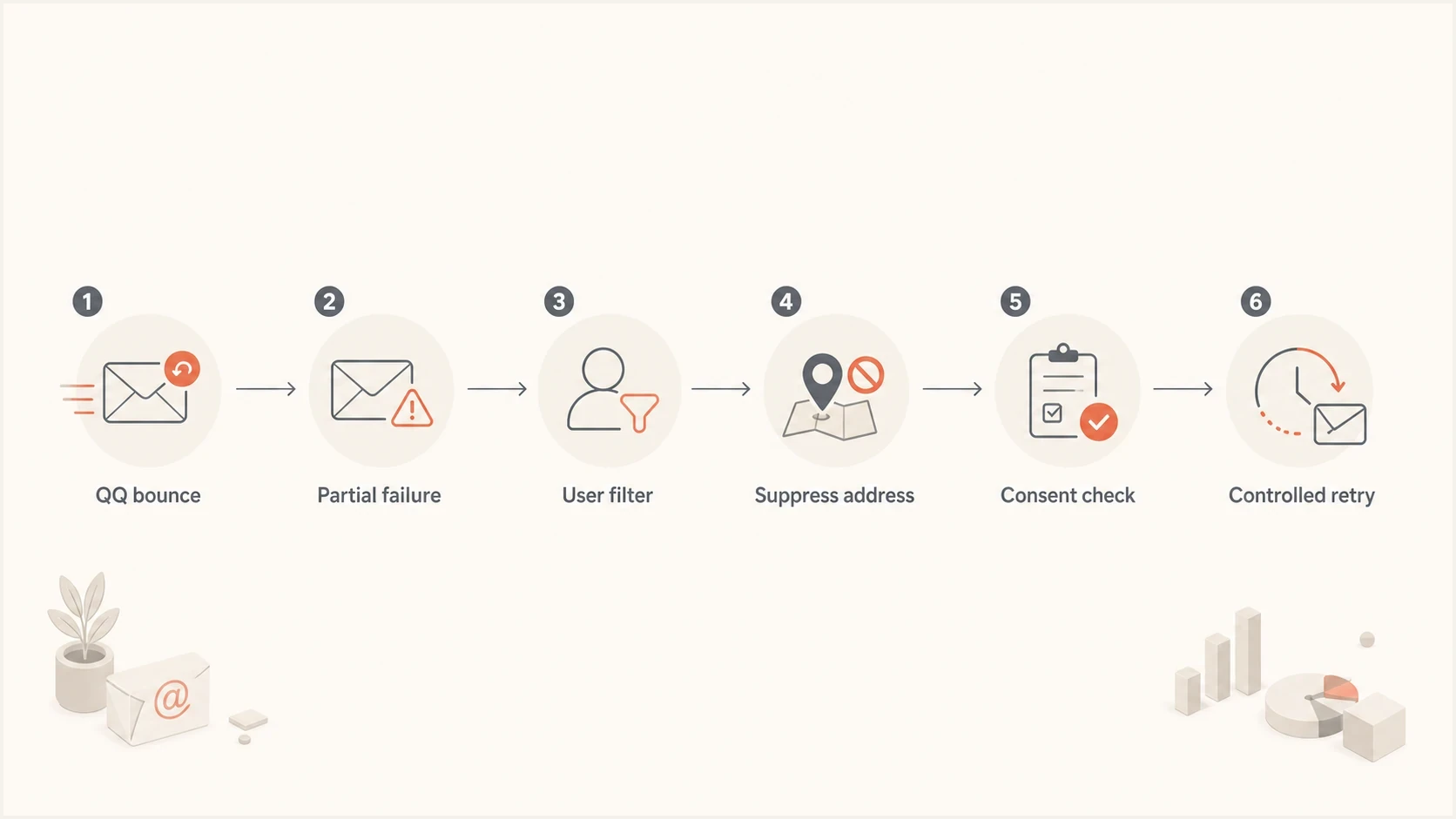
Decision flow for resolving partial QQ.com email delivery failures.
- Suppress: Move the affected QQ addresses into a no-email segment after the first confirmed personal filter rejection.
- Verify: Check whether the subscriber has recent engagement, paid status, active enrollment, or a support relationship.
- Contact: Use an account portal, SMS, app notification, or support channel to ask the user to remove the blacklist entry or add the sender to their allowlist (whitelist).
- Reconfirm: Send again only after the user takes a clear action that proves they want the messages.
A fixed wait time does not clear a recipient's personal QQ blacklist. If the user set the filter, time alone does not remove it. For a marketing list, treat those addresses as permanently suppressed. For account or education mail, require an explicit support case, portal preference change, or fresh opt-in before retrying.
For broader QQ strategy, keep the QQ segment cleaner than the rest of the list. The QQ.com best practices path is stricter: send fewer emails, use clearer consent, and remove silent recipients faster.
Handle a named RBL or DNSBL rejection
A 554 or 5.7.1 response that names an RBL or DNSBL is different from a QQ 0/92 user-filter rejection. It identifies the connecting IP as blocked by a public or receiver-side blocklist (blacklist). Capture the full bounce before checking status because a sender with an IP pool can easily investigate the wrong address.
- Save the evidence: Record the complete SMTP response, timestamp, receiving MX, message ID, envelope sender, and connecting IPv4 or IPv6 address.
- Match the IP: Confirm that the IP in the bounce belongs to the affected sending stream rather than another IP in a shared or rotating pool.
- Check the listing: Verify the exact IP's current status. If listed, stop the cause, complete the blacklist owner's removal process, and keep proof of delisting.
- Repair SMTP identity: Confirm the PTR hostname resolves forward to the same IP and use a stable, valid EHLO or HELO name.
- Retry correctly: Let the sending MTA retry temporary 4xx responses. Treat 5xx responses as permanent for that recipient and message, and avoid campaign-level resends until the cause is fixed.
If the exact IP is no longer listed, compare the delisting time with the rejection time and verify every IP in the sending pool. A stale cached result or a different pool IP can explain the mismatch. Do not rotate traffic to a fresh IP to bypass the block because that carries the same unresolved sending behaviour into a new reputation.
A QQ recipient's allowlist can repair a personal mailbox filter. It cannot override an IP rejection that happens before QQ accepts the message. A reply can provide a positive contact signal, but it does not delist the sending IP.
When to pause or contact QQ
If the pattern changes and most QQ mail starts failing, treat it as a sending reputation incident. At that point, a pause has value because it stops bad signals while you clean up the list, DNS, content, and volume plan. Use a staged restart, not a full-volume retry.
Internal QQ.com recovery bands
These are example operating bands for triage, not thresholds published by QQ.
Low concern
under 1%
Small number of isolated user-level rejects
Investigate
1-5%
Concentrated failures in old or inactive QQ segments
Pause broad sends
over 5%
Failures spread across recent and engaged QQ recipients
Contacting QQ is worth trying when you have evidence of a broad block, a clean sender setup, and a business reason for delivery. It is weak when the issue is a list of users who blocked the sender themselves. The stronger mitigation package includes timestamps, source IPs, envelope sender, From domain, sample message IDs, bounce text, authentication results, and a short explanation of what changed.
|
|
|
|---|---|---|
Some users | Suppress affected recipients | Only after reconfirmation |
Old segment | Pause and clean list | Restart with engaged users |
All QQ mail | Pause risky streams | Ramp after clean tests |
All domains | Investigate IP reputation | Restart after root cause |
The right mitigation path depends on the bounce pattern.
For China-specific sending, also check whether your content, consent flow, and local expectations fit the recipient base. The Chinese market rules matter more when you send at volume to QQ, NetEase, Sina, and other Chinese mailbox providers.
Monitor recovery and keep it stable
A QQ.com recovery plan fails when the sender fixes DNS but keeps mailing the same unhappy users. Monitor engaged and inactive QQ users separately, and keep every address that produced a personal blacklist or filter rejection suppressed. These groups should never share the same retry plan.

Blocklist monitoring page showing domain and IP checks across blocklists with importance and status
Suped's product keeps DMARC reports, authentication failures, alerts, blocklist (blacklist) status, hosted SPF, and sender issue remediation in the same operational workflow. For MSPs and teams that manage many domains, use the domain-level views to keep a QQ issue on one domain separate from a DNS or reputation problem on another.
Example QQ restart plan
A controlled restart keeps volume low until bounce and complaint signals stay clean.
QQ segment volume restored
Keep a daily view of delivery rate, hard bounce rate, QQ-only rejection rate, complaint rate, DMARC pass rate, and blacklist status. A public blocklists reference helps explain what an IP listing means, but the recovery decision still depends on your own bounce data.
- Clean start: Restart only with QQ users who opened, clicked, logged in, purchased, or requested mail recently.
- Strict stop: Suppress any QQ address that returns another personal blacklist or filter rejection.
- Separate streams: Keep transactional and marketing mail on separate, clearly governed sending streams.
- Daily review: Review QQ-specific outcomes daily during recovery, not only aggregate campaign metrics.
Views from the trenches
Best practices
Segment QQ users separately so partial rejections do not distort the whole campaign.
Treat user filter bounces as consent signals and suppress them before retrying again.
Keep authentication, IP reputation, and list source evidence ready before escalation.
Common pitfalls
Assuming every QQ bounce is a global IP block wastes time and keeps bad mail flowing.
Retrying users who set filters creates complaint pressure and hurts the sender further.
Mixing inactive QQ users with engaged users makes recovery data harder to trust.
Expert tips
Translate QQ detail pages carefully because one phrase can change the fix completely.
Restart QQ traffic with a small engaged cohort before adding older list segments.
Use non-email channels for real users who need account mail after blocking a sender.
Expert from Email Geeks says a partial QQ failure with that rejection text usually means specific subscribers blocked the sender, not that QQ applied a global IP block.
2024-08-07 - Email Geeks
Expert from Email Geeks says those recipients should stop receiving mail unless they remove the block through another channel and clearly want the messages again.
2024-08-07 - Email Geeks
Choose the right QQ recovery path
For the QQ.com 0/92 style rejection, stop mailing the affected QQ addresses immediately, classify them as user-level blocks, and only restore them after a clear subscriber action. Then audit DMARC, SPF, DKIM, sending IP reputation, complaint history, and QQ segment engagement before sending more volume.
For a broader QQ block, pause risky QQ campaigns, keep necessary transactional mail clean and low volume, send only to recently engaged users during restart, and watch bounce patterns daily. A mitigation request to QQ is strongest after the sender can show clean authentication, clean list handling, and a specific change that reduced bad signals.




