How to get Microsoft to reclassify a website link redirector?

Published 28 Jun 2025
Updated 23 Sep 2026
13 min read
Summarize with
Updated on 23 Sep 2026: We added a diagnostic step for separating Microsoft reputation warnings from TLS, browser, and network failures, and refreshed the Defender submission and retesting workflow.
To get Microsoft to reclassify a website link redirector, treat it as a URL reputation incident first and an email deliverability incident second. Confirm that Microsoft produced a Safe Links or SmartScreen warning rather than a TLS, browser, DNS, or network error. Then prove the redirector is clean, remove or isolate bad destination URLs, submit the correct URL for review, and escalate with a concise evidence pack if the initial review does not resolve it.
For an ESP or marketing platform link redirector, Microsoft can evaluate the redirector domain, the final landing page, and the behaviour of intermediate redirects. A clean root domain does not always clear the tracked click URL. A customer-specific branded tracking domain also does not fully isolate reputation if the redirect infrastructure, path pattern, or abused destination has already been associated with unsafe links.
- Confirm: capture the exact warning, original URL, rewritten URL if present, timestamp, recipient tenant, and final destination.
- Clean: audit recent campaigns that used the redirector and pause any customer, campaign, or destination with suspicious content, open redirects, or unexpected landing pages.
- Submit: use the review route for the Microsoft product that displayed the warning, and submit the tracked URL rather than only the root domain.
- Escalate: provide the submission ID and proof that the same URL chain has been remediated and retested.
Why Microsoft flags redirectors
Microsoft Safe Links checks URLs in supported Microsoft 365 environments. Depending on the client and policy, it can rewrite the URL or call Safe Links through an API when the user clicks. Microsoft explains the protection model in its Safe Links documentation. A redirector can be flagged when the final destination is risky, the redirect behaviour resembles abuse, or Microsoft has an unsafe verdict for part of the URL chain.
A website link redirector has its own domain and IP reputation, but it also inherits risk from the URLs it sends users toward. A compromised customer, expired landing page, or uncontrolled redirect can therefore make a shared click-tracking service look unsafe.
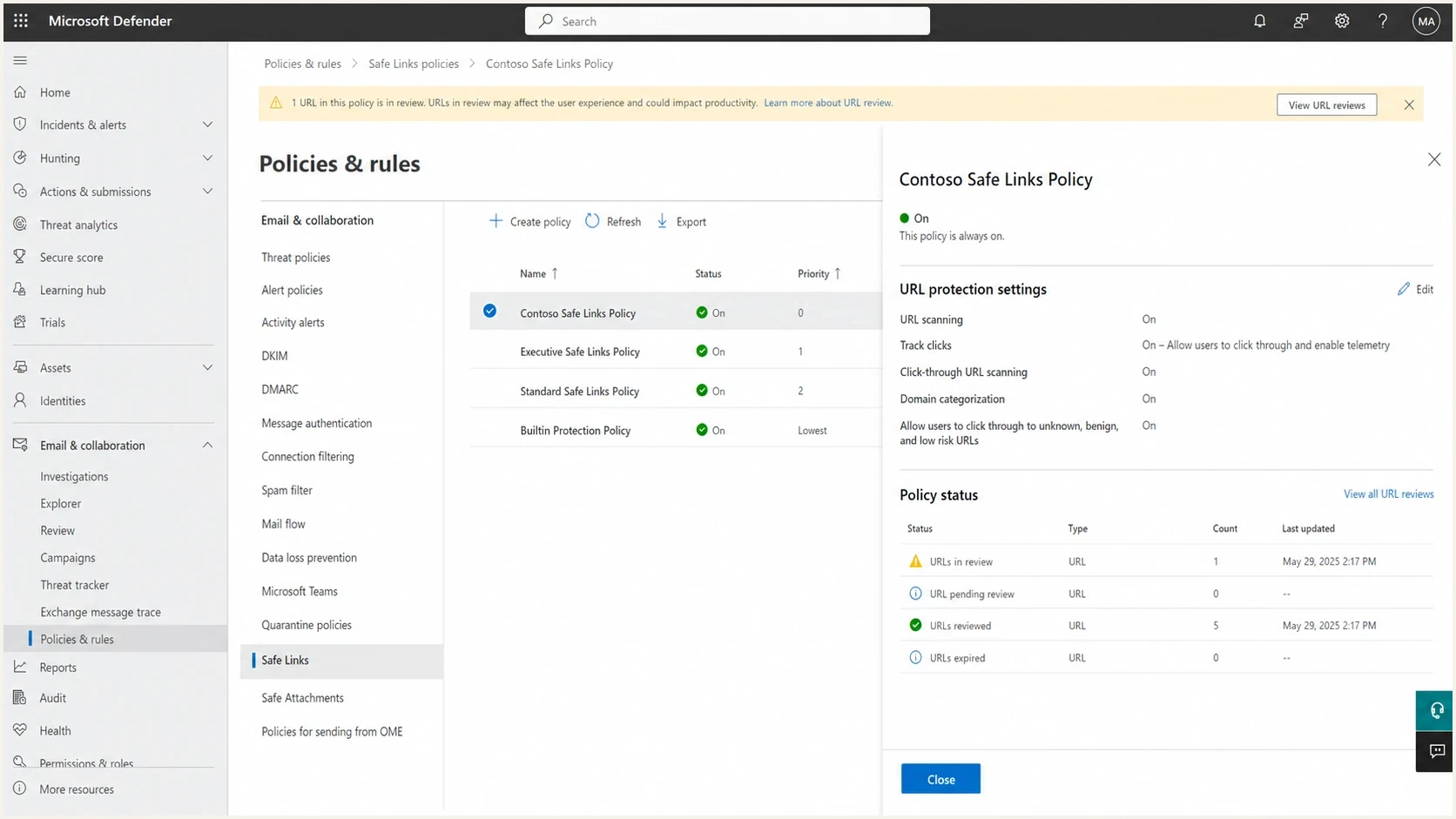
Microsoft Defender portal with Safe Links policy settings and a URL review warning.
Likely false positive
- Scope: only Microsoft users see the warning, and other mailbox providers accept the same campaign.
- Checks: malware scans and URL reputation checks show no active unsafe content.
- Pattern: the warning appears across normal customer links without a clear campaign change.
- Fix path: submit the tracked URL and escalate with evidence through the affected tenant.
Actual redirector risk
- Scope: multiple security systems or customer tenants flag the URL chain.
- Checks: the final URL changed, the landing page was compromised, or an open redirect exists.
- Pattern: a sender or customer recently pushed unusual volume or unfamiliar domains.
- Fix path: disable the bad route first, then request reclassification after retesting.
Match the warning to the review route
Do not treat every Microsoft warning as Safe Links. Microsoft Defender for Office 365 and Microsoft Defender SmartScreen use different review routes. The warning page, URL shown in the delivered message, and message trace tell you which route to use.
|
|
|
|---|---|---|
Safe Links | The message URL uses safelinks.protection.outlook.com, or Defender records a URL click verdict even when the client shows the original link. | An affected tenant admin submits the original tracked URL on the Defender Submissions page. |
SmartScreen | Microsoft Edge displays a browser page stating that the site was reported as unsafe. | On the warning page, open More information and report that the site does not contain threats. |
Use the visible warning to choose the reclassification route.
SmartScreen owners should keep the confirmation email
Microsoft's current owner workflow sends a confirmation email from the SmartScreen Reputation Group. Keep that message and reply to it with the redirect chain, cleanup proof, and business impact if the warning remains or the case is urgent.
Rule out a redirect, TLS, or policy failure
A redirect that fails in Edge or on one network does not automatically need Microsoft reclassification. Record the exact page title and error text before opening a reputation case. A certificate warning, browser redirect control, DNS failure, or managed security policy needs a different fix.
|
|
|
|---|---|---|
Safe Links warning after an email click | Defender for Office 365 URL verdict | Use the Defender Submissions page. |
Edge says the website was reported as unsafe | SmartScreen reputation verdict | Report the site as safe from the warning page. |
Connection is not private or secure | Certificate, hostname, protocol, or HTTPS configuration | Fix TLS and retest the complete redirect chain. |
Pop-ups and redirects are blocked | Browser permission or site setting | Correct the site behaviour or browser setting. Do not file a reputation appeal. |
The link works on mobile data but not a managed network | DNS filtering, endpoint protection, firewall policy, or proxy handling | Ask the network administrator for the blocking product, rule, and event record. |
Route the incident by the message the user actually sees.
Do not bypass a warning to test production traffic
Use a controlled test account and inspect logs instead. A bypass can expose the tester to an unsafe destination and does not establish that the redirector is clean.
First isolate the exact failure
Start by proving what Microsoft is classifying. Do not assume the root domain is the issue. With link redirectors, the failing object is often the full tracked URL path, a branded tracking subdomain, or a redirect chain that lands on a customer page.
For Safe Links, send a new email to a mailbox protected by Microsoft Defender for Office 365. Click the link in a supported Outlook client and record the warning page or Defender click verdict. If the same email passes in non-Microsoft mailboxes, that supports a Microsoft-specific classification issue, but it does not prove the redirector is safe.
Submit the tracked URL, not only the homepage
Submit the original tracked redirector URL that Microsoft evaluated. Keep the Safe Links rewritten URL when one appears, and include the final landing page so the reviewer can reproduce the complete chain. A homepage review can come back clean while the campaign link still triggers the warning.
- Original: the tracked URL in the HTML before Microsoft processes it.
- Rewritten: the safelinks.protection.outlook.com URL when the client or policy exposes one.
- Final: the destination after every redirect completes.
- Evidence: screenshots, timestamps, tenant IDs, message headers, click records, and campaign identifiers.
Evidence pack templatetext
Incident: Microsoft Safe Links flags branded redirector
Affected domain: links.customer.example
Original URL: https://links.customer.example/c/abc123
Safe Links URL: https://*.safelinks.protection.outlook.com/...
Final destination: https://www.customer.example/landing-page
First seen: <YYYY-MM-DD HH:MM timezone>
Affected tenants: contoso.com, fabrikam.com
Sender domain: mail.customer.example
Message ID: <paste-message-id>
Action taken: paused campaign and verified final landing page
Requested action: reclassify URL as safe after review
Clean the redirect chain before asking
A reclassification request has a better chance when the redirector is demonstrably controlled. Check every destination used by the affected customer or campaign, then look for abuse patterns that make a shared redirector look like a disposable shortener. Remove any questionable path before submitting the review.
- Open redirects: reject any parameter that lets an unauthenticated user send traffic to an arbitrary domain.
- Expired pages: remove links that now land on parked domains, error pages, or unrelated content.
- Redirect responses: use an intentional 301, 302, 307, or 308 status, return a valid Location header, and remove loops or broken hops.
- Long chains: reduce unnecessary hops because each extra redirect adds another reputation dependency.
- Customer abuse: suspend the sender or template that generated the risky click activity.
- HTTPS: keep the redirect and destination on valid TLS with no mixed-content handoff.
A permanent or temporary redirect status does not improve URL reputation by itself. The status must match the redirect's purpose, and every hop must remain controlled.
Check public blocklist (blacklist) status as a separate part of the incident. Suped's platform can keep blocklist monitoring, authentication checks, alerts, and the remediation timeline in one operational record. It does not replace Microsoft's URL review.
Blocklist checker
Check your domain or IP against 144 blocklists.







If the domain or IP appears on public blocklists, fix that separately from the Microsoft case. If broader checks are clean and Microsoft still blocks only through Safe Links or SmartScreen, state that scope plainly without speculating about Microsoft's internal signals.

Blocklist monitoring page showing domain and IP checks across blocklists with importance and status
Submit and escalate to Microsoft
For a Safe Links false positive, an affected tenant admin should open the Microsoft Defender portal, go to Actions & submissions, open Submissions, choose the URLs tab, and select Submit to Microsoft for analysis. Enter the full original tracked URL. Choose "It appears clean" when a verdict is needed, or "I've confirmed it's clean" when the investigation has established that the URL is safe.
Microsoft currently accepts up to 50 URLs in one submission, but submit the smallest representative set that reproduces the incident. Microsoft also accepts a domain-level pattern when the verdict affects the domain broadly. For a path-specific redirector problem, start with the affected tracked path. A good-URL submission can cover later variations under that path, so separate query strings do not always need separate submissions.
A tenant allow is temporary mitigation
When the option is available, "Allow this URL" creates an entry in that tenant's Tenant Allow/Block List and overrides URL-based filtering when the URL is encountered again. It does not globally reclassify the redirector. Microsoft says the entry should become active within five minutes. Use the shortest practical expiry, add the incident or case ID to the note, and continue the Microsoft review.
A URL allow created through a clean submission can be set to expire within 30 days, or use the default removal after 45 days from the last clean determination. Remove it sooner when Microsoft clears the verdict and normal testing passes.
|
|
|
|---|---|---|
Defender submission | Safe Links flags the URL | tracked URL |
Temporary tenant allow | mail must resume | expiry and note |
Dispute result | completed verdict is wrong | new evidence |
Support case | impact is recurring | submission ID |
Use each path for its specific purpose.
Follow the submission status on the URLs tab. If an eligible completed result is wrong, use Dispute submission result and select Result so Microsoft reevaluates it with the original history attached. A result can be disputed once. Resubmitting an eligible item starts the analysis again without the earlier verdict or history and can be used more than once when the URL or evidence has materially changed.
Open a Microsoft 365 support case from an affected tenant when business impact continues after submission, or when the same clean redirector is repeatedly classified as unsafe. Include the symptom, submission ID, exact URL evidence, completed remediation, and requested action. If the first response repeats general sender guidance, ask for escalation to the Defender for Office 365 or URL reputation team.
Short escalation wordingtext
Microsoft Safe Links is blocking this branded tracking URL.
The redirector is controlled by our email platform.
We verified the final destination and paused risky traffic.
Defender submission ID: <paste-submission-id>
The URL remains unsafe in the affected Microsoft 365 tenant.
Please escalate for URL reputation review and reclassify it if clean.
If the issue affects ongoing B2B mail, keep a separate note for customer support teams. State that Microsoft is reviewing a URL reputation false positive, not that the customer's mailbox is broken. The related page on how to contact Microsoft covers the support evidence and routing details in more depth.
What to monitor while waiting
Do not assume reclassification has cleared until a fresh message and fresh click both pass. Cached verdicts, existing rewritten URLs, and tenant-specific policy differences can make one test pass while another still fails.
In the affected tenant, use the Microsoft URL protection report to record the click action, app, recipient, domain, and click time. The report provides near-real-time Safe Links evidence, but user click data appears only when Track user clicks is enabled in the effective Safe Links policy.
Run the same email through an email tester after the review request, then test again from the affected Microsoft tenant. The tester helps catch authentication, content, and link issues in the message itself, while the tenant click test confirms the Microsoft Safe Links verdict.
- Retest: send a new message after Microsoft completes the URL review.
- Compare: test multiple affected tenants because Safe Links policy and caching differ.
- Log: record each URL verdict with timestamp, tenant, message ID, screenshot, click action, and submission ID.
- Separate: track Microsoft URL reputation apart from IP blocks, SCL changes, and spam placement.
Suped's platform can keep blocklist (blacklist) alerts, DMARC authentication changes, and the incident timeline attached to the affected sending domain. That record helps teams compare a Microsoft-only URL verdict with broader sender reputation signals without treating DMARC as a URL reclassification control.
Prevent the next redirector false positive
A redirector is safer when it behaves like controlled email infrastructure, not a public shortener. The strongest preventive control is destination governance. Every tracked link should point to a known customer destination, and every customer should lose redirect privileges quickly when their links create risk.
- Tenant isolation: use customer-branded domains where practical and keep abuse response tied to each customer.
- Destination allowlists: approve landing domains before campaigns go live, especially for new senders.
- Page integrity: restrict uploads, review scripts, apply Content Security Policy, and stop unknown sites loading in frames.
- Abuse throttles: slow or suspend campaigns when click volume or complaint behaviour changes suddenly.
- Short chains: avoid stacking several tracking, analytics, and CMS redirects on one click.
- Fast rollback: keep a process to disable one customer path without taking down every sender.
Microsoft URL reputation problems can also overlap with Outlook warnings. The related guide on unsafe Outlook links is useful when the symptom is a user-facing link warning rather than a message rejection.
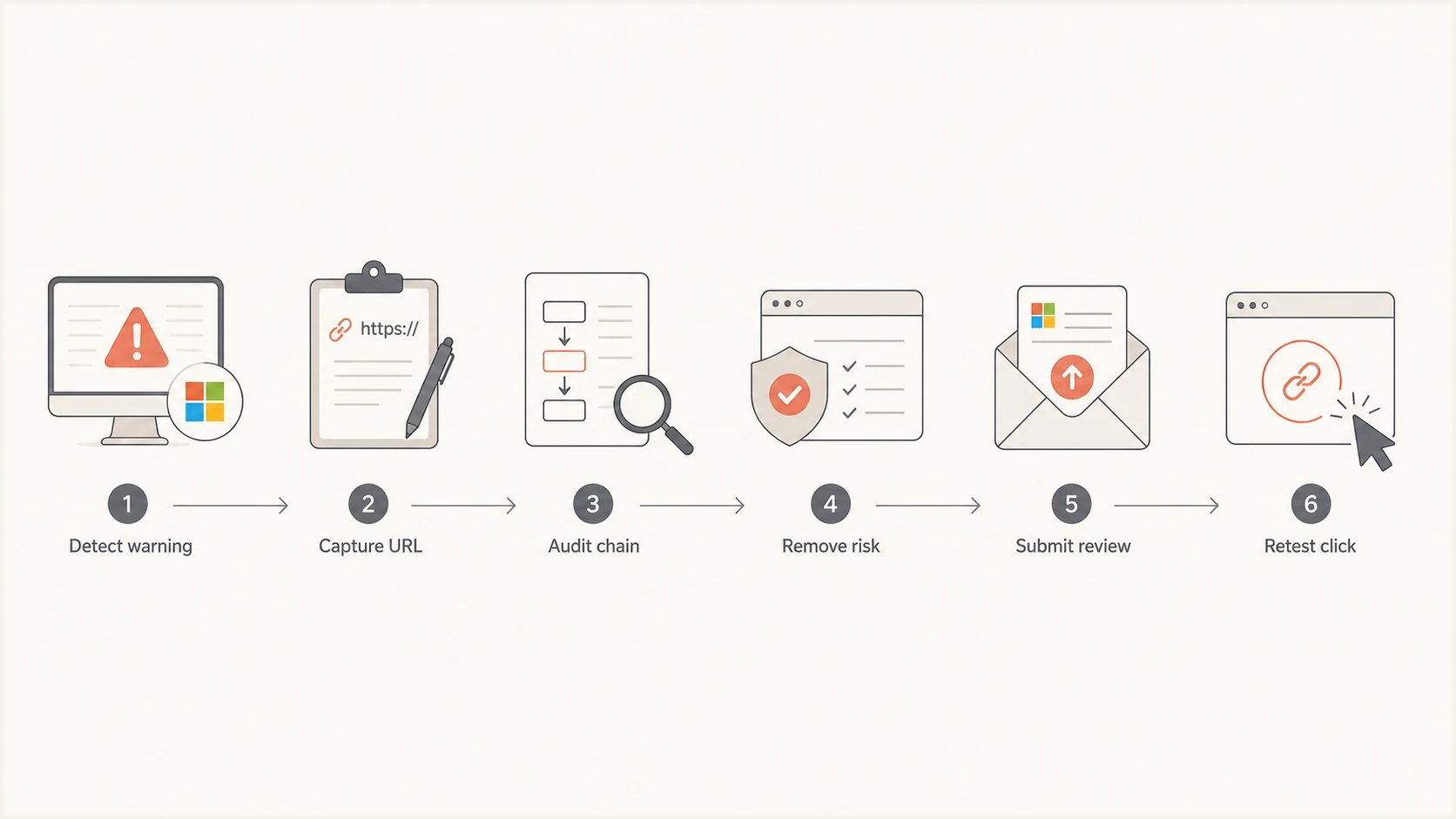
Microsoft Safe Links and SmartScreen redirector reclassification flow from warning to retest.
Views from the trenches
Best practices
Capture the exact Safe Links URL and final destination before opening the review case.
Pause questionable customer links first, then submit the cleaned redirect chain for review.
Keep a tenant-specific test mailbox so Microsoft-only URL verdicts are easy to reproduce.
Common pitfalls
Submitting only the root domain leaves the blocked tracking path classified as unsafe.
Assuming clean public scans prove safety misses tenant-specific Safe Links behavior.
Leaving open redirect behavior unfixed gives reviewers a valid reason to keep the block.
Expert tips
Attach timestamps, message IDs, screenshots, and the final URL to shorten review cycles.
Track URL reputation separately from IP reputation so the case stays focused and clear.
Give support a precise reclassification request instead of a broad deliverability complaint.
Marketer from Email Geeks says a manual report and a Microsoft 365 escalation cleared a similar Safe Links false positive the next day.
2021-02-26 - Email Geeks
Marketer from Email Geeks says it matters whether the redirector is an ESP click encoder or a public shortener-style service.
2021-02-26 - Email Geeks




