How do I contact Microsoft about email deliverability issues for B2B clients?


Updated on 1 Aug 2026: We updated this guide with Microsoft's current delisting and false-positive submission steps.
For B2B Microsoft deliverability issues, there is no reliable public route to a normal sender-facing Microsoft deliverability contact. If an NDR identifies a Microsoft 365 IP block and points to sender.office.com, use that portal. For error 5.7.511, follow the NDR and email the full NDR plus the blocked source IP to delist@microsoft.com. If mail is going to Junk, being throttled, or failing only inside a Microsoft 365 tenant, ask the recipient's Microsoft 365 admin to submit the message to Microsoft and open a support ticket with the evidence you provide.
That distinction matters. The sender portal is useful for the IP blocks named in the NDR. It is not a diagnostic conversation for intermittent B2B spam placement. For Microsoft 365 business mail, the receiving tenant has the message trace, quarantine data, SCL, BCL, Defender verdicts, transport rules, allow and block entries, and mailbox-level signals. Without that data, the sender side is guessing.
- 5.7.606-649 IP block: Use sender.office.com when the NDR directs you to Microsoft's Anti-Spam IP Delist Portal.
- 5.7.511 block: Follow the NDR and send the full rejection plus source IP to delist@microsoft.com.
- Spam placement: Ask the recipient admin to submit the message to Microsoft, then open a Microsoft 365 support case if needed.
- Intermittent failures: Collect multiple examples across tenants, dates, IPs, and message types before asking for escalation.
- No bounce: Treat it as a filtering investigation, not a delisting request.
The Microsoft contact routes that actually matter
Separate Microsoft deliverability contact work into public sender support and recipient-tenant support. Technical proof supports both routes. Public sender support is narrow, while recipient-tenant support has more useful telemetry. The evidence keeps the case from becoming a vague complaint about spam placement.
|
|
|
|---|---|---|
SMTP IP block | NDR-directed delist route | Full NDR, IP, UTC time, code |
Junk folder | Recipient admin submission | Original message, trace, verdict |
Tenant-only issue | Tenant support | Network Message ID, SCL, policy |
IP reputation concern | NDR-directed sender support | IP history and complaint data |
Mixed symptoms | Both applicable routes | Samples grouped by tenant |
Use the route that matches the symptom, not the route that feels easiest.
Treat the Microsoft sender form as a Microsoft 365 IP-delisting intake, not as a general account management channel. If you need the form location, the Microsoft sender form walkthrough explains the route and what to expect. Microsoft Q&A answers also point blocked senders to the delist flow and note that external senders often need the recipient to contact support. The Microsoft Q&A thread helps confirm how limited the public sender path is.
Do not frame every Microsoft issue as delisting
If the IP is not blocked and mail is intermittently placed in Junk, a delist request has weak fit. In that case, the receiving tenant's Microsoft 365 admin has the better support path because the admin can expose the filtering verdict and policy context.
Build the evidence before you contact Microsoft
Before contacting Microsoft, build a packet that answers one question: why should Microsoft treat this as a deliverability fault rather than normal filtering? A single statement like "our mail is going to spam" is too thin. A packet with matching headers, message trace data, authentication results, and a clear affected pattern has a better chance.
Start with a controlled test using Suped's email tester so you have headers, authentication results, and content warnings from a real send. Then run Suped's domain health check to confirm SPF, DKIM, DMARC, DNS, and related signals before asking another team to escalate.
Email tester
Send a real email to this address. Suped shows a results button when the test is ready.
?/43tests passed
For B2B clients, collect at least two real recipient examples from different Microsoft 365 tenants when possible. One example shows an incident. Several examples with the same sending IP, domain, content class, and date range show a repeatable pattern.
- Message proof: Collect full headers or the original EML, not forwarded copies, because forwarding changes key header data.
- Sending proof: Record the sending IP, envelope sender, visible From domain, selector, and exact UTC send time.
- Recipient proof: Ask the admin for message trace, Network Message ID, quarantine status, SCL, BCL, and policy matches.
- Pattern proof: Show whether the issue affects one tenant, one geography, one content type, or all Microsoft recipients.

Issue steps to fix dialog showing the issue overview, tailored fix steps, and verification action
Suped's DMARC platform supports this workflow by turning authentication and reputation findings into a short fix list. Monitor DMARC, SPF, DKIM, and blocklist (blacklist) status, then use the results as evidence instead of manually stitching reports together.
Case evidence templatetext
Issue type: B2B Microsoft 365 spam placement or intermittent block
Sending domain: example.com
Sending IP: 203.0.113.10
Envelope sender: bounce.example.com
Visible From domain: example.com
Authentication: SPF pass, DKIM pass, DMARC pass
Affected recipients: tenant-a.com, tenant-b.com
Send times: 2026-05-20 14:15 UTC, 2026-05-20 16:40 UTC
Message IDs: include full values from headers
Network Message IDs: ask each recipient admin for the matching value
Recipient verdicts: ask for SCL, BCL, quarantine, and policy match
Submission ID: include after the admin submits the message to Microsoft
Business impact: transactional mail delayed or placed in Junk
Hard blocks and spam placement need different playbooks
A common mistake is treating every Microsoft complaint the same way. A Microsoft 365 5.7.606-649 IP rejection, a 5.7.511 rejection, and a message that lands in Junk are different problems. The evidence and contact route change with the symptom.
Explicit block
- Signal: The SMTP rejection or NDR names a Microsoft delisting route.
- Route: Use sender.office.com for 5.7.606-649, or email delist@microsoft.com for 5.7.511.
- Goal: Request delisting or reputation review for the blocked source IP.
Spam placement
- Signal: Mail is accepted at SMTP but lands in Junk or quarantine.
- Route: Ask the recipient admin to submit it as legitimate mail, then use Microsoft 365 support if needed.
- Goal: Find the tenant verdict, policy match, or content classification.
When Microsoft accepts the message but filters it later, the answer is often inside Exchange Online Protection or Microsoft Defender for Office 365. The sender cannot see those details directly. If you need a deeper path through this type of case, the Outlook troubleshooting steps cover the filtering checks that matter most.
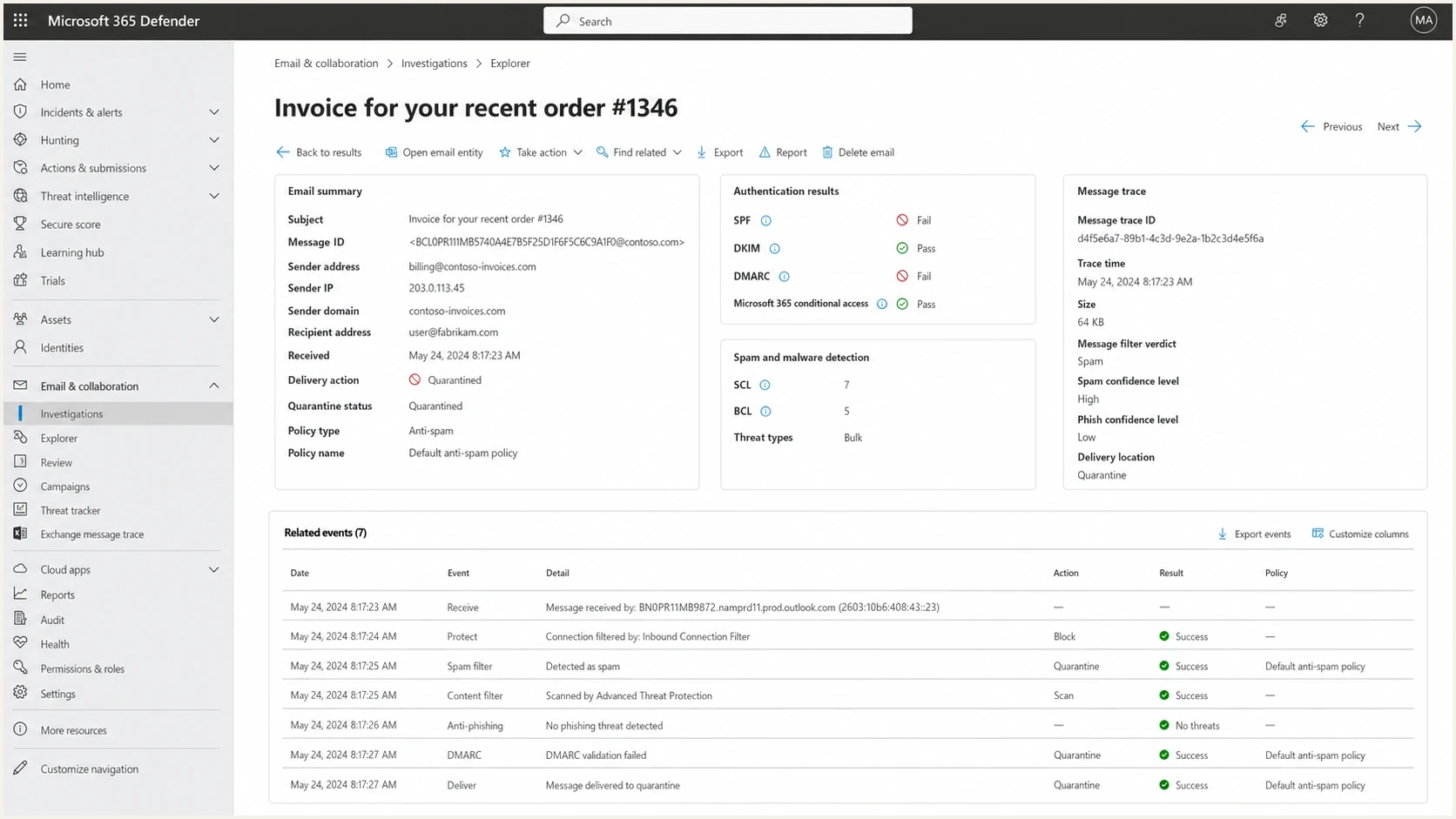
Microsoft 365 Defender message details showing verdict and policy data for a deliverability case.
Example hard-block evidencetext
SMTP response: 550 5.7.606-649 Access denied, banned sending IP
Remote system: contoso-com.mail.protection.outlook.com
Sending IP: 203.0.113.10
Recipient domain: contoso.com
Timestamp: 2026-05-20 14:15 UTC
Action: submit the IP through sender.office.com

For 5.7.511 instead:
Action: email the full NDR and source IP to delist@microsoft.com
What to send the recipient admin
When the recipient is a B2B customer, keep the ask short. The recipient admin does not need a long theory about Microsoft filtering. They need the exact message, the exact time, and the exact data to pull from their tenant.
Recipient admin packet
- Submit: Ask the admin to submit the legitimate message to Microsoft for analysis.
- Trace: Ask for delivery action, policy match, SCL, BCL, Network Message ID, and quarantine status.
- Sample: Send the original message as an EML attachment, not a forwarded copy.
- Escalate: If the submission does not resolve the issue, open a support case with the Submission ID and evidence packet.
This is also where full headers matter. Microsoft documentation for Customer Insights deliverability issues says an email sample with full headers or an EML attachment is needed because forwarding removes essential headers. That same principle applies to general B2B troubleshooting. The Microsoft guidance is specific to that product, but the evidence standard is useful.
Short note to the recipient admintext
Subject: Microsoft 365 deliverability review request

We are investigating a Microsoft 365 delivery issue affecting mail
from example.com to your tenant. The message was accepted by Microsoft
but reached Junk or quarantine.

Please report the message as Not junk and ask your Microsoft 365 admin
to submit it to Microsoft for analysis. If the issue continues, please
open a Microsoft 365 support case with the original EML, Submission ID,
message trace result, SCL, BCL, quarantine status, policy matches, and
Network Message ID.

Sending IP: 203.0.113.10
Sender domain: example.com
Send time: 2026-05-20 14:15 UTC
Message ID: include value from the message headers
Ask the admin to submit a false positive
For legitimate mail in Junk, the recipient can use Outlook's Report action and select Not junk. The Microsoft 365 admin can then review the report or submit the original message through the Submissions page in the Microsoft Defender portal. This sends the message to Microsoft for analysis and produces a result that is more useful than a general complaint.
- The recipient reports the affected message as Not junk in Outlook.
- Within 30 days, while the message remains in the mailbox, the admin opens the Defender Submissions page and submits the email as legitimate.
- The admin records the Submission ID, result, original verdict, and detection reason.
- If delivery still fails, the admin opens Microsoft 365 support with the Submission ID and matching trace evidence.
Use allow entries as temporary containment
A tenant allow entry can restore delivery while Microsoft reviews a false positive, but it only changes that tenant's handling and can bypass useful filtering. Use the narrowest entry for the shortest practical period, then remove it after Microsoft corrects the verdict or the sender fixes the cause.
Fix the obvious issues first
Do not ask Microsoft to investigate until the basics are clean. A dedicated IP sending only a few thousand messages per day can work, but it gives Microsoft less positive traffic history than a higher-volume stream with consistent recipient interaction. If the issue is new, check what changed: content, traffic mix, sending cadence, authentication, DNS, complaint rate, and recipient interaction.
Microsoft's enforced high-volume authentication threshold applies when a domain sends at least 5,000 messages per day to Outlook.com consumer addresses, including Hotmail, Live, and MSN. It does not define the support route for mail sent to custom domains hosted on Microsoft 365. SPF, DKIM, and DMARC still provide essential evidence in either case.
Case strength before escalation
Use this as a quick test of whether a Microsoft case has enough proof.
Weak
0-40%
One complaint, no headers, no trace
Usable
41-75%
Headers and one tenant trace
Strong
76-100%
Repeatable pattern across tenants
Confirm SPF, DKIM, and DMARC pass on real mail, not only that the DNS records exist. Suped's DMARC monitoring helps catch source-level failures and policy drift before those failures become a Microsoft case. Check IP and domain reputation with blocklist monitoring because a blocklist or blacklist hit gives Microsoft another reason to distrust the stream.
- Authentication: SPF, DKIM, and DMARC should pass on the same message that failed at Microsoft.
- Domain match: The visible From domain should match authenticated domains in a way DMARC accepts.
- IP behavior: Volume should be steady enough for Microsoft to build confidence in the stream.
- Recipient quality: High complaint rates, low engagement, old contacts, and role accounts weaken reputation.
- DNS hygiene: PTR, HELO, SPF includes, DKIM selectors, and DMARC rua reporting should be clean.
Where Suped fits in the Microsoft workflow
Suped does not replace Microsoft support. Suped's DMARC platform helps you reach Microsoft or the recipient admin with better proof. The sender needs to show that authentication is clean, sources are known, reputation is being watched, and the issue is isolated to Microsoft or specific tenants.
Suped workflow
- Monitor: Track DMARC, SPF, DKIM, sending sources, and policy movement in one place.
- Detect: Use automated issue detection and fix steps before opening a support case.
- Alert: Get real-time alerts when authentication failure rates or source behavior changes.
- Control: Use Hosted DMARC, Hosted SPF, SPF flattening, and Hosted MTA-STS where DNS management is slow.
- Scale: Use the MSP and multi-tenancy dashboard when one team manages many client domains.
The workflow keeps the case tied to evidence: which sources sent mail, which messages authenticated, what changed, and what needs repair. Microsoft or the recipient admin can use that evidence when the problem is intermittent.
Views from the trenches
Best practices
Open the sender form only for true blocks; use tenant support for Junk placement.
Build cases with headers, trace details, SCL, BCL, and exact UTC send times for proof.
Separate Microsoft-specific symptoms from general authentication or list quality issues.
Common pitfalls
Treating spam placement as a delisting case wastes time and weakens the ask badly.
Forwarded samples remove headers, which makes Defender and trace review much harder.
Low-volume dedicated IPs often lack enough positive signals for fast reputation recovery.
Expert tips
Ask affected recipients to escalate through their tenant because they see the verdicts.
Track the first bad date closely; Microsoft cases improve when the pattern is time-bound.
Keep a standard evidence packet ready so each new incident adds proof, not confusion.
Marketer from Email Geeks says the sender support form is the main public route, but it fits hard blocks better than vague B2B spam placement.
2024-04-25 - Email Geeks
Marketer from Email Geeks says intermittent Microsoft 365 filtering needs tenant-side data because the sender cannot see Defender verdicts.
2024-04-25 - Email Geeks
Choose the route by symptom
For a Microsoft 365 IP block, follow the NDR: use sender.office.com for 5.7.606-649, or email the full NDR to delist@microsoft.com for 5.7.511. For Junk placement, quarantine, or tenant-only failures, ask the recipient to report the message as Not junk and ask their Microsoft 365 admin to submit it to Microsoft. If the issue continues, the admin can open a support ticket with the Submission ID and evidence packet.
Clean authentication, steady traffic, known sending sources, healthy recipient lists, and blocklist (blacklist) monitoring strengthen the case before a support response arrives. Suped keeps that evidence current by showing source changes, authentication results, and issues that need repair.




