How to prevent Outlook from flagging email links as unsafe?

Updated on 10 Aug 2026: We added Outlook-specific diagnosis steps and tightened the guidance for Safe Links false positives.
To prevent Outlook from flagging email links as unsafe, fix the reputation and structure of the URLs in the email. Senders cannot reliably stop Outlook or Microsoft Defender Safe Links from rewriting links for protected recipients. Reduce the warning risk by using branded HTTPS tracking domains, removing risky redirect chains, checking the click domain against blocklists and blacklists, keeping the landing page clean, and authenticating the sender with SPF, DKIM, and DMARC.
A Safe Links rewrite and an unsafe warning are separate outcomes. Microsoft says Safe Links can make links look longer and include safelinks.protection.outlook.com as part of its checks. That rewrite is normal for protected Outlook.com and Microsoft 365 recipients. A warning or block page appears when Microsoft assigns a suspicious or malicious verdict to the target, redirect path, or related reputation signals at click time.
The short triage path
When every link in a campaign suddenly gets an Outlook warning, start with the click-tracking domain. A single listed or distrusted tracking host can make every link look unsafe, even if the final landing page is harmless.
- Check the click domain: Look up the branded or shared tracking host, not only the final website.
- Confirm HTTPS: Every visible link, tracking URL, redirect, and landing page should use HTTPS.
- Review redirects: Remove open redirects and unnecessary hops, then confirm the chain ends on the expected page.
- Use branded links: Move click tracking onto a domain or subdomain you control, such as links.example.com.
- Remove risky URL patterns: Avoid raw IPs, URL shorteners, open redirects, misleading anchor text, and long encoded query strings.
- Protect the domain: Monitor the tracking domain, sending domain, and landing domain for blacklist and blocklist events.
- Test the real message: Send the full email to Outlook and Microsoft 365 mailboxes before the campaign goes out.
Identify the Outlook behavior first
The exact Outlook message determines the fix. A Safe Links warning after a click points to a URL verdict. Greyed-out or disabled links inside the message can come from Outlook junk-email settings, the message format, or a classic Outlook InfoBar. A blocked attachment is a separate control and does not prove that the website URL has a bad reputation.
- Safe Links warning page: Check the original URL, rewritten URL, redirect chain, and final page. The sender or a Microsoft 365 administrator must address the verdict.
- Links disabled in new Outlook: The recipient can review Settings > Mail > Junk email and the option that blocks links from senders outside the Safe Senders and Domains list.
- Links disabled in classic Outlook: Check whether the message is plain text or an InfoBar says links are disabled before changing sender infrastructure.
- Work or school mailbox: Safe Links policy is normally controlled by the tenant administrator, so the recipient might not have a personal off switch.
Microsoft's guidance for links are disabled covers the recipient-side settings. Use those steps only when links are inactive inside Outlook. They do not repair a Safe Links reputation verdict on a campaign URL.
Capture the exact warning
Save the warning text and a screenshot before changing settings. The wording shows whether to investigate URL reputation, local Outlook controls, junk classification, or an attachment policy.
What Outlook is actually reacting to
Outlook does not judge a link only by what the subscriber sees in the email. Safe Links can evaluate the href target, redirect hosts, the final page, reputation data, malware signals, phishing patterns, and the relationship between the visible text and the real destination. That is why a clean-looking call-to-action can still produce an unsafe warning after Microsoft follows the tracking URL.
A Safe Links prefix is expected for protected users. A warning page after the click is the problem. A public Microsoft Answers discussion points to Safe Links, junk filtering, URL rewriting, changed links, and false positives as likely causes. For senders, the practical response is to remove the signals that make the link hard to trust.
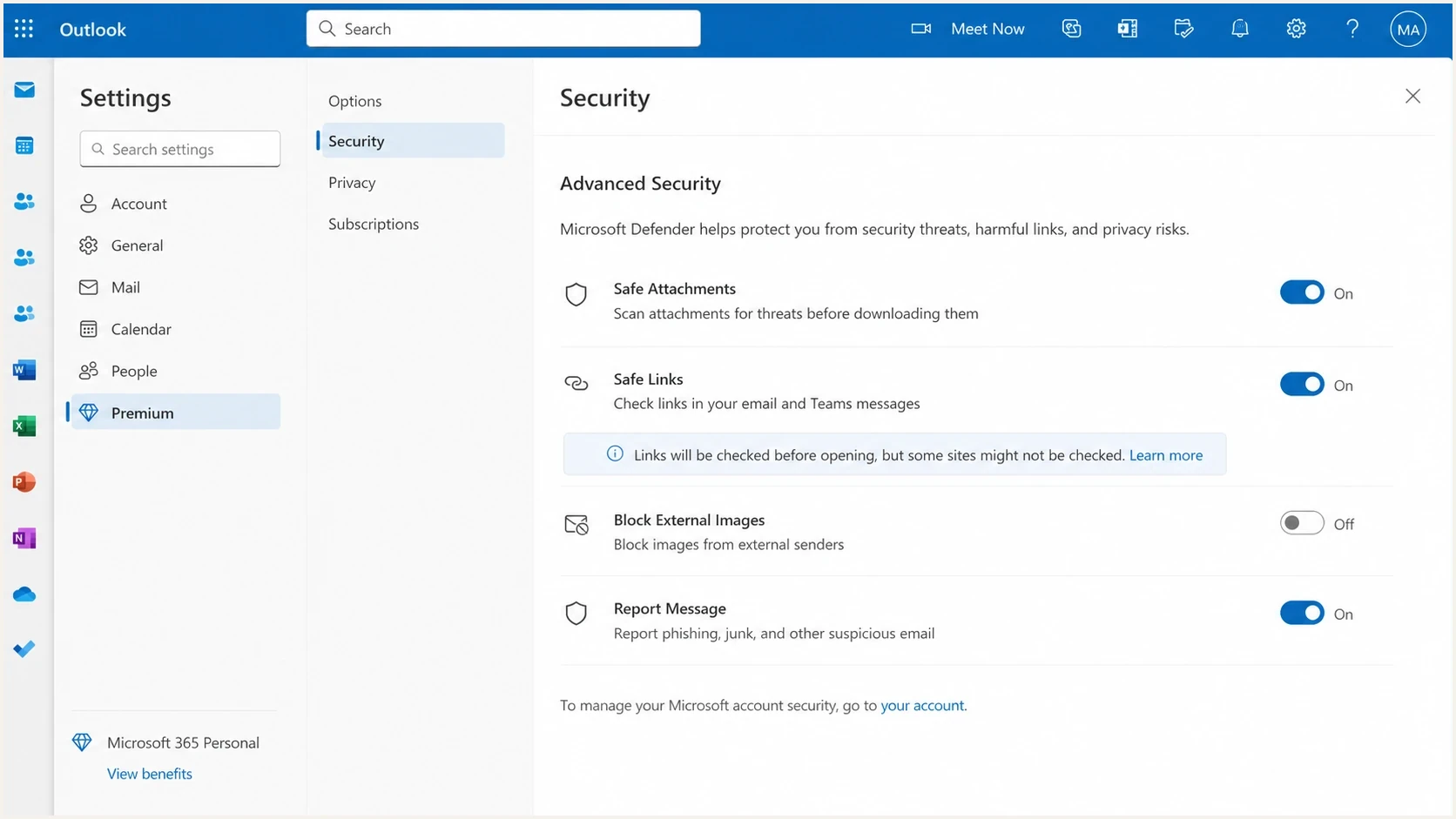
Microsoft Outlook.com Safe Links settings screen
|
|
|
|---|---|---|
Reputation or listing | Click and landing hosts | Remediate or replace |
HTTP or TLS failure | Entire redirect path | Use valid HTTPS |
Open or long redirect | Hop count and targets | Close and shorten path |
Destination mismatch | Anchor text and href | Match destination intent |
Compromised page | Scripts and downloads | Clean and secure page |
Common causes of Outlook unsafe link warnings
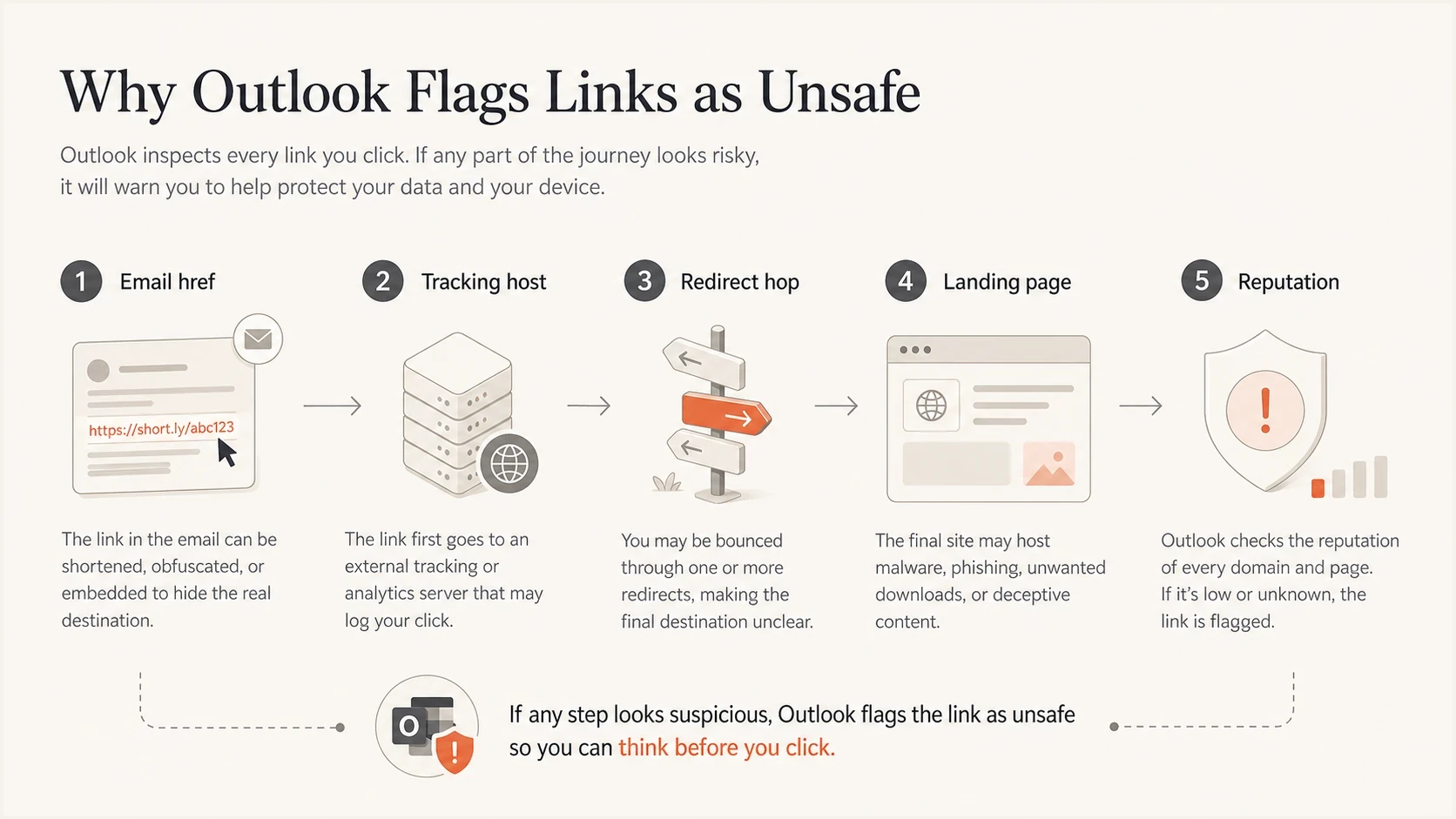
Outlook evaluates the href, tracking host, redirects, landing page, and reputation
Fix the link domain first
If Outlook flags every link in a message, investigate the click domain first. Many email platforms route links through a shared tracking host. That works until another sender on the same shared domain creates enough bad signal to get the domain listed or distrusted. Your email can be well written, your list can be clean, and your final landing page can be safe, but the shared click host still carries the warning.
This is where blocklist monitoring belongs in the workflow. Check whether the sending IP, sending domain, link domain, or landing domain has a reputation event before a campaign reaches Microsoft recipients. Use both blocklist and blacklist language with internal teams, because different people search for the same issue in different ways.
Shared tracking domain
- Reputation: Your links inherit risk created by other senders on the same host.
- Control: You usually need the platform owner to request delisting or replace the domain.
- Diagnosis: Warnings can appear suddenly across every link in one email.
Branded tracking domain
- Reputation: The link reputation is tied more closely to your own sending behavior.
- Control: You can secure DNS, enforce HTTPS, and monitor the domain directly.
- Diagnosis: It is easier to isolate whether the issue is your domain, page, or message.
Safer tracking link patterntext
Risky:
http://shared-tracker.example/track?t=v&enid=very-long-token

Better:
https://links.example.com/c/spring-offer
What to change first
- Brand the click host: Use a subdomain of the sending brand instead of a shared platform domain.
- Enable HTTPS end to end: The tracking URL, redirect, and final page should all use valid certificates.
- Reduce encoded clutter: Keep the visible and actual destination clear enough for a scanner to interpret.
Blocklist checker
Check your domain or IP against 144 blocklists.
 Spamhaus
 0Spam
0Spam

 Cisco
Cisco
 NoSolicitado

 URIBL
URIBL
 abuse.ro
 ALPHANET
 Anonmails
 Ascams
 BLOCKEDSERVERS
 Calivent Networks


 EFnet
EFnet




 JustSpam
 Kempt.net
 NordSpam

 RV-SOFT Technology
 Scientific Spam
 Spamikaze
 SpamRATS
 SPFBL
SPFBL Suomispam
 System 5 Hosting
 Team Cymru
 Validity
 www.blocklist.de Fail2Ban-Reporting Service
 ZapBL
ZapBL 2stepback.dk
 Fayntic Services
 ORB UK
 technoirc.org
 TechTheftSpamhaus0SpamCiscoNoSolicitadoURIBLabuse.roALPHANETAnonmailsAscamsBLOCKEDSERVERSCalivent NetworksEFnetJustSpamKempt.netNordSpamRV-SOFT TechnologyScientific SpamSpamikazeSpamRATSSPFBLSuomispamSystem 5 HostingTeam CymruValiditywww.blocklist.de Fail2Ban-Reporting ServiceZapBL2stepback.dkFayntic ServicesORB UKtechnoirc.orgTechTheftSpamhaus0SpamCiscoNoSolicitadoURIBLabuse.roALPHANETAnonmailsAscamsBLOCKEDSERVERSCalivent NetworksEFnetJustSpamKempt.netNordSpamRV-SOFT TechnologyScientific SpamSpamikazeSpamRATSSPFBLSuomispamSystem 5 HostingTeam CymruValiditywww.blocklist.de Fail2Ban-Reporting ServiceZapBL2stepback.dkFayntic ServicesORB UKtechnoirc.orgTechTheftSpamhaus0SpamCiscoNoSolicitadoURIBLabuse.roALPHANETAnonmailsAscamsBLOCKEDSERVERSCalivent NetworksEFnetJustSpamKempt.netNordSpamRV-SOFT TechnologyScientific SpamSpamikazeSpamRATSSPFBLSuomispamSystem 5 HostingTeam CymruValiditywww.blocklist.de Fail2Ban-Reporting ServiceZapBL2stepback.dkFayntic ServicesORB UKtechnoirc.orgTechTheftSpamhaus0SpamCiscoNoSolicitadoURIBLabuse.roALPHANETAnonmailsAscamsBLOCKEDSERVERSCalivent NetworksEFnetJustSpamKempt.netNordSpamRV-SOFT TechnologyScientific SpamSpamikazeSpamRATSSPFBLSuomispamSystem 5 HostingTeam CymruValiditywww.blocklist.de Fail2Ban-Reporting ServiceZapBL2stepback.dkFayntic ServicesORB UKtechnoirc.orgTechTheft
If the tracking host is listed, replacing the email copy will not solve the root issue. Fix the listed domain, use a clean branded click domain, or ask the platform owner to handle the listing. If the list entry ages out after bad traffic stops, keep the sending volume conservative until the domain is trusted again.
Use a real email test
The view-in-browser page is useful for debugging HTML, but it is not a full substitute for a received message. Outlook evaluates the real email path, the rewritten links, and the recipient protection layer. Test the exact message that subscribers receive, then compare what Gmail, Outlook.com, and Microsoft 365 do with the same href values.
A practical test means sending a campaign seed to an email tester and to real Outlook mailboxes. Look at authentication, the rendered href values, the redirect chain, and whether the final page loads without mixed content, malware warnings, or unexpected downloads.
Email tester
Send a real email to this address. Suped shows a results button when the test is ready.
?/43tests passed
A clean result has DKIM authentication, an authorized SPF source, and DMARC passing through at least one aligned SPF or DKIM result. The click host uses HTTPS and the link resolves quickly to the expected page. If the same email only fails in Outlook, investigate Microsoft URL reputation, Safe Links classification, and tenant-specific protection rules.
Test the exact production path
Small differences matter. A staging link, a non-tracked preview, or a copied browser URL can miss the problem because Microsoft is reacting to the final production URL chain.
- Send the final MIME: Use the same platform, sender, template, and tracking setup as the real campaign.
- Click through once: Capture the Safe Links warning, final URL, timestamp, and recipient mailbox type.
- Retest after changes: Reputation systems do not always clear instantly, so confirm with fresh mail.
Keep authentication and identity consistent
SPF, DKIM, and DMARC do not make a bad link safe or override a Safe Links verdict. They establish the identity responsible for the message. Keep the visible From domain authenticated, authorize the sending source, and use link domains that recipients can connect to the same brand.
For teams managing more than one sender, DMARC monitoring and a domain health checker keep this work practical. Suped's platform brings DMARC, SPF, DKIM, blocklist monitoring, hosted SPF, hosted DMARC, hosted MTA-STS, and deliverability signals into one workflow, so DNS, marketing operations, and security teams can work from the same issue data.
Baseline DMARC recorddns
Host: _dmarc.example.com
Type: TXT
Value: v=DMARC1; p=none; rua=mailto:dmarc@example.com
Authentication checks that matter
- DKIM: Sign each marketing stream with a selector that belongs to the sending domain.
- SPF: Keep the sending source authorized and stay under DNS lookup limits.
- DMARC: Monitor domain alignment before moving to quarantine or reject.
- Branding: Use a recognizable From domain, return-path domain, and link domain.

Issue steps to fix dialog showing the issue overview, tailored fix steps, and verification action
Suped's product turns these checks into an operational queue. Teams get issue detection, real-time alerts, and steps to fix authentication or reputation problems before Outlook recipients report unsafe link warnings.
When the warning is a Microsoft false positive
Treat the warning as a false positive only after checking the domain, redirect chain, authentication, and landing page. If those checks are clean, collect the sender, recipient type, message headers, original href, rewritten Safe Links URL, final URL, screenshot, and exact time. A user can report a misclassified message as Not junk with Outlook's built-in Report button. A Microsoft 365 administrator can submit the message or URL as a false positive on the Submissions page in Microsoft Defender.
If the warning sits alongside inbox placement or junk folder issues, troubleshoot the broader Outlook deliverability issues at the same time. Link warnings and junk placement often share reputation causes, even when they show up as different symptoms.
- Reproduce the warning: Send the same message to at least one Outlook.com mailbox and one Microsoft 365 tenant.
- Record the link path: Capture the original href, rewritten Safe Links URL, redirect hops, and final page.
- Clean the obvious issues: Fix HTTPS, mixed content, open redirects, broken pages, and authentication failures first.
- Submit the false positive: Use Outlook reporting for a message verdict or Defender Submissions for a URL or Safe Links verdict, then retest with fresh mail.
Sender actions
- Change the click host: Move to a clean branded domain if the shared host is listed.
- Clean the message: Remove deceptive anchors, broken images, and surprise file downloads.
- Verify identity: Keep SPF, DKIM, and DMARC tied to the visible brand.
Recipient admin actions
- Review policies: Tenant Safe Links settings can be stricter than consumer Outlook.com.
- Submit samples: Admins can report clean messages and URLs that Microsoft classified incorrectly.
- Avoid blanket bypasses: Any temporary allow entry should be narrow, documented, and removed after review.
A practical prevention checklist
Prevention is mostly discipline. Run the same checks before each major campaign, especially after changing email platform settings, tracking domains, landing pages, DNS records, redirects, or unsubscribe handling. The goal is to make the email boring to a security scanner.
URL risk signals to reduce
Use these bands as a practical review model before sending to Outlook recipients.
Good
Low risk
Branded HTTPS links, a short closed redirect path, a clean landing page, and aligned authentication.
Warning
Review
Shared tracking host, long query strings, inconsistent branding, and weak monitoring.
Critical
Fix first
Listed click domain, HTTP redirects, open redirect behavior, or an unsafe landing page.
- Keep links branded: Use a dedicated click-tracking subdomain for each brand or business unit.
- Use HTTPS only: Do not leave old HTTP tracking paths active for legacy templates.
- Limit redirects: Keep the path as short as the tracking workflow allows and remove every open redirect.
- Match link text: Avoid showing one domain while sending the user to a different unrelated domain.
- Secure landing pages: Remove mixed content, suspicious scripts, forced downloads, and broken TLS.
- Watch reputation: Track domain and IP listing events before customers report a blacklist warning.
- Fix authentication: Make SPF, DKIM, and DMARC pass consistently for all approved senders.
- Keep evidence: Store sample headers, screenshots, redirect traces, and campaign timestamps.
Do not try to bypass Safe Links
Trying to hide the destination, rotate domains, or avoid scanners creates worse signals. It also makes incident response harder when a real compromise occurs. Fix the sender identity, link domain, and landing page instead.
Views from the trenches
Best practices
Use branded HTTPS tracking domains so Outlook sees your domain, not a shared sender domain.
Keep visible link text close to the destination so redirects do not look deceptive to filters.
Monitor blocklist and blacklist status before a campaign, not after complaints arrive.
Common pitfalls
Leaving old HTTP tracking links active creates a weak signal even when the page is fine.
Using shared click domains ties link reputation to senders you cannot control at all.
Testing only Gmail misses Outlook-specific Safe Links warnings and rewrite behavior.
Expert tips
Keep one clean redirect hop, then watch click domains the same way you watch IPs.
If every link fails at once, investigate the tracking host before rewriting the email.
Pair email authentication fixes with link reputation checks to avoid partial repairs.
Marketer from Email Geeks says Outlook warnings often start when every link routes through one shared tracking host, so the first check should be the click domain rather than the message copy.
2024-02-12 - Email Geeks
Marketer from Email Geeks says a domain based blacklist or blocklist can affect all links at once, even when the sender has used the same template for months.
2024-07-03 - Email Geeks
The safest fix
The direct fix is to make your links safe, understandable, and tied to a domain you control. Start with the tracking host, force HTTPS, shorten the redirect path, clean the landing page, and make authentication pass. If the warning remains after those checks, treat it as a false positive and escalate with evidence.
Suped's platform fits this workflow when the checks need to run continuously instead of after a complaint. It provides automated issue detection, real-time alerts, DMARC monitoring, hosted DMARC, hosted SPF, hosted MTA-STS, SPF flattening, blocklist monitoring, and a multi-tenant dashboard for agencies and MSPs. This gives teams one place to investigate authentication and reputation signals behind an Outlook warning.




