How do I diagnose and resolve 550 blocks in Marketo?

Published 21 Jun 2025
Updated 26 Sep 2026
14 min read
Summarize with
Updated on 26 Sep 2026: We corrected the Microsoft 550 5.4.1 guidance and added a clearer code-by-code diagnosis workflow.
To diagnose 550 blocks in Marketo, start with the complete bounce text, not the Marketo bounce category or the basic 550 reply alone. A 550 response is a permanent rejection for that delivery attempt, but the enhanced status code and provider wording identify whether the receiving system rejected the recipient, sender, domain, IP, authentication, routing, or message policy. Marketo generally uses Category 1 for spam or blocking-related hard bounces and suspends sends to the person for 24 hours, but the category alone does not identify the root cause.
The fastest path is to export the bounce details, group the exact SMTP responses, then segment them by recipient domain, sending domain, sender address, program, acquisition source, and age of address. A Microsoft response such as 550 5.4.1 with Recipient address rejected: Access denied usually points to an invalid or missing recipient rejected by Microsoft 365 directory-based edge blocking. It is not evidence of a sender reputation block by itself. A response that names a banned sending IP, blocked sender, or DMARC failure belongs on a separate reputation or authentication path. If an inbound destination asks for SMTP authentication, verify the recipient domain's MX path and confirm that delivery is reaching a server that accepts mail for that domain.
- Immediate answer: do not chase every 550 as a blocklist or blacklist event. Sort the complete rejection text first.
- Likely root cause: repeated 5.1.x or Microsoft 5.4.1 recipient rejections usually point to bad address data, while IP-specific 5.7.x responses point to reputation or policy.
- Best next move: pause the affected segments, validate their acquisition sources, and match the exact response to the correct remediation path.
What a 550 block means in Marketo
A 550 block in Marketo is a delivery rejection returned by the receiving mail system. Marketo records it inside email activity, often alongside a bounce category and a bounce detail string. The category controls how Marketo handles the person after the bounce, while the detail string tells you whether the receiving system rejected the recipient, sender, domain, IP, authentication, routing, or message policy.
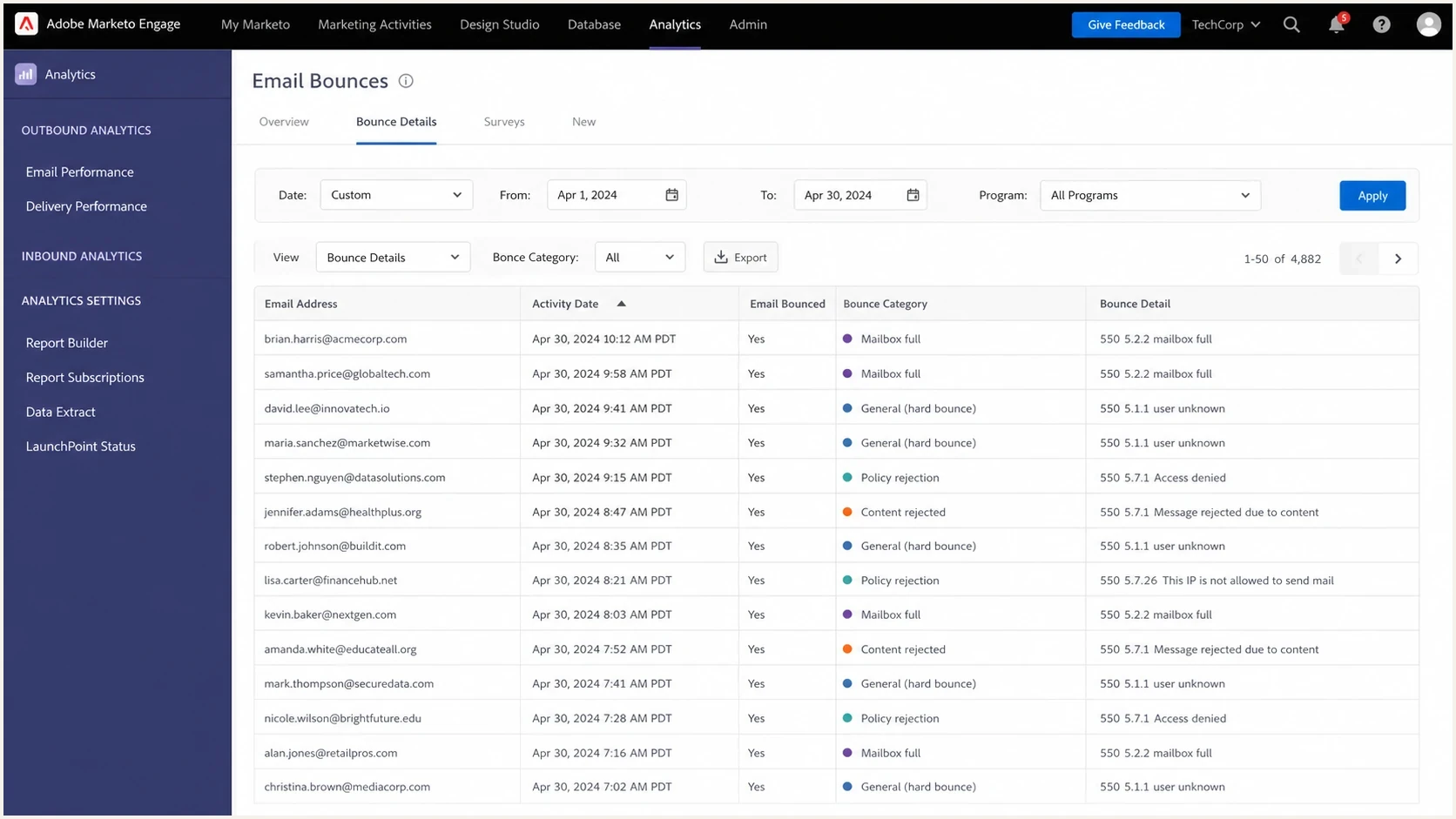
Adobe Marketo Engage bounce activity table with Category 1 and 550 details.
The same 550 code can cover different causes. Treat 550 5.4.1 with Microsoft's Recipient address rejected: Access denied wording as an invalid-recipient or recipient-directory signal first. Generic 5.4.1 wording can instead describe routing trouble, so retain the provider text and remote host. Also separate a sender address block from an IP block. A sender address block can follow the visible From address or envelope sender. An IP block follows the sending IP. A domain block can affect Marketo and other mail streams that use the same domain.
|
|
|
|---|---|---|
5.4.1 Recipient address rejected | Invalid or missing Microsoft 365 recipient | Confirm address and recipient directory |
5.7.606-649 banned sending IP | IP reputation block | Identify the sending IP |
5.7.509 DMARC reject | DMARC alignment failure | Check SPF and DKIM alignment |
5.1.1 user unknown | Bad mailbox address | Suppress the address |
Use the complete response to choose the next diagnostic path.
For general 550 code interpretation, compare your Marketo details with common SMTP patterns in 550 error causes and broader bounce code meanings. Marketo-specific community threads on Marketo send failures also show why the full bounce detail matters more than the high-level activity label.
Start with the rejection text
The first diagnostic step is a frequency table of exact bounce details. Do not summarize them too early. A small wording difference can separate a bad recipient from a sender block, and a sender block from an IP block. Pull at least 30 days of Marketo email bounce activity, then count the exact response strings while retaining the enhanced status code and responding host.
Bounce detail examples to group
550 5.1.1 User unknown
550 5.4.1 Recipient address rejected: Access denied
550 5.7.1 Delivery not authorized, message refused
550 5.7.509 Access denied, sending domain does not pass DMARC verification
550 5.7.606 Access denied, banned sending IP
After grouping exact strings, add receiver grouping. For B2B Marketo databases, a high share of Microsoft 365 domains is normal. If 5.4.1 recipient rejections appear across many unrelated Microsoft 365 domains, inspect the acquisition source and age of those addresses, especially first-send failures, before blaming sending infrastructure. If a response names a banned sending IP across many domains, investigate a broader IP reputation issue. If a 5.7.1 policy rejection is concentrated at one company, investigate that tenant's recipient restrictions or local block.
Do not over-read the category
Marketo Category 1 is useful for finding spam and blocking-related hard bounces, but it is not a root-cause diagnosis. Use the category to understand Marketo's handling, then use the SMTP text to choose the investigation path.
- Category: tells you how Marketo classified and handled the bounce.
- Detail: tells you what the receiving system actually rejected.
- Pattern: tells you whether the problem is isolated, receiver-specific, or systemic.
For Microsoft examples, Microsoft 550 guidance is useful for understanding how Exchange Online frames recipient and sender-related failures. Use it as context, then still rely on the exact Marketo bounce detail you have in front of you.
Read the enhanced code and rejection stage
The three-digit SMTP reply and the enhanced status code answer different questions. The basic 550 reply says the server permanently rejected the current delivery attempt. The enhanced code narrows the subject: 5.1.x concerns address status, 5.4.x concerns routing or network status, and 5.7.x concerns policy or security. Provider-specific wording still matters because providers sometimes use a generic family in a more specific way.
|
|
|
|---|---|---|
550 5.1.1 User unknown | The destination mailbox does not exist | Keep Email Invalid and suppress |
550 5.4.1 Recipient address rejected | Microsoft 365 cannot find or accept the recipient | Verify the address and source |
550 5.7.1 Delivery not authorized | Recipient restriction or transport policy | Contact the recipient administrator |
550 5.7.509 DMARC reject | The From domain failed DMARC | Fix SPF or DKIM alignment |
550 5.7.606-649 banned sending IP | Microsoft blocked the sending IP | Record the IP and open the proper escalation |
Match the full code and wording before choosing a fix.
The SMTP stage adds another clue. A rejection during RCPT TO happens before the server receives the message body, so recipient validity or an envelope-level policy is more likely. A rejection after DATA can involve message authentication, content, or a transport rule. Marketo bounce details do not always expose the command stage, so use it only when the raw diagnostic includes that context.
Keep 4xx deferrals separate from 5xx rejections. Marketo treats soft bounces as temporary and applies retry logic for roughly 24 to 36 hours. A 5xx response should not be retried blindly, although a valid address can become deliverable after a recipient-directory, routing, authentication, or reputation problem is corrected.
Handle Email Suspended and Email Invalid correctly
Marketo does not handle every hard bounce the same way. Category 1 generally covers spam or blocklist-related rejection and prevents sends to the person for 24 hours through Email Suspended. Category 2 covers an invalid or nonexistent address, sets Email Invalid to true, and prevents future sends until the address is independently confirmed and the field is manually reset.
|
|
|
|---|---|---|
Category 1 | Email Suspended for 24 hours | Investigate policy or reputation |
Category 2 | Email Invalid blocks future sends | Suppress unless independently validated |
Email Suspended = true | Historical flag remains set | Check Email Suspended At |
Match Marketo status to the correct operator response.
The Email Suspended flag remains true after the 24-hour sending restriction expires, so do not use that flag alone to decide whether a person is currently blocked. Check Email Suspended At. Do not clear Email Invalid merely to retry a campaign, because Marketo only recommends resetting it after the address has been confirmed as valid. Adobe's current bounce classification guidance documents these different outcomes.
Sort the problem by receiver and source
Once the main rejection families are clear, build a working table that ties each bounce to the recipient domain and to how the lead entered the database. This is where the diagnosis usually stops being abstract. If blog signups without verification create most first-send bounces, the fix is list quality. If one sales-owned source creates sender blocks at business domains, the fix is source governance. If all recent programs have the same IP-specific block pattern, the fix is reputation recovery and send reduction.
Healthy diagnostic view
- Receiver domain: shows whether one company or many companies are rejecting you.
- Acquisition source: separates verified leads, imports, events, partner lists, and web forms.
- Address age: separates first-send failures from deterioration after repeated mail.
Weak diagnostic view
- Raw count: says how many errors exist, but not what is causing them.
- Single screenshot: hides whether the pattern is concentrated or spread across receivers.
- Category only: turns different SMTP problems into one hard-bounce bucket.
Also calculate the bounce rate trend. A rate above 2 percent deserves immediate source review, but the rate alone does not prove a provider-wide block. A sudden jump in 550s after a list import, nurture change, or sales campaign is more diagnostic than the raw number alone. Track both the rate and volume.
Example bounce rate trend
Illustrative values only. Use your Marketo trend to identify a stable hygiene issue or a new blocking event.
Bounce rate
If the trend is improving, keep tightening inputs and suppressions. If the trend is worsening, pause the highest-risk programs first. That means unverified signups, old event lists, purchased or appended data, high-frequency nurtures, and any source that gets 550s on the first send.
Do not treat a single successful SMTP probe as proof that a mailbox exists. Catch-all domains can accept every RCPT TO command, including invented addresses, and some providers deliberately return ambiguous results. Avoid large-scale manual probing because rate limits can create temporary errors or block the probing IP. Combine syntax and domain checks with mailbox evidence and the real Marketo bounce outcome.
Separate IP, domain, address, and list quality problems
The hard part is deciding whether the block is tied to Marketo's sending IP, your sending domain, a specific sender address, or the quality of the audience. Use the rejection wording and distribution pattern together.
Illustrative 550 evidence weighting
Conceptual values, not incident probabilities. Match SMTP wording to receiver distribution.
IP
Domain
List
A true IP block often names the sending IP or sends you to an IP-based removal path. A shared Marketo IP can create issues outside your direct control, but do not assume shared IP blame when the rejection text says the sender address or domain is blocked. Receiver-controlled sender blocks usually mean someone at that organization objected to your mail, set a local block, or trained their filtering system against that sender.
A sender block is a reputation warning
When the bounce says the sender is blocked, the fix is not a DNS tweak. Reduce unwanted sends, identify which source created the complaint pattern, and stop routing questionable audiences through the same sender domain.
- From address: check whether other teams use it for outreach or imports.
- Domain reuse: remember that one bad channel can affect all mail from the domain.
- Receiver trust: improve consent, engagement, and suppression before asking for help.
An MX routing failure is different. If a domain has no inbound mail server, or delivery reaches a host that is not meant to receive mail for the domain, the rejection can mention relay denial or required SMTP authentication. That is a list quality or routing signal. Validate the domain's MX records, suppress the bad address when the domain has no valid inbound route, and inspect the acquisition source that produced it.
Check authentication, blocklists, and placement
SPF, DKIM, and DMARC usually are not the direct cause of a bounce that says the sender is manually blocked. They can be the direct cause when the rejection names an authentication failure, such as Microsoft 550 5.7.509 for a DMARC reject. Confirm that Marketo signs with DKIM for your domain, your SPF path is valid, and DMARC passes in alignment for the visible From domain.
Suped's product puts DMARC monitoring, SPF and DKIM visibility, blocklist monitoring, and deliverability signals in one place. Use its issue details to identify authentication failures and unknown sources, then compare alert timing with the receiver and bounce-detail groups from Marketo.

Issue steps to fix dialog showing the issue overview, tailored fix steps, and verification action
Use Suped's blocklist monitoring workflow to watch the sending IPs and domains that Marketo uses, then connect any listing to the exact bounce pattern. A blocklist (blacklist) hit explains some 550s, but it is not proof by itself. The bounce text still decides whether the receiver rejected you because of a public listing, local policy, sender reputation, or invalid recipients.
If you need a broader diagnostic pass, run a domain health check against the sending domain and send a live campaign test through the email tester. For blacklist context, the blocklists guide explains why a listing needs root-cause cleanup before removal requests have any staying power.
?
What's your domain score?
Deep-scan SPF, DKIM & DMARC records for email deliverability and security issues.
Treat these checks as triage, not as a replacement for the Marketo bounce export. If the domain checks are clean but one receiver keeps rejecting you, treat the issue as receiver policy or recipient-side reputation. If authentication fails, fix that before asking any receiver to review the block.
Where Suped fits in this workflow
Suped's product is useful when Marketo is only one part of the sending environment. Its hosted DMARC, SPF, and MTA-STS controls can centralize policy changes, while blocklist monitoring and multi-domain reporting preserve the operational trail across sending domains.
- Issue detection: shows failed authentication, unknown sources, and steps to fix.
- Hosted controls: simplify DMARC, SPF, and MTA-STS changes without repeated DNS edits.
- Reputation view: connects blocklist and deliverability signals to authentication health.
Resolve the issue in Marketo
The fix depends on the cause, but the operating plan is consistent: stop making the signal worse, clean the source that created it, verify authentication and reputation, then resume gradually. Do not ask a receiver to lift a block while the same audience and cadence are still producing rejections.
- Export evidence: pull bounce detail, enhanced code, responding host, recipient domain, program, send date, sender address, acquisition source, and first-send flag.
- Suppress confirmed bad addresses: remove invalid recipients, domains with no inbound route, and repeated permanent mailbox failures.
- Pause risky segments: stop old imports, unverified web signups, low-engagement nurtures, and sources with first-send 550s.
- Audit other senders: check whether sales, support, product, or customer teams use the same domain for cold or bulk mail.
- Validate authentication: confirm Marketo DKIM, SPF inclusion, DMARC alignment, and reporting coverage.
- Escalate with evidence: follow the NDR instructions or open a Marketo support case when the response names a sending IP or shared infrastructure.
- Resume slowly: start with recent consent and high engagement, then watch the 550 rate by receiver and response family.
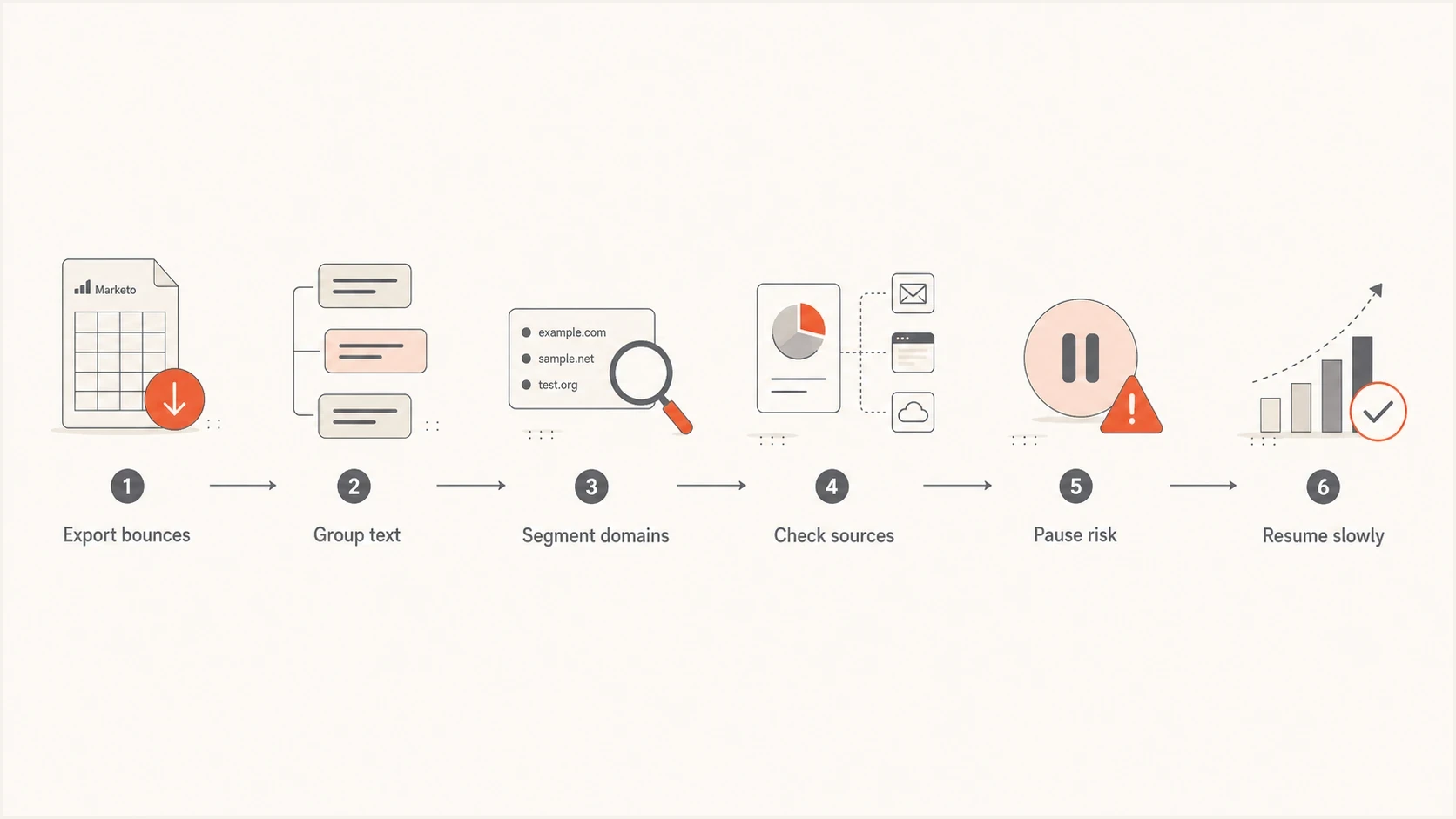
Flowchart showing how to diagnose and recover from Marketo 550 blocks.
Inside Marketo, keep a bounce directory rather than treating bounce data as a one-time export. Create fields or operational lists that preserve the latest bounce detail, latest bounce date, recipient domain, source, and whether the address bounced on its first mailing. Include the native Email Suspended At and Email Invalid values so marketing and sales operations teams can distinguish a temporary block from an invalid address.
Fields to capture for repeat analysis
Latest bounce detail
Latest bounce date
Latest bounce category
Email Suspended At (native)
Email Invalid (native)
Recipient domain
Acquisition source
First-send bounce flag
Last successful delivery date
Last engaged date
If the evidence points to a shared Marketo IP issue, open a support case with exact bounce examples, timestamps, sending IPs where available, recipient domains, campaign names, and the volume trend. If the evidence points to your sender reputation, support cannot fix it alone. You need lower complaint risk, better targeting, verified signup paths, and suppression of sources that create first-send bounces.
Views from the trenches
Best practices
Group 550s by exact text, recipient domain, sender address, and acquisition source first.
Compare first-send bounces with later bounces to separate list quality from reputation.
Pause the worst segments before asking for removal, then prove volume and complaints dropped.
Common pitfalls
Treating every 550 as an IP block wastes time when sender or domain blocks are visible.
Sending unverified blog signups straight into Marketo can inject typos and trap risk.
Fixing DNS alone will not clear a receiver policy block caused by unwanted mail patterns.
Expert tips
Ask sales what else uses the same sender domain because one channel can damage all mail.
Separate Microsoft recipient errors from codes that explicitly name a blocked sending IP.
Use bounce rate trend, not raw 550 count alone, to decide urgency and send reductions.
Marketer from Email Geeks says the raw 550 rejection text should drive the diagnosis because a Marketo category does not show the root cause.
2024-02-12 - Email Geeks
Marketer from Email Geeks says a manually blocked sender message points to a recipient-side sender block, not a normal IP block.
2024-03-18 - Email Geeks




