How do I avoid SURBL CT blacklisting for a 100% opt-in list?

Published 5 Aug 2025
Updated 31 Jul 2026
12 min read
Summarize with
Updated on 31 Jul 2026: We updated this guide with confirmed opt-in controls, correct SURBL CT bitmask checks, and a clearer verification and removal workflow.
The direct answer: a 100% opt-in list avoids SURBL CT blacklisting by combining confirmed opt-in with evidence that addresses remain valid and expected recipients. Suppress long-term inactive subscribers under a documented policy, isolate every acquisition source, check every tracked URL, and monitor the click-tracking domain itself. A SURBL CT listing concerns domains inside email links, especially click-tracking domains, rather than the sending IP.
Opt-in does not stop addresses from becoming risky. People abandon mailboxes, domains expire, addresses get recycled, forms get attacked, imports get mislabeled, and old engagement rules become weak after Apple MPP made opens less useful. When a list hits traps even though the original signup was legitimate, treat freshness, acquisition controls, and consent records as separate parts of the diagnosis.
SURBL says its CT data covers click tracker domains used by senders that mail addresses without confirmed opt-in, including mail sent to traps. That detail matters. For broader blocklist and blacklist context, start with blocklist basics, then handle CT as its own link-domain reputation problem.
What SURBL CT measures
SURBL is a URI reputation dataset. Filters query domains found in message bodies, then use the result to help score or block messages. The CT list covers click tracker domains, including branded CNAME tracking hosts used by email platforms.
The official SURBL lists page identifies CT as click tracker domains and documents the multi-list bitmask where CT has value 32. A response ending in 32 means CT only, while a combined value can include CT and another list. A CT result does not by itself prove deliberate abuse. It means the tracker domain crossed SURBL's data threshold, so the sender needs to find the mail stream, segment, or signup source that created the signal.
|
|
|
|---|---|---|
CT bit set | Tracker risk | Audit links |
Trap signal | Consent or data gap | Trace source |
No recent action | Weak current proof | Review policy |
Shared host | Mixed senders | Confirm ownership |
Compact CT signal map
SURBL multi query examplebash
dig +short A click.example.com.multi.surbl.org
# 127.0.0.32 means CT only
# 127.0.0.96 means CT plus ABUSE: 32 + 64
# 127.0.0.1 means query access is blocked, not that the domain is listed
Important distinction
A SURBL CT blacklist or blocklist hit does not always mean the visible destination URL is bad. The listed domain is often the tracking host that redirects clicks. Changing creative copy alone rarely fixes the source of the listing.
How to verify a CT listing
Start with a delivered message from the affected stream and record the exact hostname used for click redirects. Check that hostname through SURBL's lookup, then check the registrable parent domain if the message filter or lookup result points there. URI parsers can normalize hosts differently, so testing only the brand's main website domain can miss the domain that receivers evaluated.
- Identify the listed host: Inspect the message source and redirect chain instead of guessing from the visible link text.
- Confirm control: Determine whether the tracker is dedicated to your mail, shared by a platform, or delegated through a branded CNAME.
- Decode the A record: Treat CT as present whenever bit 32 is set in the final octet, even when the response is not exactly 127.0.0.32.
- Repeat after cleanup: Verify the live result again because SURBL states a 60-second TTL and an average update interval of 30 to 40 seconds.
Parse A records, not TXT records
SURBL describes TXT responses as human-readable context. Automated checks should decode the A record. A 127.0.0.1 response means access to the public query service is blocked, so it must not be logged as a blacklist or blocklist hit.
Why opt-in lists still hit traps
The phrase 100% opt-in needs two checks: whether the mailbox owner confirmed the signup and whether the address remains safe to mail. A subscriber who confirmed five years ago but has no recent delivery, click, purchase, login, or reply presents more risk than a subscriber who confirmed and acted last week. CT problems often come from treating both addresses as equal.
What confirmed opt-in proves
- Mailbox action: The recipient completed a confirmation step sent to the submitted address.
- Signup source: The form, transaction, or integration recorded where the address entered the list.
- Consent record: The sender can retain the timestamp and confirmation event for investigation.
What CT risk exposes
- Current reach: The address still belongs to a real, reachable subscriber.
- Data decay: Old addresses can become dead records or otherwise unsafe to mail.
- Shared damage: One tracker domain can carry risk across many campaigns.
The most common causes are stale segments, listbombing through unprotected forms, old partner data, reactivated suppressions, recycled domains, and automation paths that keep mailing addresses after bounces or complaints. For a deeper explanation of trap sources, see spam trap types.
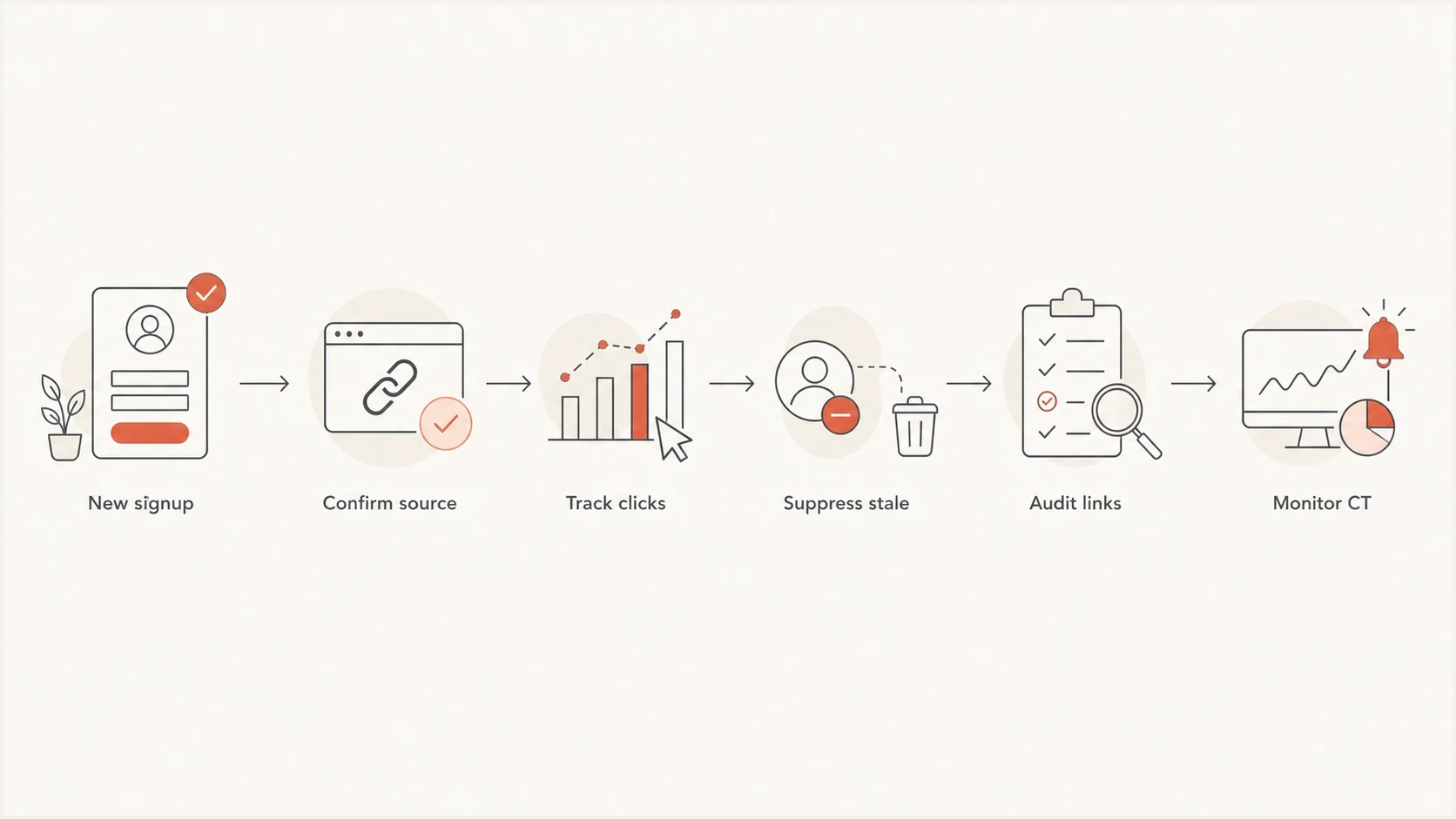
SURBL CT prevention flowchart for signup validation, engagement checks, link auditing, and monitoring.
The prevention plan
A sound prevention plan treats CT as both a data problem and a domain reputation problem. The goal is to keep unconfirmed, stale, or otherwise risky addresses away from the tracker domain before they create enough signal for a blacklist or blocklist listing.
- Quarantine stale subscribers: Stop normal campaigns when an address crosses your documented inactivity limit and has no other recent customer activity.
- Segment by source: Track CT risk by form, import, integration, store, event, and campaign type.
- Protect every form: Use confirmed opt-in, rate limits, bot checks, and validation for public signup paths.
- Split tracking hosts: Use separate branded tracking domains for major mail streams when volume and risk justify the operational overhead.
- Audit redirects: Check each final URL, short link, affiliate link, hosted file, and redirected landing page.
- Watch changes: Monitor the tracking domain, sending domain, and related IPs after every list import or reactivation.
Example engagement cutoffs for CT risk
A starting policy that must be adjusted for sending frequency, customer activity, and complaint data.
Active
0-90 days
Recent click, purchase, login, or reply.
Watch
91-180 days
Lower volume and monitor complaints.
Reconfirm
181-365 days
Use a limited repermission path only.
Suppress
365+ days
Remove from normal mail streams unless other recent activity supports contact.
Treat these cutoffs as a starting point, not a universal standard. A weekly newsletter and an annual account notice need different rules. Tighten the policy when a CT signal, complaint spike, bounce change, or test result maps to a segment. Keep the final rule documented so future imports do not reopen the same problem.
Blocklist checker
Check your domain or IP against 144 blocklists.







How to audit links and tracking domains
The fastest CT audit starts with the exact domains that appear in message bodies. Export samples of recent campaigns, transactional messages, automations, and reactivation sends. For each message, list the tracking host, visible destination, final destination after redirects, persistent template links, and the segment that received it.
Do not assume that branded tracking protects you. A CNAME such as click.example.com can carry reputation because it appears in the email body. If one brand, store, or customer acquisition path has weak data, a shared tracker can carry that signal into unrelated mail. Confirm whether the hostname is dedicated to your account before deciding who must handle remediation.
Audit checklist
- Tracker host: Confirm which click domain appears in each mail stream.
- Redirect chain: Resolve shorteners, affiliate hops, expired campaign links, and preference-page links.
- Segment map: Tie every risky send to source, age, consent method, and recent activity.
- Ownership check: Verify that tracking hosts, landing domains, and delegated subdomains still belong to the expected owner.
This is where Suped's product connects the investigation to routine authentication work. Suped's blocklist monitoring puts domain and IP reputation checks beside SPF, DKIM, and DMARC monitoring, so the incident record can stay with the affected domain.

Blocklist monitoring page showing domain and IP checks across blocklists with importance and status
For teams managing many domains, Suped can automate issue detection and alerts while keeping domains separated in a multi-tenant view. The workflow is direct: identify the listed domain, decide whether the issue is isolated or widespread, assign the source cleanup, and record the verification result.
How to find the risky segment
When CT risk appears, start with the send log rather than a delisting request. Pull every campaign and automation that used the listed tracker during the risk window. Compare each send by acquisition source, confirmation status, last click, last successful delivery, domain age, and whether the address came from a form that accepts public traffic.
- Recent import: Pause the import and review consent proof before sending again.
- Old segment: Apply the documented inactivity policy, then suppress addresses that lack current activity or a valid reason for contact.
- Public form: Look for bursts, repeated IP ranges, suspicious domains, and unusually fast submissions.
- Partner path: Require source-level proof and stop any path that cannot supply it.
Signup abuse deserves its own review. Listbombing attacks can add real addresses to your list without the mailbox owner's consent, even when the submission appears opt-in inside your system. CAPTCHA alone does not resolve that gap. Use confirmed opt-in, throttling, form telemetry, and source tagging. A deeper prevention path is covered in listbombing attacks.
Weak evidence
- Open-only: Opens are inflated by privacy prefetching and image caching.
- Old consent: A signup date alone says little about current reachability.
- Bulk source: Imported labels hide source quality differences.
Stronger evidence
- Recent click: A deliberate action tied to a current mailbox is stronger than an open.
- Customer activity: A purchase, login, reply, or support interaction supports a current relationship.
- Source proof: Timestamp, form, confirmation event, and collection source help isolate risk.
When you are already listed
If the tracker domain is already listed, reduce harm first. Pause the segments most likely to be stale, unconfirmed, or source-weak. Keep current transactional mail running only when it has clean links, expected recipients, and a separate risk profile. Do not rotate domains merely to outrun the listing. That spreads the problem and weakens the evidence needed for a durable fix.
Then prepare a short remediation packet. SURBL's SURBL FAQ says removal starts through its lookup process. Before using the removal form, document what changed, which segments were suppressed, who controls the tracking domain, and how recurrence will be prevented. For a focused response plan, see SURBL delisting.
Removal packet outlinetext
Domain: click.example.com
Issue: SURBL CT listing
Cause found: stale segment without current confirmation or activity evidence
Fix applied: segment suppressed and confirmed opt-in enabled
Ownership: dedicated branded tracking domain
Monitoring: tracker, sending domain, and IP checks active
Do not skip remediation
A delisting request without a source fix creates repeat-listing risk. Use this order: pause the risky stream, isolate the cause, clean the data, request removal through the official lookup form, then verify the live result.
Authentication still matters
SPF, DKIM, and DMARC do not remove a SURBL CT listing. They still matter because they help receivers and internal teams separate link-domain reputation from sender identity. If authentication is broken at the same time as a CT listing, the investigation has two distinct faults to resolve.
Run a domain health check when changing tracking hosts, sending domains, SPF includes, DKIM selectors, or DMARC policy. Send a real message through an email tester after DNS changes so you can inspect headers, authentication results, and content signals together.
Suped's product keeps DMARC reporting, SPF and DKIM visibility, blocklist monitoring, domain health checks, alerts, and incident notes in one workflow. Use that record to connect a CT alert to the affected tracking host, authentication state, source cleanup, and final verification.
Best operating pattern
- Authenticate first: Keep SPF, DKIM, and DMARC passing before link reputation issues appear.
- Monitor together: Track domains, IPs, policies, and blocklist or blacklist status in one workflow.
- Alert early: React to reputation changes before the next large campaign.
- Document fixes: Keep source cleanup, suppression rules, DNS changes, and verification tied to the incident.
Views from the trenches
Best practices
Segment by last click and last successful delivery before sending broad campaigns again.
Use dedicated tracking domains per mail stream so one issue does not taint every program.
Keep signup source, consent date, and engagement evidence available for every address.
Review CT and other blocklist signals beside complaints, bounces, and revenue drops.
Common pitfalls
Treating opt-in as permanent consent lets old addresses become trap-like liabilities.
Using opens after MPP as the only engagement signal hides subscribers who never click.
Reusing one click domain across brands makes CT diagnosis slower during a listing.
Asking for delisting before fixing source issues leads to repeat listings later.
Expert tips
Pause the riskiest segments first, then test with recent clickers before wider sends.
Check every redirected URL in templates, not only the visible destination domain.
Compare CT timing with campaign IDs, imports, forms, and automation entry points.
Keep a removal packet ready with domain, cause, fix, and monitoring evidence for review.
A marketer in Email Geeks reported that a fully opt-in list can still hit traps when old addresses have not received mail successfully or clicked for a long time.
2024-03-13 - Email Geeks
A marketer in Email Geeks reported that SURBL CT appeared to have a lower listing threshold than some other SURBL lists, so senders should still investigate it.
2024-03-13 - Email Geeks
The practical answer
To avoid SURBL CT blacklisting for a 100% opt-in list, distinguish recorded signup consent from confirmed opt-in and current reachability. Keep confirmed, traceable subscribers in normal campaigns under a documented inactivity policy. Protect signup forms, separate mail streams where the risk justifies it, audit every redirected link, and monitor the tracking domain directly.
If a listing already exists, identify the exact listed host, pause the risky segments, document the cause, fix the acquisition or reactivation path, request removal through SURBL's lookup form, and verify the live result. Suped's product can keep the domain checks, authentication state, alerts, and remediation notes attached to the same incident.




