How can I get a quick response for a SURBL delisting?

Published 30 May 2025
Updated 9 Aug 2026
10 min read
Summarize with
Updated on 9 Aug 2026: We updated this guide with SURBL's official removal route, category-specific cleanup steps, security checks, and evidence-based follow-up guidance.
The fastest route to a SURBL delisting response is to fix the root cause, document the fix, and submit one concise request through the official lookup and removal form. There is no reliable shortcut or published response-time guarantee. A slow or unsuccessful review often means that risky URLs, redirects, related domains, compromised assets, or weak evidence still need attention.
SURBL lists domains and IP addresses that appear as hosts in message-body URIs, so a clean sending IP does not clear a listed website or tracking domain. Start with blocklist basics, check the affected host in the SURBL lookup, and keep the SURBL FAQ open while preparing the request. The goal is to remove doubt, not to send more messages.
A faster reply starts before the ticket
Repeated pings rarely help when the underlying signals still look risky. Make the domain reviewable first.
- Confirm: Check the exact domain or IP used in the URI, the URL path, the reported SURBL list, and the current status.
- Clean: Remove risky redirects, compromised pages, stale campaign assets, and abusive traffic sources.
- Prove: Show what changed, when it changed, who verified it, and which control prevents the issue from returning.
Why SURBL response time slows down
SURBL does not publish a guaranteed review time. A case with complete remediation, stable ownership, secured access, and clear evidence is easier to assess. Old promotional pages, aggressive affiliates, related domains, or an incomplete security cleanup require more investigation. In those cases, another follow-up does not resolve the evidence gap.
Check these blockers before sending another follow-up:
- Shared hosting: The listed domain remains tied to infrastructure or accounts that were involved in abuse.
- Affiliate reuse: The same landing page, offer, or redirect chain appears across related domains.
- Snowshoeing: Similar campaigns spread across many domains or senders to dilute reputation signals.
- Incomplete security cleanup: A malicious page is gone, but vulnerable software, stolen credentials, or unauthorized DNS records remain.
- Thin request: The delisting note asks for removal but gives no root cause, list category, remediation dates, or owner accountability.
What a weak request looks like
- Vague cause: The sender says the listing is wrong but does not identify the triggering traffic or compromised asset.
- No proof: The request lacks cleanup dates, affected paths, redirect checks, or ownership details.
- Pressure only: The follow-up asks for speed without showing that the risk has changed.
What a useful request looks like
- Known cause: The sender names the campaign path, traffic source, compromised page, or redirect.
- Clear fixes: The request lists specific changes and the date each change went live.
- Review ask: The sender asks SURBL to recheck after cleanup and identify any remaining issue.
Match the fix to the SURBL list
The lookup result should determine the cleanup plan. SURBL's public multi.surbl.org dataset combines several categories, and one response can indicate membership in more than one list. Record every reported category and resolve each cause before requesting removal.
|
|
|
|---|---|---|
ABUSE | Spam or other abuse sites | Stopped traffic source, removed offer or redirects, documented consent controls, and checked a current message sample |
PH | Phishing content | Removed pages, patched the site, secured accounts and DNS, and completed credential resets |
MW | Malware hosting | Removed malicious files, patched systems, reset credentials, and checked devices used to upload content |
CR | Compromised website | Cleaned injected content, closed the entry point, secured CMS and hosting access, and checked DNS control |
CT | Click tracking tied to mail without confirmed opt-in | Stopped the affected mail, disabled tracking paths, reviewed the traffic source, and documented confirmed opt-in |
DM | Disposable email domain | Documented the domain's actual purpose and any classification error |
SURBL categories and the evidence each review needs
Security cases require full cleanup
For PH, MW, or CR listings, removing the visible page is not enough. Secure the website, hosting account, CMS and plugins, upload devices, credentials, and DNS control panel before submitting the removal form.
Build a SURBL delisting request that can be reviewed
A quick response is more likely when the request reads like a completed investigation. Avoid long explanations and blame. Send a short case that answers five questions: which host is listed, which list reported it, what caused it, what changed, and what evidence supports the change.
Review SURBL contact policies before writing. Submit through the removal form offered by the SURBL lookup result. Do not send a delisting request to SURBL's discussion list.
- Identify: Name the domain or IP used in the URI, the affected path, and every reported list category.
- Explain: State the root cause in one or two sentences without hiding previous mistakes.
- Remediate: List concrete fixes, including removed pages, disabled redirects, secured accounts, and sender changes.
- Document: Give dates, affected URL paths, ownership details, consent controls, and current test results.
- Ask: Request a recheck and ask for the remaining issue if the host cannot be cleared.
Delisting request templatetext
Subject: SURBL delisting review for example.com

Domain or URI host: example.com
Affected path: https://example.com/offer
SURBL result: [ABUSE, PH, MW, CR, CT, or DM]

Root cause:
A legacy affiliate campaign used this domain in unsolicited email traffic.
The campaign and redirect chain are now disabled.

Actions completed:
- Removed the affected landing page on YYYY-MM-DD
- Disabled affiliate tracking links on YYYY-MM-DD
- Paused all email containing this URL
- Removed the traffic source and reviewed consent records
- Secured website, hosting account, CMS, and DNS access where applicable

Evidence:
- The affected path no longer serves or redirects to the offer
- A current message sample contains only approved first-party URLs
- Screenshots show the disabled campaign and redirect settings
- Access controls prevent the path from being reused

Request:
Please recheck the domain and confirm any remaining issue.
What to include as proof
- Screenshots: Show the current page, redirect state, disabled campaign settings, or secured account.
- Dates: Give exact remediation dates so the reviewer can separate old evidence from current behavior.
- Controls: Explain how the same page, redirect, account, or traffic source is blocked from reuse.
Check every URI signal before following up
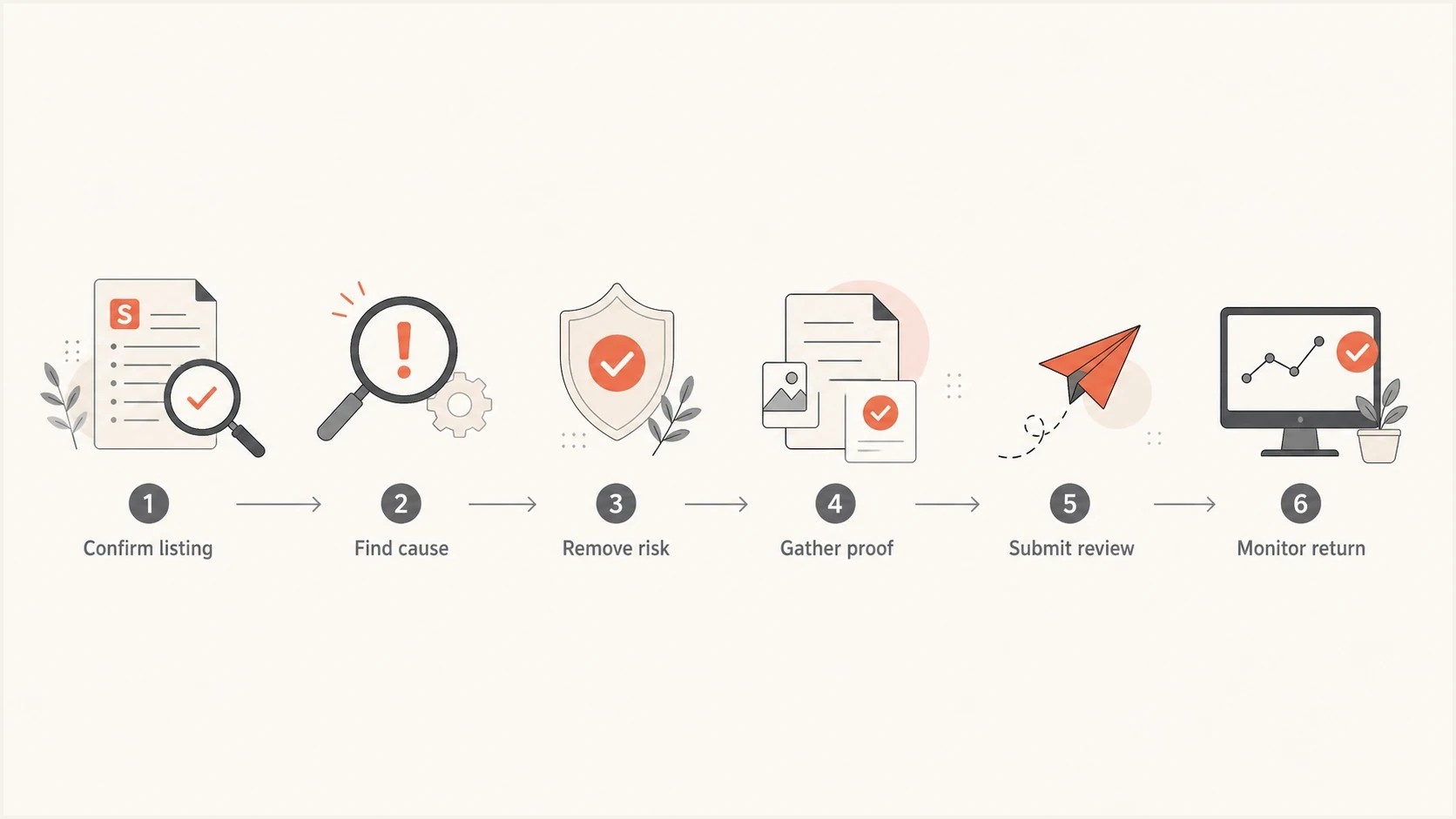
SURBL delisting flowchart covering listing confirmation, cleanup, evidence, review, and monitoring.
Before following up with SURBL, inspect the domain as a reviewer would. Find anything that still makes a message-body URI look unsafe. Redirect chains, reused templates, compromised subdomains, unauthorized DNS records, or shared access that has not been secured all require remediation before another request.
|
|
|
|---|---|---|
Listing | Exact host and list | Confirm the current result |
Landing page | Content and scripts | Remove abusive or injected content |
Redirects | Every hop and target | Disable old and unauthorized paths |
Security | CMS, accounts, devices, DNS | Patch systems and reset access |
Email sample | All visible and tracked URLs | Remove unapproved hosts |
Common checks before a SURBL delisting follow-up
A broad domain health check helps catch obvious DNS and authentication issues before the delisting note goes out. It does not replace SURBL review or a website security audit, but it prevents avoidable distractions in the request.
?
What's your domain score?
Deep-scan SPF, DKIM & DMARC records for email deliverability and security issues.
After the website, account access, DNS, and redirects look clean, send a live message through an email test. Review every visible URL and tracking host in the sample. Keep the result with the ticket evidence.
If the domain uses shared infrastructure, document the host, account ownership, related domains, redirect controls, and third-party pages that still carry the brand or offer. Move or isolate the asset when the existing environment cannot be secured.
Follow up without weakening the request
A follow-up should be short and evidence-based. Send one when there is a meaningful new fix or when the original request has had a reasonable review window. Repeating the same request every few hours gives the reviewer no new reason to act and can split the evidence across messages.
When to follow up after cleanup
SURBL publishes no response-time SLA, so use the state of the case instead of a fixed countdown.
Complete submission
Wait for review
Keep the submitted evidence and any confirmation together while the request is reviewed.
New remediation
Update the case
Send a concise update when another affected URL, account, or control has been fixed.
No reply or removal
Recheck the cause
Run the lookup again and rebuild the evidence before sending another message.
A useful follow-up does not ask for special treatment. It identifies the original request, lists only new facts, and asks whether any remaining signal prevents delisting.
Short follow-up exampletext
Subject: Follow-up for SURBL review of example.com

Hello SURBL team,

This follows the removal request for example.com.
Since the original request, we completed these changes:

- Removed the last affiliate redirect on YYYY-MM-DD
- Confirmed every affected path no longer redirects
- Sent a fresh message containing only approved URLs
- Reset access to the website and DNS control panel

Please recheck the domain when possible.
If any remaining signal blocks removal, please identify what still needs review.

Thank you.
Avoid these follow-up mistakes
- Wrong channel: Do not send removal requests to the SURBL discussion list.
- Blame shifting: Do not blame an old agency without showing what has changed under the current owner.
- Partial cleanup: Do not ask for removal while risky redirects, compromised assets, or related campaigns remain active.
Where Suped fits
Suped's product supports the wider email authentication and reputation workflow around a SURBL case. Its blocklist monitoring connects blocklist and blacklist alerts with DMARC, SPF, DKIM, and deliverability checks, helping the team determine whether the domain issue is isolated or part of a broader change.

Blocklist monitoring page showing domain and IP checks across blocklists with importance and status
The practical value during delisting is a shared evidence workflow. The team can record when the listing appeared, which domain was affected, what authentication changed, and which fixes were completed before submitting the SURBL request.
- Listing alerts: Detect a domain or IP listing before campaign symptoms become the first warning.
- Authentication context: Review DMARC, SPF, DKIM, and DNS changes alongside blocklist or blacklist status.
- Issue tracking: Assign fixes and keep the remediation record in one operational workflow.
- MSP workflow: Manage client domains, reports, and reputation checks in a multi-tenant dashboard.
How Suped supports a SURBL case
Suped's alerts and diagnostics help build a timeline of the listing, affected domain, authentication changes, and completed fixes. Use that timeline to prepare the evidence pack, then submit the removal request through SURBL's own lookup workflow.
Views from the trenches
Best practices
Verify the list, root cause, remediation status, and evidence before asking SURBL to recheck.
Move risky redirects, affiliate pages, forms, and tracking hosts out of the sending path first.
Send one concise ticket, then follow up only when new evidence or fixes are available.
Common pitfalls
Repeating the same request without changes makes the case look unresolved, not urgent.
Treating a domain listing like an IP issue misses pages, hosts, redirects, and compromised accounts.
Leaving cousin domains and reused content active gives SURBL a reason to hold the listing.
Expert tips
Document ownership, opt-in path, traffic source, and current redirects in plain language.
Separate the client from old agency assets before requesting a fresh SURBL review again.
Keep monitoring after delisting because a reused landing path can bring the listing back.
Marketer from Email Geeks says a slow SURBL response often means unresolved evidence remains, so the next step is a deeper domain and campaign review.
2025-03-20 - Email Geeks
Marketer from Email Geeks says shared hosting and related domains can keep a domain listed even after the obvious campaign has stopped.
2025-03-20 - Email Geeks




