Does UCEPROTECTL3 listing impact email deliverability, especially with Microsoft Office 365?

Published 15 Jun 2025
Updated 8 Aug 2026
11 min read
Summarize with
Updated on 8 Aug 2026: We updated this guide with UCEPROTECT Level 3 criteria and Microsoft NDR-specific troubleshooting.
Usually not. A UCEPROTECTL3 listing alone rarely explains Microsoft 365 (Office 365) non-deliveries. Treat it as weak background evidence unless the bounce specifically names UCEPROTECT, the recipient uses a custom DNSBL rule, or the same sending IP has other hard evidence of poor reputation.
For Microsoft 365, the more likely causes are Microsoft's own filtering signals: IP and domain reputation, message content, URL reputation, authentication results, recipient tenant policy, volume patterns, and complaint history. Microsoft does not need UCEPROTECTL3 to reject or quarantine mail.
- Practical answer: Do not start by paying for UCEPROTECT delisting or changing infrastructure only because of a Level 3 listing.
- Best next step: Read the full NDR, check the message headers, and compare Microsoft results with other mailbox providers.
- Real exception: A recipient-side policy or gateway can block on that blacklist, but the bounce usually says so.
Monitor blocklist and blacklist data because it can expose infrastructure shifts early. Rank each list by receiver use and direct evidence instead of treating every listing as equal.
What UCEPROTECTL3 means
UCEPROTECT has multiple levels. Level 3 lists an ASN-level network area, not one sender or one bad IP. Under UCEPROTECT's published policy, Level 3 automatically lists all IP space assigned to an ASN when its SPAMSCORE reaches 50 or higher and at least 50 Level 1 impacts from that ASN have appeared within seven days.
If your sending provider or its upstream network reaches that threshold, your IP can appear in Level 3 even when your own mail program has no obvious abuse pattern. The SPAMSCORE measures recent Level 1 impacts relative to the ASN's allocated IP space, so it describes the wider network rather than proving that your brand sent spam.
That scope makes Level 3 less precise than direct receiver evidence such as SMTP rejection text, Microsoft 365 message trace data, headers, and DMARC aggregate results.
|
|
|
|---|---|---|
Level 1 | Single IP | More specific |
Level 2 | Network range | Mixed value |
Level 3 | ASN-wide | Low precision |
Compact comparison of UCEPROTECT listing scope.
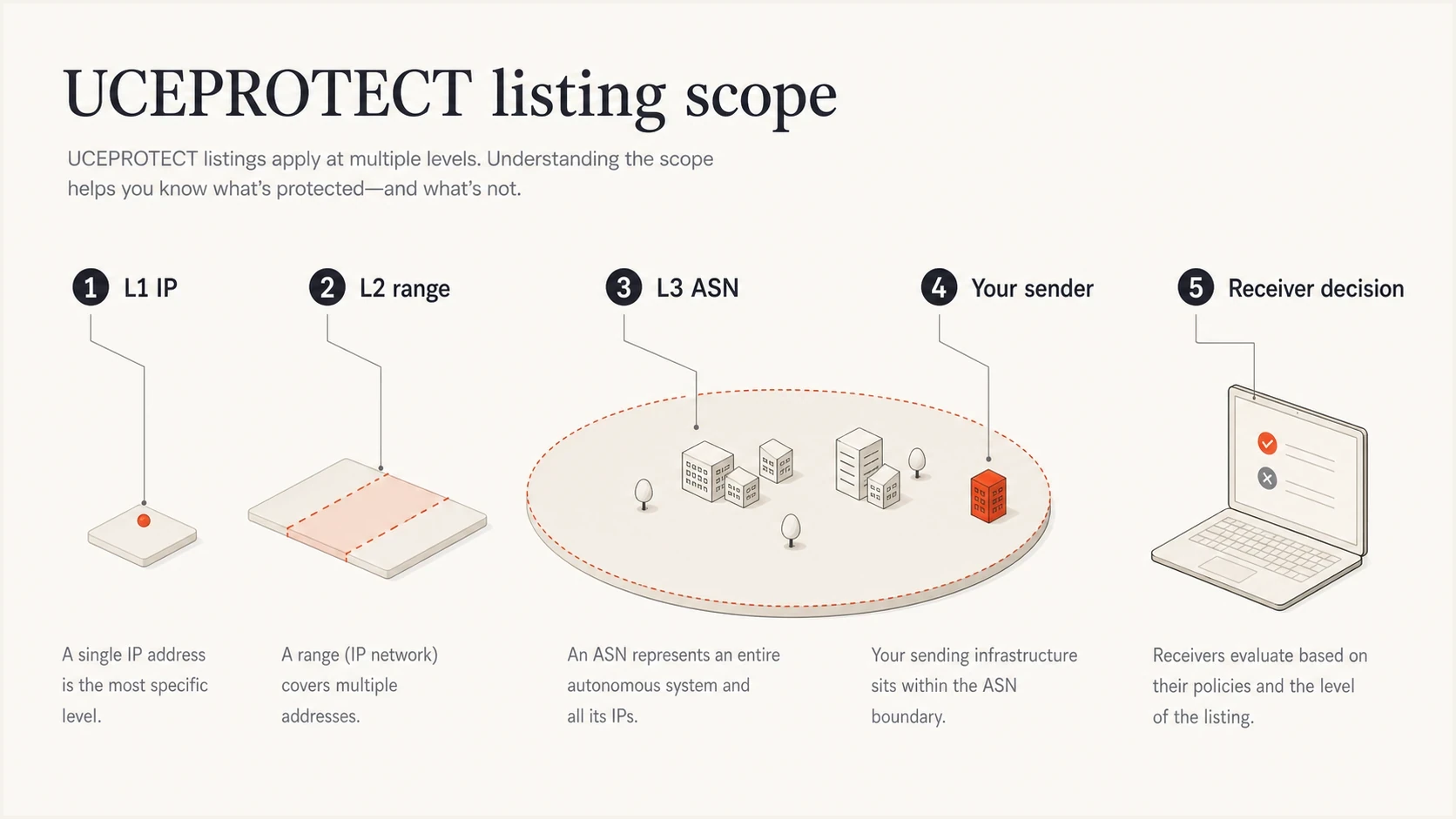
Infographic showing UCEPROTECT Level 3 as an ASN-wide listing rather than one sender.
Do not treat Level 3 as proof
UCEPROTECT's own Level 3 policy warns that using the blacklist (blocklist) to block mail can cause collateral damage to innocent users. Record the listing as a network-level signal, not a root cause by default.
Why Office 365 bounces need their own investigation
Microsoft 365 filtering is not a simple public-blocklist lookup. Microsoft evaluates authentication, sender history, recipient history, message behavior, URL risk, tenant settings, and composite authentication. A UCEPROTECTL3 hit in a separate checker does not prove Microsoft used that data.
Microsoft's Microsoft guidance focuses on outbound authentication and sender identity as deliverability fundamentals. Office 365 failures usually respond to changes in authentication, reputation, content, or recipient policy, not the removal of a broad UCEPROTECT Level 3 listing.
Example bounce cluestext
550 5.7.511 Access denied, banned sender
550 5.7.513 Service unavailable, Client host [IP] blocked by recipient domain using Customer Block list
550 5.7.606-649 Access denied, banned sending IP [IP]
X-Forefront-Antispam-Report: SCL:5; compauth=fail
These clues point to different Microsoft or recipient actions, not automatically to UCEPROTECT. If the bounce names a Microsoft code, handle that code directly. For example, Microsoft S3150 bounces need a different path than a broad ASN listing.
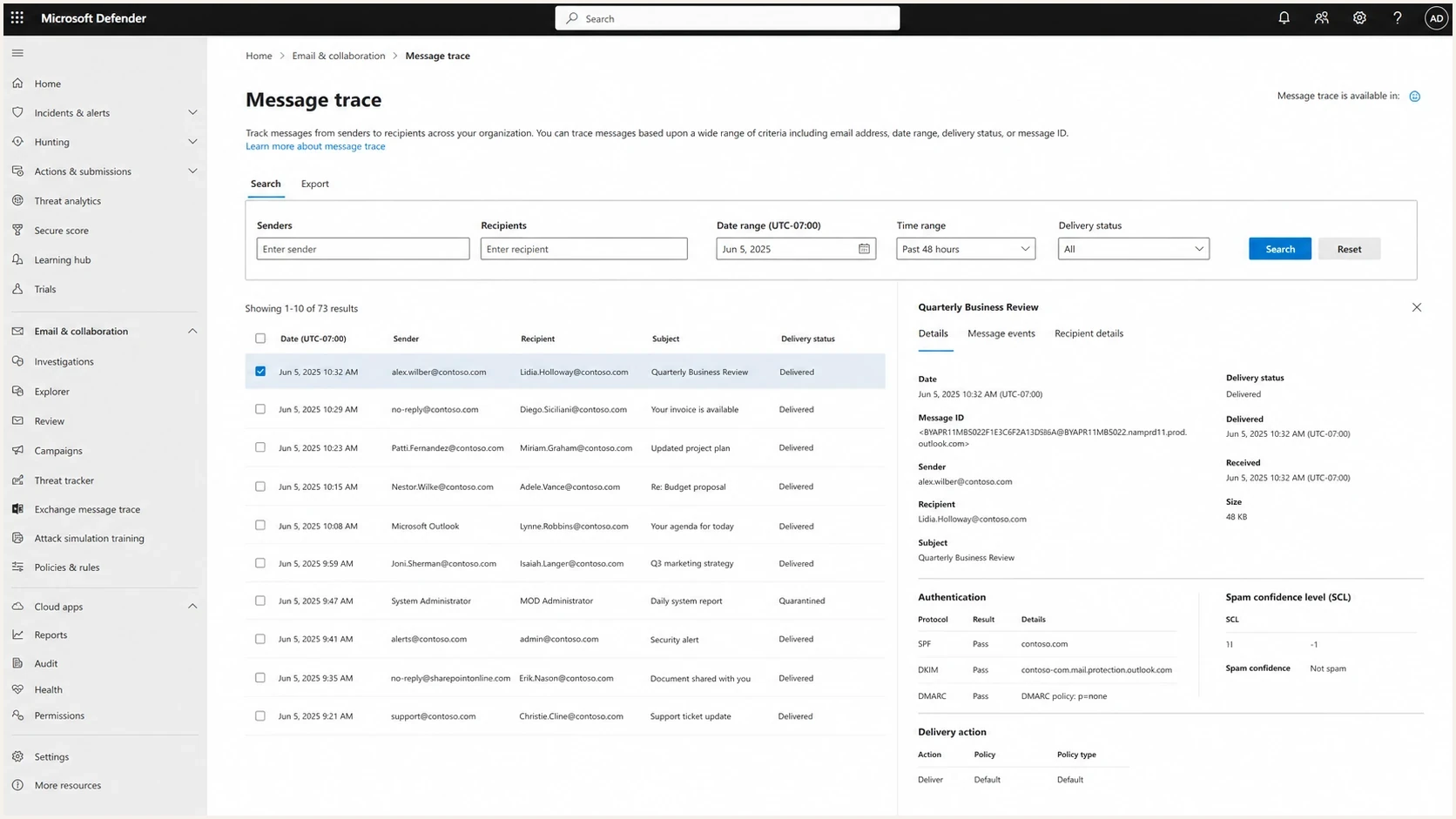
Microsoft Defender portal message trace screen showing delivery status and authentication details.
If the same campaign lands elsewhere but fails at Office 365, that does not make UCEPROTECTL3 the cause. It means Microsoft sees a different risk profile. Isolate the pattern by recipient tenant, sending domain, IP pool, URL, template, authentication path, and volume band.
Read the Microsoft NDR code before delisting
A Microsoft 365 NDR often identifies who owns the block and what to do next. Match the enhanced status code and complete diagnostic text before opening any blacklist or blocklist removal request.
|
|
|
|---|---|---|
5.7.511 | Microsoft banned the sending IP | Send the full NDR and IP to the Microsoft address named in the bounce |
5.7.606-649 | The sending IP is on Microsoft's blocked senders list | Follow the Microsoft self-service delisting instructions in the NDR |
5.7.513 | The recipient domain used its Customer Block list | Ask the recipient administrator to review its IP block |
UCEPROTECT named | A recipient rule or upstream gateway explicitly used that DNSBL | Confirm the receiving system and resolve the network-level cause with the sender or provider |
Microsoft NDR codes that separate Microsoft blocks from recipient policy.
Do not convert any Microsoft access-denied code into proof that Microsoft checked UCEPROTECTL3. The code distinguishes a Microsoft-managed sending IP ban from a recipient-owned block. Only explicit diagnostic text connects the rejection to a named external DNSBL.
How to test the real cause
Start with evidence from the failing message. A public blacklist check is useful, but it belongs behind the bounce, headers, authentication results, and receiver-specific behavior. Good blocklist basics help separate a noisy listing from a list that receivers actually use.
- Capture the NDR: Keep the full SMTP response, enhanced status code, diagnostic text, original sending IP, timestamp, and Message-ID.
- Inspect headers: Check SPF and DKIM results, whether either authenticated domain matches the visible From domain for DMARC, and Microsoft composite authentication.
- Compare mailboxes: Send the same controlled message to Office 365 and other mailbox environments.
- Check the domain: Run a domain health check across SPF, DKIM, DMARC, rDNS, and DNS basics.
- Test a message: Use an email tester to inspect the actual message, not only the sending IP.
Blocklist checker
Check your domain or IP against 144 blocklists.







When a listing appears only on UCEPROTECTL3 and the bounce never names it, continue the investigation. When the same IP also appears on a high-use list, has rising complaints, fails authentication, or has poor URL reputation, treat the listing as a symptom of a broader reputation problem.
How much to care about UCEPROTECTL3
Rank the listing by direct evidence, not by how alarming the lookup result looks.
No bounce mention
Low
Office 365 rejects mail, but the NDR does not name UCEPROTECT.
Custom tenant policy
Medium
A recipient admin confirms a DNSBL or gateway policy checks it.
Bounce names it
High
The rejection explicitly cites UCEPROTECT or a local rule using it.
What to do next
A UCEPROTECTL3 listing deserves attention only when it connects to a receiver action. Build a chain of evidence around the sending IP, recipient domain, exact rejection, filtering system, and policy behind it. Without that chain, the listing is just a lookup result.
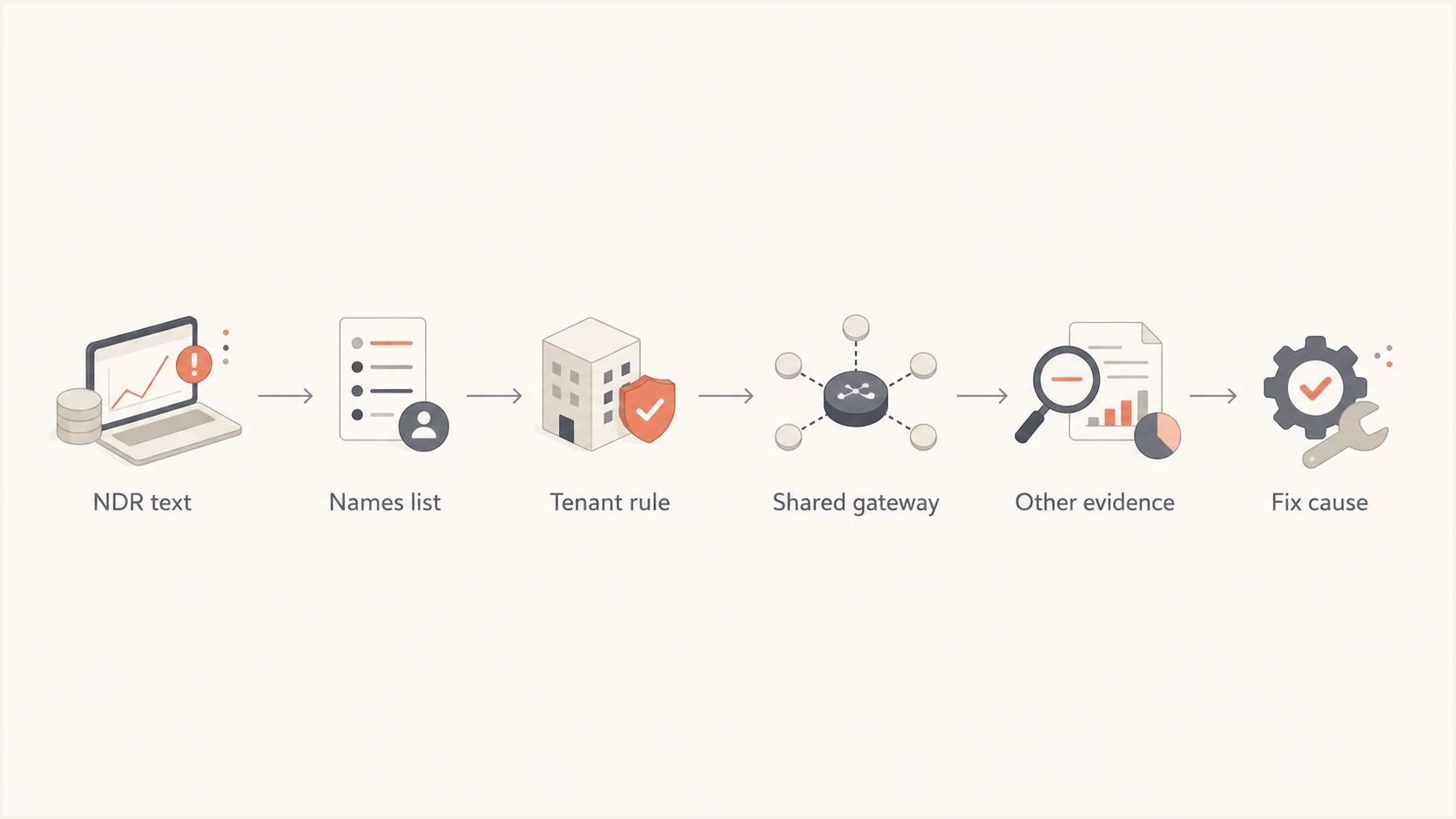
Flowchart for deciding whether a UCEPROTECTL3 listing matters to an Office 365 bounce.
- Explicit SMTP text: The rejection names UCEPROTECT or another DNSBL policy in a local blacklist rule.
- Recipient confirmation: The receiving admin confirms that a tenant policy or gateway checks that list.
- Shared gateway: The failed recipients route through a non-Microsoft gateway before Office 365.
- Pattern match: Only recipients behind the same receiving setup fail, and the same mail works elsewhere.
- Other reputation data: The same IP or domain has complaints, bad URLs, authentication failures, or high-use blocklist hits.
If none of those are present, do not make UCEPROTECTL3 the main workstream. Document it, keep monitoring, and spend the fix time on authentication, content, list quality, and Microsoft-specific evidence.
If the Office 365 non-deliveries are happening now, split the work into two tracks. One proves whether UCEPROTECTL3 has any direct role. The other fixes the deliverability issues Microsoft is more likely to act on.
If the bounce does not name it
- Deprioritize delisting: Do not pay or request removal only because a public lookup shows Level 3.
- Fix authentication: Make sure SPF or DKIM authenticates a domain that matches the visible From domain so DMARC passes.
- Review content: Check links, redirect chains, attachments, and template changes.
- Check volume: Look for sudden Microsoft recipient spikes or new IP pool movement.
If the bounce names it
- Confirm scope: Ask whether Microsoft owns the block or a recipient-side policy or gateway owns it.
- Share evidence: Send the recipient admin the headers, IP, timestamp, and SMTP text.
- Escalate cleanly: Ask the ESP for the IP history and any network-level reputation notes.
- Separate the scope: A recipient-specific rule is not the same as global Office 365 blocking.
For Office 365-only symptoms, also check SCL movement and Microsoft-specific rejection codes. SCL troubleshooting is useful when mail is accepted but routed to junk or quarantine.
A better priority order
- Receiver evidence: SMTP rejection text, message trace, quarantine reason, and headers.
- Authentication health: SPF, DKIM, DMARC, rDNS, HELO, and domain matching.
- Reputation evidence: Complaints, engagement, bounce rate, content, URLs, and high-use blocklists.
- Weak signals: Broad ASN-level blacklist entries that the receiver never cites.
Where Suped fits
Suped is our DMARC reporting and email authentication platform. It supports this workflow by keeping DMARC, SPF, DKIM, sender sources, blocklist monitoring, and deliverability signals in one place instead of spreading the investigation across disconnected notes.
Use Suped to correlate DMARC aggregate data with authorized sending sources and authentication changes. When an Office 365 rejection appears beside a UCEPROTECTL3 listing, that evidence helps separate a real sender failure from an unrelated ASN-wide lookup result.

Blocklist monitoring page showing domain and IP checks across blocklists with importance and status
- Automated issue detection: Suped flags authentication and sender-source problems with steps to fix.
- Real-time alerts: The product can warn you when failures spike or a domain reputation signal changes.
- Hosted SPF: Suped helps manage SPF senders and stay under DNS lookup limits.
- Hosted DMARC: Policy staging is easier when you can see real sender behavior first.
- Blocklist context: Suped's blocklist monitoring helps track IP and domain listings without treating every blacklist as equal.
- MSP dashboard: Agencies and managed service providers can track multiple client domains in one view.
The workflow is simple: confirm the bounce, verify authentication, check whether Microsoft is the only receiver failing, then monitor whether a real sender or reputation issue is changing. Keep UCEPROTECTL3 in the record, but do not let it drive the fix unless the receiver names it.
Views from the trenches
Best practices
Treat UCEPROTECTL3 as low priority unless bounce evidence names it directly in SMTP text.
Segment Microsoft troubleshooting around authentication, content, URLs, and sender history.
Monitor blocklist and blacklist changes, but rank each list by receiver use and bounce evidence.
Common pitfalls
Paying for L3 delisting before reading the NDR wastes time and rarely changes Microsoft outcomes.
Assuming every Office 365 non-delivery is blocklist driven hides authentication failures.
Treating a shared ASN listing as a single IP fault points teams toward the wrong owner.
Expert tips
Ask the recipient admin for quarantine details when the bounce text lacks a public list name.
Compare Microsoft results with other mailbox providers before blaming one blacklist entry.
Keep Suped alerts focused on real authentication changes and blocklists that affect sending.
Marketer from Email Geeks says UCEPROTECTL3 usually has no practical effect on sending results, so it should not become the main Microsoft troubleshooting path.
2023-02-03 - Email Geeks
Marketer from Email Geeks says UCEPROTECT Level 3 covers the ASN, which can include the sender, the whole ESP, and a wider network block.
2023-02-03 - Email Geeks
The practical call
A UCEPROTECTL3 listing is not a good primary explanation for Microsoft Office 365 non-deliveries. It is an imprecise ASN-wide signal disconnected from how most Office 365 filtering decisions are made.
Act on the listing only when the bounce names UCEPROTECT, the recipient confirms a custom DNSBL policy, or stronger reputation evidence appears at the same time. Otherwise, spend the effort on the issues Microsoft exposes: authentication, sender reputation, content, URLs, volume, and tenant-specific policy.




